Google Ads is getting an A/B test that lets you try different budgets and ROI targets across multiple Search campaigns. It rolls out in September 2026. The comparison itself will close inside the platform from then on. Staying inside what the official pages state, this article separates the question the feature settles from the one it does not.
Contents
TL;DR#
-
What arrives in September 2026 is an A/B test for budgets and ROI targets across multiple Search campaigns
The official blog announces it as a capability built on the one-click experiments in AI Max
-
The timing is published by month only
The wording stops at "rolling out in September" — no date is given
-
What the test reports is the conversions Google Ads counts
Both the counting scope and the attribution model are set by the platform's own definitions
-
Fix the adoption condition before the test starts
Decide up front how much the added budget has to move revenue recorded on your own site
1. What Arrives in September Is a Budget Test That Spans Campaigns#
What grows in September is the means to try different budgets and ROI targets across several Search campaigns.
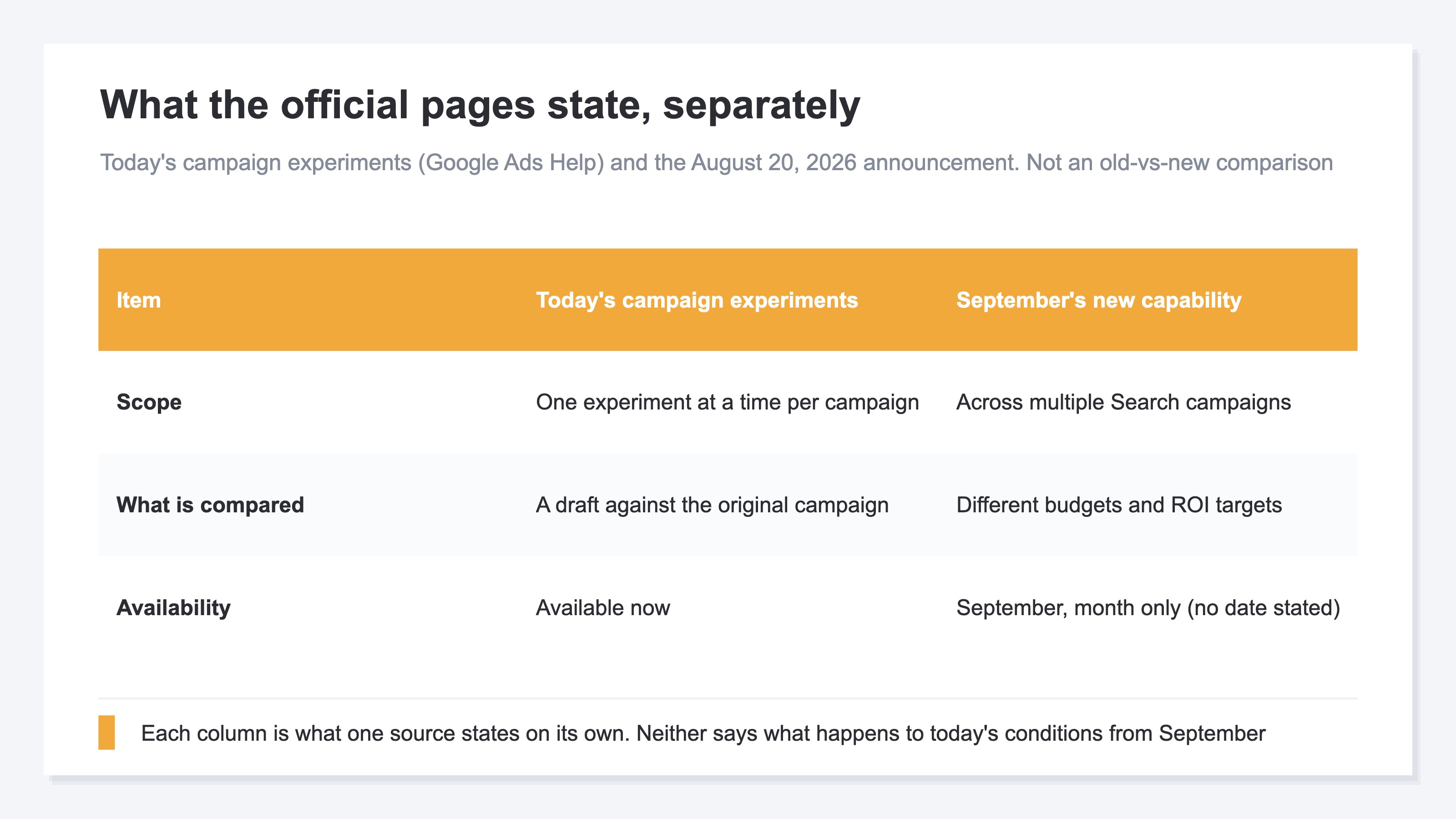
The Google Ads & Commerce Blog post dated August 20, 2026 states it this way. Building on the one-click experiments in AI Max, Google is introducing a way to test different budgets and ROI targets across multiple Search campaigns in a single A/B test[1]. It rolls out in September, and it is described as helping you see exactly how scaling up your campaigns impacts your bottom line[1].
For this September budget test, keep three limits in view. The subject is Search campaigns[1]. The timing is September, with no date stated[1]. And the foundation is explicitly the one-click experiments in AI Max[1]. Whether the same thing works on campaigns that are not using AI Max is not addressed in this announcement. The scope of the automatic upgrade from the same announcement is covered in Google's AI Max in September: Dynamic Search Ads Aren't in Scope.
Today's campaign experiments are described separately in the official help pages. An experiment runs alongside the original campaign for a period you set, using a portion of the original campaign's traffic and budget[2]. Only one experiment can run on a campaign at a time[2]. Experiments are available on Search Network and Display Network campaigns[2].
These are two things the official pages state separately. The August 20 announcement does not touch the specification of today's experiments, so what happens to those conditions from September is written in neither source.
What grows in September is the means of comparison. Whether to raise the budget or hold it is not settled inside the test result. The test will put two allocations against each other over the same window, but whether that verdict moves your money is decided by a standard that sits outside the verdict. What you prepare first is that standard.
2. The Winner Is Decided on the Conversions Google Ads Counts#
The numbers in the test result are conversions counted under Google Ads' own definitions.
Conversion counting has a scope. Per the official help pages, when someone clicks an ad on one device and converts on another device or browser, that conversion is counted in the "All conversions" column[3]. Over the same window, the value changes with which column you are reading.
An allocation logic is in there too. An attribution model assigns credit to the ads along the path leading to a conversion[4]. The default in Google Ads is data-driven attribution, and you can switch to another model such as last click[4]. The conversion values in the test result are numbers that have already passed through that allocation.
None of this makes the numbers wrong. The platform counts conversions under the platform's definitions, and those definitions decide the winner. The verdict that one allocation beat the other is handed down inside that definition.
Your own site holds a different record: the amount at which a purchase closed. Whichever browser it crossed, whichever ad on the path took the credit, it stays as one order's amount, one line at a time. How much revenue moved during the test window exists only on that side of the record. The word "results" is the same, but the two are separate definitions.
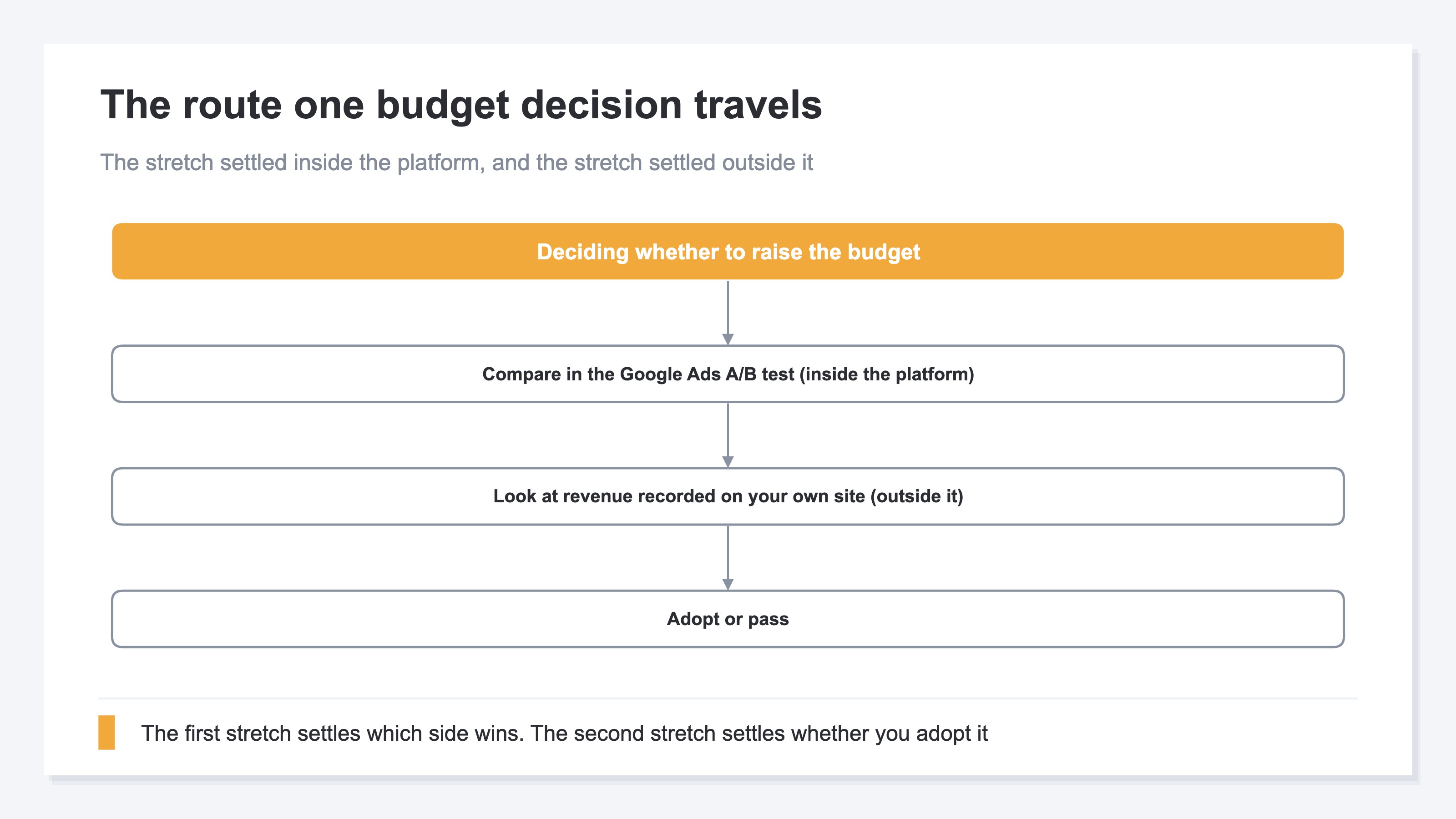
Laid out as a route, the decision has two stretches. The first closes inside the platform. The second is outside it. The test settles the first stretch, and the adoption condition is settled in the second.
How far efficiency holds after an increase is covered in More Ad Spend Does Not Always Mean More Profit. What happens to revenue after the target value itself moves is covered in Target CPA Bidding Changed on August 17.
3. Fix One Adoption Condition Before the Test Starts#
There is only one thing to fix in advance: how much the added budget has to move revenue recorded on your own site.
Debating "do we adopt the winner?" after the test ends goes nowhere. The verdict comes out under the platform's definitions, and no standard exists yet for whether that number is enough for your business. Set the standard first and the end-of-test call is answerable with a number.
The shape is this. Take the same window as the test, and pull campaign-level revenue plus platform-level ad spend twice, once before it starts and once after it ends. Ad spend can be viewed alongside for periods where it has been imported, and if you use ROAS (revenue as a multiple of ad spend), you can calculate it by hand from those two. Decide up front that clearing a set level means adopt and falling short means pass. How to judge the recommended budget the platform pushes at you is covered in Limited by Budget in Google Ads: The Recommendation Optimizes for Clicks.
One more thing stays invisible inside the test. Budget share and revenue share do not match.
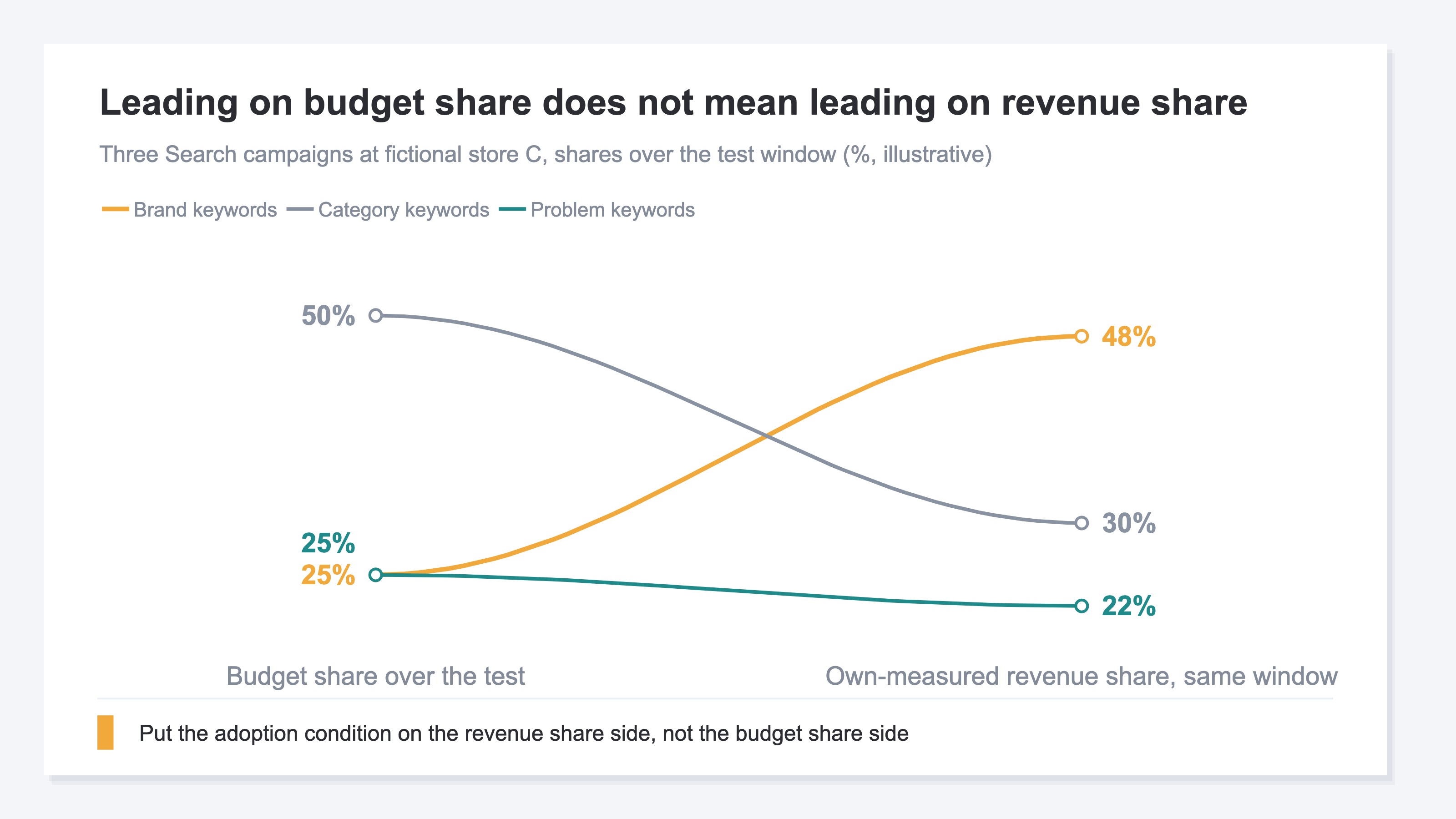
Across the three campaigns at fictional store C, the leader on budget share over the test window was the category keyword campaign at 50%. The leader on revenue share closed on the site over the same window was the brand keyword campaign, which held 25% of the budget. Leading on budget share does not mean leading on revenue share. So the adoption condition belongs on the side of whether revenue share moved. How to read overall efficiency across platforms is covered in Summing Platform ROAS Overstates It: Use MER for True Overall Efficiency.
The material you need already exists on both sides. How much went to which campaign, and which side won, stay on the Google Ads side. How much sold during that window stays on your own site. What has to be built is not data but a route that pulls the latter out over the same window and at the same campaign level as the test.
RevenueScope solution
Traffic carrying a utm_campaign (the part of the tracking marker appended to a link that names the campaign) is broken out and displayed at campaign level. The items are revenue, RPS (revenue per session), AOV, and CVR. Revenue is the amount at which a purchase closed on your own site. Pull the campaign view once before the test starts and once after it ends, and the two line up on the same four items.
For periods where ad spend has been entered or uploaded, ad spend at the ad platform level is shown alongside the matching channel's revenue as well. The revenue and ad spend the adoption condition needs line up on the same screen.
Search campaigns at fictional store D, seen at campaign level (one example, illustrative)
| Campaign | Revenue | RPS | AOV | CVR |
|---|---|---|---|---|
| Brand-name keywords | 720,000 yen | 240 yen | 8,000 yen | 3.0% |
| Category-name keywords | 180,000 yen | 300 yen | 9,000 yen | 3.3% |
| Problem-phrase keywords | 100,000 yen | 500 yen | 10,000 yen | 5.0% |
※ The table above is one illustrative example. The demo screen runs on the sample data of the sample store, refreshed daily, so its figures differ from these.
A little over seven tenths of revenue is gathered into the brand keyword campaign alone. Roll all three into one test in this shape, and the overall number is settled almost entirely by how that one campaign moves. Even when the total shifts, that is closer to the fact that this one campaign shifted than to an answer about allocation. The candidates to check first for an increase are the other two, the ones buried in the total. RPS is 300 yen on category keywords and 500 yen on problem keywords, both above the 240 yen on brand keywords.
That fixes the next move. Raise the budget on the problem keyword campaign only, let the same number of days pass, and pull the same four items again. Hold the four items you pulled again against the adoption condition you fixed before the test started.
FAQ#
Frequently asked questions#
Q. When exactly in September does it become available?
A. The official blog stops at "rolling out in September," and no date is stated[1]. Because the announcement is by month, you cannot build a preparation schedule around a specific start date.
Q. Can campaigns that are not using AI Max use it?
A. The August 20 announcement states that it is being introduced building on the one-click experiments in AI Max[1]. Whether campaigns not using AI Max can use it is not addressed in that announcement.
Q. How is this different from today's campaign experiments?
A. The official help pages state that today's experiments use a portion of the original campaign's traffic and budget, and that only one experiment can run on a campaign at a time[2]. The August 20 announcement states that a way is being introduced to test different budgets and ROI targets across multiple Search campaigns in a single A/B test[1]. The two are separate statements, and what happens to today's conditions from September has not been published.
Summary#
What arrives in September is an A/B test for trying different budgets and ROI targets across multiple Search campaigns[1]. The subject is Search campaigns, and the timing is published by month only[1]. The foundation is explicitly the one-click experiments in AI Max[1].
What the test settles is the conversions Google Ads counts. Both the counting scope and the attribution model are set by the platform's definitions[3][4]. How much the added budget moved revenue on your own site sits in your own record.
The adoption decision still needs one revenue threshold. When the test ends, how much would revenue have to be up before you adopt that allocation?
See which ads actually drive revenue, at a glance
Free up to 2,000 sessions/month, AI connection included. No credit card required. Up and running in 5 minutes.