
"Budget went up, so let's add spend to the channel with the best ROAS." You scale it — revenue grows, but profit barely moves. Sound familiar? The usual culprit is saturation. Ads reach the most responsive audience first, so the more you spend, the less each additional yen returns (declining marginal ROAS). This article explains why scaling can erase profit, how to spot the "stop point," and how to decide scale, refresh, or cut for each channel.
Contents
TL;DR#
-
Saturation = how much of a channel's responsive audience you have already reached. The further along, the less each extra yen returns.
Because the most responsive audience sells first, marginal ROAS drops as you spend more.
-
Average ROAS hides saturation.
Overall ROAS can still look profitable while the last yen you added (marginal) is already in the red.
-
To tell whether a channel is near its stop point, check whether revenue followed the month you raised spend.
Where spend rose but revenue moved only a few percent, refreshing creative or moving to a new channel beats simply adding budget.
-
Scale the channel where revenue still follows spend, not the one with the best ROAS.
Even a top-ROAS channel offers little upside once growth has flattened. Move spend to where revenue still responds.
1. Why more ad spend can shrink your profit#
Bottom line: ads sell to the most responsive audience first, so each additional yen gets less efficient as you spend more.
When you run ads, they first reach people who want to buy now or already have interest. This audience converts very efficiently. But as you raise budget and widen delivery, you increasingly reach people who aren't ready to buy yet. For the same product, the audience you reach later is harder to convert.
Because of this "later audiences convert worse" property, every additional yen of ad spend returns less revenue (declining marginal ROAS). The first ¥100k may have a high ROAS, but as you stack the next ¥100k and the one after that, the efficiency of the added portion steadily falls.
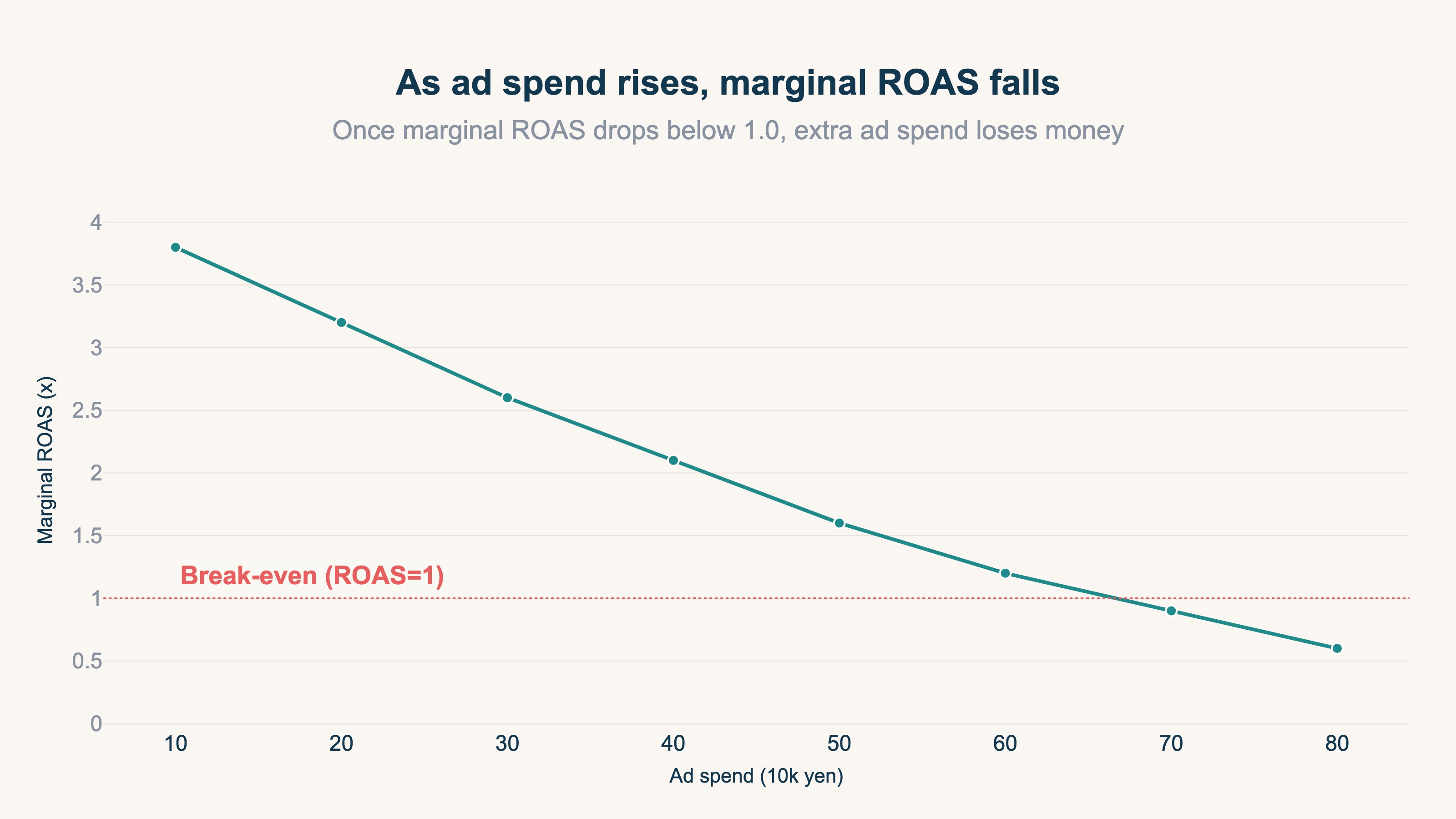
This is saturation. It measures how much of a channel's responsive audience you've already used up. Pour more budget into a saturated channel and revenue barely moves while ad cost piles on. The result: revenue grew, but profit didn't.
2. Average ROAS hides saturation#
Bottom line: overall ROAS can look profitable while the last yen you added is already losing money.
The ROAS shown in your ad dashboard is revenue against your total spend for the period — an average. But the number you need for decisions is the marginal one: "if I add the next yen, how much comes back?" Even with an average ROAS of 2.7, after scaling up the marginal ROAS on the last portion may have fallen to 0.8. The average gets propped up by the efficient early spend, masking the decline in the later portion.
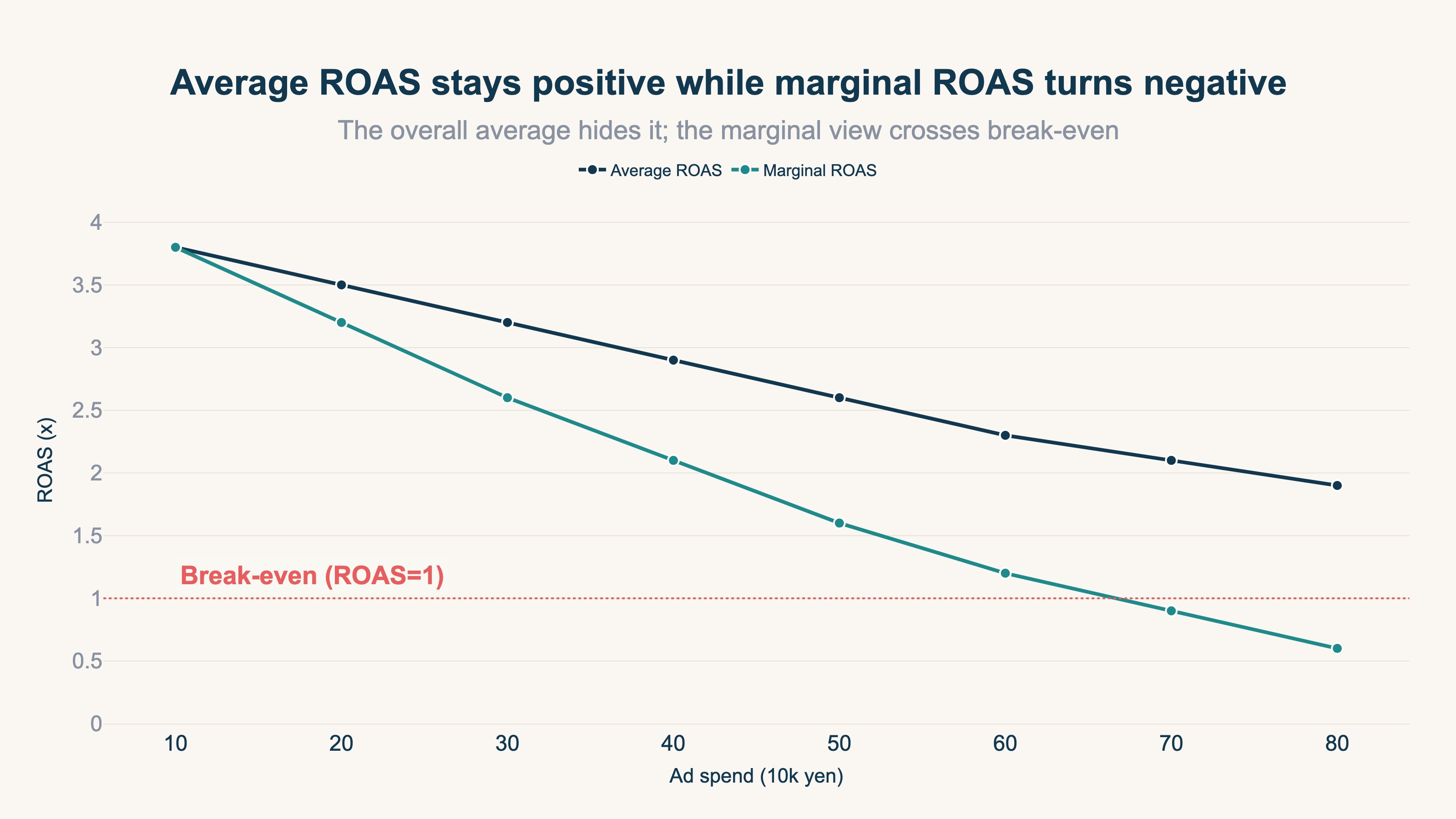
Judge by the average and you conclude "it's still high, so let's add more" — while the inefficient marginal portion quietly erases profit. How risky it is to set budgets off average ROAS is covered in detail in Average ROAS can't set your ad budget. From here, this article focuses on telling that marginal decline from your own numbers through a single number: saturation.
3. Telling from your own numbers when a channel is near its ceiling#
Bottom line: did revenue rise by the same proportion in the month you raised spend? That is your marker for how close the stop point is.
It's hard to tell "am I done, or can I still grow this?" from average ROAS alone. What works here is a comparison you can build from the numbers already in front of you: in the month you raised a channel's spend, did revenue through that channel rise by the same proportion? Line that up month by month.
| Revenue in a month you raised spend 20% | State | What to do |
|---|---|---|
| Rose about 20%, roughly in proportion | Room to invest | Scale gradually and check the same ratio next month |
| Rose only about 10% | Diminishing returns have begun | Refresh creative and targeting to lift the ceiling |
| Moved a few percent, or stayed flat | The stop point is close | Adding budget worsens efficiency. Expand to new channels or segments |
The 20% step is only an example — substitute whatever change you actually made. What matters is holding the proportion you added against the proportion that came back. Seasonality and creative swaps shift growth too, so don't decide on a single month; read several in a row.
The key point: a channel whose growth has flattened doesn't mean "you can't grow this" — it means "you can't grow it with the current approach." Change the creative, widen the audience, and the responsive pool grows, lifting the ceiling itself. Saturation is a way to think about the stop point if you keep doing the same thing.
One clarification. This reading needs no saturation figure at all. Neither your ad dashboards nor RevenueScope below computes saturation for you. The reason saturation appears on the RevenueScope demo screen is that the sample store's data carries a value; on your own site it does not appear. What you actually look at is how channel revenue and ROAS moved month over month.
4. Deciding scale, refresh, or cut per channel#
Bottom line: the channel to scale is the one where revenue still follows spend, not the one with the best ROAS.
Add the reading from the previous section and channels look different. A common mistake is "add budget to the best-ROAS channel." But if revenue has stopped following spend there, the added portion is low-efficiency. Conversely, a channel with slightly lower ROAS where revenue still follows turns added budget straight into results.
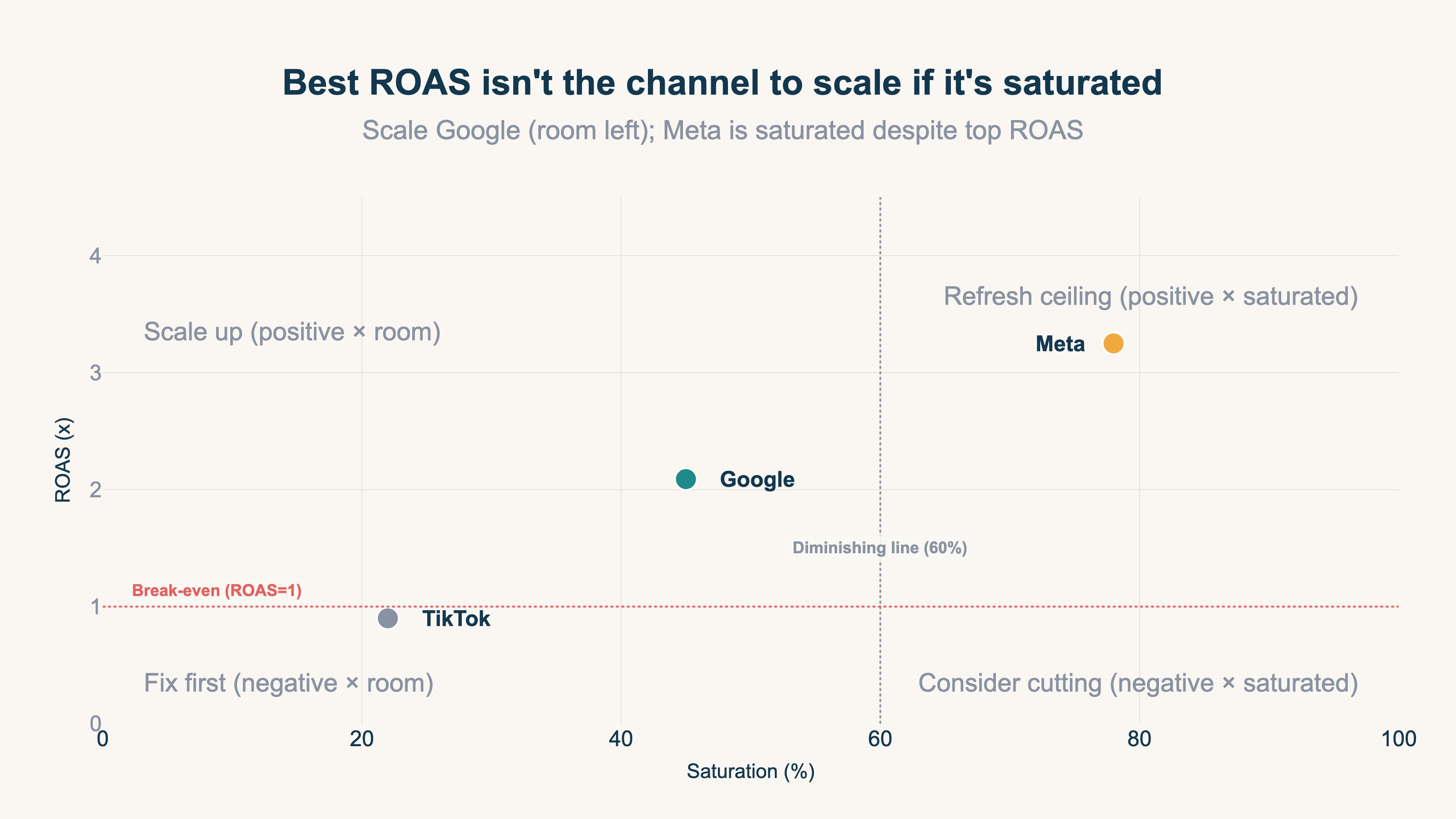
The decision splits three ways.
- Scale: channels where revenue rose along with the spend you added, and ROAS is profitable. This is where your "next ¥10k" goes.
- Refresh: channels where spend rose but revenue growth has gone slack, and you don't want to drop them. Swap creative or audience to lift the ceiling, then reconsider scaling.
- Cut (or hold): channels with a loss-making ROAS. Even where revenue still follows spend, don't add until you have evidence you can improve efficiency.
Combining ROAS with how revenue responds to spend lets you lay out "where to add, what to refresh, what to stop" on one view. Ad dashboards are siloed per channel, so the starting point is putting every channel on the same basis.
RevenueScope solution
The root reason saturation goes unseen is that each ad dashboard shows only its own channel. As long as you open them one at a time and copy figures out, which channel's added portion has stopped paying stays invisible before you even get to comparing. The problem of each platform reporting only its own ROAS is also covered in platform ROAS vs MER.
Let's be precise about what the tool does. Saturation is a way of reading your numbers, not something RevenueScope estimates on its own. It displays a value where one is supplied, and the only place one is supplied is the sample store's demo data. What it returns is revenue and RPS (revenue per session) per channel, plus ROAS for periods where you entered ad spend. Whether a channel is saturated is your call, made by reading that lineup.
Enter your ad spend into RevenueScope and channel revenue and ROAS land in the same table. For example (illustrative — fictional Store A, 30 days):
| Channel | Sessions | Revenue | RPS | Ad spend | ROAS |
|---|---|---|---|---|---|
| Google Ads | 4,000 | ¥600,000 | ¥150 | ¥400,000 | 1.5 |
| Meta | 3,000 | ¥360,000 | ¥120 | ¥200,000 | 1.8 |
| Direct | 2,500 | ¥250,000 | ¥100 | — | — |
Note: the table above is an illustration. The demo screen runs on the sample data of our showcase store (refreshed daily), so its numbers differ. Channels with no ad spend entered leave the ROAS cell empty.
This lineup alone doesn't settle "scale or stop." Both ad channels are profitable, so on the surface either looks safe to scale. That's where the previous section applies. A channel whose spend you have raised month over month while revenue growth flattens is not paying for the added portion, even when the average stays profitable — and the material for that judgment is revenue and ROAS lined up by month.
You can also ask for a budget starting point. What earns its keep here is less "reshuffling the split" than "spotting where you are over-invested." Run it at a realistic monthly figure and the channel you currently spend the most on comes back with a sharply reduced proposal, and expected ROAS rises by that much. It proposes a cut because that channel's added portion has already stopped paying.
⚠ This starting point is built from the ROAS of channels where you entered spend. It is not capping anything by saturation. Channels with little spend in the period also swing widely in ROAS, so a high figure that happened to land can pull the allocation toward it. RevenueScope flags this in its own response, so rather than executing the amounts as-is, check the largest channels first.
The ROAS here is revenue divided by ad spend — a revenue-based ratio. RevenueScope does not output profit after cost of goods (gross margin) or inventory (revenue-based ROAS is a different thing from profit-based ROAS vs ROI). The allocation is a starting point for a human to decide, not automated bidding. The final call on where to add budget is yours.
FAQ#
Frequently asked questions#
Q. How should I estimate how saturated a channel is?
A. Line up what you spent on that channel against how revenue grew, month by month. Raise spend 20% and see revenue rise 20%, and there is headroom; raise spend 20% and see revenue move a few percent, and the added portion has already stopped paying. You need no numeric scale for this. Seasonality and creative changes move it too, so read several months rather than deciding on one.
Q. If ROAS is still profitable, can't I keep adding?
A. Average ROAS can be profitable while the last portion you added (marginal ROAS) has dropped below break-even. Decisions need the marginal, not the average. Saturation is the name for that marginal decline, so it's safest to judge with both average ROAS and how revenue responds to added spend.
Q. Does a channel that has stopped growing mean it's unusable?
A. No. It means "hard to grow with the current approach." Change the creative or widen the audience, and as the responsive pool grows, the ceiling itself rises. Flattened growth means consider a refresh first, not an immediate cut.
Q. Which screen shows my channel's saturation?
A. On your own site, no saturation figure appears. What you see on the demo screen is the sample store's value — less a displayed figure than a reading you take from your own numbers. What you need in order to take it is channel revenue and ROAS lined up over the same period; follow that by month and you can see whether revenue grew in step with the spend you added. Each ad dashboard only ever shows its own channel, so the value of a cross-channel tool is in putting them side by side.
Conclusion#
Ads sell to the most responsive audience first, so the more you spend, the less each added yen returns (marginal ROAS). That's saturation. Average ROAS hides the decline, so "the average is still profitable, let's add more" is how profit disappears.
As a first step, ask per channel: "if I scale up now, what would the ROAS on the added portion be?" The place for your next ¥10k isn't the best-ROAS channel — it's the one where revenue still follows the spend you add.
See which ads actually drive revenue, at a glance
Free up to 5,000 sessions/month, AI analyst included. No credit card required. Up and running in 5 minutes.
References#
- Google, "About Target ROAS bidding," 2024
- Meta, "About budgets and schedules," 2024
- Google, "Set a budget for your campaign," 2024