"What should my ROAS target be?" is a common question. You hear the industry average is around 4x and set 4x as the goal. But is there any basis for that number? A ROAS target isn't something to borrow from someone else's average — it's set from your own store's breakeven ROAS, the floor below which ads run a loss. And setting one store-wide target like "ROAS 4x" hides the efficiency gap between channels (Google Ads, Meta Ads, and so on) inside the average. This article covers how to back the target out from breakeven, why to set it per channel, and how to decide scale-up or pull-back by achievement and saturation.
Table of contents
TL;DR#
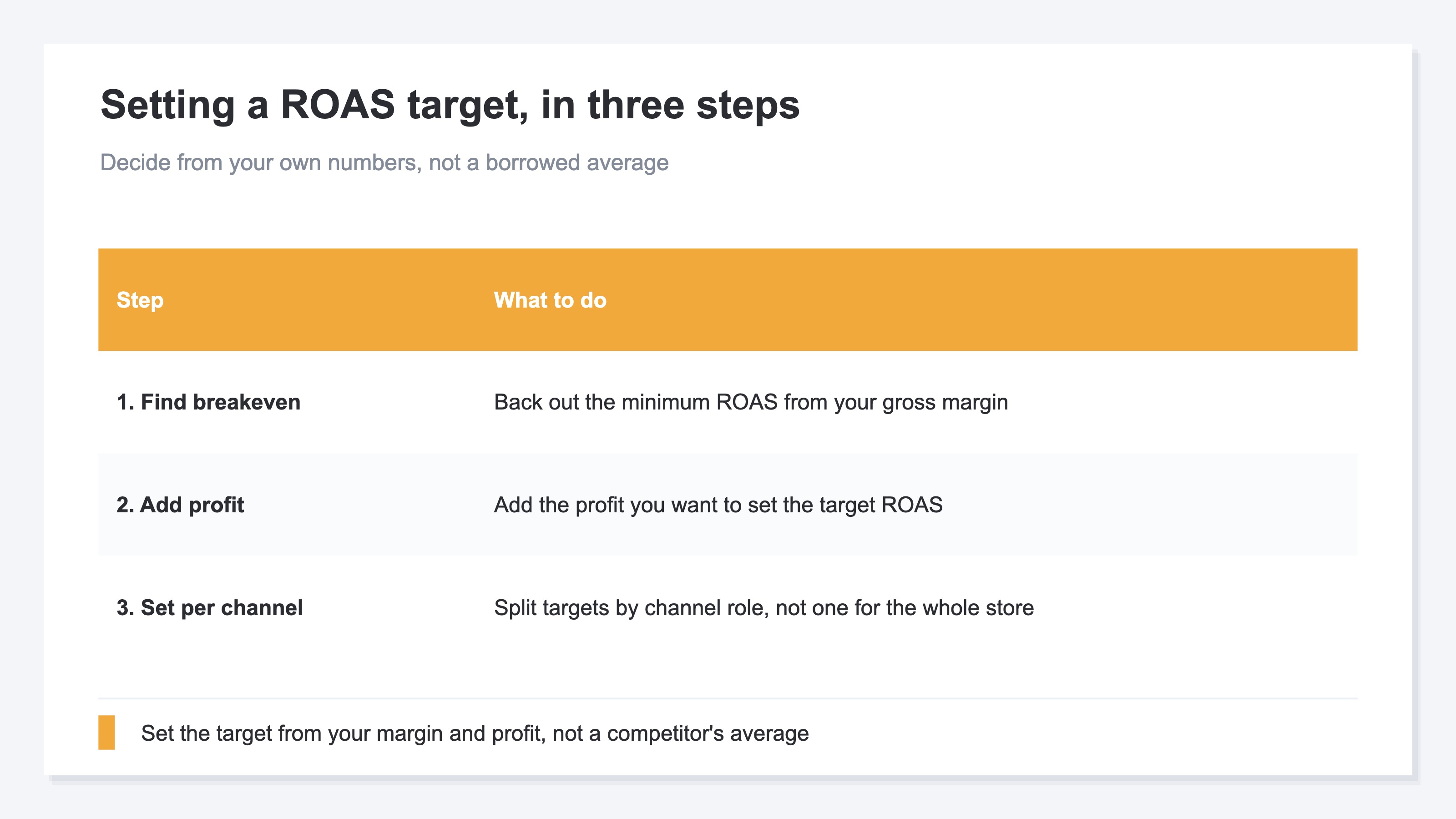
- Set the ROAS target from your own breakeven ROAS (the no-loss floor), not an industry average. Breakeven is backed out from gross margin; add the profit you want to get the target.
- A store-wide target hides the gap between channels. Google Ads and Meta Ads differ in both breakeven and role, so set targets per channel.
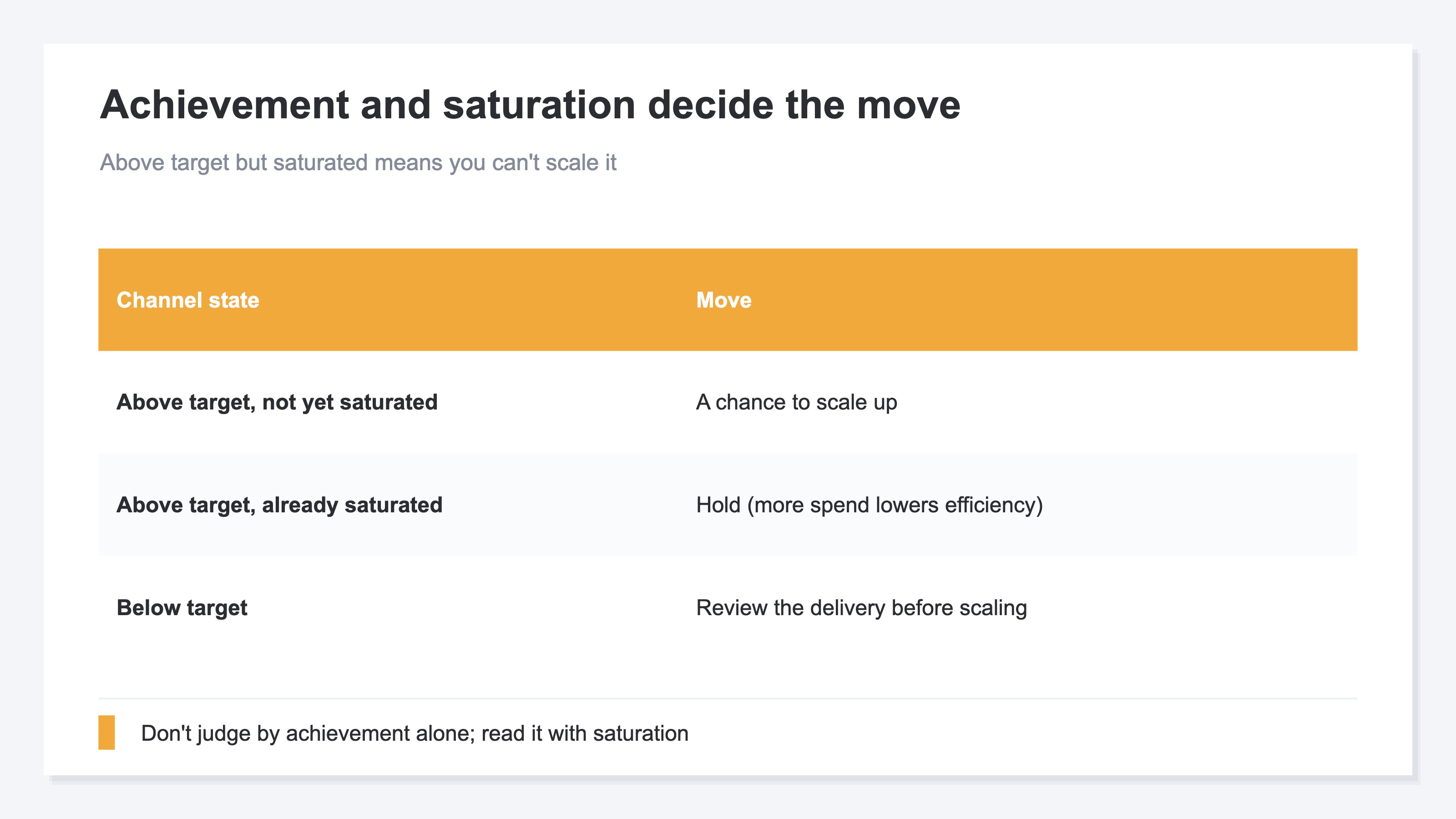
- Read each channel by achievement (how close to target) and saturation (whether more spend still pays). Above target but saturated means you can't scale it.
1. Set the ROAS target from breakeven ROAS first#
Bottom line: set the ROAS target not from an industry average, but from your own no-loss floor — breakeven ROAS.
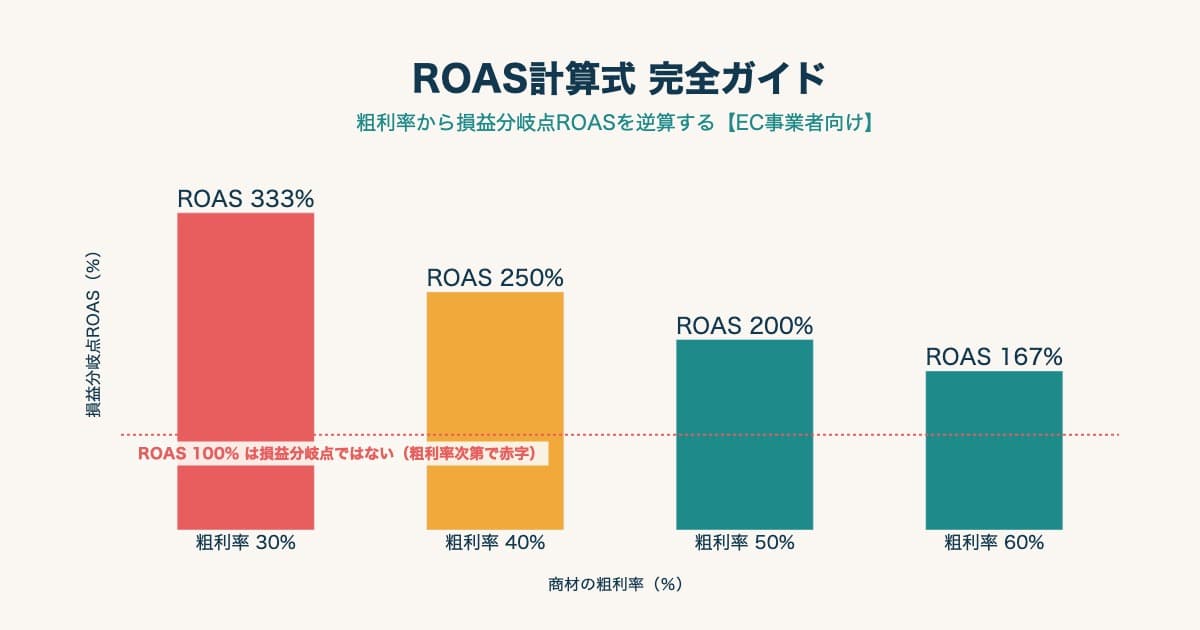
ROAS (return on ad spend) is ad-driven revenue divided by ad cost. "ROAS 400%" means 4 in revenue per 1 in ad spend. But how much of that 4 stays as profit depends on gross margin (revenue minus cost of goods). For a low-margin product, ROAS can look high yet still lose money once ad cost is taken out. So before setting a target, find the breakeven ROAS — the line below which you go into the red. Breakeven ROAS is backed out from gross margin; the method is covered in detail in How to calculate breakeven ROAS by gross margin.
Once you know breakeven ROAS, add "how much profit you want to keep" on top, and that's your target ROAS. If breakeven is 250%, you might set the target at 350% to secure profit. The target isn't "4x because others do 4x" — it's "my breakeven is 250%, plus profit, so 350%," decided from your own numbers. That's the starting point. In Google Ads, you can set this target ROAS as the basis for bidding, and the same applies to Shopping campaigns [1][2].
2. Set targets per channel, not one store-wide#
Bottom line: set the ROAS target per channel (per ad destination), not one store-wide. So the gap hidden in the average isn't missed.
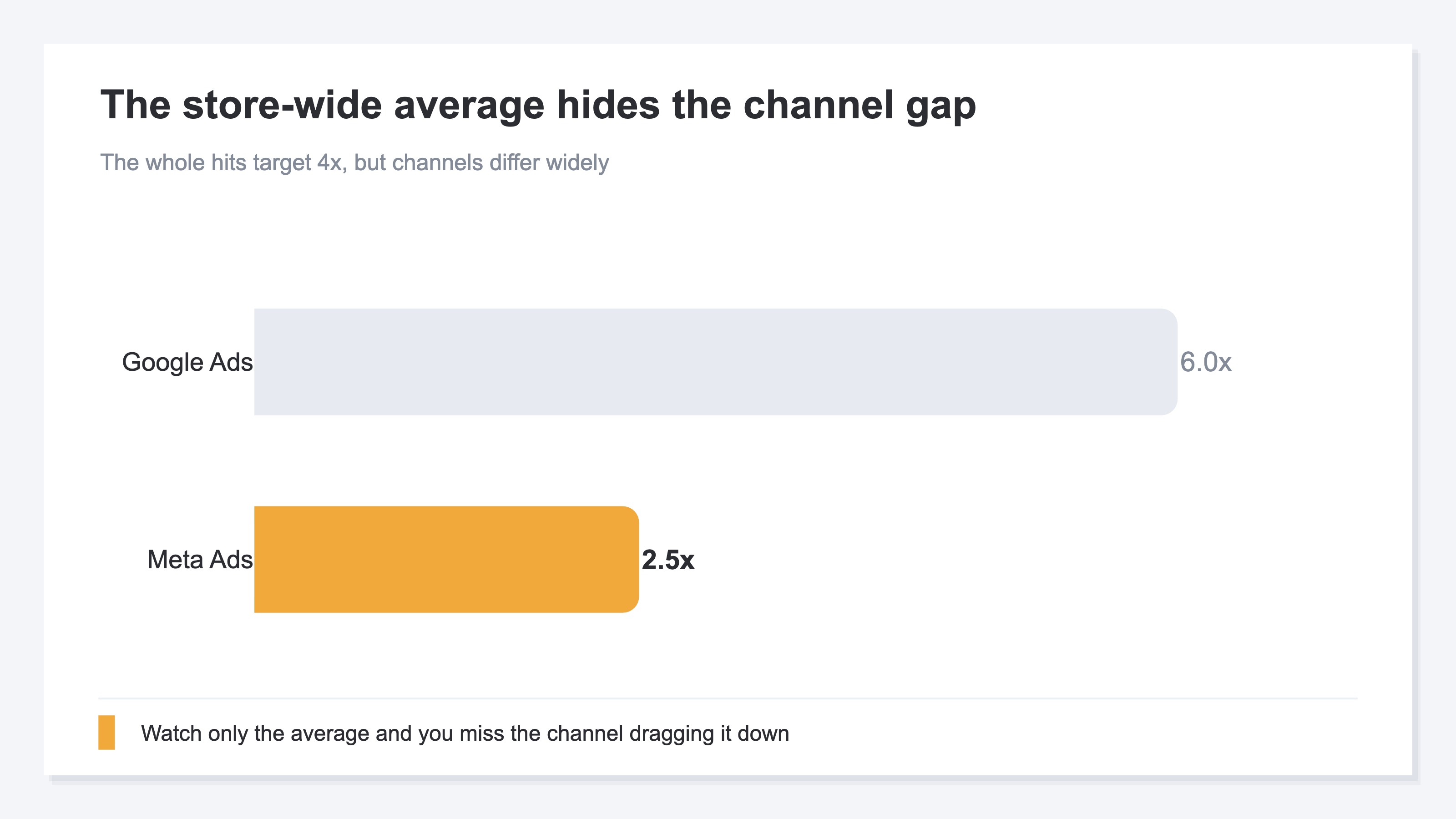
Set one target like "store-wide ROAS 4x" and you can tell whether you hit it. But you can't see which channels make up that 4x. The whole could be 4x while the breakdown is Google Ads at 6x and Meta Ads at 2.5x. Watch only the average and feel reassured you "hit target," and you miss the Meta Ads dragging it down. You also miss the room to lean harder into the strong Google Ads.
There's another reason to split targets by channel: channels differ in breakeven and in the role they're good at. A search channel that captures people who already want to buy and a social channel that reaches people who will want to buy naturally show different ROAS in the moment. Apply the same target and you might cut a new-customer channel as "below target." So set targets to match each channel's role, separately.
3. Decide scale-up or pull-back by achievement and saturation#
Bottom line: read two things per channel — achievement toward target and saturation — to decide whether to scale up or pull back.
Achievement is how close the channel's actual ROAS is to its target ROAS. 100% means on target, 120% means above it. But achievement alone can't tell you "is it safe to scale." That's where saturation comes in. Saturation is a gauge of whether adding more ad spend to that channel still pays, or starts losing efficiency.
A channel above target (achievement 120%) and not yet saturated is a chance to scale up. A channel above target but already saturated will only lose efficiency with more spend, so hold. A below-target channel needs its delivery reviewed before scaling. Judge by achievement alone, or by budget alone, and you hit the failure of "pouring spend into a strong but saturated channel and dropping efficiency." Reading the two together makes the scale-up/pull-back call accurate.
RevenueScope helps
Trying to run ROAS targets per channel, you keep hitting the same chore. Compute each channel's actual ROAS, compare it to its target to measure achievement, and read saturation too — "is it safe to add more." Lining all that up by hand every month is the heavy part.
RevenueScope takes over that comparison. It shows each channel's actual ROAS as achievement against your set target, and reads saturation alongside, in one view (figures shown are demo data).
| Channel | Actual ROAS | Achievement vs target | Saturation |
|---|---|---|---|
| Google Shopping | 4.8x | 120% (above target 4.0x) | 38% (room to scale) |
| Meta Advantage+ | 2.6x | 65% (below target 4.0x) | 84% (near saturation) |
| Google P-Max | 3.9x | 98% (near target 4.0x) | 56% |
The point of this table is that achievement and saturation together make the move clear. Google Shopping is above target (120%) and not yet saturated (38%), so it's a chance to scale up. Meta Advantage+ is below target (65%) and near saturation (84%), so review its delivery before scaling. Watch only the store-wide average and you'd never see the difference. Line up achievement and saturation per channel, and where to scale and where to pull back can be decided with reasons.
To be clear: backing out breakeven ROAS itself (from gross margin) is the scope of a separate article. What RevenueScope takes over is lining up, against the target you set, each channel's actual ROAS, achievement, and saturation in one view to prepare the scale-up/pull-back material. It does not calculate gross margin or inventory. What number to set the target at, and where to lean in the end, is up to you.
FAQ#
Frequently asked questions#
Q. How do I calculate breakeven ROAS?
A. Roughly, it's "100% ÷ gross margin." If your gross margin is 40%, then 100 ÷ 0.4 = 250% is breakeven ROAS. Below it, ad-driven revenue can't cover cost of goods and ad spend, so you run a loss. Including shipping and payment fees makes it more precise. For the detailed steps and benchmarks by industry, see How to calculate breakeven ROAS by gross margin.
Q. Can't I just use the industry-average ROAS as my target?
A. It's a useful reference, but better not used as the target directly. An industry average includes other stores with different margins and price points. A high-margin store keeps profit at a lower ROAS than the average; a low-margin store can lose money even at the average. First find your own breakeven ROAS and add profit on top. Use the industry average as a gauge to check your own number isn't far off.
Q. Won't varying targets per channel make management complex?
A. Start with a common floor from your store-wide breakeven, then split targets only for channels with different roles (new acquisition vs returning, for example). You don't need a finely separate target for every channel. What matters is not missing the "channel dragging it down" and the "channel you could lean into" hidden in the average. Starting by splitting into two or three roles keeps it from getting too complex.
Conclusion#
Set the ROAS target not by borrowing an industry average, but from your own breakeven ROAS (the no-loss floor). Breakeven is backed out from gross margin, and adding the profit you want gives the target.
And a single store-wide target hides the efficiency gap between channels. Google Ads and Meta Ads differ in breakeven and role, so set targets per channel. Then read achievement toward target and saturation — whether you can still add — together, to decide scale-up or pull-back.
Above target but saturated means you can't scale; below target means review delivery before scaling. Line up achievement and saturation per channel, and you allocate ad budget with reasons, not by gut.
See which ads actually drive revenue, at a glance
Free up to 5,000 sessions/month, AI connection included. No credit card required. Up and running in 5 minutes.