From September 2026, the automatic upgrade to Google's AI Max (shown in Google Ads as AI Max for Search campaigns) begins. What is in scope, though, is not Dynamic Search Ads. The Dynamic Search Ads migration was pushed back to February 2027, and what switches in September is two other things. This article lays out what is in scope, and how to follow revenue once the switch has happened.
Contents
TL;DR#
-
What switches automatically in September is not Dynamic Search Ads
The automatic upgrade for Dynamic Search Ads was pushed back to a February 2027 start
-
Two things are in scope for September
Campaigns using text customization (formerly automatically created assets), and campaigns using the campaign-level broad match setting
-
Which features get enabled differs by what you were using
Final URL expansion, the setting that widens where clicks land, is not enabled by default in the September automatic upgrade
-
Even when the platform's unit of evaluation changes, your own revenue and sessions measure on the same yardstick
Sorting them by channel, though, takes UTM
1. September's Automatic Upgrade Is Not Dynamic Search Ads#
Dynamic Search Ads have dropped out of what switches automatically in September.
Google first posted this announcement on April 15, 2026, and it said there that Dynamic Search Ads would be automatically upgraded in September as well[1]. That post was updated afterwards, on June 11. The update says that, having heard advertisers need more time to complete the transition, Google is extending the timeline for the Dynamic Search Ads sunset and auto-upgrade, which will begin in February 2027[1].
The help page carries the same dates. "Starting in February 2027, campaigns using Dynamic Search Ads (DSA) will automatically be upgraded to AI Max"[2]. If you read only the April announcement and are rushing to make September, that premise has changed.
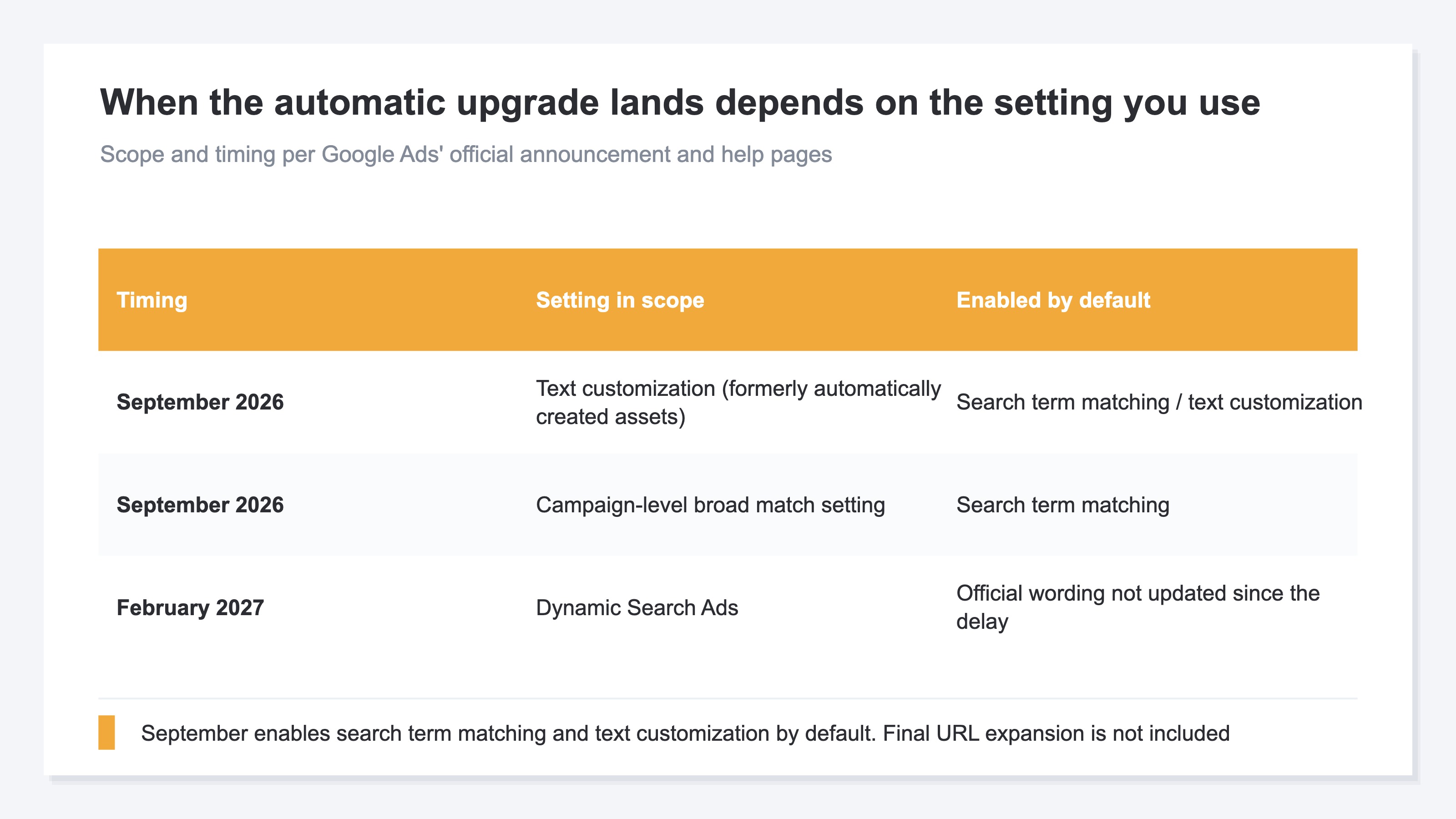
So what does switch automatically in September? The updated section of the official blog names two: campaigns using automatically created assets, and campaigns using the campaign-level broad match setting. Those two, it says, continue to be auto-upgraded starting in September 2026 as planned[1]. The help pages say the same, noting that campaigns using text customization (formerly known as automatically created assets) will automatically be upgraded to AI Max starting in September 2026[3].
The Setting Sits in the Asset Optimization Panel#
Text customization sits under the "Asset optimization" panel in AI Max. Go to Campaigns in the Campaigns menu, select the Settings tab, pick the campaign you want, and select AI Max — the panel appears there[4].
The help pages also keep the older instructions for automatically created assets as a separate section, where you select the campaign on the Settings tab and open "Change automatically created assets settings" from Edit[4]. But the help pages also say that turning text customization on means using the feature in AI Max, and that once you disable the legacy automatically created assets feature you won't be able to enable it again[4].
The change of name is easy to miss too. Automatically created assets began upgrading into text customization from May 27, 2025[4]. If you still hold the old name in your head, the very word you search the settings screen for doesn't match.
2. If You're in Scope, Google Writes the Ad Text#
The features the automatic upgrade enables differ by what was in scope.
Campaigns that were using automatically created assets get search term matching and text customization enabled by default. Campaigns that were using the campaign-level broad match setting get search term matching alone[1].
Worth marking off here: the feature that widens where clicks land is not part of September. For the two things auto-upgraded in September, what the official blog lists as enabled by default stops at search term matching and text customization — final URL expansion is not among them[1]. What happens in September reaches as far as ad text being generated and search terms widening; it does not mean the page a click lands on gets swapped out by Google's judgment.
Turning AI Max on yourself, though, carries a different scope. The help pages say that turning on AI Max turns on text customization and final URL expansion for the campaign, and that you can toggle them off individually in campaign settings[5]. The scope that arrives automatically and the scope that arrives when you switch it on yourself have to be read as two separate things.
What Each of the Two Features Changes#
Search term matching finds relevant search queries — not only from the keywords you registered, but from the content of your ads and landing pages — and serves your ads against them[5]. Text customization takes text from your existing ads, landing pages and assets and generates headlines and descriptions tailored to the search query[5].
Once those two are in, the premise you count ad results on changes. When ad text is generated for you, you can no longer follow which headline worked at the level of the ad text you wrote yourself. When search terms widen, aggregation at the level of registered keywords no longer sits on the same conditions before and after. New breakdowns have been added on the reporting side: the search terms report gains a "source" column showing why the match happened, the keywords report gains summary rows for AI Max, and the landing pages report gains a "Selected by" column[5]. What increases is the breakdown, not the revenue itself. This shape — judging automation you can't see inside by the revenue at the exit — also came up in judging P-MAX by landed revenue.
You Can Turn It Off, but One Setting Rides Along#
You can clear the text customization checkbox in the "Asset optimization" panel[4]. You can also remove generated headlines and descriptions individually from Ads[4].
One thing rides along. If final URL expansion is enabled on a campaign and you turn text customization off, final URL expansion turns off with it[4]. You meant to stop one thing, and the behavior of where clicks land changes too.
3. The Platform's View Changes, but Your Revenue Yardstick Doesn't#
Whoever writes the ad text, the formula for revenue per visit doesn't change.
RPS (revenue per visit) is the revenue actually recorded on your own site divided by the sessions on your own site. Numerator and denominator both sit on your side, so however Google generates ad text and however far it widens search terms, the material the calculation runs on is untouched. You can place August's level next to October's level with the definition held constant.
There is a boundary here. Site-wide RPS comes out regardless of what the platform does, but sorting it by channel or by campaign requires the incoming links to carry UTM (the tags appended to a link so traffic sources can be told apart). Without them, there is no channel breakdown to begin with. That premise is the one laid out in Google's AI Max comes to Shopping, which covers the same AI Max — with the difference that the Shopping setting is one you choose to switch on, so you can mark the before and after of enabling it yourself. The design of UTM itself is covered in campaign-level revenue efficiency by UTM.
You Can't Pick the Switch Date, so Record the Level First#
With a setting you switch on yourself, you can split the period at the moment you enabled it. This one is an automatic upgrade, so the timing is not yours to decide. Notifications are said to arrive in your account beforehand[1], but on when in September it happens, the official wording goes no further than expecting all upgrades to conclude by the end of September[1]. Some changes get published down to the day — the change to target CPA bidding on August 17 was one — but this one stops at the month.
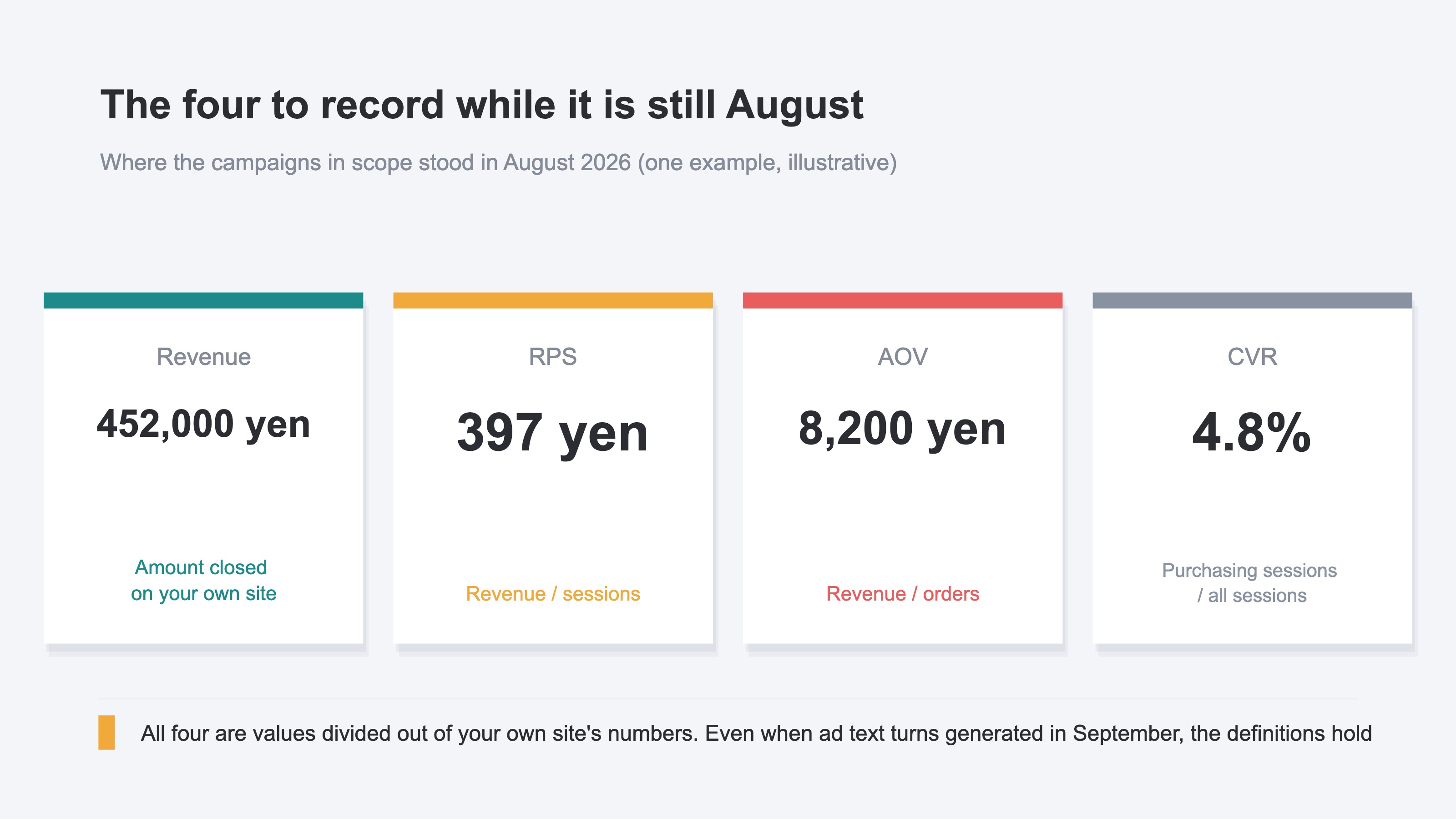
The practical move is to record where you stand now, during August. For the campaigns in scope, record four things — revenue, RPS, AOV (average revenue per order) and CVR (purchase rate) — and you can put the same four side by side across the switch. The timing of the switch itself can be narrowed later by tracing the trend back.
RevenueScope solution
RevenueScope holds the data for comparing before and after a switch on the same yardstick. Site-wide revenue and sessions are displayed as a daily trend, so you can trace the point where the level moved down to the day. For campaigns, opening a channel row displays revenue, RPS, AOV and CVR by utm_campaign for the recent period. Revenue here is not the conversion value shown in the ad platform's console — it is the amount for which a purchase completed on your own site. For periods where ad spend has been entered or imported by upload, ad spend by channel and the matching channel revenue measured by RevenueScope can be viewed side by side on the same screen.
However many new breakdowns appear in the platform's console, what is being divided here is the revenue for which a purchase completed on your own site. Whoever's hand wrote the ad text, these four, sorted by campaign, line up with their definitions unchanged.
Ask an AI Assistant Through MCP and This Is What Comes Back#
Ask for the past 30 days by campaign, and this comes back.
| utm_campaign | Sessions | Revenue | RPS | AOV | CVR |
|---|---|---|---|---|---|
| Campaign in scope for September | 1,520 | ¥547,000 | ¥360 | ¥7,300 | 4.9% |
| Campaign not in scope | 980 | ¥388,000 | ¥396 | ¥8,200 | 4.8% |
An illustrative comparison for checking the September AI Max upgrade. A snapshot of the past 30 days, from the sample store — a fictional site with sample data.
The level recorded during August for the campaign in scope was RPS ¥397, AOV ¥8,200, CVR 4.8%. Over the past 30 days RPS has come down to ¥360, but CVR sits at 4.9% and has barely moved. What fell is not the purchase rate — it is the amount per order. The campaign not in scope shows RPS ¥396 and AOV ¥8,200 over the same 30 days, so the going rate across the site did not change.
Narrowed this far, the next move is decided. Use the site-wide daily trend to close in on when the level moved, then match that window against the change history in Google Ads and the search terms report, and you can confirm whether it was when the automatic upgrade landed. From there: if the increase in revenue matches the increase in ad spend, keep going. If it doesn't, turn text customization off and measure again on the same four metrics. Why the clicks a platform reports and your own measurement diverge is covered in Google Ads clicks and GA4 sessions.
FAQ#
Frequently asked questions#
Q. We use Dynamic Search Ads. Do we have to migrate by September?
A. You are out of scope for the September automatic upgrade. The automatic upgrade for campaigns using Dynamic Search Ads starts in February 2027[1][2]. Google recommends migrating early[1], but the reason to rush against a September deadline is gone.
Q. Where can I tell whether my campaign is in scope for September?
A. Select the campaign from the Settings tab under Campaigns, and check whether the "Text customization" checkbox is selected in the "Asset optimization" panel under AI Max[4]. The help pages also keep the older instructions for automatically created assets, where you open "Change automatically created assets settings" from Edit on the Settings tab[4]. Campaigns using the campaign-level broad match setting are in scope as well[1].
Q. From September on, can the page my ads link to change on Google's judgment?
A. Final URL expansion, the setting that widens where clicks land, is not enabled by default in the September automatic upgrade[1]. If you turn AI Max on yourself it is enabled along with text customization, but you can disable them individually in campaign settings[5].
Summary#
What switches automatically in September is campaigns using text customization (formerly automatically created assets) and campaigns using the campaign-level broad match setting. Dynamic Search Ads were pushed back to February 2027. For those in scope, what gets enabled by default reaches as far as search term matching and generated ad text; the setting that widens where clicks land is not included.
Since the timing of the switch is not yours to choose, the practical move is to have the material for comparison ready first. Record four things during August — revenue, RPS, AOV and CVR — and however many new breakdowns appear in the platform's reports, you can put before and after side by side with the definitions unchanged.
See which ads actually drive revenue, at a glance
Free up to 2,000 sessions/month, AI connection included. No credit card required. Up and running in 5 minutes.
References#
- [1] Google "We're upgrading Dynamic Search Ads to AI Max" (2026)
- [2] Google Ads Help "About Dynamic Search Ads" (2026)
- [3] Google Ads Help "About text customization in Search campaigns" (2026)
- [4] Google Ads Help "Turn text customization on or off in Search campaigns" (2026)
- [5] Google Ads Help "How AI Max for Search campaigns works" (2026)