From August 17, 2026, the way bidding works in Google Ads changes. Among campaigns capped by budget, the ones that had been performing better than their target will see the actual figure move toward the target. This article lays out what is in scope and how to settle the number you put in the target.
Contents
TL;DR#
-
Only campaigns flagged Limited by budget are in scope
Campaigns with headroom left in the budget carry on as before
-
This is not a change that raises costs directly
The daily and the monthly budget caps stay in place as they are now
-
Matching the target to actuals is an act of fixing the current cost as the correct one
Whether it is right is settled by how much revenue that ad spend produced on your own site
1. Only Budget-Limited Campaigns Are Affected#
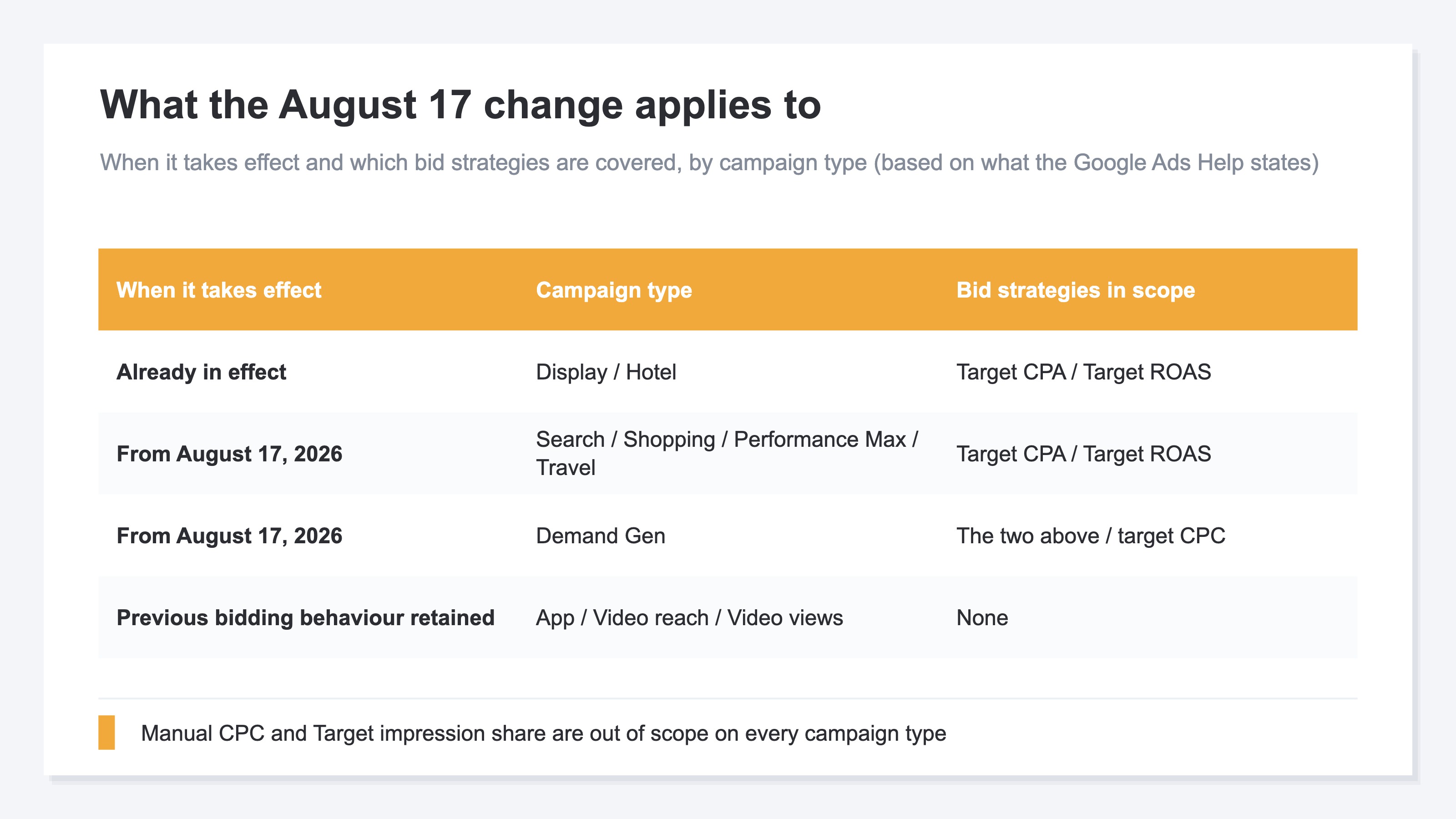
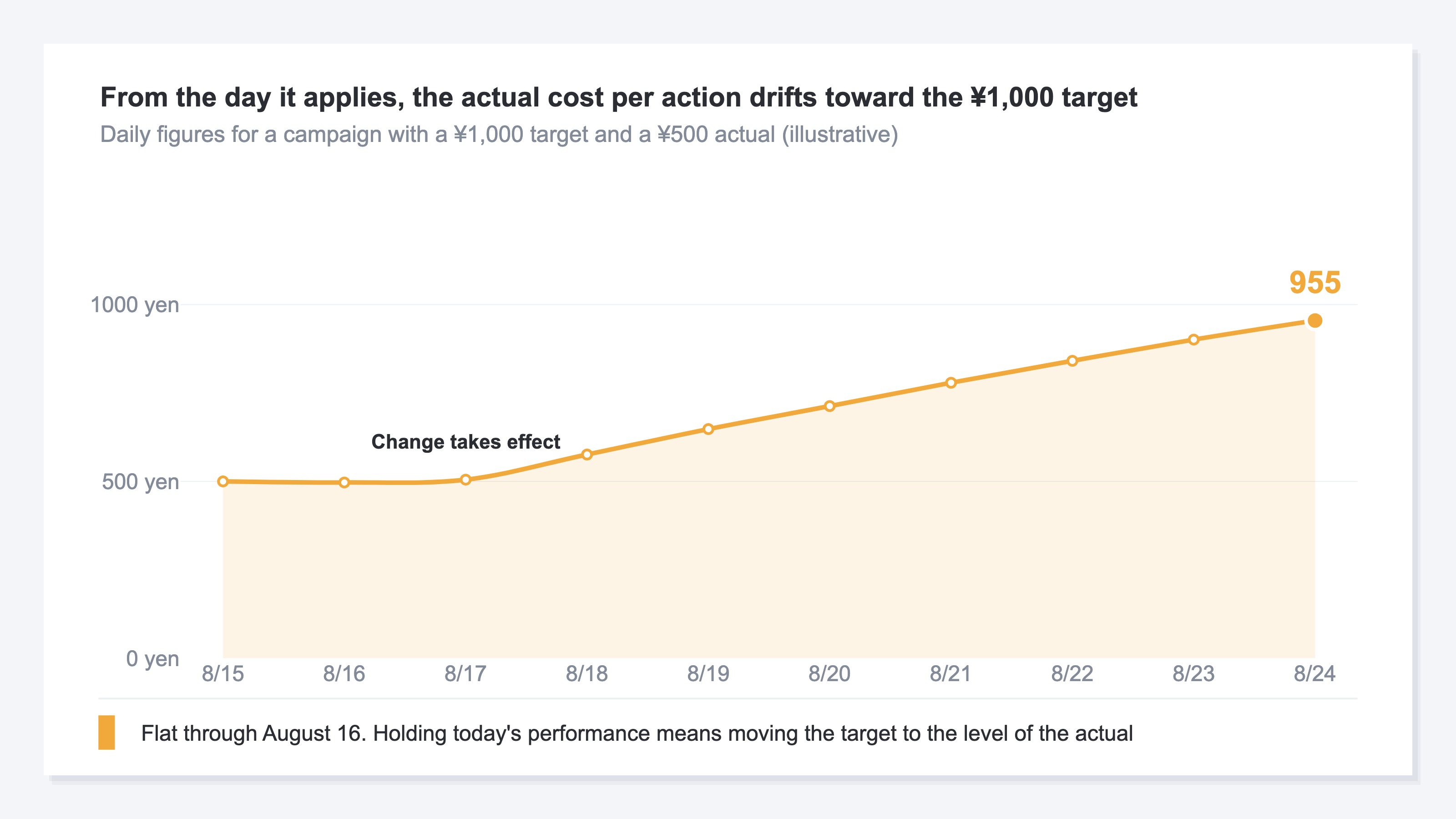
The official help gives this example. A target cost per action of ¥1,000, with a recent actual cost per action of ¥500. From August 17 onward, delivery works toward bringing the actual up near ¥1,000, and holding today's performance means changing the target to ¥500[1].
In scope are campaigns whose status reads Limited by budget and that use a bid strategy based on a target. Target CPA automates bidding by having you name the average cost per action you want[3]. Target ROAS is the strategy that adjusts bids from a forecast of conversion value[4]. Demand Gen's target CPC is in scope too[2]. Campaigns that are not being limited stay as they are, and manual CPC and Target impression share are out of scope[2].
Reading this change as a price rise in disguise goes too far. Asked whether costs will increase because of the change, the official answer is no[2]. The cap was never an exact daily line: for most campaigns a single day can reach twice the average daily budget, and a month up to 30.4 times it[5]. The frame itself does not move. What moves is what you pay for one conversion inside that frame.
Nor does Google adjust budgets or targets on its own[1]. How to take the recommendations in the interface is covered in what the Google Ads optimization score is worth.
Using the target adjustment tool to bring the target down to actuals is the remedy the official side prepared. The help also says that aligning before August 17 should not produce large swings or changes in existing performance[2]. Only the order has been swapped. Hold a standard for telling whether the tool's figure is right for your business, and apply the figure after that. Skip that order and you end up making the same decision over again after August 17.
2. Matching the Target to Actuals Locks In the Current Cost per Action#
So is rewriting the target to match the actual all there is to it?
The official side lists five responses. Keep the target as it is, match it to recent actuals, enter a different figure in line with business goals, switch bid strategy[1]. The fifth is raising the budget, which removes the qualifying condition itself. The help also states that keeping campaigns from being limited by budget is important[2].
The part worth watching is that "match the actual" does not always mean "lower it". With Target CPA the actual sits below the target, so the move is downward. With Target ROAS it runs the other way: if the actual is above the target, the move is upward. Leaving it untouched is also among the official options[1].
Rewriting the target to match the actual is also an act of fixing the current cost as the correct one. What gets judged is the level of the target and nothing else. Whether that cost is right for the revenue you make is a separate question.
There are places where you have to decide it yourself. Campaigns with fewer than 7 conversions get no recommended target, on the grounds that performance is hard to forecast[2]. Adjusting manually is what the help points to[2]. A campaign carrying a product that sells a few units a month usually meets that condition.
Whether it is right is settled not by the level of the cost but by how much revenue one acquisition at that cost leaves behind. The place that measures that amount is not the ad interface. It is your own site.
3. How Much Revenue the Same Ad Spend Produced#
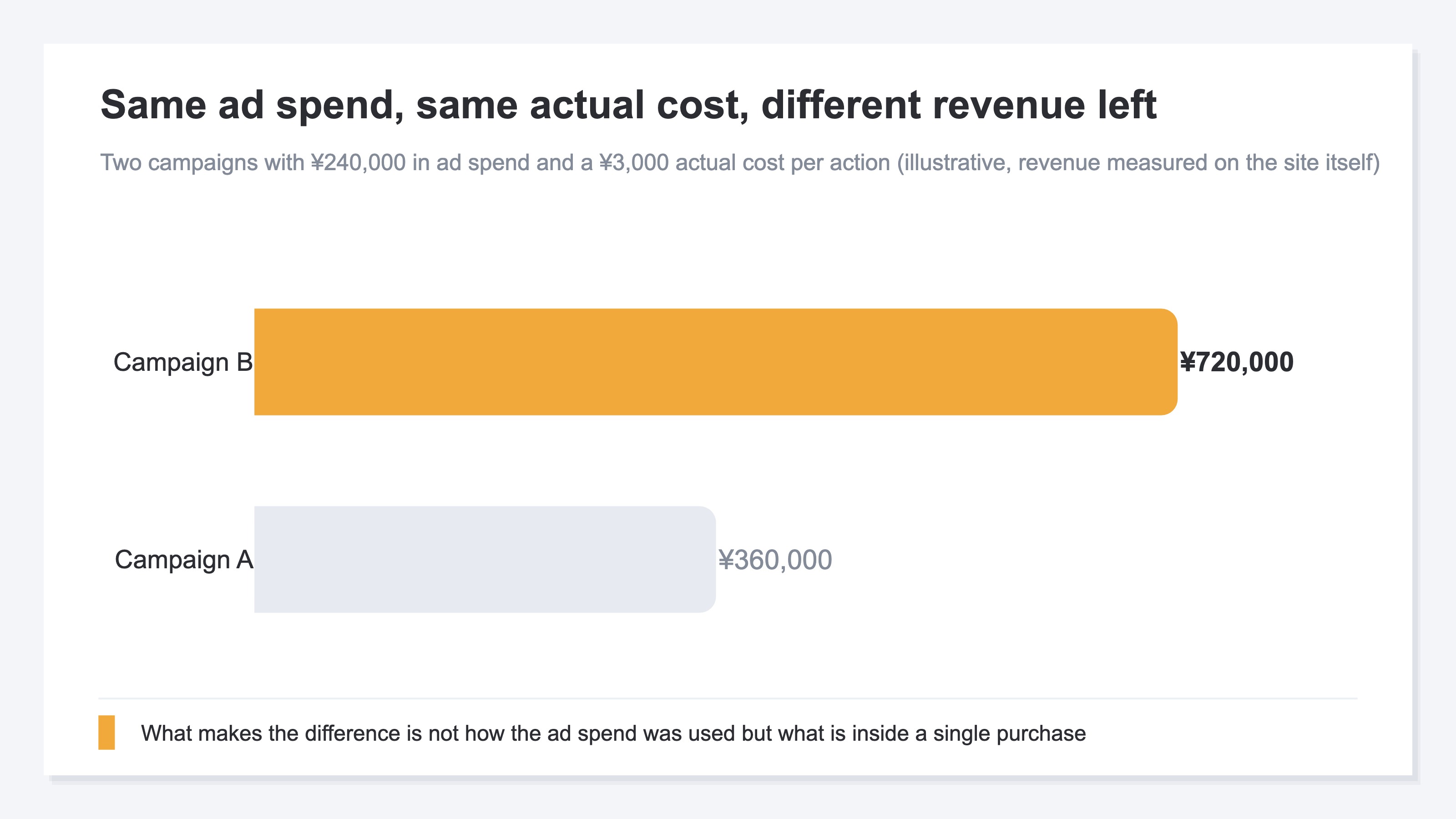
Ad spend of ¥240,000, an actual cost per action of ¥3,000. Two campaigns that look exactly alike in the interface can differ by twice over in the revenue measured on the site itself: ¥360,000 against ¥720,000.
Cost per action looks at two things, ad spend and conversion count. Average order value and units per order both sit outside that calculation. Revenue can hold when the count falls, if the amount of a single purchase rises. It can fall even when you defend the count, if the orders coming in are all small.
If you want to set the target from revenue, what you look at is ROAS: revenue you measured yourself divided by ad spend. Where to put the level is in setting a ROAS target per channel, the gap against what the platform reports is in MER versus platform ROAS, and the breakdown after a change is in splitting a ROAS drop into CPC, CVR and AOV.
Raise the budget so the limit comes off and ad clicks grow, and share can move over from branded search and organic search. Even when the ad conversion count rises, the store's revenue as a whole does not necessarily rise by the same amount.
Here, check the units. GA4's Google Ads campaigns performance report, once the account is linked, shows ad cost, cost per conversion, return on ad spend and total revenue for each campaign[6]. But the denominator of cost per conversion is the number of times the events you marked as conversions occurred[6]. Mark add-to-cart and it is the cost of one add-to-cart. Total revenue in the same table is the amount actually generated by purchases and the like[6]. Until the units line up, what the two divided together represents is not settled.
RevenueScope solution
What comes out at the campaign level is four things: revenue, RPS, AOV and purchase rate. Revenue in RevenueScope is the total of purchases measured on the site itself, and RPS is revenue per session.
Asking RevenueScope about fictional Store A's Google Ads at the campaign level (illustrative)
| Campaign | Revenue | RPS | AOV | Purchase rate |
|---|---|---|---|---|
| Branded keywords | ¥450,000 | ¥450 | ¥9,000 | 5.0% |
| Product category | ¥300,000 | ¥150 | ¥6,000 | 2.5% |
| Generic keywords | ¥150,000 | ¥100 | ¥5,000 | 2.0% |
RPS opens 4.5x between ¥450 and ¥100, and inside that sit an AOV of ¥9,000 against ¥5,000 and a purchase rate of 5.0% against 2.0%. That is the difference behind how much revenue the same ad spend leaves.
Roll those three up and the channel list holds them in a single line. Ad spend and the platform-reported figure come in here as well.
The channel list for the same period (illustrative)
| Channel | Ad spend | Sessions | Revenue | RPS | ROAS |
|---|---|---|---|---|---|
| Google Ads | ¥300,000 | 4,500 | ¥900,000 | ¥200 | 3.0 |
| Meta Ads | ¥200,000 | 2,500 | ¥400,000 | ¥160 | 2.0 |
Note: both tables were built as teaching examples. The sample store runs on sample data, refreshed daily, so opening it from the CTA keeps the same cut with today's figures in place.
The ¥200 that comes out of the roll-up is a different figure from any of the three above. The August 17 change applies campaign by campaign, so deciding from ¥200 means putting the same judgement on delivery at ¥450 and delivery at ¥100.
If you tighten a target first, it is generic keywords, the lowest RPS of the three. The budget that frees up can go to the two carrying the higher AOV and purchase rate.
FAQ#
Frequently asked questions#
Q. Will ad spend go up after August 17?
A. The official answer is that costs do not increase directly because of this change, and that the daily and monthly budget caps are always maintained[2]. It also says the daily cost itself can move, for instance when demand rises[2].
Q. Why is the bid target adjustment tool not showing in the account?
A. It is being released in stages and appears on the settings pages of eligible campaigns over time[2]. Note that campaigns with fewer than 7 conversions get no recommended target, so adjusting manually is what the help points to[2].
Q. We left headroom in the budget, so why are impressions not growing?
A. That is a moment to suspect something other than budget. The procedure for separating it out from your share of the auction is in when search ad impressions drop.
Summary#
What changes on August 17 is how campaigns behave when they are limited by budget and use a bid strategy based on a target. It is not a change that raises costs directly, though with Performance Max and Demand Gen the split across channels can shift[1].
The direction of the response reverses with the strategy. Target CPA moves down, Target ROAS moves up. Leaving it untouched is a decision, and so is raising the budget to remove the qualifying condition.
The same ad spend at the same actual cost still leaves different amounts of revenue on the site itself. What number to put in the target is settled by how much revenue one acquisition at that cost creates. Campaigns with fewer than 7 conversions, where no recommended target appears, can be decided on your own once you hold that standard.
See which ads actually drive revenue, at a glance
Free up to 2,000 sessions/month, AI connection included. No credit card required. Up and running in 5 minutes.
References#
- [1] Google Ads Help "Changes to target based bid strategies" (2026)
- [2] Google Ads Help "Frequently asked questions about changes to Target-based bid strategies" (2026)
- [3] Google Ads Help "About Target CPA bidding" (2026)
- [4] Google Ads Help "About Target ROAS bidding" (2026)
- [5] Google Ads Help "About average daily budgets" (2026)
- [6] Analytics Help "Google Ads campaigns performance report" (2026)