
Open September 2026 ad numbers in October and, with ad spend unchanged from August, which page produced the revenue no longer reads the way it did the month before. The cause sits on September 16, 2026 — the day LINE Yahoo Ads starts delivering automatically created quick link assets on search ads.
Contents
TL;DR#
-
The official notice gives two dates
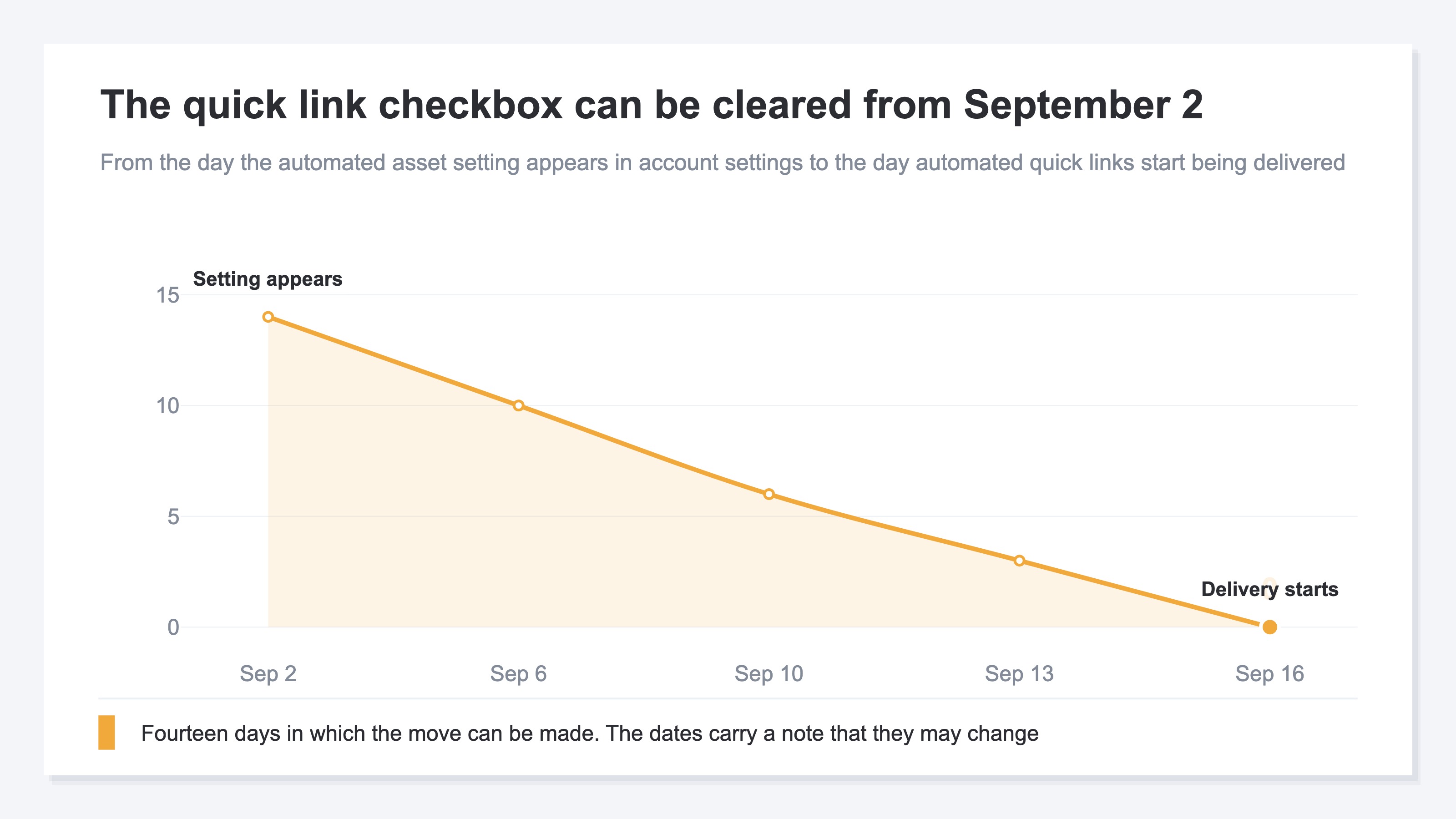
The automated asset setting appears in account settings on September 2, and automated quick links start delivering on September 16
-
There is nothing to sign up for — the action is clearing it
Automatic creation of ad display assets is turned on for every search ads account on the day it takes effect
-
What gets created is a link to a page other than the ad's final URL
The tighter the set of destinations an advertiser has been running, the more pages join it that were never specified
-
September's page-level gains read wrong if the traffic source isn't separated
Whether to clear it or keep it rests on whether the added destinations produce revenue
1. The Setting Appears September 2, Automated Quick Links Deliver September 16#
The official notice gives two dates: one is the day the setting becomes available, the other is the day delivery starts.
The scope is LINE Yahoo Ads search ads[1]. Two dates are listed as planned: September 2, 2026 (Wed), when the automated asset setting is added to the account settings screen, and September 16, 2026 (Wed), when delivery of automatically created quick link assets starts[1]. A note accompanies them saying the timing is subject to change[1].
What is easy to misread is that the two carry different meanings. September 2 is the day the setting becomes operable, not the day something starts automatically. What starts automatically is September 16.
The notes state plainly that there is nothing to sign up for: automatic creation of ad display assets is turned on for every search ads account on the day it takes effect[1]. What stays on the advertiser's side is not the action of turning it on but the action of clearing it. If the automation is not wanted for operational reasons, the procedure is to clear the quick link checkbox once the automated asset setting has been added to the account settings screen[1].
So the window in which the move can be made runs from September 2, when the setting appears, to the moment delivery starts.
Another Platform Changes Its Automation the Same Month#
Automation switched on by default is not confined to this platform. Google Ads also begins automatic upgrades from September 2026, and the scope of that one is laid out in Google's AI Max in September. That one has generated ad text as its subject, so what changes sits in a different place.
2. What Gets Created Is a Link to a Page Other Than the Ad's Final URL#
A quick link displays, underneath the ad, a link to a URL different from the one the ad title points to.
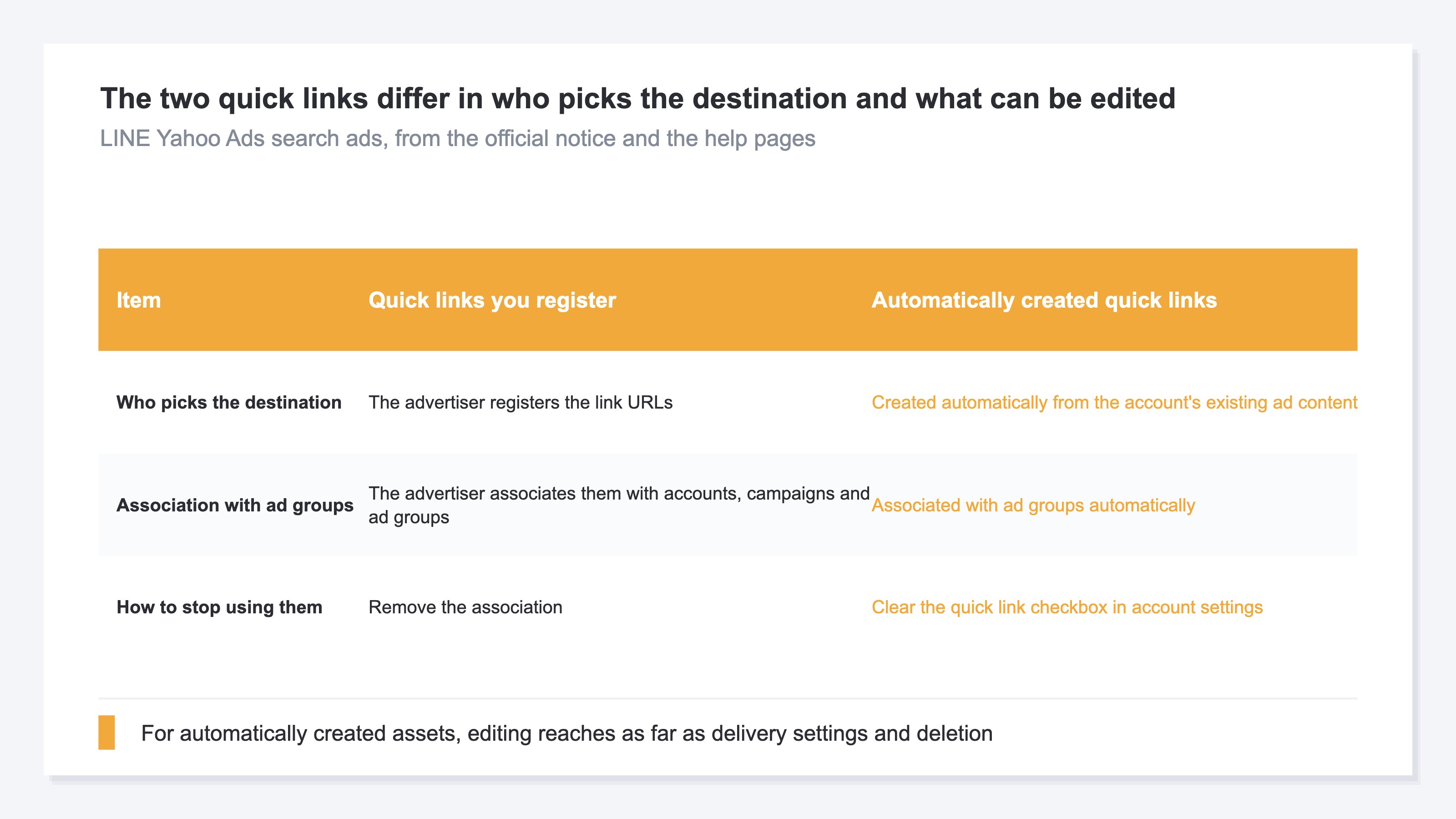
The help page defines it this way: a quick link asset lets you add URL links at the lower part of your ads that differ from the landing page URL, taking people to specific pages on your website rather than the top page, and showing links to useful content can help improve the conversion rate[2].
This is the core of the change. What gets created automatically is not ad text but a link to a page other than the final URL. From September 16, in other words, where an ad sends people widens past the single URL the advertiser specified.
The material the automation draws on is stated as well. Quick link assets are created automatically from the ad content already in the account and associated with ad groups automatically; because the assets start delivering once approved in review, the whole path from creation to delivery happens without the advertiser doing anything[1]. No advertiser check sits between creation and delivery.
There is a line around what can be edited, too. Editing an ad display asset created by the automation reaches as far as changing its delivery settings and deleting it[1]. Rewriting the text or the destination to bring it closer to intent is not one of the options.
The Tighter the Hand-Built Setup, the More the Destinations Were the Intent#
The help page lists uses for quick links: a business with locations in several regions sending people straight to each region's page, sending people to pages by product or service category, and using the start and end dates in the schedule setting to swap links by season[2]. In every one of them, which page to send people to was the advertiser's decision.
The order they appear in is not the advertiser's decision either. The help page says quick link assets appear in the order they are most likely to be clicked[2]. Once the pool of candidate destinations grows automatically, the combination that shows underneath the ad widens past the existing setup as well.
An ad that used to send people only to a seasonal product's landing page starts sending them to category pages, feature pages and articles too. That is what happens on September 16.
3. More Destinations Means Landing Revenue by Page Reads Differently#
When page-level numbers move from September on, whether the movement came from search or from ads is not settled by the page-level numbers alone.
As a premise, traffic from the platform has to be sorted into a channel in the first place. How LINE Yahoo Ads traffic gets classified is covered in Yahoo! Ads landing in organic search in GA4. If that part is broken, none of what follows holds.
The pages picked as automated destinations are existing pages on the site: category pages, feature pages, articles. Every one of them has been judged on search traffic until now. Once ad traffic mixes into them in September, room opens up to read a page-level gain as search working. Whether the gain came from search or from ads is not settled by looking at one page-level number.
The same thing happens on the revenue side. When landings that used to read as "this ad, this landing page" split across several pages, landing revenue splits with them. Ad spend stays booked to the same campaign, so looking only at campaign-level numbers leaves the split itself out of view.
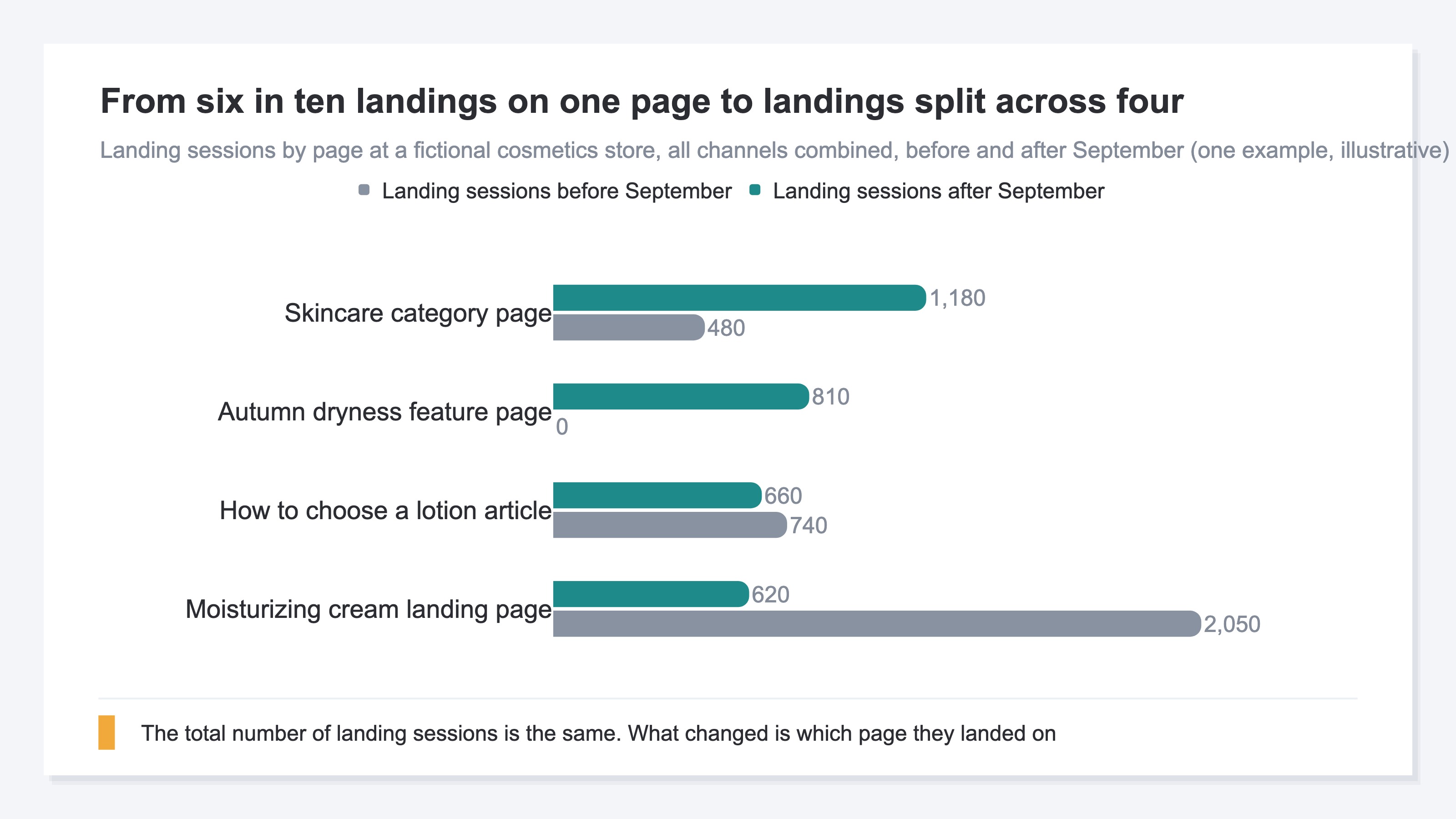
What the decision to clear it or keep it rests on sits inside that split. More destinations is not bad news in itself. Sending people straight to pages they want can improve the conversion rate, as the official page says[2]. The problem is that whether the added destinations actually produce revenue does not come out of the volume numbers. The habit of judging landing pages on revenue efficiency is laid out in how to spot a landing page that sells.
Chase the Added Destinations by Hand and the Prep Work Eats the Time#
By hand, it starts with opening the ad console and writing out the destination URLs of the quick links the automation created. Then page-level numbers come out of the site and get matched against that list. At that point the ad-side URLs carry parameters while the site side comes out as bare paths, so a round of normalizing the notation goes in first. The prep work takes longer than the matching does.
And the material the automation draws on is the ad content in the account[1]. Change what is in the account and the pool of destinations turns over, so this prep work is not the kind that is done once. What sets the speed of the decision is the notation-matching that sits ahead of the comparison.
RevenueScope solution
RevenueScope displays page-level numbers across two screens. The first is page-level traffic: pageviews, unique visitors, average dwell seconds and bounce rate, plus the change in pageviews against the previous period and that page's impressions, clicks and average position in Google Search, all on the same row. Where a page had no row in the previous period it is marked as new, so a page that first appeared as a destination in September can be identified. The second is content actions, which displays landing revenue by page — measured revenue attributed to the page that was the entry point of the session in which the purchase completed, summed across all channels. What landing revenue is good for is covered in why content CVR isn't worth measuring.
The order of use runs in two steps. First, on the traffic screen, narrow to the pages that are new in September and the pages whose traffic grew. Google Search clicks sit on the same row, so a page whose traffic grew while its search clicks did not is a page whose gain came from outside Google Search. Exposure in Google Search is the base here, so that column answers for the search side. Then move to the content actions screen and check the landing revenue of the pages that were narrowed down. That screen takes pages with exposure in Google Search as its base and displays the ones where there is a move to make.
Ask an AI Assistant Through MCP and This Is What Comes Back#
Ask for landing revenue by page from September on, and this comes back.
| Page | Landing sessions | Landing revenue | RPS |
|---|---|---|---|
| Moisturizing cream landing page | 620 | ¥422,000 | ¥680 |
| Skincare category page | 1,180 | ¥130,000 | ¥110 |
| Autumn dryness feature page | 810 | ¥40,000 | ¥49 |
| How to choose a lotion article | 660 | ¥60,000 | ¥91 |
An illustrative quicklink comparison using sample data for a fictional site.
The moisturizing cream landing page, lowest of the four in landing sessions, comes first in landing revenue and in RPS (revenue per session) alike. The category page, highest in landing sessions, sits at ¥110 RPS — about a sixth of the landing page's ¥680. The feature page sits at ¥49.
The decision settles here. If the added destinations are only collecting volume, clear the automatic creation and bring destinations back to the one that was specified. If they are producing revenue, keep them and build those pages up as destinations. What decides the direction is not the rows that came out on top by volume — it is the one row that came last.
FAQ#
Frequently asked questions#
Q. If we don't want the automation, when do we do what?
A. The automated asset setting is added to the account settings screen on September 2, 2026[1]. If the automation is not wanted for operational reasons, clear the quick link checkbox once that setting has been added[1]. Delivery of automatically created quick link assets starts on September 16, 2026[1], so the clearing has to happen before delivery starts. The dates carry a note that the timing is subject to change[1], so it is worth watching the notice page for updates.
Q. Can we edit the text or destination of an automatically created quick link afterwards?
A. No. Editing an ad display asset created by the automation reaches as far as changing its delivery settings and deleting it[1]. Creation itself runs off the ad content already in the account, and delivery starts once the asset is approved in review[1].
Q. Page-level traffic grew in September. Can we call that a search result?
A. Not on the traffic number alone. The pages picked as automated destinations are existing pages on the site, so ad traffic mixes into pages that used to be judged on search alone. Checking whether that page's Google Search clicks grew by the same amount separates out where the gain came from. Tracing revenue when the site's own page structure moves is covered in rankings fell after a redesign.
Summary#
On LINE Yahoo Ads search ads, the automated asset setting is added to account settings on September 2, 2026, and delivery of automatically created quick link assets starts on September 16[1]. Automatic creation of ad display assets is turned on for every search ads account on the day it takes effect[1], so not wanting it means clearing the quick link checkbox before delivery starts. The dates carry a note that the timing is subject to change[1].
What gets created is a link to a page other than the ad's final URL[2]. From September on, the set of pages an ad click lands on changes, and landing revenue by page splits with it. Whether to clear it or keep it rests on whether the added destinations produce revenue. A destination that came out on top by volume is not necessarily on top by revenue, so what decides it is landing revenue page by page.
See which ads actually drive revenue, at a glance
Free up to 2,000 sessions/month, AI connection included. No credit card required. Up and running in 5 minutes.