
Even within the same site, landing pages (LPs, the page a visitor first lands on) come in two kinds: ones that sell well and ones that hardly sell at all. Some LPs draw plenty of traffic but never turn it into revenue, while others get few visits yet earn steadily. If you can tell these apart, you'll see which pages to fix and which pages to send your ads to.
Yet most people judge an LP by conversion rate alone (CVR, the share of visitors who actually bought). That makes you miss something important. Because there are LPs with a low CVR that still earn well, thanks to a large order value per purchase. What you really want to see is "how much revenue, on average, each visitor to that LP generated"—in other words, per-page revenue efficiency. This article walks through what you miss when you look at LPs by CVR alone, and how the picture changes once you compare them by revenue efficiency (RPS).
Table of contents
What this article covers#
- Judging an LP by conversion rate (CVR) alone makes you miss the difference in order value. There are LPs with a low CVR that still earn well because each purchase is large.
- What you should look at is revenue efficiency (RPS, revenue per session). RPS captures both conversion rate and order value in a single number, so you can compare LPs fairly by "how much revenue, on average, each visitor generated."
- Where to act is decided by the combination of "traffic volume" and "RPS." An LP with lots of traffic but a low RPS is the candidate where a fix pays off most.
1. What you miss when you judge LPs by CVR alone#
When you measure an LP's performance, the first thing that comes to mind is conversion rate (CVR). If 100 people come and 2 buy, the CVR is 2%. It's easy to grasp and widely used. But ranking LPs by CVR alone can lead you astray.
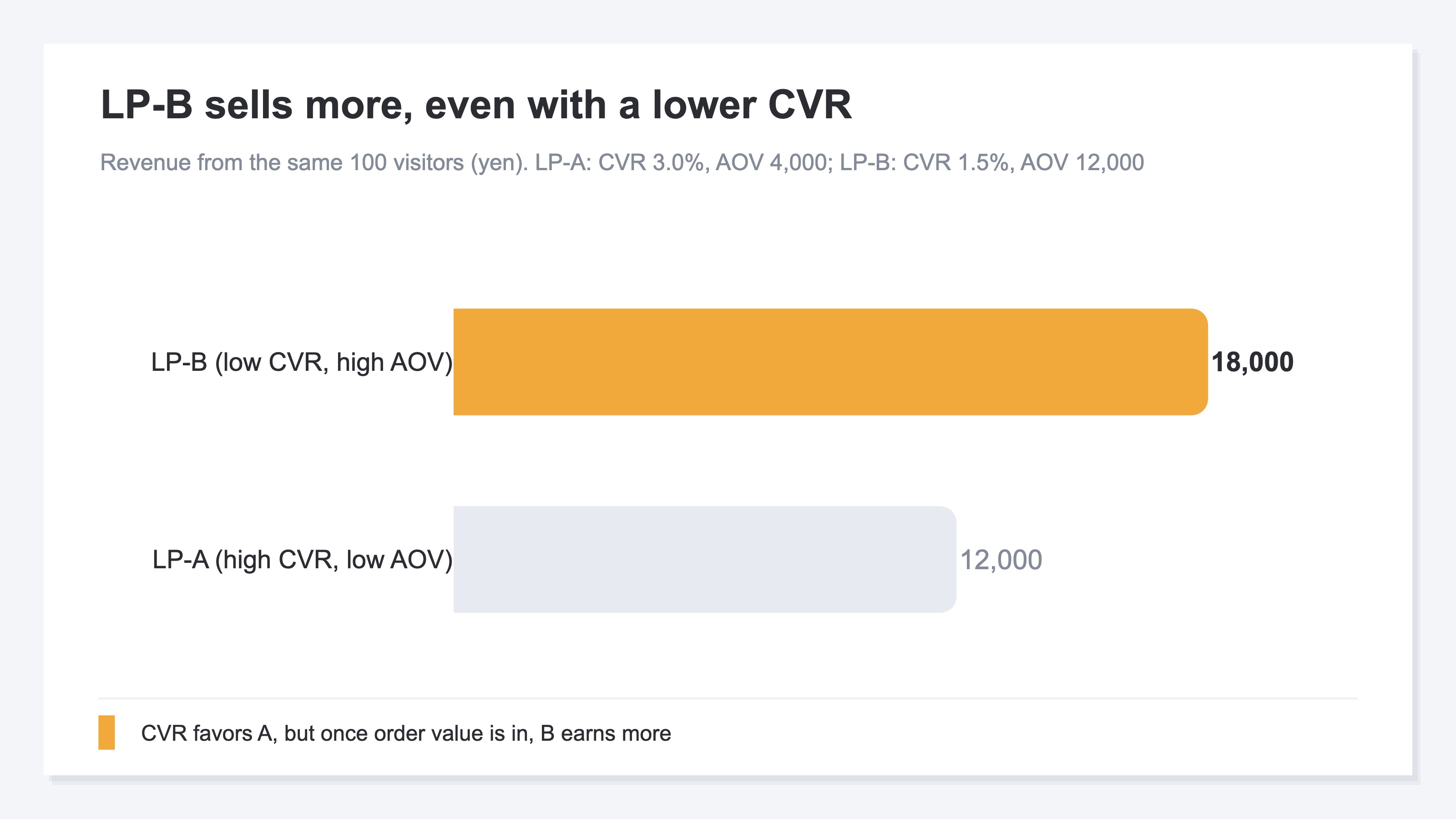
Take two LPs as an example. LP-A has a high CVR of 3.0%. LP-B, on the other hand, has a CVR of 1.5%—half of A's. By CVR alone, A wins and B needs work; that's the call you'd want to make. But once you look at the order value per purchase, the story changes. Say A's order value is ¥4,000 and B's is ¥12,000. If the same 100 people come, A earns 3 × ¥4,000 = ¥12,000, while B earns 1.5 × ¥12,000 = ¥18,000. It turns out B—the one with the lower CVR—actually earns more.
Why does this happen? Because CVR only looks at "whether they bought," not "how much they bought." An LP where many people buy a cheap product and an LP where a few people buy an expensive one—line them up by CVR alone, and the former is rated highly while the latter is undervalued. The higher the order value an LP handles, the more it loses out under the CVR lens. To measure an LP's true strength, you need to look at conversion rate and order value together, as one.
2. Seeing it through revenue efficiency (RPS) | capturing conversion rate and order value together#
That's where revenue efficiency comes in (RPS, Revenue Per Session = revenue per visit). RPS shows how much revenue, on average, was generated per visit to that LP. The calculation is revenue ÷ visits. Very simple.
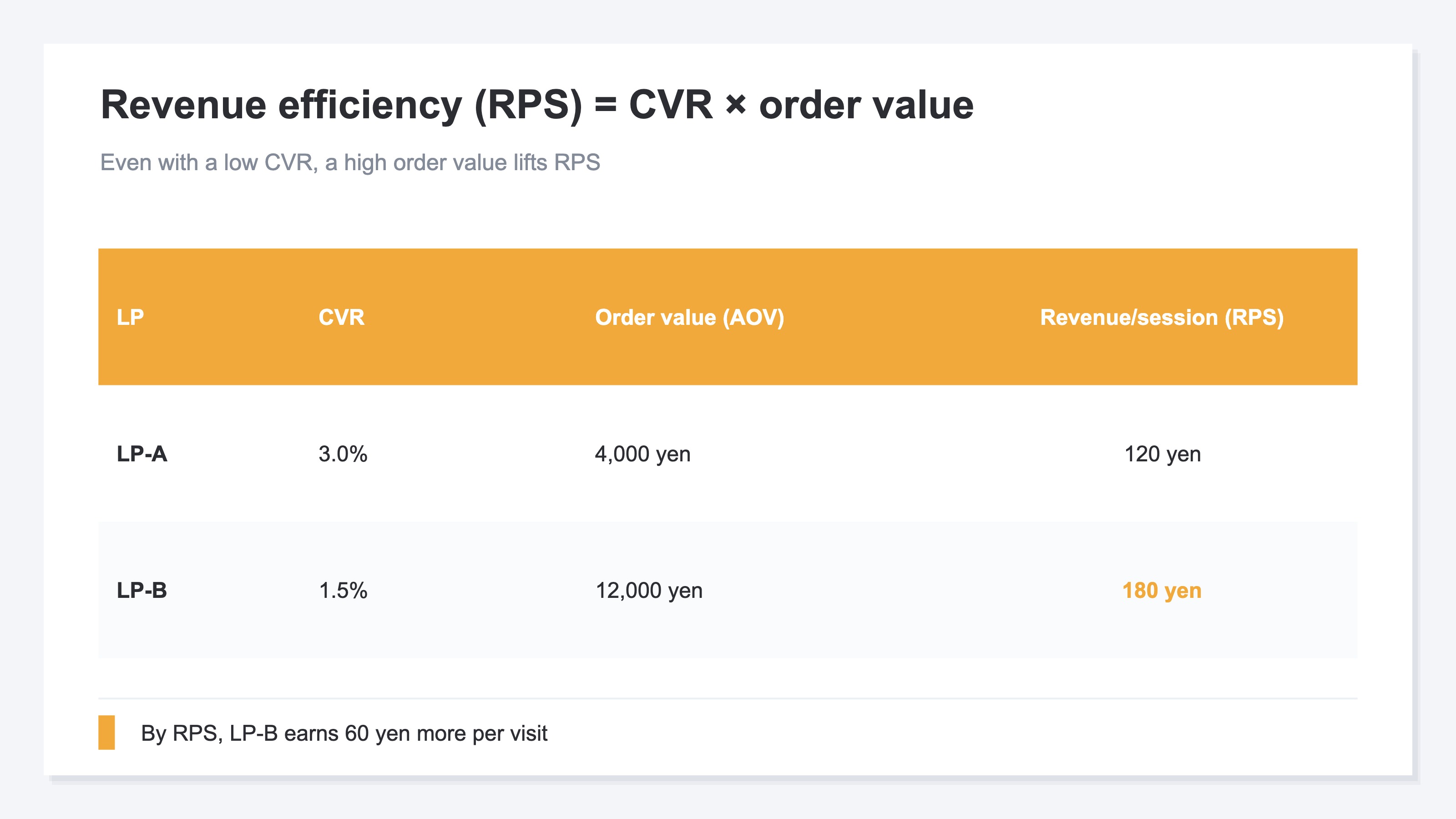
What's handy about RPS is that it captures both conversion rate and order value in a single number. In fact, the relationship is RPS = conversion rate (CVR) × order value (AOV). In other words, RPS is an overall measure of revenue efficiency, multiplying "did many people buy (CVR)" by "how much each bought (order value)." So even with a low CVR, a high order value lifts RPS; and even with a high CVR, a low order value keeps RPS down.
Let's revisit LP-A and LP-B through RPS. LP-A is 3.0% × ¥4,000 = ¥120. LP-B is 1.5% × ¥12,000 = ¥180. Compared by RPS, it's clear B earns ¥60 more per visit. Had you looked at CVR alone, you might have written B off as "the loser." Just by lining everything up under the single metric of RPS, you can fairly compare the true earning power of your LPs.
3. Use traffic volume and RPS to decide where to act#
Once you know each LP's RPS, the next question is "which LP to act on." The thing to look at alongside it is traffic volume (how many people reach that LP). Combine RPS with traffic volume, and the priority order for where to act comes into view.
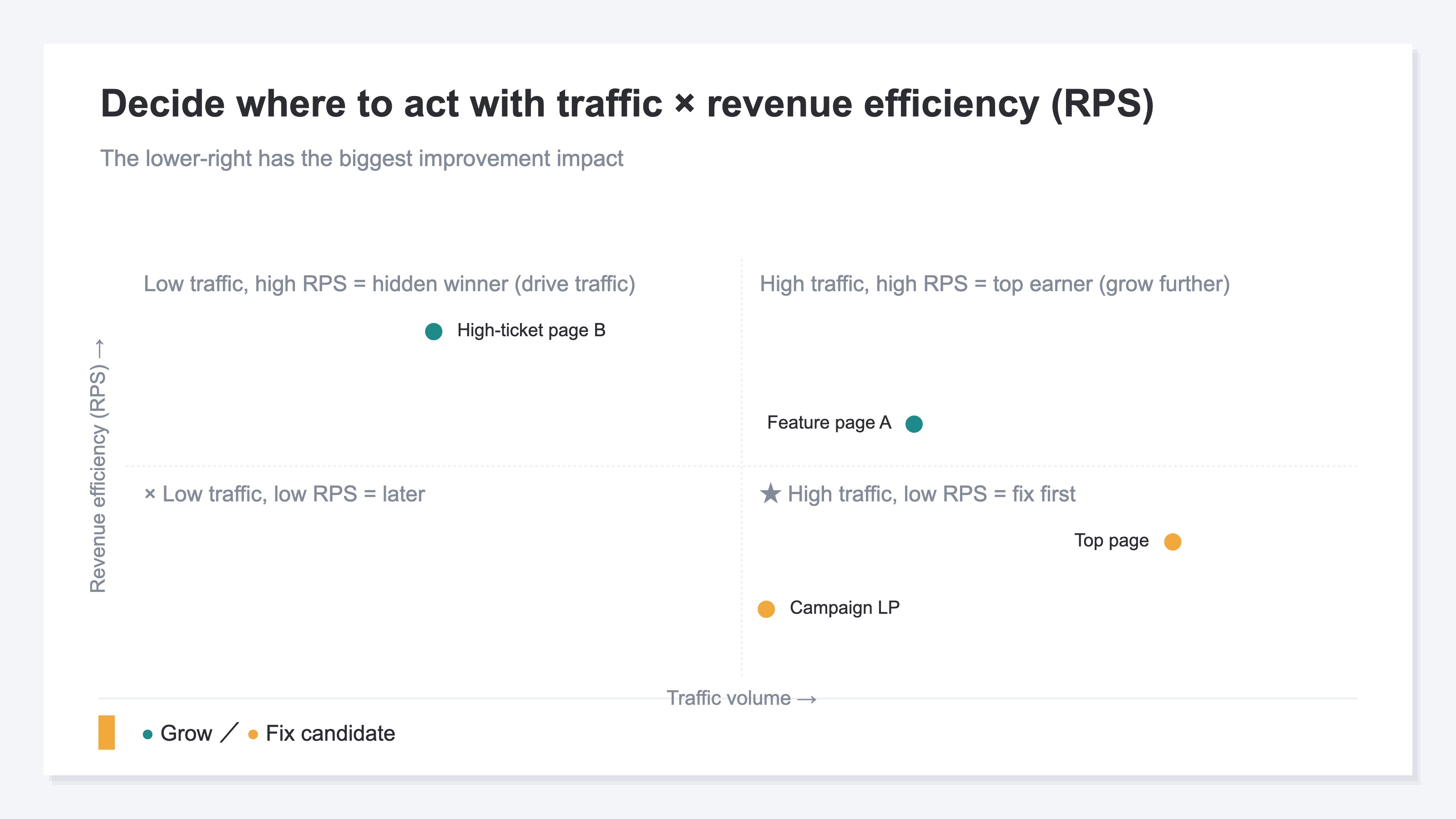
You can sort it into four combinations. (1) LPs with high traffic and high RPS are your earners—candidates to grow further by sending more ads. (2) LPs with high traffic but low RPS are the top fix candidates. Because so many people come, even a small lift in RPS makes a big revenue impact. (3) LPs with low traffic but high RPS are hidden stars—worth drawing more people to. (4) LPs with both low traffic and low RPS can wait. Even if you work on them, the revenue you'd gain is small.
Looking through these four combinations, you'll often discover that an LP you thought "I should fix this because the CVR is low" was actually a star earning through order value. Conversely, an LP you were happy with because traffic was high turns out, by RPS, to be only gathering people without earning. Where to act is decided not by gut feel, but by the combination of two numbers: traffic volume and RPS.
The idea itself isn't hard. What's hard is keeping it up for each LP, every month. You can get each LP's visit count from web analytics (GA4 and the like), but GA4's page reports center on views, bounce rate, and time on page—per-page revenue efficiency, "how much revenue the people who came to that page generated," is hard to see by default. To produce per-page RPS, you have to pull each page's visits and revenue separately and match them up by hand every time. That compiling becomes the wall before you ever reach a decision.
RevenueScope solution
When you try to view LPs through revenue efficiency, the wall you hit at the end is always the same: "I want to know each LP's RPS, but the per-page visits and revenue live in separate places, and they won't line up unless I re-compile them every time."
RevenueScope consolidates those scattered numbers onto a single screen, lining up visits, conversion rate (CVR), order value (AOV), revenue efficiency (RPS), and revenue for each LP (page) (figures are demo data).
| LP (page) | Visits | Conversion rate (CVR) | Order value | RPS (revenue efficiency) |
|---|---|---|---|---|
| Top page | 5,000 | 1.0% | ¥6,000 | ¥60 |
| Feature page A | 3,000 | 3.0% | ¥4,000 | ¥120 |
| High-ticket product page B | 1,200 | 1.5% | ¥12,000 | ¥180 |
| Campaign LP | 2,500 | 0.6% | ¥5,000 | ¥30 |
See this table on one screen, and the priority order you couldn't sense before surfaces. The top page, with the most visits, has a low-ish RPS of ¥60. Meanwhile, the high-ticket product page B—whose CVR is a mere 1.5%—has the highest RPS at ¥180: a hidden star earning through order value. And the one to watch is the campaign LP. It gathers 2,500 visits, yet its RPS is only ¥30. This is the top fix candidate of "high traffic but low RPS." The next move comes into view: "first lift the campaign LP's RPS, then send traffic to the high-earning high-ticket product page B."
Let's be clear about one thing. What RevenueScope does is split out conversion rate (CVR), order value, revenue efficiency (RPS), and revenue for each LP, and line them up on a single screen. Which page's what to fix—that judgment is yours to make. Also, metrics like page usability (heatmaps and click movement) or customer lifetime value (LTV) are not something RevenueScope handles. What it produces goes as far as per-page revenue and its efficiency. It assembles the material for deciding where to act, but you're the one holding the wheel.
FAQ#
Frequently asked questions#
Q. Isn't conversion rate (CVR) alone enough to evaluate an LP?
A. CVR only looks at "whether they bought," not "how much they bought." So the higher the order value an LP handles, the more it gets undervalued by CVR alone. LPs with a low CVR that still earn through order value are genuinely common, so looking through revenue efficiency (RPS)—which rolls conversion rate and order value into one—lines up an LP's true strength fairly.
Q. How are RPS and order value (AOV) different?
A. Order value (AOV) is "the average purchase amount per buyer," and it doesn't include people who didn't buy. RPS (revenue per session) is "the average revenue per visitor," and people who didn't buy are included in the denominator. Because the relationship is RPS = conversion rate (CVR) × order value (AOV), RPS captures both "how many people bought and how much each bought"—an LP's overall revenue efficiency.
Q. Can I see per-LP revenue efficiency in GA4?
A. GA4's page reports center on views, bounce rate, and time on page; you can see per-page visits, but revenue efficiency—"how much revenue the people who came to that page generated"—is hard to see by default. To produce per-LP RPS, you have to pull each page's visits and revenue separately and match them up by hand. That monthly compiling becomes the biggest hurdle when comparing LPs by revenue efficiency.
Summary#
Judging an LP by conversion rate (CVR) alone makes you miss the difference in order value. Because there are LPs with a low CVR that still earn through order value. What you should look at is revenue efficiency (RPS, revenue per session). Since RPS = conversion rate × order value, it captures both in one and lets you compare an LP's true earning power fairly.
Where to act is decided by the combination of traffic volume and RPS. In particular, "an LP with high traffic but low RPS" is the candidate with the biggest fix impact. Start by lining up your main LPs not just by CVR but by RPS. The true earning power of the LP you were happy with because traffic was high, and the existence of the quiet LP that was actually earning, come into view at the same time.
See which ads actually drive revenue, at a glance
Free up to 5,000 sessions/month, AI connection included. No credit card required. Up and running in 5 minutes.
References#
- [1] Google Analytics Help, "Landing page report" (2025)