You are spending on Yahoo! Ads and the orders are coming in, yet open GA4 and no revenue sits on the ad channel while organic search revenue alone keeps rising. The GA4 report labels it Organic Search. This does not mean GA4 or Yahoo! Ads is malfunctioning. This comes out of the fact that GA4 reads only two things when it decides a channel.
Contents
TL;DR#
-
yclid is not among the materials GA4 uses to decide a channel
Automatic detection by source platform is provided for Google's five systems only
-
Paid Search is an AND of two conditions, Organic Search an OR of two
That asymmetry sends ad traffic carrying no utm down onto the Organic Search side
-
Mixed together, the ad numbers and the SEO numbers go wrong in opposite directions at once
Ads read lower than they really are, and organic search reads higher
1. yclid Never Appears in GA4's Channel Decision#
When the referrer is passed through as Yahoo, Yahoo! Ads revenue piling up on the Organic Search side is not a defect. It is how the product works.
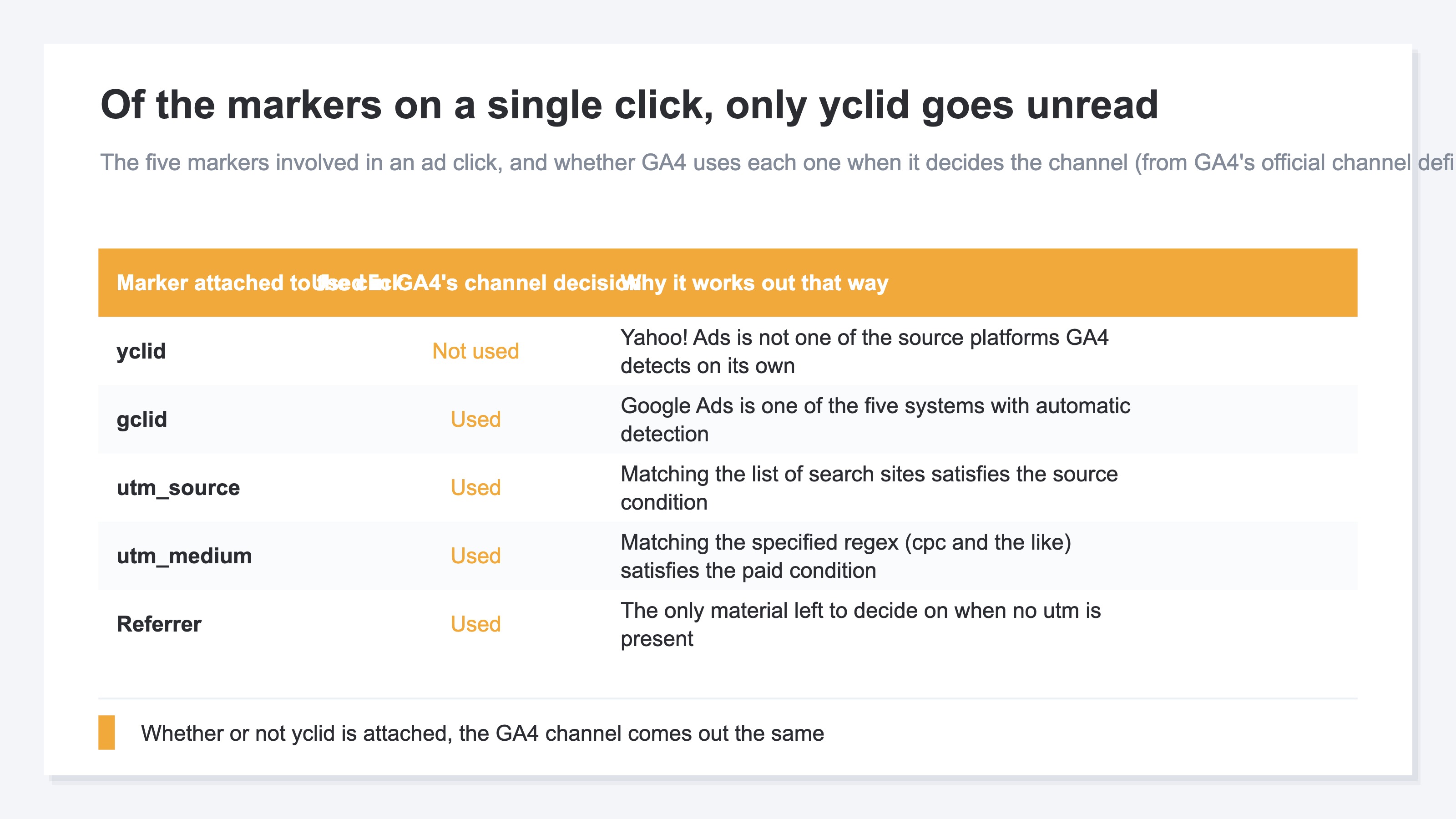
What makes that statement safe is that GA4 publishes what it reads when it decides a channel. There are two materials, utm and the referrer, and the yclid attached to a Yahoo! Ads click is in neither of them. Walk back and forth through the ad account settings suspecting a misconfiguration and there is nothing there to correct.
Start with what auto-tagging does to the landing URL. When auto-tagging for an ad account is specified to "Set," a click ID "YCLID" is added to the initial URL people are redirected to after clicking an ad under that account[1]. It is appended at the end. A URL that already carries ?a=bbb becomes ?a=bbb&yclid=..., and the parameters written before it are left exactly as they were[1]. If you had written utm there, the utm is untouched. The setting is per account, so if you keep Search Ads and Display Ads in separate accounts, each one has to be checked[1]. On the Yahoo! Ads side, the complementary feature for conversion analytics is itself built on the assumption that yclid is present[2].
The step after that is where it stops working. GA4 decides a channel automatically only for media it is integrated with by source platform. There are five systems, and five only: Google Ads, Display & Video 360, Campaign Manager 360, Search Ads 360 and Merchant Center[3]. Yahoo! Ads is not among them. What remains is the set of rules for manual traffic, and not one condition in that set reads a click ID[3].
Google's own click ID is treated on a completely different footing. GA4's documentation warns that including manual campaign values alongside existing Google Click ID (GCLID) values can lead to misattribution[4]. The fact that a conflict is possible means GCLID has a layer where it gets read. yclid has no such layer to begin with. For the case where the Google Ads numbers themselves refuse to line up, see when Google Ads clicks and GA4 sessions don't agree.
So whether yclid is attached or not, the GA4 channel comes out identical. The axis you have to think along moves from "are the tag settings correct" to "what do we do with the revenue from the period when utm was missing."
2. Paid Search Uses AND While Organic Search Uses OR#
The two GA4 channels are not built symmetrically in how their conditions are joined.
Set the official definitions side by side. Paid Search is "Source matches a list of search sites AND Medium matches regex ^(.*cp.*|ppc|retargeting|paid.*)$"[3]. Organic Search is "Source matches a list of search sites listed under SOURCE_CATEGORY_SEARCH OR Medium exactly matches organic"[3].
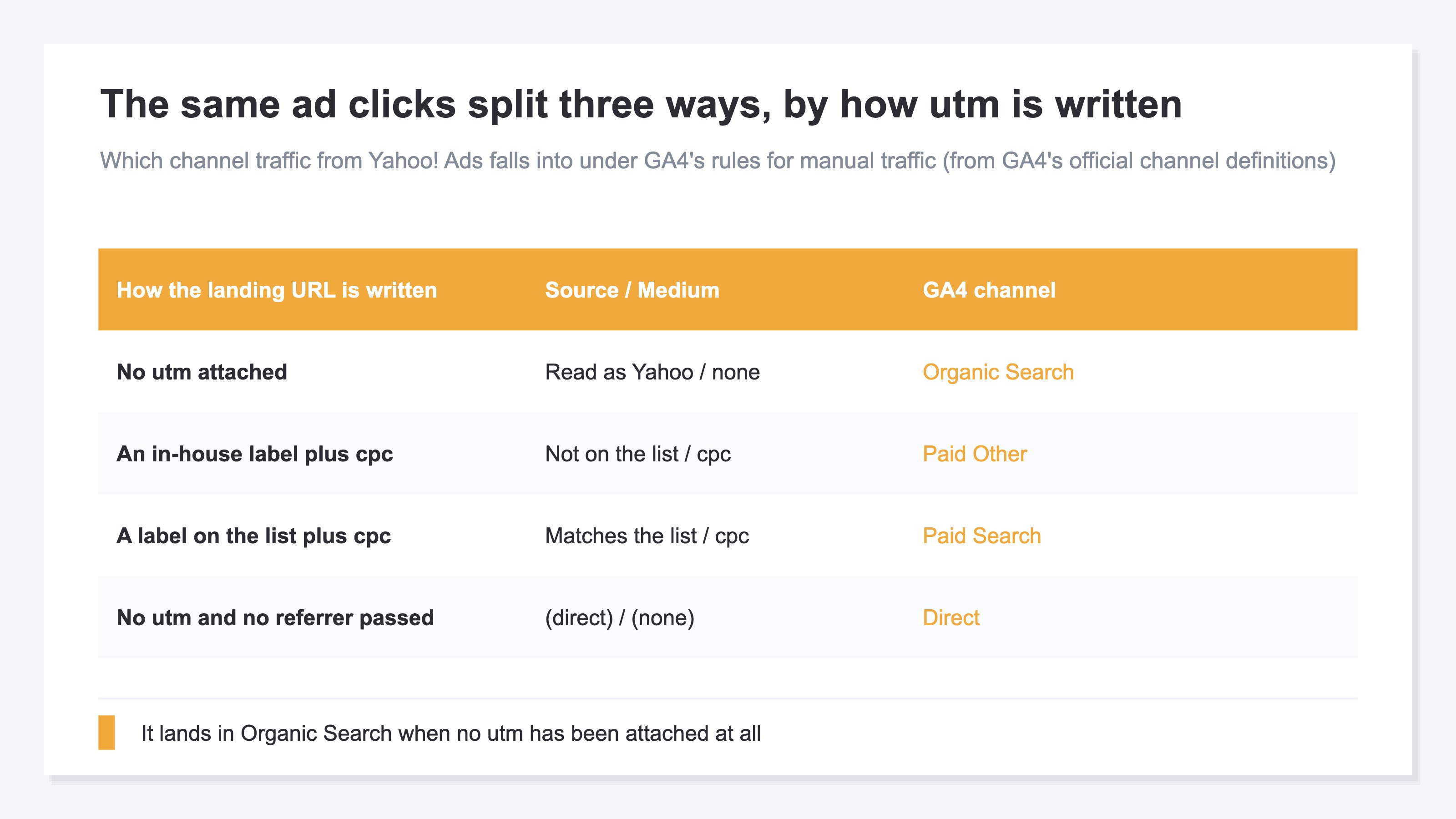
One is joined with AND, the other with OR. Getting into Paid Search takes both the source and the medium, while Organic Search is satisfied by the source matching the list on its own. When a Yahoo! Ads click has its source read as Yahoo and not a single utm is attached, the only condition that traffic satisfies is the Organic Search one. There is also a path where the referrer is never passed at all and the traffic falls into Direct; why Direct grows in GA4 covers the causes on that side.
There is one more trap. GA4 distributes a list of sources and their categories. Of the Yahoo entries listed there as search sites, the ones that correspond to Yahoo! JAPAN are yahoo, yahoo.co.jp and yahoo.com (the rest are country-specific search hosts). Labels decided in-house, like yahoo_ads or ydn, are not on that list[5]. Attach cpc as utm_medium and the source side still fails to match, so the Paid Search condition is not met. The destination becomes Paid Other.
To put it together: attach no utm and it goes to Organic Search; attach an in-house label and it goes to Paid Other; only when the label is one on the list does it go to Paid Search. Clicks on the same ad split three ways. How to read the utm_medium regex is covered in what goes into utm_medium for Meta Ads. How to settle on utm_source itself is in how to write utm_source for Meta Ads.
Large advertisers have a way around this. If the Search Ads 360 engine account type is something like "yahoo.jp", GA4 routes the traffic to Paid Search automatically[3]. That assumes you are running on Search Ads 360, though, and it does nothing for a small or mid-sized store trafficking its own campaigns.
3. Mixed Together the Ad and SEO Numbers Go Wrong in Opposite Directions#
Only one side going wrong would be the easy case. Two sides go wrong at the same time, in opposite directions.
Revenue from a channel you paid for gets added onto the revenue of traffic that cost nothing. Organic Search RPS reads higher than it really is, Yahoo! Ads RPS reads lower than it really is, and sometimes reads as zero. RPS means revenue per session. Decide the next budget allocation from those two figures and the judgment tilts toward stopping the medium that is working and adding to the surface that is not. One mistake works from both sides, so the distance from the right answer opens at twice the speed.
The same thing happens on the acquisition side. Google Search Console clicks are flat, yet GA4 Organic Search sessions and revenue are the only things climbing. That contradiction is left standing with no explanation, and measuring the effect of SEO work stops being possible at all.
What makes it worse is that a single bucket called Organic Search now holds Yahoo! Ads traffic, unpaid Yahoo Search traffic and unpaid Google Search traffic together. All three cost different amounts and call for different moves, and on the report they are displayed as one line. The procedure for confirming whether utm is actually arriving is in GA4's campaign parameter diagnostic.
At this point many people put the conversion count from the Yahoo! Ads console next to the GA4 revenue figure and try to reconcile them. But what the console totals is click-level conversions anchored on yclid, while GA4 channel revenue is counted per session. Divide one by the other while the units differ and there is nothing that fixes what the result means. What is needed here is channel revenue with the units already lined up.
RevenueScope solution
Add one more material to the decision and this branch comes apart. RevenueScope classifies channels in four stages, in this order: known utm labels, the click ID, utm_medium, then the referrer. Because the click ID sits at stage two, traffic is counted as Yahoo! Ads even when utm_source carries an in-house label such as yahoo_ads. Classification is settled at the moment the visit is received, so as long as yclid is arriving, Yahoo! Ads revenue from the day the setting goes in accumulates as an independent channel no matter how utm is written.
Inconsistent campaign naming is a separate matter. Flyer-Insert-08 and flyer-insert-2608 are counted as two different campaigns in RevenueScope as well. What is being resolved here is only which channel a click is placed in.
Asking RevenueScope about 30 days at fictional store Sora (illustrative)
| Channel | Sessions | Revenue | RPS |
|---|---|---|---|
| Google search | 9,000 | ¥900,000 | ¥100 |
| Yahoo! search | 6,000 | ¥300,000 | ¥50 |
| Yahoo! Ads | 4,000 | ¥600,000 | ¥150 |
| Direct | 1,000 | ¥100,000 | ¥100 |
Note: this table is one example built to show how the numbers are read, not figures from a real store. The demo screen that opens from the CTA is drawn with the sample store's sample data, refreshed daily, so choosing the same view will not produce matching numbers.
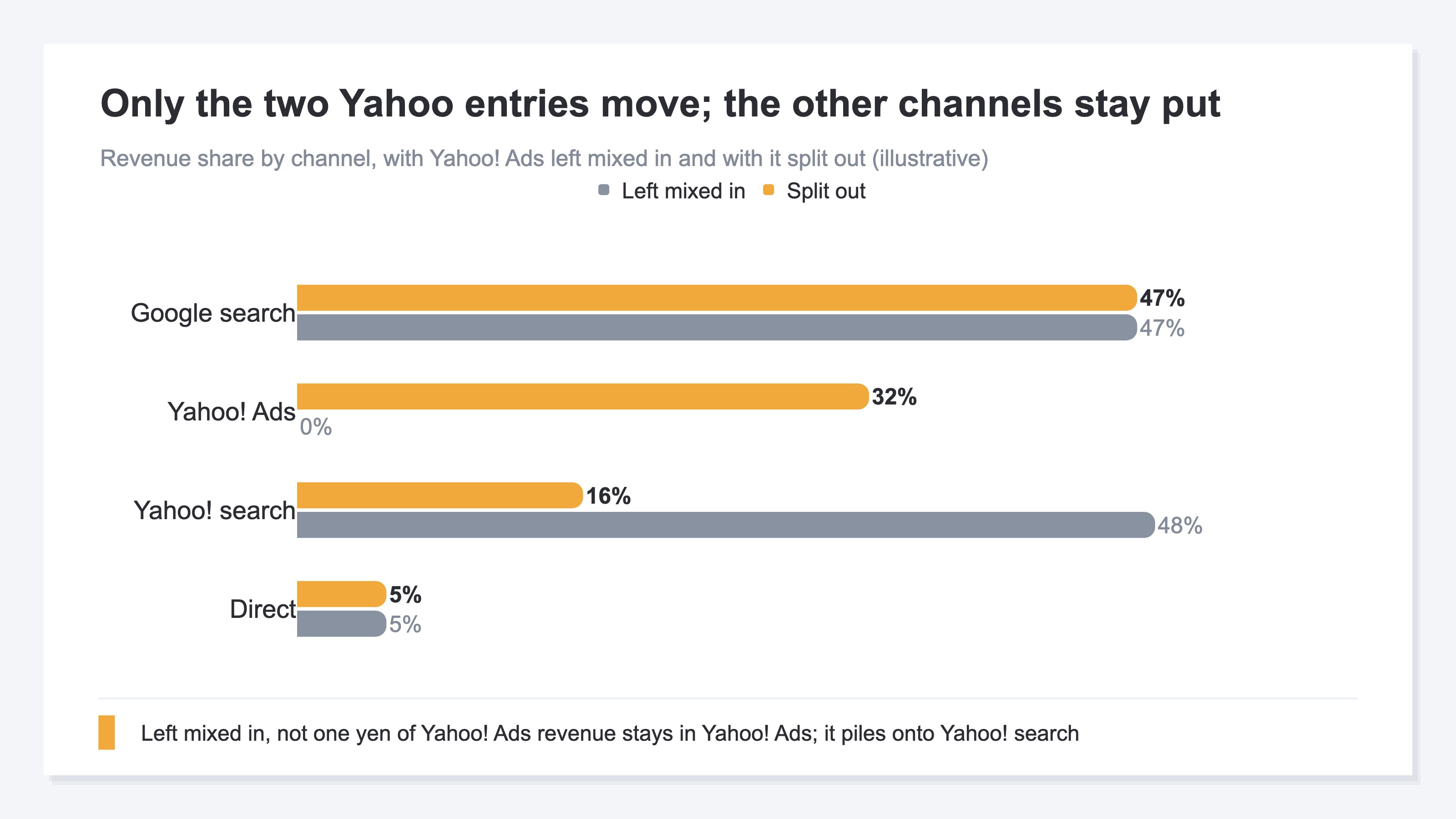
What catches the eye is Yahoo! Ads at an RPS of ¥150. Its sessions number 4,000, the smallest of the four, yet each session produces 1.5x the revenue a Google search session produces. Without this classification in place, that ¥600,000 is added onto Yahoo! search's ¥300,000 and displayed as one bucket: 10,000 sessions, ¥900,000, an RPS of ¥90. Yahoo! search, truly at ¥50, reads as ¥90, and the Yahoo! Ads figure of ¥150 is left nowhere on the screen. You end up weighing whether to stop a ¥150 channel while looking at data that reads four-fifths higher than the truth.
Split those 30 days into a first half and a second half and the RPS lead changes hands from Yahoo! Ads to Google search. The second half, after the trafficking tool was swapped, carries no utm, but yclid is still attached, so Yahoo! Ads survives as an independent channel in both halves. Fix next month's allocation on one table that lumps the whole month together and that handover goes unseen. The next move is to cut the period in half first, put out the same four channels, and shift budget toward whichever one held its RPS in the second half.
FAQ#
Frequently asked questions#
Q. If we turn auto-tagging on, will Yahoo! Ads separate out in GA4?
A. It will not. What auto-tagging attaches is yclid[1], and GA4's channel decision has no condition that reads a click ID[3]. Auto-tagging exists to complement conversion analytics on the Yahoo! Ads side[2].
Q. Does it get solved by setting utm_source to a label on the search site list?
A. For channel classification alone, yes. If the source matches a label on the list and the medium matches the specified regex, the Paid Search condition is met[3]. What it rests on, though, is a person writing the landing URLs correctly every single time. Every time the agency or the trafficking tool changes, the same check comes back around.
Q. Do the conversion counts in the Yahoo! Ads console match GA4's?
A. They do not. Console conversion analytics is built starting from yclid[2], while GA4 counts per session. Rather than chasing the size of the difference, treat them as two things counted in different units.
Summary#
Yahoo! Ads revenue mixes into GA4's Organic Search because GA4 reads only two things when it decides a channel: utm and the referrer. The yclid riding on the click is not used in that decision, and as long as the referrer arrives as Yahoo, there is no way to separate Yahoo! Ads from Yahoo Search out of it. Structurally, the one material that can split paid from unpaid is utm and nothing else.
utm is written by a person every time, and it breaks every time the agency or the trafficking tool changes. Revenue from the broken period piles onto the organic search side, and the ad numbers and the SEO numbers go wrong in opposite directions at once. What to look at is not the tag settings in the ad console but RPS by channel with paid and unpaid already separated.
See which ads actually drive revenue, at a glance
Free up to 2,000 sessions/month, AI connection included. No credit card required. Up and running in 5 minutes.
References#
- [1] Yahoo! JAPAN Ads Help "Auto-tagging" (2026)
- [2] Yahoo! JAPAN Ads Help "Complementary feature for conversion analytics" (2026)
- [3] Google Analytics Help "Default channel group" (2026)
- [4] Google Analytics Help "Scopes of traffic-source dimensions" (2026)
- [5] Google Analytics Help "GA4 Source Categories" (2026)