GA4 has added a new diagnostic about campaign measurement[1]. The warning itself clears once you fix the links. There is one thing to check before you clear it: how much revenue the traffic landing on that URL is tied to right now. That is what sets the order you fix them in.
Contents
TL;DR#
- On July 30, 2026, a new diagnostic appeared for properties where GBRAID and
gad_are missing from the URL - Aggregate identifiers are parameters Google Ads attaches, so the operator's job is not to add them but to avoid dropping them
- Where a redirect sits in the path — a short link, a relay page for measurement — the parameters drop unless the handoff is configured
- The order to fix in comes from the revenue of the campaign, not from the top of the diagnostic's list
- A channel's single RPS row is a weighted average of the campaigns inside it, and sometimes not one campaign inside actually runs at that number
1. What the New Diagnostic in GA4 Actually Says#
On July 30, 2026, a new diagnostic was added to GA4[1]. It targets properties where the aggregate identifiers GBRAID and gad_ are missing from the URL. The diagnostic returns two things: the URLs with the problem, and how to resolve them[1]. It is described as relating to the accuracy of campaign data[1].
Aggregate identifiers (URL parameters beginning with GBRAID or gad_) are URL parameters that help maintain reporting accuracy in cases where GA4 cannot automatically retrieve campaign information from Google's advertising platforms using the standard GCLID or DCLID[2]. GBRAID itself is described as a privacy-preserving identifier that measures campaign data in a non-unique fashion, without linking it to individual users or events[2].
gad_* covers parameters with different roles. The first, gad_source, identifies the source of the ad traffic (Google Search, the Display Network, and so on). The second, gad_campaignid, identifies the specific campaign that drove the click[2]. Both are URL parameters on the Google Ads side[3][4].
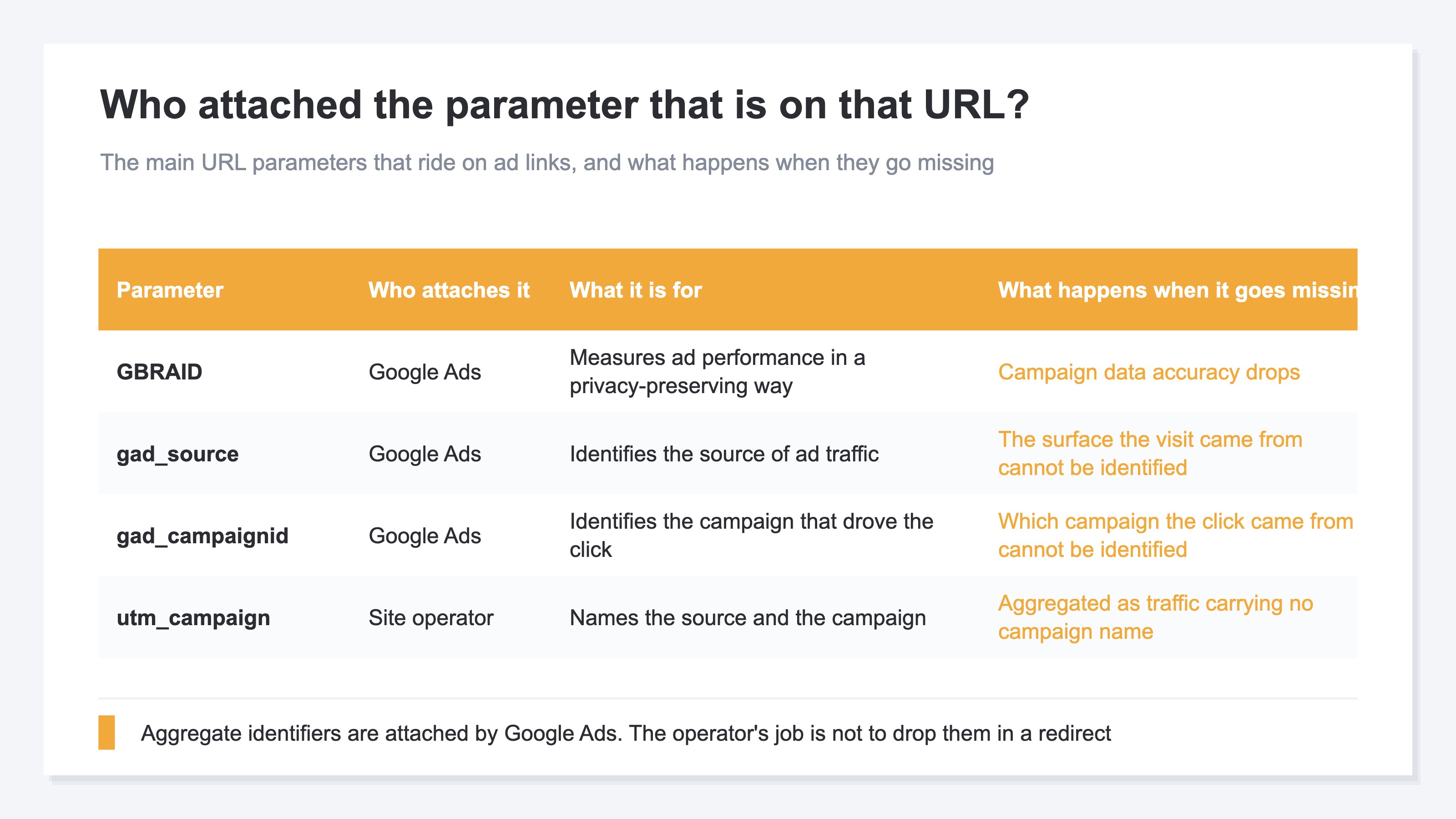
The official help says that for the most accurate attribution and measurement, you should not remove or block aggregate identifiers from your landing page URL[2]. Seen from the operator's side, this is less something you attach than something you avoid dropping.
There is also a note on where the parameters attach and where they fall away. &gad_* is added to the end of the final URL, before any fragment identifier (the string that follows "#")[2]. And where the website contains redirects, it is stated as important that the redirect keeps the &gad_* URL parameter, because Google Ads tags and Google Analytics tags expect to observe &gad_* as a top-level parameter on the page where the tags load[2].
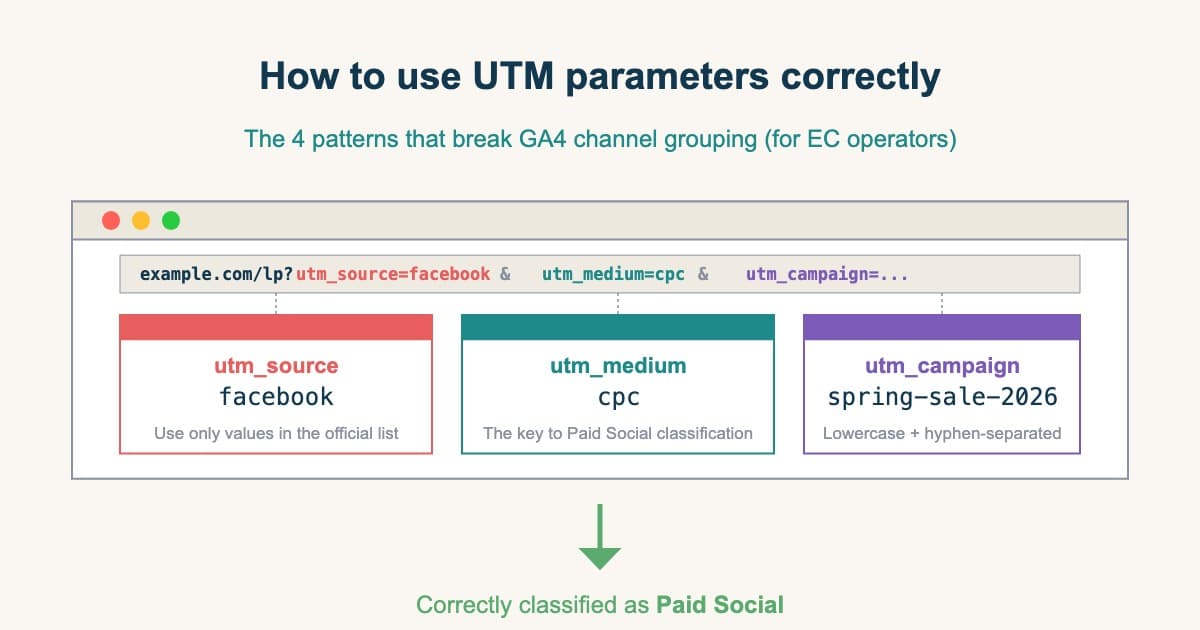
Paths with a redirect in them are not unusual. Short links, relay pages for measurement, forwarding from an old domain. Each of them is in place for an operational reason, and whether it is configured to carry the parameters through depends on whoever put it in and when. UTM tags fall away in the same spot. How to attach them is covered in the UTM patterns that break GA4 channel grouping.
2. Swap One Step in the Order Before You Fix#
The content of the repair work is usually right. You look at the redirect settings and make the parameters carry through. What is off is the order. Work from the top of the list the diagnostic produced, and you fix the landing URLs of small-revenue campaigns first while the large ones wait.
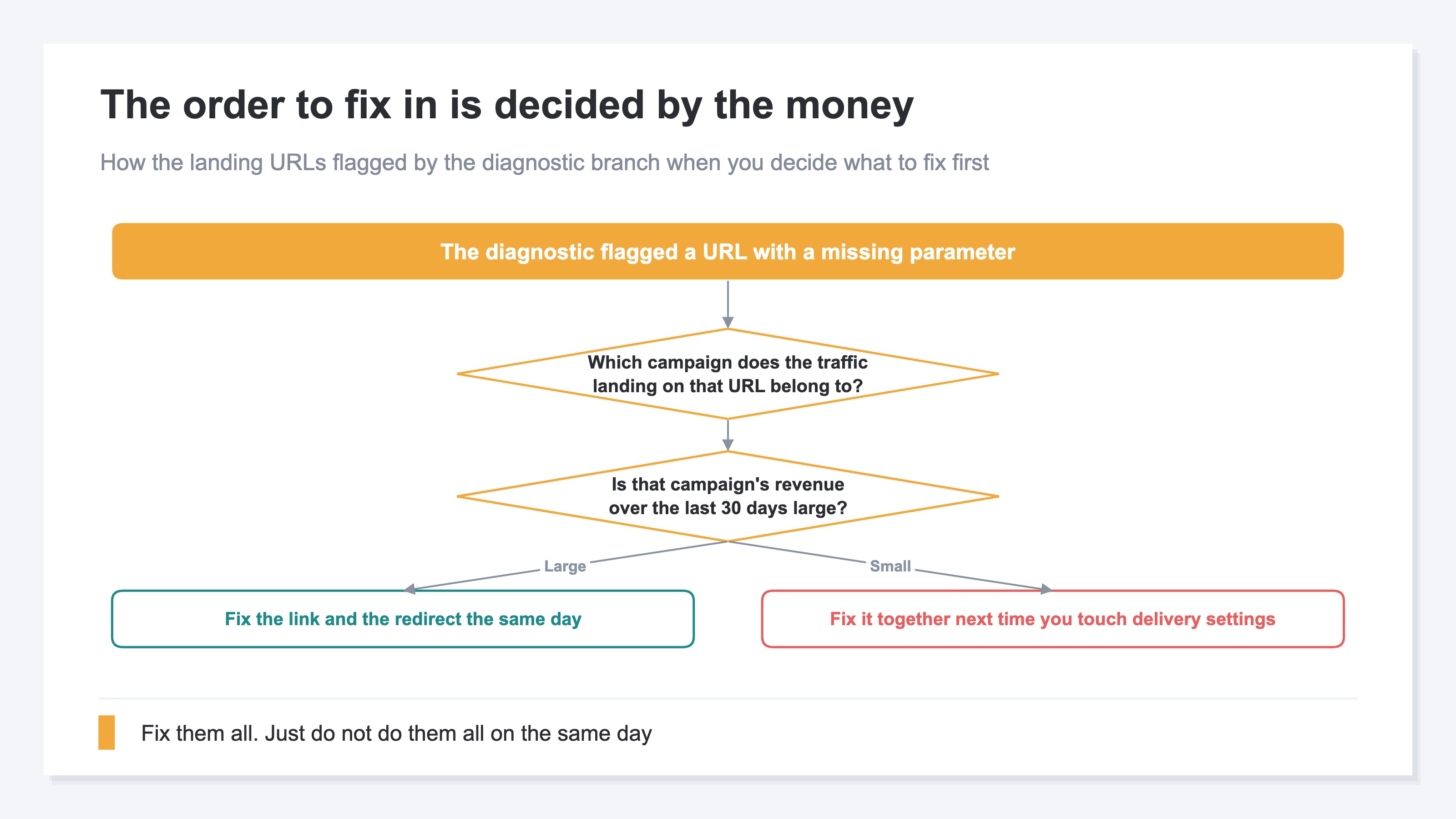
Two things go in ahead of that: which campaign the traffic landing on that URL belongs to, and that campaign's revenue over the last 30 days. Once both are in hand, you reorder the list by amount.
What the official explanation carries goes as far as the URLs with the problem and how to resolve them[1]. There is no mention of how much revenue a given URL is tied to. Revenue itself can be checked in a different GA4 report. The diagnostic outputs a list of URLs while the report side aggregates by campaign, so matching which URL belongs to which campaign is left to you.
Once the amounts are out, the branch is simple. Landing URLs for large-revenue campaigns get fixed the same day. Small ones get fixed together the next time you touch the delivery settings. Everything still gets fixed, so this doesn't reduce the target — it is a question of order. The thinking behind checking revenue campaign by campaign is covered in campaign-level revenue efficiency.
3. A Channel Average Won't Show the Revenue Impact#
Fictional Store W runs four ad campaigns. Revenue over the last 30 days is ¥2,100,000 at the top and ¥120,000 at the bottom. That is a spread of more than 17x.
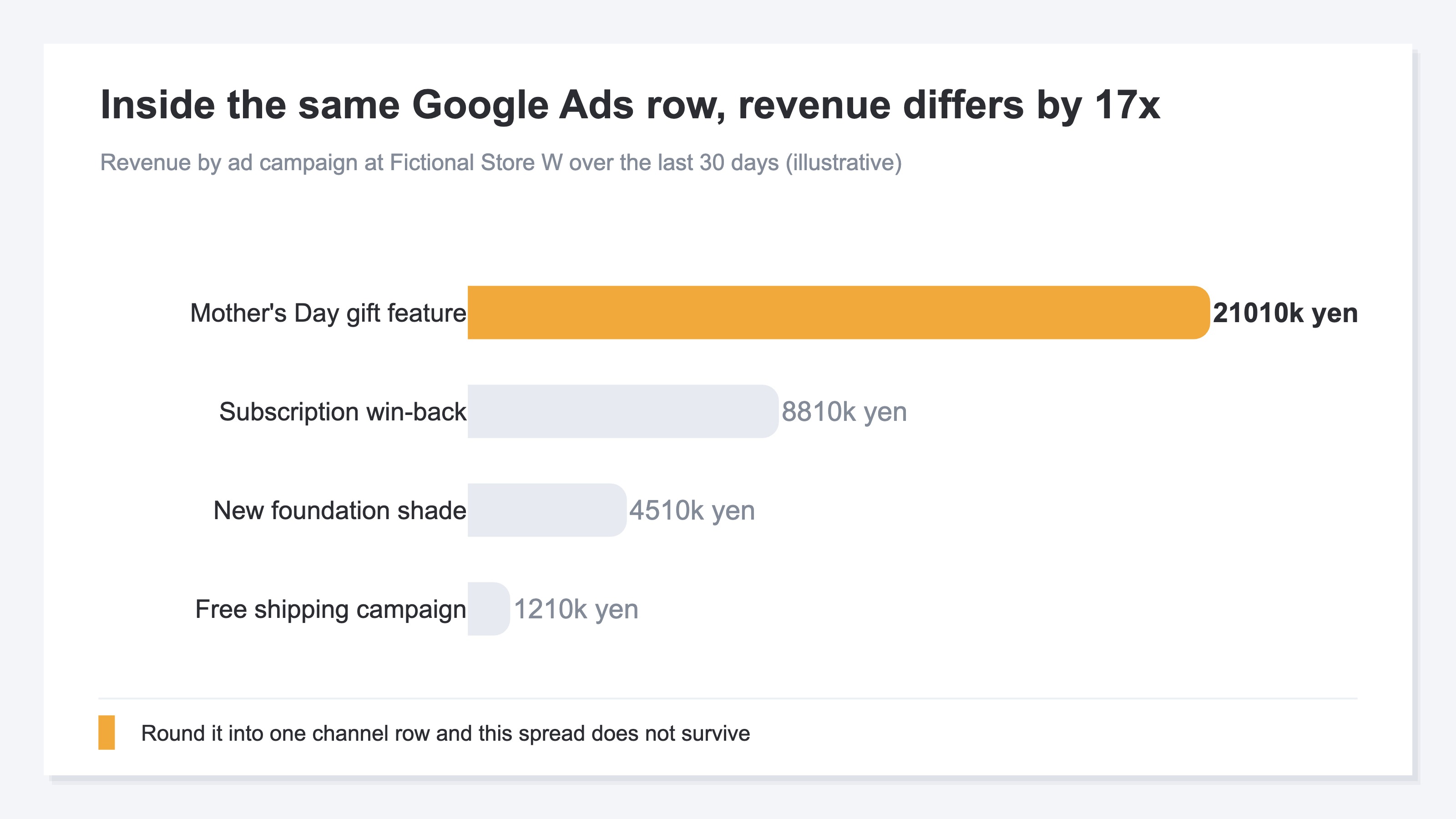
In a channel-level list, those four collapse into a single number called "Google Ads" — ¥3,550,000 in total. A rounded number is useful when you are working out which channel to shift ad spend toward next month. It is not enough when you are deciding the order of repairs, because a ¥2,100,000 landing URL and a ¥120,000 landing URL look equally urgent.
Once rounded, the number also makes it hard to confirm the effect of a fix. Say you fix measurement on the bottom two first — the new foundation shade announcement and the free shipping campaign — for ¥570,000 combined. That is a slice of the ¥3,550,000 channel total, so checking the single Google Ads row the following month won't separate what the fix added from delivery simply growing. The place to confirm whether the work was right is in the four campaigns, before they are rounded.
There is also traffic that appears in none of those four: the visits that landed with the parameters not carried through. Traffic that never got a campaign name doesn't disappear from the list either. It mixes into the (not set) and Direct rows, and the amount is displayed. What isn't displayed is the attribution — which of the four that amount belonged to cannot be read from that row. Nor is there any display saying something went missing. One of the four is simply booked short, so checking the total at month end won't tell you whether it fell or whether it was always that size. Confirming the shortfall takes a list that displays traffic with no campaign name as its own row and shows which channel that row sits under. Where traffic that falls outside the classification ends up takes the same shape in what makes GA4 Direct / (none) grow.
RevenueScope solution
Deciding the order of repairs by amount takes revenue at the campaign level. That is the part RevenueScope solves. It displays sessions, revenue and RPS (revenue per session) for each channel, and opening a channel displays revenue, RPS, AOV (average order value) and CVR (purchase rate) for each campaign inside it. Traffic carrying no campaign name is displayed as a (none) row.
Judging that an aggregate identifier is missing is the diagnostic's job, and what gets fixed is the link and redirect settings. What RevenueScope supplies is the money — the actual revenue by campaign for traffic that carries UTM tags.
Ask an AI assistant such as ChatGPT over MCP, "Over the last 30 days, which of the ad campaigns sold how much?", and the inside of Google Ads comes back in the following shape. It is written out with Fictional Store R for the sake of explanation.
| Campaign | Revenue | RPS | AOV | CVR |
|---|---|---|---|---|
| Branded keywords | ¥640,000 | ¥320 | ¥8,000 | 4.0% |
| Generic keywords | ¥360,000 | ¥45 | ¥9,000 | 0.5% |
(none) | ¥1,000,000 | ¥100 | ¥10,000 | 1.0% |
Note: what the table above is for is not matching amounts but the shape of what gets displayed once a channel row is opened. The figures belong to Fictional Store R and are placed here for this article's explanation, so they do not match the sample data of the sample store that the demo screen reads (refreshed daily).
In this store's channel-level list, Google Ads is a single row and RPS is displayed as ¥100. Search the three rows above for the delivery running at that ¥100 and you won't find it. Branded keywords read ¥320, generic keywords ¥45. The only one matching ¥100 is (none), the traffic carrying no campaign name. ¥100 is the sum of revenue across the three rows divided by the sum of sessions, and as something to put your hands on it does not exist. The order of repairs is decided one campaign at a time, not by the single channel row.
(none) is the aggregation row for traffic that landed without utm_campaign attached. If utm_source and utm_medium survive, the channel is judged to be Google Ads, so whatever lost only the campaign name is aggregated into the (none) inside that channel. Where a redirect drops the parameters wholesale, though, the material for judging the channel is lost at the same time. From there the destination splits in two. If the referrer drops along with them, it goes to Direct; if the referrer survives as google.com, it moves to Organic Search. In the latter case ad revenue mixes into search revenue, so no amount of opening the Google Ads campaign list brings that portion out (what makes GA4 Direct / (none) grow). Revenue of ¥1,000,000 is half of this channel, so the landing URLs to fix today are the ones for deliveries classified as (none).
FAQ#
Frequently asked questions#
Q. If this diagnostic appears, should we pause the ads?
A. There is no need to pause. What the diagnostic points at is the parameters attached to landing URLs, not whether the delivery itself is any good. What you should avoid is deciding allocation on campaign-level results from a period when the parameters were missing. What wasn't captured is displayed nowhere, and it still ends up as the basis for the decision.
Q. Are GBRAID and gad_ parameters we attach ourselves?
A. Both are URL parameters on the Google Ads side[3][4]. The official help asks that aggregate identifiers not be removed or blocked from the landing page URL[2]. On the operator's side there is no work to attach them; the job is keeping the settings that avoid dropping them.
Q. Do all the URLs in the diagnostic have to be fixed?
A. All of them are in scope. They do not all have to be fixed on the same day. Start with the landing URLs of large-revenue campaigns, and gather the rest into the next time you touch the delivery settings. Deciding the order by amount alone changes how much revenue you protect on day one.
Q. Can we just assume redirects are the cause?
A. The official documentation doesn't rank causes by frequency, so redirects cannot be declared the main one. That said, the official help explains that where a redirect is involved it is important to keep &gad_* in the redirect as well, and states that tags expect to observe it as a top-level parameter[2]. If you use redirects, that is the first place to check.
Summary#
On July 30, 2026, a new diagnostic appeared for properties where GBRAID and gad_ are missing from the URL[1]. What the diagnostic names is the URLs where the loss is happening, and what gets fixed is the link and redirect settings. Once you have dozens of landing URLs, where to start is left to you.
The content of the repair work doesn't change. What changes is the order. Get campaign-level revenue out first, and fix the landing URLs with the largest amounts. The small ones can wait for the next time you touch the delivery settings. A channel's single RPS row is a weighted average of the campaigns inside it, so deciding urgency on that number as it stands treats ¥2,100,000 and ¥120,000 the same.
There is one thing to do today. Put the list of URLs from the diagnostic next to revenue by campaign. The landing URLs from the top three rows are today's work.
See which ads actually drive revenue, at a glance
Free up to 5,000 sessions/month, AI connection included. No credit card required. Up and running in 5 minutes.