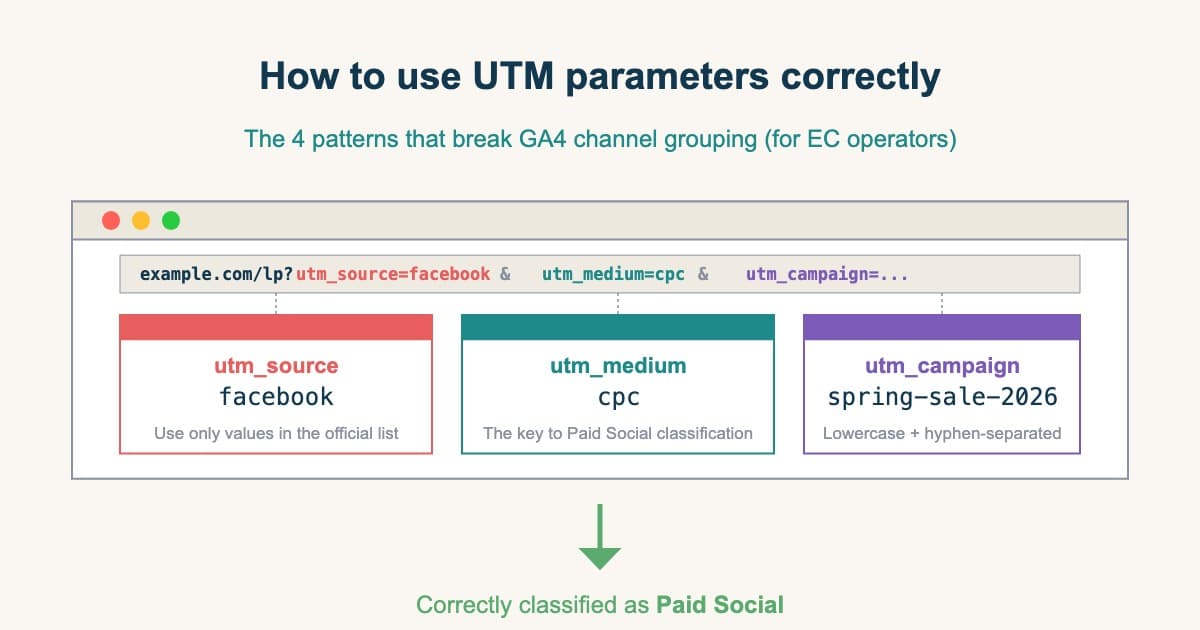
"The CV that should have been attributed to ads is showing up under Direct / (none)." "One Meta campaign is split across two rows in GA4." Open the monthly report and you'll find UTM parameter problems quietly breaking the data, every month.
UTM parameters look like a fire-and-forget mechanism, but in practice the moment you put a value GA4's classification logic does not understand, your channel grouping collapses. This article walks through the correct way to use UTM parameters — derived from GA4's official specifications — and the 4 patterns that cause channel classification to fail.
Setting UTMs correctly is only the starting line. What you actually need is to take UTM normalization as a given, line up real revenue per channel side by side, and decide which traffic to push your next budget toward. This article organizes UTM naming rules and GA4's classification logic, then goes one level up — to "comparing revenue efficiency across channels," the view that only opens up once your UTMs are clean.
Table of contents
- What UTM parameters are — the role of each of the 5 fields
- UTM naming rules — inconsistency is what fragments your reports
- The 4 patterns that break GA4 channel classification
- Generating UTMs — using Campaign URL Builder
- Verifying UTMs before launch
- Per-channel correct values: Meta, TikTok, and LinkedIn have dedicated guides
- Even with perfect UTMs, GA4 has no "channel revenue-efficiency comparison"
- How RevenueScope helps
Key takeaways#
- There are 5 UTM parameters (source / medium / campaign / term / content). The first three (source / medium / campaign) must be set on every paid URL. Values should always be lowercase, hyphen-separated, no spaces.
- 4 patterns cause GA4 to misclassify: ① values not in GA4's official source list, ② case sensitivity and naming inconsistency, ③ medium / source combinations that fail the regex condition, ④ UTM loss through redirects, referrer policies, and in-app browsers.
- UTMs identify "whether a visit came via ads," not the revenue efficiency of each channel. GA4's standard reports don't produce a table that lines up per-channel RPS (revenue per session), AOV, and purchase rate after UTM normalization on one screen. To decide where your next budget should go, you need that comparison available separately (covered in §7).
1. What UTM parameters are — the role of each of the 5 fields#
Bottom line: UTMs are five fields — source / medium / campaign / term / content. GA4 reads the source-and-medium combination to auto-classify each session into a channel.
UTM (Urchin Tracking Module) parameters are 5 query-string tags appended to your URL. They embed traffic-source information into the URL itself, telling Google Analytics and other analytics tools which campaign or channel a visit came from.
The 5 parameters GA4 officially recognizes are[1]:
| Parameter | Required / optional | What it represents | Where it surfaces in GA4 |
|---|---|---|---|
utm_source | Required | The traffic source (e.g. google, facebook, newsletter) | "Source" |
utm_medium | Required | The traffic type (e.g. cpc, email, social) | "Medium" |
utm_campaign | Required | Campaign name (e.g. spring-sale-2026) | "Campaign" |
utm_term | Optional | Search keyword (mostly for paid search) | "Keyword" |
utm_content | Optional | Creative identifier within a campaign (e.g. hero-banner-a) | "Ad content" |
A typical URL looks like this:
https://example.com/lp/?utm_source=google&utm_medium=cpc&utm_campaign=spring-sale-2026&utm_content=hero-banner-a
GA4 reads the combination of utm_source and utm_medium and applies Google's "Default Channel Group" classification rules to label each session as Paid Search, Organic Social, Direct, etc.[2] If your UTM values don't match those rules, the channel report stops being meaningful from that moment on.
1.1 Distinguishing utm_source and utm_medium#
The most common stumbling block in practice is the difference between utm_source and utm_medium. The basic rule:
utm_source= "where the visit came from" (specific platform / site / service name)utm_medium= "what type of visit it is" (paid / email / organic / social / etc.)
Examples:
- Google search ad →
source=google/medium=cpc - Newsletter shared on Facebook →
source=facebook/medium=social - Your own newsletter →
source=newsletter/medium=email - Yahoo search ad →
source=yahoo/medium=cpc
utm_medium answers "is this an ad, organic, email, or social?" utm_source answers "specifically which platform?" Mixing these two up causes most of the channel-classification errors covered in section 3.
1.2 The role of utm_term and utm_content#
These two are optional but become valuable as your operation matures:
utm_term: records the bid keyword for paid search ads. Google Ads' auto-bidding and DSAs populate it automatically.utm_content: identifies the creative variant in an A/B test within the same campaign — e.g. "hero image A vs B," "CTA copy X vs Y."
In GA4, utm_term surfaces as the "Keyword" dimension and utm_content as the "Ad content" dimension. Think of them as optional levers for finer-grained reporting.
2. UTM naming rules — inconsistency is what fragments your reports#
Bottom line: The biggest failure isn't a technical bug — it's naming inconsistency. Lowercase, hyphen-separation, and avoiding non-ASCII prevent most of the "one campaign split across rows" damage.
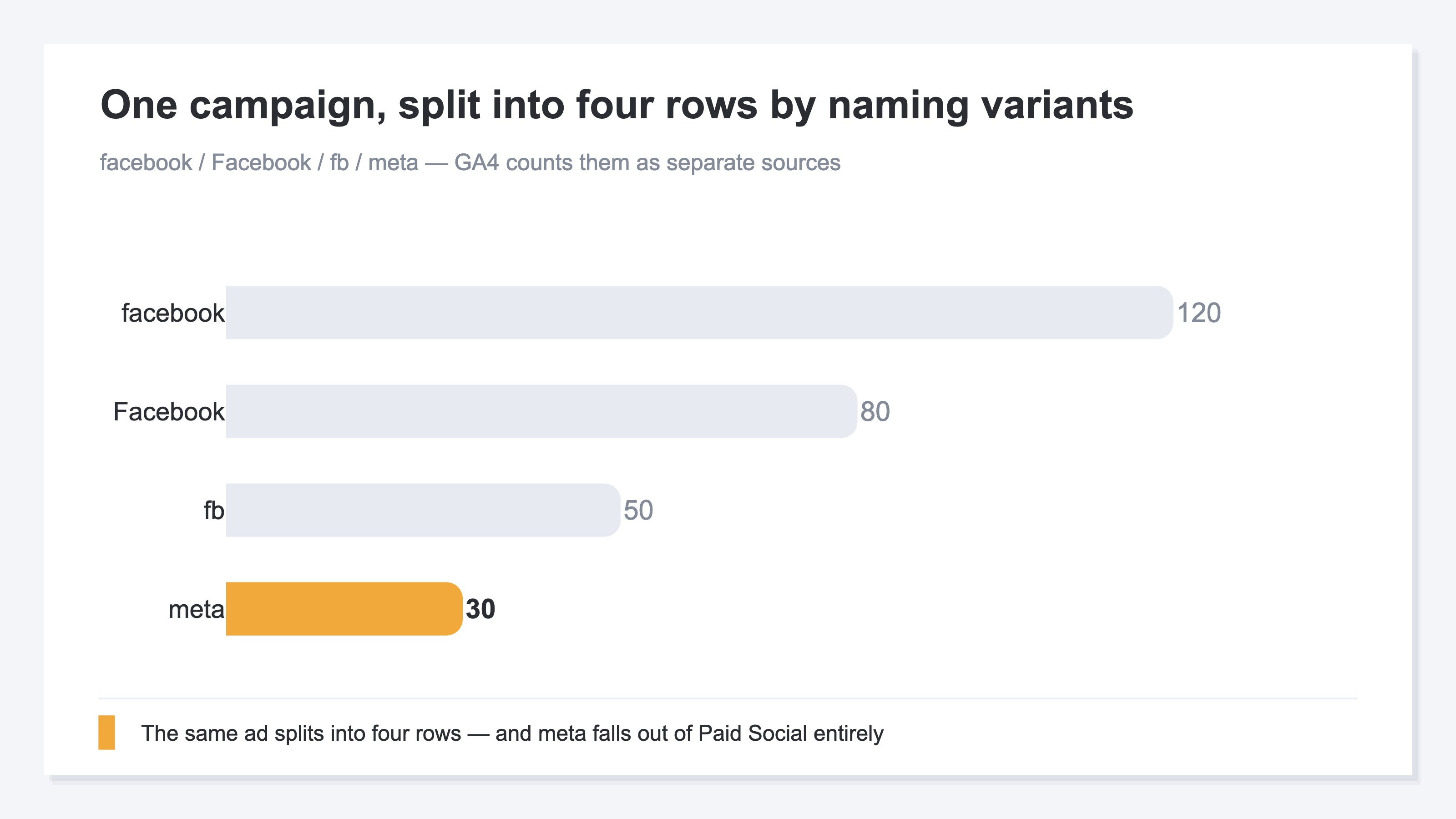
The most frequent UTM mistake isn't a technical bug — it's naming inconsistency. When the same campaign carries facebook, Facebook, fb, and meta across different ads, GA4 splits one campaign into four rows, each showing roughly a quarter of the real number. The ad platform reports "campaign-level revenue: 1M JPY," but GA4 shows "facebook 250K / Facebook 250K / fb 250K / meta 250K" — and the report reader is left wondering which one is real.
The three core rules that prevent this:
2.1 Always lowercase#
GA4 stores utm_source values case-sensitively[2]. facebook and Facebook are tracked as separate sources. Just enforcing "everything lowercase" as a team rule eliminates most naming inconsistencies.
2.2 Hyphen-separate, never space, prefer hyphen over underscore#
A value like utm_campaign=spring sale 2026 gets URL-encoded to spring%20sale%202026, and GA4 displays exactly that ugly string in the campaign name field. Use spring-sale-2026 instead. Underscores (spring_sale_2026) technically work but mix poorly with other GA4 metric names — hyphen is the de-facto industry standard.
2.3 Avoid non-ASCII characters#
Including non-ASCII characters like Japanese (utm_campaign=春のセール) results in URL-encoded strings like %E6%98%A5%E3%81%AE showing up in GA4 reports. Stick to alphanumerics and hyphens.
2.4 A naming convention template — share it across the team#
If UTM values are decided ad hoc, three months later nobody remembers who named what. Defining a shared naming convention up front protects long-term report quality.
| Channel | utm_source | utm_medium | utm_campaign example | utm_content example |
|---|---|---|---|---|
| Google Search Ads | google | cpc | 2026-spring-sale-search | headline-a |
| Yahoo Search Ads | yahoo | cpc | 2026-spring-sale-yss | headline-a |
| Meta Ads (Facebook / Instagram) | facebook | cpc | 2026-spring-sale-meta | image-a |
| LINE Ads | line | cpc | 2026-spring-sale-line | talkhead-a |
| Newsletter | newsletter | email | 2026-04-newsletter | top-cta |
| Affiliate | affiliate | referral | 2026-spring-sale-aff | partner-x |
| Press release | prtimes | referral | 2026-04-prtimes | — |
| YouTube video description | youtube | social | 2026-spring-sale-yt | video-x |
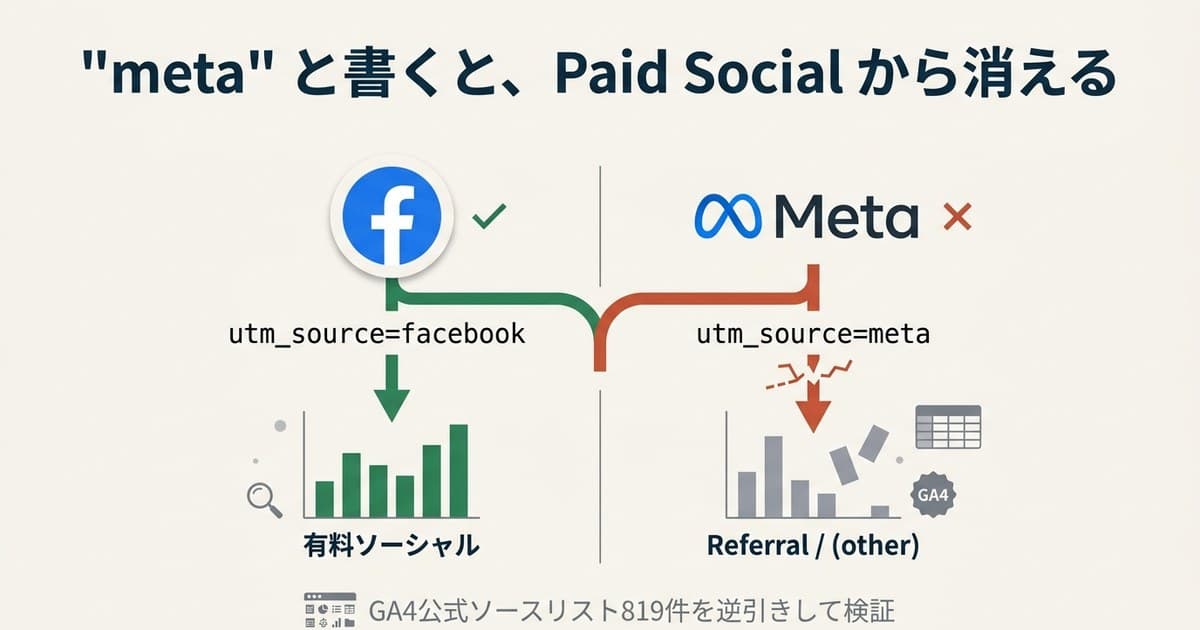
Pick utm_source carefully. GA4 cross-checks the value against its "Source Categories" list and auto-classifies facebook as SOURCE_CATEGORY_SOCIAL.[3] If you use a value that's not in the list (e.g. meta), it falls into Referral instead of Paid Social. For Meta ads in particular, utm_source=facebook is the safe default. The companion article Meta Ads utm_source: what to actually use covers this in detail.
3. The 4 patterns that break GA4 channel classification#
Bottom line: Misclassification almost always falls into 4 patterns: ① a value not in the official list, ② naming inconsistency, ③ a source-and-medium combination collision, ④ UTM lost in transit. Fix ① and ② first.
When UTMs are set but the GA4 channel report still doesn't show traffic in the intended channel (Paid Search, Paid Social, etc.), the cause almost always falls into one of these 4 patterns.
| # | Failure pattern | Where it ends up classified |
|---|---|---|
| 1 | utm_source value not in GA4's official source list (e.g. utm_source=meta) | Referral / (other) |
| 2 | Case sensitivity / inconsistent naming (facebook / Facebook / fb mixed) | Same campaign split across multiple rows |
| 3 | utm_medium=social + utm_source=facebook triggers OR-condition collision | Paid Social leaks into Organic Social |
| 4 | UTM lost through redirects / referrer policy | Direct / (none) |
3.1 Pattern 1: utm_source value not in GA4's official source list#
GA4 channel classification works by matching utm_source values against the "Default Channel Group Source Categories" list distributed by Google[3]. As of April 2026 the list contains roughly 820 source names, with facebook mapped to SOURCE_CATEGORY_SOCIAL, google to SOURCE_CATEGORY_SEARCH, youtube to SOURCE_CATEGORY_VIDEO, and so on.
Putting a value not in the list into utm_source causes GA4 to decide "this isn't social, search, or video either" and bucket the traffic as Referral or (other). A common example is utm_source=meta. Once Meta rebranded, more operators started using this value — but meta is not registered in the source list, so it doesn't classify into Paid Social[3].
What to do:
- Before launching, check that the
utm_sourceyou plan to use exists in the official list - Lock major sources to:
google/yahoo/bing/facebook/instagram/twitter/line/youtube/tiktok - If you must use a value outside the list, define a custom channel group in GA4 with your own classification rules
3.2 Pattern 2: case sensitivity and inconsistent naming#
As mentioned, GA4 treats utm_source values case-sensitively. The common failure mode looks like this:
| Operator | Value used | GA4 treatment |
|---|---|---|
| A | facebook | SOURCE_CATEGORY_SOCIAL |
| B | Facebook | SOURCE_CATEGORY_SOCIAL (separate row) |
| C | fb | SOURCE_CATEGORY_SOCIAL (yet another row) |
| D | meta | Not classified as social |
With four people on the team, one campaign splits across four rows, and one of those rows (meta) drops out of Paid Social entirely. The monthly report shows "Paid Social dropped sharply," but the truth is just that the classification fell off.
What to do:
- Document the naming convention from section 2.4 and store it in a shared location (Notion, Google Drive) every operator references
- Standardize on Google's Campaign URL Builder for all URL generation — never hand-typed
- Implement a 2-step approval flow where one person reviews the URL before it goes live
3.3 Pattern 3: medium and source combination collides with GA4's regex#
GA4 channel classification reads the combination of utm_source and utm_medium, not source alone. The classification logic is published — for example, Paid Social matches when:
utm_sourcematches the social-source list ANDutm_mediummatches the regex^(.*cp.*|ppc|retargeting|paid.*)$[2]
The catch is that Organic Social is defined with an OR condition[2]:
utm_mediummatchessocial/social-network/social-media/smORutm_sourcematches the social-source list
This means utm_source=facebook + utm_medium=social — a seemingly natural combination — is classified as Organic Social purely because utm_medium=social matches. Paid ad revenue ends up labeled as organic, the Paid Social report goes empty, and ad ROAS is understated.
What to do:
- For paid social channels — Meta, X (Twitter), LINE — fix
utm_medium=cpc - Reserve
utm_medium=socialexclusively for organic posts (Organic Social) - Verify the channel classification in GA4's real-time report before launching (covered in section 5)
3.4 Pattern 4: UTM lost through redirects, referrer policy, etc.#
Often overlooked: the UTM is set correctly at launch, but gets stripped somewhere on the path before the user lands on the LP. Common causes[4]:
- Some URL shorteners drop query strings on redirect
- HTTPS → HTTP redirects strip the referrer (and the UTM with it) because the browser refuses to send referer to a less secure destination
<meta name="referrer" content="no-referrer">on the LP makes referrer-based source detection impossible across the board- In-app browsers (LINE, Facebook) drop referrer / UTM depending on the browser implementation
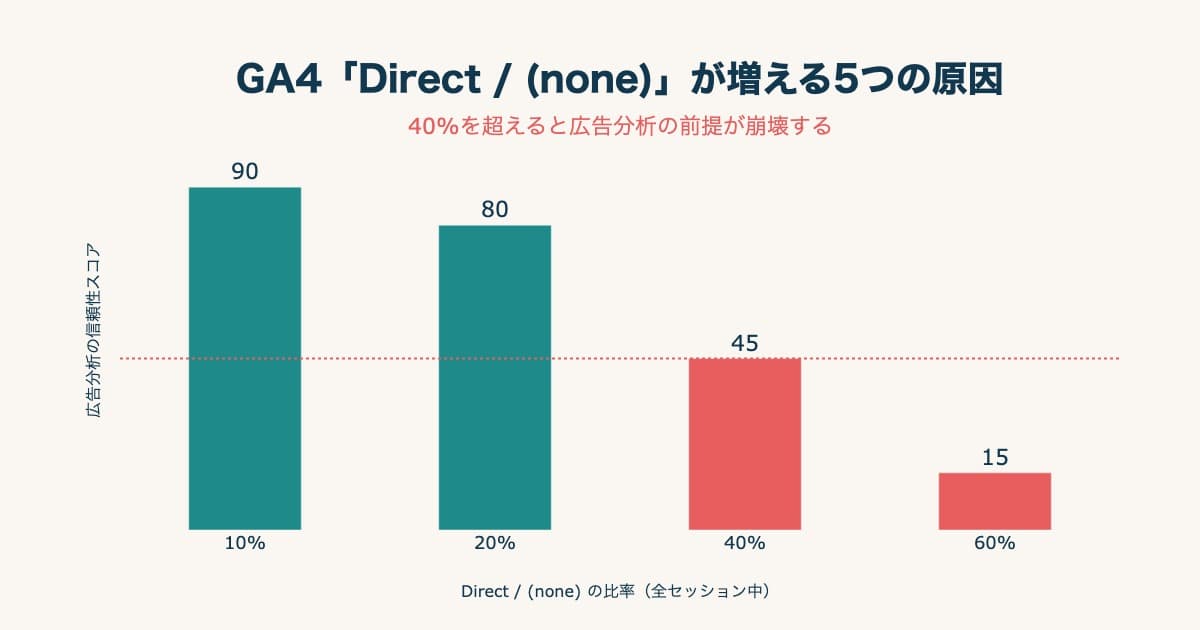
When the UTM is gone, what was originally a paid visit ends up classified as Direct / (none) or (not set). Operators with Direct above 30% of traffic likely have 10–20% paid CV hidden in there. The companion article GA4 Direct/None: 5 causes that quietly inflate it and how to diagnose has the diagnostic playbook.
What to do:
- Use a custom-domain shortener (your own server) or simply distribute the long URL with the UTM intact
- Always serve the LP over HTTPS; never let an HTTPS → HTTP redirect happen
- Don't set
referrer-policy: no-referreron the LP. If you must restrict referer, choosestrict-origin-when-cross-origininstead - For each major ad platform, run a pre-launch test access and verify in GA4 DebugView that the UTM landed correctly
4. Generating UTMs — using Campaign URL Builder#
Bottom line: Don't hand-type UTMs — generate them with Google's official Campaign URL Builder. That alone structurally prevents whitespace, full-width characters, and typos.
Google's official Campaign URL Builder is a free tool for generating UTM-tagged URLs[5]. Hand-assembling URLs invites typo and whitespace bugs; standardizing on this tool is the realistic move in production.
Workflow:
- Open Google Campaign URL Builder
- Website URL: full LP URL (
https://example.com/lp/) - Campaign ID: (optional) your internal campaign ID
- Campaign Source:
utm_sourcevalue (e.g.facebook) - Campaign Medium:
utm_mediumvalue (e.g.cpc) - Campaign Name:
utm_campaignvalue (e.g.2026-spring-sale-meta) - Campaign Term: (optional, paid search only) bid keyword
- Campaign Content: (optional) creative identifier
The fully-formed URL appears at the bottom of the page. Copy it and paste it into the destination URL field of the ad platform — that's it. Removing the manual URL-assembly step structurally prevents whitespace, full-width characters, and typos.
4.1 Meta Ads URL dynamic parameters#
In Meta Ads, you can replace the campaign / ad-set / ad name fields in the URL with Meta's official URL dynamic parameters, which expand to actual values at delivery time[6]:
utm_source=facebook
utm_medium=cpc
utm_campaign={{campaign.name}}
utm_content={{ad.name}}
utm_term={{adset.name}}
utm_id={{campaign.id}}
Macros like {{campaign.name}} are replaced by Meta with the actual campaign / ad-set / ad name when the ad serves. This eliminates the need to hand-write a UTM for every ad and naturally preserves A/B test granularity.
4.2 Google Ads auto-tagging (GCLID)#
In Google Ads, enabling auto-tagging automatically appends a gclid parameter, and ad reports flow into GA4 in their full form even without UTMs[7]. Toggle "Settings → Account settings → Auto-tagging" — this is the de facto standard.
Auto-tagging doesn't conflict with using UTMs. Keeping utm_campaign for internal reporting is convenient when other BI tools (Looker Studio, in-house DWH) consume the same data.
5. Verifying UTMs before launch#
Bottom line: Catching a setup bug after launch loses that period's data permanently. Verify three things before you go live — DebugView, the Realtime report, and UTM survival through redirects.
Catching a UTM bug after launch means losing that period's data permanently. Routinizing pre-launch verification is the single best investment in long-term report quality.
5.1 Verify in GA4 DebugView#
GA4's DebugView lets you observe your own session in real time:
- Install the GA Debugger Chrome extension
- Visit the planned launch URL (a staging environment is fine)
- Open DebugView in the GA4 admin and inspect the
page_viewevent - Check that the event detail contains
source/medium/campaignwith the expected values
If the URL parameters got stripped or the utm_source value is missing from the source list, this is where you catch it.
5.2 Verify channel classification in GA4 Realtime#
Once events are confirmed in DebugView, switch to Realtime in GA4 and check which channel your session is being attributed to. If "User first source / medium" and "Session default channel group" show the intended channel (e.g. Paid Social), the same classification will hold post-launch.
5.3 Verify UTM survival through redirect chains#
For ads using URL shorteners, affiliate links, or your own custom-domain shortener, confirm that the UTM survives to the final LP:
- Visit the planned shortened URL in your browser
- When the address bar resolves to the final LP, eyeball whether UTM parameters are still attached
- If they're missing, revisit the shortener configuration or your own redirect implementation
5.4 Pre-launch checklist#
For day-to-day operations, the following pre-launch checklist dramatically reduces incident rates:
- All three of
utm_source,utm_medium, andutm_campaignare set - All values are lowercase and hyphen-separated
-
utm_sourceis in GA4's official source list, or a custom channel group covers it -
utm_mediumresolves to the intended channel under GA4's classification logic (Paid Search / Paid Social / Email, etc.) - The URL was generated via Campaign URL Builder (no hand-typing)
- DebugView shows the expected
source/medium/campaignvalues - Realtime confirms classification into the intended channel
- For shortener-mediated URLs, the UTM survives to the final LP
Per-channel correct values: Meta, TikTok, and LinkedIn have dedicated guides#
Bottom line: The values for utm_source and utm_medium have a correct answer per channel. For Meta, TikTok, and LinkedIn, check the recommended value in each dedicated guide, derived from GA4's official spec.
So far we've covered the principles that apply across every channel — UTM naming rules and GA4's classification logic. But the actual values for utm_source and utm_medium have a correct answer per channel, decided by how each platform is registered in GA4's official source category list and matching regex.
The recommended values for the major ad platforms are organized in dedicated guides, each derived from GA4's official specification.
- Meta Ads
utm_source: Meta Ads utm_source: Use "facebook", Not "meta" (GA4 Official) - Meta Ads
utm_medium: What goes into utm_medium for Meta Ads — explained by GA4's official regex - TikTok / LinkedIn Ads
utm_source: What goes into utm_source for TikTok and LinkedIn Ads — Google's official list has the answer
Each one helps you prevent, per channel, the failures listed in section "3. The 4 patterns that break GA4 channel classification." Once you've decided which channel to launch on, check the recommended value in the matching guide before entering it into Campaign URL Builder.
6. Even with perfect UTMs, GA4 has no "channel revenue-efficiency comparison"#
Bottom line: Even with perfect UTMs, GA4's standard reports don't contain a table that lines up per-channel RPS, AOV, and purchase rate after UTM normalization on one sheet. Comparing revenue efficiency across channels takes separate work.
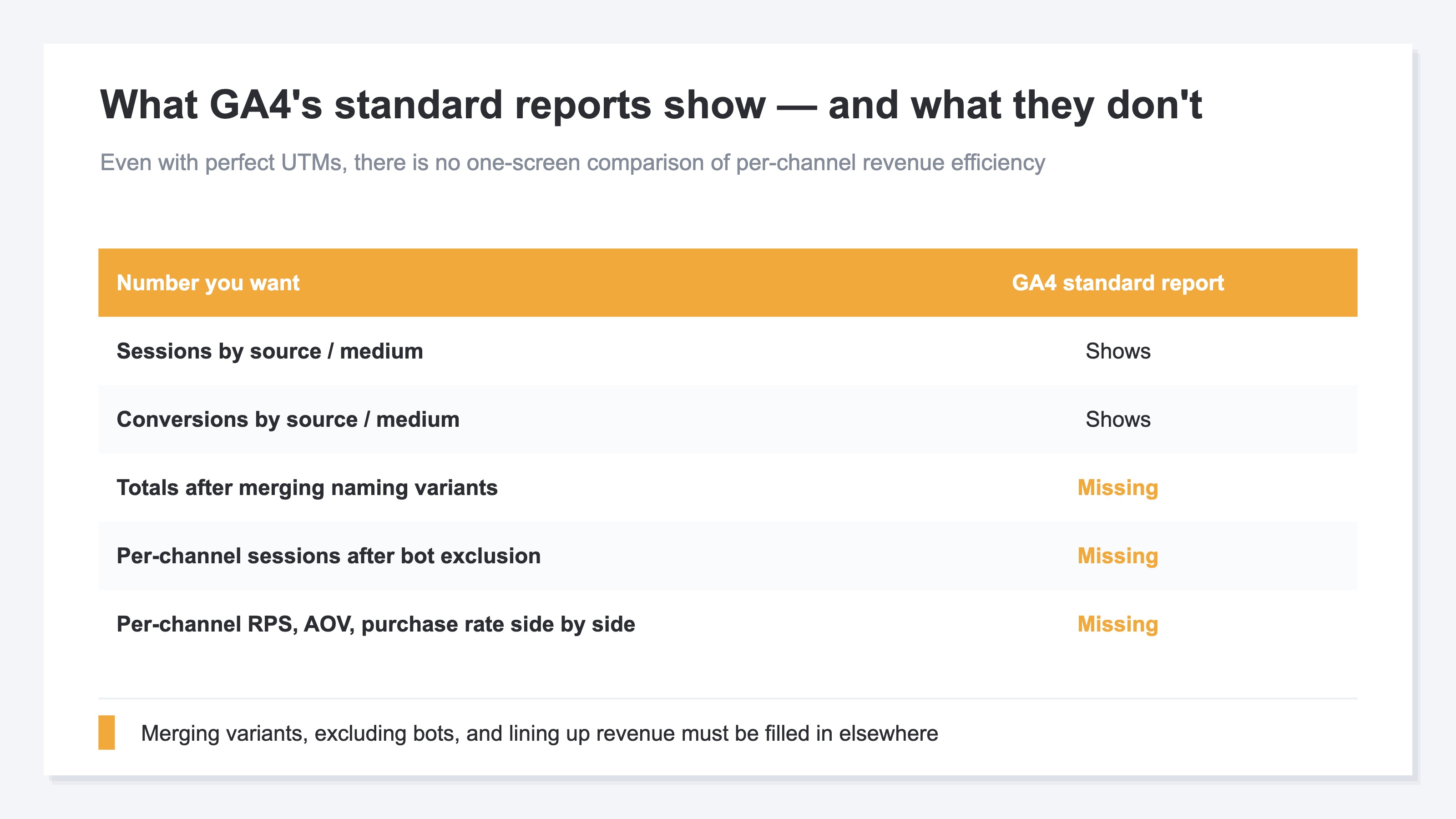
Even if you set UTMs perfectly, GA4's standard reports don't contain a table that lines up per-channel RPS, AOV, and purchase rate after UTM normalization on a single sheet. GA4 gives you sessions and conversions per source/medium, but to line up revenue per session across channels after merging naming variants, you have to hand-build an Exploration, exclude bot traffic, and join in the revenue. And if the UTMs are even slightly broken, the denominator (sessions) and numerator (revenue) drift between channels — and the comparison itself stops holding.
For instance, none of the following questions can be answered by GA4's standard reports alone, even with perfect UTMs:
- Which produces higher revenue per session — Paid Social or Organic Search?
- How many times higher is the email-sourced purchase rate vs. paid-search-sourced?
- Which channel should you be funding more heavily right now?
These are the questions you most want answered when deciding which channel to push your next budget toward. Yet GA4's standard reports only show sessions and conversions per source/medium. Merging naming variants, then lining up bot-excluded revenue per session across channels — that comparison has to be set up separately, outside the standard reports.
RevenueScope solution — comparing per-channel real revenue after UTM normalization on one screen
Bottom line: RevenueScope merges naming variants automatically, then lines up per-channel RPS (revenue per session), AOV, and purchase rate on bot-excluded real revenue, on one screen.
So you can decide "which channel actually generates revenue" and "where your next budget should go" without hand-building a GA4 Exploration. What RevenueScope handles is turning the comparison from §6 — the one that never appears in standard reports even with perfect UTMs — into something you can see on one screen.
- Automated UTM normalization: merges
facebook/Facebook/fb/metanaming variants into one channel. The numbers that split into four rows in §2 get returned to their true total (the part GA4 keeps tallying as separate rows). - Real revenue with bots excluded: removes auto-detected bots from the denominator of per-channel RPS, computing revenue per session on human sessions only. This avoids the distortion where bot traffic inflates the denominator and sinks RPS.
- Per-channel RPS side by side: lines up Paid Social, Organic Search, newsletters, and search ads by RPS, AOV, and purchase rate on one screen. It answers, on the spot, the §6 questions of "which channel sells the most per session" and "where to fund more heavily."
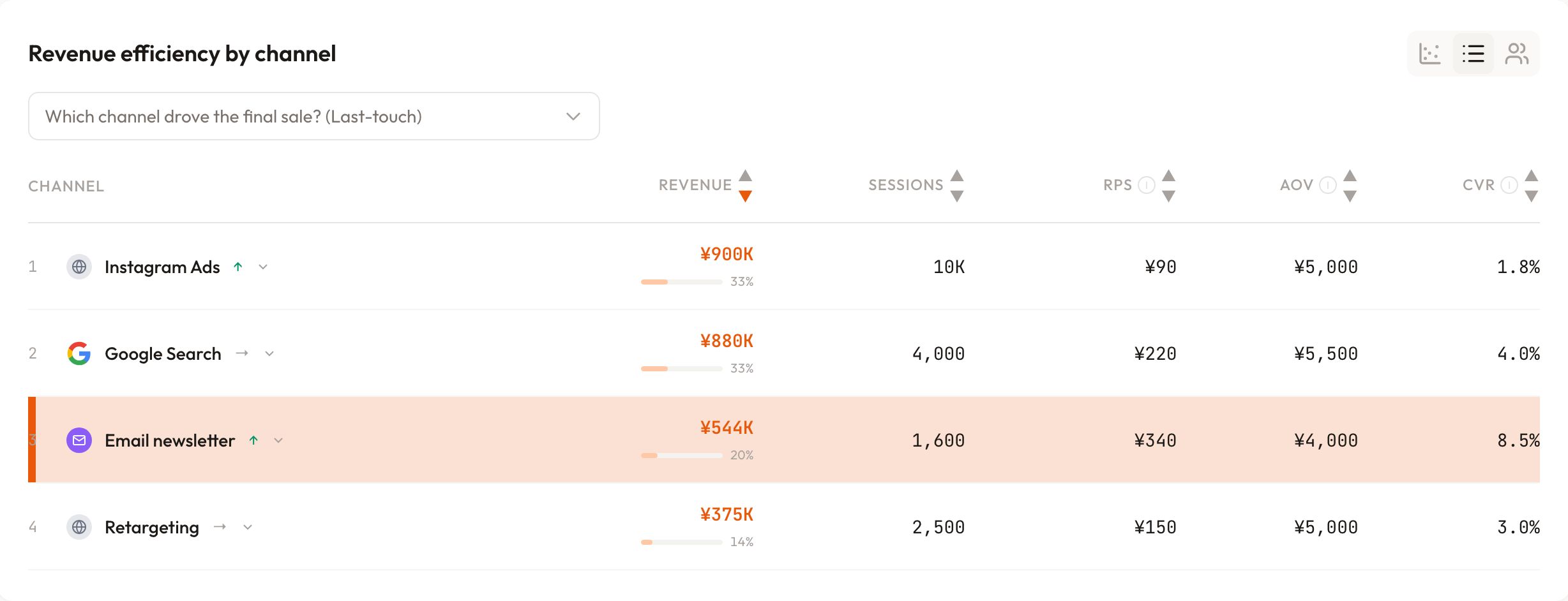
RevenueScope's dashboard (demo data shown). It lines up per-channel real revenue after UTM normalization.
UTM hygiene is the prerequisite for getting this comparison right. Broken UTMs distort channel classification, which corrupts both the denominator (sessions) and the numerator (revenue) per channel. Only when the naming rules, the GA4 classification logic, and the pre-launch verification in this article are in place — and then naming-variant merging and bot exclusion sit on top — can you decide budget allocation on the basis of per-channel revenue efficiency.
For reference, the breakeven-ROAS thinking that combines with the ad platform's reported ROAS is organized in a separate article, ROAS Guide 2026.
See which ads actually drive revenue, at a glance
Free up to 5,000 sessions/month, AI connection included. No credit card required. Up and running in 5 minutes.
References#
[1] Google Analytics, "Custom campaigns," 2024
[2] Google Analytics, "[GA4] Default channel group," 2024
[3] Google Analytics, "[GA4] Default channel group source categories," 2024
[4] W3C, "Referrer Policy," 2017
[5] Google Analytics, "Campaign URL Builder," 2024
[6] Meta for Business, "About URL parameters," 2024
[7] Google Ads, "About auto-tagging," 2024