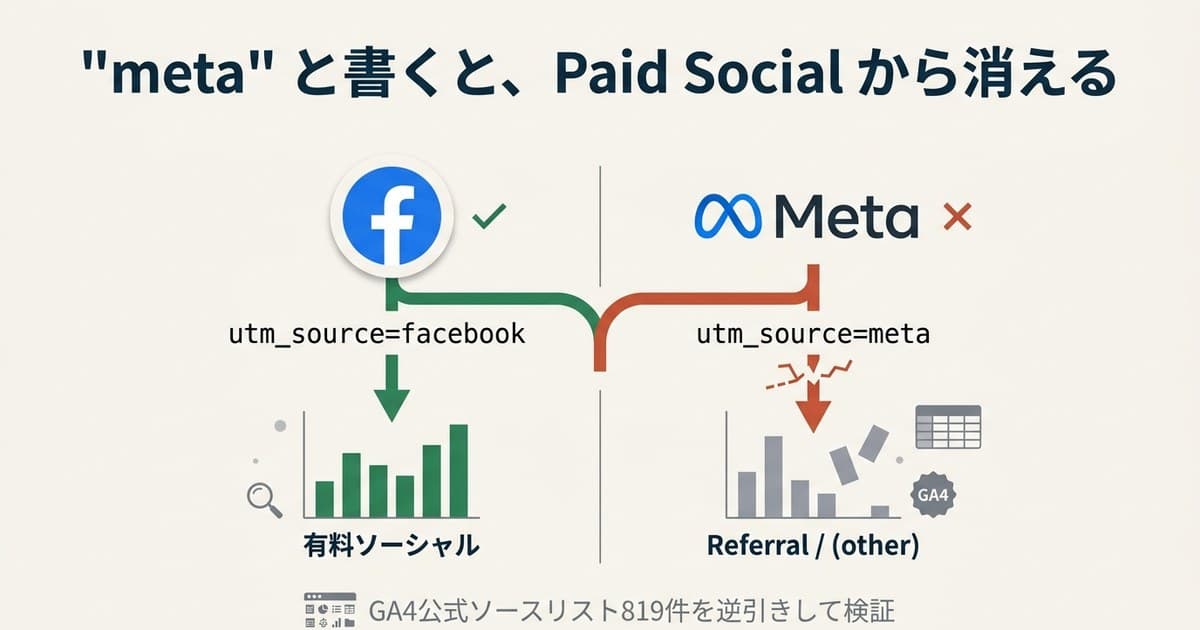
It's not unusual to see utm_source=meta on URLs for Meta Ads (Facebook Ads and Instagram Ads). After the corporate rename to Meta, it feels natural.
But when you open GA4's officially published "Default Channel Group Source Categories" list, the registered entries are facebook, fb, and facebook.com. meta is not on the list[1]. This isn't a cosmetic issue — it's the exact point where your Paid Social report either holds together or falls apart.
Getting the value right, though, is only the starting line. What you actually need is to normalize the spelling, line up real revenue by channel, and decide which traffic deserves the next budget. This article derives the right utm_source value for Meta Ads by working backward from GA4's own classification logic and source list — then goes one level up, to the per-channel revenue comparison that naming alone never gives you.
Table of contents
Key takeaways#
- Use
utm_source=facebook(lowercase).metais not in GA4's official list, so it never lands in Paid Social - Use
utm_medium=cpc. Puttingsocialinstead pulls paid traffic into Organic Social. Most mistakes are casing drift — whenfacebook/Facebook/fb/metaco-exist, one campaign splits into four rows - The right value is only a prerequisite. Even with
utm_source=facebooklocked, GA4's standard reports never show "RPS, AOV, and purchase rate by channel — after spelling is normalized — on a single screen." Deciding where to put the next budget requires that comparison to exist somewhere else (covered in §5)
1. How GA4 decides "Paid Social"#
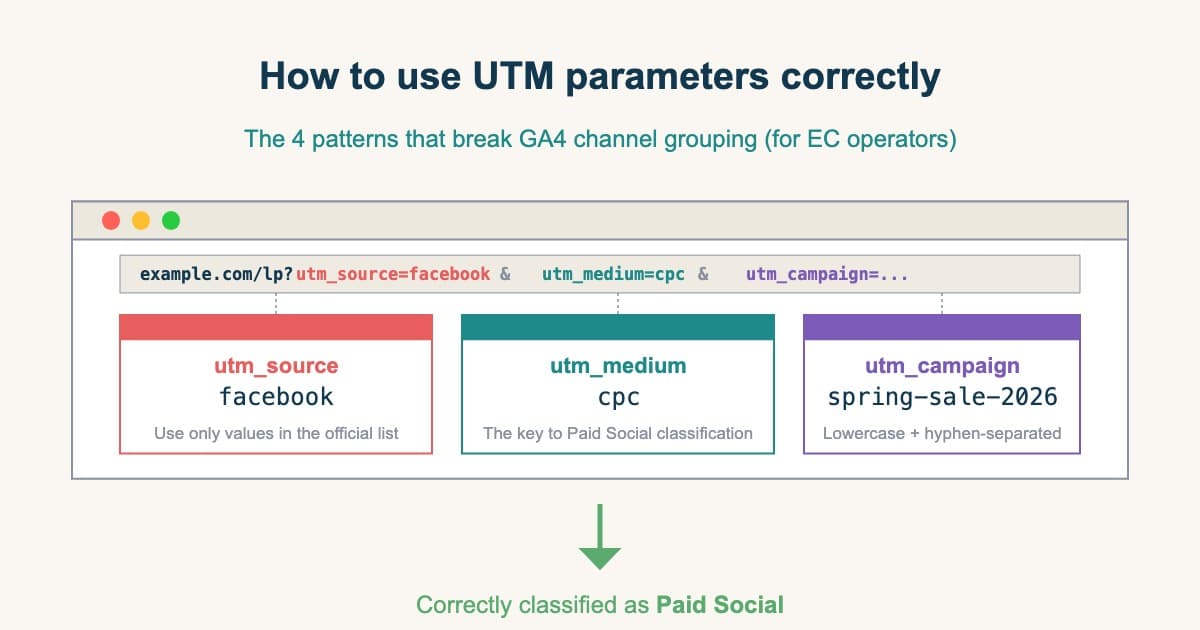
Conclusion: A session lands in Paid Social only when utm_source is on the official list and utm_medium is in the cpc family. meta is rejected right at this gate.
Per Google's official documentation, GA4 classifies a session as Paid Social when both conditions are true[1]:
- Source (
utm_source) matches GA4's managed "social sites regex list" - Medium (
utm_medium) matches the regex^(.*cp.*|ppc|retargeting|paid.*)$
The social-sites regex list itself is published by Google as an .xlsx file. When you download and open it, you see 819 source names paired with category labels[1]. Whether something lands in Paid Social isn't a matter of judgment — it's decided mechanically by whether the value is in that public file.
2. How facebook and meta are treated in the official list#
Conclusion: The official list has facebook, fb, and instagram — but the value meta appears nowhere. That's why utm_source=meta drops to Referral instead of Paid Social.
A relevant excerpt:
utm_source value | Category in GA4's official list |
|---|---|
facebook | SOURCE_CATEGORY_SOCIAL |
facebook.com | SOURCE_CATEGORY_SOCIAL |
fb | SOURCE_CATEGORY_SOCIAL |
m.facebook.com | SOURCE_CATEGORY_SOCIAL |
instagram | SOURCE_CATEGORY_SOCIAL |
instagram.com | SOURCE_CATEGORY_SOCIAL |
twitter | SOURCE_CATEGORY_SOCIAL |
meta | Not in the list |
Meta | Not in the list |
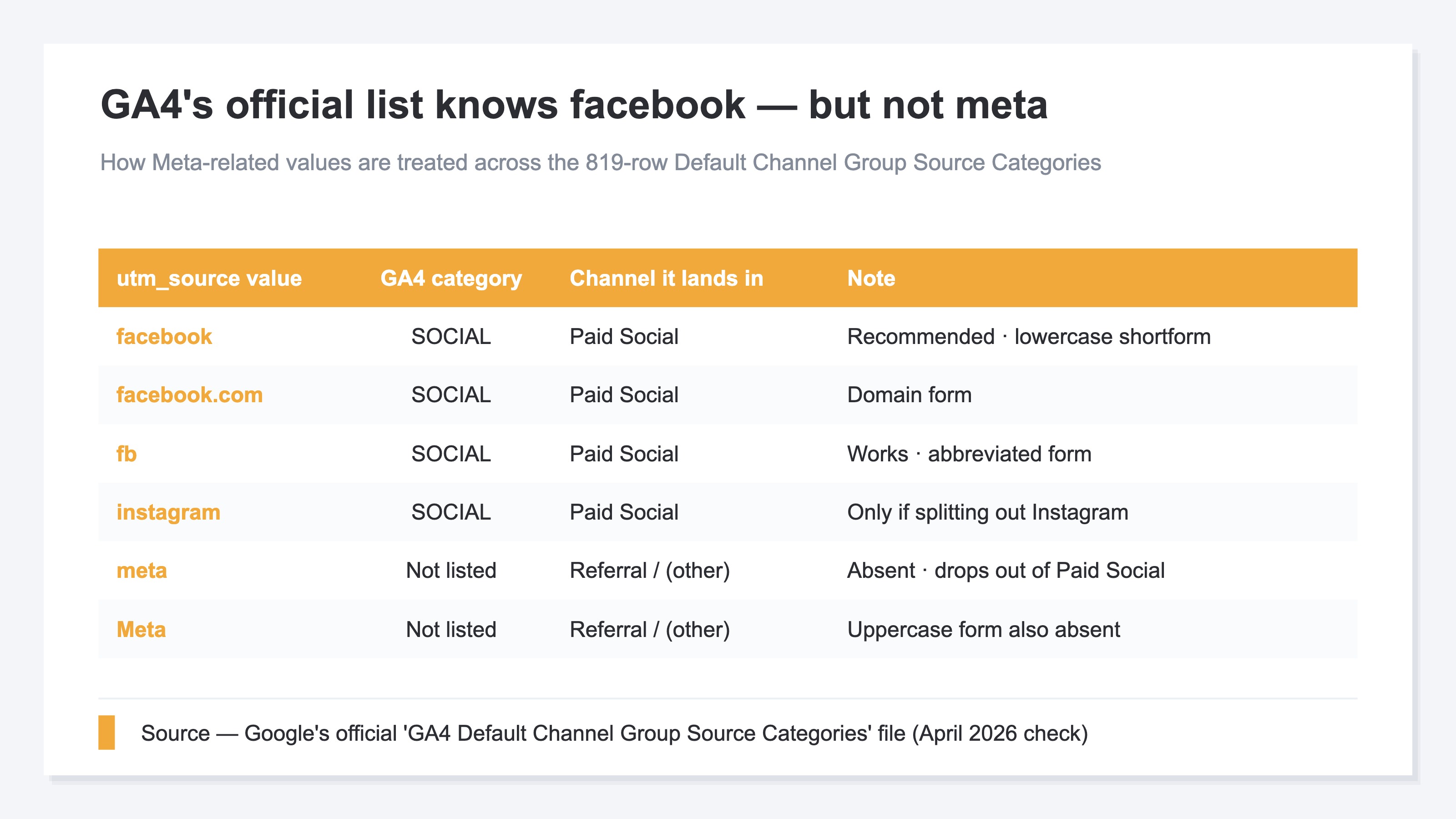
The string meta appears nowhere in GA4's official classification list. Ads tagged utm_source=meta are therefore judged by GA4 as "not a social site" and land in Referral or (other), not Paid Social. The intuition "the company is now Meta, so utm_source=meta is natural" doesn't match Google's classification rules.
3. Four ways utm_source breaks#
Conclusion: Derived forms (meta), mixed casing, a medium/source mismatch, and mid-path loss all either drop traffic out of Paid Social or split one campaign across rows — and the revenue roll-up breaks.
Mistake 1: utm_source=meta makes Paid Social disappear#
As above, meta isn't in the official list. Meta Ads revenue surfaces as a standalone row meta / cpc instead of rolling into Paid Social. Next month's report shows "Paid Social revenue collapsed," but really — the classification just peeled off.
Mistake 2: facebook vs. Facebook become two channels#
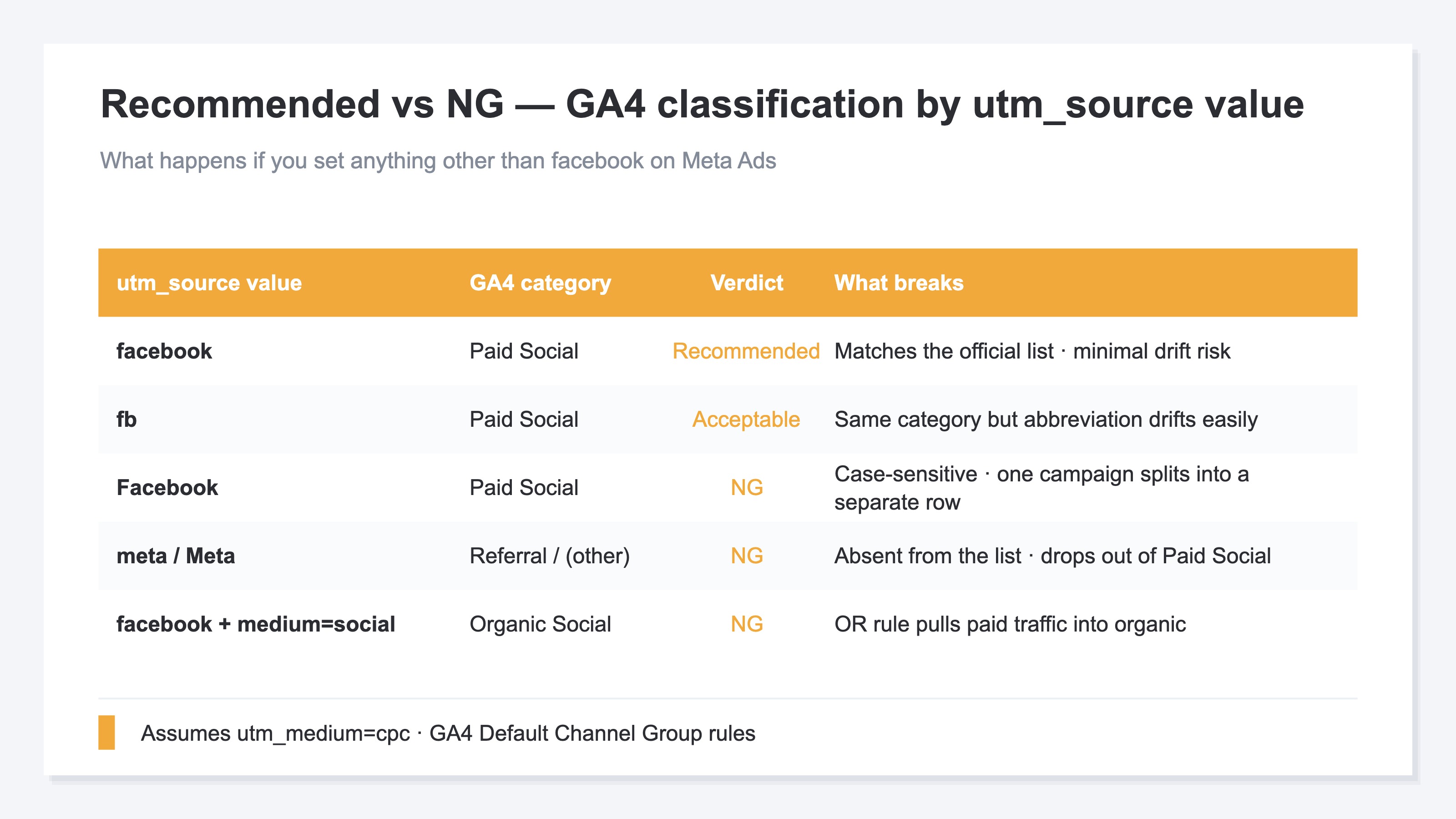
GA4 stores utm_source values case-sensitively. Within a single campaign, mixing utm_source=facebook and utm_source=Facebook produces two separate rows. When four variants (facebook / Facebook / fb / meta) coexist, one campaign splits into four rows, each showing roughly 25–33% of the true number.
Mistake 3: utm_medium=social routes paid into Organic Social#
GA4's Organic Social rule fires when utm_medium matches social / social-network / social-media / sm / social network / social media, OR utm_source matches the social list[1]. Because this is an OR condition, utm_source=facebook + utm_medium=social lands in Organic Social purely on the medium match. Paid revenue gets counted as organic, and your ad ROAS looks artificially low.
Mistake 4: URL dynamic parameters fail validation after delayed substitution#
Meta's "URL dynamic parameters" let you embed macros like {{campaign.name}}, {{adset.name}}, {{ad.name}} in your URL, expanded at delivery[2]. Convenient — but the preview at submission time still shows the raw macro. If you don't verify after launch, you won't notice that utm_campaign is empty or that unexpected characters (spaces, non-ASCII) crept in, until you open GA4 mid-campaign.
4. Recommended format and verification#
Conclusion: utm_source=facebook + utm_medium=cpc, both lowercase. This matches the official list by the shortest path and avoids misclassification into Organic Social.
Given the classification logic above, lock the Meta Ads URL parameters to this:
utm_source=facebook
utm_medium=cpc
utm_campaign={{campaign.name}}
utm_content={{ad.name}}
utm_term={{adset.name}}
utm_id={{campaign.id}}
Why each value#
utm_source=facebook— AmongSOURCE_CATEGORY_SOCIALentries in GA4's official list, this is the most common representation of Meta Ads.fbis functionally equivalent, but locking tofacebookminimizes casing drift operationallyutm_medium=cpc— Matches GA4's Paid Social regex^(.*cp.*|ppc|retargeting|paid.*)$and does not match anysocial-family Organic rule. Minimum collision riskutm_campaign={{campaign.name}}— Substituted at delivery. Place the raw macro at submission and verify post-launch that real values are flowing into GA4utm_content={{ad.name}}andutm_term={{adset.name}}— Align granularity so the GA4 "Campaign" dimension can be decomposed by ad / ad set
"We want to split out Instagram"#
Instagram ads also ship through Meta Ads Manager. If you want delivery-surface separation, switching utm_source from facebook to instagram does give you an Instagram-only row — but you then need to re-aggregate to see total Meta Ads revenue. Depending on your reporting design, a cleaner long-term setup is: keep utm_source at the delivery platform level and store the delivery surface in a custom dimension from the {{placement}} macro.
Two-step verification#
At minimum, run these two checks before and after launch:
- Pre-launch URL expansion simulation — In the Meta Ads Manager ad edit screen, enter test values in the URL parameter fields and open the "URL preview." Confirm macros expand as intended with no unexpected characters (spaces, non-ASCII, uppercase) injected
- Post-launch GA4 realtime check — Within 30 minutes of delivery start, open GA4 → Realtime → "Source/Medium" and verify visits appear as
facebook / cpc. If you seemeta / cpcor(direct) / (none), the parameters aren't reaching GA4
5. Even with the right value locked, GA4 has no "per-channel revenue comparison"#
Conclusion: Even with utm_source=facebook locked perfectly, GA4's standard reports never produce "RPS, AOV, and purchase rate by channel, after spelling is normalized, on one screen." Comparing revenue efficiency across channels takes separate work.
By this point, locking Meta Ads' utm_source to facebook gets you as far as correct classification into Paid Social. But "how much that correctly-classified Paid Social actually sold, versus search ads or newsletter" never comes out of GA4's standard reports, no matter how perfect your naming.
GA4 gives you sessions and conversions per source/medium, but lining up per-session revenue across channels — after normalizing spelling variants — requires hand-building an exploration report, excluding bot traffic, and joining revenue. For example, none of these questions can be answered from the standard reports alone, even with a flawless utm_source:
- Which has higher per-session revenue: a Paid Social session or an Organic Search session?
- How many times higher is newsletter purchase rate compared to Meta Ads?
- Where should the next budget go — Meta Ads or search ads?
These are the questions you most want answered when deciding which channel gets the next budget. The state where you can line up bot-excluded per-session revenue across channels — after merging spelling variants — has to be built outside the standard reports.
RevenueScope solution—comparing real revenue by channel after normalization, on one screen
Conclusion: RevenueScope automatically merges the facebook / Facebook / fb / meta spelling variants, then presents RPS (revenue per session), AOV, and purchase rate by channel, on bot-excluded real revenue, on a single screen.
Getting the naming right is the prerequisite that makes this comparison possible. What RevenueScope handles is the step after — turning the comparison from §5 ("the one GA4 never shows even with a perfect utm_source") into something you can read directly on one screen.
- Automated UTM normalization — Merges
facebook/Facebook/fb/metainto one channel. Even periods you ran asmetathat dropped into Referral are re-merged into the Paid Social campaign (the part GA4 keeps in separate rows). - Bot-excluded real revenue — Removes auto-detected bots from the denominator of channel RPS, computing per-session revenue on real human sessions only. Avoids the distortion where bot inflation swells the denominator and sinks RPS.
- Per-channel RPS side by side — Lines up Meta Ads, search ads, newsletter, and organic search by RPS, AOV, and purchase rate on one screen. Answers the §5 questions — "which channel sells highest per session," "where to add budget" — on the spot.
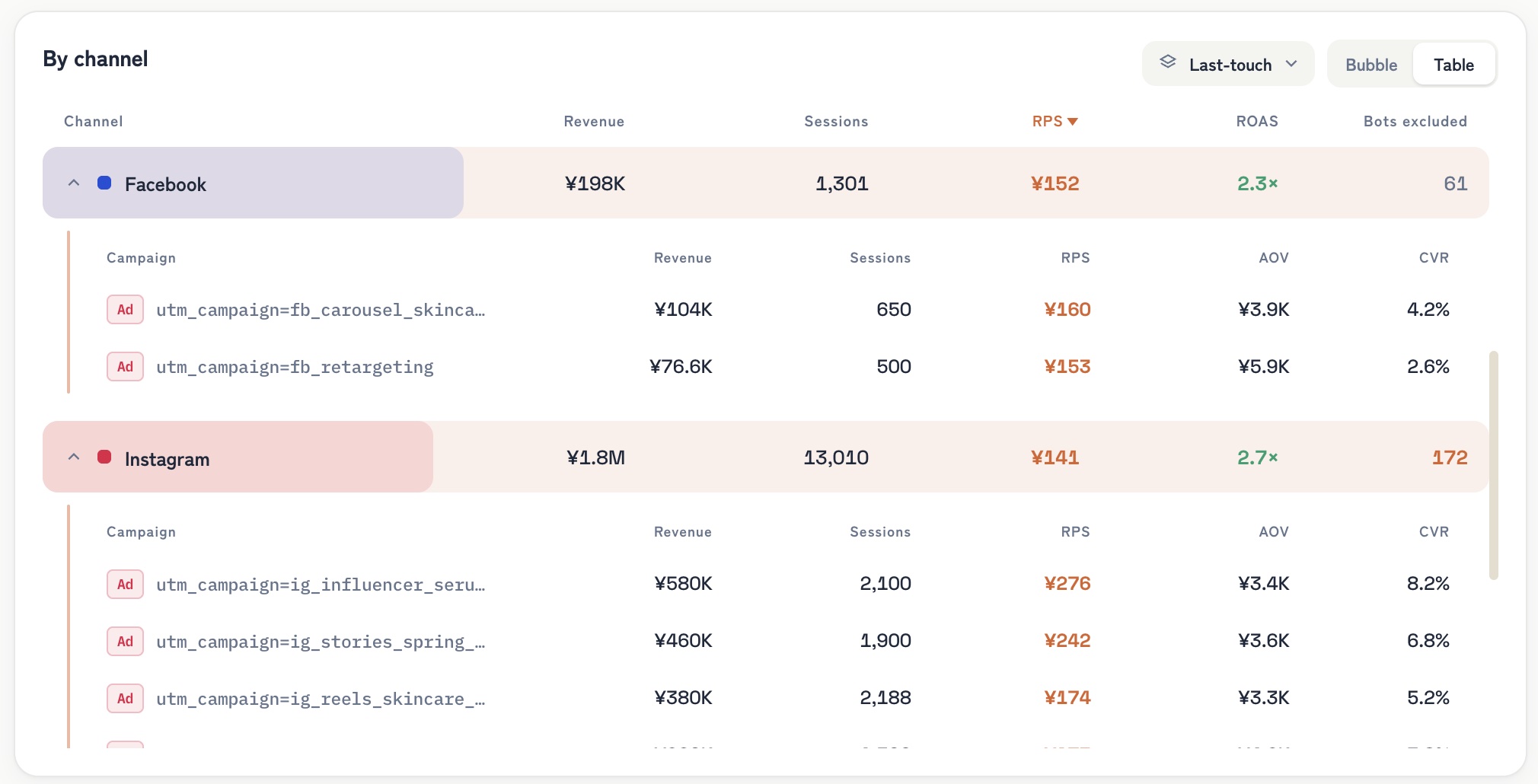
RevenueScope's dashboard (demo data shown). Lines up real revenue by channel after normalization.
The quality of your utm_source setup is the prerequisite for getting this comparison right. If utm_source breaks as meta, Meta Ads revenue scatters into Referral, and neither the denominator (sessions) nor the numerator (revenue) of RPS can be tallied correctly by channel. Only when the official list, the recommended value, and pre-launch verification covered here are in place — and spelling normalization and bot exclusion sit on top — do you reach a state where you can decide budget allocation on per-channel revenue efficiency.
Bottom line — the "correct answer" is in GA4's own file#
Social media debates the utm_source question endlessly: "Team facebook," "Team meta," "Team fb." But what GA4 actually reads is one public file with 819 source-category entries. facebook is in it. meta is not. This isn't a blog opinion or a vendor recommendation — it's the specification of the classification engine itself.
And getting the value right is only the prerequisite. It's only after you normalize spelling, exclude bot traffic, and line up real revenue by channel that you can decide — on a revenue basis — whether to weight the next budget toward Meta Ads. When delivery platforms multiply, agencies stack, and URLs get issued independently inside and outside the org, picking a single organizational-level convention and locking it down is the very first prerequisite of that decision.
Related articles on /en/news:
- UTM: 4 patterns breaking GA4 channel grouping
- Meta Ads utm_medium: what's the correct value
- TikTok and LinkedIn utm_source: Google's official answer
- GA4 "Direct / (none)": 5 causes, diagnosis, and fixes
- The last-click trap distorting ad-budget decisions
See which ads actually drive revenue, at a glance
Free up to 5,000 sessions/month, AI analyst included. No credit card required. Up and running in 5 minutes.