Attribution is how you decide which touch (channel) gets credit for a sale. And there's more than one way to do it. Last-click — the most widely used — is just one model. With the same revenue data, which model you use can dramatically change how a channel is judged. This guide compares the four common attribution models (last / first / linear / time-decay), what makes each different, and how to pick one by "what you want to know," with concrete examples.
Table of contents
Key takeaways#
-
An attribution model is a rule for which touch gets credit for a sale.
Last-click is just one of them — no model is absolutely correct
-
The four common models (last / first / linear / time-decay) each answer a different question.
With the same data, switching models flips how channels rank
-
Decide "what you want to know" first, then pick the model.
Lock into one model and you judge with numbers that don't fit your question
1. What attribution is: last-click tends to be the default#
Bottom line: attribution is how you count which touch gets credit for a sale. The most common default is last-click.
Attribution is how you assign a sale's credit across the channels involved in a purchase. The simplest is last-click: it gives 100% of the revenue to the channel of the final pre-purchase visit. If someone arrives via branded search and buys, that revenue is entirely "branded search." It's easy to aggregate and the reports are clear, which is why most analytics tools use it by default.
That simplicity is a strength. But when you look only at last-click, every channel that built awareness or supported comparison earlier in the journey is counted as zero. So being conscious of "which model you're viewing through" is the starting point for evaluating channels.
2. The four attribution models, and how they differ#
Bottom line: the four common models differ in where they place the weight. The same data is judged differently.
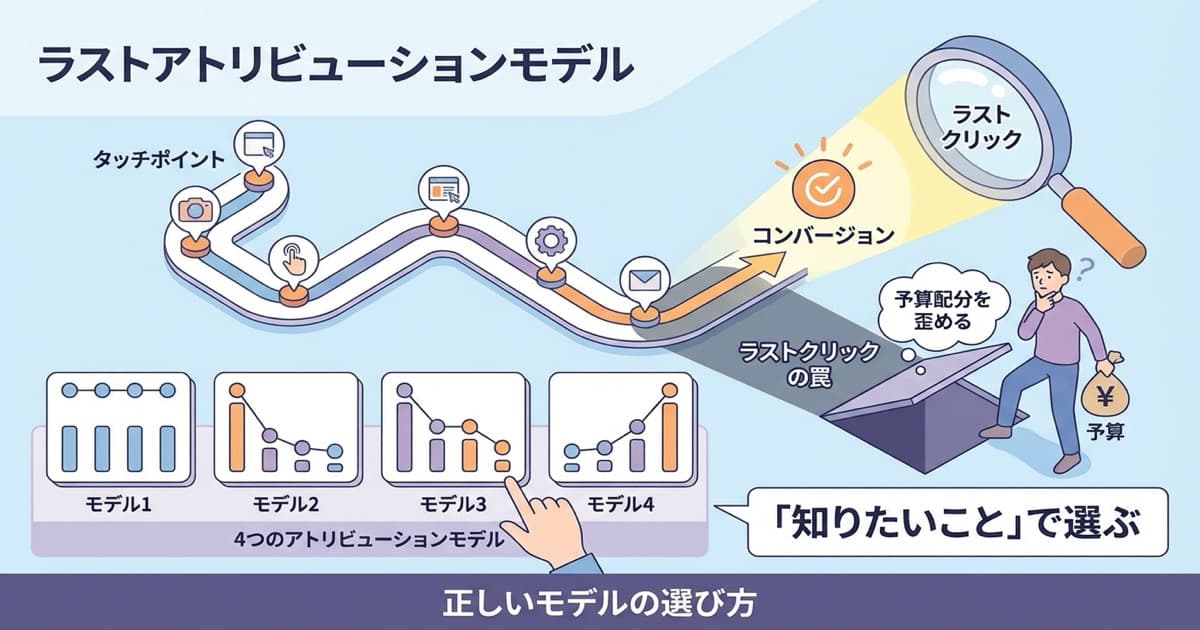
When several channels collaborate toward a purchase, how do you distribute the credit? There are four canonical models:
- Last-touch (last-click): 100% to the final channel. Good for evaluating the closing trigger
- First-touch: 100% to the first channel. Evaluates which channel brought in new customers
- Linear: Evenly across all involved channels. Views the whole path flatly
- Time-decay: Heavier weight closer to purchase. Emphasizes the final push without zero-weighting awareness
The important fact: no model is absolutely correct. Each has a philosophy, and each shows some things and hides others.
A concrete example. Say a customer's path was "Tuesday: discovered via an Instagram ad → Thursday: compared on Google search → Saturday: bought via branded search." For the same single purchase, last-touch credits it entirely to branded search; first-touch credits it entirely to Instagram; linear splits it evenly across the three; time-decay weights branded search more heavily. The same behavior, judged wholly differently depending on the model.
3. Pick the model by "what you want to know"#
Bottom line: there's no single correct model. Decide the question first, then pick the model that fits.
Models aren't better or worse than each other. What matters is to decide the question first, then pick the model that fits it. This mapping makes it clear:
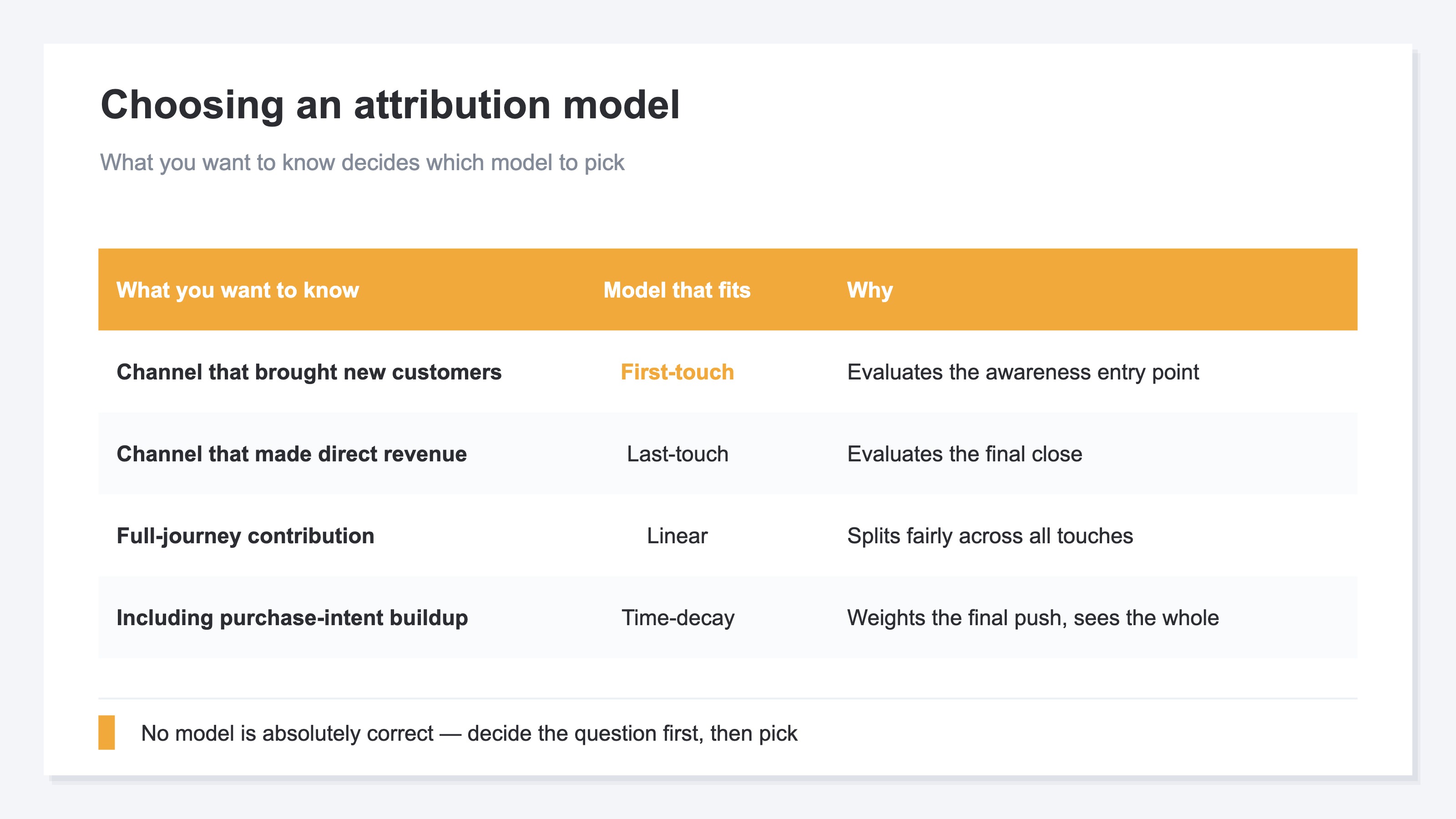
| What you want to know | Model that fits | Why |
|---|---|---|
| Which channel brought in new customers | First-touch | Evaluates the awareness entry point |
| Which channel produced direct revenue | Last-touch | Evaluates the final close |
| Full-journey channel contribution | Linear | Splits fairly across all touches |
| Including the purchase-intent buildup | Time-decay | Weights the final push while seeing the whole |
The key operational point is not to get stuck on one model. For reviewing new-acquisition channels, use first-touch; for evaluating a final-push campaign, use last-touch — switch by the question you want to answer.
4. What happens if you move budget on one model alone#
Bottom line: decide budget on last-click alone, and you can wrongly cut the upstream channels that created awareness.
Move budget on a single model and you get blind spots. Under last-click, an Instagram ad looks like it produces little direct revenue and becomes a cut candidate. But view the same data under first-touch, and you may see that Instagram was the channel first bringing in new customers. Cut Instagram here, and a few months later the volume of branded search itself shrinks and revenue erodes — a second-order effect.
This specific mechanism of "moving budget on last-click costs you," and what to do about it, is covered in detail in Moving budget on last-click alone costs you: how to read attribution right. This article is the groundwork beneath it: that models come in types, and you switch between them by question.
RevenueScope solution
Bottom line: comparing four models on the same data is heavy by hand. RevenueScope lets you switch and compare them on one screen.
To use models by question, you need to view the same revenue data through several of them. Doing that in GA4 means rebuilding exploration reports, re-aligning channel classifications, and so on — manual work that piles up every time you change models. The idea is simple, but it gets heavier the more you repeat it.
RevenueScope lets you switch the same revenue data across last-click, first-click, linear, and time-decay with one click. And it does so on clean numbers with bots removed, aligned on one common yardstick: RPS (revenue per session). So a reversal like "Instagram, tiny under last-click, was the biggest entry point under first-click" shows up on the spot.
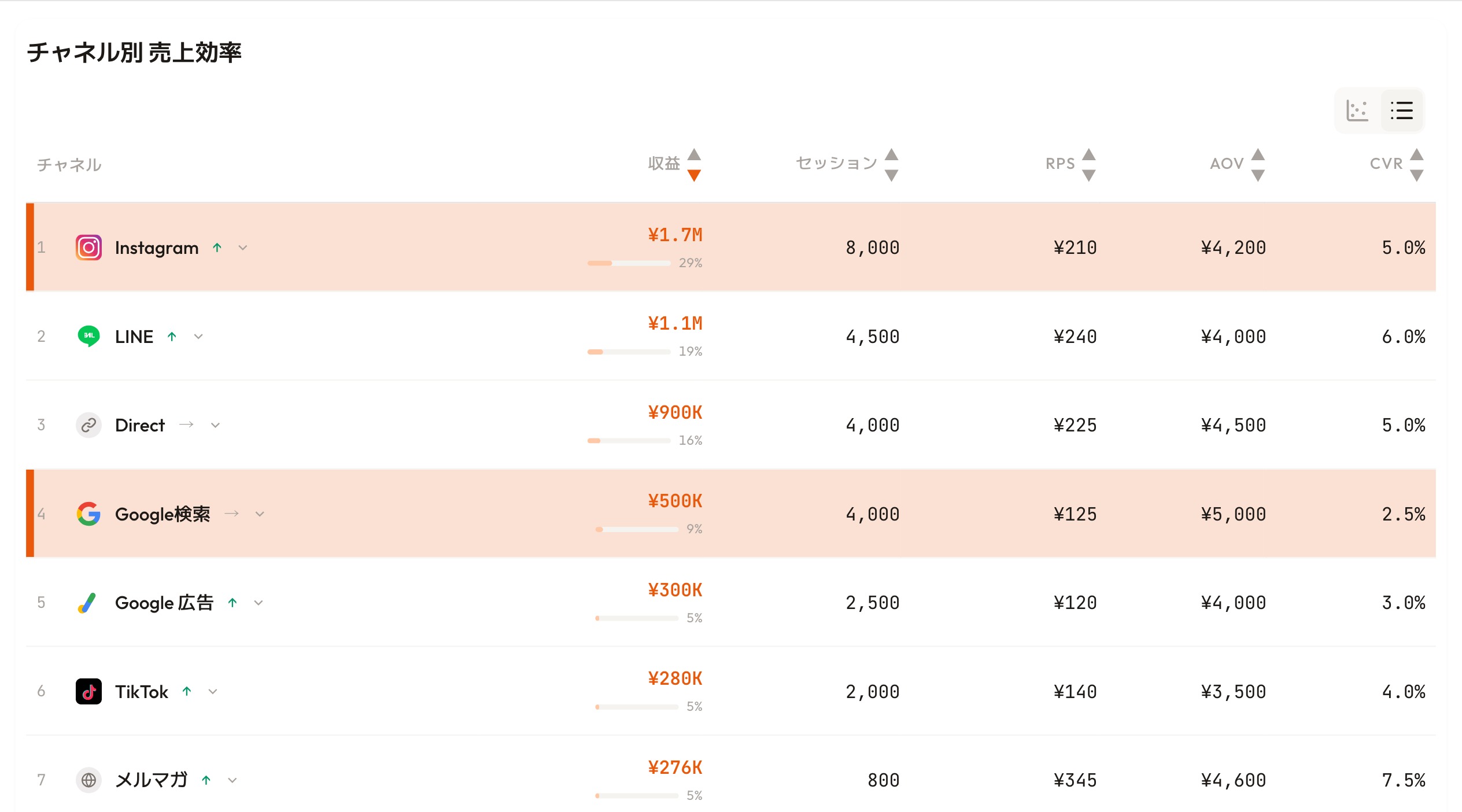
Instead of rebuilding GA4 reports again and again, you switch models and compare channels in place. That's far more practical than building a perfect measurement model from scratch.
FAQ#
Frequently asked questions#
Q. So which attribution model should I use?
A. There's no single "correct" model. Use first-touch to learn the new-acquisition entry point, last-touch to learn the closing trigger — pick by the question. Rather than locking into one, switch between several.
Q. Should I avoid last-click entirely?
A. No. It's simple to set up and good enough for seeing the closing trigger. The problem is deciding budget increases and cuts on last-click alone. Use it as a daily guide, and check another model when making allocation decisions.
Q. Is multi-touch attribution hard to adopt?
A. Advanced statistical models are expensive and hard to operate, but switching among the four models here (last / first / linear / time-decay) isn't conceptually hard. The hard part is re-building the same data by hand every time. Replace that with one click in a tool, and it becomes usable for daily decisions.
Summary#
An attribution model is a rule for which touch gets credit for a sale. The four common ones — last, first, linear, time-decay — each answer a different question, and switching models flips how channels rank on the same data.
What matters isn't hunting for the one correct model, but deciding "what you want to know" first, then picking the model. Stay locked into a single model and you judge with numbers that don't fit your question. As a first step, take your main channels' revenue and compare it under a model other than last-click.
See which ads actually drive revenue, at a glance
Free up to 5,000 sessions/month, AI analyst included. No credit card required. Up and running in 5 minutes.
References#
- Google Analytics "Get started with attribution" 2024
- Google Ads "About attribution models" 2024
- Google Analytics "About data-driven attribution" 2024