You open a GA4 report and "Direct / (none)" is 30% or 40% of total traffic. Something feels off. You know direct URL entry can't be that common; bookmarks alone can't explain that volume. Yet the "unknown traffic" row keeps growing.
In most cases this is not a user-behavior story — it's a measurement-loss story. This article maps the five causes of inflated Direct / (none), derived from Google Analytics' classification logic and the W3C Referrer Policy spec, with diagnostics and fix priority for each.
Table of contents
TL;DR#
-
Direct / (none) is the "source unknown" flag
Sessions where GA4 captured neither UTM parameters nor a referrer land here
-
80% of causes are fixable in-house
UTM loss, protocol downgrades, redirects, and referrer policy are mostly resolved by your own configuration
-
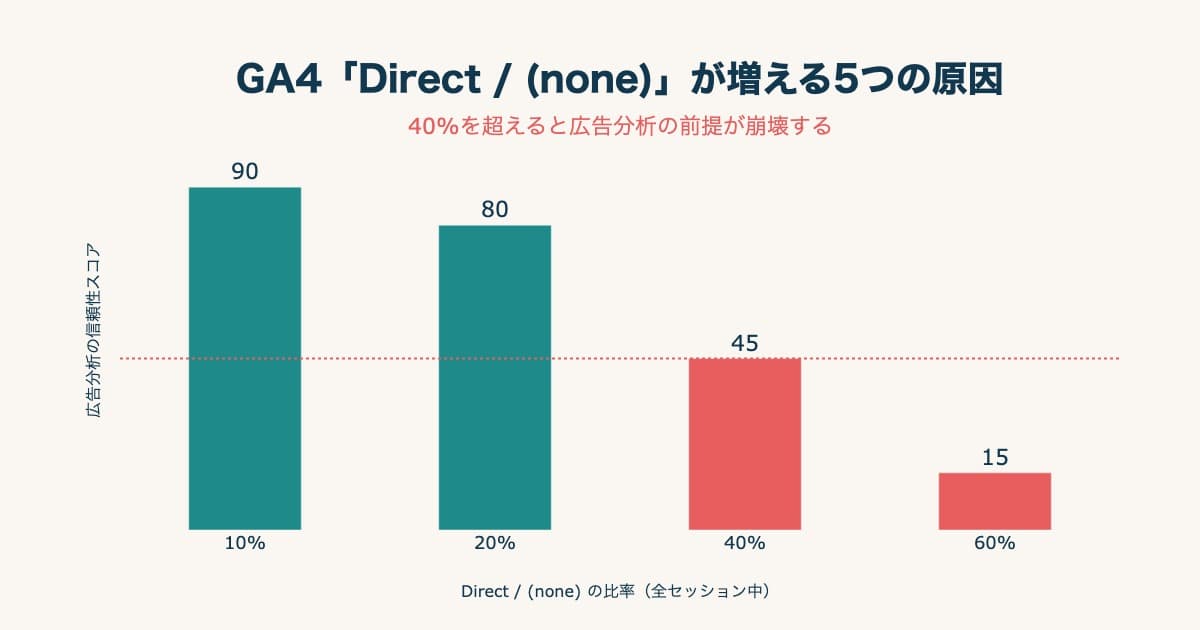
Above 20%, watch. Above 40%, ad analysis has collapsed
Ad-driven traffic sneaks in, and ROAS gets overstated
-
AI traffic became "half" visible
Since May 2026 GA4 has an "AI Assistant" channel, so session counts are available for free. But referrals that arrive without a referrer still land in Direct / (none), and Google's AI Overviews and AI Mode are excluded from that channel
-
Lowering the share is a different question from "which channel sold"
Even at 15% Direct, GA4 standard shows you sessions and conversions only. Budget allocation is judged by comparing real revenue and RPS per channel
1. What "Direct / (none)" actually means — GA4's rule#
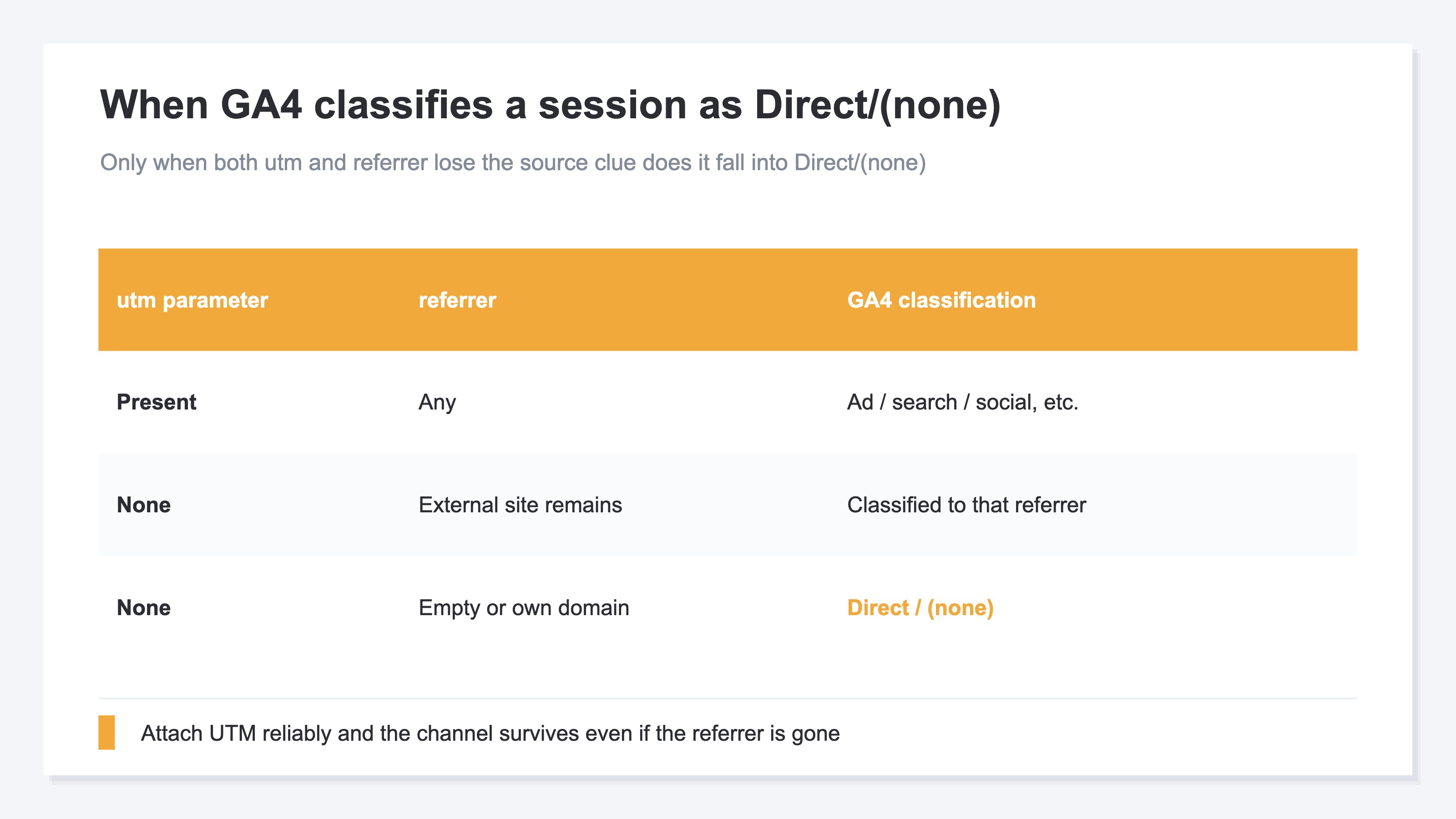
Bottom line: Direct / (none) collects sessions with no surviving clue about the source — neither UTM nor referrer.
GA4's help docs are explicit[1]: a session lands in Direct / (none) when both conditions are true.
- The landing URL has no campaign parameters (
utm_source,utm_medium, etc.) - The browser's
Refererheader (GA4'sreferrerdimension) is empty, or matches your own domain
In short: sessions with no surviving clue about the source — neither ad, nor search, nor social — collect here. In principle this should be limited to bookmarks, direct URL entry, and email-client clicks. In practice, ad-driven and social-driven sessions keep sneaking in.
"Direct," "(direct) / (none)," and "direct traffic" are one channel#
The same channel appears under different names depending on where you look. The default channel group calls it "Direct." The source / medium report shows "(direct) / (none)." In conversation and in write-ups, people say "direct traffic." Naming the channel on its own gives you "Direct"; naming the source and medium pair gives you "Direct / (none)." The target is the same single channel — GA4 does not aggregate them separately.
So "direct is high" in a meeting and "Direct / (none) is 35%" in a report describe one and the same thing. How the other channels get decided is covered in GA4 Channel Classification: Even Done Right, Revenue Stays Hidden.
Threshold for Direct / (none) share#
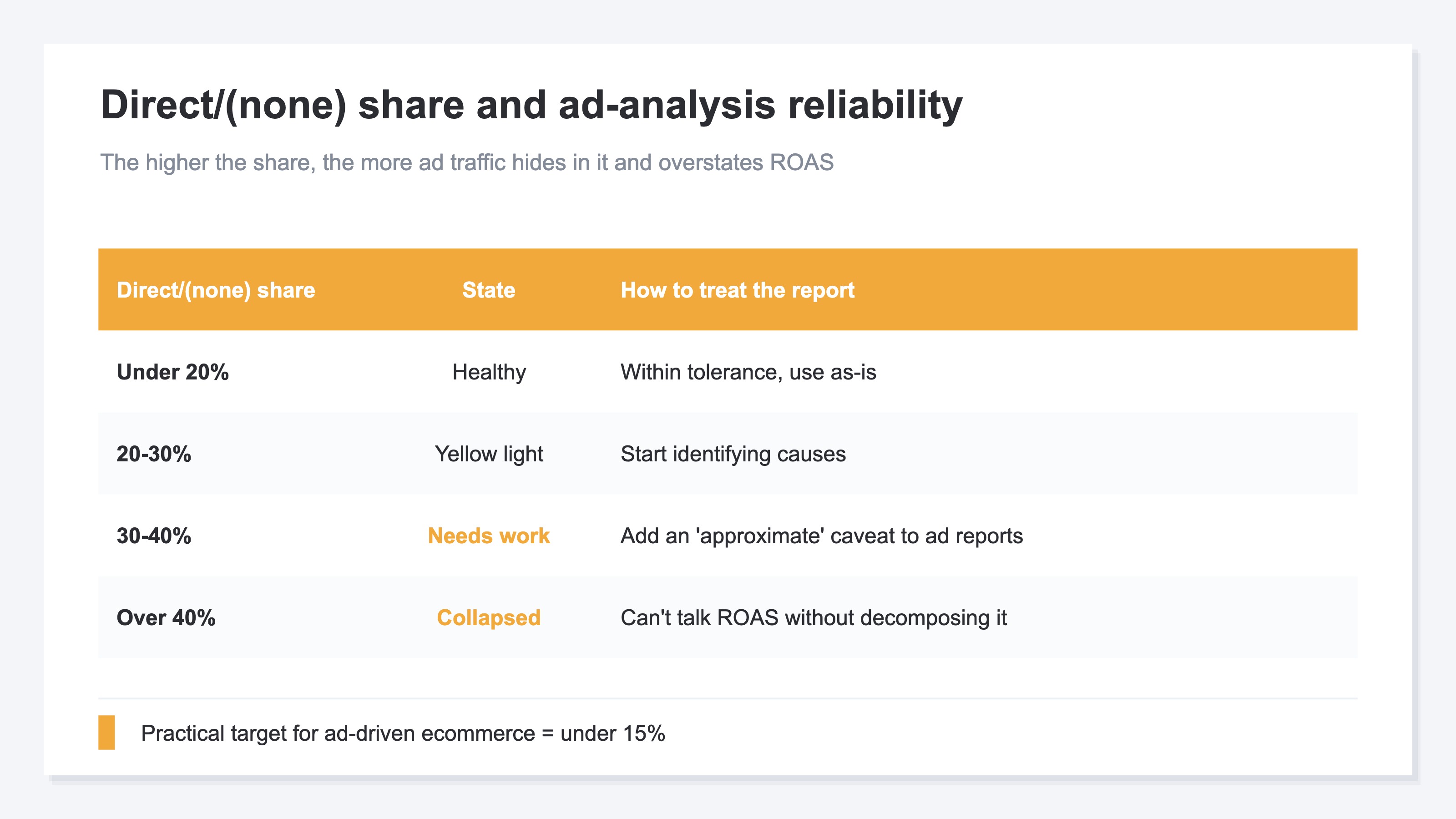
- Under 20% — Healthy. Within tolerance
- 20–30% — Yellow light. Start identifying causes
- 30–40% — Needs improvement. Ad reports need an "approximate" caveat
- Over 40% — Analysis collapsed. You can't talk about ROAS without decomposing Direct / (none)
At 40%+, writing "Paid Search ROAS is 400%" in a report doesn't mean what it says — some of Paid Search's real traffic hides in Direct / (none), skewing the number high. When ad-budget decisions depend on this number, you cannot cede precision here.
2. The five causes of inflated Direct / (none)#
Bottom line: causes collapse into two families — "no campaign parameters arrived" or "the referrer disappeared."
At the root, causes collapse into two families: "no campaign parameters arrived" OR "referrer disappeared." Listed in descending order of real-ops frequency.
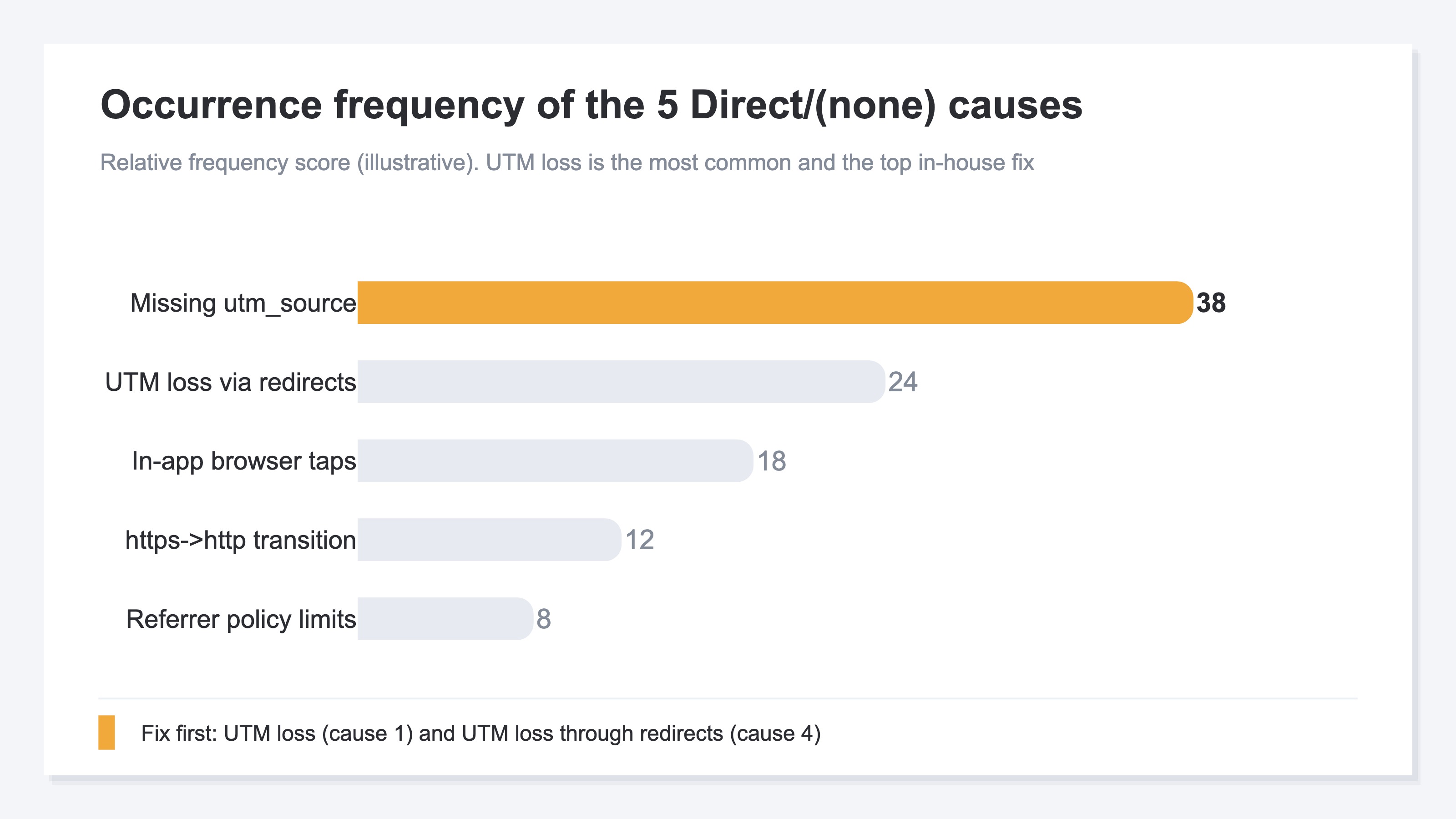
Cause 1: Missing utm_source — delivery-side omission#
The most common. Meta Ads, Google Ads, LINE Ads, Yahoo! Ads, email newsletters, LINE official accounts, X post links. Forget utm_source / utm_medium on any of these, and if referrer is also lost (cookie-consent dialog etc.), the session falls into Direct.
Especially common: newsletters, messaging-app links, QR code links. Channels without an agency running alongside tend to have operators pasting URLs manually — which is where UTM drops off.
Cause 2: referrer lost on https → http transition#
A transition from HTTPS to HTTP makes the browser intentionally not send the Referer header. This is the W3C Referrer Policy spec's default behavior, designed to prevent "downgrades"[2].
Even with "our site is https so we're fine," an http intermediate domain on the path nukes the referrer at delivery time.
Cause 3: In-app browser taps — a structural constraint#
When users tap URLs inside the LINE / Instagram / Facebook / X in-app browsers, the Referer header may not be set by the app, or may be a proprietary value (e.g., com.facebook.katana). GA4 doesn't match these against its social-sites list, so they land in Direct.
D2C and B2C ecommerce with high mobile-traffic shares are hit hardest — reliably attaching UTM is essentially the only prevention.
Cause 4: Redirects dropping the referrer#
Shortlinks (bit.ly, lin.ee, t.co) and redirects through intermediate domains generally don't pass source information to the final landing page. Server redirects (HTTP 301/302) behave differently across browsers, and JavaScript redirects almost always nuke the referrer.
"We use shortlinks for ad tracking" paradoxically ends up inflating Direct / (none) in GA4. Whether UTM parameters survive the redirect chain needs separate verification.
Cause 5: Deliberate restriction via referrer policy#
The W3C Referrer Policy spec lets sites control how much referrer info is sent on outbound transitions, via <meta name="referrer"> or HTTP response headers[2]. Most modern browsers default to strict-origin-when-cross-origin, which only sends the host name on cross-origin transitions.
Sites running stricter no-referrer policy send an empty referrer — which does land in Direct / (none). The referring site controls this, so it can't be fixed on your end.
3. Where AI traffic lands — the channel added in May 2026#
Bottom line: only half of it changed. AI referrals that carry a referrer now get their own channel; the rest still lands in Direct / (none).
Google Analytics added a way to measure AI-assistant traffic in its May 13, 2026 release notes[4]. When the referrer matches a recognized AI assistant, GA4 automatically sets medium to ai-assistant and campaign to (ai-assistant), and files the session under the "AI Assistant" default channel. No setup is required. The assistants Google names are ChatGPT, Gemini, Deepseek, Copilot, and Grok[1], plus Claude[4] — but those are examples, and the matching list itself is not published.
This is the part that has changed. "AI traffic is invisible in GA4" is no longer accurate: channel identification — how many sessions arrived — is now available for free in the standard reports.
What it does not do is dissolve the subject of this article. Three points are worth holding onto.
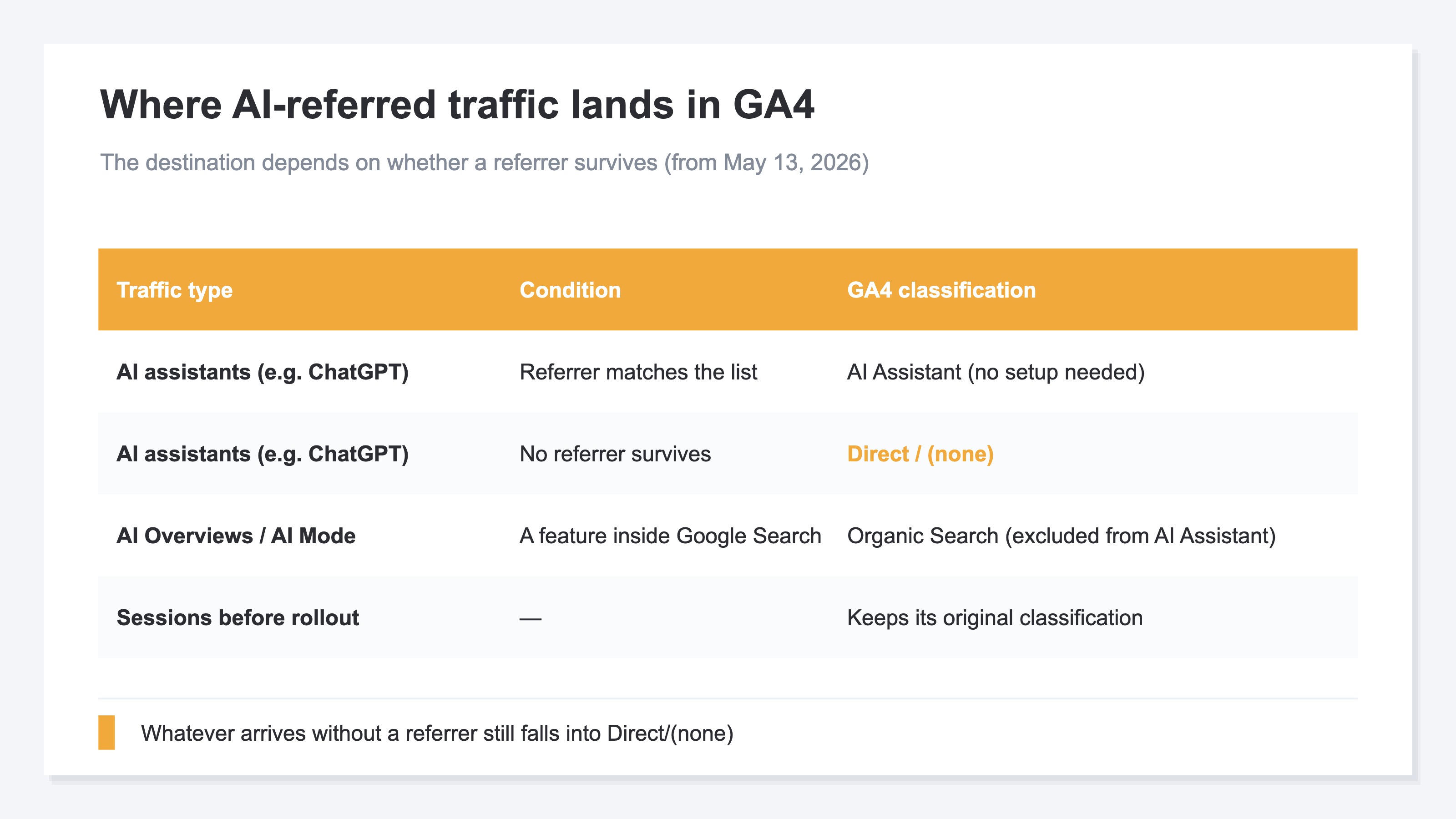
First, AI referrals that arrive without a referrer still land in Direct / (none). Mechanically this is the same "referrer disappeared" family as Causes 3 and 5 — not a sixth cause, but a new source feeding an existing one. That referrer-less portion is something RevenueScope cannot decompose either.
Second, Google's own AI Overviews and AI Mode are excluded from this channel and counted as Organic Search[1]. The documentation states this explicitly, so "the new channel makes all AI traffic visible" does not hold.
Third, medium is assigned at collection time, so sessions recorded before the rollout keep their original classification. Nothing is re-sorted retroactively.
Separating what GA4 solved from what it left open keeps the reading honest. It solved channel identification. It left two things open. One is bot exclusion: AI-assistant traffic is the layer where crawler and agent activity mixes in most heavily, so the channel figure can read higher than reality. The other is revenue — GA4 stops at session counts. Both are covered in GA4's AI Assistant Channel: Watch the Bot and Revenue Blind Spots.
4. Diagnosis and fix order#
Bottom line: start with small-effort, high-impact fixes — UTM loss (Cause 1) and UTM loss through redirects (Cause 4) first.
Diagnosis — decompose with GA4 Explorations#
"Direct / (none) is 30%" isn't actionable without knowing whether it's UTM loss, redirects, or in-app browsers. Combine these dimensions in GA4 Explorations:
| Breakdown axis | Dimension | Causes it isolates |
|---|---|---|
| Device category | Device category | Mobile skew → likely Cause 3 (in-app browsers) |
| Landing page | Landing page + query string | Concentrated on specific LP → Causes 1 / 2 / 4 |
| Hour of day | Date + Hour | Matching ad-delivery windows → Cause 1 |
| Country | Country | High overseas share → Cause 5 |
Did Direct spike, or has it always been high?#
Start by separating the shape of the increase. A jump from one specific date onward and a level that has been high all along point at different suspects.
If it jumped from a given day, something changed around that day: a redirect config change, a tag swap, a new ad campaign going live — or bot crawling. Find the day the daily session count changed, then match it against the changes your own team made just before it. How to tell bots apart: Traffic Suddenly Spiked? Suspect Bots Before You Celebrate. How bots distort channel shares: What Is Bot Traffic? Causes That Skew Channel and Ad Evaluation, and How to Exclude It.
If no such day exists and the level is simply high, the cause is one of the five in Section 2. Work down from Cause 1 in frequency order.
Fix order — small effort, high impact first#
| Priority | Cause | Fix | Effort |
|---|---|---|---|
| High | 1. UTM loss | Unify and template URL generation at delivery side | Small |
| High | 4. Redirects | Ensure UTM survives every redirect stage | Small |
| Medium | 2. https → http transition | Move intermediate domains to https | Medium |
| Medium | 3. In-app browsers | Cover via UTM (browser behavior can't be changed) | Small |
| Low | 5. Referrer policy | Not your domain — replace with UTM | — |
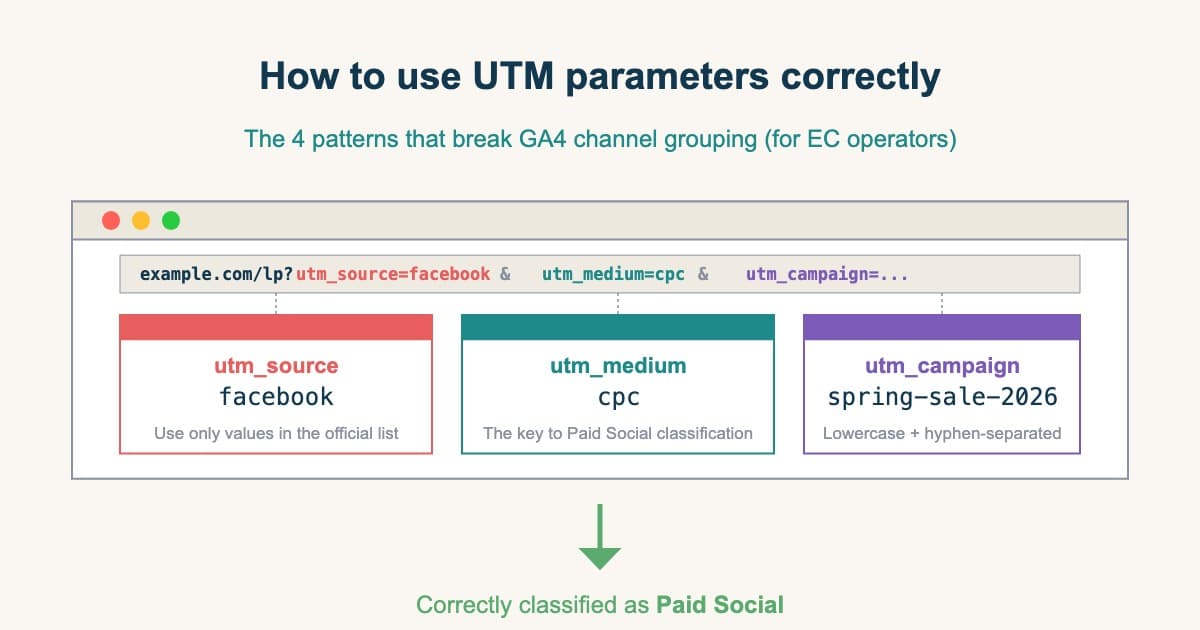
Start with Cause 1 (UTM loss) and Cause 4 (UTM loss through redirects). Both are solved by the same two operational disciplines: "reliably attach UTM" and "verify UTM survives each path." One intervention, two causes fixed. How to attach UTM itself — which parameter takes which value, and why a tagged URL can still miss its channel — is covered in UTM: 4 patterns breaking GA4 channel grouping.
The single highest-leverage fix: unify your URL builder at the delivery platform layer. If utm_source varies across Meta Ads / Google Ads / LINE Ads as facebook / Facebook / meta, you'll fix Direct / (none) only to hit a different problem (broken channel classification) next. UTM casing-drift: The utm_source you should NOT use for Meta Ads.
Living with residual Direct / (none)#
It won't reach 0%. Even under 15%, GA4 standard reports only show sessions and conversions — per-channel real revenue, RPS, and visitors, what you need for budget calls, never appears there.
Even after fixing all five causes, Direct / (none) will not drop to 0%. Real bookmarks, real URL typing, and browsers that suppress referrers all exist. Commonly cited practical targets (the right level varies with your own measurement setup):
- Ad-driven ecommerce : Under 15%
- Media-driven sites : 20–25% is an acceptable ceiling
- B2B SaaS : Around 20% is a realistic equilibrium
Reaching these floors makes Paid / Organic / Social channel classification trustworthy. If you're still above 40% after cleanup, that's a signal to revisit foundational measurement — tag implementation, consent management tooling.
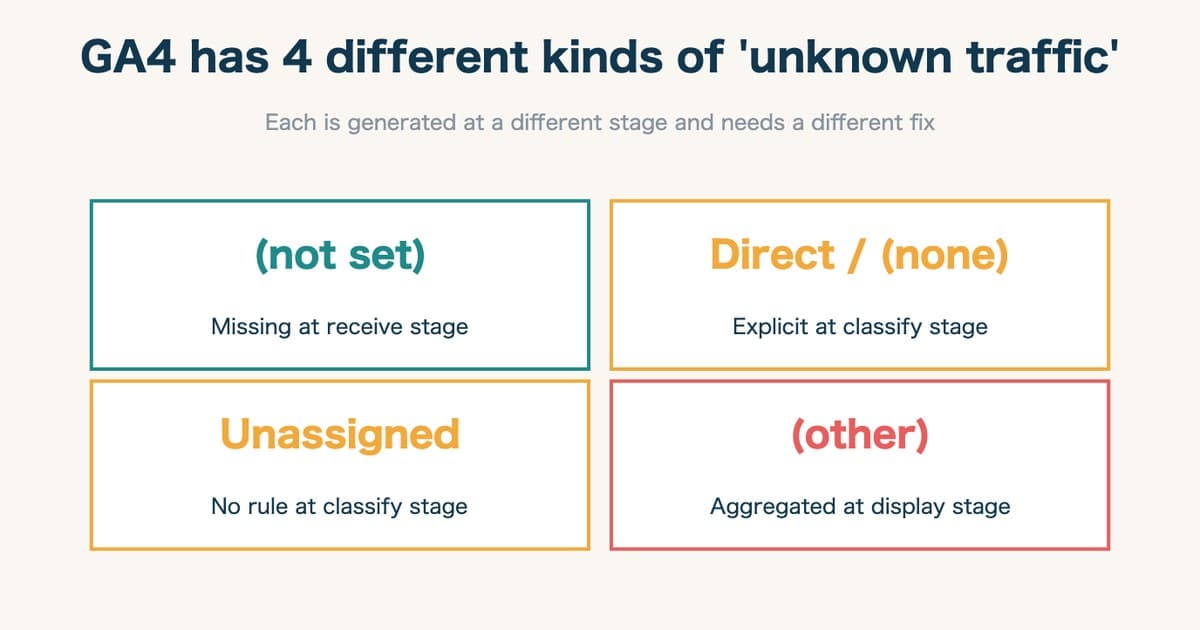
One more distinction: Direct / (none) and the "(not set)" / "Other" / "Unassigned" rows in GA4 are not the same thing. They look alike — all of them read as "traffic we can't explain" — but they arise differently and take different fixes. GA4 unknown traffic: why fix alone fails separates them.
RevenueScope solution
Bottom line: Even after you reassign Direct back to its real channel, "how much that channel actually sold" never comes out of GA4's standard reports, no matter how well you re-classify. That's where RevenueScope begins.
A lot of Direct/(none) means revenue that ads or search actually brought in has lost its referrer and slipped into Direct. RevenueScope preserves the referrer with its own tracking and reassigns that traffic back to its real channel as far as a surviving referrer allows. Sessions that lost both UTM and referrer cannot be returned to their original source by RevenueScope either — the referrer-policy cases in Cause 5, and the AI referrals covered in the previous section, fall into this group. That re-classification is preprocessing, not an attempt at complete coverage. The core is comparing real revenue, sessions, RPS (Revenue Per Session), AOV, CVR, and bots excluded by channel on clean data. Expanding a channel shows revenue, sessions, RPS, AOV, and CVR by campaign. That is where you decide which channel deserves the next dollar.
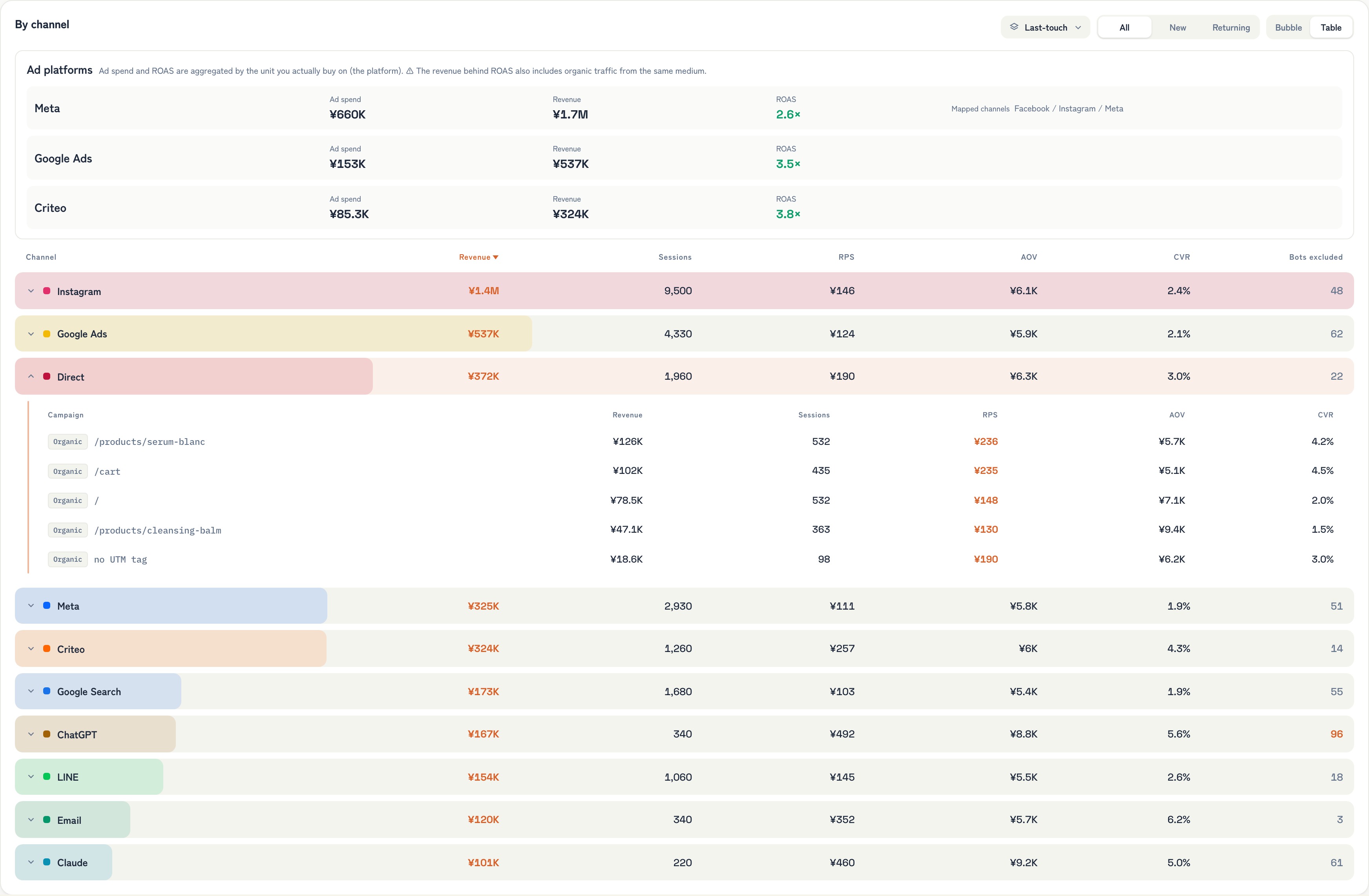
RevenueScope's dashboard (demo data shown). It lines up real revenue by channel, including Direct.
Take the screen above. Direct accounts for ¥372K — the third-largest channel by revenue. If most of that is really visits from ads or search, that revenue should be credited to another channel. That's the next step toward not misjudging ad performance because of a measurement gap.
FAQ#
Q1. Are Direct / (none) and Direct / Direct different?#
Yes. Direct / (none) means "source unknown." Direct / Direct doesn't exist as a GA4 standard classification. You may see "(direct) / (none)" in some reports — same meaning: no UTM, no referrer.
Q2. Even with perfect UTM, Direct / (none) won't drop?#
Referrer-policy cases and true bookmark traffic stay. But ad / newsletter / social leakage drops significantly — share can compress to 15–25%. "Not zero, but low enough not to break decisions" is the realistic goal.
Q3. Can GA4 re-classify what's already in Direct / (none)?#
Not natively. Explorations let you hypothesize, but GA4 has no built-in historical reclassification. And even if you could re-classify, GA4 standard has no way to line up "how much each channel sold" by revenue. RevenueScope handles both — the Direct re-classification and the per-channel real-revenue comparison. Sessions that lost both UTM and referrer, though, cannot be returned to their original source by either route.
Q4. Does traffic from ChatGPT and other AI tools also become Direct / (none)?#
It depends on whether a referrer survives. If it does, the session has been filed under the "AI Assistant" channel automatically since May 13, 2026. If it doesn't, it still lands in Direct / (none). Note that Google's own AI Overviews and AI Mode are counted as Organic Search rather than AI Assistant. Section 3 covers this in detail.
Wrap-up — Direct / (none) isn't about user behavior, it's about measurement#
When Direct / (none) rises, many operators read it optimistically as "brand awareness is up; more direct visitors." As this article shows, the vast majority is measurement loss. Ad effectiveness becomes invisible, ROAS gets overstated, and ad-budget decisions drift accordingly.
May 2026 added an "AI Assistant" channel to GA4, so AI referrals are now countable for free. What arrives without a referrer, though, still sinks into Direct / (none) — closer to one more source feeding an existing cause than to a problem that has been solved.
The first move is tracking the Direct / (none) share monthly. But the real goal isn't lowering the ratio itself — it's "allocating your next ad budget based on which channel actually creates revenue." Even at 15% Direct, if you can't see the remaining channels' real revenue and RPS side by side, you end up moving budget on ROAS alone.
RevenueScope re-classifies the sessions composing Direct / (none) back to their true source, then lines up per-channel real revenue, RPS, and visitors on bot-excluded numbers on one screen. Beyond the work of lowering the ratio, it's the foundation for confirming "how much each channel sold" by revenue and deciding budget allocation.
See which ads actually drive revenue, at a glance
Free up to 5,000 sessions/month, AI analyst included. No credit card required. Up and running in 5 minutes.
References#
[1] Google Analytics Help "Default channel group" April 2026
[2] W3C "Referrer Policy" April 2026
[3] Google Analytics Help "[GA4] Direct traffic" April 2026
[4] Google Analytics Help "Analytics releases — New AI Assistant traffic measurement" May 13, 2026