"I enforced utm tagging to reduce GA4's Direct / (none), and yet the total volume of 'unknown traffic' has hardly changed." This is one of the most common questions we hear.
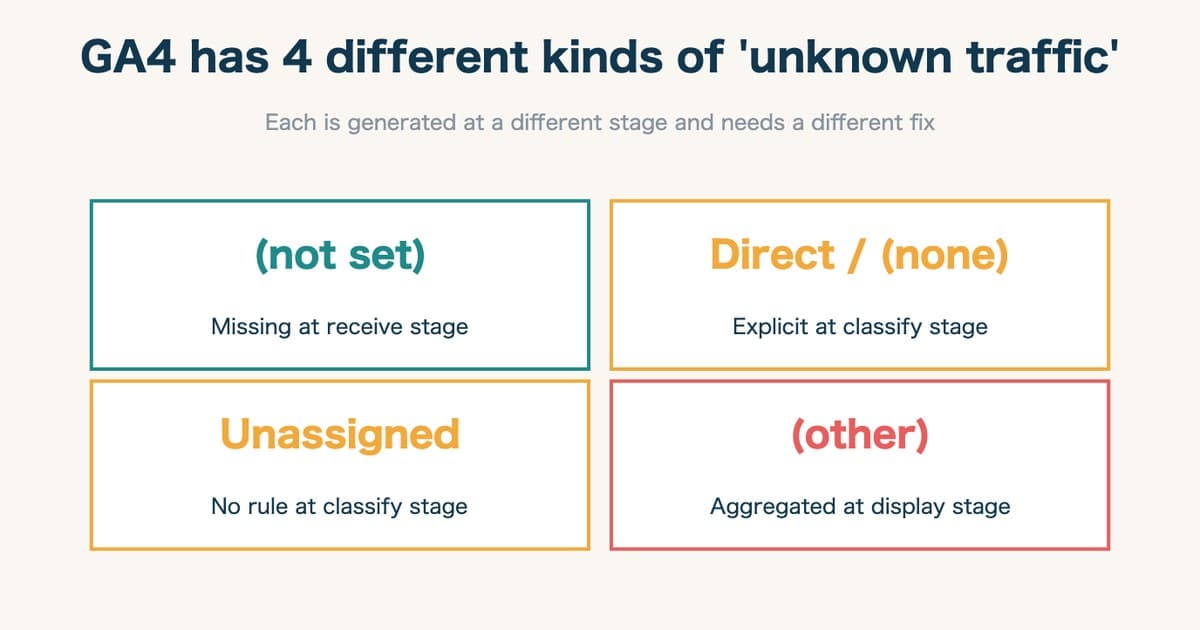
The reason is straightforward: in GA4 reports, what looks like "unidentifiable traffic" is not one category but four. "Direct / (none)", "(not set)", "Unassigned", and "(other)" — these tend to be treated as a single bucket of "unknown traffic," but each is generated at a different stage and demands a fundamentally different fix.
Treating them as one leads to misdirected work — applying a channel-grouping rewrite when the real problem is a missing tag, or auditing every measurement tag when a simple channel-grouping addition would do. Reducing Direct / (none) on its own does nothing for the other three; (not set), Unassigned, and (other) keep being generated through entirely separate mechanisms.
This article maps the four categories back to Google Analytics' official documentation, identifies the stage at which each is generated, and lays out diagnostic steps and fix priorities for each.
Table of contents
- Why these four are conflated
- "(not set)" — missing at the receive stage
- "Direct / (none)" — explicit result at the classify stage
- "Unassigned" — no matching rule at the classify stage
- "(other)" — aggregation at the display stage
- The 4-category fix matrix
- The first diagnostic step — see which category is largest in your property
- How RevenueScope helps
TL;DR#
- (not set) is missing data at the receive stage. The dimension value never reached GA4. The fix is in the measurement tag implementation.
- Direct / (none) is an explicit classification result at the classify stage. It's not missing data — it's a deliberate classification.
- Unassigned is a no-rule-matched outcome at the classify stage. The data arrived; the channel grouping has no rule to handle it.
- (other) is a display-stage aggregation. Cardinality limits cause low-frequency rows to be bucketed.
1. Why these four are conflated#
Bottom line: the four are generated at different GA4 stages — receive → classify → display. Different stage, different fix.
What the four share at first glance is "we cannot make meaningful sense of this traffic in the report." It's common in operations to treat "(not set)," "Unassigned," and "(other)" as one indistinguishable mass and exclude all of them from analysis.
But they are generated at different stages inside GA4. Mapped to the three stages from data arrival to report rendering, the relationship snaps into focus.
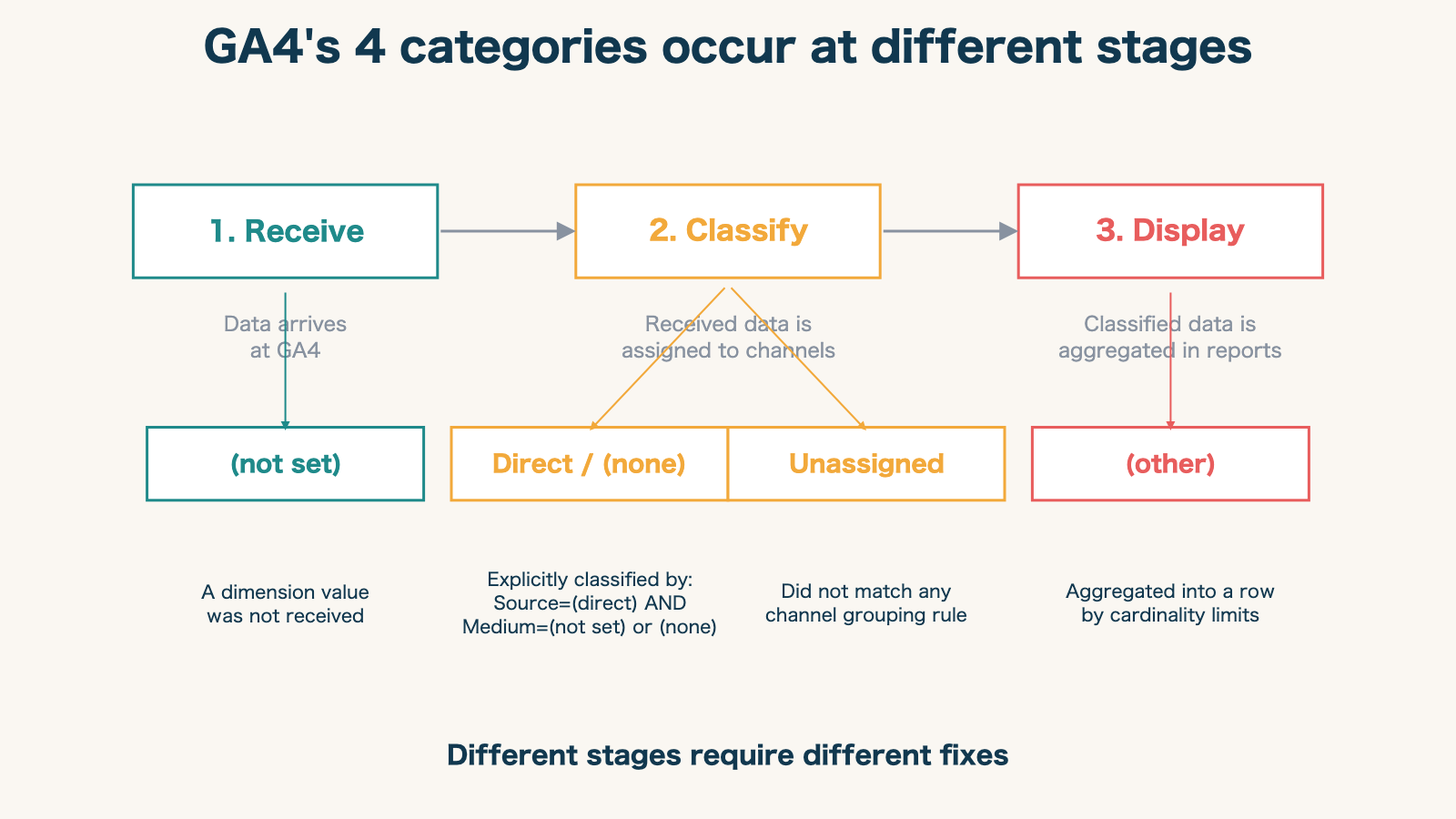
| Stage | Categories generated | State |
|---|---|---|
| 1. Receive | (not set) | Data itself is missing |
| 2. Classify | Direct / (none), Unassigned | Received data is routed to a channel |
| 3. Display | (other) | Classified data is aggregated for display |
Holding this hierarchy in mind lets you separate "which stage did this problem occur at?" in under a minute. Let's examine each.
2. "(not set)" — missing at the receive stage#
Bottom line: (not set) is missing data. The fix is in the measurement tag implementation, not the channel definition.
Google Analytics Help defines "(not set)" precisely as "a placeholder name that Analytics uses when it hasn't received a value for a dimension"[1]. In plain English: the value was empty.
Google publicly enumerates the situations that produce it[1]:
- Google Ads-related: Google Ads account and Analytics property not linked, auto-tagging disabled, manual tags with incomplete UTM parameters
- Session source / medium:
session_startevent missing, Google tag initialization trigger misconfigured - Landing page: session has no
page_viewevent - Content groups:
content_groupparameter sent with empty value - Custom parameters: within 24 hours of registration, or parameters added after
session_start - Consent mode: events with denied consent treated as separate sessions
The common thread is that the data was lost before it ever reached GA4. No amount of channel-grouping editing will solve this. The fix is in the measurement tag implementation.
3. "Direct / (none)" — explicit result at the classify stage#
Bottom line: Direct / (none) isn't missing data — it's an explicit "direct" classification. It's only a problem when the ratio swells.
Direct / (none) is not missing data. It is GA4 explicitly classifying the session as direct traffic based on its official rule. The Default channel group definition gives the logic[2]:
Source matches exactly "(direct)" AND Medium is "(not set)" or "(none)"
The confusing part: the Direct rule itself contains the condition Medium = (not set). This is the rule that explicitly classifies sessions whose Medium dimension arrived empty as Direct, and is distinct from the dimension-wide "(not set)" placeholder.
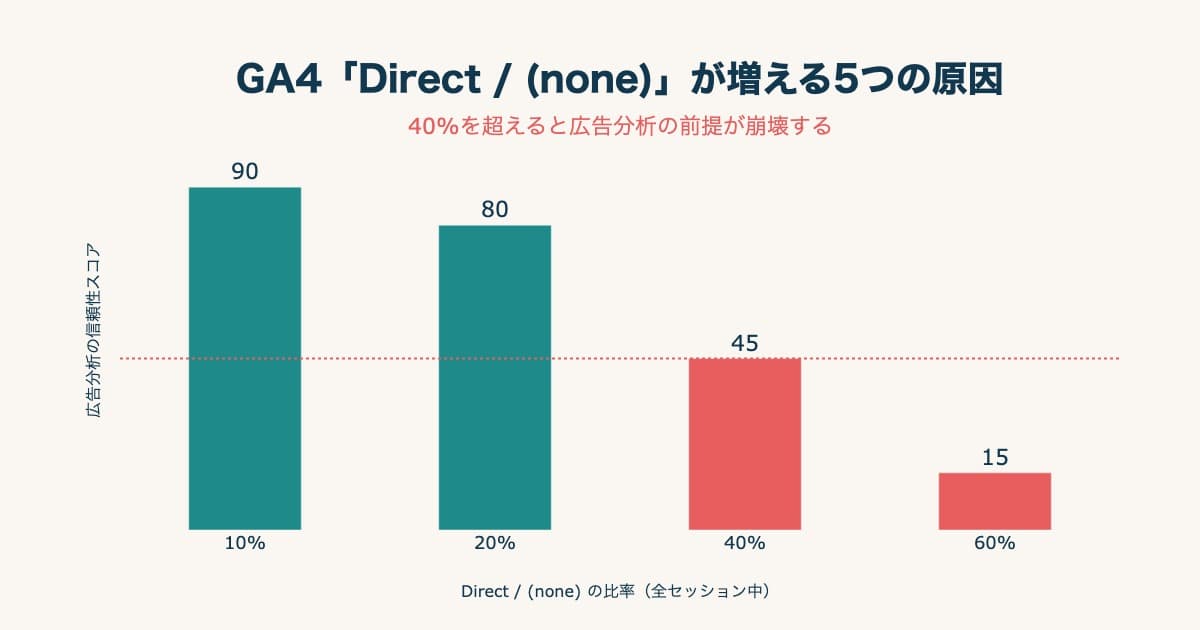
A high Direct / (none) ratio is, in classification logic terms, normal operation. The problem appears when the ratio swells beyond reasonable bounds — typically because ad and social traffic is leaking into Direct due to lost utm parameters or referrer suppression. We cover diagnosis and remedies for that case in a separate article: 5 causes of GA4 'Direct / (none)' traffic — diagnosis and fix guide.
4. "Unassigned" — no matching rule at the classify stage#
Bottom line: Unassigned means the data arrived but no rule matched. The fix is adding a channel grouping definition.
Google Analytics Help defines Unassigned as "the value Analytics uses when there are no other channel rules that match the event data"[2]. The data reached GA4. Source and Medium have values. But no channel grouping rule's conditions matched it.
This is decisively different from "(not set)". Where (not set) means "the data never came," Unassigned means "the data came, but no rule covered it."
Common causes are organized in Google's official tagging best practices[3]:
- Traffic from emerging platforms (TikTok, LINE Ads, new ad networks) where Default channel grouping has no matching rule
- Custom channel groups in use, but specific Source / Medium combinations were left out of the definitions
- UTM parameters present, but
utm_mediumvalues do not match the standard values GA4's classification expects (cpc, organic, referral, etc.)
The fix direction is updating the channel grouping definition. Don't re-instrument tags — add the missing Source / Medium → channel mapping to your channel grouping in the report layer.
5. "(other)" — aggregation at the display stage#
Bottom line: (other) is neither measurement nor classification — it's display aggregation from too many distinct dimension values.
Google Analytics Help defines "(other)" as "the value Analytics uses for an aggregated row due to cardinality limits"[4]. This is not a classification problem — it is pure display aggregation, caused by upper limits on the number of rows a report can show.
Standard GA4 properties use 500 unique values per dimension as a cardinality guideline[4]. Beyond that, additional values may be aggregated into (other). Reports also have row caps; for example, if the Pages and screens report supports up to 100,000 rows but the property has 150,000 unique pages, the 50,000 lowest-frequency rows get bucketed into (other).
(other) growth is neither a measurement nor classification issue — it's a dimension design issue: too many distinct values. Common sources include:
- Page paths containing user IDs or order IDs in query strings
- Product detail page URLs that grow unboundedly with the catalog
- Event parameters carrying free-text input or session IDs (effectively unbounded value sets)
The fix is trimming the number of distinct dimension values. Google officially recommends "exclude query strings from URLs," "do not store user IDs as custom dimensions," and "use the User-ID feature instead"[4].
6. The 4-category fix matrix#
Bottom line: the four differ in both fix direction and who owns it. Mix them up and you waste effort.
Here is a single-page summary of the four categories by generation stage and fix direction.
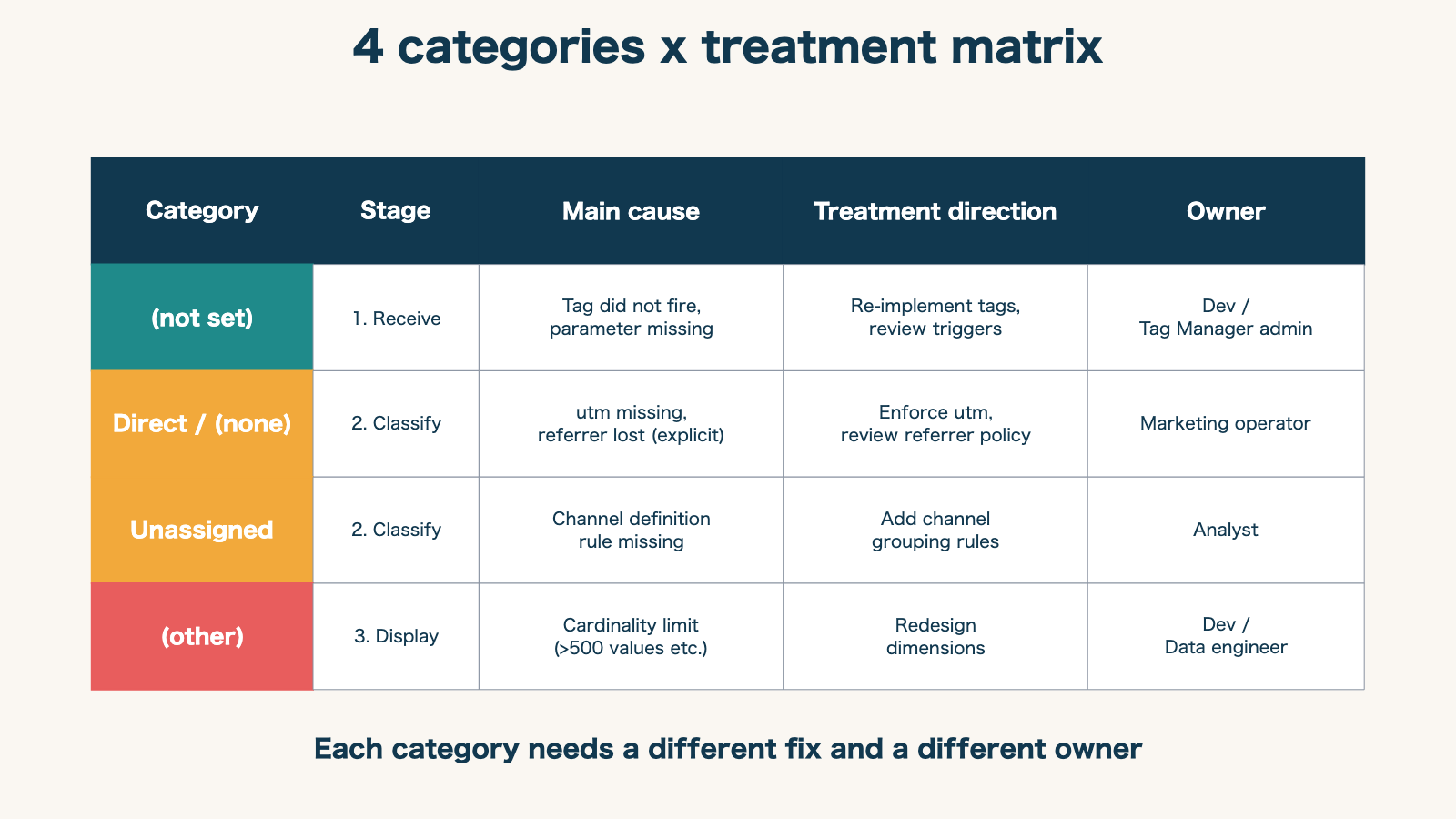
What stands out is that the fix direction and the responsible person differ for every category. Asking an analyst to fix (not set) by editing channel definitions is the wrong play. Asking an engineer to fix Unassigned by re-instrumenting tags is wasted effort.
7. The first diagnostic step — see which category is largest in your property#
Bottom line: first measure which category dominates your property, then set a fix priority per category.
Once you understand the four categories, the first concrete action is to measure which one dominates in your property. In the "Acquisition → Traffic acquisition" report, switch the dimension to "Session default channel group" and the Unassigned share becomes immediately visible. Switching to "Source / medium" reveals the (not set) and (direct) / (none) shares. The "Pages and screens" report with "Page path" surfaces the (other) share.
A practical diagnostic sequence:
- Unassigned > 10%: start with channel grouping additions. Check whether you've adopted a new ad platform recently
- A dimension with (not set) > 5%: audit the implementation of the tag sending that dimension
- Direct / (none) > 20%: decompose using the 5-causes flow in the companion article
- (other) appearing: revisit page path and event parameter design — reduce dimension cardinality
These four steps establish a fix-priority order even when all four categories are present.
RevenueScope solution
Bottom line: separating the four categories matters — but GA4 reports alone still won't show you the revenue of the channels once you've reclassified them. RevenueScope puts that on one screen.
Even after you separate and fix (not set), Unassigned, Direct / (none), and (other), seeing "which channel actually produced revenue" next means rebuilding GA4 exploration reports by hand — and that gets heavier while channel classification is still broken.
RevenueScope re-classifies inbound sessions with its own logic, routes sessions that GA4 buckets as Unassigned or Direct / (none) back to their actual source, and lines up real revenue by channel on one screen. You can verify the channel-level revenue GA4 reports alone can't follow, revenue-first.
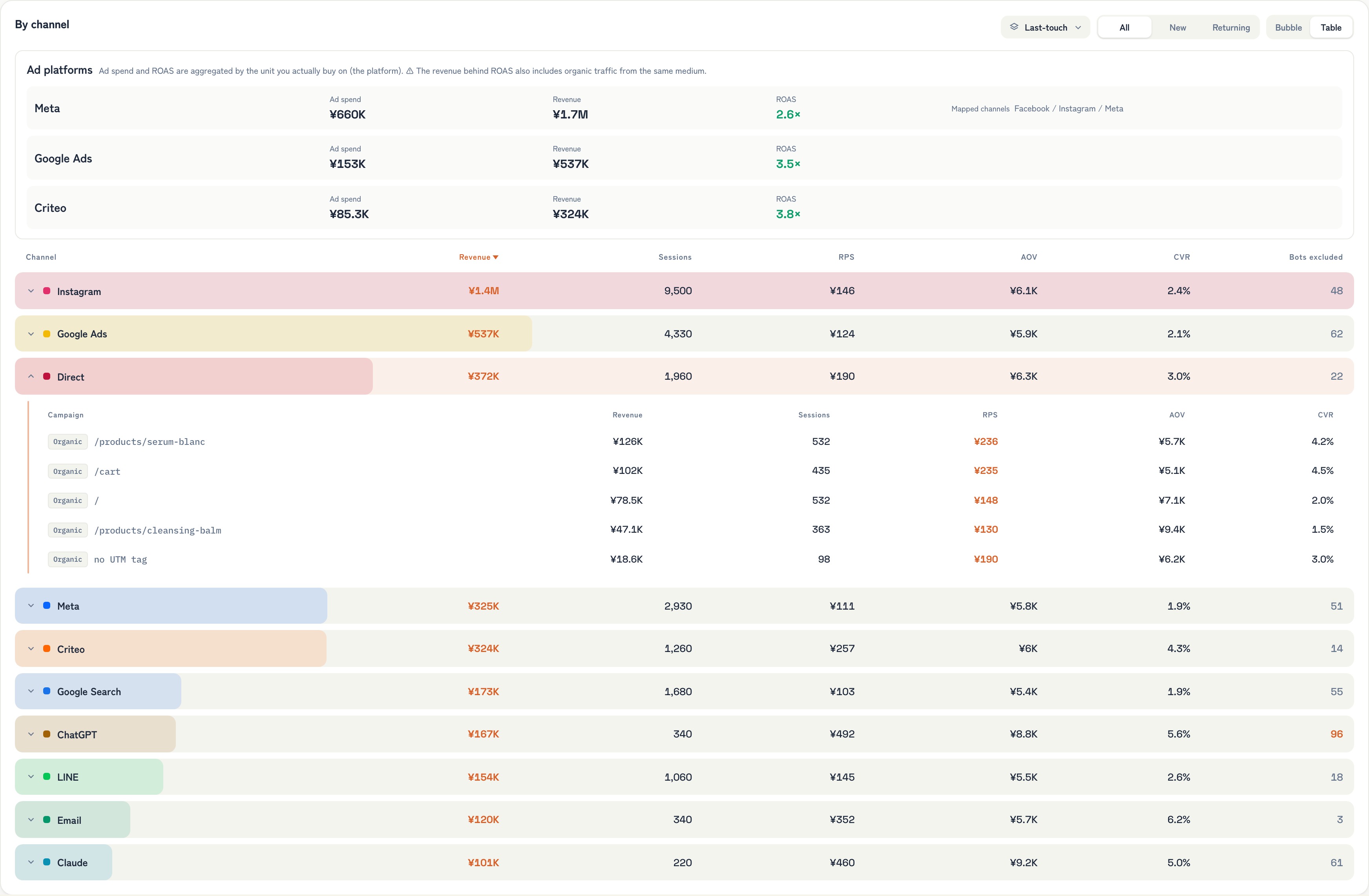
Fix the four categories in GA4, and in parallel read "how much the reclassified channels actually sold" by revenue. That's the next step toward moving ad decisions without being thrown by unknown traffic.
Summary — don't bucket "couldn't be classified"#
The four values that surface in GA4 reports — "(not set)", "Unassigned", "(other)", and "Direct / (none)" — are routinely treated as a single mass of "unknown traffic." But they are separate phenomena that GA4 generates at different stages.
- (not set) is missing at the receive stage: fix the measurement tag
- Direct / (none) is an explicit classification at the classify stage: enforce utm
- Unassigned is a no-rule outcome at the classify stage: add channel definitions
- (other) is aggregation at the display stage: rethink dimension design
Separating the four by their generation stage prevents misdirected fixes and wasted effort. Even simply assigning each category to the right team — analyst, engineer, marketing operator — dramatically shortens troubleshooting time.
Related articles on /en/news:
- 5 causes of GA4 'Direct / (none)' traffic — diagnosis and fix guide
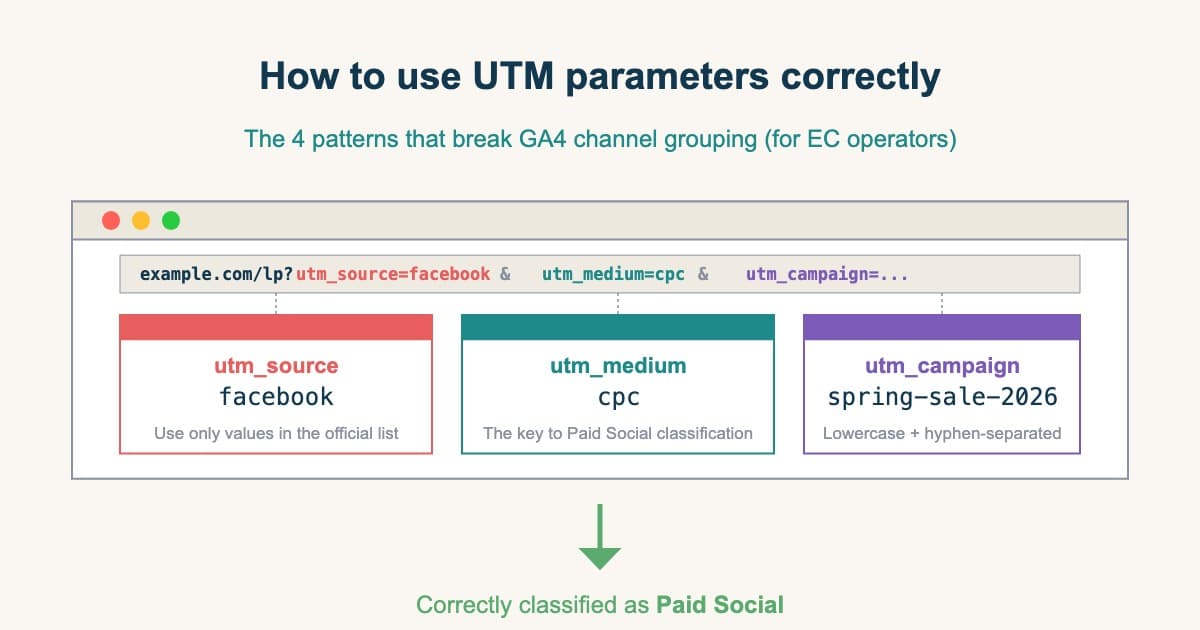
- UTM: 4 patterns breaking GA4 channel grouping
- The utm_source you should not use for Meta ads — and why GA4 makes it disappear
- GA4 e-commerce setup in 30 minutes — Shopify checklist
- 71% of stores have GA4 installed, only 11% actually use it — here's what's broken
- GA4 isn't built to show you revenue — the attribution blind spot
- The last-click trap that distorts ad-budget decisions
See which ads actually drive revenue, at a glance
Free up to 5,000 sessions/month, AI connection included. No credit card required. Up and running in 5 minutes.
References#
- Google Analytics Help "[GA4] About (not set)" April 2026
- Google Analytics Help "[GA4] Default channel group" April 2026
- Google Analytics Help "Tagging best practices to avoid unassigned, (not set), and direct traffic issues" April 2026
- Google Analytics Help "[GA4] High-cardinality dimensions" April 2026