
You open GA4 and yesterday's revenue reads zero. Sessions are the same as ever, and only the revenue column is empty. This article covers the order in which to look at that symptom, and what to base decisions on until the isolation is finished.
Contents
TL;DR#
-
When only revenue is zero and sessions are as usual, the first thing to suspect is purchase events not arriving
A day with zero orders looks exactly the same on screen, so start by confirming the orders sitting in the cart
-
The order to look in is the session count, then a test order's firing, then a match against actual order counts
Working down in that order settles whether it is the sending side or the receiving side, and how many days back it started
-
What has stopped is the measurement, and the revenue itself is still held on the payment side
The amounts stay with the payment provider, and what stops is the material you decide allocation with. Confirming the fix takes until the next day at the earliest
1. The First Screen People Open After Seeing Zero Revenue Is the Wrong One#
Yesterday's revenue reads zero. Sessions on that same day come to 1,400, no different from the same weekday a week earlier. When those two sit on one screen, the first thing to suspect is that purchase events are not arriving. A day with zero orders looks exactly the same, though, so start by confirming whether orders are sitting in the cart.
Most people who see that screen open Google Tag Manager. The purchase tag must have broken — that reading is a natural one. Enter from there, however, and a correct setting leaves you with nothing to go on, and the path dead-ends. There is another place to look first.
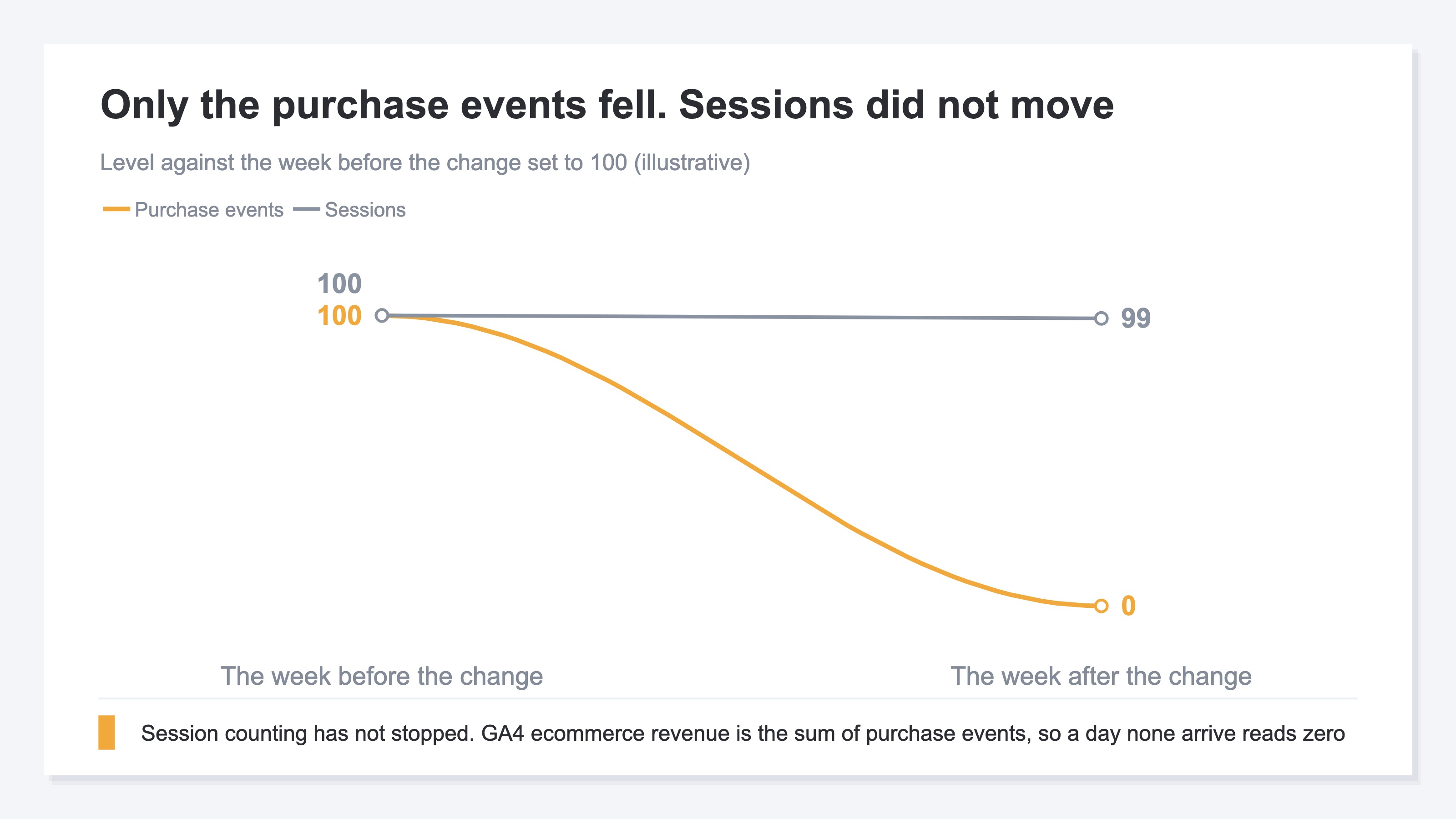
GA4 ecommerce revenue is the sum of the purchase events the site sent. An event carries product information in an array called items, and when it sends an amount it attaches the currency setting as well[1]. The assumption is that this is sent at the moment a purchase completes[2]. So revenue of zero means no more than this: not one purchase event arrived. And even when events do arrive, if the currency setting is missing they are not calculated correctly as revenue[1].
If you remember installing a consent management banner around the same time, the drop takes a different shape. It usually settles at a level reduced by some proportion, and falling all the way to zero is not typical. For that separation, see GA4 numbers fell after the consent banner.
2. Check the Session Count First, Then Confirm the Firing#
The first thing to look at is the session count for that same day. If it is unchanged from the week before, the only thing that has stopped is the purchase event. The case where sessions went to zero along with revenue is handled in the FAQ.
Next comes a test order. Put one through and watch on the spot whether the purchase arrives as an event. The screens to use are DebugView[3] and the preview feature that serves the same purpose on the tag manager side[4]. When no firing is visible, move to the sending side; when it fires but does not land in revenue, move to the receiving side. How to assemble the purchase event is covered in tracking ecommerce purchases with GTM.
That much settles the sending side or the receiving side, but not since when. What settles that is the match against actual order counts. Pull the order count by date from the cart or payment admin screen and pair it with the GA4 purchase event count. The same pairing can also be used to estimate the proportion being lost, but what you want out of it here is a date.
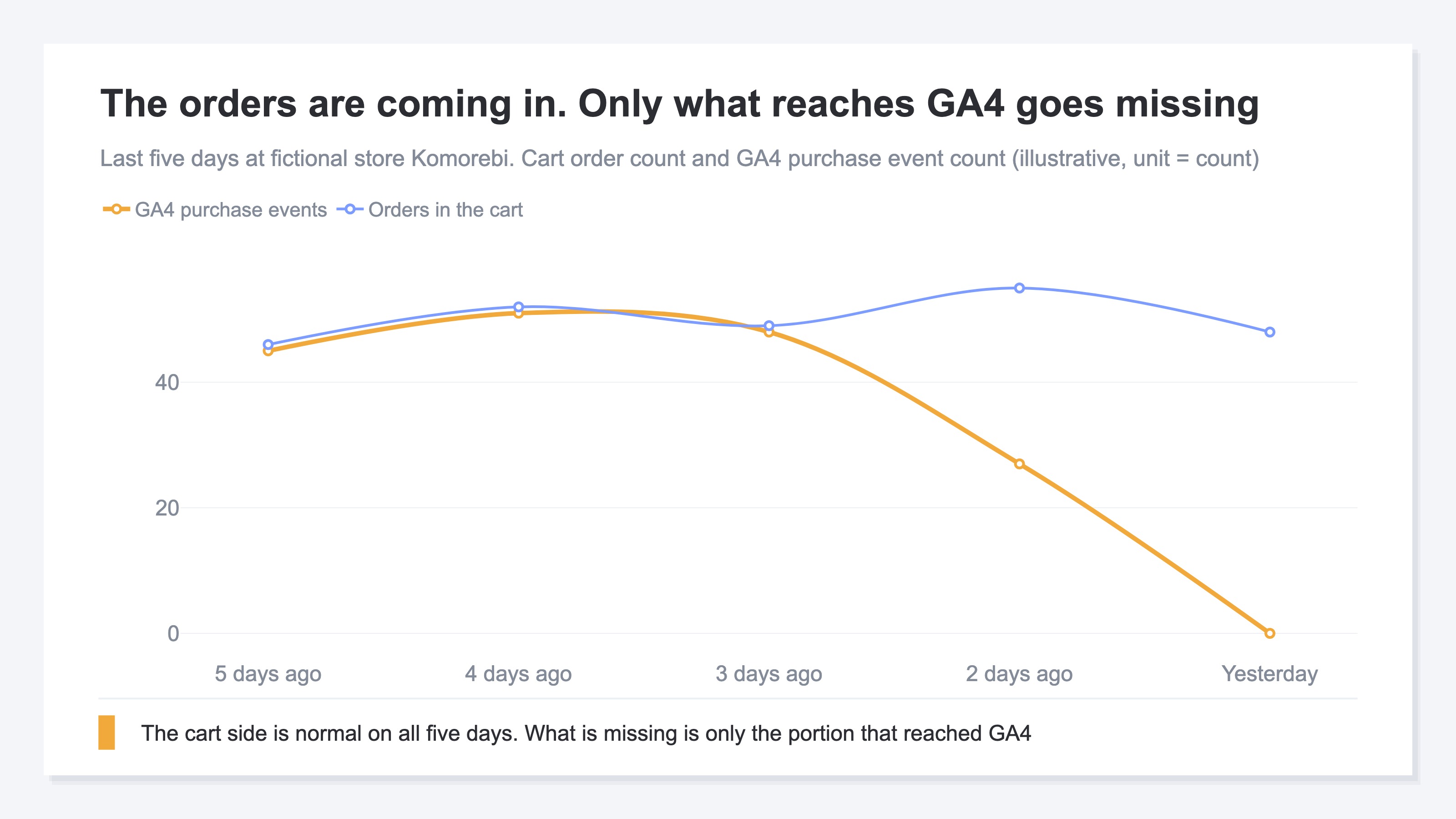
Paired up, the loss takes on a shape. Start by finding the first day the two opened apart. If a day just before it holds only half the records, that is a day where firing split around the time some work was done, and it is the candidate for the starting point. Once the date is fixed, you can go and look at what changed on the site that day. Note that zero and "slightly off" are different in cause and in response. A discrepancy of a few percent falls under why GA4 revenue doesn't match Shopify.
When conversions in the ad admin screen stopped from the same day too, this is not a story confined to GA4. Look at the places both paths run through, such as the tag manager. The inspection procedure is in a five-minute checkup for ad conversion tracking, and the cart-specific things to confirm are in the GA4 ecommerce setup checklist.
This pairing only holds up, though, for as long as someone pulls the actual order counts every day and pairs them to the same dates. DebugView and preview can only confirm firing while you are operating them. If the same thing happens the day after that work stops, it gets found on the day someone next builds the table.
3. What Stopped Is the Measurement, Not the Revenue#
The previous day's data becomes usable in GA4 reports at around 3:30 p.m. the next day as a standard. It is stated plainly that this is not a guaranteed time and that processing can run late[5]. That is why isolation does not finish in a day.
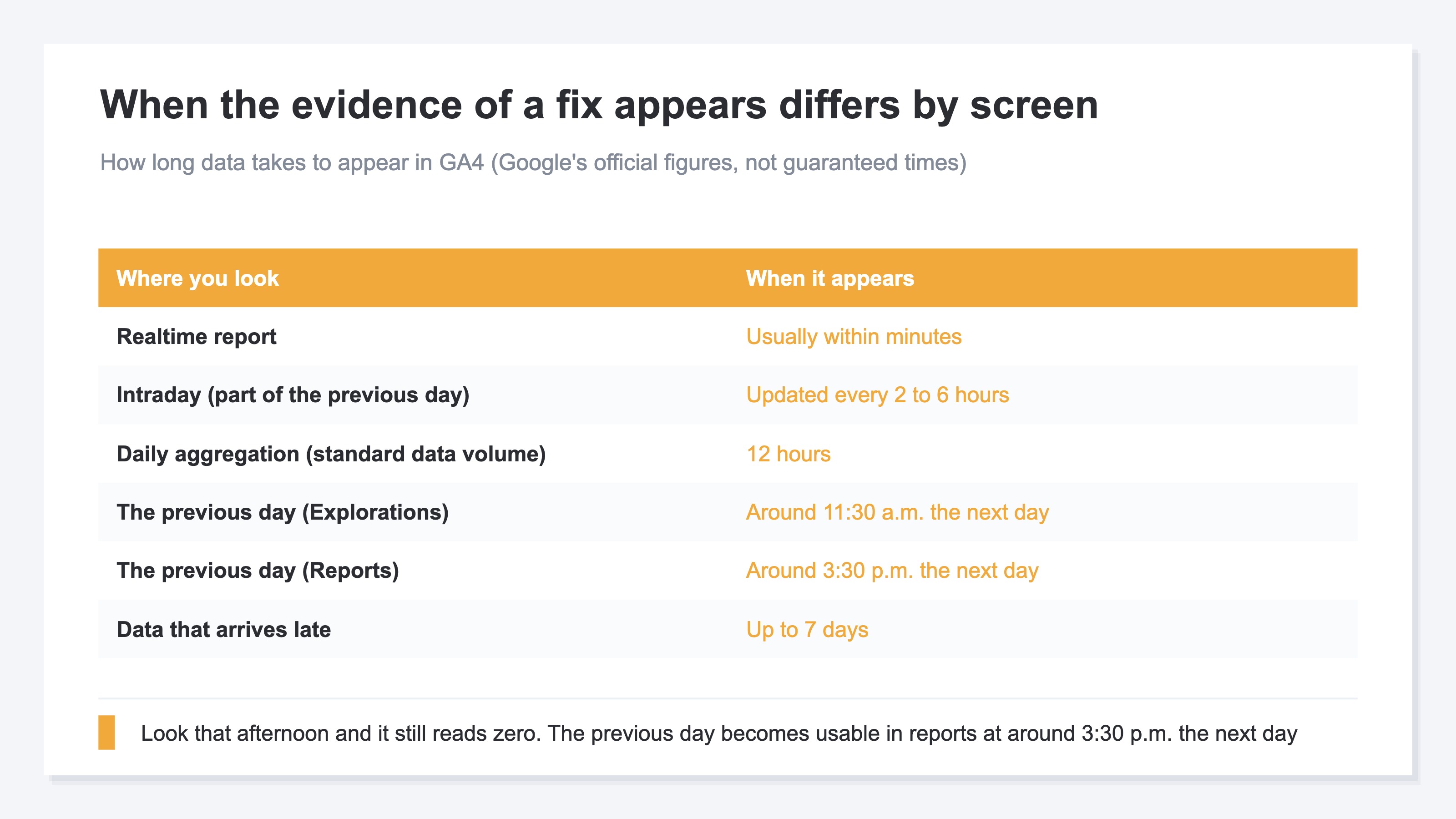
Open the screen on the afternoon of the day you fixed the tag and the revenue column still reads zero; the evidence that it is fixed only appears the next day or later. If all you want is whether it is firing right now, the realtime report reflects it within minutes as a rule[5]. What you see there, though, is the event at that instant, not the day's revenue total. Some data can also arrive up to seven days late[5].
Through all of it, the revenue itself has not fallen. Payments keep going through and the amounts stay on the payment side. What drops out is the material for deciding where to direct spend. Decisions you had been making by looking at RPS (revenue per visit) and revenue by channel lose their input, and nothing else.
And those decisions come with due dates. This month's ad budget is consumed daily, and sale purchase orders have deadlines counted back from the delivery date. Identify the day it broke, fix it, then confirm the previous day lands in reports the following day. Two days at the very least, or a week if you wait for the late-arriving portion. Within those two days to a week, the days on which allocation gets decided arrive as usual.
RevenueScope solution
Revenue, sessions, RPS, AOV and CVR are displayed on one screen. Specify a period and the current period's figures appear with a comparison to the prior period and a daily trend.
Sessions are counted by RevenueScope's own tag. Revenue is received from the same dataLayer purchase event GA4 uses, so if that stops, RevenueScope's revenue and RPS fall to zero on the same day. As long as the measurement tag is alive, sessions alone stay recorded at that day's level, and the difference in how each one falls stays visible as a shape in the daily trend.
Asking RevenueScope for the channel breakdown of the seven days before the change at fictional store Komorebi (illustrative)
| Channel | Sessions | Revenue | RPS |
|---|---|---|---|
| Google search | 5,200 | ¥620,000 | ¥119 |
| Meta | 2,400 | ¥120,000 | ¥50 |
| Direct | 1,800 | ¥90,000 | ¥50 |
| 600 | ¥40,000 | ¥67 | |
| Total | 10,000 | ¥870,000 | ¥87 |
Note: what to read here is only the spread between Google search and the other three channels. Both the amounts and the lineup of channels are one example built for the explanation, and what sits in the demo screen is the sample store's sample data, refreshed daily.
Of the ¥870,000, ¥620,000 comes out of Google search, and the other three channels together add up to ¥250,000. RPS is also highest there at ¥119, so this store's allocation gets decided by looking at Google search. On the day purchase events stop, every RPS in the table goes to zero at once, that ¥119 included. The number that was doing the most work in the decision disappears at the same moment as the rest.
FAQ#
Frequently asked questions#
Q. Sessions went to zero as well. Is the cause the same?
A. It has stopped further upstream than the purchase event, on the measurement tag or on the tag manager that delivers it. If you installed it as custom HTML, session counting stops at the same time the tag manager as a whole goes down. The order to look in does not change.
Q. I fixed the tag but the screen still reads zero. Does that mean it is not fixed?
A. You cannot judge that within the same day. The previous day's data becomes usable in reports at around 3:30 p.m. the next day as a guide[5]. If all you want is whether it is firing right now, the realtime report will normally confirm it within minutes[5].
Q. Can revenue from the period it was stopped be filled in afterwards?
A. Purchase events that were never sent do not fill themselves in later. There is data that arrives with a delay of up to seven days[5], but that is about arrivals running late. Cover the missing period with the cart's order data.
Summary#
When GA4 revenue suddenly goes to zero, the first thing to open is not the tag settings but the sessions for that same day. If they are at their normal level, the only thing not arriving is the purchase event. From there you work down in order: a test order's firing, then the match against actual order counts.
The evidence that it is fixed appears from around 3:30 p.m. the next day onward. What to do today is pull the actual order counts for yesterday and today and pair them with the GA4 purchase event counts for the same dates. The date on which the two came apart is the starting point for going to look at what changed that day.
See which ads actually drive revenue, at a glance
Free up to 2,000 sessions/month, AI connection included. No credit card required. Up and running in 5 minutes.