
You want to properly count "a purchase completed" on your online store. You've heard GTM (Google Tag Manager) can do it, but it's not quite clear what to set up, or what changes once you're counting. This article is for people at that stage.
Bottom line: the basics of tracking ecommerce purchases with GTM and dataLayer can be grasped as a common pattern, even when the cart differs. But the key is not to let measurement end at "counting." You can get purchase counts and revenue amounts, yet "which channel is truly producing revenue" and "where to shift budget next" don't come out of measurement alone. Connecting the numbers you count to a revenue decision is the real purpose of measurement.
If you'd rather compare "whether purchase tracking is possible" across the major carts, Comparing GTM tracking across ecommerce carts: the difference comes after support is a better fit. This article isn't a comparison — it lays out the common "how-to pattern" that holds regardless of cart.
Table of contents
Key takeaways#
-
Ecommerce purchase tracking runs on a common "dataLayer → GTM → analytics" pattern
When a purchase completes, the revenue amount and order number are pushed to a hand-off spot called the dataLayer, GTM picks it up and sends it to your analytics tool. Even when the cart differs, this flow itself is the same.
-
What you line up is three things: the fire, the values and order ID, and duplicate prevention
Measurement fires exactly once at the moment of purchase, revenue and order number pass through correctly, and the same purchase isn't counted twice. Line up these three and the foundation for purchase tracking is built.
-
Don't let measurement end at "counting" — connect it to a revenue decision
You can get purchase counts, but "which channel produced revenue" is hard to see in GA4's standard view. Only when you take the numbers you counted down to per-channel revenue efficiency does the next move get decided.
1. How ecommerce purchase tracking works: the dataLayer-to-GA4 pattern#
Bottom line: ecommerce purchase tracking runs on a common pattern — "purchase completes → push to dataLayer → GTM picks it up → send to the analytics tool." Even when the cart differs, this flow doesn't change.
"Purchase tracking" sounds hard, but the data flow is simple. The instant a customer completes a purchase, information like the revenue amount, order number, and items bought is pushed to the dataLayer (a "hand-off spot" on the page)[2]. GTM picks up what was pushed there and sends it to an analytics tool such as GA4 as a "purchase event."
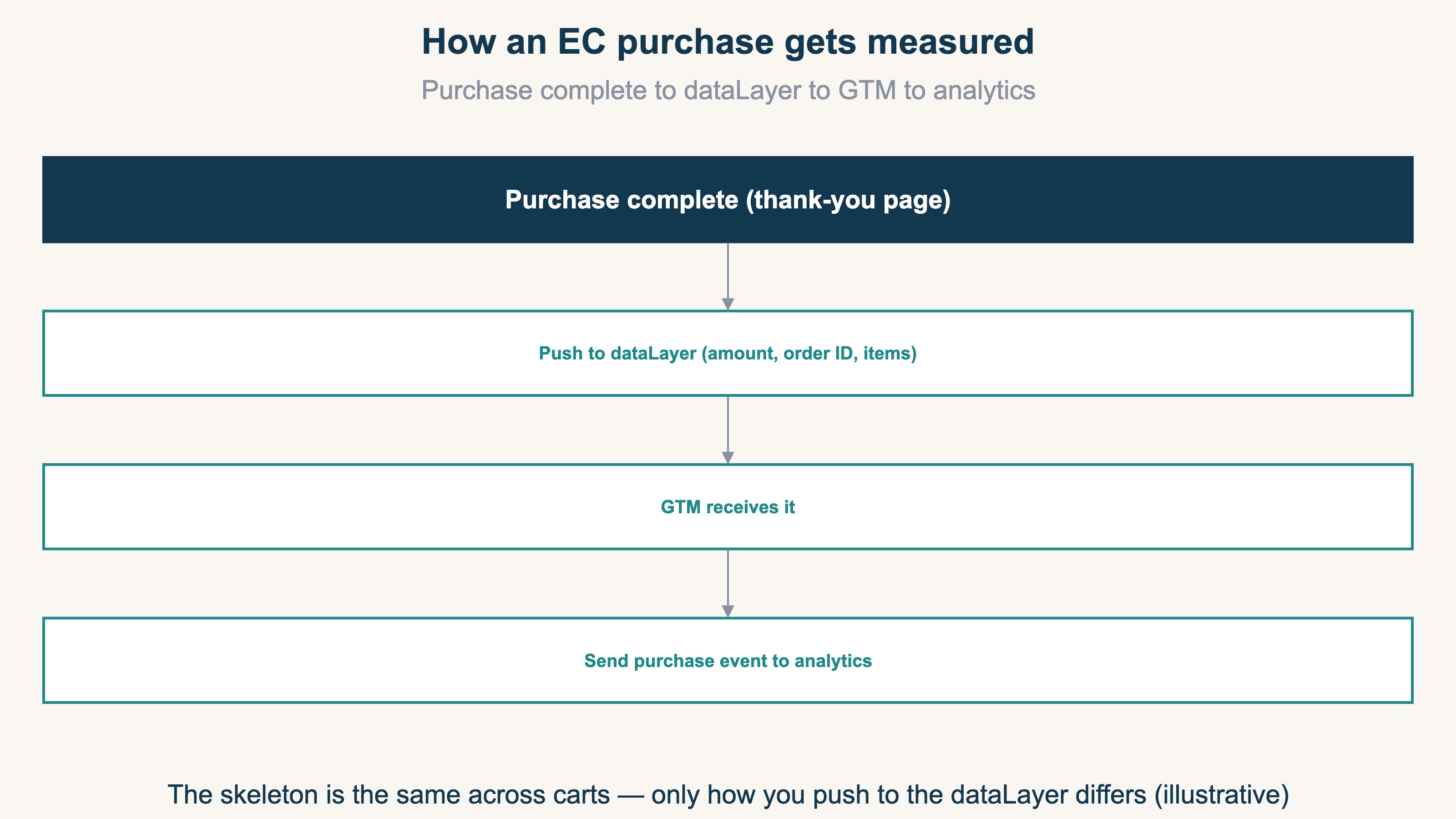
The point is that even when the cart differs, this "push to the dataLayer, GTM sends it" skeleton is shared. What differs is only how information gets pushed to the dataLayer (the cart's spec). So once you understand this pattern, it carries over to any cart. For the basics of event setup on the GA4 side, see GA4 event setup: the complete guide to a solid tracking foundation as well.
2. The common purchase-tracking steps for any cart#
Bottom line: regardless of cart, what you line up is three things — the fire, passing the values and order ID, and preventing duplicates. Get these three right and the foundation for purchase tracking is built.
The detailed setup screens differ by cart, but the substance you need to line up is shared. Nail these three points:
- The fire (when to run measurement): have measurement run exactly once on the purchase-complete screen (the thank-you page, etc.). If it runs on an intermediate page, you end up counting people who didn't buy
- Passing the values and order ID: pass the revenue amount and order number (order ID) correctly via the dataLayer. If the amount isn't passed, you get "we know the count but not the revenue"
- Preventing duplicates: don't count the same purchase twice. Using the order number as a marker, design it so an already-counted purchase isn't counted again — that's the safe approach
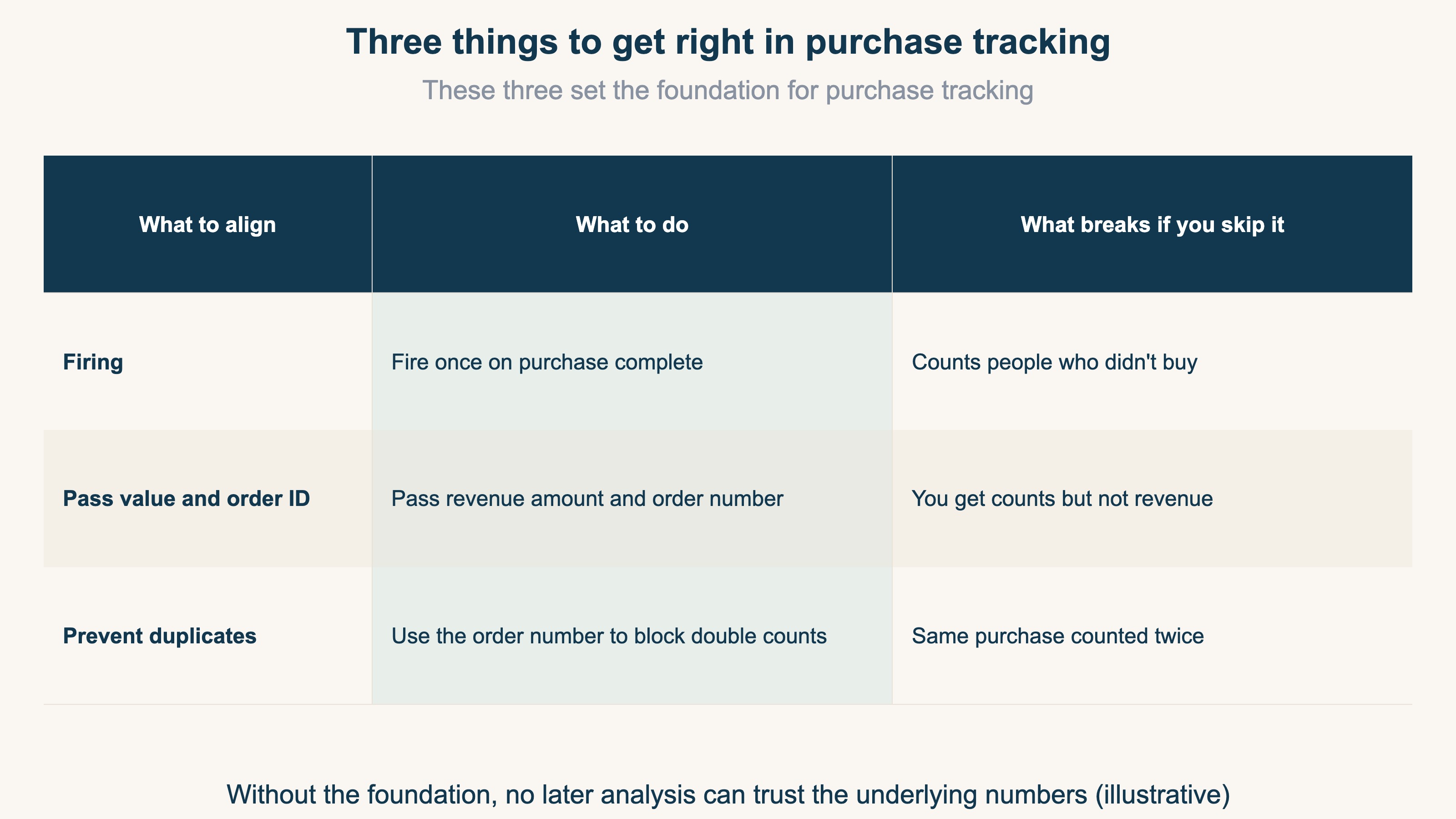
These three are, so to speak, the "foundation" of purchase tracking. Without the foundation in place, no matter how much you analyze afterward, the underlying numbers can't be trusted. Conversely, get these three right and, as purchase tracking goes, you've passed. For each cart's support status, see Comparing GTM tracking across ecommerce carts: the difference comes after support; for checking the setup on Shopify, GA4 ecommerce setup checklist: Shopify edition has it laid out.
3. How tracking typically drifts, and why what comes next sets you apart#
Bottom line: measurement only records "when a script ran in the browser," so its counts won't match the server-side record. Knowing the nature of the drift and then moving on to what comes after measurement — per-channel revenue — is what sets you apart.
Even with the tracking foundation in place, the numbers won't be perfect. The reason is that GTM and GA4 measurement only run when a script executes in the browser. The orders your store's server records and the measurement that runs in the browser count things by different mechanisms. So the two won't match exactly[1].
Another drift stacks on top of this: bots (automated, program-driven access). Some bots execute scripts, so even without a purchase they get recorded as access, and with their source unknown the numbers swell as "Direct" or "unknown." It's a drift where numbers stand up even though no person came. Leave measurement drift unattended and you'll judge "this channel is working" off the distorted numbers, and your budget allocation drifts off too.
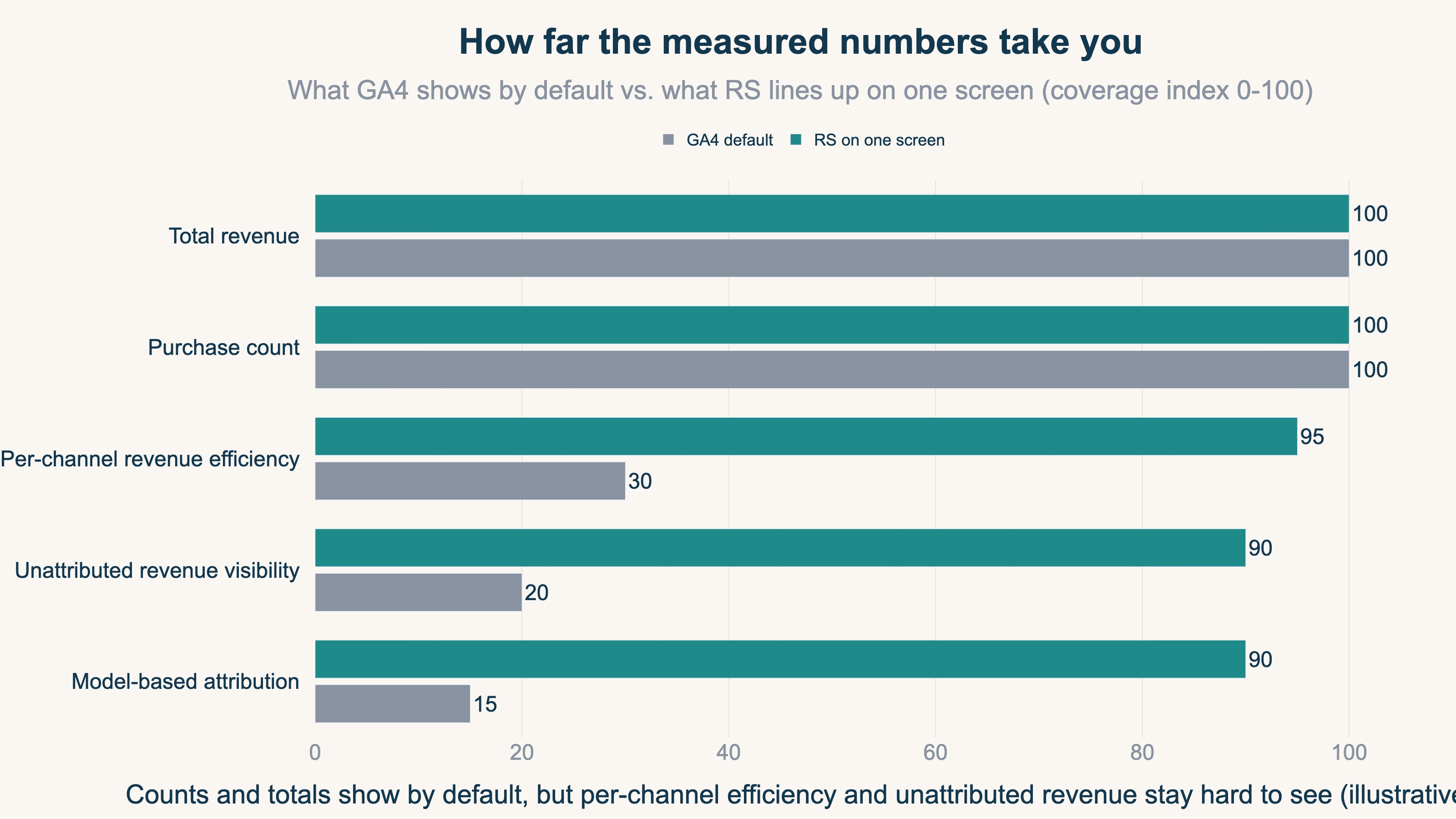
And the real value of measurement is everything beyond this point. Even if you can get purchase counts and revenue amounts, "which channel truly produced revenue" and "where to shift budget next" are structurally hard to see in GA4's standard reports. Measurement is the foundation for counting; it only gains meaning once you connect the numbers you counted to a revenue decision.
RevenueScope solution
Bottom line: taking the numbers you measured, with bots removed, down to per-channel revenue efficiency (RPS) on a single screen — that's structurally heavy in standard GA4; it's RevenueScope's domain.
Even with the purchase-tracking foundation built, you tend to stall at "so which channel should I weight budget toward." RevenueScope takes the revenue you measured, splits it by channel on human numbers with bots removed, and brings it down to revenue per session (RPS), lined up on a single screen. On top of that, revenue not tied to any channel is surfaced as an "unknown source" row, so you can read it as a floor.
For example, here's what "asking RevenueScope" looks like (demo data):
| Channel | Purchases | Revenue (JPY) | RPS (JPY) |
|---|---|---|---|
| Search | 90 | 90,000 | 100 |
| 60 | 54,000 | 180 | |
| Ad A | 40 | 16,000 | 20 |
By purchase count alone, search is the most; but by revenue per session (RPS), the most efficient is email. Only when you go from measurement's "counting" down to "which channel is working" does the next place to weight budget come into view. RevenueScope lets you switch among attribution views — last / first / linear / time-decay — so you can also confirm the channels that contributed upstream. Note that RevenueScope specializes in reading the measured numbers and bringing them down to per-channel revenue efficiency, turning them into material for revenue decisions. For how to compare channel efficiency, see Comparing channel analytics across ecommerce SaaS: judging by revenue; for the RPS view, What is RPS: judging acquisition quality by revenue per visit as well.
FAQ#
Q. Can I track purchases without using GTM?
Depending on the cart, a purchase-tracking mechanism may already be provided without GTM. That said, with GTM you can manage the fire timing and value hand-off in one place, and handle it with the same approach across carts. The advantage is that it carries over to any cart.
Q. The revenue I measured doesn't match the revenue in my cart's admin.
Some drift is to be expected. GTM and GA4 measurement only record when a script runs in the browser, which counts differently from the orders the server records. Bot contamination and cases where the measurement tag doesn't fire also create gaps. Rather than forcing an exact match, the realistic approach is to know the cause of the drift and use the numbers to grasp the trend.
Q. I'm getting purchase counts. What should I look at next?
Look at "which channel produced revenue." Even if you can get purchase counts and total revenue, until you go down to per-channel revenue efficiency (RPS), where to weight budget next isn't decided. Looking by channel on human numbers with bots removed makes the judgment less likely to wobble.
Summary#
The basics of tracking ecommerce purchases with GTM and dataLayer can be grasped as a pattern shared across carts: "purchase completes → push to dataLayer → GTM picks it up → send to the analytics tool." What you line up is three things — the fire, passing the values and order ID, and preventing duplicates. But measurement only records when a script runs in the browser, so the numbers drift from the server record and under the influence of bots. And even if you get purchase counts, which channel truly produced revenue is hard to see in GA4's standard view. Don't let measurement end at "counting" — bring it down to per-channel revenue efficiency with bots removed, and connect it to the next move. Take it that far, and purchase tracking starts to help with revenue decisions.
See which ads actually drive revenue, at a glance
Free up to 5,000 sessions/month, AI connection included. No credit card required. Up and running in 5 minutes.