"We've implemented all 12 GA4 events. We thought measurement was done — but the report still doesn't show which channel is selling most efficiently." A common voice from e-commerce operators. GA4 event setup is the starting point for measurement, but finishing setup isn't the same as connecting to revenue decisions. This article closes out the "setup side" — the 3-layer boundary, the 12 e-commerce recommended events, reserved-collision avoidance, and 3-layer verification — and then lays out where the wall from setup to revenue actually sits.
Table of contents
TL;DR#
- GA4 events have 3 layers (automatic / recommended / custom). Blur the boundary and the implementation guarantees breakage within months
- E-commerce operators lean on the 12 recommended events per spec; custom events are strictly for behaviors recommended events can't express
- Reserved prefixes (
ga_/google_/firebase_) and reserved parameters (page_referreretc.) drive most of the "silent failures" you don't notice for six months - On the 4-gate flow — configure → verify → decompose revenue → next move — GA4 alone auto-carries you through gate 2, to the doorstep of gate 3. The rest needs a separate mechanism
1. Why "configured" isn't the end of GA4 event setup#
Bottom line: "we implemented the 12 events" = "we can measure it," but not yet "we can use it for a revenue decision." GA4 event setup is the starting point. Beyond it sit verification, revenue decomposition, and the next move.
What happens in a lot of teams: right after implementation completes, you think "that's the measurement done," open the report, and find "it doesn't show what I thought." Some of that traces back to shipping with the 3-layer boundary vague — but fixing that alone isn't enough. Capturing purchase.value correctly and seeing "which channel is selling most efficiently" sit on different layers. The most frequent implementation failures are four: double-counting purchase, casing inconsistencies in custom event names, silent drops from reserved prefixes, and revenue aggregating to zero because value was a string. Fix those technically and they clear up — but the revenue-connection conversation hasn't even started. On the underlying event-vs-session count, see GA4's event count and session count.
2. The 3 layers of GA4 events, and the 12 e-commerce recommended events#
Bottom line: most behaviors that happen on an e-commerce site are already covered by "recommended events." Custom events stay reserved for behaviors recommended events cannot express.
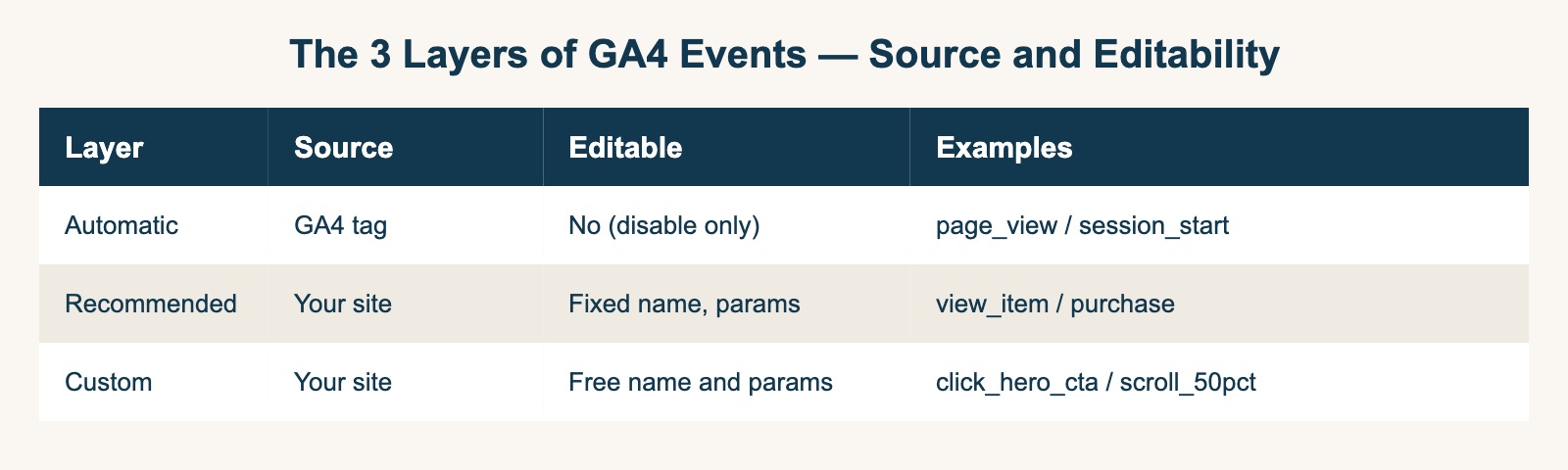
GA4 events fall into three layers by who sends them and how GA4 recognizes them. Automatic = Google defines and sends (page_view, session_start, etc. — fixed spec). Recommended = Google defines, your site sends (view_item, add_to_cart, purchase, etc. — spec provided). Custom = your site defines and sends (site-specific — no reserved prefixes). Recommended events worth implementing on an e-commerce site map to the user journey as 12 items.
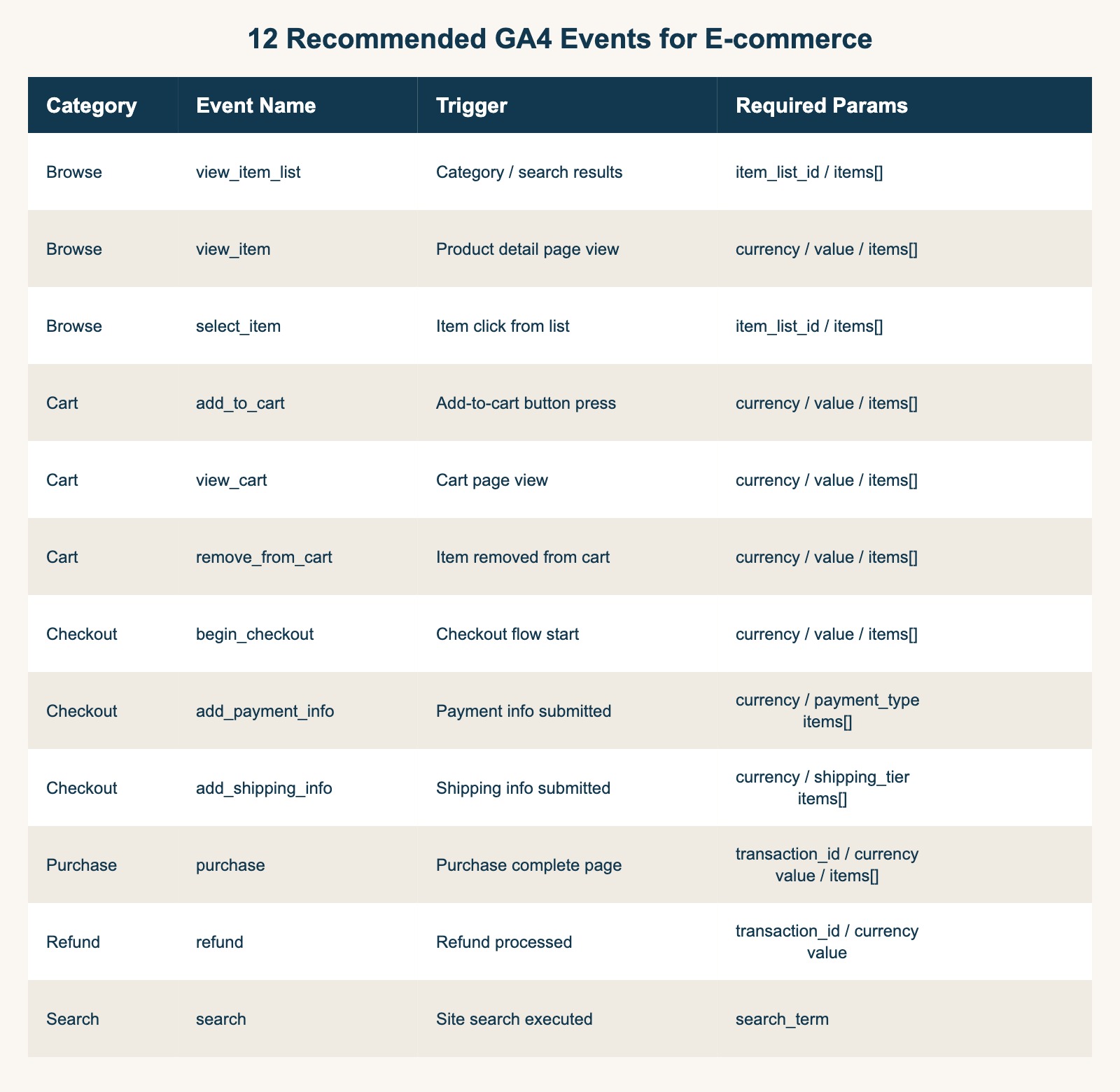
| Category | Event name | When to send | Required parameters |
|---|---|---|---|
| Browse | view_item_list | Category / search results | item_list_id / items[] |
| Browse | view_item | Product detail view | currency / value / items[] |
| Browse | select_item | Click from a list | item_list_id / items[] |
| Cart | add_to_cart | Cart-add tap | currency / value / items[] |
| Cart | view_cart | Cart page view | currency / value / items[] |
| Cart | remove_from_cart | Remove from cart | currency / value / items[] |
| Checkout | begin_checkout | Enter checkout | currency / value / items[] |
| Checkout | add_payment_info | Payment info entered | currency / value / payment_type / items[] |
| Checkout | add_shipping_info | Shipping info entered | currency / value / shipping_tier / items[] |
| Purchase | purchase | Purchase complete | transaction_id / currency / value / items[] |
| Refund | refund | Return complete | transaction_id / currency / value |
| Search | search | On-site search | search_term |
The failure with the highest frequency is purchase. When transaction_id is empty or duplicated, GA4's dedup fails and revenue double-counts. The Shopify case where purchase fires both from "thank-you page view" and "app-side conversion" is the single most common failure. Concrete countermeasures are in GA4 e-commerce setup checklist (Shopify).
3. Custom-event design and avoiding reserved collisions#
Bottom line: lock naming rules and parameter design before implementation. Retrofitting the conventions later is essentially a re-design of your measurement data. Reserved collisions (ga_ prefix, page_referrer etc.) are the main driver of six-month silent failures.
Three naming rules. First, order as verb_noun (click_hero_cta). Noun_verb order (hero_cta_click) reads poorly when events line up in reports. Second, snake_case throughout. Mixing camelCase or kebab-case splits them across separate events in GA4 reports. Third, avoid reserved prefixes. Event names starting with ga_ / google_ / firebase_ are dropped by GA4 on receipt [3]. If you want a custom prefix, use a 1-2 character marker like rs_click_cta.
Three parameter-design rules. First, minimum necessary (5-7 per event in practice). Second, consistent typing (value is always numeric, item_id is always string — avoids BigQuery aggregation errors). Third, register as custom dimensions (parameters used in reports must be registered in GA4 admin or they don't show up in the UI).
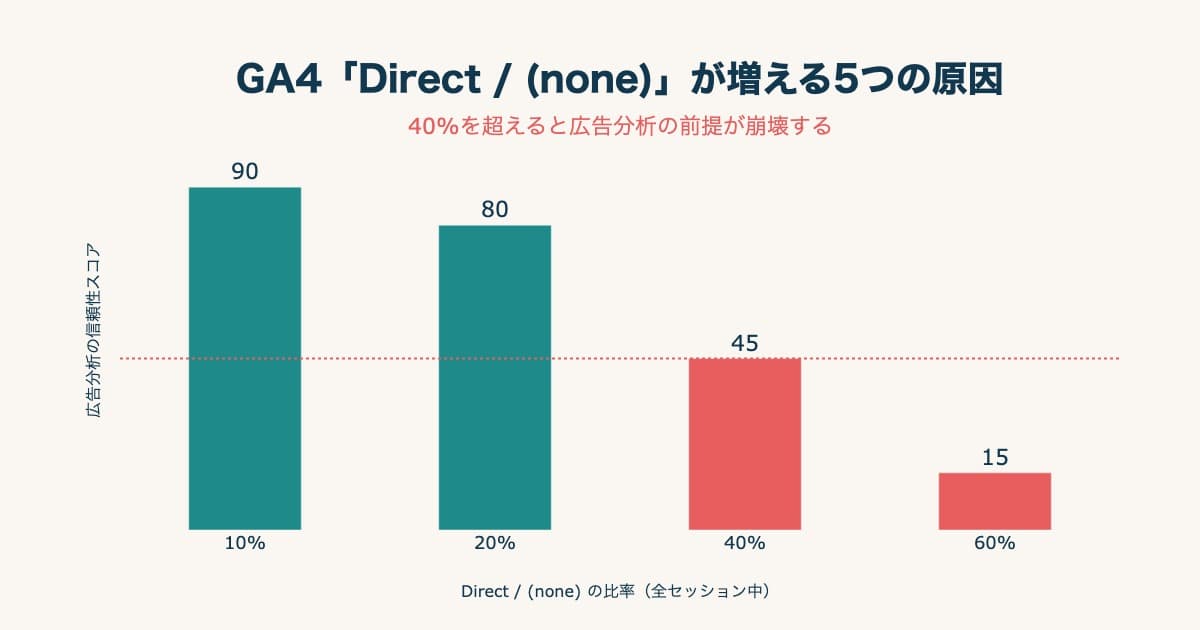
The most frequent reserved-parameter collision is redefining your own page_referrer / page_location / page_title. Values mix with GA4's auto-collected ones of the same name, producing the "(not set)" pattern in reports. Diagnosing "(not set)" is covered in GA4's Direct/(none): five causes. Whatever rules you decide, document them in a team-shared source; with more than one implementer, verbal or Slack-only agreement will collapse within six months.
4. The real wall after setup — verification and connecting to revenue#
Bottom line: on the 4-gate flow — configure → verify → decompose revenue → next move — GA4 alone gets you cleanly through the second gate (verify), to the doorstep of gate 3. From the third gate on, you're hand-building exploration reports.
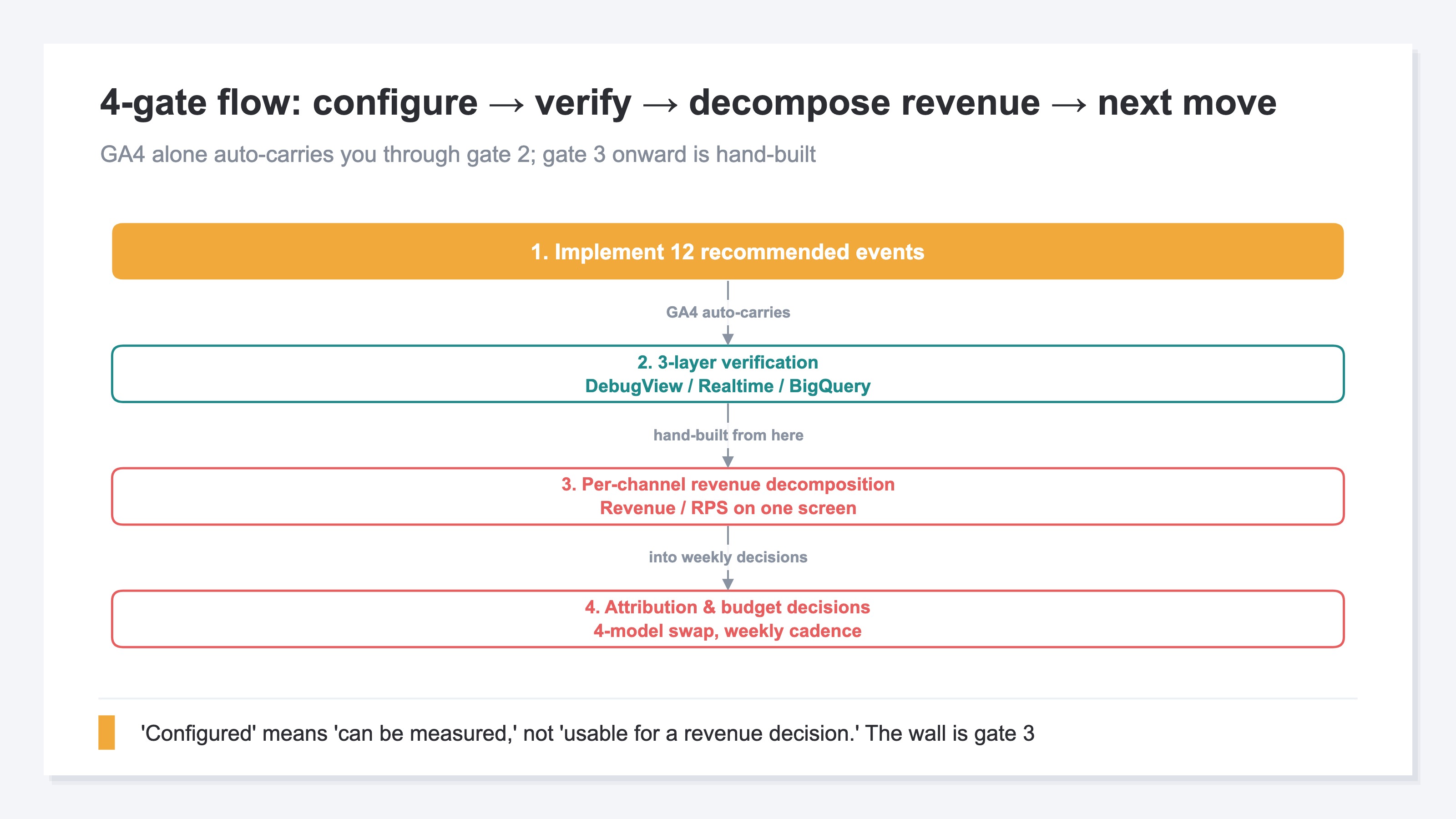
Start with gate 2, verification. After implementation, verify across three layers. Right after: DebugView, event sends confirmed per second (event name, required parameters, type). Before publish: Realtime report, confirmed the events were counted (visible in DebugView but not in Realtime suggests a reserved prefix). One week after publish: BigQuery export, confirmed the actual stored parameter structure. Skip any of these and "looks measured but is silently broken" slips through. This is where GA4 alone carries you.
The problem starts at gate 3. Capturing purchase.value correctly still doesn't put "which channel's sessions are producing revenue most efficiently" in front of you. GA4's standard e-commerce reports don't lead with this cut. To line up per-channel revenue and RPS (revenue per session), you have to compose an exploration report from dimensions yourself. And switching attribution model (last / first / linear / time_decay) means rebuilding that exploration report four times. Revenue, RPS, and sessions live on separate screens; cross-referencing takes another step. For a mid-market operator, running this weekly is too heavy. The wall after "configured" isn't technical — it's about folding into the weekly decision. Source/medium-level revenue breakdown is covered in GA4 Source Groups and revenue breakdown.
RevenueScope helps
RevenueScope takes over gates 3 and 4 — turning the purchase (revenue) data among what your events collect into revenue decisions. get_breakdown (dimension=channel) attributes purchase.value per channel under last-touch and lines revenue and RPS up on the same screen alongside sessions and engagement. Pass an attribution_model parameter and last, first, linear, and time-decay switch with a click. No GA4-style screen rebuilding. The table below is the sample store's per-channel attributed-revenue share (last-touch).
| Channel | Attributed revenue share |
|---|---|
| Direct | 30.1% |
| Google Search | 26.9% |
| ChatGPT | 14.2% |
| Meta | 6.0% |
| Claude | 4.8% |
| Google Ads | 3.8% |
| Perplexity | 3.8% |
| Gemini | 3.6% |
| Referral | 3.1% |
| Yahoo! Search | 2.6% |
| Copilot | 1.0% |
| X | 0.0% |
| Bing | 0.0% |
| Unattributed | 7.8% of total revenue |
Actual output from the sample store (a fictional site with sample data). Shares are of attributed revenue; the Unattributed row is the share of total revenue left unattributed.
One thing to be clear about. What RevenueScope takes over is producing per-channel revenue and RPS (with sessions and engagement) on one screen from the purchase (revenue) data you collect — with attribution model swapped one-click to fold into a business decision. It does not consume behavioral events like view_item, and it does not return AOV or CVR per channel (those live in the site-wide summary and campaign drilldowns). It does not replace GA4 event setup (no GTM-replacement, either). Gross margin, LTV, and inventory are outside the scope. It complements GA4 rather than replacing it, connects read-only, so the event tracking you set up keeps working as-is. Which model to weight, and how to move channel budgets, is your call.
FAQ#
Frequently asked questions#
Q. Once the 12 GA4 events are implemented, what should we look at next?
A. In order: first, 3-layer verification (DebugView → Realtime → BigQuery) to confirm "sending, counting, storing." Then move to lining up per-channel revenue and RPS on one screen to compare "which channel sells most efficiently" weekly. This cut doesn't lead the GA4 default reports, so it's either build an exploration report or use a dedicated dashboard.
Q. What actually happens with reserved prefixes (ga_ / google_ / firebase_)?
A. GA4 drops them on receipt [3]. Even if you implement them, they don't measure, so nothing shows up in reports. The annoying part is that "we think it's implemented" but numbers don't rise, so root-causing takes time. Design custom event names to avoid reserved prefixes. If you want an org-specific marker up front, use a short custom prefix like rs_.
Q. Is it realistic to align custom-event design after implementation?
A. Not really. Implemented event names and parameter names are already tied to the data you've sent, and renaming creates a break with historical data. Naming rules and type consistency need to be decided before implementation. If mixing has already happened, the practical migration is: (1) leave existing events in place, (2) apply the new rules to new implementations only, (3) report on the two rulesets separately.
Summary#
GA4 event setup is the starting point for measurement, not the destination. Nailing the 3-layer boundary (automatic / recommended / custom), the 12 recommended events, custom naming rules, reserved-collision avoidance, and 3-layer verification gets you to "verifiably configured." That's the range GA4 auto-carries you through.
Beyond that, seeing "which channel is selling most efficiently" weekly means multi-sheet exploration reports and switching attribution across four models by hand. For a mid-market operator, that's too heavy — implementation ends and the numbers stop being used in decisions. The real wall after setup isn't technical; it's whether you can fold decomposition into the weekly workflow.
RevenueScope takes over gates 3 and 4 — connecting the purchase (revenue) data your events collect to per-channel revenue/RPS and one-click model swap. It complements GA4 rather than replacing it, connects read-only, so the event tracking you set up keeps working as-is. Whether the post-setup decision workflow becomes weekly-runnable is what decides whether the data you're collecting starts moving revenue.
See which ads actually drive revenue, at a glance
Free up to 5,000 sessions/month, AI connection included. No credit card required. Up and running in 5 minutes.