Marketing KPIs get harder to prioritize the more of them you track. "There are too many variables to explain to the client." "The more I open the dashboard, the less clear it gets what to actually fix." These are the complaints I hear most from EC operators and marketers. Collecting metrics feels reassuring, but it actually slows the decision down. This article isn't a line-by-line deep dive into which five metrics to pick. It lays out the design philosophy for narrowing your metrics, how to set priorities, and how to run the cycle — all anchored in revenue. The more you narrow, the clearer your next move.
Table of contents
Key takeaways#
- Marketing KPIs get harder to prioritize as you add metrics. The real cause of "too many variables to explain, teams burning out" is not too few metrics — it's a failure to narrow.
- The one test for what to keep is "does it move revenue?" Keep only the metrics that map to a cross-section of the revenue formula, demote the rest to supporting metrics, and the survivors order themselves.
- Once you've narrowed, pick the single metric that matters most for your current phase and revisit it every 3 months. Priority isn't fixed — it shifts as the business phase changes.
- The thinking is simple; doing it every time, across every channel, is the hard part. That's exactly why lining all of it up in one view starts to pay off.
1. More metrics, fewer decisions#
Bottom line first: adding KPIs does not make decisions faster. The more metrics you track, the more "which one should we move?" scatters, and priorities stop resolving.
The voices from the floor are more visceral than that. "Seasonality, AI, competitors, the economy — there are so many variables that all I can tell the client is 'everything is trending green.'" One marketer's line captures the whole pain of metric overload. If you review 20 metrics every week and 15 are "up from last week" while 5 are "down," which one actually deserves a move? The meta-argument eats the meeting, and it ends before anyone gets to the actual tactics.
The other trap is vanity metrics — the numbers that look good. Follower counts, PV, bounce rate, and dwell time get promoted to KPIs precisely because GA4 makes them easy to pull, but their link to revenue is usually weak. A falling bounce rate doesn't guarantee a rising CVR (purchase rate). Confuse "metrics you can measure" with "metrics you should measure," and the numbers that are merely easy to grab end up sitting at the top of your priority list. This is the classic trap economists call the McNamara fallacy — overvaluing what's measurable and dismissing what isn't.
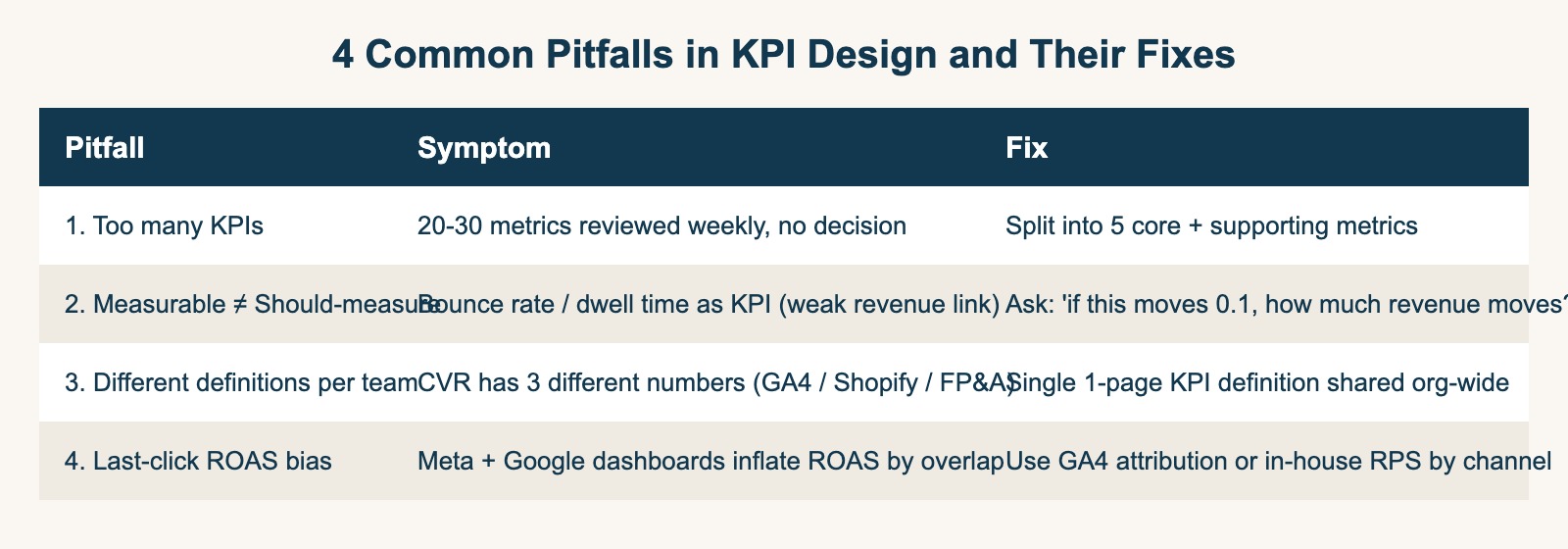
Adding a metric is easy. The hard part is deciding, after you've added it, what to look at and what to ignore. The struggle to set priorities doesn't come from having too few metrics — it comes from not having narrowed. So what you need next isn't a new metric; it's a test for which metrics to keep.
2. The one test: does it move revenue?#
Here's the answer up front: you decide what to keep on a single test — "does it move revenue?" With that axis, you never agonize over what to keep and what to cut.
The backbone is this decomposition formula:
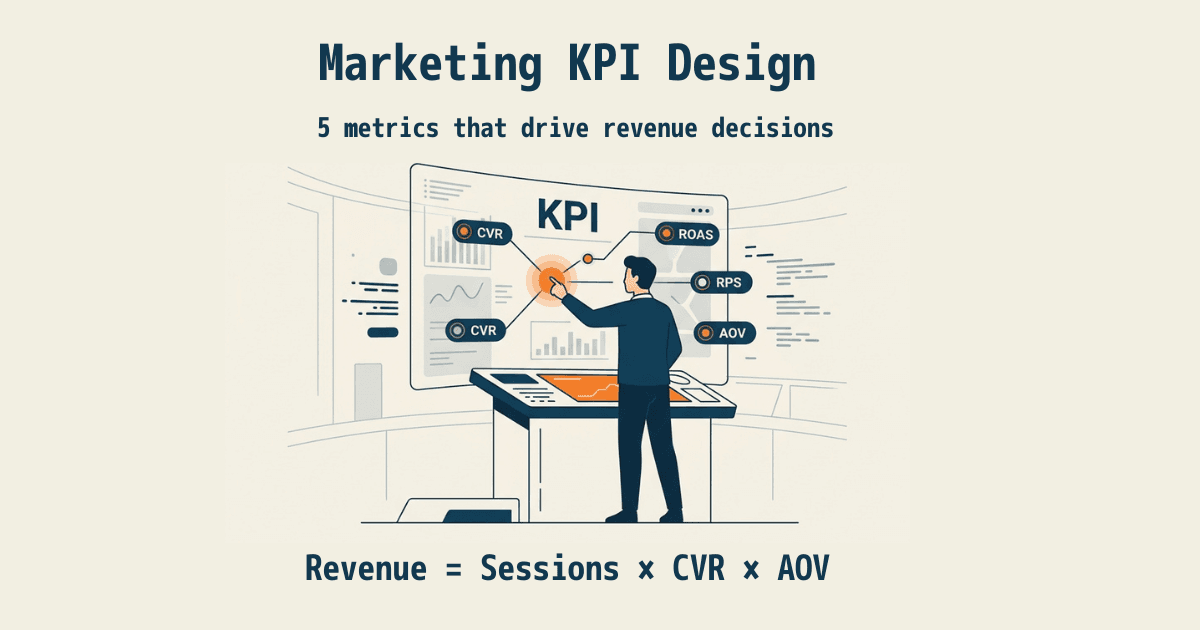
Revenue = Sessions × CVR × AOV
CVR is the purchase rate (the share of sessions that bought), and AOV (average order value) is the size of a single purchase. Revenue is nothing more than the product of these three. So a "metric that moves revenue" is one that maps to some cross-section of the decomposed revenue formula. Conversely, a metric that doesn't sit on any cross-section of this formula never rises to the top of the priority list, no matter how easy it is to pull.
The practical question when narrowing is exactly one: "If this metric moves a little, how many yen of revenue moves?" Keep the metrics you can answer with a concrete figure. Cut the metrics whose answer is vague out of your KPIs and demote them to supporting metrics. Most follower counts and dwell-time numbers fall away because they can't answer that question. The survivors share a common yardstick — how they move revenue — so priorities fall into place on their own.
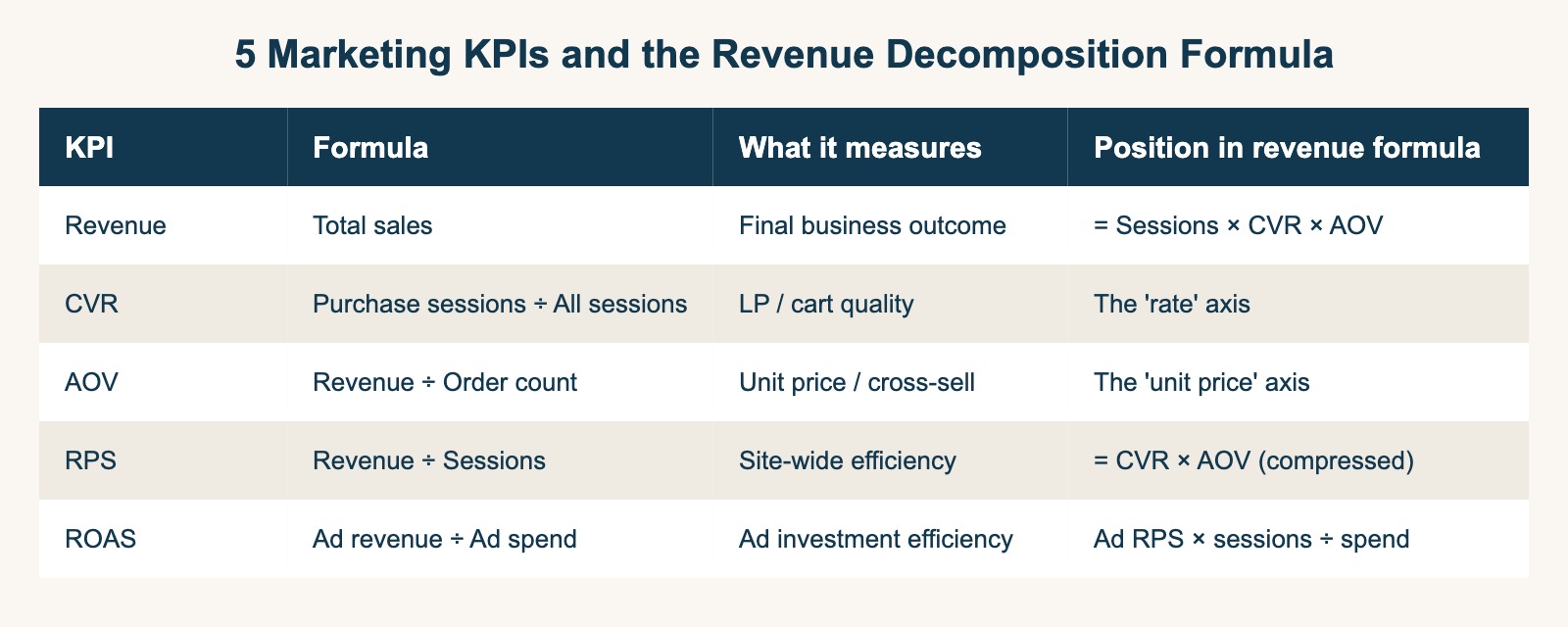
So which five do you put at the core? If we walk through each metric's definition in detail here, this very article turns into the "lining up metrics" it warns against. The contents of the five — Revenue, AOV, RPS (revenue per session), CVR, and Sessions — plus how to calculate each and what to decide from it, are covered in EC KPIs: narrow to five, and how to choose them. This article deliberately avoids going deep on the contents and stays on the design philosophy of "what you use to decide which to keep." If you're running ads, the thinking on adding ROAS (revenue against ad spend) is in The complete guide to ROAS, and how to read RPS is in What is RPS: how to use revenue per session.
3. Turn the shortlist into priorities, then run it#
Bottom line: once you've narrowed, assign priority to "the single metric that matters most for your current phase" and re-assign it every 3 months. Priority isn't done once you set it — it's something you run.
Setting priority also starts from the decomposition formula. Translate the abstract goal "we want to grow revenue" into which of a session shortfall, a CVR shortfall, or an AOV shortfall matters most right now. If you simply have too few visitors, it's Sessions; if visitors come but don't buy, it's CVR; if you want to lift the ticket, it's AOV — lean into the one that moves the needle for your current phase. Drop "everything matters" and narrow to one, and your tactical priorities decide themselves.
One distinction worth drawing here is between lagging and leading indicators. Revenue is a lagging indicator — it takes time to move. CVR, AOV, RPS, and Sessions are leading indicators — your tactics move them directly. The reason "revenue dropped" in a meeting ends with "yeah, it dropped" is that you can't move a lagging indicator directly. Only when you decompose revenue into leading indicators and debate where to act does it turn into tactics.
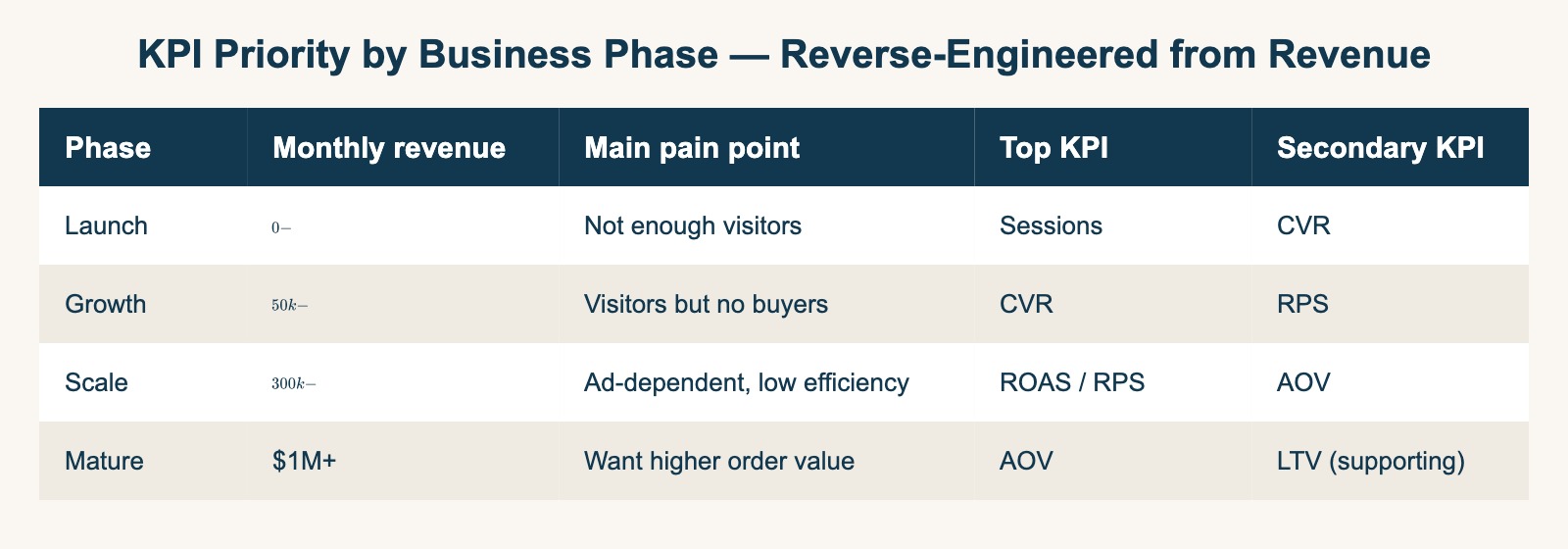
The 3-month review is what corrects the drift. Put three questions to each surviving metric. First, did this metric move from any of your tactics over the past 3 months? Second, when this metric moved a little, how many yen of revenue moved? Third, is the owner for acting on this metric clear? Any metric that answers "no" to one of these is a candidate to demote to a supporting metric or drop from your KPIs. Split the survivors further into "improvement KPIs you want to move this quarter" and "health KPIs you watch only when they breach a baseline," and your weekly review can spend its time on improvement KPIs alone. When this three-beat rhythm — narrow, prioritize, revisit — is turning, KPIs stop being something you line up and become a tool for deciding your next move.
RevenueScope helps
We've now walked the design template: narrow metrics by "does it move revenue?", set priority on the one that matters most for your current phase, and revisit every 3 months. The thinking is simple. What's heavy is doing this every time, across every channel. Matching which metric moved revenue and re-assigning priority, done by hand, lands on you whole every month.
And existing tools aren't built for this matching. GA4 leads with behavior metrics — sessions, PV, bounce rate — and decomposing metrics from revenue takes separate setup. Ad platforms give you ROAS, but not site-wide or per-channel RPS. The result is that the five metrics you carefully narrowed to end up scattered across separate tools.
RevenueScope lines up these five metrics in one view. It puts Revenue, AOV, RPS, CVR, and Sessions on the same screen, decomposes them by channel or new-vs-returning, and shows in yen which metric is moving revenue. Connect your ad spend, and ROAS lands on the same screen too. It creates a state where you choose "which to prioritize" on the evidence of revenue, not on gut feel.
| Metric | Value (last 90 days) | What cross-section it is |
|---|---|---|
| Revenue | ¥747,140 | The business outcome itself |
| Sessions | 4,009 | The denominator of revenue (traffic volume) |
| CVR (purchase rate) | 4.1% | Share of visits that bought |
| AOV (revenue per order) | ¥4,501 | The size of a single purchase |
| RPS (revenue per session) | ¥186 | The revenue one visit generates |
| ROAS (when ad spend connected) | 2.44 | Revenue per ¥1 of ad spend |
Five metrics plus ROAS when ad spend is connected, on one screen (sample data from a fictional store, last 90 days)
The view above is demo data (a sample fictional store). What you can see here is that the five metrics sit on one screen and stay lined up as the cross-sections of revenue they each represent. When CVR falls and AOV rises, how did RPS move? You read the interplay between metrics on one screen, without doing the math in your head. RevenueScope doesn't reach into gross margin, inventory, or LTV — it specializes in the five revenue-based metrics and lines them up in one view. That's why you can decide the priority of your narrowed metrics on revenue and connect straight to your next move.
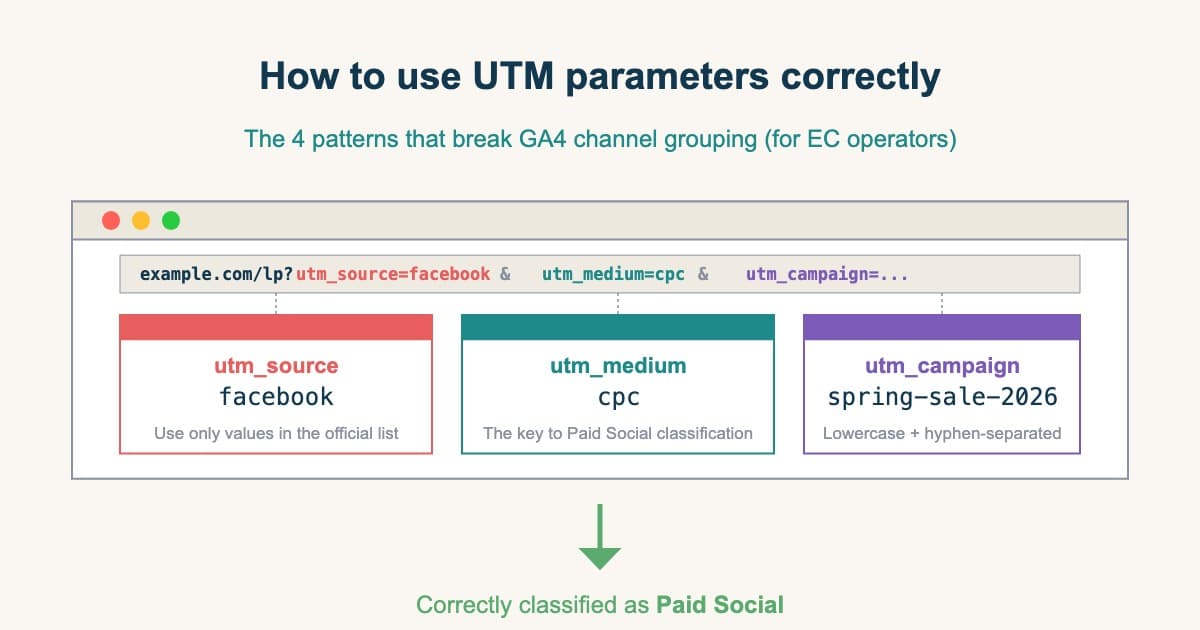
If your UTM (the parameters that mark traffic source) design is broken, per-channel RPS and ROAS get distorted too. As a prerequisite for calculating the five metrics correctly, it's worth also getting How to use UTM parameters correctly in order. How to separate ad-driven revenue from the rest is covered in GA4 attribution blind spots.
FAQ#
Frequently asked questions#
Q. How many KPIs should I narrow down to in the end?
A. Five is a rough guide, but the essence is choosing by "does it move revenue?", not by the number itself. Keep only the metrics that map to a cross-section of the decomposed revenue formula (Revenue, AOV, RPS, CVR, Sessions), demote the rest to supporting metrics, and you naturally settle around five. Don't decide the number first — think of it in the order of "narrow by the test, and the result happens to be five." Which five to put at the core is covered in detail in EC KPIs: narrow to five.
Q. How do I confirm my narrowed five are the "right five"?
A. Put the question "if this moves a little, how many yen of revenue moves?" to each metric. A metric you can answer in yen is worth keeping; a metric whose answer is vague is a candidate to demote to a supporting metric. Rightness is confirmed by how a metric moves revenue, not by its name. Repeat this question at the 3-month review and you keep dropping the metrics that no longer match reality.
Q. Do the priority KPIs change by industry?
A. The five metrics themselves don't change by industry, but the weighting does. An ad-heavy D2C leans on RPS and ROAS; a one-off-purchase product leans on Sessions and AOV — the metrics that move the needle for your current phase come to the front. What matters is dropping "everything matters" and leaning priority into the one metric that moves the needle most right now. Priority isn't fixed; you re-assign it as the business phase changes.
Summary#
Marketing KPIs get harder to prioritize the more of them you track. Too many variables to explain, teams burning out, dashboards that blur what to fix the more you open them — the real cause of that struggle isn't too few metrics, it's a failure to narrow.
The one test for what to keep is "does it move revenue?" Keep only the metrics that map to a cross-section of the decomposed revenue formula, and demote anything that can't answer "if this metric moves, how many yen of revenue moves?" to a supporting metric. The survivors get a revenue yardstick, and priorities fall into place on their own. Once you've narrowed, lean into the one metric that matters most for your current phase, and re-assign it every 3 months. This three-beat rhythm turns KPIs from "something you line up" into "a tool for deciding your next move."
The thinking is simple, but matching how metrics move revenue every time, across every channel, is hard work. That's exactly why keeping the five metrics lined up in one view — with priority shown on revenue — lets you decide, on evidence, whether to keep going or rethink.
See which ads actually drive revenue, at a glance
Free up to 5,000 sessions/month, AI connection included. No credit card required. Up and running in 5 minutes.