Audit more than 50 Google Ads accounts and the single most common mistake isn't bidding or targeting. It's conversion tracking that is broken — or doesn't exist at all. Consider an HVAC company that ran ads for eight months with zero conversion tracking, optimizing blind. It doesn't matter how good the ad, the targeting, and the landing page are if the conversions can't be reliably tracked. The scary part: when tracking breaks, your ads keep serving as if nothing happened. There is no alarm — budget just keeps flowing into the dark. This article covers the common ways conversion tracking breaks, and a five-minute checkup you can run on your own store.
Table of contents
TL;DR#
-
Broken tracking doesn't stop your ads — that's what makes it dangerous
Auditors rank it the most common mistake; one business went eight months without noticing
-
The checkup takes three steps and five minutes
Place one test order → confirm the event fires in GA4 Realtime → compare CV counts between your ad console and GA4
-
The warning signs: wild CPA swings, a channel stuck at zero conversions, and a multiple-fold gap between platforms
-
Once fixed, don't judge your ads on data from the broken period
1. Why conversion tracking breaks: five common causes#
Bottom line: it's almost always either "never set up" or "knocked loose by a site update."
Conversion tracking is the wiring that tells your ad platform that someone who clicked an ad actually purchased [1]. The wiring is a tag — a small piece of measurement code on your site — which means anything that touches your site can break it. The five common causes:
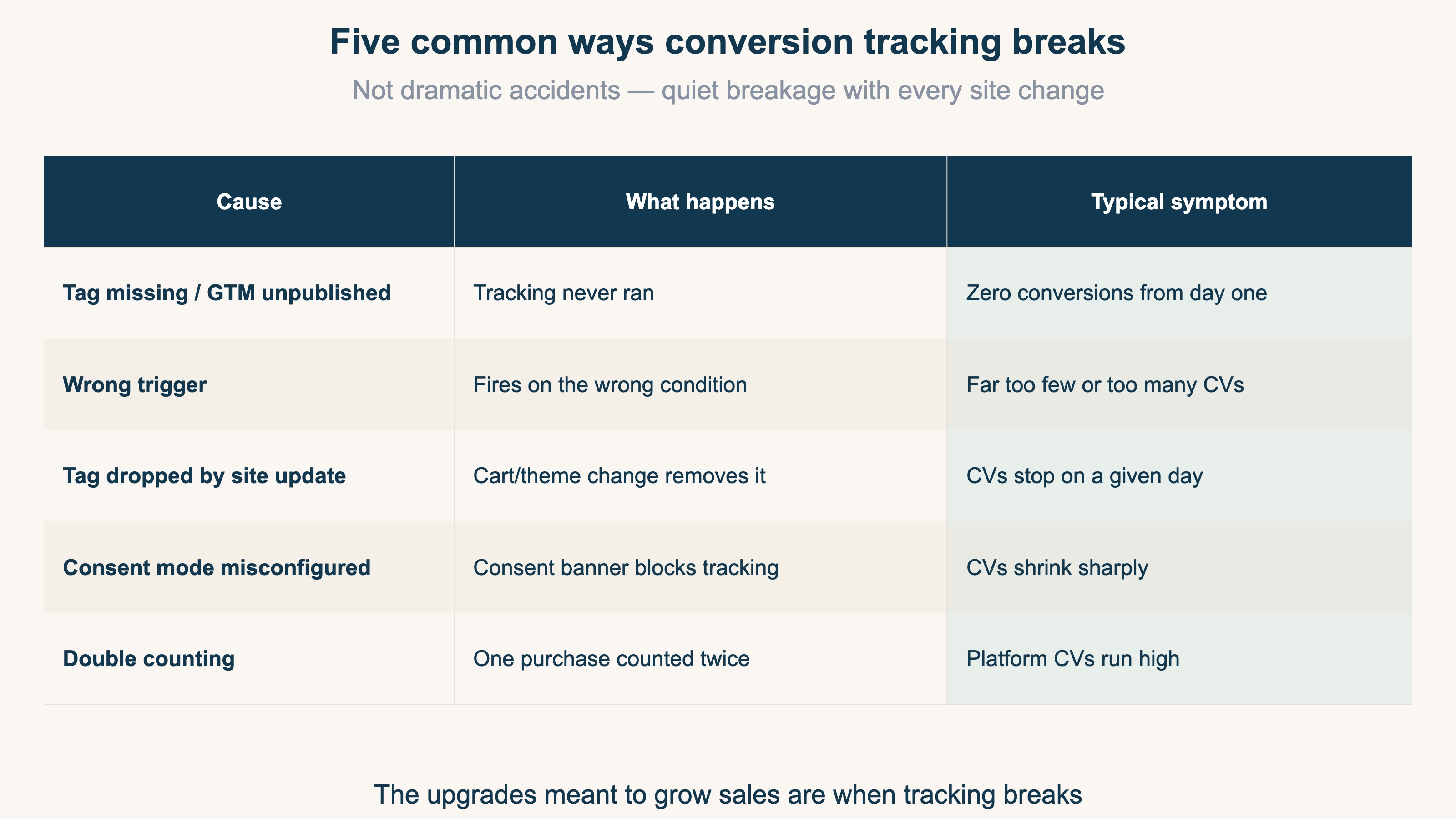
In practice, the classic failure modes are a GTM container that was never published [4], a wrong trigger, and consent mode implementation mistakes. Notice that none of these are dramatic accidents. A product page redesign, a cart system upgrade, a new cookie consent banner — every forward-looking change you make to grow sales is also a quiet opportunity for tracking to break.
2. The five-minute checkup: three steps#
Bottom line: place one real test order and confirm that single order shows up in both GA4 and your ad console.
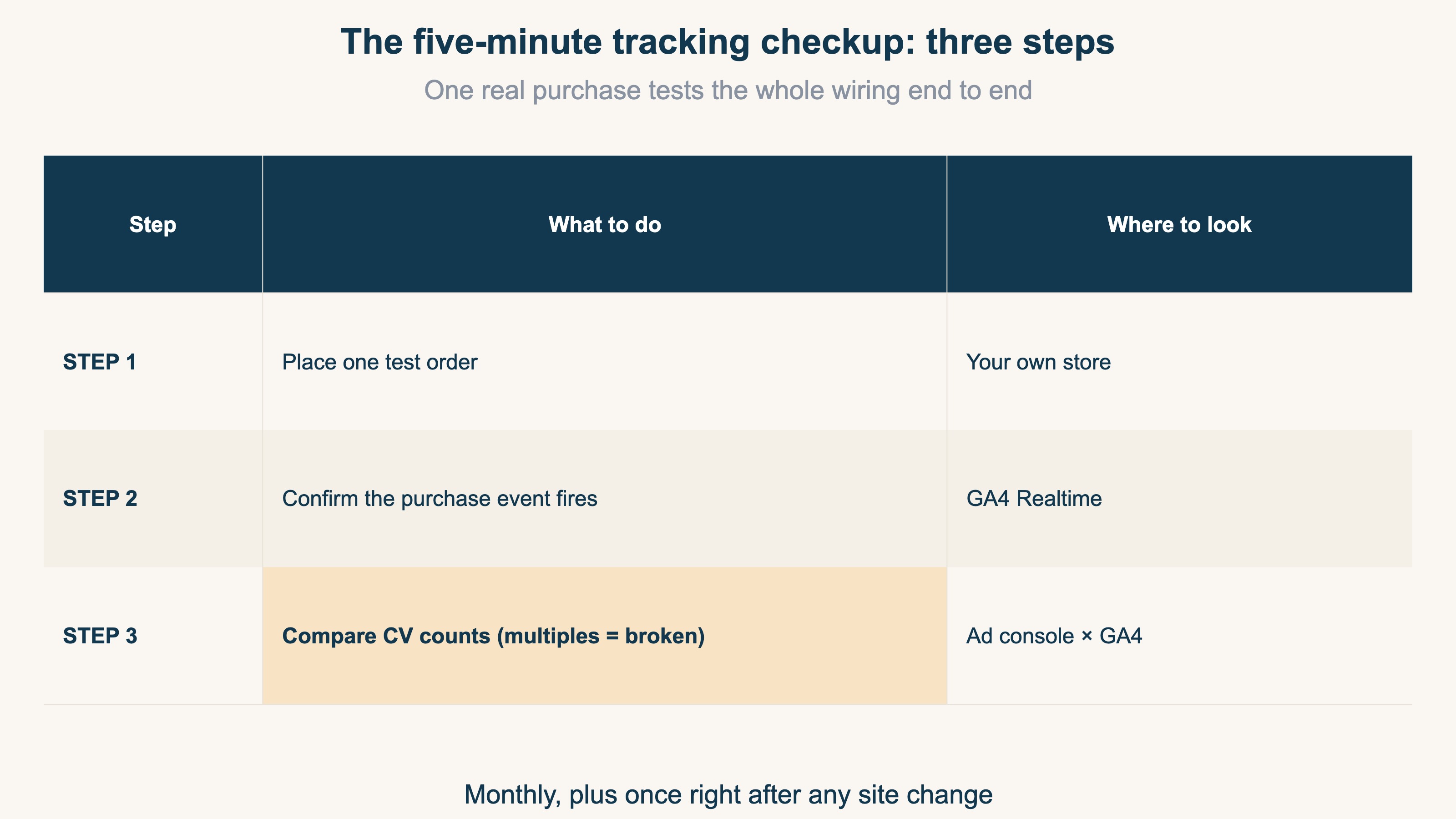
STEP 1: Place one test order. Complete a real purchase on your own store (a test coupon or your cheapest item is fine). Only a real purchase action tests the entire wiring end to end.
STEP 2: Confirm the event fires in GA4 Realtime. Right after the purchase, open GA4's Realtime report and check that a purchase event appears within a few minutes [2]. If it doesn't, the tag isn't firing at all (suspect causes 1-3).
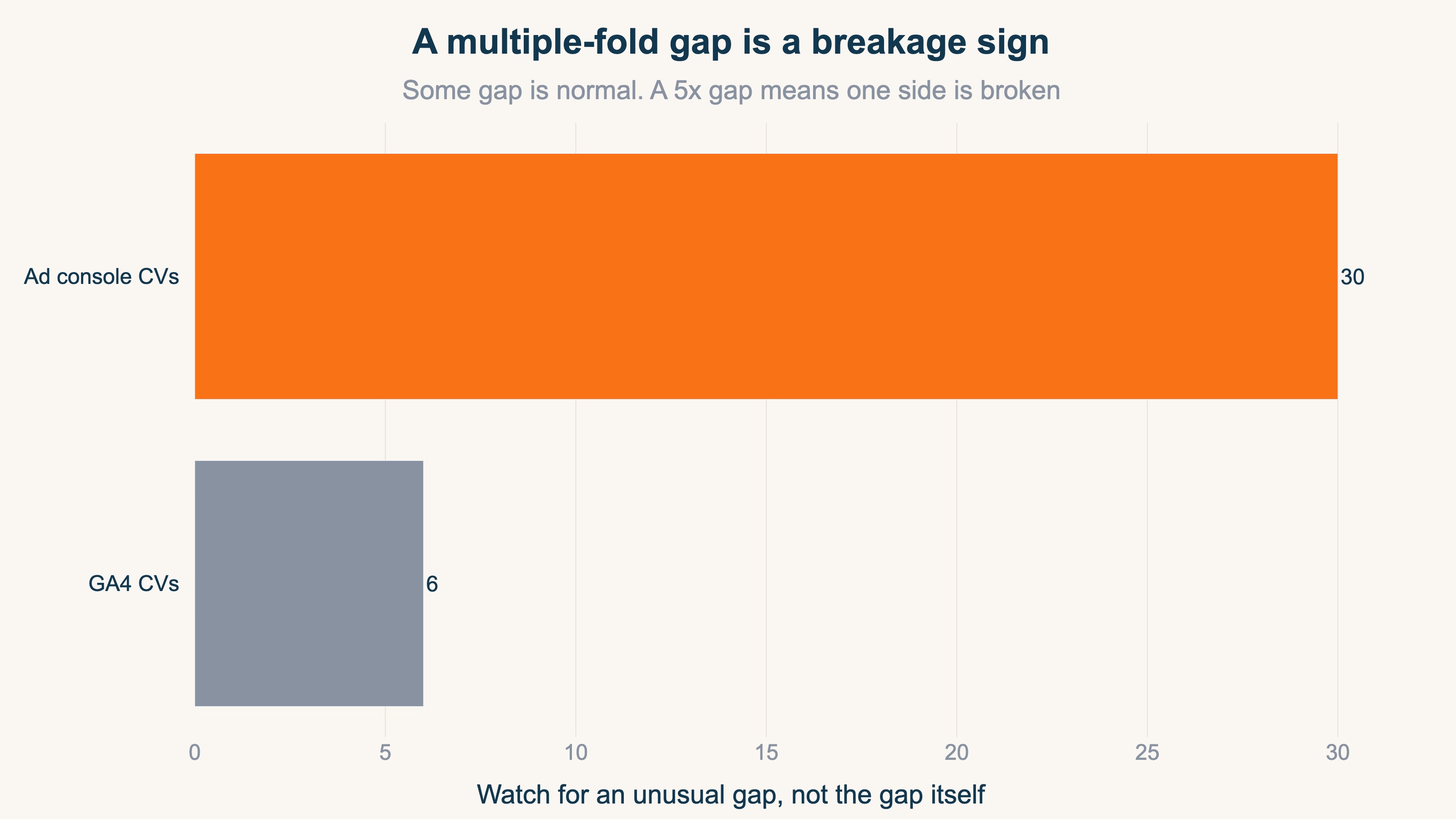
STEP 3: Compare CV counts between your ad console and GA4. Pull the last two to four weeks of conversions from both. By design they will never match exactly — counting rules and attribution timing differ, so some gap is normal. What you're looking for is a multiple-fold gap, or one side stuck at zero — that means one of the two is broken [3].
That's five minutes. Run it monthly, plus once right after any site change, and the "didn't notice for eight months" disaster becomes nearly impossible.
3. Warning signs your tracking is broken#
Bottom line: wild swings, persistent zeros, and big platform gaps point at broken measurement before they point at bad ads.
Here's a common pattern. You can get clicks, but leads aren't consistent, and your cost per lead swings wildly — 3-5x month to month. That swing rarely means "bids need adjusting." It usually means something underneath is unstable: tracking, or what happens after the click. Optimizing campaigns without clean attribution can feel productive while quietly pointing everything in the wrong direction.
The three warning signs:
- CPA (cost per acquired order) or CPL swinging 3-5x month to month — real businesses rarely change that fast; suspect measurement first
- One channel stuck at zero conversions — ads serving, clicks arriving, zero results is usually breakage, not unpopularity
- A multiple-fold gap between your ad console and GA4 — some gap is normal; multiples are not
For the underlying reasons GA4, ad consoles, and your cart never agree perfectly, see Why GA4 Revenue Doesn't Match Shopify — it's the foundation for telling a normal gap from a broken one. And if clicks arrive but results don't, bots are another suspect: see What Is Bot Traffic?.
4. After you fix it: re-grade your ads on clean data#
Bottom line: don't judge any ad on numbers from the period when tracking was broken.
Two things to do after the fix.
First, throw out the broken period as evidence. An ad that looked like a loser during eight months of zero tracking may have been quietly converting. Cut it based on broken data and you lose twice.
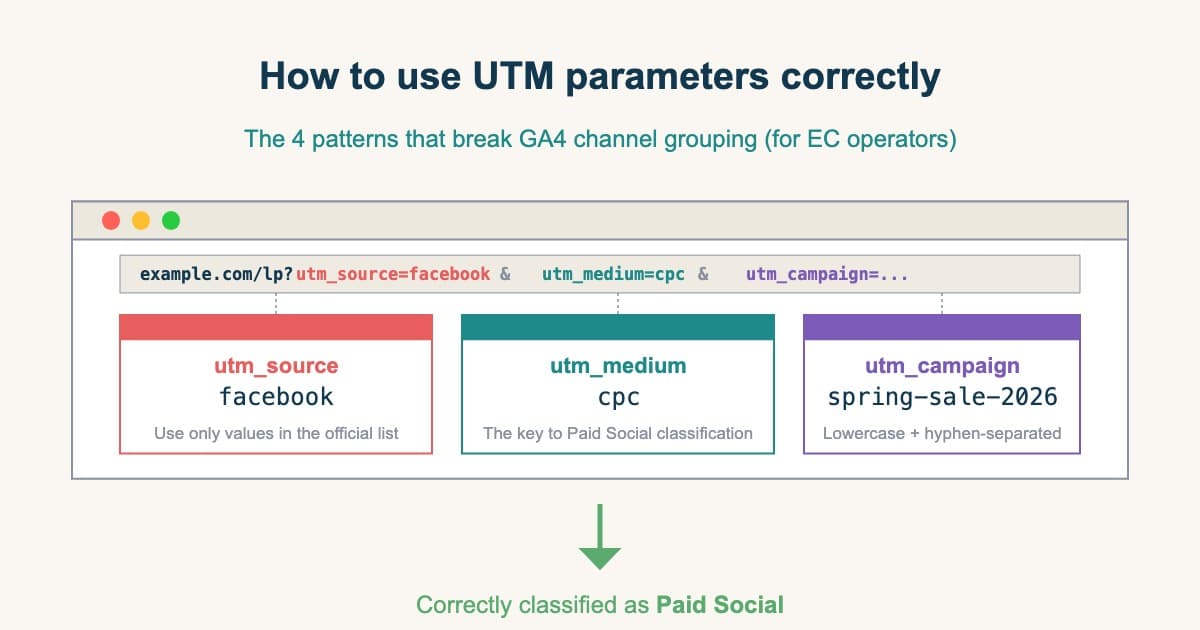
Second, on top of clean tracking, re-grade channels and campaigns on actual revenue. Tag your ads correctly with UTMs (the labels that record where a visit came from) and match each campaign to the revenue it produced. Start with How to Use UTM Parameters Correctly for the tagging, and What Is Ad Effectiveness Measurement? for the grading. To avoid giving all credit to the last ad clicked, see Moving Budget on Last-Click Alone Costs You.
RevenueScope solution
Bottom line: run an independent yardstick alongside your ad platform, and breakage shows up the day it happens.
The chapter-2 checkup takes five minutes, but breakage happens between checkups. The way to catch it early is to keep a second, independent measure of sessions and revenue running at all times. RevenueScope aggregates sessions, revenue, and CVR (conversion rate) per channel with its own measurement tag — so when only your ad platform's tag breaks, RevenueScope keeps reporting revenue normally, and the breakage surfaces the same day as a gap against your ad console's suddenly-collapsing conversions.
And when a site update severs purchase tracking entirely, the anomaly itself appears on screen:
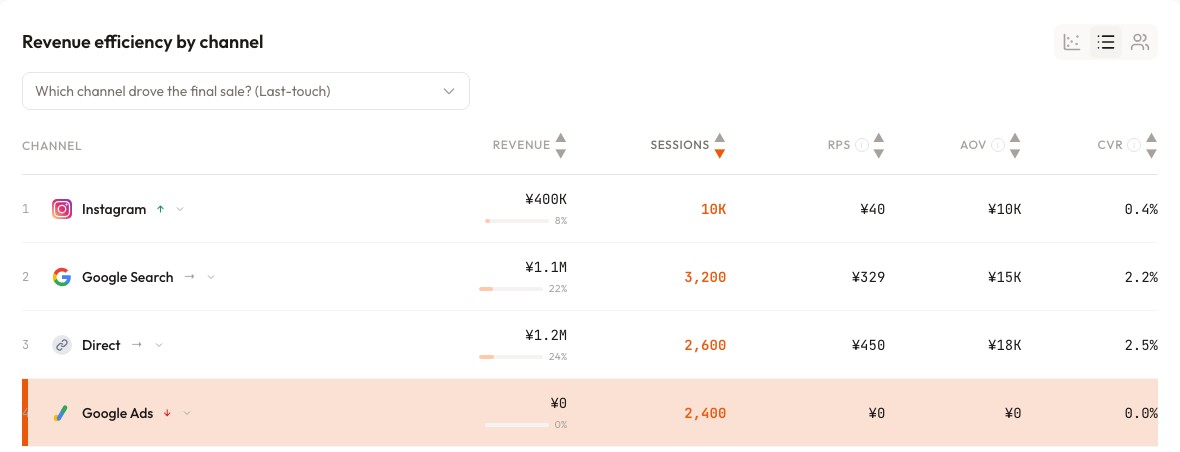
In the screen above (demo data), Google Ads is gathering 2,400 sessions — with zero revenue and a CVR of 0%. On pay-per-click ads, "traffic arrives but no revenue is ever recorded" doesn't mean nobody is buying. It means purchase measurement is severed somewhere. Seeing that anomaly on one screen while ad money is still flowing turns "noticed eight months later" into "noticed the same day."
You can also let an AI assistant (ChatGPT or Claude) read the data and ask, "anything unusual versus last week?" — it will flag sudden drops in revenue or CVR per channel, with the judgment material attached.
FAQ#
Q1. How big a gap between my ad console and GA4 counts as abnormal?
Some gap is unavoidable — click-based versus session-based counting, attribution windows, and reporting-date differences all contribute. The breakage signs are a multiple-fold gap or one side stuck at zero. Watch for an unusual gap, not the gap itself.
Q2. Should I exclude my test order from the data?
Separate the two roles. Canceling and refunding the test order fixes your books — it does not remove the recorded conversion from GA4 or your ad console. To keep the measurement data clean, exclude your own IP address if you plan to test repeatedly. A single checkup order has negligible impact.
Q3. How often should I run the checkup?
Monthly as a routine, plus once right after any site change — cart upgrades, theme changes, consent banner rollouts, tag cleanups. Most breakage happens at the moment the site changes.
Summary#
- Broken conversion tracking doesn't stop your ads. It's the most common audit finding, with real cases unnoticed for eight months
- The checkup is three steps in five minutes: test order → GA4 Realtime → compare CV counts across platforms
- Wild CPA swings, persistent zeros, and multiple-fold gaps mean broken measurement before they mean bad ads
- After fixing, don't grade ads on broken-period data — and keep an independent yardstick running to notice the same day
See which ads actually drive revenue, at a glance
Free up to 5,000 sessions/month, AI connection included. No credit card required. Up and running in 5 minutes.