
The GA4 purchase count is higher than the confirmed order count on the cart side. Revenue is inflated by the same amount. Pinning down the cause isn't especially hard. Fixing it takes time, though, and the ad spend keeps going out every day in the meantime. Which decisions can still be made on numbers that are still inflated? That is what gets settled first.
Contents
TL;DR#
- GA4 counts the purchase events it receives as many times as they arrive. What is off is the send side
- There are three causes: a reload of the purchase confirmation page, a purchase tag firing twice, and a faulty transaction ID
- Send an empty string as the transaction ID and every purchase event is removed as a duplicate[1]
- AOV doesn't change, because revenue and the order count inflate by the same factor, so it can't be used to detect this
- While every order is being double counted uniformly, revenue share and the RPS ranking across channels don't change places
1. GA4 Counts Correctly, the Send Side Is Off#
GA4 counts the purchase events it receives, as many times as they arrive. There is nothing wrong on the counting side.
The symptom follows a fairly set pattern. From day 4, the GA4 purchase count alone lifts. From there it runs alongside the confirmed order count on the cart side at a ratio that stays roughly constant.
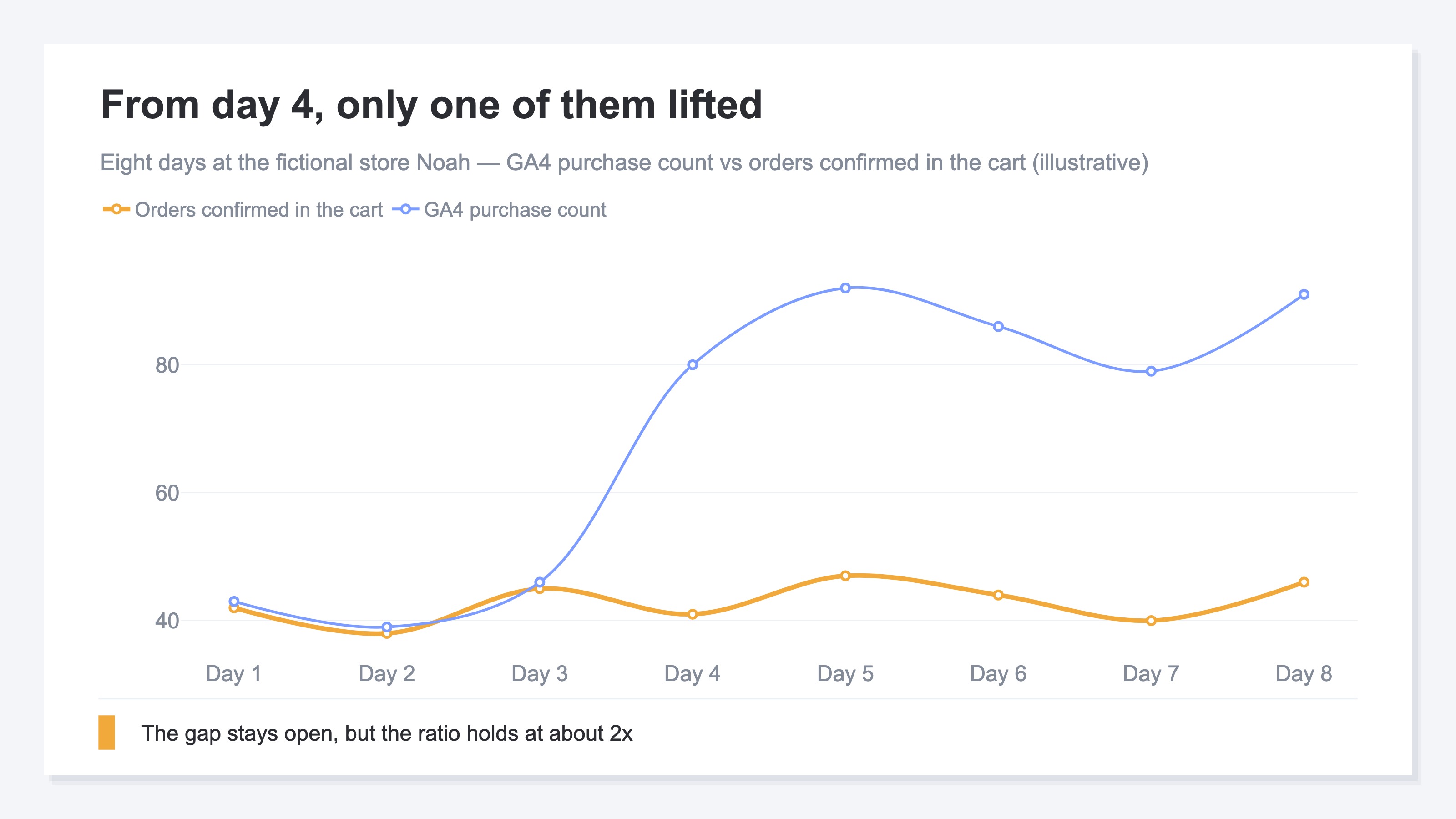
The clue is that the ratio stays roughly constant. If it jumped on one particular day, a sale or fraudulent orders would be the thing to suspect. When every day carries the same factor, what to suspect is not the individual orders but the sending mechanism itself.
This is not a GA4 defect. GA4 is counting correctly. What doesn't match the actual number of orders is the number of times events were sent. Once that much is clear, the next thing to decide isn't the repair procedure. It's what to put at the center of the decision until the repair lands.
There is a symptom that points the other way, too. That is when GA4 revenue comes out lower than the cart, and it involves how returns are handled and when revenue is booked. Why GA4 revenue doesn't match Shopify covers that case.
2. Three Causes, Three Places to Check, Two Directions#
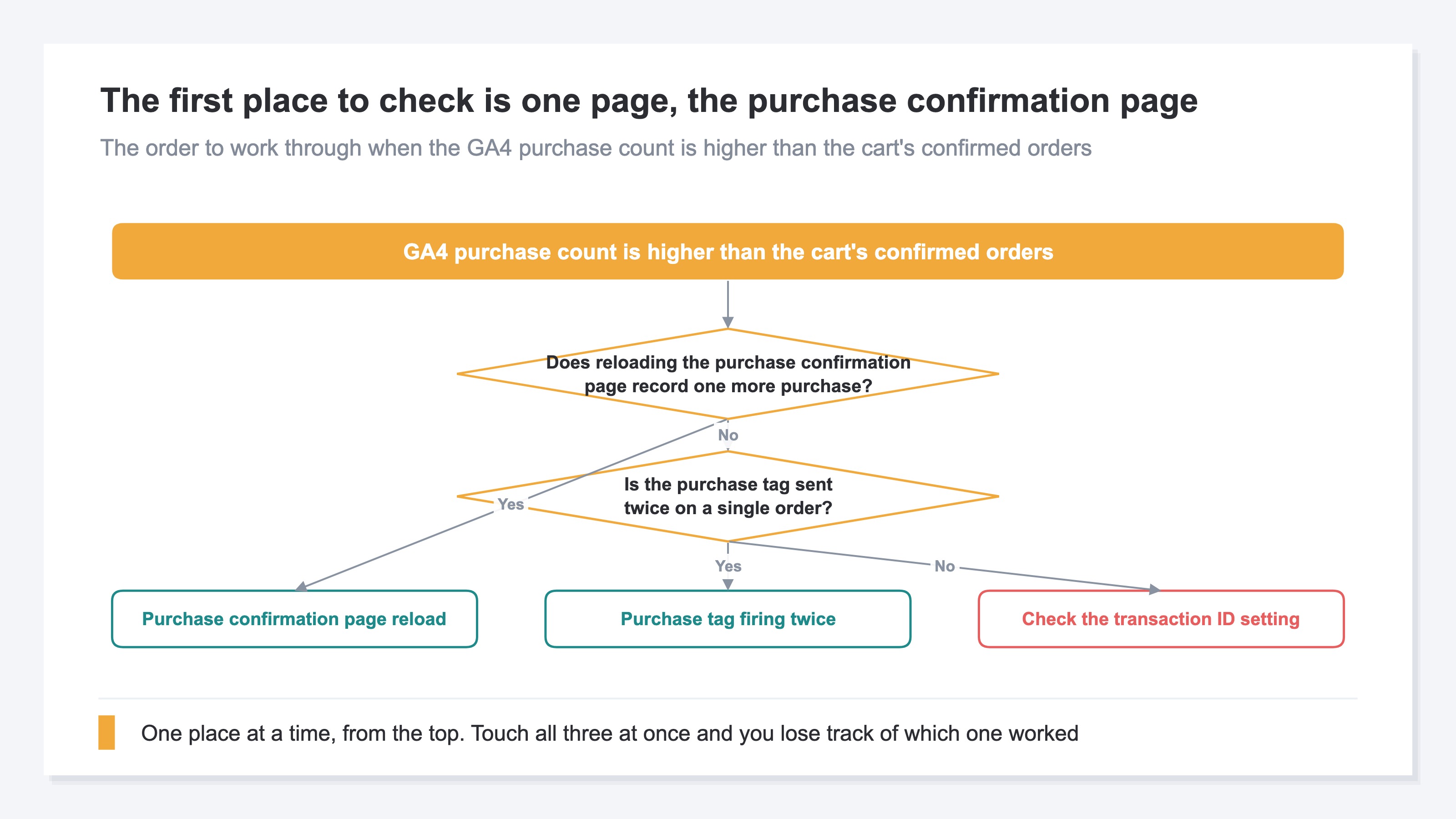
The place to check differs by cause. And whether the purchase count swings toward more or toward fewer is not the same either.
One assumption first. To measure that a purchase occurred, you send a purchase event carrying the item objects defined in the corresponding fields[3]. One per order. That one becoming two is the symptom here.
First, a reload of the purchase confirmation page. In a setup that places the purchase event on the purchase confirmation page, a purchase is recorded every time that page is loaded again. The browser's back button, a bookmark opened to check the order details, a confirmation link that arrived by email. Every one of them is a natural action for the reader. Checking it takes no more than putting one test order through and then reloading the purchase confirmation page. GA4's DebugView displays the events collected in real time, but using it requires debug mode to be enabled[5].
Next, the purchase tag firing twice. A Google Tag Manager trigger calls a tag when an event of that type is detected[4]. And a new trigger fires, by default, on all events of the relevant event type[4]. If several triggers with overlapping conditions hang off the same purchase tag, one order can be sent twice. That said, the official documentation does not state that multiple triggers always mean two sends. What to look at is not the number of settings but the number of sends on a single order. For the basics of the setup itself, see tracking ecommerce purchases with GTM.
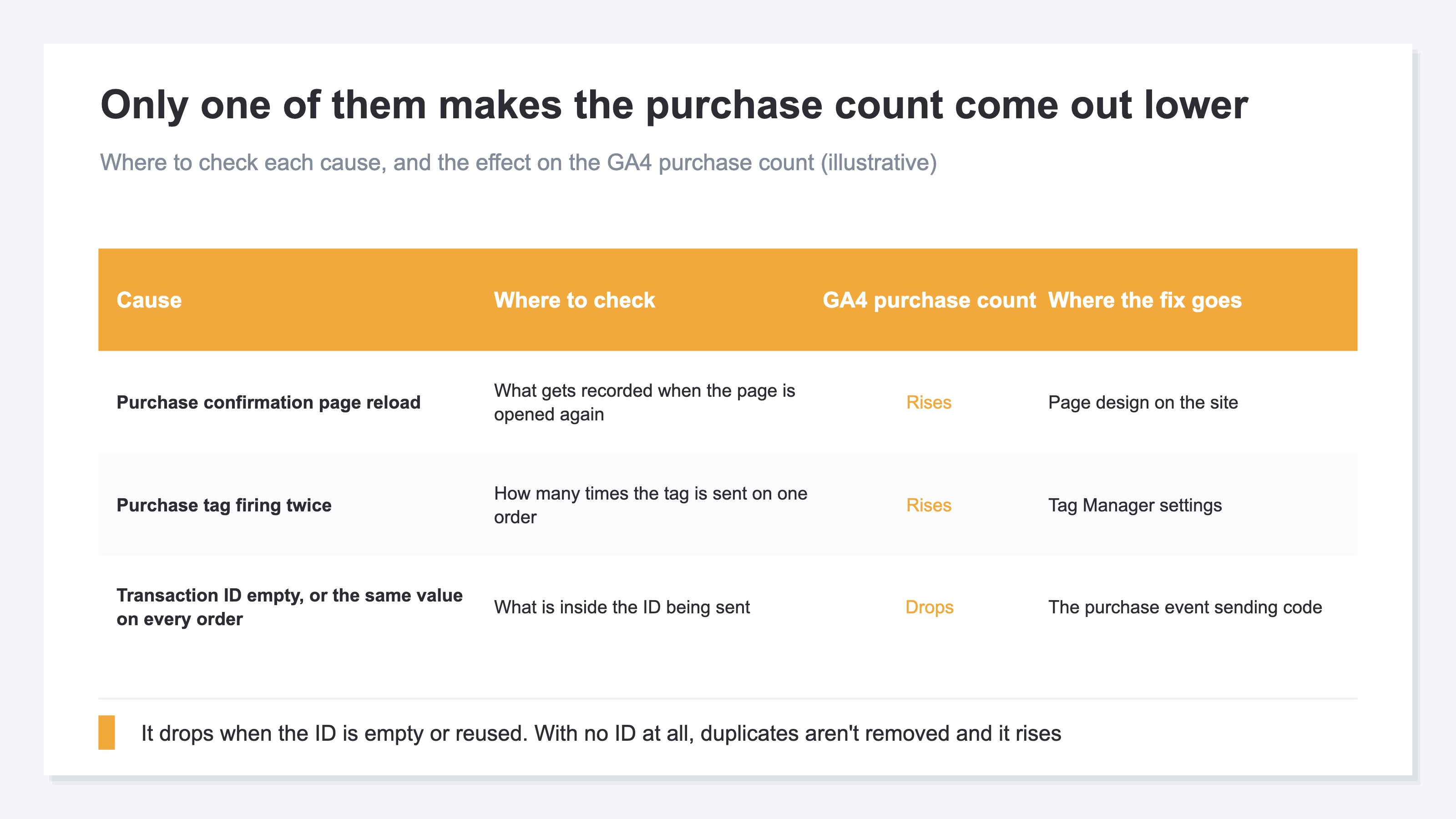
Last is the transaction ID. Here alone, the direction the number swings is reversed.
transaction_id is the ID that uniquely identifies a transaction, and using this parameter lets you avoid duplicate purchase events[2]. Add a transaction ID and, when two purchases are registered with the same transaction ID, Google Analytics removes the duplicate purchase[1].
The reversal starts here. An empty string must not be sent as the ID. Purchase events where transaction_id="" are all removed as duplicates[1]. Sending the same fixed ID on every order does the same thing. If the same ID is sent for different transactions, key events risk being counted significantly lower than their actual value[1].
So when an empty string is in the ID, and when the same value is reused across every order, the swing is toward fewer purchases, not more. Touch this just in case in the middle of chasing a symptom of too many, and the purchase count then comes out lower than reality.
When the ID itself isn't being sent, it's the other way around. There is no clue for removing duplicates, so a purchase that arrived twice is counted twice. This is the cause on the side that increases, and whether the purchase carries an ID changes which direction to look in. The ID needs to be unique per order and a dynamic value[1]. The order confirmation number can be used as-is[1]. For the full picture of the parameters carried on purchase, see GA4 event setup.
A mismatch between the CV count in an ad platform's console and the CV count in GA4 is a separate story. That one is a number the ad platform declares, this one is purchase events GA4 counts, so even the party doing the counting differs. For the path where the platform-side number rises, see Google Ads enhanced conversions; for the gap between the platform and GA4 itself, see ad vs GA4 CV count mismatch.
3. What Double Counting Breaks and What It Leaves Standing#
What double counting breaks is the absolute values only. Ratios across channels don't break. And AOV lands on the side that doesn't break.
AOV, average revenue per order, is revenue divided by the order count.
AOV = revenue ÷ order count
When a purchase is counted twice, revenue and the order count both double. Numerator and denominator inflate by the same factor, so the result of the division doesn't change. The reading "AOV is at its usual level, so we're fine" stops holding here. AOV can't be used to detect this symptom.
Purchase rate and RPS (revenue per session) swing toward the higher side. The number of sessions that purchased, and revenue, both inflate together. All of that is still about absolute values.
What doesn't break is the ratios. If every order is being counted twice uniformly, revenue share by channel and the RPS ranking don't change places at all. The factor rides on every channel equally, so it cancels the moment a ratio is taken.
This holds only when it is happening uniformly, though. If the double send happens only on the confirmation page of one payment method, or only on the landing page of one campaign, that channel alone is overvalued. Shift budget there and the allocation has to be reorganized after the repair lands.
Uniform or skewed can't be judged from a single channel row. Go one level down and check campaign by campaign. Campaign-level figures are a snapshot of that period, though, so a prior-period comparison doesn't appear there. It comes down to reading the period before the symptom and the period after it at the same granularity, twice, and setting them side by side.
At this point the option of holding all decisions until the repair is done comes up. But even landing on the cause in a day, putting a hand into the sending mechanism and waiting for it to take effect puts you weeks out. And the ad spend goes out every day in between. So the question changes. Not "how do we fix the GA4 numbers" but "with the numbers still inflated, which channel do we shift budget toward". What the latter needs isn't correct absolute values but an ordering that can still be compared with the same factor riding on all of it.
RevenueScope solution
RevenueScope displays sessions, revenue and RPS by channel on one screen. Open a row and it displays revenue, RPS, AOV and purchase rate for each campaign inside that channel. Revenue is received from the site's purchase events, so if those are being sent twice, this revenue inflates by the same factor too. That is why what gets used is the ratio, and that is also the side the decision rests on.
Ask an AI assistant such as ChatGPT over MCP, "For the last 30 days, what are RPS and revenue share by channel?" and it comes back in the following form. For the sake of explanation, it is written out for the fictional store Minami.
| Channel | Sessions | Revenue | RPS | Revenue share |
|---|---|---|---|---|
| Google search | 4,000 | ¥600,000 | ¥150 | 40% |
| Google Ads | 2,000 | ¥450,000 | ¥225 | 30% |
| 3,000 | ¥300,000 | ¥100 | 20% | |
| Direct | 2,000 | ¥150,000 | ¥75 | 10% |
Note: the figures belong to the fictional store Minami, placed here for explanation and rounded. What the demo screen reads is the sample store's sample data (refreshed daily), so neither the amounts nor the ordering match the table above. Revenue share is calculated from the revenue in the table.
Even while the GA4 purchase count is coming out higher than the actual orders, there are things this ordering can settle. The share is 40%, and the RPS ranking doesn't move either. What can be decided today is whether to shift budget toward Google Ads, the highest on RPS.
That ¥225 is the average of the Google Ads row, though. Open the row and RPS for branded keywords is ¥360, for generic keywords ¥90. Not one campaign inside it is delivering at ¥225.
These two are what to look at. Read the same two for the period before the symptom appeared, and set the growth from there side by side. If the two have grown in step, the decision about which one to grow doesn't change. If only one has moved, what is changing is only part of the delivery. With the average alone, that call can't be made.
FAQ#
Frequently asked questions#
Q. Should revenue from the period with the higher purchase count be dropped from reports entirely?
A. There's no need to drop it. The absolute values can't be used, but revenue share across channels and the RPS ranking remain. Drop it entirely and the comparable period itself disappears. Leaving it out only where amounts get reported is enough.
Q. If AOV is at its usual level, can we take it that double counting isn't happening?
A. No. Revenue and the order count inflate by the same factor, so AOV doesn't change. It looks like its usual level even while double counting is happening. Check by matching against the confirmed order count on the cart side, daily.
Q. If a transaction ID is being sent, does the purchase count stay flat even when the tag fires twice?
A. If two purchases are registered with the same transaction ID, the duplicate purchase is removed[1]. But if the ID is an empty string, every purchase event is removed as a duplicate[1]. The ID needs to be unique per order and a dynamic value[1].
Q. How long does the fix take?
A. Pinning down the cause can often be finished in a day, and if the fix is on the tag side the work itself is short. What takes time is waiting for the corrected data to accumulate until a prior-period comparison can be read. Comparing weekly, it settles a few weeks out.
Summary#
When the GA4 purchase count is higher than the cart's confirmed order count, there is nothing wrong on the counting side. The number of times events arrived simply doesn't match the actual number of orders. The causes are a reload of the purchase confirmation page, a purchase tag firing twice, and a faulty transaction ID. The place to check differs by cause. When an empty string is in the ID, and when the same value is reused across every order, the swing is toward the purchase count coming out lower[1]. When the ID itself isn't being sent, duplicates aren't removed and the swing is toward more.
AOV doesn't change, because revenue and the order count inflate by the same factor. Settle it now that AOV can't be used for detection. What can be used is the match against the confirmed order count on the cart side.
Waiting for the repair to finish is only necessary when the amounts themselves are being reported. Open RPS and revenue share by channel, and note down the current ranking. As long as the factor rides uniformly, that ranking is the same after the repair too. The budget allocation can be decided today.
See which ads actually drive revenue, at a glance
Free up to 2,000 sessions/month, AI connection included. No credit card required. Up and running in 5 minutes.
References#
- [1] Google Analytics Help "[GA4] Minimize duplicate key events with transaction IDs" (2026)
- [2] Google for Developers "Recommended events" (2026)
- [3] Google for Developers "Measure ecommerce" (2026)
- [4] Google Tag Manager Help "About triggers" (2026)
- [5] Google Analytics Help "Monitor events in DebugView" (2026)