
Your ad platform's dashboard says "78 conversions this month," but when you pull the same period and the same campaign in GA4, the number is different. And the gap changes every month. So you recount at month-end, wondering which one is right — a scene most ad managers know well.
Here's the conclusion first. In most cases this mismatch is not because a tag is broken. Your ad platform and GA4 count conversions differently to begin with, so even when both are working correctly, the totals won't line up. This article breaks down why they diverge structurally across four causes, explains that what you should track is not "an exact match" but "the stability of the gap," and shows that the fastest path is to unify investment decisions on the revenue you measure on your own site.
Table of contents
TL;DR#
-
A CV count mismatch is not a "breakage" — it's a "difference in counting"
The ad platform and GA4 define attribution, the measurement window, and duplicate handling differently, so even when healthy the totals won't align
-
Reconcile by hand and it drifts again next month
As long as the counting differs, the monthly cross-channel recount never ends
-
Track the "stability of the gap," not an exact match
If it stays within a consistent band, measurement is healthy. A sudden change in that band is the sign of trouble
-
Unify investment decisions on site-measured revenue
Rather than spend time reconciling counts, it's faster to compare how much each channel actually sold, on a single yardstick
1. Why the ad platform and GA4 report different CV counts#
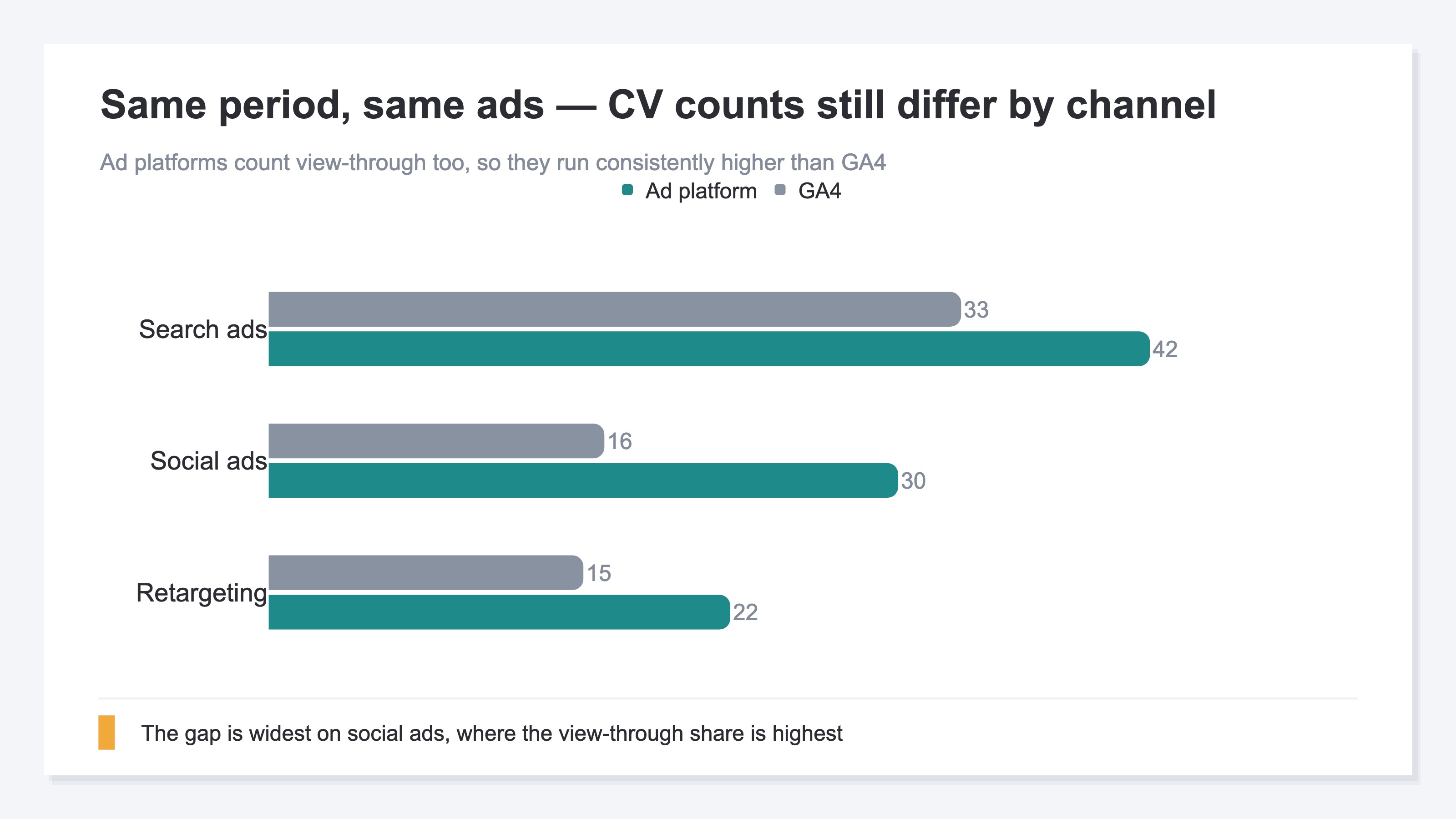
Bottom line: There are four main reasons they diverge — attribution definitions, duplication from server-side sends, view-through CV, and the measurement window. None of these mean anything is "broken"; each is the tool behaving exactly as specified.
Attribution definitions differ#
The ad platform counts it this way: "if a conversion happens after this ad was clicked, it's the ad's result." GA4 re-sorts by the channel a user last touched at the moment of conversion (last-click family), or by a model such as data-driven. Both the entity doing the counting and the rule for which click gets credit are different, so the same purchase is booked in different places. How the attribution model shifts where counts and revenue land is explored in The last-click attribution trap.
Duplication from server-side sends#
In recent years, in addition to browser-side measurement, it has become common to also send conversions to ad platforms from the server (server-side sending, CAPI, etc.). When both the browser and the server send the same purchase, the platform runs de-duplication — but its criteria differ from how GA4 counts. As a result, the platform's totals tend to come out higher. The double-counting logic that makes each platform look inflated is laid out in MER vs. platform ROAS.
View-through CV#
Someone who only saw an ad — never clicked it — later comes to your site on their own and buys. Counting that as a result is "view-through CV." It's especially common on paid social, and the platform counts it as a result. In GA4's last-click family, however, there was no click, so it isn't credited to the ad. This factor alone opens a wide gap in the counts.
The measurement window#
"How many days after a click do we count a CV?" — this period (the measurement window) also changes the numbers when the platform and GA4 are set differently. If the platform uses a 30-day window and GA4 draws a different boundary, the same purchase can fall inside one and outside the other depending on the day.
2. "Matching" the counts is structurally impossible#
Bottom line: Since the counting methods themselves differ, even if you reconcile CV counts by hand to make them match, they drift again next month. The matching work never ends.
At many companies, month-end means putting the ad platform and GA4 side by side and trying to fill the CV-count gap in a spreadsheet. The idea is simple. But this is the trap. Whether view-through CV is included, the criteria for removing duplicates, the measurement window — none of these will be exactly the same next month. Even if you line the numbers up cleanly this month, next month the view-through ratio shifts and a different gap appears. The matching work returns to square one every month.
And the burden spikes as channels multiply. Paid search, paid social, retargeting — each platform has its own counting quirks, so reconciling them one by one burns half a day at every monthly ad review. This isn't a problem of difficult concepts; it's the kind of problem where the same manual work has to be repeated every time, across channels.
What matters is telling apart whether this mismatch is "a gap that happens because something is broken" or "a gap that happens even when everything is healthy." Breakage gaps — a detached tag, a mis-fired trigger — can be fixed, but a gap from differences in counting is not something to fix. Checking for breakage is covered in Is your ad CV tracking broken?, and the mechanism behind numbers that never align by design is summarized in Why GA4 and cart revenue don't match. Once you've fixed the breakage, the gap that remains is not something to erase — it's something to decide how to live with.
3. What to track is the stability of the gap#
Bottom line: The goal is not to make the counts match. It's to watch whether the gap between the ad platform and GA4 stays within a consistent band, and to investigate only when that band suddenly changes.
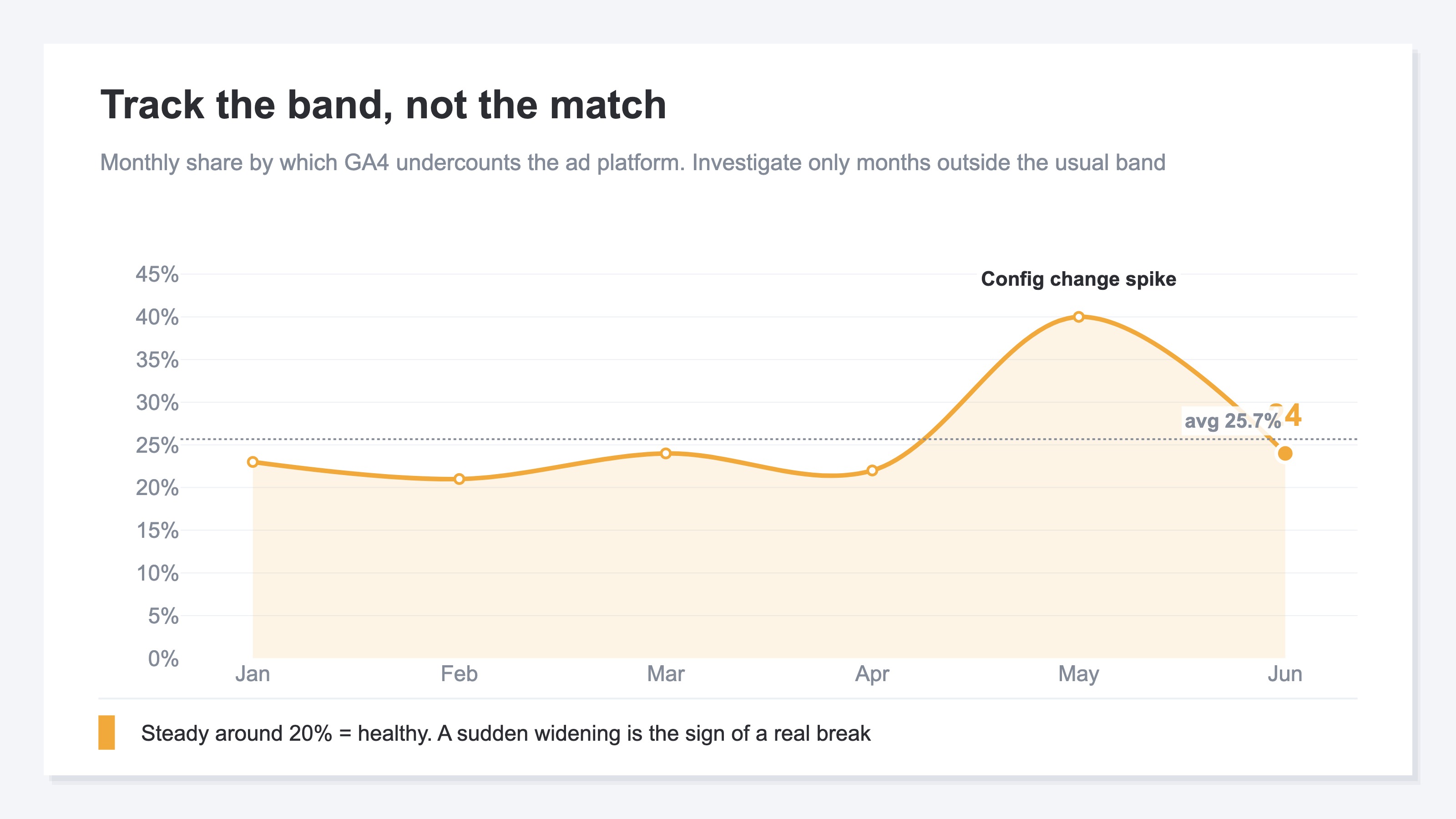
If the gap never reaches zero, what should you look at? The answer is the stability of the gap. For example, if the band "GA4's CV is roughly 20–30% lower than the ad platform every month" holds steady, you can judge that measurement is running healthily. The gap owed to different counting is, in effect, like a fixed offset on a ruler.
Conversely, the month a gap that was always 20% suddenly widens to 50% is when you go investigate for the first time. A detached tag, a changed consent-management setting, an altered redirect path — these real breakages surface as a sudden change in the gap rate. Once you know the normal band, you can spend effort only on the anomalies.
Switch to this view and month-end work changes from "make the counts match" to "confirm the band is as usual." It's far lighter than reconciling to a match, and it serves the real purpose — early detection of anomalies.
4. Unify investment decisions on site-measured revenue#
Bottom line: Rather than endlessly reconciling which CV count is right, the shortcut is to unify investment decisions on a third yardstick — the revenue you measure on your own site. You compare by how much sold, not by counts.
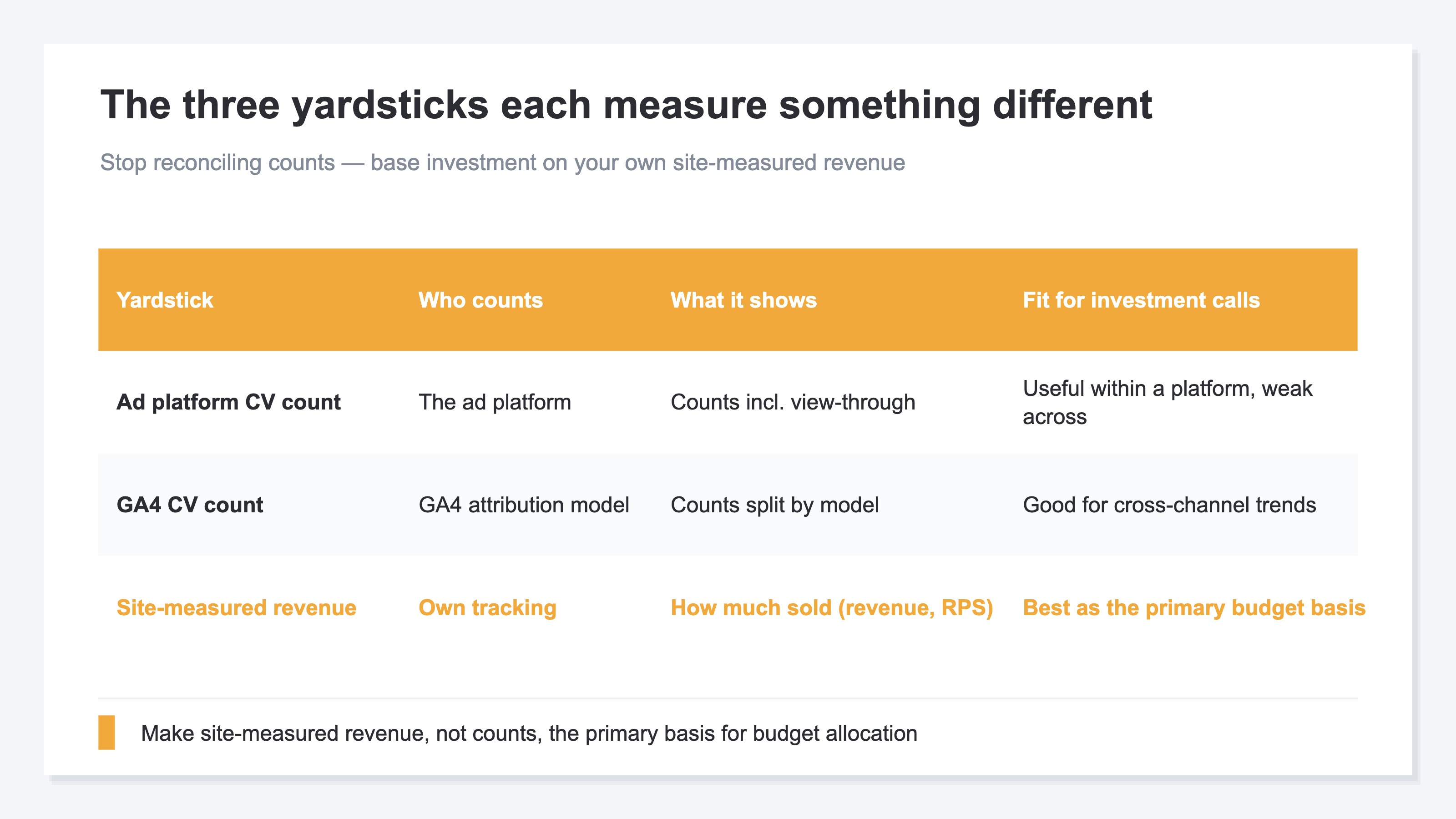
Both the ad platform's CV count and GA4's CV count are meaningful numbers. But both are "counts," not "how much sold." Even at the same count, a month that sold high-priced items and a month of only cheap items have completely different business impact. That's exactly why deciding which channel to shift budget toward is steadier when you compare by site-measured revenue rather than by reconciling counts.
The yardstick to use here is RPS (Revenue Per Session — revenue per visit). Line up each channel by "how much revenue it generates per visit" and you can see which channel is truly earning, without being swayed by whether the counts are high or low. Treating the platform's counts and your own measured revenue as separate sources and using them to check each other is also touched on in Verifying your agency's monthly report against your own data.
Unify the yardstick on measured revenue and the substance of the monthly worry changes. Instead of "which CV count is right," you shift that time into "which channel deserves the next dollar."
RevenueScope solution
Bottom line: RevenueScope doesn't try to "match" the CV counts the ad platforms report with your site-measured revenue. It's the foundation for stopping the count reconciliation and using site-measured revenue as the basis for decisions.
The CV-count mismatch was structural, coming from differences in counting. If so, rather than force everything into a single number, the clearer path is to move the basis of decisions to measured revenue. RevenueScope measures site-side revenue with its own tracking and puts revenue and RPS by channel on one screen. For periods with ad spend entered, it also shows ad spend alongside the corresponding channel's revenue. RevenueScope does not bring in or display the CV counts or conversion value that ad platforms report.
The yardstick here is the purchase amount RevenueScope measures itself. The platform's conversion value is a reported figure that includes view-through and the platform's own measurement window; because the counting differs, it's natural the amounts don't align with site-measured revenue. Check the platform's figures in the platform's own dashboard, and use the measured-revenue side for budget decisions.
For investment decisions, you use the measured-revenue side. Site-wide, the last 30 days show revenue of ~¥420K, RPS of ¥307, and a purchase rate of 3.1% (the sample-data fiction site). Compare by RPS across channels and you can decide budget allocation by "which channel sells the most per visit" rather than by the volume of CV counts. You can also switch the attribution model (last-click / first-click / linear / time-decay) to try out how revenue leans toward different channels. Note, though, that this switches the attribution of site-measured revenue — it does not mean RevenueScope makes the ad platform's CV counts match.
RevenueScope centers on revenue itself. It replaces the monthly manual reconciliation of counts with a single yardstick: measured revenue.
FAQ#
Q1. Which is right — the ad platform's CV count or GA4's?#
Neither is "wrong." They just count differently, and each is a correct number per its own spec. The ad platform includes view-through and the platform's measurement window; GA4 counts along its attribution model. Rather than pick a single "correct" number, the practical move is to lean investment decisions on site-measured revenue.
Q2. Is there a setting that makes the CV counts match exactly?#
It's structurally difficult. As long as the presence of view-through CV, the criteria for removing duplicates, and the measurement window differ between the platform and GA4, a gap remains no matter how you tune the settings. The goal should not be a match, but confirming that the gap rate stays within a consistent band.
Q3. What gap rate is considered healthy?#
There's no single correct value. The practical view is relative: accumulate a few months of your own normal band, and investigate the months that fall well outside it as anomalies. Look at "is it the same as usual" rather than the absolute value.
Q4. Does installing RevenueScope make the count mismatch disappear?#
No. What RevenueScope does is produce site-measured revenue as a separate yardstick from the counts; it does not bring in the CV counts or conversion value that ad platforms report. Think of it as the foundation for stopping count reconciliation and moving to judging by revenue.
Wrap-up — CV counts: don't match them, judge by real revenue#
When the ad platform's and GA4's CV counts don't match, many managers assume "something is broken" and try to fill the gap by reconciling at every month-end. But as this article showed, the majority isn't breakage — it's a structural gap from differences in counting: attribution definitions, duplication from server-side sends, view-through CV, and the measurement window. As long as the counting differs, matching by hand drifts again next month.
So what you should track is not an exact match, but whether the gap rate stays within a consistent band. Investigate only when the band suddenly changes, and month-end work gets far lighter. On top of that, unify the investment decision of where to shift budget on site-measured revenue rather than count reconciliation. That means comparing by how much sold, not by counts.
RevenueScope doesn't force the platform's reported figures and your own measured revenue to match — it uses measured revenue as the yardstick. Compare revenue and RPS by channel on one screen and decide which channel deserves the next dollar — it's the foundation for letting go of the monthly manual work spent reconciling counts.
See which ads actually drive revenue, at a glance
Free up to 5,000 sessions/month, AI connection included. No credit card required. Up and running in 5 minutes.