
You set up the purchase tag in GTM, and GA4 counts more purchases than you have orders. Touch the settings and the purchase count comes up short instead. Only one point separates the side that adds from the side that erases. And more than one system receives that point.
Contents
TL;DR#
- What decides the count isn't the GA4 screen. It's how many tags inside the GTM container send a purchase
- Of the 476 sites whose tag setup was visible, 24% had GA4 placed only inside the GTM container
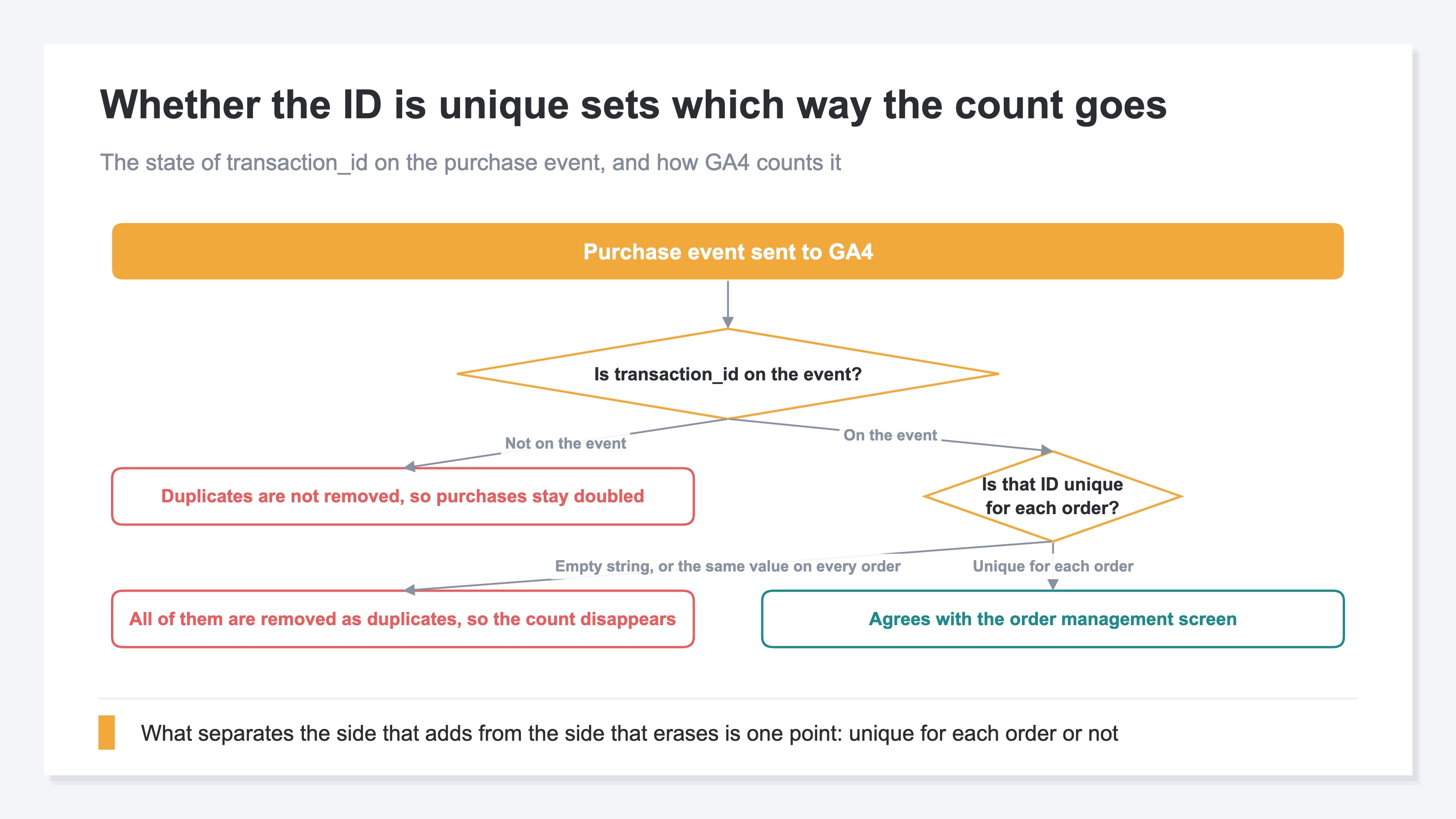
- What separates the side that adds from the side that erases is one point: whether
transaction_idis unique for each order[1] - GA4 isn't the only receiver. Google Ads minimizes duplicate conversions through a separate system of its own[4]
- Before you start fixing, decide which number you judge by: the GA4 side or the ad platform side
1. You Can't Tell How Many Tags Send a Purchase Until You Open the Container#
How many purchases get counted is decided inside the GTM container, not on the GA4 screen.
In August 2026 I scanned how tags are built on 517 EC sites in Japan. The scan covered own-domain EC sites that rank at the top for the statutory disclosure page required under Japan's Act on Specified Commercial Transactions. These are not figures that represent EC in Japan as a whole.
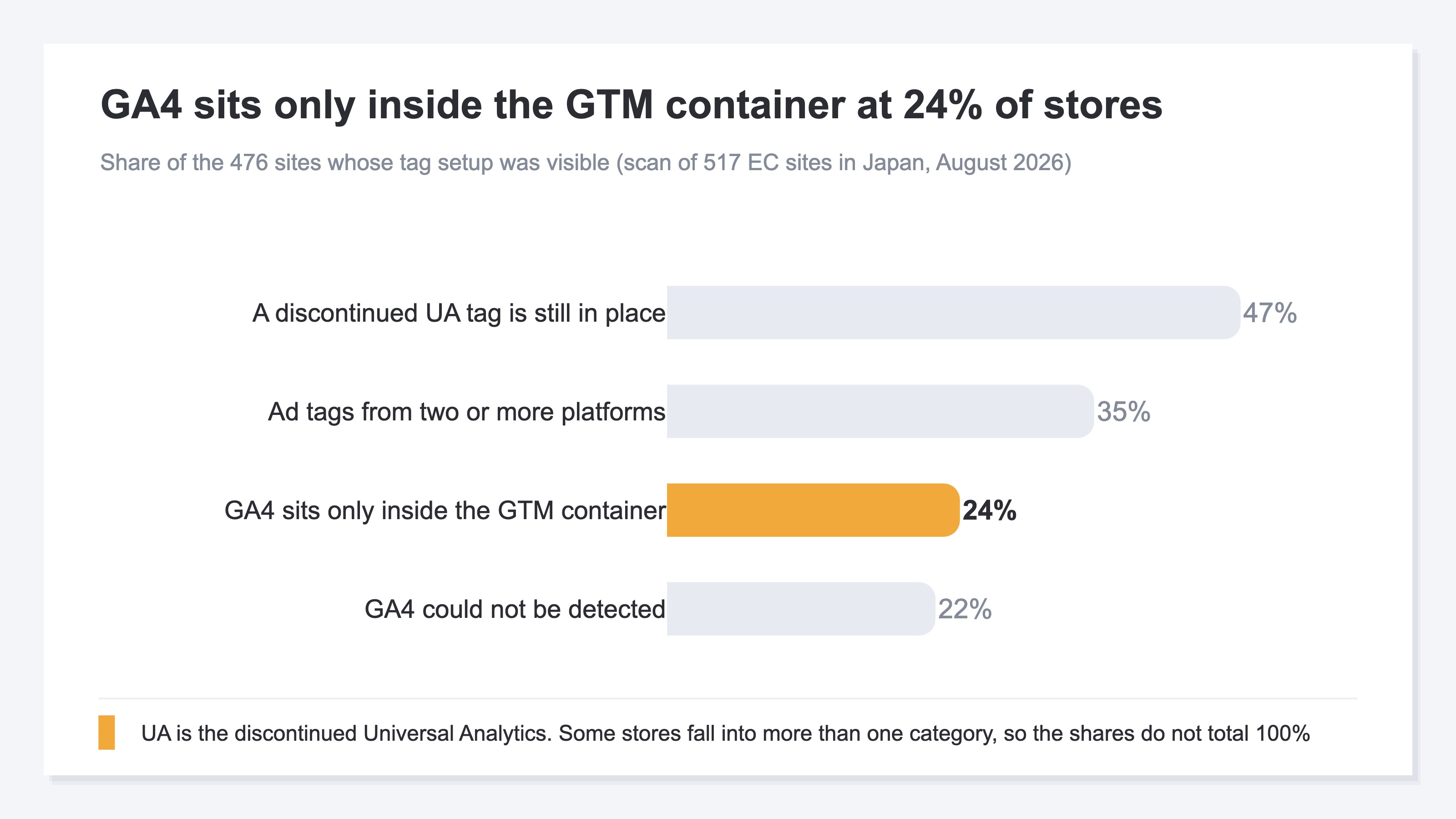
Of the 476 sites whose tag setup was visible, 24% had GA4 placed only inside the GTM container. You cannot see that 24% by reading the page source, because it isn't visible until you open the container. A discontinued Universal Analytics tag was still in place at 47%, and that group mixes cases written directly into the source with cases sitting inside the container.
Narrow to the 259 sites where the settings themselves could be read, and a purchase event was confirmed at 61% (158 sites). That does not mean the remaining stores measure no revenue. A cart's standard integration, code written straight into the page, and implementations that live on the purchase confirmation page never surface in the container.
Containers hold one more thing: tags you have no memory of installing. Some hosted store-building services are built to deliver one shared container to every store on the platform. Among the 306 container IDs the scan turned up, 3 appeared on more than one store. Twelve stores are involved. Six of them run a cart from a hosted store-building service, and the tags riding in that container were not installed by the store and cannot be edited from the store side. The rest include cases where one operator runs several stores through a single container. How the standard measurement implementation differs from cart to cart is laid out in EC cart measurement compared.
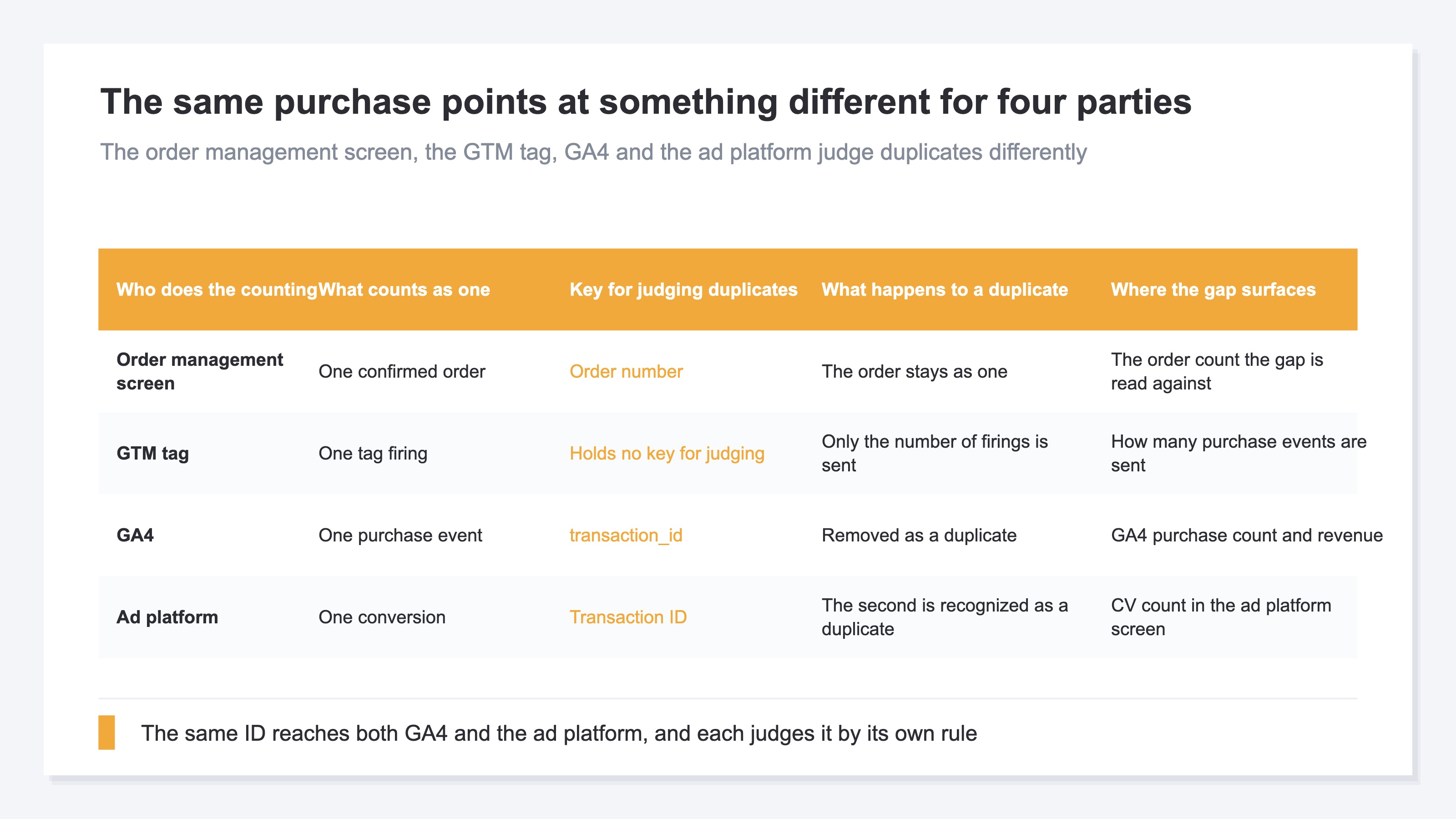
"One purchase" is one confirmed order on the order management screen. On a GTM tag it is one firing, in GA4 one purchase event received, on an ad platform one conversion. The same phrase splits into four different things. What you go after isn't the numbers. It's which of the four you decide with.
2. Whether the ID Is Unique Turns One Setup Into Double Counts or Missing Ones#
What sets the direction is one point: whether transaction_id is unique for each order.
To measure that a purchase occurred, you send a purchase event carrying the items defined in the corresponding fields[2]. A GTM trigger calls the tag when an event of that kind is detected[3]. If triggers with overlapping conditions hang off the same purchase tag, a single order can fire it twice. The steps for building the purchase tag in GTM itself are covered in tracking ecommerce purchases with GTM.
transaction_id is the ID that uniquely identifies a transaction. Using this parameter lets you avoid duplicate purchase events[5]. When two purchases are registered against one transaction ID, Google Analytics removes the duplicate[1]. If you never send the ID at all, there is nothing to remove them by. Two purchases that arrive stay two in the totals. This is the side that adds.
The direction reverses when you do send an ID but it isn't unique. There is one value you must never send: an empty string. Purchase events whose transaction_id is an empty string are removed as duplicates, every one of them[1]. Fixing the same ID across all orders does the same thing, and key events can end up counted far below their true value[1]. What you need is a value that changes with each order[1].
The order for isolating the adding side, and how to read the numbers until the fix lands, is in GA4 purchase counts higher than orders. This article covers what sits before that: who is sending inside the GTM container, and how many places it goes to.
On the side where revenue reads low, there is a separate path that involves how returns are handled and when revenue is booked. Why GA4 revenue doesn't match Shopify covers that one.
3. Two Systems Receive the Same ID#
GA4 and the ad platforms receive the same ID and judge duplicates separately.
The GA4 side works as described in the previous section. Google Ads also has a mechanism that uses a transaction ID to minimize duplicate conversions. When a conversion action occurs twice with the same transaction ID, the second conversion is recognized as a duplicate[4].
The two are separate systems. The same ID reaches both, and each judges by its own rule. So even with everything configured correctly, the GA4 purchase count, the CV count in the ad platform's screen and the order count in the order management screen do not agree. The parties doing the counting differ to begin with. The gap between the platforms and GA4 itself is covered in ad and GA4 CV counts don't match.
Once you know they don't agree, here is the work that actually follows. Open the container's tags one at a time and confirm which tag sends what to GA4 and to the ad platform. Pull one ID that was sent and match it against the order number on the order management screen. Repeat the same work once for every tag that sends a purchase. If a shared container is in the mix, the part you cannot edit is in scope too.
This work doesn't disappear once the fix ships. Every time you add a tag, every time the cart side changes its spec, the same matching comes back. Budget allocation slips to next week not because the cause is unknown. It slips because this matching never finishes.
RevenueScope solution
What RevenueScope provides is the place to do the matching. Next to the revenue by channel that RevenueScope measured, it puts the figures the platform reports. Sessions, revenue and RPS (revenue per session) by channel are shown on one screen. For periods where ad spend has been entered, ad spend is shown side by side on the same screen. Ad spend is registered by form entry at the year, month and channel level, or by bulk import from CSV. For channels that carry ad spend, the platform-reported figures appear in the same table: impressions, clicks, platform-measured CV count and platform-measured CV value, four items. RS-measured revenue can be matched against them right there.
Through MCP you can ask an AI assistant such as ChatGPT for RPS and revenue share by channel over the last 30 days. The answer comes back in this shape. For the sake of explanation, it is written out for the fictional store Kohaku.
| Channel | Sessions | Revenue | RPS | Revenue share |
|---|---|---|---|---|
| Meta | 3,200 | ¥840,000 | ¥263 | 58% |
| Google search | 5,400 | ¥320,000 | ¥59 | 22% |
| Google Ads | 1,900 | ¥190,000 | ¥100 | 13% |
| Direct | 1,500 | ¥100,000 | ¥67 | 7% |
Note: the figures belong to the fictional store Kohaku, placed here for explanation and rounded. What the demo screen is built on is the sample store's data, a fictional site with sample data, refreshed daily. Neither the amounts nor the order match the table above. Revenue share is calculated from the revenue in this table.
Of the ¥1,450,000 total, ¥840,000 comes through Meta, so a single channel takes close to six in ten of the revenue. That shape is not proof of good health. It is dependence. And distortions in counting concentrate in the same channel. If the purchase tag is off only on the pages Meta lands on, what it moves is that 58%. When the same thing happens on a channel holding a tenth of the total, the decision changes in a different way. So before the fix, settle which receiver's "one purchase" you decide with. Whether to cut the budget or lean into it comes after that, from how far it sits from the platform-reported figures.
FAQ#
Frequently asked questions#
Q. Can we remove the tags riding in a shared container ourselves?
A. When the service is built to deliver one shared container to every store, the store side cannot edit it. What you can operate is only what sits inside the container you installed yourself. Put the numbers you decide with on the side of the measurement system you can manage.
Q. If transaction_id is in place, does the purchase count stay flat even when the tag fires twice?
A. When two purchases are registered against the same transaction ID, the duplicate is removed[1]. But an empty string, or the same value used across all orders, gets everything removed as a duplicate[1]. It isn't enough to attach one. It has to be unique for each order[1].
Q. Can we make the GA4 purchase count and the ad platform's CV count agree?
A. They won't agree. Google Ads has a separate mechanism that uses a transaction ID to minimize duplicate conversions[4]. The parties doing the counting differ, so what you need is to settle which one you decide with.
Q. Should we hold off on allocation decisions until the fix is done?
A. Before deciding whether to hold off, decide which number you put at the center. The GA4 purchase count, the ad platform's CV count and the order count on the order management screen will not agree even after the fix. Keep the one you settled on next to the platform-reported figures in the same table, and you can follow how the distance between them changed before and after the fix, read the same way each time.
Summary#
What's riding in a GTM container isn't knowable until you open it. In the scan I ran in August 2026, 306 container IDs turned up, and 3 of them appeared on more than one store. Twelve stores are involved. Tags you have no memory of installing do show up in practice.
What separates the side that adds from the side that erases is one point: whether transaction_id is unique for each order[1]. Send no ID and the purchases stay doubled in the totals; send an empty string or a reused value and all of them are removed as duplicates[1]. That is why touching the same setting flips the direction.
There is also more than one receiver. Google Ads holds a separate mechanism that uses a transaction ID to minimize duplicate conversions[4]. Before you start fixing, settle first which number you judge by, the GA4 side or the ad platform side. Making the three agree comes after that.
See which ads actually drive revenue, at a glance
Free up to 2,000 sessions/month, AI connection included. No credit card required. Up and running in 5 minutes.
References#
- [1] Google Analytics Help "[GA4] Minimize duplicate key events with transaction IDs" (2026)
- [2] Google for Developers "Measure ecommerce" (2026)
- [3] Google Tag Manager Help "About triggers" (2026)
- [4] Google Ads Help "Use a transaction ID to minimize duplicate conversions" (2026)
- [5] Google for Developers "Recommended events" (2026)