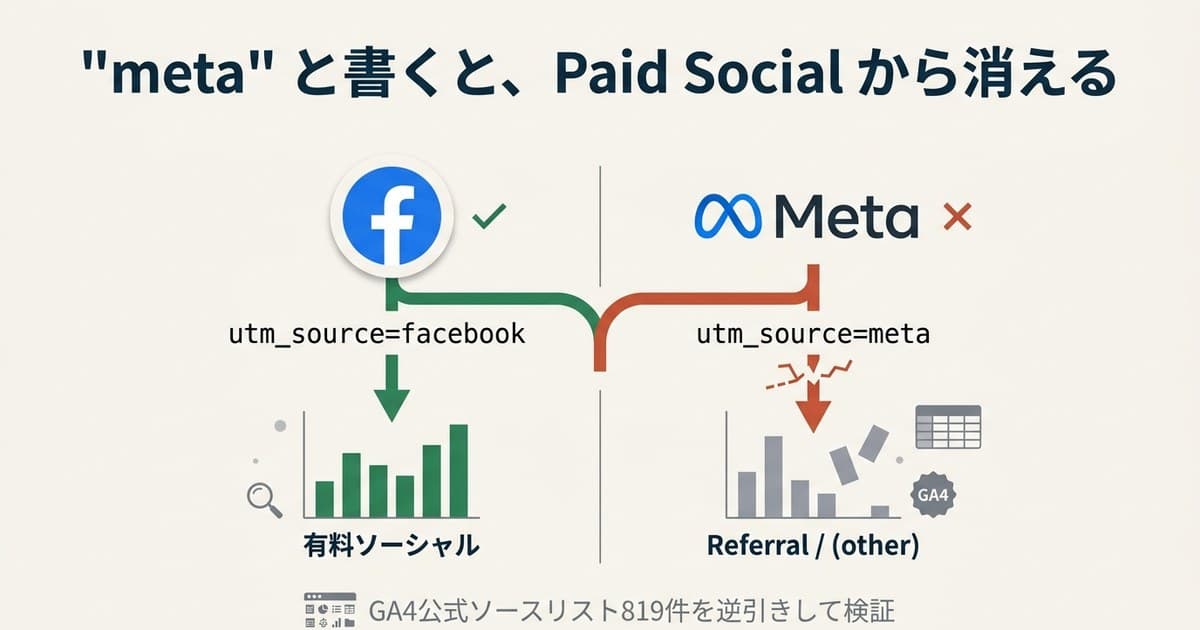
Putting utm_medium=social on Meta Ads URLs causes GA4 (Google Analytics 4) to log paid clicks as "organic" traffic. This isn't a misconfiguration or a GA4 bug — it's the result of GA4's official classification regex ^(.*cp.*|ppc|retargeting|paid.*)$[1] OR-ing against the Organic Social rule.
This article works through what to put into utm_medium for Meta Ads, using the official regex GA4 actually evaluates. Then it goes one step further — into the question that always remains after the naming is fixed: "so which traffic actually sold the most?" Cleaning up utm_medium fixes classification; the material for deciding where to put your budget comes after that.
Table of contents
Key takeaways#
- Use
utm_medium=cpc. Shortest match for GA4's Paid Social regex - Never use
social. It collides with Organic Social and logs paid ads as organic paid_socialandpaid-socialsplit your reports. Pick one and lock it across the org- But even with correct naming, "which traffic sold the most" never shows up in GA4's standard reports. How to compare real revenue by channel, once traffic is classified, is covered in the second half
1. The regex GA4 actually evaluates#
Bottom line: only a utm_medium that contains "cp" or starts with "paid" classifies as Paid Social.
GA4's Default Channel Group auto-classifies each hit using utm_source and utm_medium[1]. A session lands in Paid Social when both conditions hold:
utm_sourcematches GA4's "social sites list"utm_mediummatches the regex^(.*cp.*|ppc|retargeting|paid.*)$
The regex chains 4 alternatives with | (OR). Each pattern's meaning and matching values:
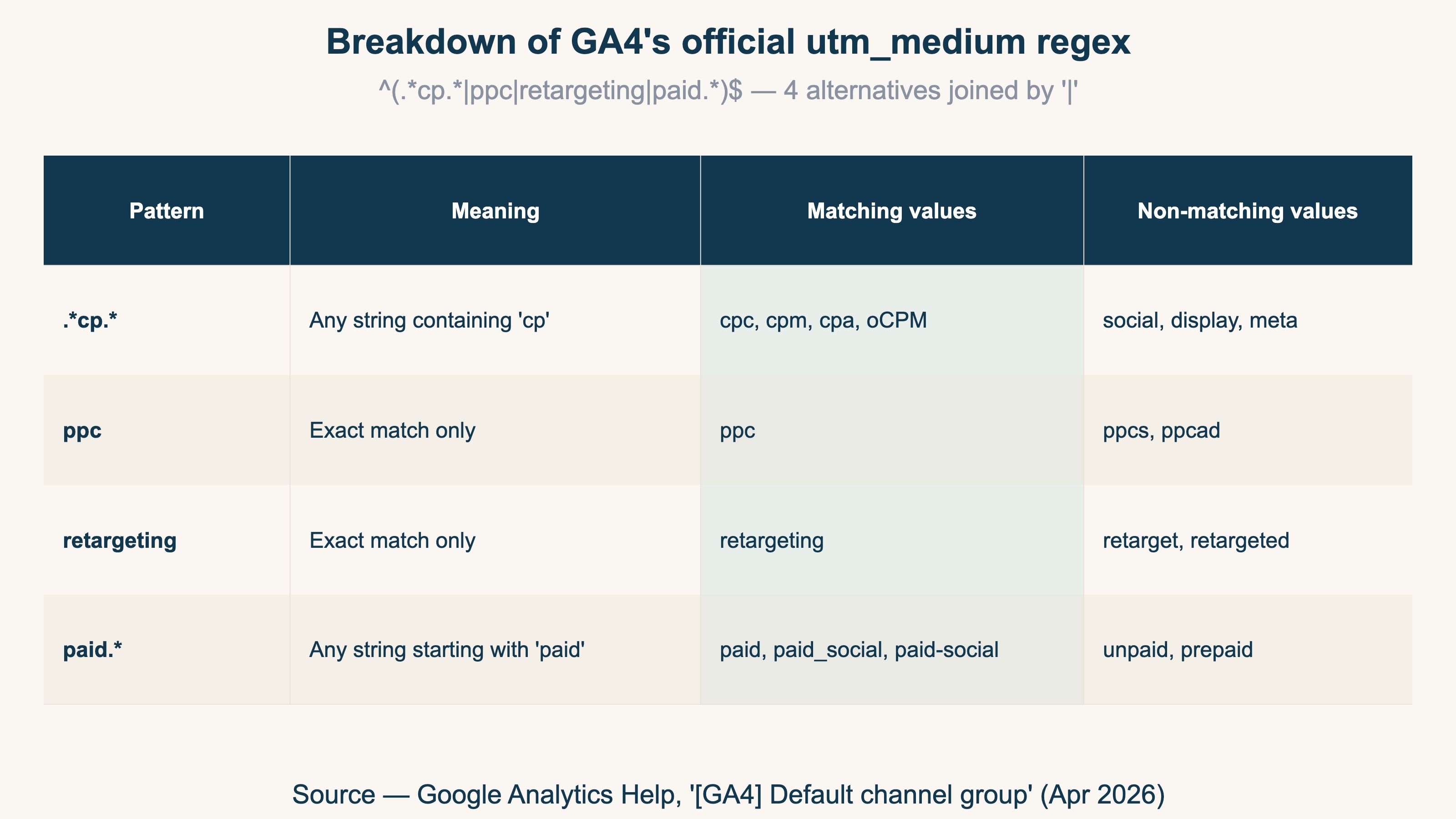
In short: values containing "cp" or starting with "paid" match. Values like social, display, meta, paid social (with a space), and blank do not match.
2. How utm_medium breaks#
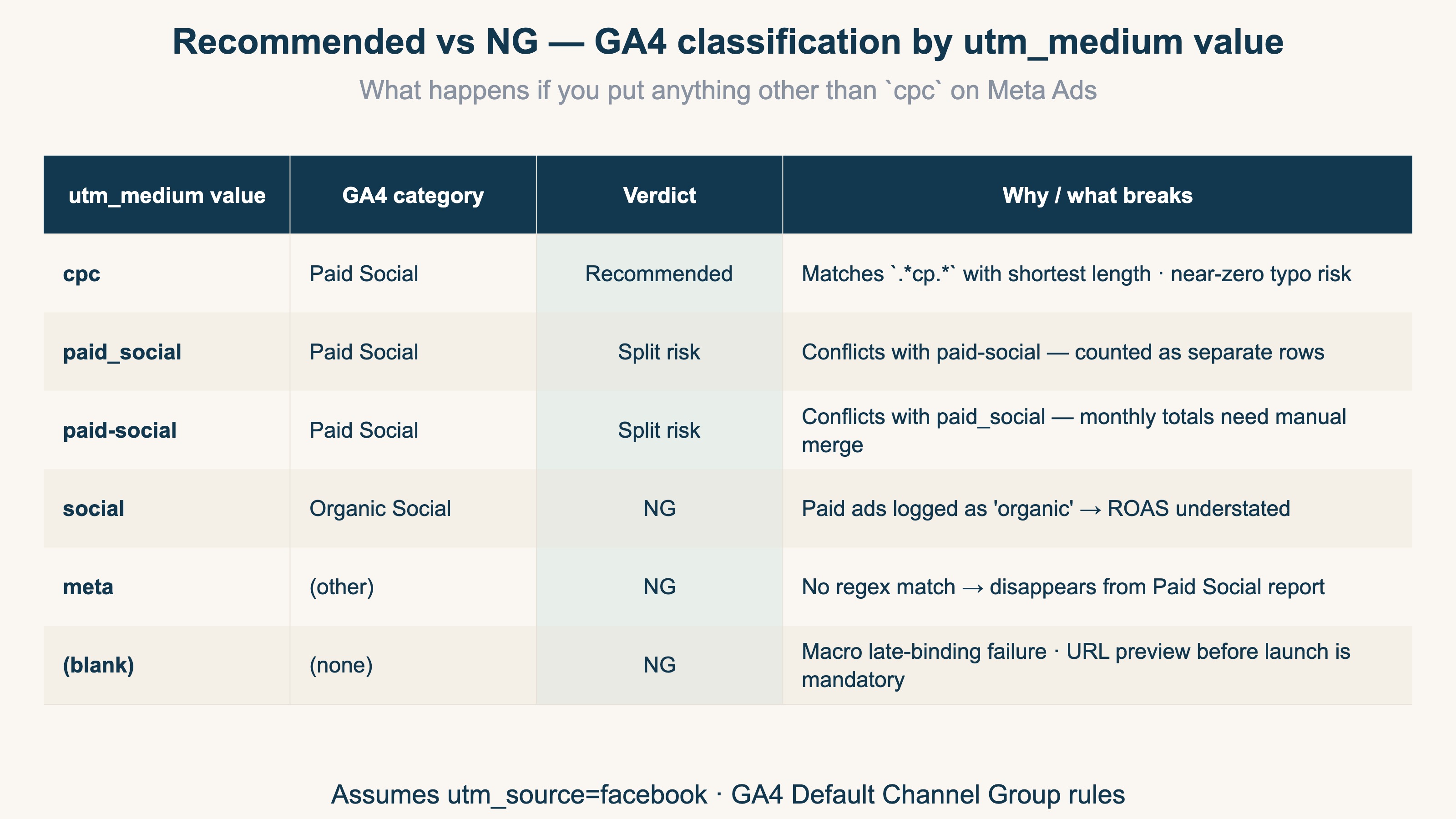
Bottom line: social disguises paid ads as organic, and meta drops into (other). Both distort ad ROAS.
Incident 1: utm_medium=social logs paid ads as organic#
GA4's Organic Social rule matches utm_medium against social / social-network / social-media / sm[1]. With utm_source=facebook + utm_medium=social, the Medium-only match is enough — the session is classified as Organic Social. Money spent on Meta paid ads gets logged as organic traffic, and reported ROAS is understated.
Incident 2: paid_social / paid-social split, and meta falls into (other)#
The regex paid.* matches both paid_social and paid-social. Paid Social classification works, but GA4 stores dimension values with the original punctuation intact. Mixing both in delivery causes Paid Social to show two separate rows that need manual merge in monthly reporting.
Separately, naming it utm_medium=meta ("because it's Meta Ads") matches none of the regex alternatives. The session fails the Paid Social condition and lands in Default Channel Group's (other), disappearing from the Paid Social report.
3. Recommended format and verification#
Bottom line: utm_medium=cpc is the answer — shortest regex match, near-zero typo risk, consistent across channels.
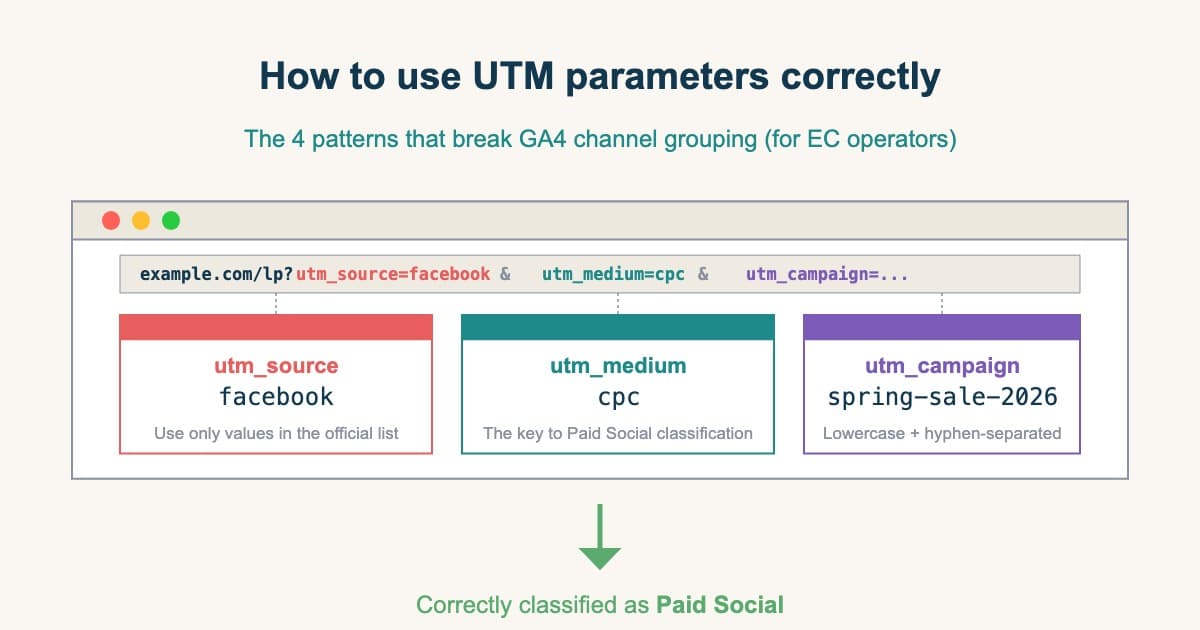
utm_source=facebook
utm_medium=cpc
utm_campaign={{campaign.name}}
utm_content={{ad.name}}
utm_term={{adset.name}}
utm_id={{campaign.id}}
Three reasons utm_medium=cpc is the safest choice:
- Guaranteed regex match: shortest fit for
.*cp.*— near-zero typo risk - Universally readable: short for "Cost Per Click" — anyone looking at the report instantly knows it's a paid-click channel
- Aligned across channels: Google Ads / TikTok Ads / LinkedIn Ads also use
cpcby convention — cross-channel reports stay consistent
Here's what happens with values other than cpc:
Two checks before and after launch:
- Pre-launch URL preview: open the URL parameter field in Meta Ads Manager's ad-editing screen, click "URL preview", confirm
utm_medium=cpcshows up as expected - Post-launch GA4 realtime: within 30 minutes, open GA4 → Realtime → Source/Medium and confirm
facebook / cpcis showing. If you seefacebook / socialor(direct) / (none), the parameter isn't reaching GA4
RevenueScope solution
Bottom line: Cleaning up utm_medium gets you as far as "classified correctly." But "how much that correctly-classified channel actually sold" never comes out of GA4's standard reports, no matter how perfect your naming. That's where RevenueScope begins.
Even if you match utm_medium perfectly to the official regex and drive spelling variance to zero, GA4's standard reports show you sessions and conversions — no further. "For the same traffic, how much did each channel earn per session (RPS)? Which has the higher AOV and purchase rate?" — lining those up side by side on bot-excluded clean numbers, the comparison you need to decide where to put your budget, sits beyond correct naming and is never filled by the naming work alone.
RevenueScope automatically normalizes utm spelling variants (even if past periods ran as social or paid_social, they merge into one channel). But normalization is only the preprocessing. The core is being able to compare, on bot-excluded clean numbers, real revenue, RPS (Revenue Per Session), AOV, and purchase rate by UTM-resolved channel and campaign on one screen.
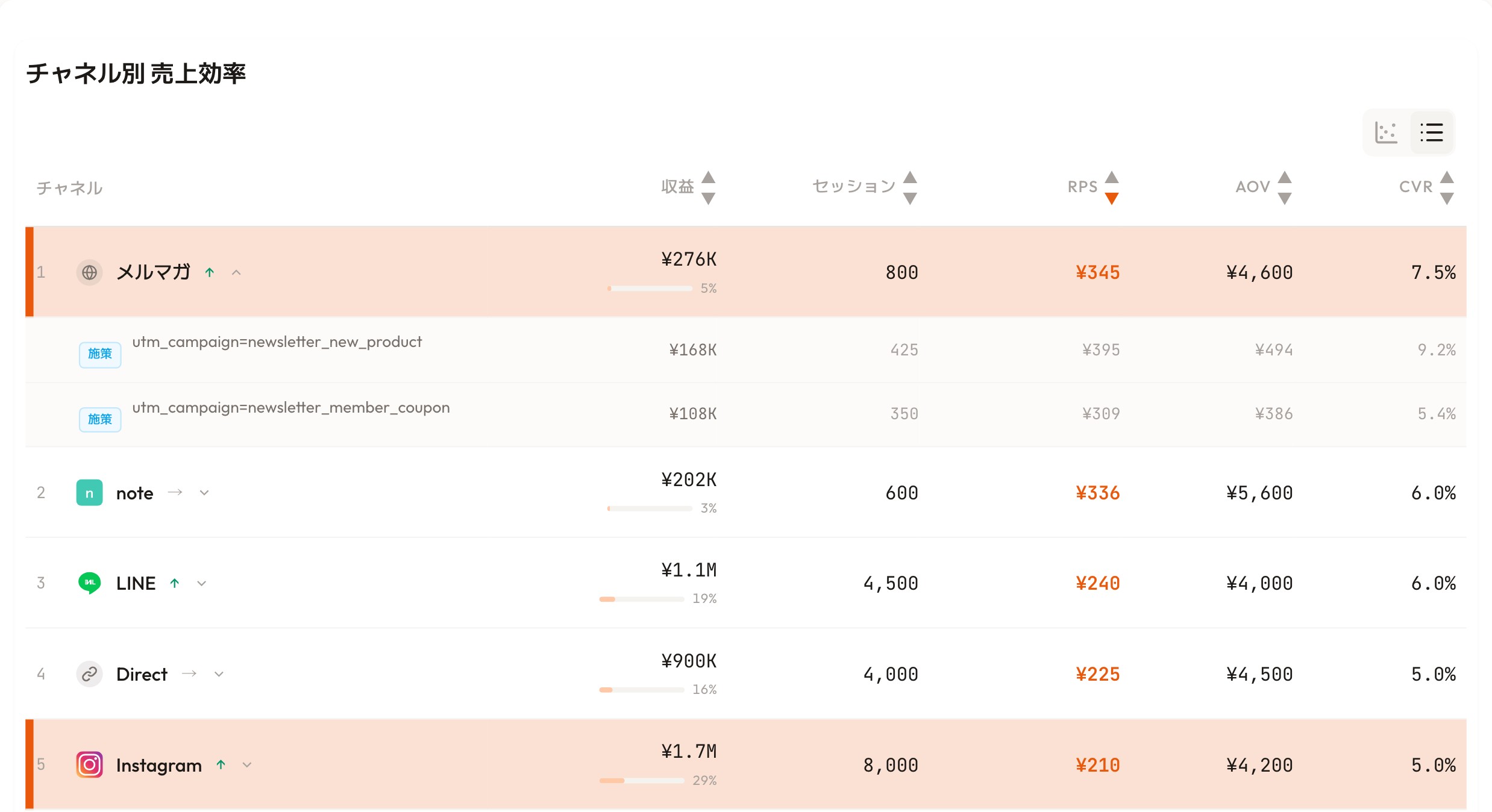
RevenueScope's dashboard (demo data shown). It lines up real revenue by UTM-resolved channel and campaign.
Take the screen above. Open the newsletter row and you see the breakdown by utm_campaign: the new-product campaign converts at 9.2%, the member-coupon one at 5.4%. Because UTM is tagged correctly, you can tell campaign-level differences within one channel — by revenue. Where to put the next budget is a call you make from this real-revenue comparison — the step that lies just beyond fixing the naming.
Summary — the "right answer" is in the regex#
There's an ongoing debate online: social vs paid_social vs cpc. But what GA4 actually evaluates is one regex: ^(.*cp.*|ppc|retargeting|paid.*)$[1]. social doesn't match. cpc does. That's the entire story.
And once you align the naming to cpc, traffic gets classified correctly. But all you learn there is that it was "classified correctly" — "so which traffic sold the most" never comes out of GA4's standard reports. If fixing the naming is this article's goal, deciding where to put your budget by revenue is the next one.
Related on /news:
- The utm_source you should NOT use for Meta Ads (pillar — utm_source edition)
- UTM parameters: how to use them right
- The "last-click trap" that distorts your ad budget decisions
See which ads actually drive revenue, at a glance
Free up to 5,000 sessions/month, AI connection included. No credit card required. Up and running in 5 minutes.
References#
- Google Analytics Help, "[GA4] Default channel group" (Apr 2026)
- Meta Business Help Center, "URL dynamic parameter spec" (Apr 2026)