What the LINE Official Account admin console shows you is messages delivered, opens and clicks. Revenue is not displayed. Open GA4 and there is no channel that singles LINE out either, and if the URL carries no UTM parameters, a tap from a chat is classified as Direct. LINE is the messaging app most shoppers in Japan use daily, and for EC it is a mainstay CRM channel — yet the revenue it earns never appears anywhere. This article lays out how to fix that.
Contents
TL;DR#
- What the LINE Official Account admin console measures is messages delivered, opens, clicks and the like. Revenue is not there
- GA4 has no channel definition dedicated to LINE. Without UTM parameters, a tap from a chat is classified as Direct or Referral and never adds up as revenue from LINE
- The starting point of the fix is UTM. Fix utm_medium to a single string and let campaign be the only part that changes from send to send
- The thinking is simple; the weight is in the repetition. Tagging every URL you send, consolidating spelling variants, excluding bots, and re-aggregating on the same rules as email all come back every month
- Friend counts and block rates on their own don't decide where delivery investment goes. Only once you compare on the same RPS as email does the next budget have a direction
1. Why LINE Revenue Doesn't Show Up in GA4#
Revenue from LINE surfacing nowhere is not the result of a setting you got wrong. There is a reason on the LINE side of the screen and a reason in GA4's classification rules, and both are in play.
The LINE Yahoo for Business service page states that what a LINE Official Account can measure is messages delivered, opens, clicks and the like[2]. What LINE can tell you is how many people opened the message and how many pressed the link. How much the people who pressed it went on to buy is recorded only on the site side.
On the site side, GA4 puts up a second wall. GA4 has a classification called the default channel group, which decides the channel from the combination of source and medium[3]. Email has a definition built on utm_medium=email, but there is no definition that singles LINE out. The machinery for collecting visits from LINE into a single row was never there to begin with.
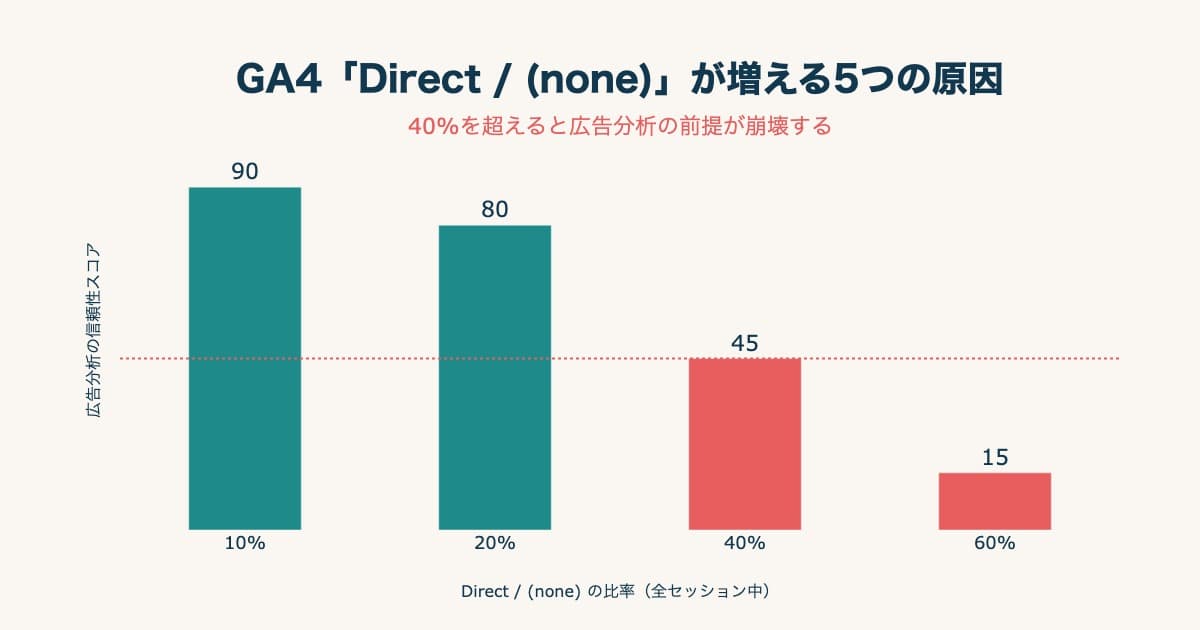
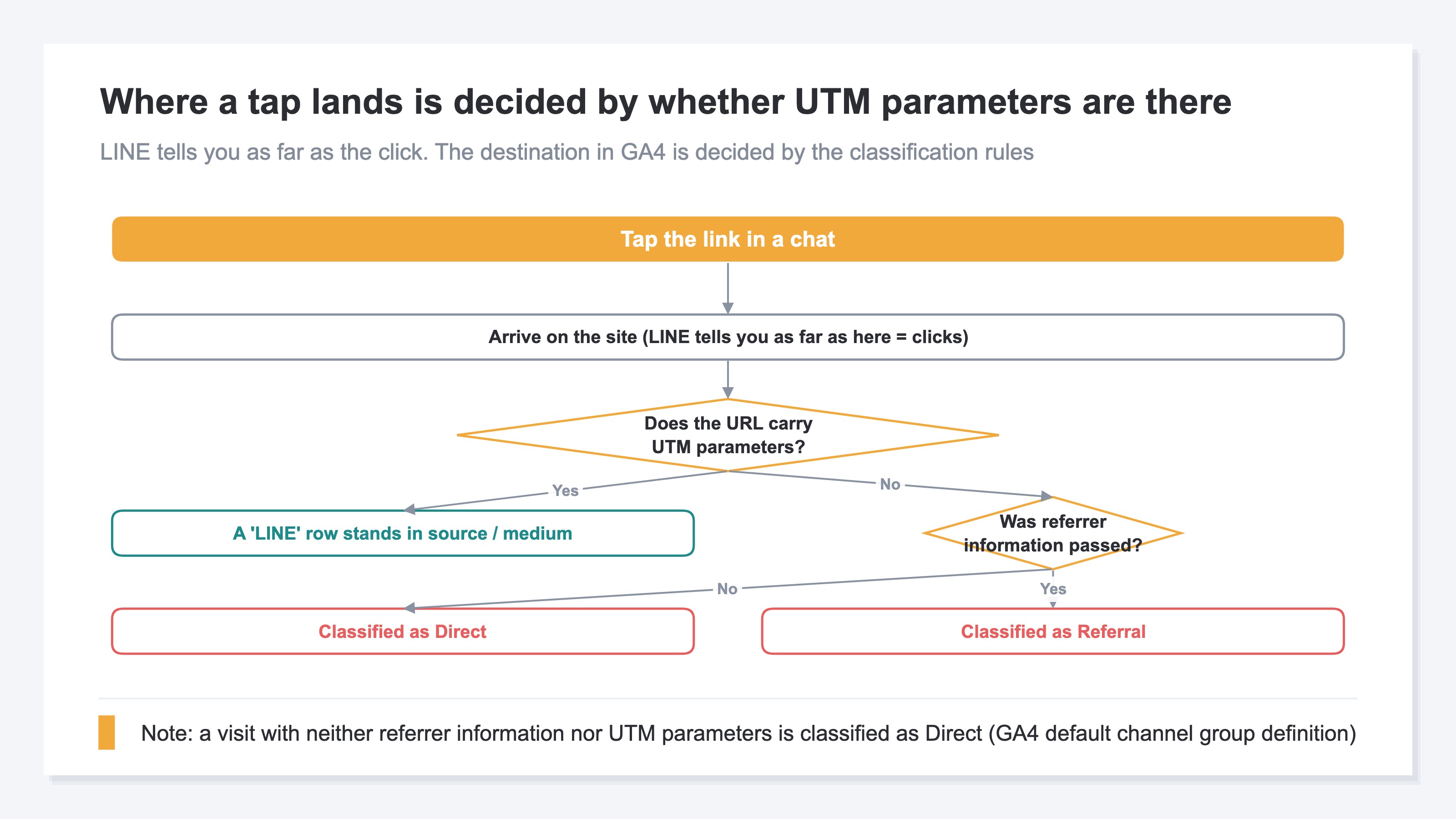
A visit that carries neither referrer information nor UTM parameters is classified as Direct in GA4[3]. If the URL you pasted into a chat has no UTM parameters, that session either falls into Direct, or the referrer alone is passed and it is classified as Referral. Neither case turns into a row named LINE. The full picture of what makes Direct swell is in why Direct / (none) keeps growing in GA4. For how to read which traffic lands in which channel, see reading GA4's default channel group.
One more point, about the path itself. The LINE Developers documentation states that adding openExternalBrowser=1 to a URL opens that URL in an external browser[1]. The browser a shopper lands in changes with a single parameter, so keep that in view as a precondition whenever measurement is the subject.
What all of this builds is a state where LINE's admin console stops at clicks, GA4 keeps the visit as Direct, and revenue alone is tallied nowhere. Friend counts and block rates are visible every day, and how much a given send earned is not. That measurement gap is the problem this LINE setup has to solve.
2. Use UTM to Label the Traffic as LINE#
Since GA4 will not identify LINE on its own, the label has to come from your side. That job belongs to UTM (Urchin Tracking Module).
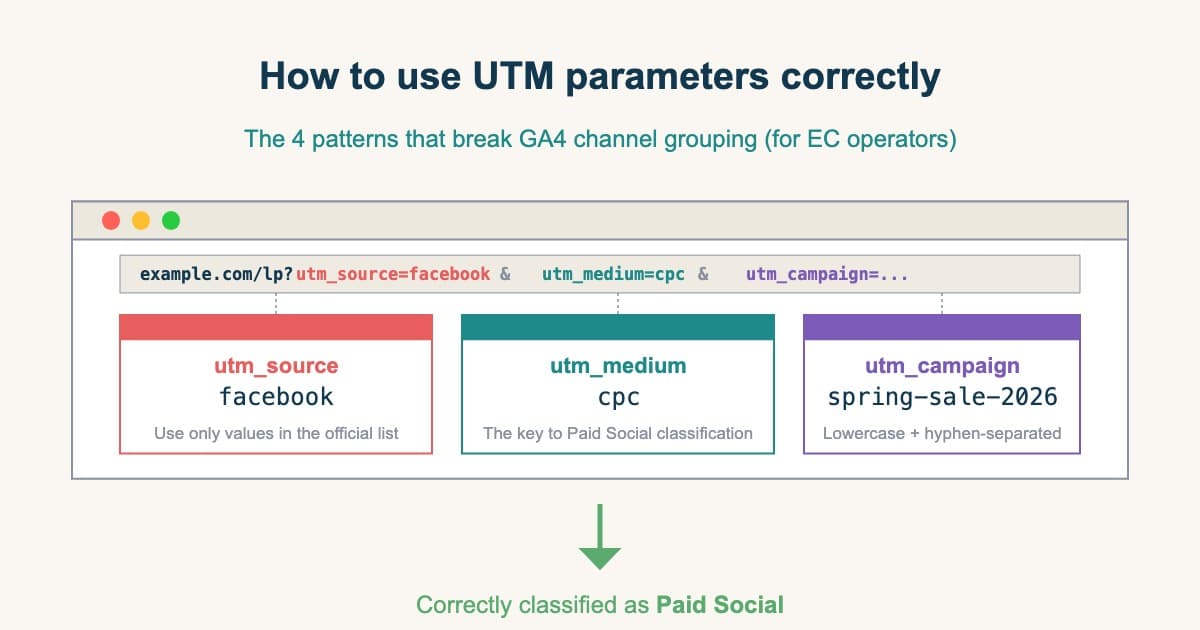
UTM parameters are tags you append to the end of a URL to tell GA4 where the visit came from. utm_source passes the source name, utm_medium the type of traffic, and utm_campaign the name of the individual initiative. The shape is something like ?utm_source=line&utm_medium=line_official&utm_campaign=0724sale. Fix source and medium, and let campaign be the only part that changes from send to send — that is the basic idea.
What matters is deciding on one string for medium and holding to it. line on one send, LINE on another, sns from a different person on the team. A difference that small splits into separate rows on the GA4 screen. Split rows are not summed, so a figure for "LINE as a whole" never arrives. How to attach UTM parameters in the first place is covered in the correct way to use UTM parameters.
The setup itself is done once. What produces the effect is the four jobs that keep coming every month afterward. Tagging every URL you send — and if one message holds several links, that means all of them. Consolidating spelling variants, which grows as more people join the work. Excluding bot traffic. And re-aggregating on the same rules as email and your other channels. Without that last one, the comparison in the next section doesn't even stand up.
There are routes that avoid UTM, but both stay supplementary. The click count in LINE's admin console reaches only as far as how many people pressed. Clicks and revenue are not tied together, so revenue stays out of reach. Matching against coupon codes does show amounts, but it works only for the sends that carried a coupon, and revenue from ordinary sends remains invisible as ever.
3. What Comparing With Email on the Same Basis Tells You#
A comparison between channels stands up only on figures counted by the same rules on the site side. The click count LINE's admin console produces is counting something else, so it cannot be used for this comparison.
Within the same CRM bracket, the problem is a different kind from email's. Email delivery tools produce an amount they call attributed revenue, so the tool, the cart and GA4 end up with three figures that disagree, and you are left choosing which to believe. Why they disagree is covered in detail in measuring email newsletter revenue. LINE's admin console produces no revenue figure at all. Before you can choose a number to believe, there is nothing on the other side to reconcile against.
So with LINE, decide the division of labour first: what gets counted where. Comparisons between initiatives belong to the delivery-side screen; comparisons between channels belong to site-side figures. Adding another measurement tool will not make the platform screen, the cart and GA4 agree. Each of them counts in a different way. Stop trying to make them match, and settle instead which question each figure answers. That is the realistic policy for measurement.
The common basis for comparing channels against each other is RPS. RPS (revenue per session) expresses how much was sold per visit, which lets you compare the efficiency of channels without being swayed by the size of the traffic. The definition and how to use it are in what RPS (revenue per session) is.
Friend counts and block rates are figures you read on the LINE side. You need them to manage the state of the list, but they cannot decide where the next budget goes. Compare on RPS and the question turns into one that can be decided. Which of LINE and email sells more per visit. Whether the next ¥10,000 should go into acquiring friends or into acquiring email subscribers. The material for the decision comes from the revenue side rather than from how a send felt.
Getting there, though, means stepping outside GA4's standard reports. Consolidate the spelling variants in your UTM parameters, exclude bots, and put revenue per session by channel side by side on one screen. That state is reached either by assembling an exploration report by hand every month, or by preparing it somewhere else.
RevenueScope solution
RevenueScope consolidates utm_source spelling variants such as differences in capitalisation, excludes bot traffic, and then displays sessions, revenue and RPS by channel on one screen. LINE, email, search and ads alike are figures aggregated on the same rules, based on actual revenue.
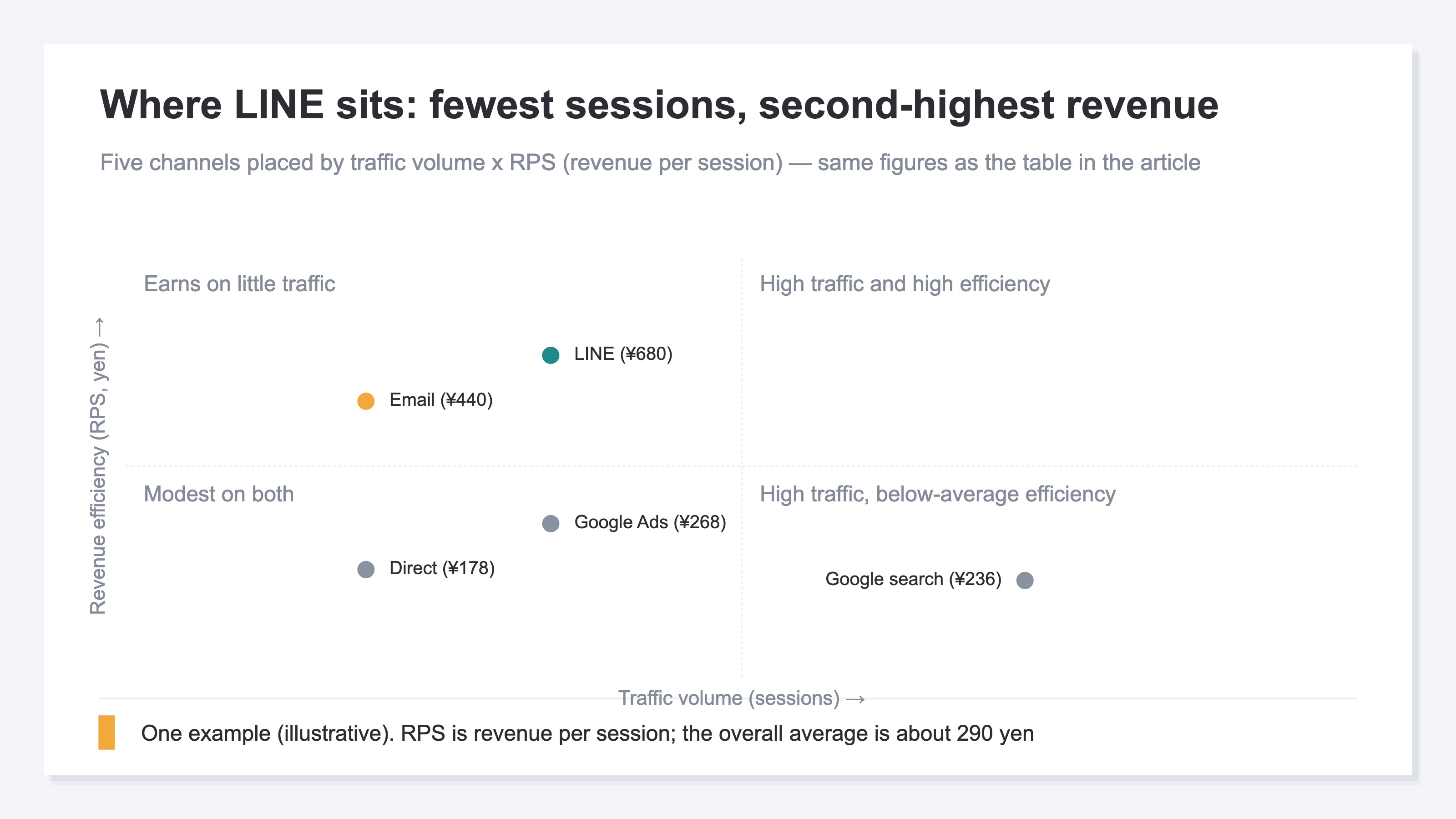
Broken out by channel, it takes a shape like this.
| Channel | Sessions | Revenue | RPS |
|---|---|---|---|
| Google search | 5,600 | ¥1,320,000 | ¥236 |
| LINE | 1,000 | ¥680,000 | ¥680 |
| Google Ads | 2,200 | ¥590,000 | ¥268 |
| 1,250 | ¥550,000 | ¥440 | |
| Direct | 1,850 | ¥330,000 | ¥178 |
This LINE comparison uses illustrative, fictional figures.
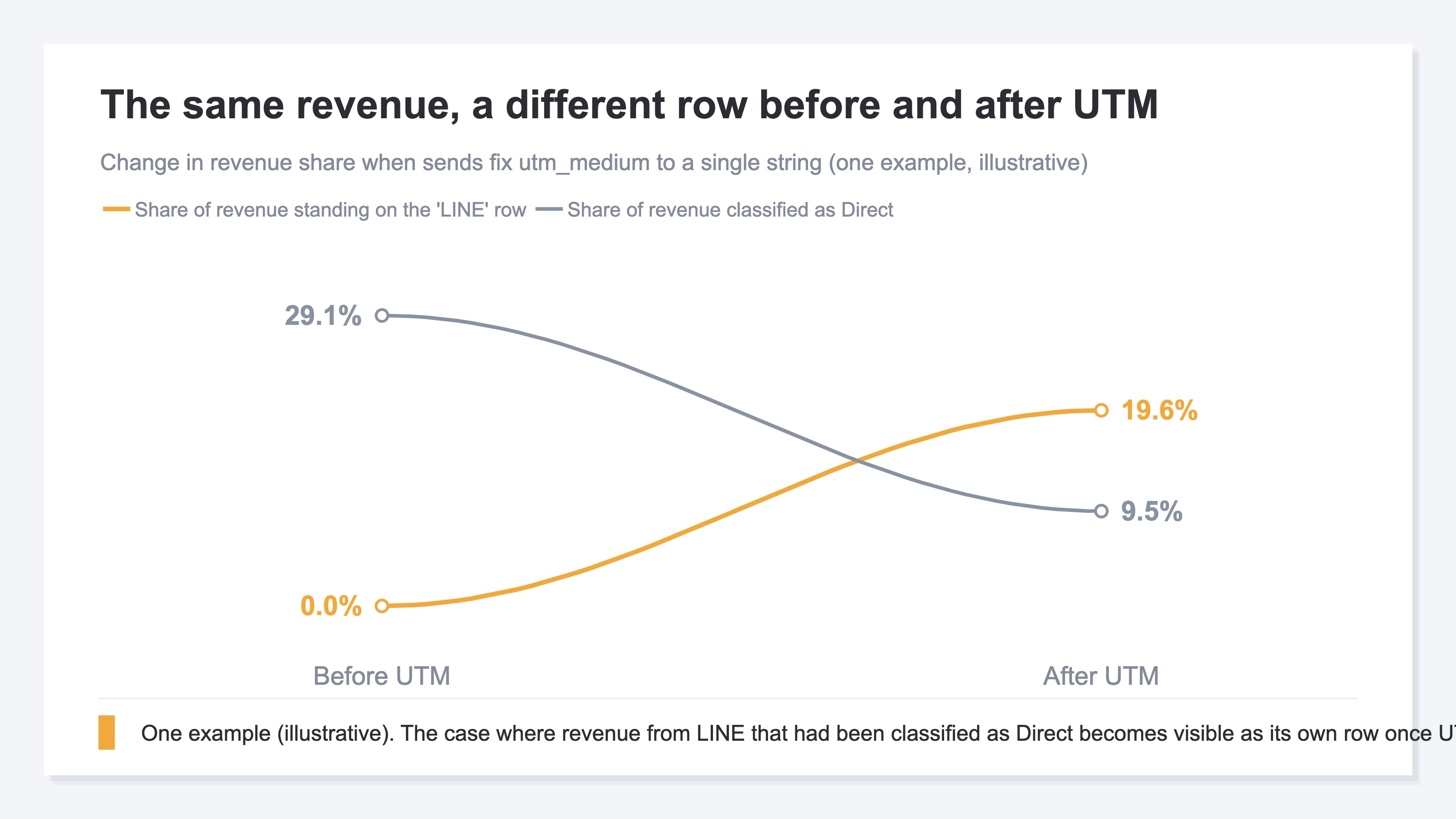
LINE in this example has 1,000 sessions, the fewest of the five channels, yet its revenue of ¥680,000 is second only to Google search. Its RPS is ¥680. Across the whole table, ¥3,470,000 in revenue divided by 11,900 sessions comes to about ¥290. One visit from LINE sells at more than 2x the average. Email, the other CRM channel, sits at ¥440, so which of the two to weight the list-building budget toward is settled by reading those two rows against each other. Direct holding at ¥178 also reads differently before and after UTM parameters are in place.
Set the click count from LINE's admin console beside the session count on this screen and the portion that was pressed but never arrived as a measured session comes into view. Sends where the gap is large are the ones to suspect first for gaps on the measurement side, such as URLs that went out untagged.
FAQ#
Frequently asked questions#
Q. Once we add UTM parameters, which GA4 channel does LINE land in?
A. It is decided by what you put in utm_medium. GA4's default channel group classifies from the combination of source and medium[3], so a string that matches no definition is treated as unassigned. For the correspondence between which traffic lands where, see reading GA4's default channel group.
Q. Can we measure sends that already went out, retroactively?
A. No. UTM parameters are recorded at the moment the link is pressed, so visits from the period when they were not attached cannot be reclassified later. Starting to attach them from today's sends onward, and building a period you can compare across, is the starting point.
Q. Does that mean we can ignore friend counts and block rates?
A. Keep watching them. They simply have a different role. Friend counts express the size of the list, block rates how the sends are being received. Both are figures you check on the LINE side, and they are the material for adjusting the frequency and the content of what you send. For a budget allocation decision, revenue efficiency by channel is added on top of them.
Q. Should we add openExternalBrowser=1?
A. The LINE Developers documentation states that this parameter opens the target URL in an external browser[1]. Whether to add it comes down to which browser you want the path to purchase completed in. Its effect on measurement varies by environment, so try it on your own sends, check how it gets recorded in GA4, and decide from there.
Summary#
Revenue from LINE being invisible is the result of two factors overlapping. LINE's admin console counts only as far as clicks, and GA4 has no channel definition that singles LINE out. Without UTM parameters, the visit is classified as Direct or Referral. Nothing was set up wrong, so searching the admin console again will not turn it up.
The starting point of the fix is UTM. Fix utm_medium to a single string and let campaign be the only part that changes from send to send. The setup ends there, and what is actually heavy is keeping up the tagging of every URL you send, the consolidation of spelling variants, the exclusion of bots, and the aggregation on the same rules as your other channels, month after month.
Then, past the point where the counting is aligned, only a comparison on the same RPS as email decides whether to invest in acquiring friends or in the frequency of sends. As long as friend counts and block rates are all you look at, that decision never arrives.
See which ads actually drive revenue, at a glance
Free up to 5,000 sessions/month, AI analyst included. No credit card required. Up and running in 5 minutes.