Few operators can answer on the spot which GA4 (Google Analytics 4) channel a click from a newsletter, SMS, or web push notification ends up in. Guesses like "probably Referral or (other)" are common.
The bottom line: the real answer is written into GA4's official "Default Channel Group" definition[1]. For every single visit, GA4 reads utm_source and utm_medium and auto-assigns it to one of the 23 channels[1] using a fixed rule set decided on Google's side — operators cannot override it. And even once classified correctly, GA4 alone will not tell you which channel actually earned the revenue.
This article reads the official rules for Email, SMS, and Mobile Push — three channels where operators actively design their own UTMs — and then connects to the real question: once classified correctly, how do you see the revenue? Pairing it with the sister utm_source pieces[2] gives a complete view of the Default Channel Group.
Table of contents
- What is the Default Channel Group, and who decides it
- The correct Email channel value — which UTMs land in Email
- The correct SMS channel value — do LINE and WhatsApp count as SMS
- Quick-reference rules for Display, Mobile Push, Affiliates, and other channels — and the revenue beyond classification
- FAQ
- RevenueScope's solution
Key takeaways#
- The correct Email channel value is
utm_medium=email.utm_sourcecan also trigger Email judgment, bututm_medium=emailis the shortest cross-tool form - The correct SMS channel value is an exact match on
utm_medium=sms. LINE and WhatsApp do not count as SMS — they fall into Referral - Even classified correctly, GA4 alone won't show revenue by channel. Classification is only the entry; which channel earned the money needs a different view
1. What is the Default Channel Group, and who decides it#
The bottom line: the Default Channel Group is a fixed Google ruleset, and operators cannot edit it.
GA4's Default Channel Group auto-classifies every visit by checking utm_source × utm_medium against the official ruleset[1]. Operators cannot rename channels inside reports. Custom channel groups can be created separately, but the default-side rules are entirely fixed by Google[1].
Where the official judgment logic actually lives#
The judgment logic is split across 2 files:
- The channel definition itself: the Google Analytics Help page "[GA4] Default channel group" lists conditional expressions for all 23 channels[1]
- The Source Categories table: a 819-row
.xlsxGoogle distributes[3], mapping eachutm_sourcevalue to a category like SOCIAL, SEARCH, VIDEO, or SHOPPING
This article focuses on the former. The latter is unpacked in the sister TikTok / LinkedIn utm_source piece[2].
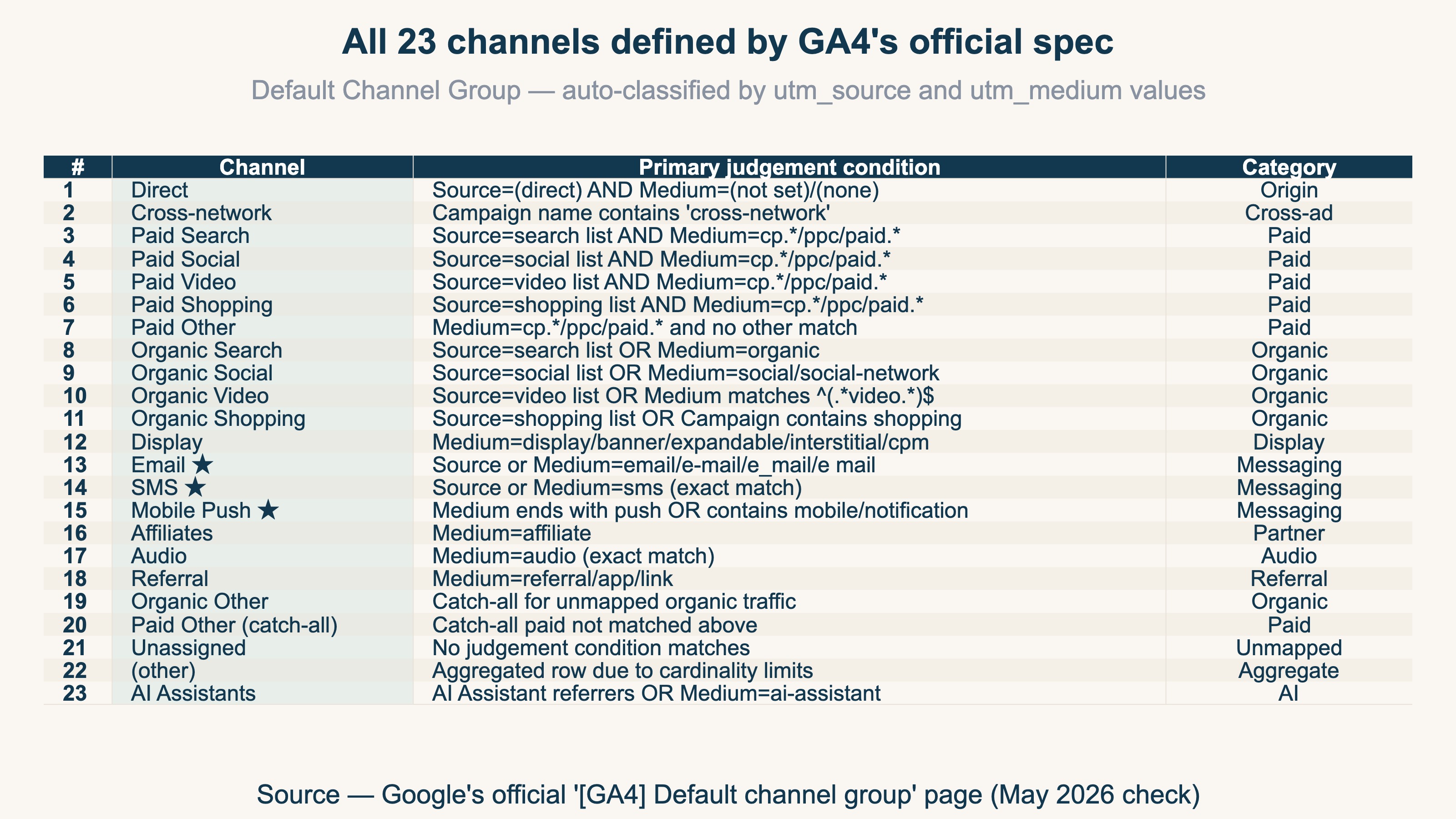
The full list of 23 channels GA4 officially defines#
The full list of 23 channels, in one image. Email, SMS, and Mobile Push are three of the channels where operators actively design UTMs themselves — and yet they are also the channels where misclassification happens most often.
Why operators can't touch the auto-classification#
Google fixes channel definitions so that GA4 reports remain comparable across sites[1]. If each operator could redefine "this is Email, this is Referral" arbitrarily, cross-industry benchmarking and reading GA4's own guides would break. Custom channel groups exist, but they live as "your own view" and cannot be mixed back into the default 23 channels by design.
2. The correct Email channel value — which UTMs land in Email#
The bottom line: if either utm_source or utm_medium matches one of four official spellings, it lands in Email.
What do you have to put on a newsletter URL to land in the GA4 Email channel? The official condition reads[1]:
Email:
Sourcematches"email|e-mail|e_mail|e mail"ORMediummatches"email|e-mail|e\_mail|e mail"
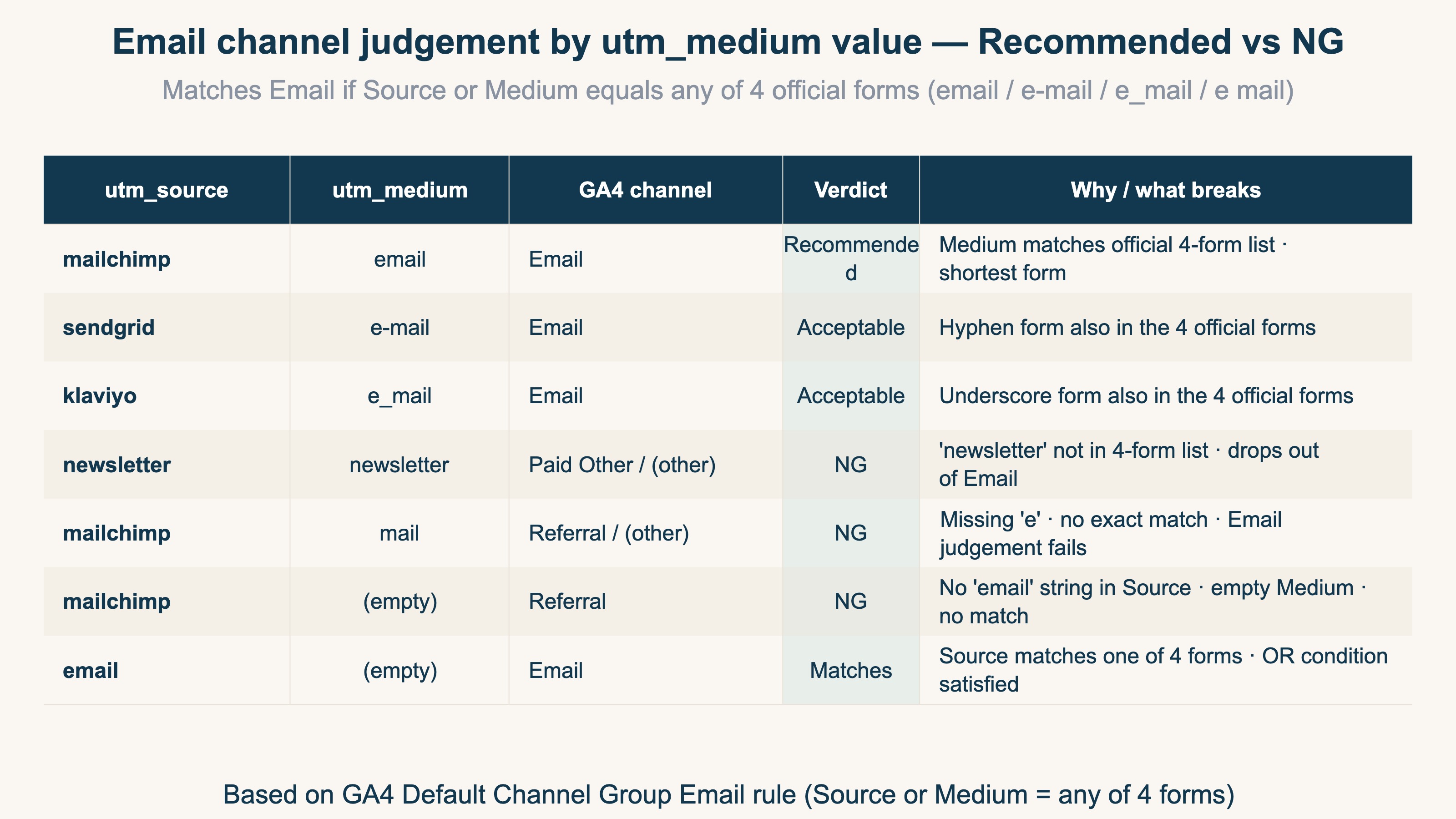
It's an OR condition — either utm_source or utm_medium matching is enough. Four spellings are accepted (email / e-mail / e_mail / e mail), so hyphen, underscore, and space separators all pass.
The "I sent the newsletter but it isn't in Email" failure modes#
Three common failure modes:
- Setting
utm_medium=newsletter: a literal translation of "newsletter" that isn't in the official 4 spellings. Lands in Paid Other or(other) - Setting
utm_medium=mail: missing the "e".mailalone doesn't match any of the 4 spellings and drops out of Email - Setting
utm_source=mailchimponly, withutm_mediumempty: if the Source side doesn't contain the string "email", judgment fails. Forgettingutm_mediumreliably sends it to Referral
When you want utm_source to carry the tool name (mailchimp, sendgrid, etc.), always pair it with utm_medium=email so the Medium-side condition triggers Email judgment.
Recommended format and a quick-reference table#
The recommended format for newsletter delivery:
utm_source=mailchimp     # tool name — your internal identifier
utm_medium=email         # shortest of the 4 official spellings
utm_campaign=2026-05-launch
utm_content=cta-button-top
How each utm_medium value gets classified, in one image:
3. The correct SMS channel value — do LINE and WhatsApp count as SMS#
The bottom line: SMS judgment is an exact sms match only — LINE and WhatsApp are not covered.
The SMS channel condition is even simpler[1]:
SMS:
Sourceis exactly"sms"ORMediumis exactly"sms"
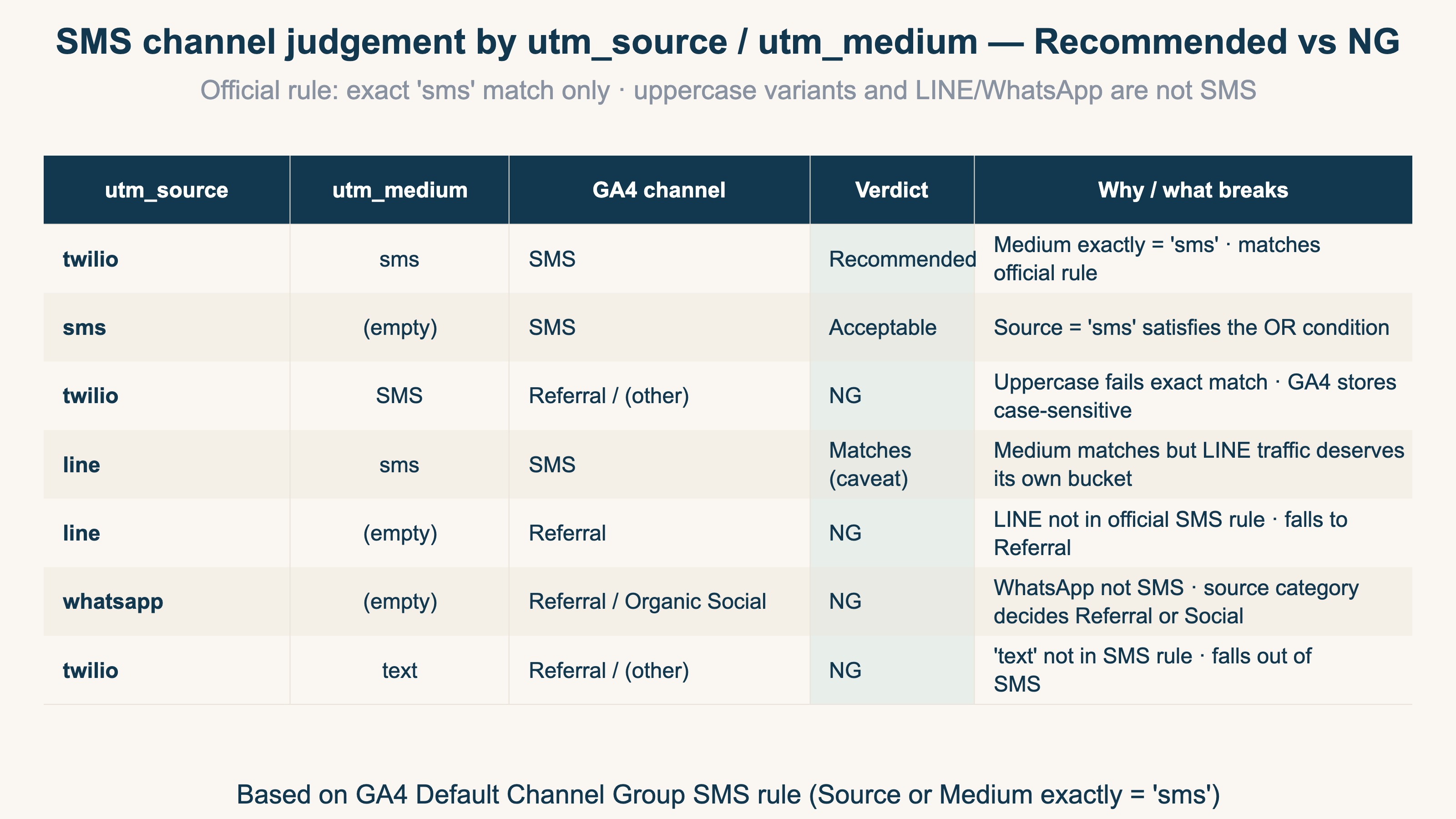
Unlike Email, this is an exact match. Any spelling other than lowercase sms (including SMS in mixed case) drops out. GA4 stores values case-sensitively, so utm_source=SMS will not match[1].
Are LINE / WhatsApp counted as SMS? The official answer is "No"#
It's tempting to lump messaging channels together, but GA4's SMS rule only triggers on the literal string sms. Setting utm_source=line or utm_source=whatsapp does not trigger SMS judgment — instead it lands in Referral, Organic Social, or (other) depending on the Source Categories table[3].
The internal ask of "I want LINE Official Account traffic bucketed with SMS" cannot be satisfied through the default channel group. A practical workaround: build a custom channel group, or keep SMS as its own channel and separately tally utm_source=line inside Referral.
Recommended format and failure-pattern quick-reference#
The recommended format for SMS delivery and the value-by-value judgment table, in one image:
4. Quick-reference rules for Display, Mobile Push, Affiliates, and other channels — and the revenue beyond classification#
The bottom line: the remaining major channels also run on fixed official rules — learn the recommended utm_medium and you avoid misclassification — but even with correct classification, GA4 alone won't show which channel earned the money.
Beyond Email and SMS, the channels where operators most actively design UTMs are Display, Mobile Push, Affiliates, and Audio. The official conditions for each, in one image[1]:
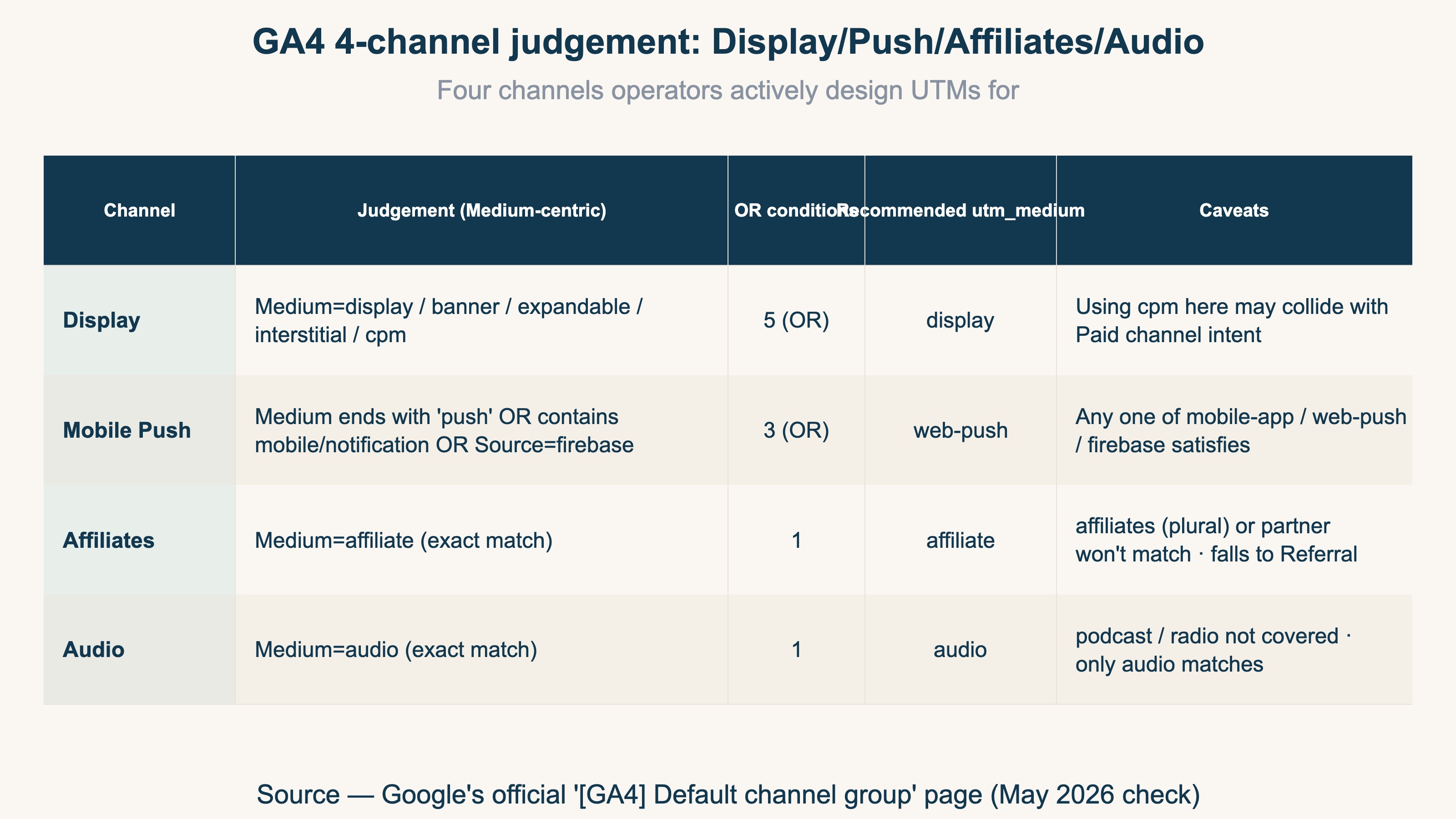
Mobile Push in particular runs on 3 OR conditions. Any one of utm_medium=web-push, utm_medium=mobile-app, or utm_source=firebase is sufficient to land in Mobile Push[1]. URLs sent from a web push notification tool should always carry one of these on utm_medium.
How to check whether your own channels are misclassified#
Once you know the official rules, you can check your own setup by opening "Acquisition" → "Traffic acquisition", breaking down by Default channel group, and seeing whether sessions land in "Unassigned" or "(other)". The idea itself isn't hard.
What is heavy is keeping it aligned every month. Each person running campaigns introduces spelling drift in utm_source / utm_medium, so you have to decompose dropped traffic down to raw values and reconcile naming inconsistencies across every channel by hand — and that prep does not last as a monthly routine. If "Unassigned" or "(other)" exceeds 5%, suspect inconsistent UTM naming across the team.
After classifying correctly, what you really want to see is revenue#
We've now decoded GA4's official Default Channel Group rules. But what operators ultimately want to know is "which channel is driving revenue". Of 1,000 sessions correctly classified as Email, how many converted and at what average order value — only then can you make a real investment call on email.
The trouble is that GA4 measures the traffic side (sessions by channel), and its standard reports have no view that lines up "how much each channel sold per session" side by side. They show sessions by channel, but offer no feature to tie utm_source / utm_medium values to revenue and compare channels by RPS (Revenue Per Session) and AOV (Average Order Value). That gap is structural.
"Classify it correctly and stop there" isn't enough. Only by reading classification through to revenue, as one connected flow, can you decide — by revenue, not gut — which of Email, SMS, or Mobile Push deserves the investment.
FAQ#
Q. If I fix GA4's channel classification, can I make revenue decisions?
Classification only gets you to the entry. Splitting channels correctly is a necessary precondition, but GA4's standard reports have no view that lines up "how much each channel sold per session." Even with correct classification, which channel earned the money needs a different view.
Q. Why doesn't utm_medium=newsletter land in Email?
Because the official Email rule only checks whether the value matches one of four spellings: email / e-mail / e_mail / e mail. newsletter isn't among them, so it falls to Paid Other or (other). If you want the tool name on utm_source, always pair it with utm_medium=email.
Q. Is traffic from a LINE Official Account counted as SMS?
No. The official SMS rule is an exact sms match only, so utm_source=line is not treated as SMS. It lands in Referral or Organic Social depending on the Source Categories table. To view LINE on its own, a custom channel group is the practical answer.
RevenueScope's solution
Even when GA4 classifies channels correctly, its standard reports have no view that lines up RPS (revenue per session) and AOV (average order value) by channel. The classification is right, yet which channel earned the revenue stays invisible without separate work — that is the structural gap.
RevenueScope takes the utm_source / utm_medium values GA4 classified correctly and ties them straight to revenue, letting you compare each channel's sessions, conversion rate, RPS, and AOV on a single screen. It excludes bot traffic, returns Direct-buried traffic to its true channel, and folds spelling variants (email vs e-mail, etc.) into the same channel.
| Channel | Sessions | Conv. rate | RPS (per session) | AOV (avg order value) |
|---|---|---|---|---|
| 1,200 | 3.1% | ¥182 | ¥5,900 | |
| SMS | 600 | 2.4% | ¥119 | ¥4,950 |
| Mobile Push | 1,800 | 0.9% | ¥41 | ¥4,600 |
RevenueScope's by-channel view (demo data). Mobile Push, with the most sessions, lands last in revenue per session — a reversal you cannot catch by watching session counts alone.
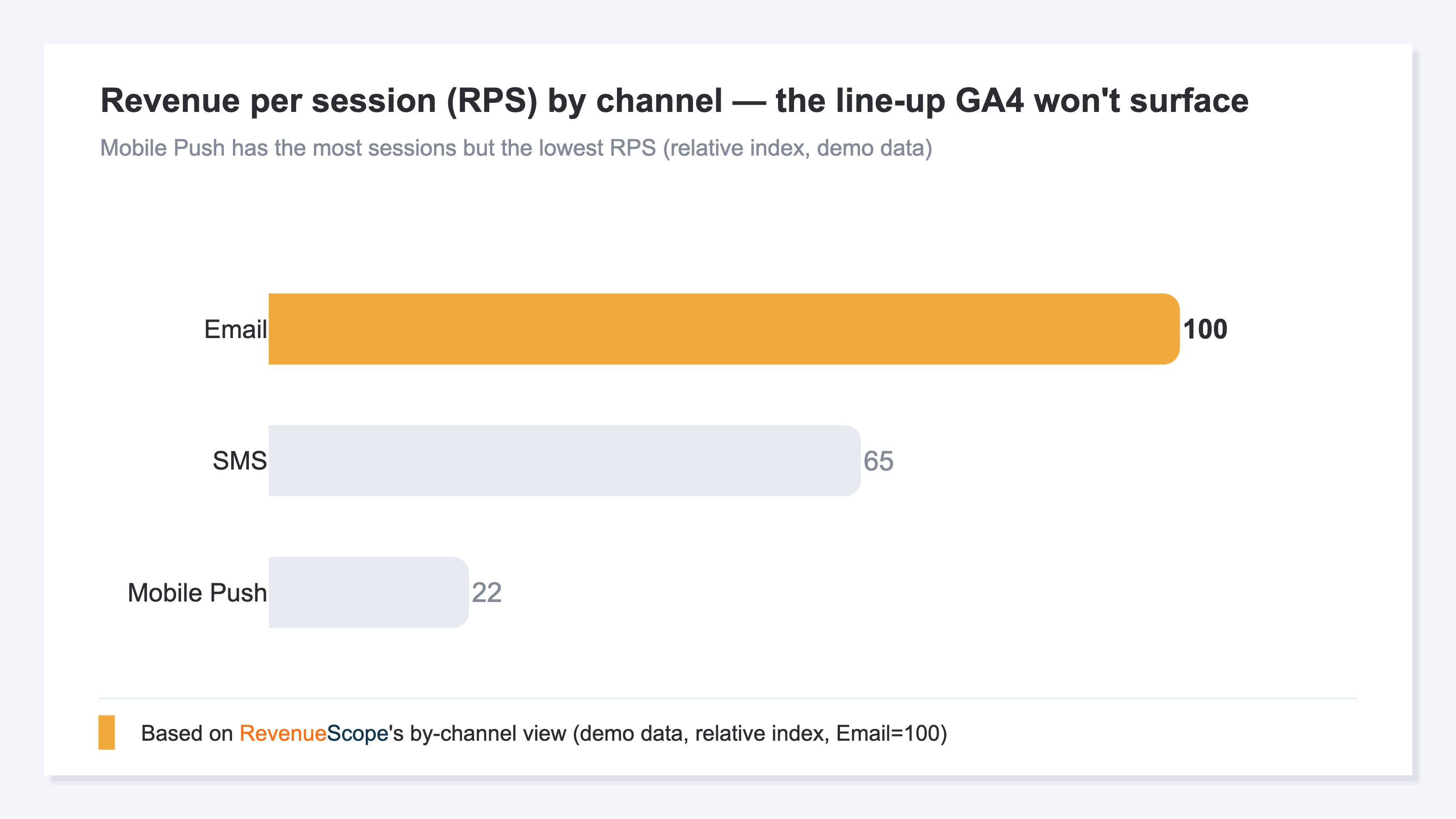
Only once you compare it this way can you decide — by revenue, not gut — whether to grow Email delivery or whether Mobile Push has many sessions but needs better quality. Note that RevenueScope covers the breakdown of Revenue / AOV / RPS / CVR / Sessions; it does not cover LTV, gross margin, ROAS, inventory, or CRM figures. For UTM tagging see How to Use UTM Parameters Correctly, for revenue per visit see RPS Basics, and for channel revenue efficiency see Comparing EC Acquisition Channels.
Summary#
GA4's Default Channel Group auto-classifies every visit by checking utm_source and utm_medium against an official ruleset across 23 channels, and operators cannot edit it. Email matches if either side equals one of four spellings, SMS matches only on an exact sms, and Mobile Push matches on any of three OR conditions. To avoid misclassification, learn the recommended utm_medium and keep naming consistent.
But even classified correctly, GA4 alone won't tell you which channel earned the revenue. Only by tying channels to revenue and comparing them by RPS and AOV can you decide, by revenue, which channel deserves investment. Classification is the entry; revenue analysis is the real work.
See which ads actually drive revenue, at a glance
Free up to 5,000 sessions/month, AI connection included. No credit card required. Up and running in 5 minutes.