
An "AI Max" item has appeared in your Shopping campaign settings. It says turning it on lifts results, but it isn't clear how you would confirm the effect afterward. What trips you up here is not what the feature does — it's how the result gets computed. Once Google decides which search terms to reach for, what the ad says and which URL the click lands on, the unit you needed in order to compute results separately is the first thing you lose.
Contents
TL;DR#
- AI Max for Shopping is in beta, and it is built from two settings: text customization and final URL expansion. Final URL expansion can be switched off per campaign, and URLs you don't want ads landing on can be excluded
- Google's announcement is dated April 30, 2026. What spread in July is reports of the setting being spotted inside standard Shopping campaigns as well
- Enable it and four things move to Google's side: how search terms are reached for, the ad copy, the landing URL and the ad format. The combination shuffles inside one campaign, so the unit that separates results disappears
- The one thing that doesn't change across the switch is the UTM you attached to the link yourself. Compare revenue and RPS for the sessions that landed on the same marker, before and after
1. What Google's AI Max Automates in Shopping#
AI Max for Shopping is still in beta, and whether to enable it is a setting the advertiser chooses[1].
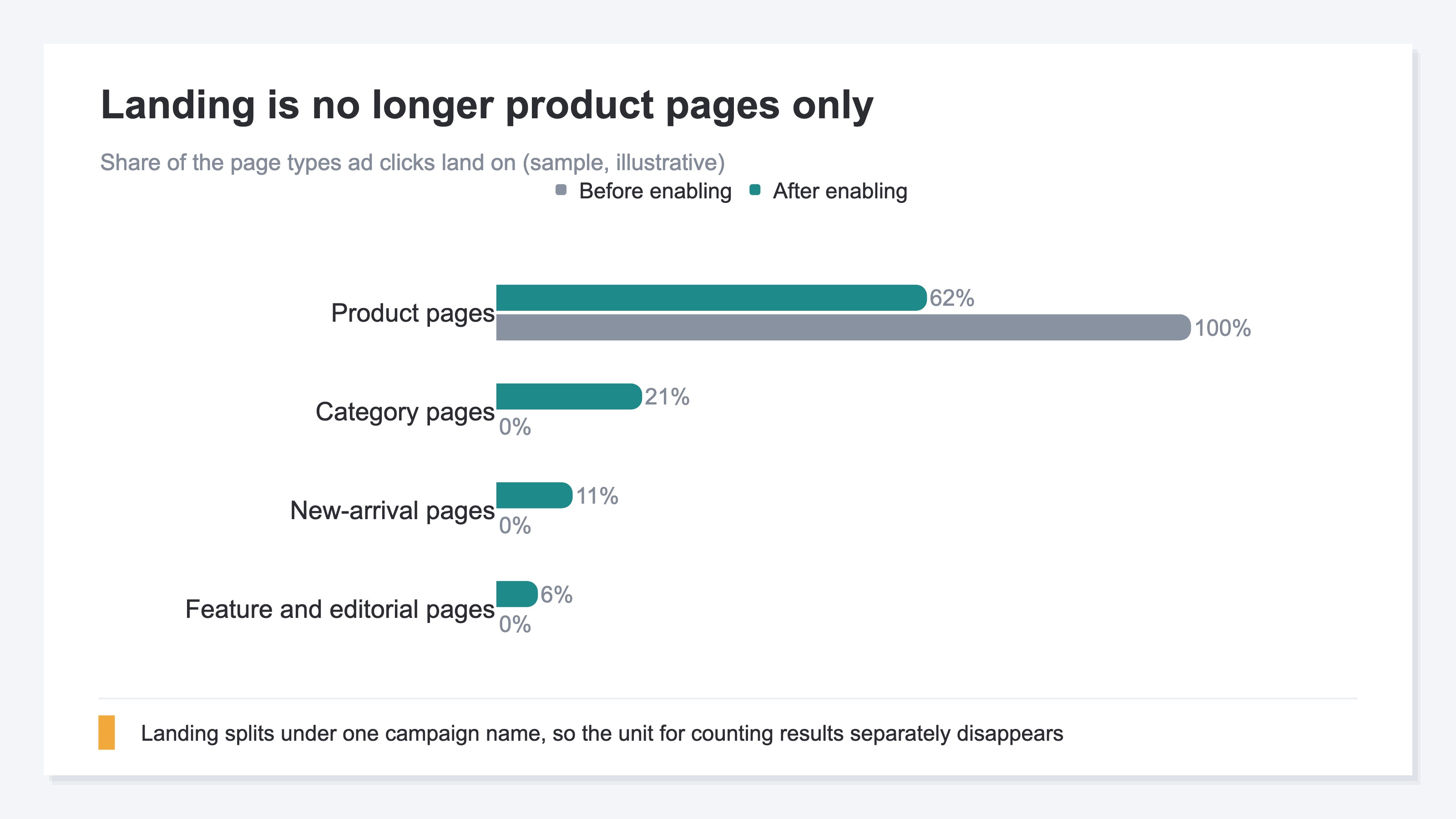
According to the official help, the feature is built from two settings. One is text customization, which writes ad copy automatically from product feed and landing page information. The other is final URL expansion. It crawls your own site and adds pages that look likely to lead to a purchase, beyond the product URLs you registered, to the pool of landing candidates[1]. Category pages, new-arrival pages and editorially built pages are all in scope. The two are not peers: final URL expansion cannot be used unless text customization is on[1]. On top of that, text ads built from product feed information can also be served, and whether a Shopping ad or a text ad goes out is decided on Google's side[1].
The Announcement Was in April; What Spread in July Was Sightings#
This is not a feature that launched in July. Google announced AI Max for Shopping on April 30, 2026[4]. The announcement says you can switch over from an existing Shopping campaign in one click, and that product targeting and bidding settings carry over as they are[4]. What happened in late July is that reports spread of the setting being seen inside standard Shopping campaigns as well[5][6]. Search Engine Land writes that until Google announces it formally, these should be taken as early sightings[6].
So the moment is not "it's available, hurry up and turn it on" — it's "decide what to confirm before you turn it on." On the Merchant Center side too, features that lean on Google's judgment keep increasing. This same current is covered in Confirming Merchant Center recommendations against revenue.
You Can Switch It Off, and You Can Exclude URLs#
It is not that control disappears. Final URL expansion is an opt-in setting at the campaign level, and it can be switched off if you don't need it[2]. You can also name URLs you don't want ads landing on and take them out of the expansion[2]. If you don't want ad spend flowing to thin-inventory category pages or old feature pages, you can exclude them up front here.
What you choose between is "hand everything to Google" and "use none of it." Text customization only, or final URL expansion with some URLs left out — the in-between settings are there from the start.

2. When Both Landing and Ad Copy Change, the Unit That Splits Revenue Disappears#
So once this setting is in, how do you count what sold? What gets harder is not whether the results are good or bad — it's the unit that separates them.
A standard Shopping campaign used to hold the combination of keyword, ad copy and landing page reasonably fixed. That is why, when results dropped, you could pick where to reach in: narrow the keywords, swap the ad copy, fix the product page. Enable AI Max and this combination moves in four places at once. Google reaches for conversational and long-tail search terms as well[6]. Ad copy is generated automatically from feed attributes[1], and the landing page is no longer necessarily the product page[1]. Whether a Shopping ad or a text ad is served also switches automatically[4].
When four things move under one campaign name, you cannot separate afterward what did the work when results changed. Revenue may have grown because conversational search terms got picked up, or because clicks landed on a category page. The conversion count in the ad console does not carry that breakdown. The same shape appeared first with Google's P-MAX, and the pattern of judging automation you cannot see inside by revenue at the exit is laid out in Judge P-MAX by revenue even when the inside is invisible.
A Different Problem From "Counting Gaps"#
This is a different problem from the platform and your own site counting differently. Counting gaps are the topic of Meta's Advantage+ and the gap with your own measurement. Here, before counting even comes up, the unit — what gets compared against what — is what breaks.
So the move changes too. Instead of aligning definitions to make the counts agree, you fix one axis that does not move and compare before against after on top of that axis.
3. The Only Thing That Stays Fixed Is the Marker You Set Yourself#
Among the four things that move, there is exactly one the advertiser can hold fixed from start to finish: the UTM (Urchin Tracking Module, the marker appended to the end of a link to tell traffic sources apart) attached to the link by hand. Even if the landing page changes from a product page to a category page, even if the ad copy is swapped, the value of utm_campaign stays the string the advertiser decided. So this is where the axis for the before-and-after comparison goes.
What to do is simple. Assign a dedicated utm_campaign value up front to the campaign you plan to put AI Max on. Then, across the four weeks before and the four weeks after, compare revenue, RPS (revenue per session), AOV (average order value) and CVR (purchase rate) for the sessions that landed on that same value. The point is to put the axis on revenue that actually occurred on the site itself, not on the conversion count in the ad console.
An Average of +5% Is Not a Forecast for Your Store#
The official help carries figures based on Google's internal data. Enable this feature and, on average, conversions and conversion value rose 5%, while CPA and ROAS held at the same level[1]. Useful as an input for the decision, but it needs care in handling. That is an average across many advertisers taken together, not a forecast for one store.
Averages get pulled by the few that grew a lot. So when you confirm it at your own store, line up the weekly values across the eight weeks around the switch and look at how the middle value (the median) and the level of the top 25% of weeks each moved. Watch the average alone and one good week is enough to read as "it went up."
Whether the Marker Survives an Expanded Landing Is Something a Real Click Settles#
There is one point here the official help did not settle. When a click lands on a URL Google picked through final URL expansion, how the measurement parameters attached to the link are handled. The official page we checked does not state it[3]. Since it cannot be asserted as spec, confirming it in actual behavior is surer.
Concretely, before enabling, run a small amount of spend, click through yourself, and see whether the utm_campaign value is still on the URL you landed on. If it isn't, the axis for the before-and-after comparison does not hold, so the decision to enable stops there. The more Google widens the landing side, the more pages tie to a single utm_campaign. GA4's traffic acquisition report can assemble revenue by campaign as well. But reselecting the added pages and the period, then reconciling revenue against order counts, becomes work that recurs each time. UTM design itself is covered in Revenue efficiency by UTM campaign. Why a single summarized RPS line turns into an average is laid out in GA4 source groups and revenue by campaign.

RevenueScope solution
RevenueScope supplies the data this before-and-after comparison needs. Open a channel row and it shows revenue, RPS, AOV and CVR for each utm_campaign inside that channel. Revenue is the amount that actually occurred on the site itself, not the conversion value the platform reported. What can be displayed is the most recent period, so you record the values on this screen before enabling, and set them beside the values four weeks later.
For periods where ad spend has been imported by form entry or CSV upload, measured ROAS by channel (revenue measured by RevenueScope ÷ ad spend) is shown on the same screen. Revenue that ties to nothing is shown as Unattributed, so the difference between the campaign totals and overall revenue can be checked too.
Asking an AI Assistant Over MCP Returns This#
Ask once before enabling and once again four weeks later, and lining up the two answers lets you compare like this.
| Campaign | Period | Sessions | Revenue | RPS | AOV | CVR |
|---|---|---|---|---|---|---|
| shopping_aimax | Before | 1,240 | ¥508,000 | ¥410 | ¥8,200 | 5.0% |
| shopping_aimax | After | 1,690 | ¥615,000 | ¥364 | ¥7,400 | 4.9% |
| shopping_std | Before | 980 | ¥392,000 | ¥400 | ¥8,000 | 5.0% |
| shopping_std | After | 1,010 | ¥408,000 | ¥404 | ¥8,100 | 5.0% |
An illustrative before-and-after comparison for an AI Max Shopping campaign. Two points in time placed side by side, from a fictional site with sample data.
What stands out in this case is that revenue is up while revenue per session is down. shopping_aimax grew from 1,240 sessions to 1,690, and revenue rose from ¥508,000 to ¥615,000. Read only that far and it is a success. But RPS fell from ¥410 to ¥364, and AOV from ¥8,200 to ¥7,400. It reads as landing spreading out and traffic reaching lower-priced products as well. The comparison campaign shopping_std sits at nearly the same level on both rows, so the change separates out as coming from the setting rather than from seasonality.
Once that much is confirmed, the next decision gets concrete. If the revenue increment matches the ad spend increment, keep going. If the RPS decline continues, add the category pages you don't want ads landing on to the URL exclusions, and measure again on the same axis.
FAQ#
Frequently asked questions#
Q. Once AI Max is on, can it be undone?
A. Final URL expansion is an opt-in setting at the campaign level, so it can be switched off[2]. You can also name URLs you don't want ads landing on and take them out of the expansion[2]. Choosing text customization only, and not using final URL expansion, is possible too[1].
Q. Does UTM carry through after final URL expansion?
A. The official help we checked does not state it[3]. Since it cannot be asserted as spec, run a small amount of spend before enabling, click through yourself, and actually look at whether the utm_campaign value is still on the URL you landed on. If it isn't, the axis for the before-and-after comparison does not hold.
Q. If it lifts results 5% on average, isn't turning it on the better deal?
A. That 5% is an overall average based on Google's internal data, and it comes paired with the statement that CPA and ROAS held at the same level[1]. At a store with different products and a different depth of inventory, the result can land elsewhere. Decide it on how revenue and RPS moved before and after in your own campaigns.
Q. Do we have to migrate to P-MAX to use it?
A. Google's official blog says you can switch over from an existing Shopping campaign in one click, and that product targeting and bidding settings carry over as they are[4]. That said, for the appearance inside standard Shopping campaigns this time, it is safer to treat it as an early sighting until Google announces it formally[6].
Summary#
Enable Google's AI Max on a Shopping campaign and four things move at once: how search terms are reached for, the ad copy, the landing URL and the ad format. Because the combination moves, the conversion count in the ad console cannot separate what did the work. The one thing the advertiser can hold fixed is the utm_campaign attached to the link by hand. Start with next week's ad serving: assign a dedicated utm_campaign value to the campaign you plan to put AI Max on. Next, generate a small click yourself and confirm the marker survives on the landing URL. Enabling comes after that, and then you compare revenue and RPS across the four weeks before and the four weeks after on the same axis.
See which ads actually drive revenue, at a glance
Free up to 5,000 sessions/month, AI connection included. No credit card required. Up and running in 5 minutes.
References#
- [1] Google Ads Help "About AI Max for Shopping campaigns (beta)" (2026)
- [2] Google Ads Help "About Final URL expansion in Search" (2026)
- [3] Google Ads Help "Expanded URL: Definition" (2026)
- [4] Google "Upgrade your Shopping campaigns with AI Max" (2026)
- [5] Search Engine Roundtable "Google Ads AI Max For Shopping Campaigns Expands" (2026)
- [6] Search Engine Land "AI Max spotted in Google Standard Shopping campaigns" (2026)