
Meta's Advantage+ shows results in Ads Manager, yet on your own site the revenue that should match them isn't there. This gap is neither fraud nor a broken setting. It comes from Meta and your site counting a purchase differently. Here is what differs, and where.
Contents
TL;DR#
- Meta's standard attribution includes view-through, a setting that counts a purchase made within 1 day of the ad being shown, with no click required
- On the site side, the entry point immediately before that purchase is not the ad. So reported results and landed revenue come apart by construction
- Advantage+ hands audience, placement and budget decisions to the platform's automation, which leaves little you can verify inside the platform
- Age and gender are treated as suggestions and delivery is not guaranteed to stay inside them. Locations and minimum age are audience controls, and those are respected
- Before you move budget, put reported results over landed revenue for the same period and read it as one ratio. What matters is not the level of the ratio but how it moves
1. Why Advantage+ Results Look Bigger#
The main reason results look bigger is that the range of purchases Meta counts is wider than the range your own site can trace.
ROAS in Ads Manager clears the target. Look at the same month's revenue on your own site, though, and the amount that would justify the ad spend isn't there. Nothing about the ad setup changed, and yet two screens disagree.
The starting point is checking the counting rules. Results shown in Ads Manager are displayed according to the attribution setting chosen at the ad set level[4]. Standard attribution offers three settings: click-through, view-through and engage-through[3]. Click-through counts purchases within 1 day or 7 days of a link click. View-through covers 1 day after the ad was shown, and engage-through covers 1 day after a click other than a link click.
Of the three, view-through is what moves the picture most. View-through counts a purchase by someone who only had the ad appear on screen and never clicked it. This article calls those "saw it only" purchases. Before doubting the numbers in Ads Manager, look at whether view-through is part of your own ad set's setting. If it isn't, none of what follows applies to you.
On the site side, the source of a visit is judged by where the person came from immediately before the purchase. Someone who only saw the ad arrives later from search or from a bookmark and buys, so the site records search or Direct as the entry point. No record of passing through the ad exists anywhere, by construction. Meta counts that single purchase as a result of its own ad; the site counts it as revenue from search. Both are correct under their own rules, and still they don't agree. In the other direction, a site that looks only at the moment before the purchase never shows the push that a view-only impression contributed. Neither is superior. Two counts with different scopes are simply running side by side.

The case where several platforms each claim the same purchase, so that summing them overstates the total, is covered in summing platform ROAS overstates it — read MER instead. This article narrows to the attribution gap that happens inside Meta alone.
2. The More You Delegate, the Fewer Checks You Keep#
What gets harder to verify is not only the substance of the results. Advantage+ moves even the decision of who to show ads to over to the platform, so less verification material stays in the operator's hands.
First, the naming. Many people remember it as Advantage+ shopping campaigns, but the current name in the official help is Advantage+ sales campaigns[2]. From here on this article uses the current name.
Meta Advantage+ is a suite of products that uses AI to optimize campaigns in real time and match ads to the people most likely to take action[1]. Choose an objective such as sales and the Advantage+ setup appears, applying AI across the campaign[5]. What the operator hands over, then, is creative, an objective and a budget; the judgment of who, where and how much is completed inside the platform. Manual campaign features are all still available[5], but the moment you choose Advantage+, the verification pattern of splitting delivery yourself and comparing is off the table.
The morning after launching, plenty of operators look at the results and are puzzled. They specified an age range, a gender and three cities to reach, and yet eight in ten of the delivered impressions went to men, at an older age band than expected, centered on cities they never specified. Clicks are there, but no purchases on their own site.
This isn't the settings breaking. It's that specifications are handled in two different ways. The official help positions age, gender, detailed targeting and custom audiences to include as audience suggestions[6]. It states plainly that suggestions don't always constrain your audience. Suggest women for gender, and if Meta's AI finds men likely to respond, ads deliver to men too. Locations, minimum age, languages and custom audiences to exclude, on the other hand, are audience controls, and delivery does not go beyond what you specified[6]. If even the cities look off, check first whether "Reach more people likely to respond to your ads" is switched on. To hold age and gender strictly as well, choose to further limit your audience and uncheck the "Use as a suggestion" box.
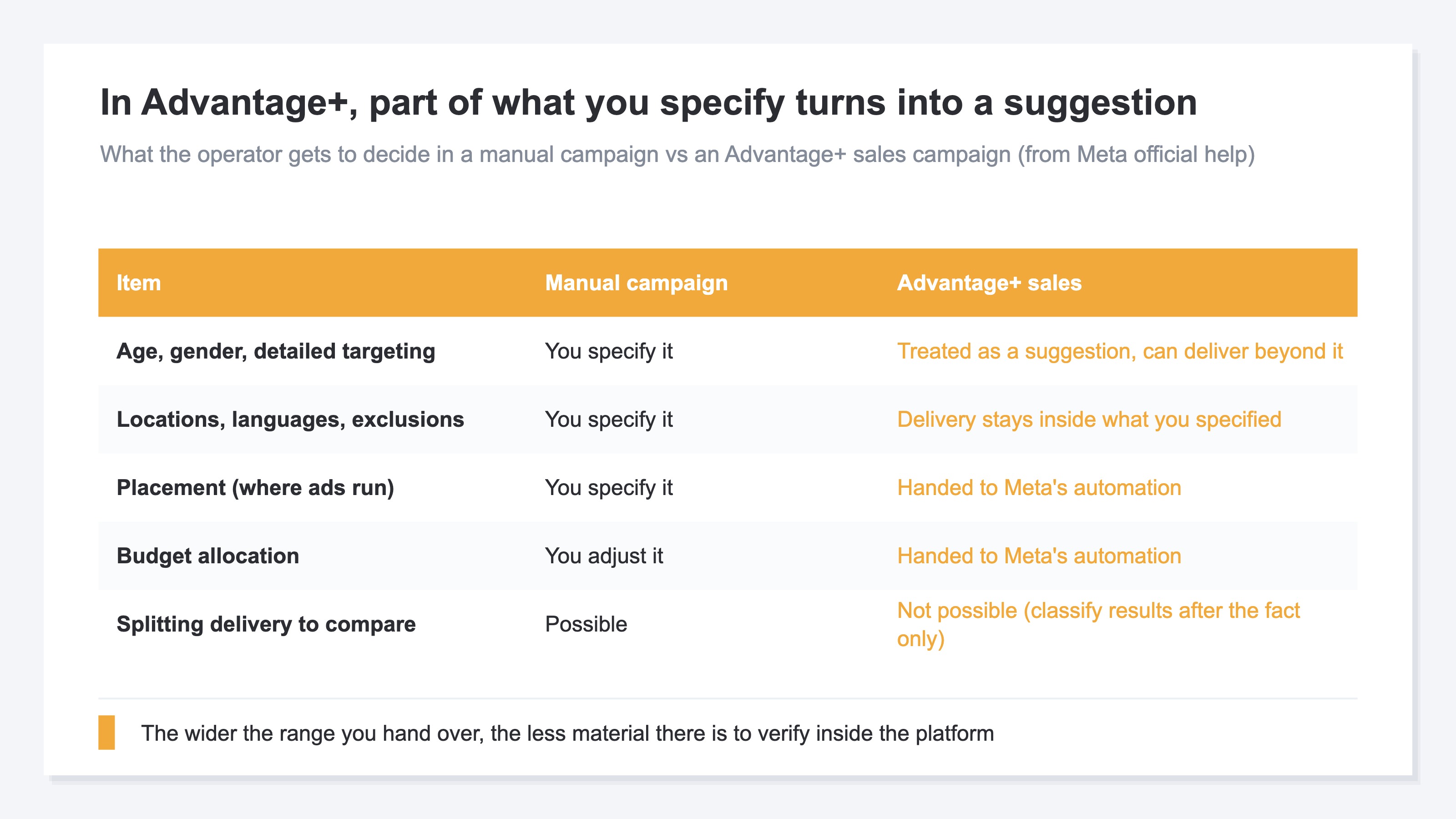
What remains is on the reporting side. The official help recommends building audience segments so that reporting breakdowns for new, engaged and existing audiences become available[2]. That is a way to classify the results after the fact, though, not a way to switch delivery yourself and compare the effect.
A similar shape shows up with Google's Performance Max. There the reading was that because the inside isn't visible, you judge by the revenue at the exit (how to judge P-MAX by landed revenue, not by its black box). With Advantage+, one more condition is added. On top of the inside being hard to see, the counting of results itself leans toward the wider side. Try to check your answers inside the platform alone and there isn't enough material. The axis for judgment has to sit outside the platform.
3. Compare Reported Results With Landed Revenue#
Putting the axis outside the platform means taking what Meta reported and what actually landed on your own site, over the same period, and reading them as one ratio.
Three steps. Take the same date range in Ads Manager and on the site side. Produce the revenue that landed on your own site as coming from Meta in that period. Divide the reported result by that revenue. What comes out is a single ratio: 2.5x, or 1.2x.
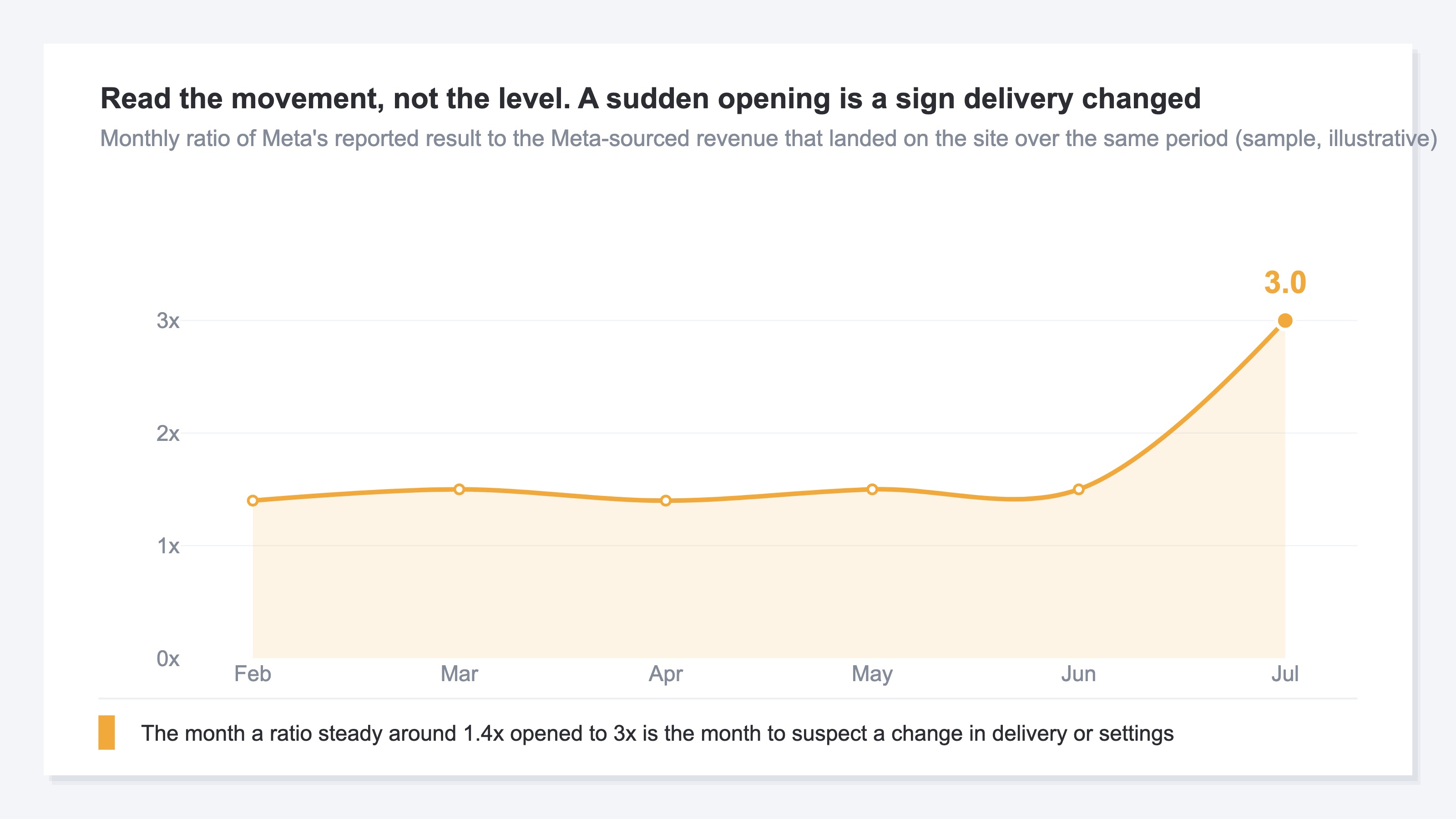
What matters is less the level of the ratio than the way it moves. As long as the counting includes view-through, the reported side coming out larger is a structural certainty, and if it holds steady around 2x, that is the normal level for that account. What to watch for is the change: it ran at 1.4x through last month and opened to 3x this month. That reads as a sign that something in delivery or the settings moved.
There is also a way to check the effect of the counting inside your own ad account. The attribution setting can be chosen at the ad set level[3]. Compare the figures against a setting that excludes view-through and you get a sense of how much of the result traces back to "saw it only." Even so, changing the setting keeps the comparison inside the results Meta counted, and reconciling against the revenue that landed on your own site cannot be done in Ads Manager. On top of that, every new month calls for the same work, plus the recurring effort of realigning each platform's aggregation units. The account-side comparison is straightforward to run. What wears on you is redoing it every month.
This all assumes Meta traffic is being captured correctly on the site side to begin with. If the way parameters are set lets the source blend into another channel, landed revenue itself won't come out right (how to set utm_source and utm_medium for Meta ads).
And the gap doesn't only run in the direction of looking bigger. Traffic arriving from an in-app browser loses its referrer and mixes into Direct, which can make things look smaller than they are (when social revenue hides in Direct). View-through points toward looking bigger; a missing referrer points toward looking smaller. Both come from aggregation rules, and they surface in opposite directions.
RevenueScope solution
RevenueScope calculates and displays ROAS based on the revenue that landed on your own site, broken out by channel. Import ad spend and the revenue that landed in that channel appears on the same line as ROAS, which is that revenue divided by ad spend. Pull the reported result from Meta's Ads Manager, set it against this landed ROAS over the same period, and the distance between the two ways of counting comes out as a ratio. Producing ROAS on landed revenue by channel is not something a platform's own Ads Manager can do. GA4 can get close if you import ad spend through Data Import, but that calls for shaping each platform's cost data and keeping up a manual upload routine.
| Channel | Ad spend | Landed revenue | ROAS on landed revenue |
|---|---|---|---|
| Meta | ¥800,000 | ¥1,370,000 | 1.7x |
| Google Ads | ¥400,000 | ¥880,000 | 2.2x |
| Yahoo! Ads | ¥200,000 | ¥420,000 | 2.1x |
Note: the figures above are illustrative.
As a different month from the monthly trend above, here is the same reading taken by channel. Meta in this example carries ¥800,000 of ad spend against ¥1,370,000 of landed revenue, so ROAS on landed revenue is 1.7x. Open Meta's Ads Manager for the same period, and if the reported result divided by ad spend comes to 3.9x, the distance between the two ways of counting is 2.3x. Apply the same arithmetic to the other two channels. If Google Ads sits at 2.9x against 2.2x for a distance of 1.3x, and Yahoo! Ads at 2.6x against 2.1x for 1.2x, then Meta alone is the one standing out. Whether the distance is coming from Advantage+ or from manual campaigns is a question about the breakdown on the reported side, and that comparison is made campaign by campaign in Meta's Ads Manager. What RevenueScope produces is landed revenue by channel, so Meta arrives as a single line. Shift budget on the reported 3.9x alone in this state and you thicken the allocation toward the channel with the lowest landed efficiency.
What level to target for each channel varies with the nature of the traffic (how to set a ROAS target per channel). What RevenueScope calculates is ROAS based on the revenue that landed on your own site. Reported results live in Meta's Ads Manager and landed revenue lives in RevenueScope, so the roles stay separate, and which way of counting a number came from stays clear every month you make the call.
FAQ#
Frequently asked questions#
Q. If I exclude view-through from the count, do I get the correct number?
A. The excluded number still stays a comparison within the results Meta counted; it has not been reconciled against the revenue that landed on your own site. Switching the setting is for estimating how much of the result traces back to "saw it only." Budget calls come after you produce landed revenue.
Q. Are Advantage+ shopping campaigns and Advantage+ sales campaigns different things?
A. The current name in the official help is Advantage+ sales campaigns[2]. Because many people remember the old name, both are still used in search. When you run into the wording "Advantage+ shopping campaigns," the safe move is to check the page under the current name.
Q. Should I use reported results or landed revenue for budget decisions?
A. Where to shift budget is a call for landed revenue. Reported results are for improving creative and ad sets inside Meta, used as a separate indicator. Holding the two in separate roles, and checking monthly whether the ratio between them is moving unusually, is the easier arrangement to run.
Q. Isn't Advantage+ delivering outside my specification a misconfiguration?
A. In most cases it isn't. Age, gender and detailed targeting are treated as audience suggestions[6]. The official help states plainly that suggestions don't always constrain your audience. To hold them strictly, respecify them as audience controls or use manual campaign features[5][6].
Summary#
The first thing to look at is whether view-through is part of your own ad set's attribution setting[3]. If it is, reported results coming out larger than the revenue landing on your own site is a structural consequence, not fraud and not a misconfiguration. Next, divide the last month of reported results by the landed revenue for the same period and produce a single ratio. Then hold that as the normal level for the months ahead and follow the way it moves, not the level itself.
Delivery looking different from what you specified is a separate check. Age and gender are treated as suggestions, so delivery is not guaranteed to narrow the way you specified[6], while locations and minimum age are held as controls. The month the ratio moves unusually is the month to revisit budget allocation.
See which ads actually drive revenue, at a glance
Free up to 5,000 sessions/month, AI connection included. No credit card required. Up and running in 5 minutes.
References#
- [1] Meta Business Help Center "About Meta Advantage+" (2026)
- [2] Meta Business Help Center "About Advantage+ sales campaigns" (2026)
- [3] Meta Business Help Center "About attribution models and attribution settings" (2026)
- [4] Meta Business Help Center "About actions attributed to your ad" (2026)
- [5] Meta Business Help Center "About the Advantage+ campaign experience" (2026)
- [6] Meta Business Help Center "About Audience controls and Audience suggestions in Advantage+ audience" (2026)