You post on Instagram and drive people to your site from the link in your profile. You can feel it working. But open GA4 and the revenue that should have come via Instagram is nowhere to be found — instead, only the "Direct (unknown source)" number keeps swelling. Anyone who runs social has probably tilted their head at this at least once.
Here's the conclusion first. This is neither a measurement mistake nor a setup oversight. Instagram's in-app browser drops the referrer (where the visit came from), so GA4 classifies it as unknown source and files it under Direct — that's the spec. And the vanished referrer itself can't be restored after the fact. But there's no need to give up. If you reconnect the revenue social produced through "revenue" rather than "referrer," you avoid undercounting it to zero. This article lays out why it hides in Direct, then walks through how to reconnect the vanished referrer through revenue.
Table of contents
TL;DR#
-
Instagram traffic becoming Direct is by design
Instagram's in-app browser doesn't carry the referrer when it opens a link. GA4 classifies a visit it can't source as unknown, under Direct — so revenue via social hides there. It's not the operator's mistake
-
You can tag the links you post
Unlike traffic via AI, on social you post the links yourself, so you can attach a marker called UTM. But screenshots, DMs, and reshares don't carry the marker over, and those still sink into Direct. Tagging alone can't prevent it
-
Reconnect the vanished referrer through revenue
The referrer itself can't be restored. There are three things to do — break the tagged revenue down to a per-visit level, switch the attribution model to surface the first social touch, and hold the remaining unknown share honestly as a percentage. The goal isn't to identify the referrer but to keep social from being counted as zero
-
The goal is "don't undercount," not "identify"
No tool can name a referrer once dropped. What you can do is lift the revenue social produced to where you can see it and disclose the rest openly. That alone changes your investment decision a great deal
1. Why Instagram traffic becomes Direct in GA4#
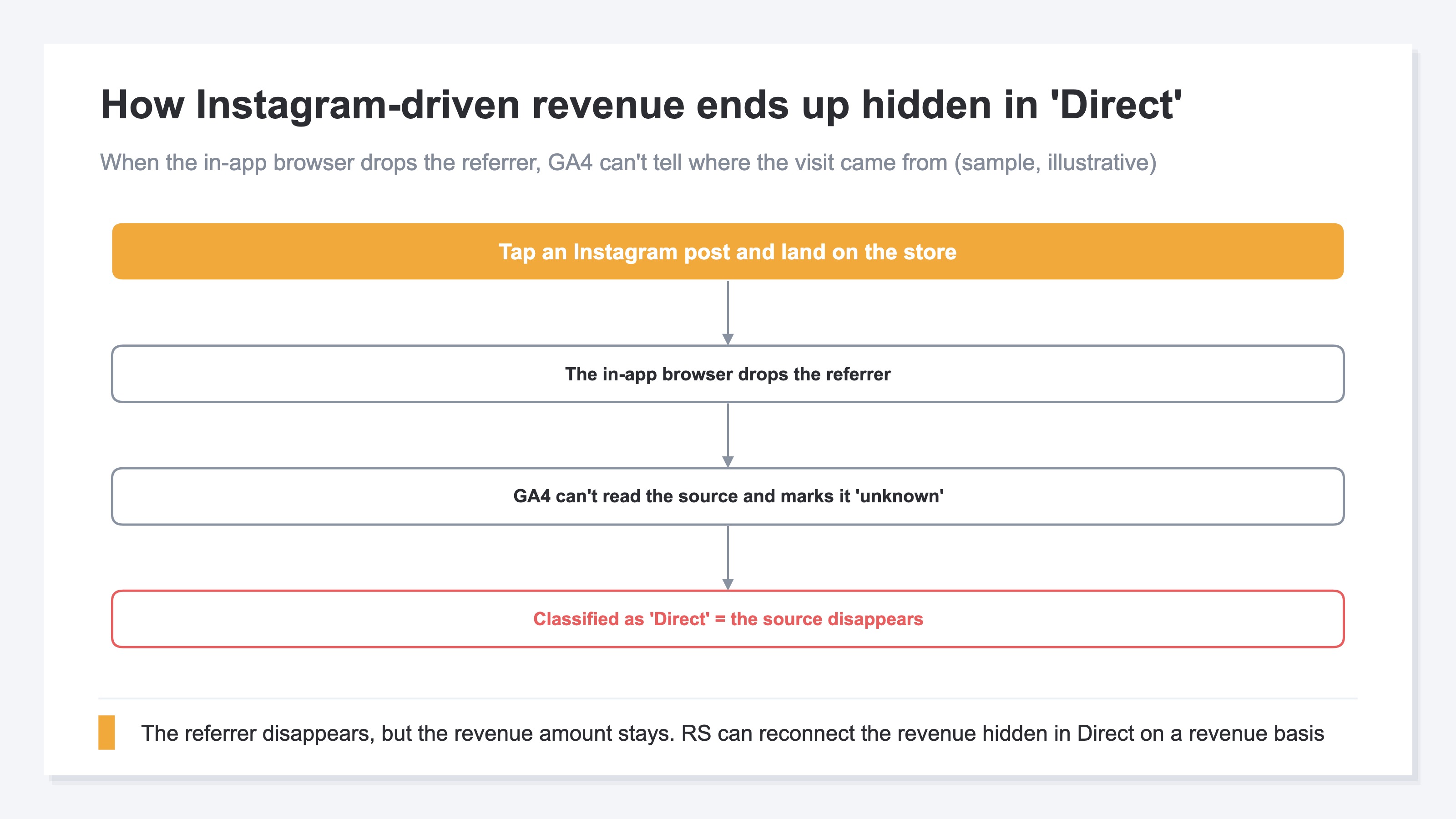
Bottom line: A link opened inside Instagram's app doesn't carry over the referrer (where the visit came from). GA4 classifies a visit with no known referrer as unknown source under (direct) / (none), so revenue via Instagram hides in Direct. This is GA4's classification spec, not a measurement failure.
Normally, when you move from one site to another, the browser passes "where you came from" to the next site as the referrer. GA4 reads this to determine the channel. But an in-app browser like Instagram's often doesn't perform this handoff. As a result, from GA4's view it looks like "a visit with an empty referrer," and what has no known origin is treated as unknown source — that is, Direct.
The same thing happens with traffic via AI like ChatGPT (Why AI traffic hides in Direct). The structure — the referrer doesn't pass and it sinks into Direct — is exactly the same shape. But social has one decisive difference. You can't control the links inside an AI's answer, whereas the links you put on Instagram are yours to prepare. In other words, you can tag them in advance. This is the move unique to social.
2. You can tag your own links, but can't fully prevent it#
Bottom line: Because you post the links yourself, you can tag the links in your profile, stories, and posts with UTM. GA4 can judge a tagged visit as coming via social. But the tag doesn't carry over to screenshots, DMs, or reshares, and the chore of keeping links tagged remains. Tagging is effective, but it alone can't wipe out Direct.
UTM is a mechanism that attaches a marker to the end of a link, like "this came from the Instagram profile." With the marker in place, even if the in-app browser drops the referrer, GA4 can read that marker and judge the visit as via social. So tagging the links you post is effective as a first step. The concrete setup steps, together with the causes of Direct, are gathered in Why Direct rises in GA4 and how to handle it, so we'll leave them there.
The problem is that even with tagging, escape routes remain. A user screenshots your post and sends it to a friend, shares just the URL over DM, someone else reshares it — in this kind of secondary spread, your hard-won marker doesn't carry over. A visit from an untagged link, again, sinks into Direct. On top of that, there's the operational chore of preparing tagged links for every post and story. So tagging is a move to "reduce Direct," not a move to "eliminate Direct." Here we switch our thinking. Stop chasing the vanished referrer, and reconnect the revenue social produced instead.
3. Reconnect the vanished referrer through revenue#
Bottom line: A referrer once dropped can't be restored. So what you chase isn't the referrer but the revenue. There are three things to do — break down the revenue from tagged traffic to a per-visit level, switch the attribution model to surface the first social touch, and hold the remaining unknown share honestly as a percentage. The goal isn't to name the origin of social traffic, but to avoid undercounting its contribution to zero.
First, break down the tagged social traffic to revenue per visit. Social is an entry point that carries "people who first get to know you" more than "people who buy right away," so revenue per visit tends to come out lower than search. Even so, putting it into numbers keeps you from counting the contribution as zero. The view on the role social itself plays is covered in detail in How to evaluate Instagram traffic by revenue.
Second, switch the attribution model. Under a view that credits only the last touch, revenue where someone first learned of you on social and bought later via Direct isn't counted as social's contribution (The trap of judging by last click alone). Switch to a model that also shows the first touch, and the social entry point that had sunk into Direct surfaces.
Third, hold the still-remaining unknown-source revenue openly, as a percentage. Treat the vanished-referrer share as zero and you undercount social; conversely, chalk it all up to social and you overcount. Placing the unattributed honestly as "there's this much of it" is closest to reality (The truth about revenue tied to no channel). The referrer vanishes, but the revenue doesn't. Move what you chase to revenue, and social's contribution can be lifted to where you can see it.
RevenueScope solution
Bottom line: RevenueScope reconnects social's revenue contribution through "revenue." It breaks tagged social traffic down to revenue per visit, switches the attribution model in one click to surface the first touch, and shows the remaining unattributed openly as its own row. RevenueScope's role is to hand you the numbers that keep social from being counted as zero — the numbers your investment decision actually needs.
For example, on the sample-data fiction site (a demo ecommerce store), leveling every channel by revenue per visit returns the following.
| Channel | Sessions | Revenue | Revenue per visit |
|---|---|---|---|
| Direct (unknown source) | 219 | ¥124,152 | ¥567 |
| Organic Search | 371 | ¥128,459 | ¥346 |
| Referral | 72 | ¥16,052 | ¥223 |
| Meta (Ads) | 183 | ¥15,633 | ¥85 |
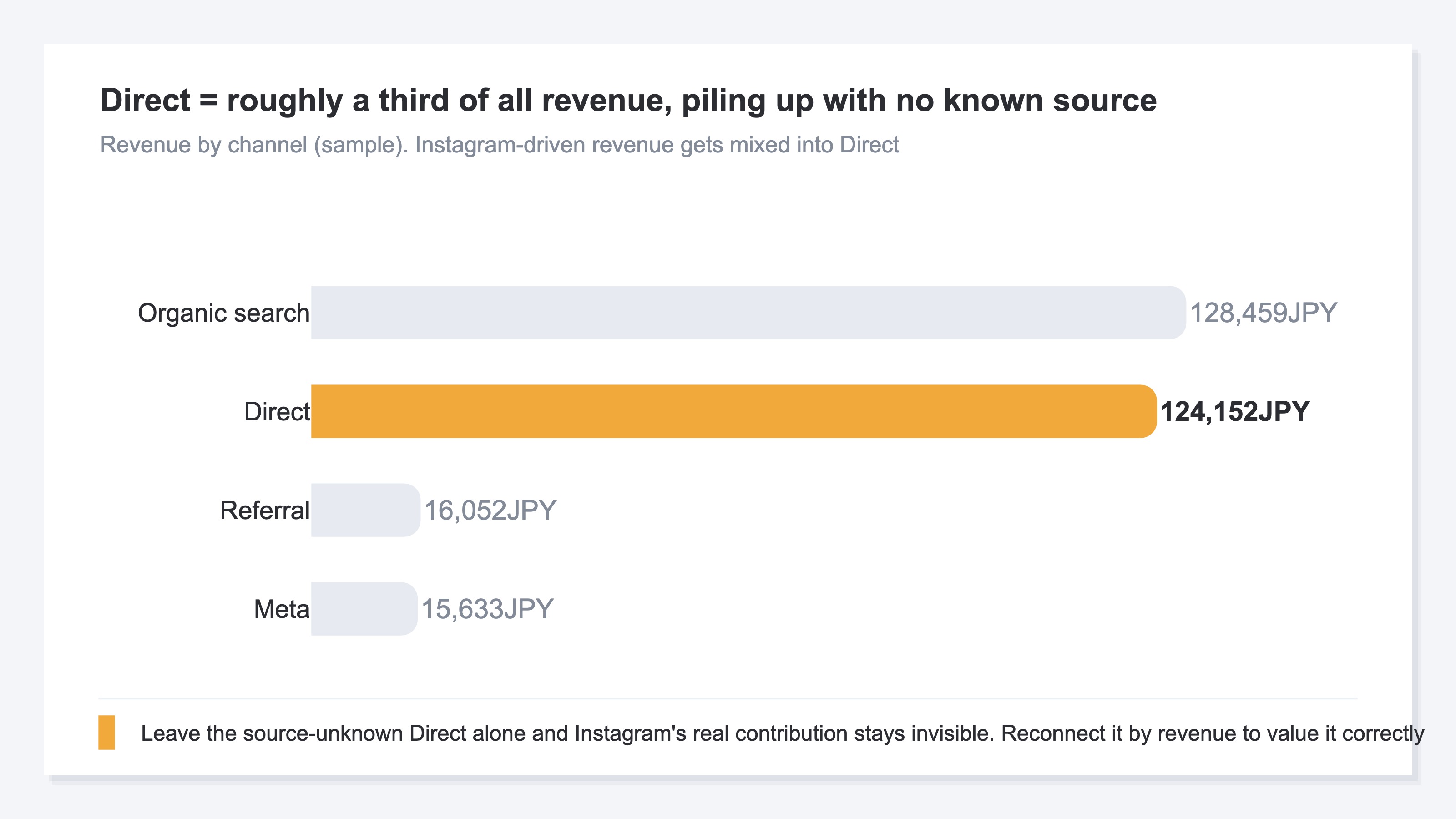
Direct has ¥124,152 in revenue — about 30% of the total ¥406,589. The origin stays unknown while the amount alone is large. Revenue via social such as Instagram is mixed in here. Cut it off as "unknown, so ignore it" and you count social's contribution as zero and misjudge your investment. RevenueScope breaks the tagged social traffic within this table down to revenue per visit, includes the first touch in the evaluation via a model switch, and shows the remaining unattributed openly, kept as this row.
RevenueScope specializes in reconnecting social's contribution through landed revenue. It gives you revenue-based metrics — revenue per visit, ROAS, and attribution — to show how much social actually drove revenue. The goal isn't to "identify" the referrer but to "not undercount" social's contribution, and it hands you exactly the numbers that one job needs.
FAQ#
Q. Does tagging with UTM solve the Direct problem?
A. Within the range of links you post yourself, it's effective. Tag the links in your profile or stories and those visits can be judged as via social. But for what spreads via screenshots, DMs, or reshares, the tag doesn't carry over and it still sinks into Direct. Tagging is a move to "reduce" Direct, not a move to "eliminate" it.
Q. Should I discard revenue whose referrer is unknown?
A. Don't discard it. Treat unknown-source revenue as zero and you erase even the social contribution mixed into it. Neither forcing an origin onto it — holding it as "there's this much unattributed," as a percentage, is the treatment closest to reality.
Q. Is it a tool that can identify the referrer?
A. RevenueScope lifts the revenue social produced to where you can see it, rather than naming the referrer itself. The revenue from tagged traffic, the first touch surfaced by a model switch, and the share of remaining unattributed — these three hand you numbers that keep social's contribution from being counted as zero. The referrer vanishes, but you can reconnect it through revenue.
Summary#
Revenue via Instagram hides in Direct in GA4 because the in-app browser drops the referrer and GA4 classifies it as unknown source. It's not the operator's mistake. And a vanished referrer can't be restored. So move what you chase from referrer to revenue. Tag the links you post, break the tagged revenue down to a per-visit level, switch the attribution model to surface the first social touch, and hold the remaining unknown share honestly as a percentage. The goal isn't to name the referrer but to avoid undercounting social's contribution to zero. The referrer vanishes, but the revenue doesn't.
See which ads actually drive revenue, at a glance
Free up to 5,000 sessions/month, AI connection included. No credit card required. Up and running in 5 minutes.