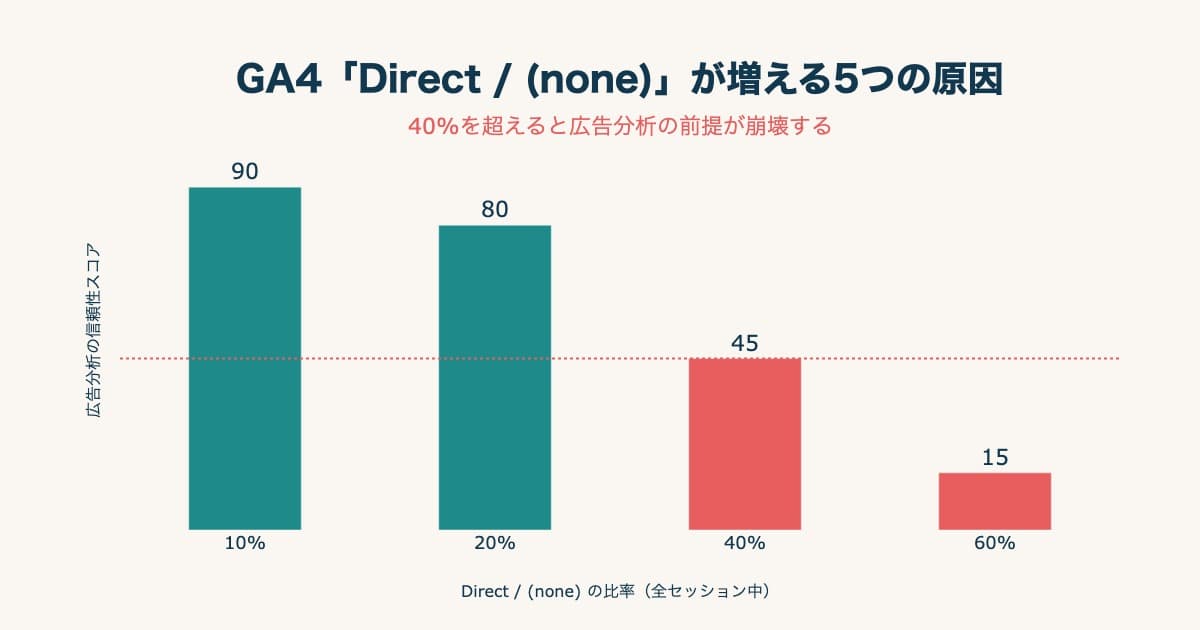
Someone consults ChatGPT, gets a product recommended, and lands right on that product page — those customers surely exist, yet when you search GA4 you can't find them. Most of the time, they're buried in the "Direct" pile. Links that AI pastes often carry no source marker (UTM), so GA4 can't judge where they came from and lumps them with bookmarks and typed-in URLs as "Direct." This article briefly covers why AI traffic disappears, then narrows to two points: how to spot that hidden traffic in your own GA4 (detection), and how to confirm whether it actually drives revenue (revenue connection).
Table of contents
TL;DR#
- Traffic from AI often arrives with no source marker (UTM), so GA4 buries it in "Direct" or unknown. Sales happen, but you can't tell they came from AI.
- The "AI Assistant" channel added in May 2026 only catches AI traffic that passes a marker. Traffic that passes nothing still sinks into "Direct."
- Free signs help you spot hidden AI traffic, but they're only circumstantial. Two walls remain: you can't catch it all, and "how much it sold" has to be lined up separately.
- What matters is splitting the hidden traffic out and reading it by revenue per session (RPS), not visit count.
Does AI Traffic Show Up as Direct or Branded?#
Bottom line: most AI traffic shows up as "Direct," because it arrives with no source marker. "Branded" search — someone typing your brand or product name — is a secondary move that happens after a person learns about you from AI; it isn't where AI traffic itself lands. Here is how it breaks down:
| Where it shows up | What is happening | Main entry point for AI traffic? |
|---|---|---|
| Direct | Most AI traffic from ChatGPT, Perplexity, etc. that passes no referrer sinks here | ◎ Most common |
| Branded search | People who learned about you from AI later search your brand or product name — a downstream footprint | △ Indirect trace |
| Organic search | Google's AI Overview and AI Mode traffic can blend into organic | ○ Sometimes |
So if the question is "Direct or branded?", the entry point is essentially Direct. Branded search is a separate move that happens after the AI touch, and reading it that way keeps your attribution honest. The next section explains why AI traffic slips into Direct in the first place.
1. Why AI Traffic Slips into 'Direct'#
Bottom line: links AI pastes often carry no source marker (UTM), so GA4 can't judge the origin and lumps them into "Direct" [1].
Links in ads and newsletters usually carry a UTM source marker. GA4 reads it and sorts them — "this is an ad," "this is a newsletter." But the links ChatGPT or Perplexity paste inside their answers often carry no such marker. With the origin unknown, they fall into "Direct," alongside bookmarks and typed-in URLs. Why the marker is missing, and how "cited" differs from "sold," is covered in AI citation revenue: "cited" and "sold" are different things. "Direct" also swells for reasons beyond AI; the full picture and a fix order are in Why GA4 "Direct/(none)" grows and how to fix it.
"But didn't GA4 add an 'AI Assistant' channel in May 2026?" It did. Yet that channel only catches AI traffic that arrives in a recognizable form. Traffic that passes no marker and no referrer still sinks into "Direct." The risk of reading the new channel's numbers at face value is covered in Don't take GA4's new AI Assistant traffic at face value. In short: some AI traffic became visible, but the rest still hides in the "Direct" pile.
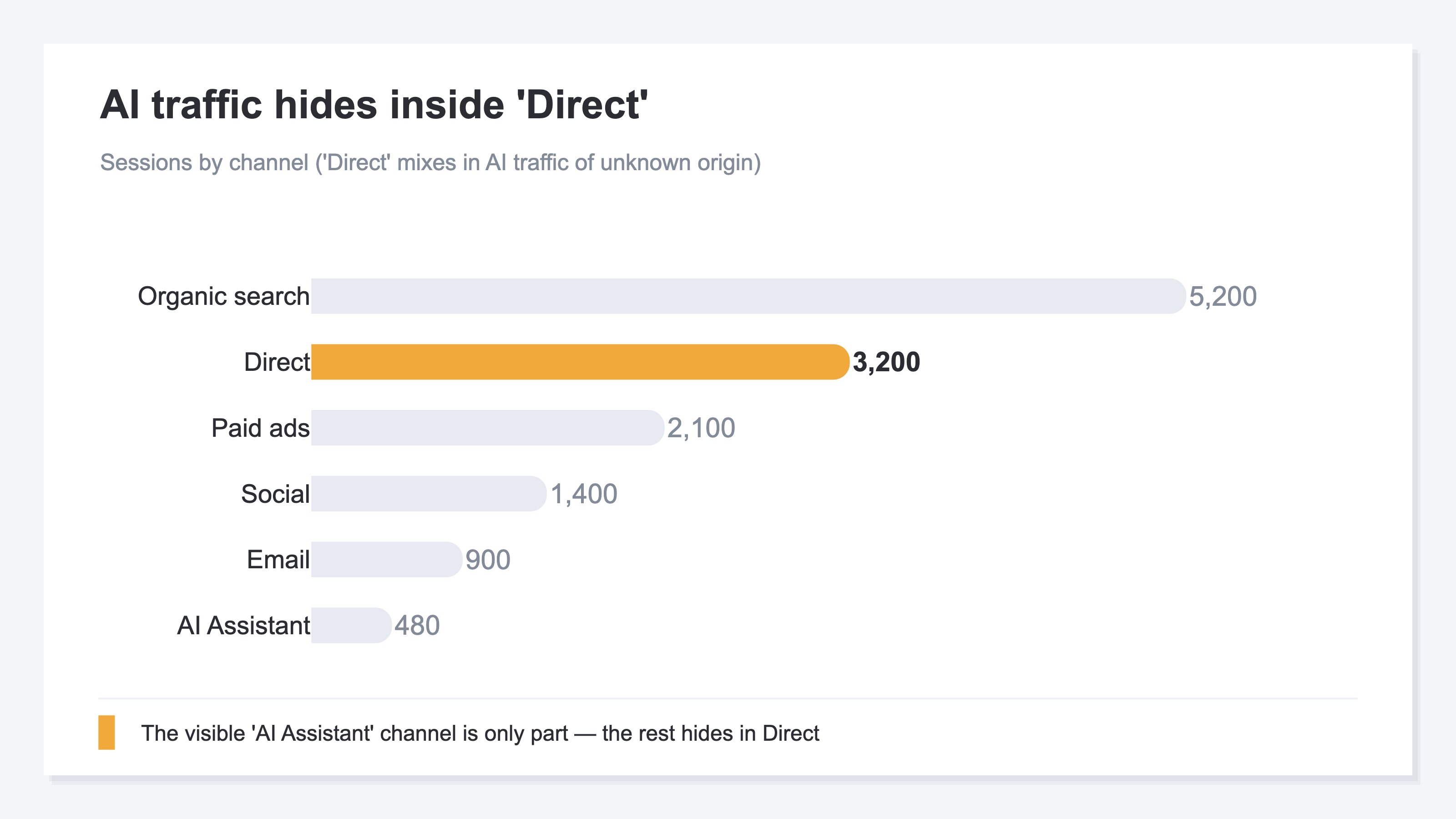
If the "Direct" in your report were truly only bookmark traffic, it wouldn't grow this large. When you compare channels in GA4's Acquisition → Traffic acquisition report [2] and "Direct" is unnaturally big, it's worth suspecting AI traffic mixed inside.
2. Signs That Hidden AI Traffic Is Inflating Direct#
Bottom line: there are free signs to spot it, but none is a definitive method — they're only circumstantial.
In your own GA4, three signs mainly suggest hidden AI traffic. First, "Direct" is unnaturally large. True direct should be limited to bookmarks and typed URLs, so it shouldn't be that big. Second, many "Direct" visits land not on the top page but straight on a specific product or article page. Bookmarks tend to cluster on the top or a set page, but AI recommends individual pages, so visitors land deep right away. Third, there's a cluster inside "Direct" with oddly good dwell time or conversion rate — a marker of buyers with set intent mixed in.
These are all "reasons to suspect," not proof that the traffic is from AI. You could build detailed regex segments in GA4 to narrow it further, but this article won't walk through that. Manual segments mean monthly rebuilds, and the unmarked portion still can't be scooped up anyway. As a starting point for diagnosis, the breakdown approach in Why GA4 "Direct/(none)" grows and how to fix it is a useful reference.
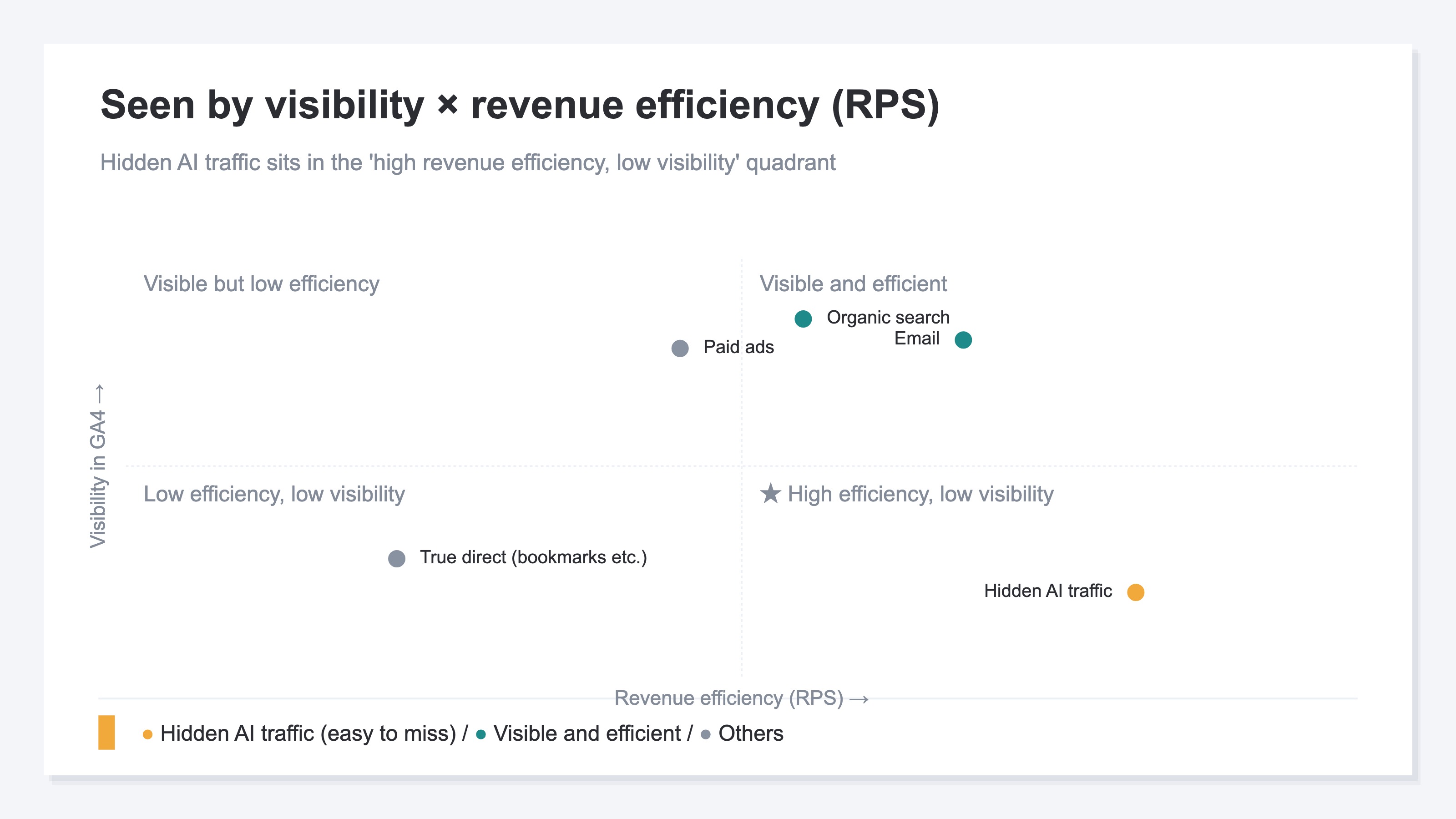
Why bother spotting it on circumstantial signs alone? The chart above is the reason. Hidden AI traffic sits in the "high revenue efficiency, low visibility" quadrant. People who arrive after consulting an AI have often narrowed down what to buy, so revenue per session (RPS) tends to run high. The basics of RPS are in The complete guide to RPS (revenue per session). The most efficient traffic hides in the least visible spot. That's why it's worth the effort to spot it.
3. Two Walls That Remain After You Spot It#
Bottom line: even after the signs help you spot it, two walls remain — you can't catch it all, and "how much it sold" has to be lined up separately.
The first wall is misses. The clues for spotting AI traffic rely on referrer and access traits, so traffic that leaves no marker and no referrer can't be split out. That's exactly why the AI traffic you do split out reads as a confident lower bound — "at least this much is arriving." Knowing it's a floor, you can build your next move on that solid number with confidence.
The second wall is that count and revenue are different. Even if you spot the AI traffic, you only learn "how many visits arrived." What an EC operator really wants is "how much that traffic sold." Watching visit count alone, you stop at "AI traffic doubled last month" and lose how much it turned into revenue. The problem of sales staying unattached in the unknown pile is also covered in Reducing unattributed revenue (sales of unknown origin). Detection and revenue connection are separate tasks to keep apart.
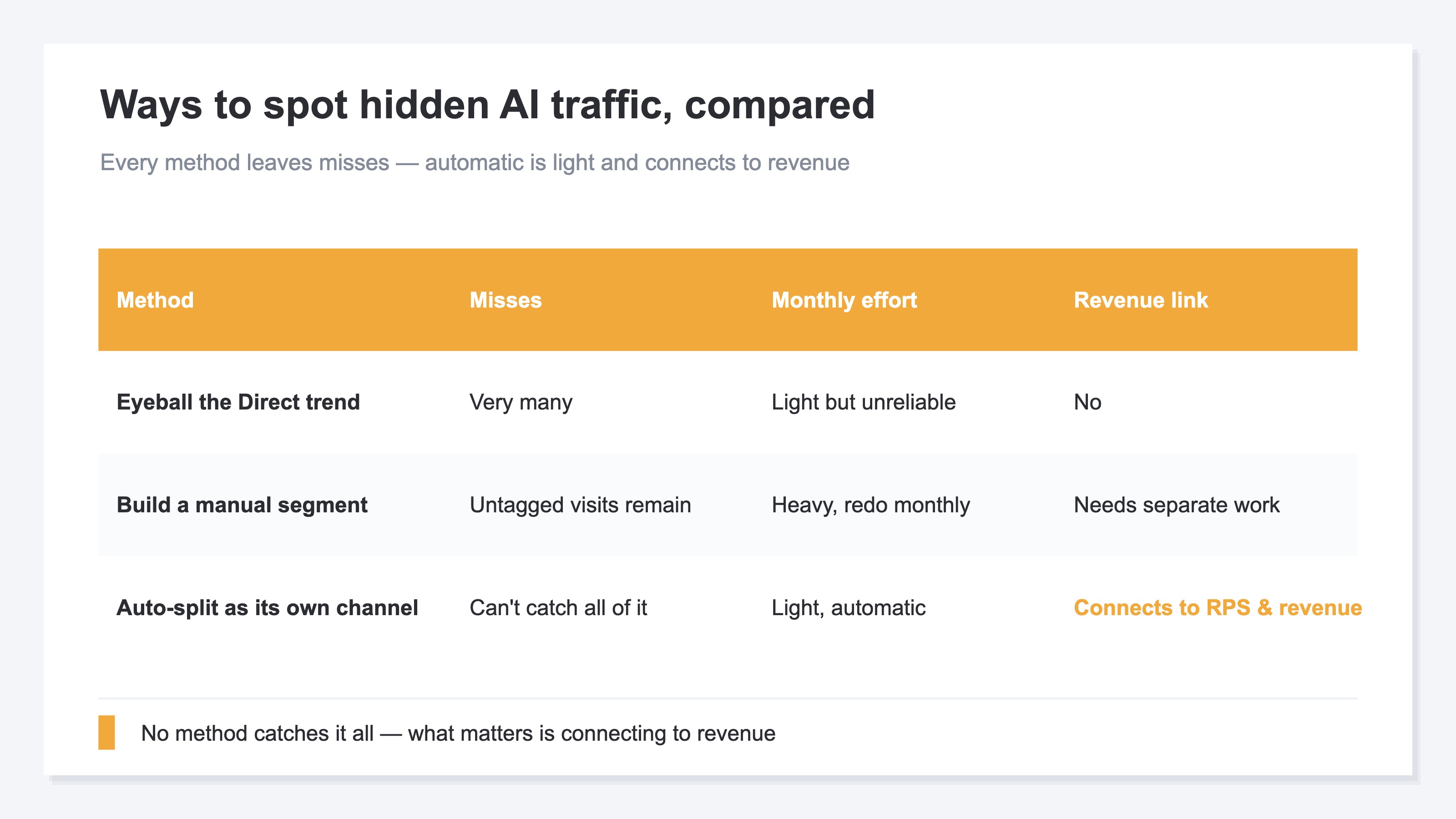
As the table shows, every method leaves misses. The difference is whether monthly effort is light, and whether it connects to revenue. Eyeballing and manual segments are heavy yet don't reach revenue. Only when you auto-split it and line it up by RPS and revenue does "spotting" turn into "deciding."
RevenueScope helps
Bottom line: in GA4 or by hand, spotting hidden AI traffic every month is heavy, incomplete, and doesn't reach revenue. That's where RevenueScope comes in.
RevenueScope is a tool with the aggregations EC revenue decisions need already built in. It splits AI-referred traffic out of the "Direct" pile, excludes bots (automated access), and lines it up by revenue per session (RPS) and revenue, not visit count. Split "Direct" out, and it looks like this (figures shown are demo data).
| Breakdown of traffic | Visits | CVR | Revenue | RPS (revenue per visit) |
|---|---|---|---|---|
| Direct (total before splitting) | 3,200 | 1.4% | ¥320,000 | ¥100 |
| └ AI-referred (the split-out part) | 700 | 2.8% | ¥196,000 | ¥280 |
| └ True direct (bookmarks etc.) | 2,500 | 0.9% | ¥124,000 | ¥50 |
The point of this table is that "Direct" lumped together reads as ¥100 per visit, but split apart the inside divides. AI-referred runs efficient at ¥280, while true direct is low at ¥50. Lumped as "Direct," that efficient AI traffic was diluted and went invisible. Split out and lined up by revenue, the numbers show "a well-buying AI stream was hiding inside Direct."
What RevenueScope does is three things. First, show the AI-referred traffic it splits out anytime, with no monthly handwork. Second, line that traffic up by RPS and revenue, not visit count. Third, find pages you're missing that AI could plausibly cite. RevenueScope specializes in reading traffic by revenue — splitting AI traffic out of Direct, lining it up by RPS and revenue, and showing which pages to act on to move sales.
FAQ#
Frequently asked questions#
Q. The new "AI Assistant" channel exists — so why does it still hide in "Direct"?
A. It does still hide. The AI Assistant channel only catches AI traffic that arrives in a recognizable form. Traffic that passes no referrer to judge by still falls into "Direct" or unknown. The new channel made part of AI traffic visible, but not all of it.
Q. If "Direct" is growing, can I assume it's all AI traffic?
A. No. "Direct" grows for many reasons beyond AI — missing markers, in-app browsers, redirects, and more. AI traffic is one part. So suspect "it may be mixed in" from the signs, and separate the causes separately. Use this article's signs only as a reason to suspect.
Q. Can free GA4 alone spot hidden AI traffic?
A. Partly — you can follow the circumstantial signs. But the unmarked portion can't be scooped up by hand, and rebuilding cross-channel segments every month is heavy work. And even if you spot it, "how much it sold" only shows when lined up separately. If keeping up detection and revenue connection by hand each month is a burden, that's when an auto-split that lines it up by RPS and revenue earns its place.
Conclusion#
Traffic from AI often arrives with no source marker, so GA4 buries it in "Direct." Even with the AI Assistant channel added in May 2026, traffic that passes no marker still sinks into "Direct." So sales happen, yet you can't tell they came from AI.
There are signs to spot it in your own GA4: an unnaturally large "Direct," direct landings on deep pages, and a well-buying cluster. But all are only circumstantial, and two walls remain: you can't catch it all, and "how much it sold" has to be lined up separately.
What matters is splitting the hidden traffic out and reading it by revenue per session (RPS), not visit count. Then you can find — by numbers, not gut — the efficient AI traffic that was hiding in "Direct." Start by suspecting what's inside your own "Direct."
See which ads actually drive revenue, at a glance
Free up to 5,000 sessions/month, AI connection included. No credit card required. Up and running in 5 minutes.