
"There's a new AI Assistant channel in GA4." If you noticed it recently, you're not alone. When someone asks ChatGPT or Gemini about a product and then lands on your store, GA4 now separates that visit out for you automatically. It's a useful feature. But reading the displayed number as "this is how much AI is selling" walks you into two blind spots. That number can include non-human access (bots), and "how much it actually sold" lives somewhere else entirely. This article explains how to read the new AI Assistant channel correctly, and why AI traffic in particular should be judged by revenue per visit — not visit count — all in plain language.
Table of contents
Key takeaways#
-
GA4 added an "AI Assistant" channel (May 13, 2026)
Visits from ChatGPT, Gemini, and others are now separated automatically into their own channel
-
But don't treat the displayed number as a result as-is
① non-human access (bots) can inflate it ② "how much it sold" doesn't appear in the standard report
-
Judge AI traffic by "revenue per visit," not "visit count"
People who arrive via AI often have strong purchase intent, so even small numbers can contribute meaningful revenue
-
Judge the "human" AI traffic — bots removed — by revenue and RPS, and the next move becomes clear
1. What the "AI Assistant" channel is (added May 13, 2026)#
Bottom line: it's a feature that automatically sorts visits from ChatGPT, Gemini, and similar tools into a dedicated "AI Assistant" bucket.
On May 13, 2026, Google Analytics (GA4) added a new channel called "AI Assistant" [1][2]. Visits judged to come from generative AI tools — ChatGPT, Gemini, Claude, Copilot, Grok — are automatically detected and grouped together. Under the hood, the medium of such a visit is automatically set to ai-assistant and classified into the "AI Assistant" channel [1]. You don't need to configure anything.
This is a significant change. Until now, many AI-driven visits lost their referrer information and ended up buried in "Direct" or "Unassigned," making it hard to gauge how much traffic AI was actually sending. Open "Acquisition → Traffic acquisition" in GA4 and you'll see the AI Assistant visit count alongside your other channels [3]. For why Direct and Unassigned balloon in the first place, see "GA4 'Direct / (none)': 5 causes and fix order," and for where AI traffic hid before the channel existed, see "When AI traffic hides in 'Direct'."
Visits from Google's own AI Overviews and AI Mode, on the other hand, do not land in this channel. The official help explicitly counts those under Organic Search [1]. Where AI Mode traffic does show up is covered in "Where does AI Mode traffic go in GA4?".
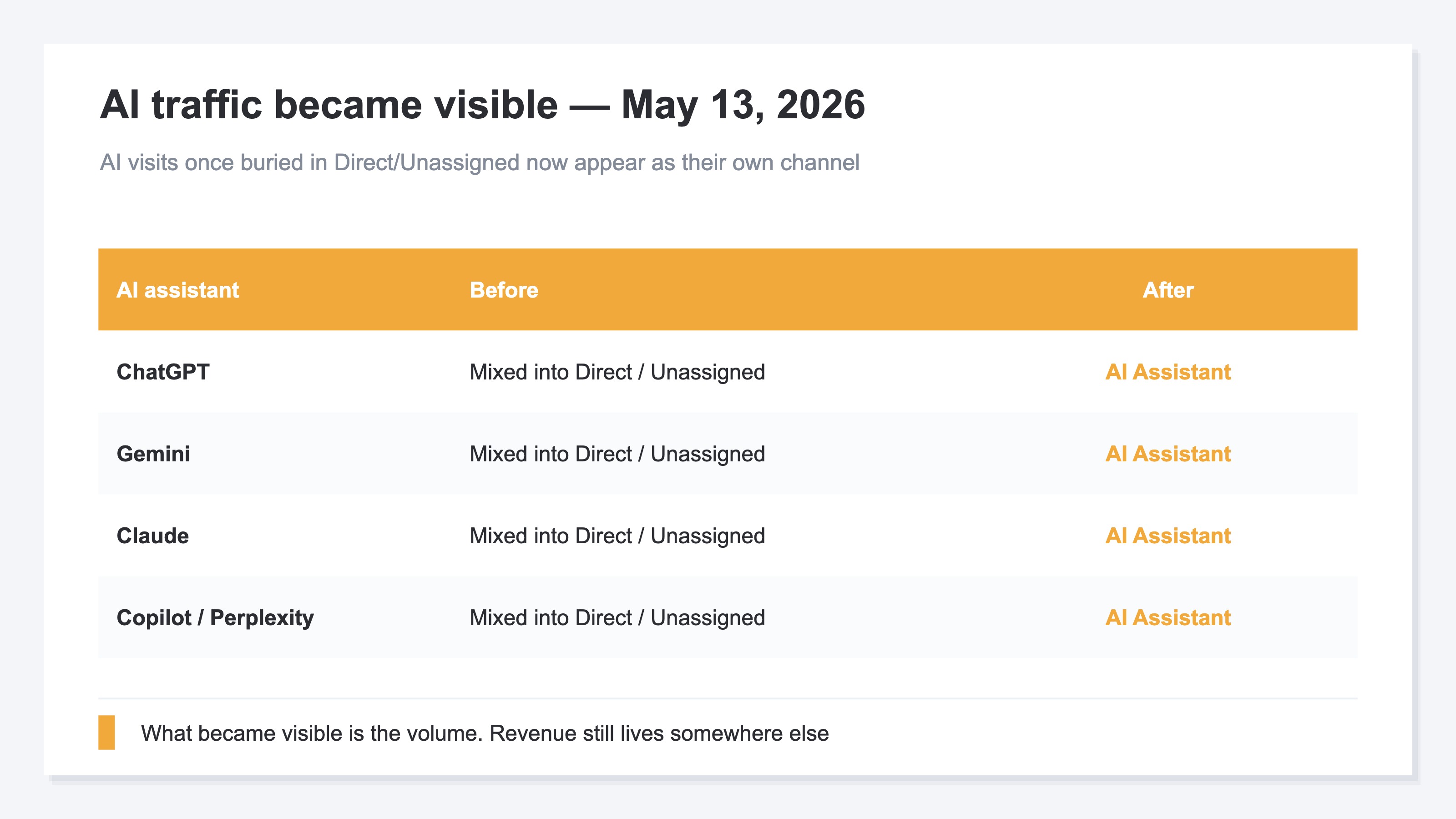
It's genuinely useful. But here's where we pause. Should you read "50 visits from AI Assistant" as "50 customers came via AI"? There are two caveats.
2. Pitfall 1: bots can inflate the numbers#
Bottom line: the "AI Assistant" number can include non-human access (bots), and Google never says this channel removes bots.
A bot here means automated software access rather than a human — search-engine crawlers, programs that AI uses to read sites for training and answering, and many other kinds. With the spread of AI, this automated access has grown rapidly over the past year or two.
The issue is that GA4's official documentation only says the AI Assistant rule classifies a visit as ai-assistant when the referrer matches a list of AI assistants — it says nothing about removing bots [1]. So if AI-related automated access is mixed into the "AI Assistant" number, it's indistinguishable from human visits on screen. "AI traffic is up!" can turn out to be a swell of non-human access.
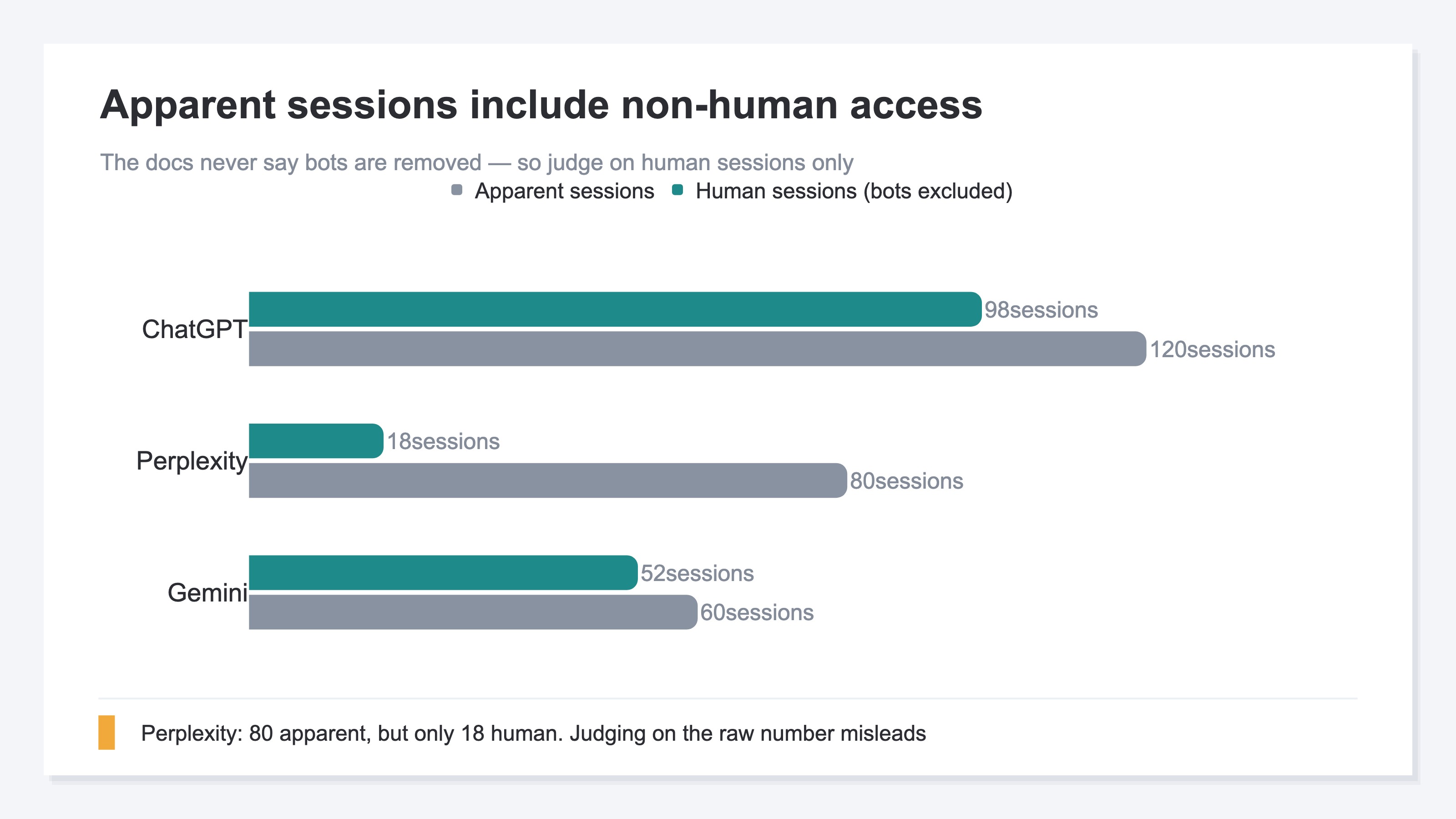
This doesn't mean the AI Assistant channel is useless. It's helpful for grasping where traffic enters. But if you're going to speak about that number as a business result, you need to view it with the automated access removed — "human visits only." Note that bot detection is not 100% perfect by nature; a human is occasionally misjudged as automated access. That's all the more reason not to declare the apparent number a result.
3. Pitfall 2: you can't see revenue#
Bottom line: the AI Assistant channel shows "how many visits came," a volume figure; how much those visits sold doesn't appear in the standard report.
GA4's standard channel report is fundamentally built to show "how many sessions (visits) came from where." The AI Assistant channel is the same — what you first learn is the volume of visits. But what an ecommerce operator most wants to know is "how much did that AI traffic ultimately sell?"
Watching only the visit count, the story stops at "AI traffic doubled last month." How much that doubled traffic translated into revenue drops out. As we'll see, people arriving via AI often have strong purchase intent, so this "revenue is invisible" state means missing the tastiest part.
One more thing changed on June 3, 2026: Google Search Console added a "Generative AI performance report" [4]. What it counts, though, is how often your link was shown on a Google search screen — no clicks, no revenue. It measures a different surface in a different unit than GA4's AI Assistant channel (see "How to read GSC's AI search report"). Impressions and visits both became visible; "how much did it sell" still appears on neither screen.
4. Why AI traffic should be judged by revenue#
Bottom line: people who arrive via AI have often already narrowed down what they're buying, so even a small visit count can contribute big revenue. That's why judging by "quality" — "revenue per visit" — rather than "volume" matters so much.
There's a difference in purchase intent between someone typing keywords into search and someone who asked an AI "what leather tote under 10,000 yen works for commuting?" and landed on the recommended product page. Because AI asks about budget and use, then recommends specific products, people arriving via AI often show up with their choice fairly narrowed down. The volume is still just a few percent of the total, but it's steadily growing.
The metric that helps here is RPS (Revenue Per Session — revenue per visit). It's a simple figure: "revenue ÷ visits," showing what one visit earned on average. For the basics of RPS, see "Revenue Per Session: compare EC ad channels by revenue." Judged by visit count alone, AI traffic can look small, yet by RPS it may turn out to be "the traffic that earns the most per visit."
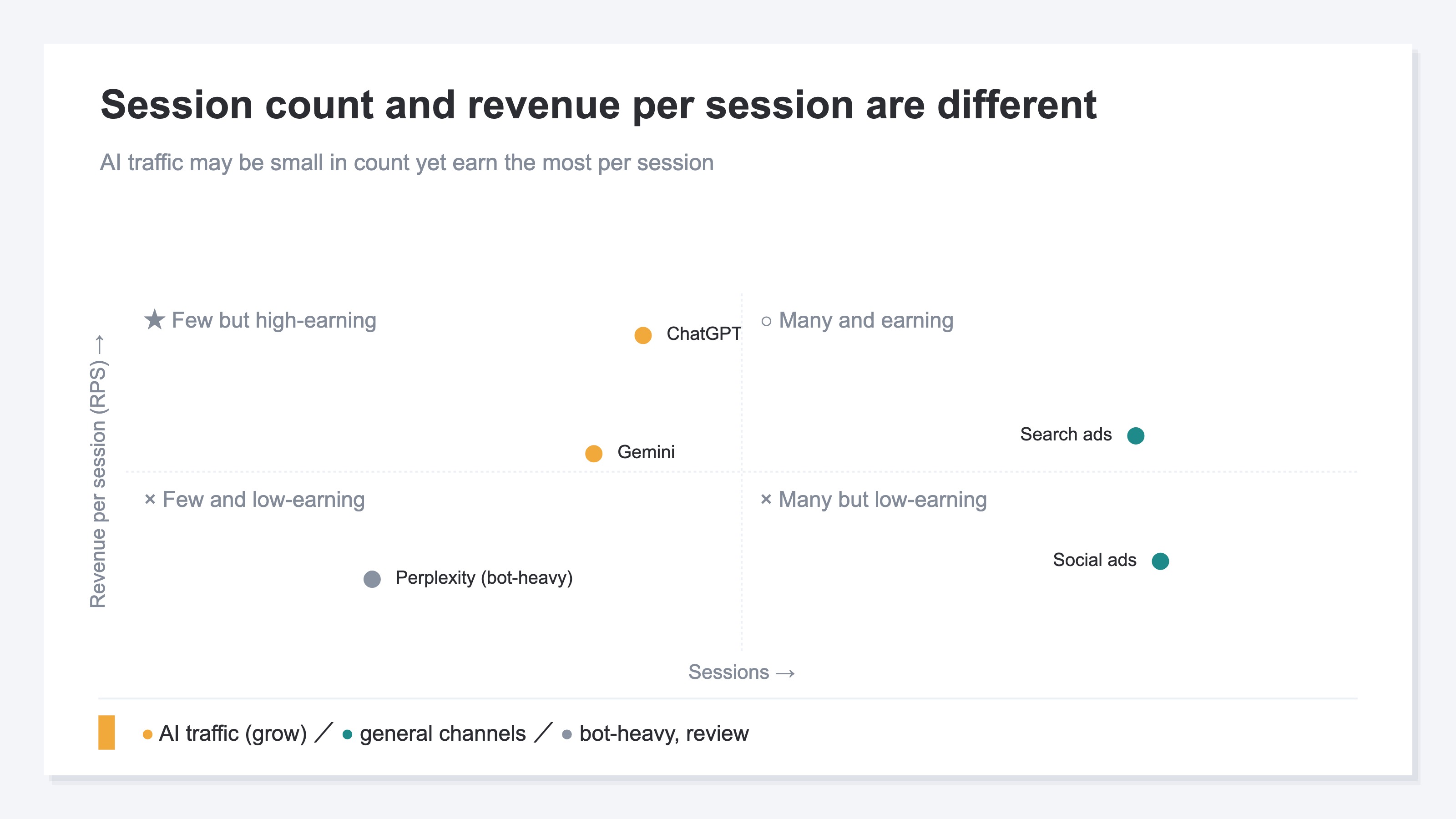
In short, the AI Assistant channel number becomes readable as a business result only after two passes: "① remove non-human access" and "② view by revenue, not visit count." The idea itself isn't hard. But you can't remove bots yourself, and redoing this across channels every month is heavy manual work.
RevenueScope solution
Bottom line: you can have the "human" AI traffic, bots removed, laid out on one screen with revenue and RPS from the start.
RevenueScope is a tool with exactly the aggregations an ecommerce revenue decision needs, prepared in advance. It judges access as human or automated (bot), and shows the "human visits only" numbers with bots removed. On top of that, it displays AI traffic as one channel — side by side with your other channels — with visit count, revenue, and RPS already calculated. Where GA4 shows only "how many visits came," you can check "how much those visits sold" in one go.
On the dashboard, each AI assistant (ChatGPT, Claude, Perplexity, Copilot, and so on) appears as its own traffic channel, lined up with your other channels on one screen. Alongside bot-excluded revenue and RPS, each channel's "Bots excluded" column discloses how many automated hits were removed (and you can feed the same numbers straight to an AI assistant to talk through the assessment).
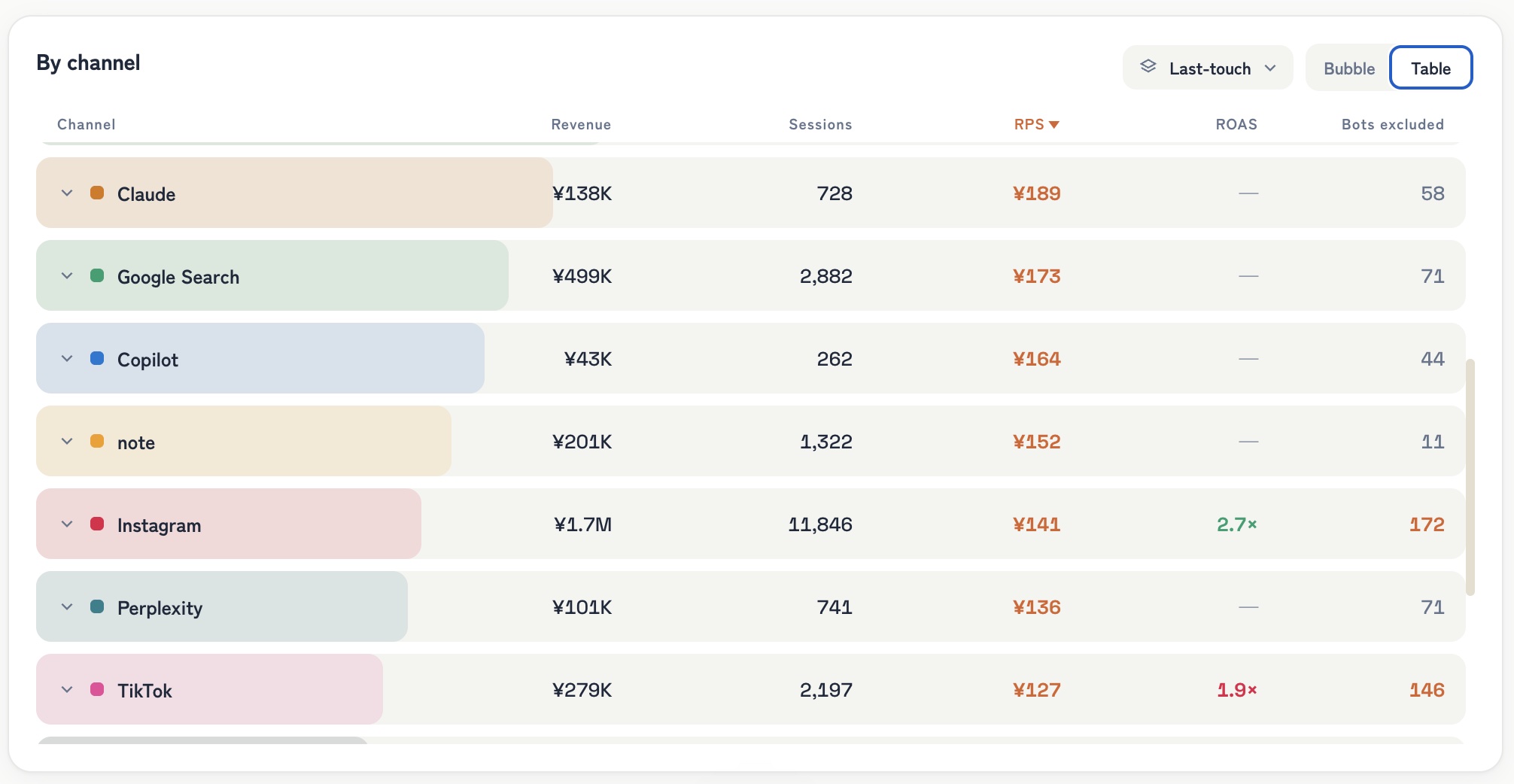
RevenueScope dashboard (demo data shown). AI-assistant traffic broken out as individual channels, showing bot-excluded revenue and RPS with the bots-excluded count.
Two points stand out. First, each AI channel's "Bots excluded" column shows the automated hits stripped out of the apparent numbers; spend budget or effort on the visit count alone, without looking here, and you'll misjudge. Second, AI traffic tends to have high RPS even with few sessions — Claude, for instance, has just 728 sessions yet a higher revenue-per-session than Instagram or TikTok. Growing it is the next move — concretely, "writing product descriptions that AI tends to cite." This idea is explored further in "More AI traffic isn't proof it worked" and "How visible is your brand in AI search." Judging by human visits and revenue, not visit count, is what makes these calls possible.
FAQ#
Q1. Do I need to set anything up to use the AI Assistant channel?
No. From May 13, 2026 onward, Google classifies it automatically on GA4's side [1][2]. You don't need to create channel settings or referrer conversion rules. Open "Acquisition → Traffic acquisition" and it appears alongside your other channels.
Q2. Can GA4 tell me how many bots are mixed in?
The standard channel report can't tell you how many of the AI Assistant figures are automated access. That's exactly why it's safer to check the "human visits only" number separately, with bots removed. Since the amount of contamination is unreadable, the key is not to report the apparent number as a result as-is.
Q3. My AI traffic is still small — is there a point in looking now?
Yes. AI traffic is a few percent of the total but steadily growing, and it's traffic with strong purchase intent. Building the habit of "judging by revenue (RPS), not visit count" while volume is small means you'll judge correctly once it grows. That said, measuring the effect of growth efforts means removing bots and tying visits to revenue every time — which is exactly what's hard to keep up by hand.
Summary#
- GA4 added an "AI Assistant" channel (May 13, 2026); visits from ChatGPT and Gemini are separated automatically
- But don't treat the number as a result as-is: ① non-human access (bots) can inflate it ② "how much it sold" isn't in the standard report
- AI traffic skews toward strong purchase intent — judge by "revenue per visit (RPS)," not visit count
- Judge the "human" AI traffic with bots removed, by revenue and RPS, and the next move becomes clear
See which ads actually drive revenue, at a glance
Free up to 5,000 sessions/month, AI connection included. No credit card required. Up and running in 5 minutes.
References#
- [1] Google Analytics Help "[GA4] Default channel group" (2026)
- [2] Google Analytics Help "What's new in Google Analytics" (2026)
- [3] Google Analytics Help "[GA4] Traffic acquisition report" (2026)
- [4] Google Search Central Blog "Introducing Search Generative AI performance reports in Search Console" (2026)



![[Research] More AI Traffic Isn't Proof It Worked: Tell the Real Gain by Revenue](/_next/image?url=%2Fimages%2Fnews%2Fai-referral-revenue-real.jpg&w=3840&q=75)