"There's a new AI search report in Google Search Console." If you noticed it recently, you're not alone. Google added a generative AI performance report to Google Search Console (GSC) — the free tool for seeing how your site shows up in search. It tells you how often your site appeared in Google's AI features, like AI Overviews (the AI summary shown above search results). It's a useful step. But the only thing this report shows is the impression count. How many clicks you got, what position you ranked at, and how much you sold — none of it appears here. This article explains, in plain language, what this report does and doesn't show, and how to avoid mistaking "impressions are up" for "revenue is up."
Table of contents
Key takeaways#
-
Google added a "generative AI performance report" to GSC (June 3, 2026)
See impression counts in AI search by page, country, device, and date
-
But this report shows impressions only
No clicks, no position, no revenue. And it covers only Google's own AI features — traffic from ChatGPT and others isn't included
-
"Impressions are up" and "revenue is up" are different things
Watching impression counts alone won't tell you whether they turned into revenue. Connect through to "revenue per visit (RPS)"
-
Judge the AI traffic that actually landed on your site by revenue and RPS per AI, and the next move (which AI to lean into) becomes clear
1. What GSC's AI search report shows is impressions only#
Bottom line: this report tells you how many times your site appeared in AI search — the impression count.
On June 3, 2026, Google added a "generative AI performance report" to Google Search Console [1]. It shows how often your site appeared in Google's own AI features, such as AI Overviews (the AI summary above search results) and AI Mode [1][2].
You can view those impressions by page, country, device, and date [1]. Until now, how you showed up in AI search was almost impossible to see. Being able to track even the impression count is a genuine step forward. You move past the "I have no idea whether AI is showing my store at all" stage.
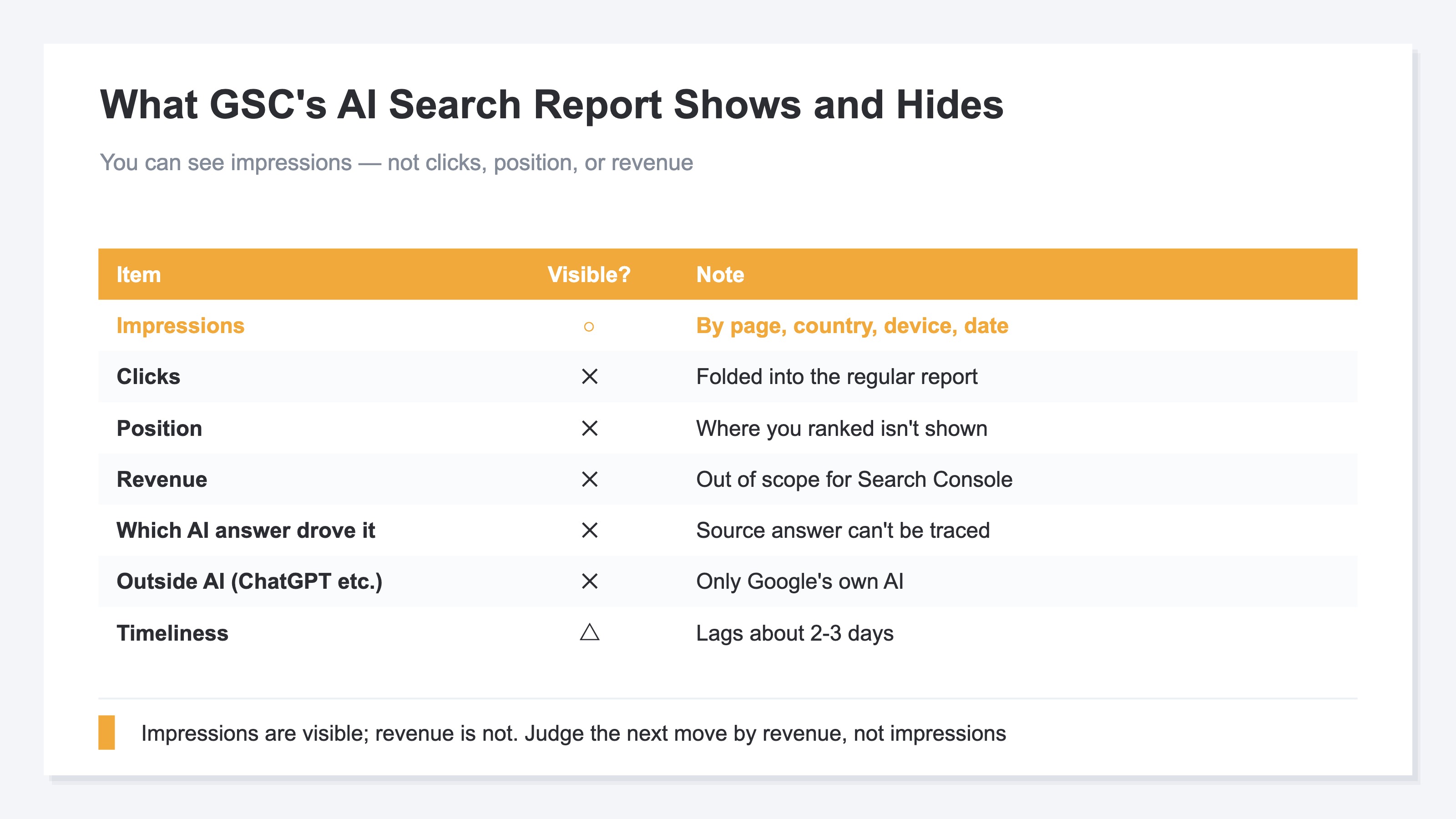
But what you learn here stops at "impressions." It's useful, no doubt — yet this is where we pause. Should you read "impressions are up" as "AI search is delivering results"? There are a few caveats. The next chapter sorts out what this report leaves out.
2. No clicks, no position, no revenue in this report#
Bottom line: this report shows impressions only. No clicks, no position, no revenue — and it covers only Google's own AI, not ChatGPT and others.
Take them in order. Clicks first. AI-search clicks are folded into your regular search performance report [2]. Pulling out the AI-only portion is hard, and this generative AI report itself has no clicks column [1]. You can see impressions but not clicks.
Position is the same. Where you appeared isn't shown in this report [1]. Your site was shown, but you can't tell whether it was in a prominent spot.
Then revenue. Google Search Console measures "how you show up in search"; purchases and revenue are out of scope. How much an impression turned into revenue simply isn't here. That's by design.
The scope is easy to miss, too. This report covers only Google's own AI features (AI Overviews and AI Mode) [2]. Traffic from outside AIs — ChatGPT, Perplexity, Claude — isn't included. Much of the AI citation activity happens on those outside AIs, yet most of it sits outside this report. On top of that, GSC covers Google search and lags about two to three days. There's also a setting to keep your site out of AI answers [2]. For other reasons GSC numbers don't line up with your other tools, see "Why your Google Search Console clicks don't add up."
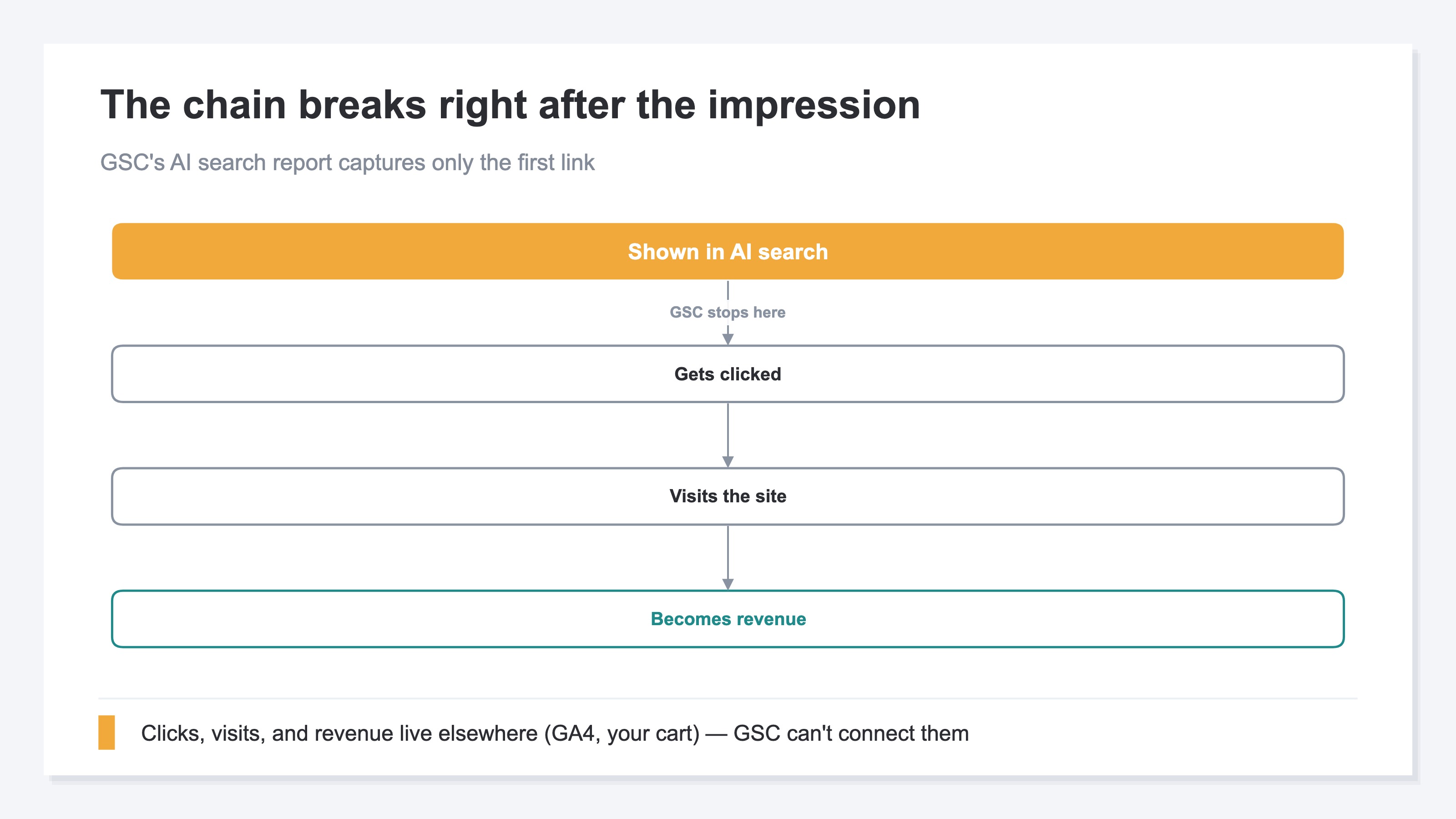
Comparing with GA4 makes the difference in vantage point clear. GA4 added an "AI Assistant" channel on May 13, 2026 [3]. It automatically separates visits that landed on your site via AI. GSC looks at "did AI show you in search" — before the click; GA4 looks at "did an AI visit land on your site" — the landing. That difference is covered in "Don't take GA4's new AI Assistant channel at face value." Both stop at "impression / visit"; revenue sits somewhere else again.
3. "Impressions are up" and "revenue is up" are different things#
Bottom line: even if impressions rise, whether that turned into revenue is a separate question. View by revenue per visit, not impression count.
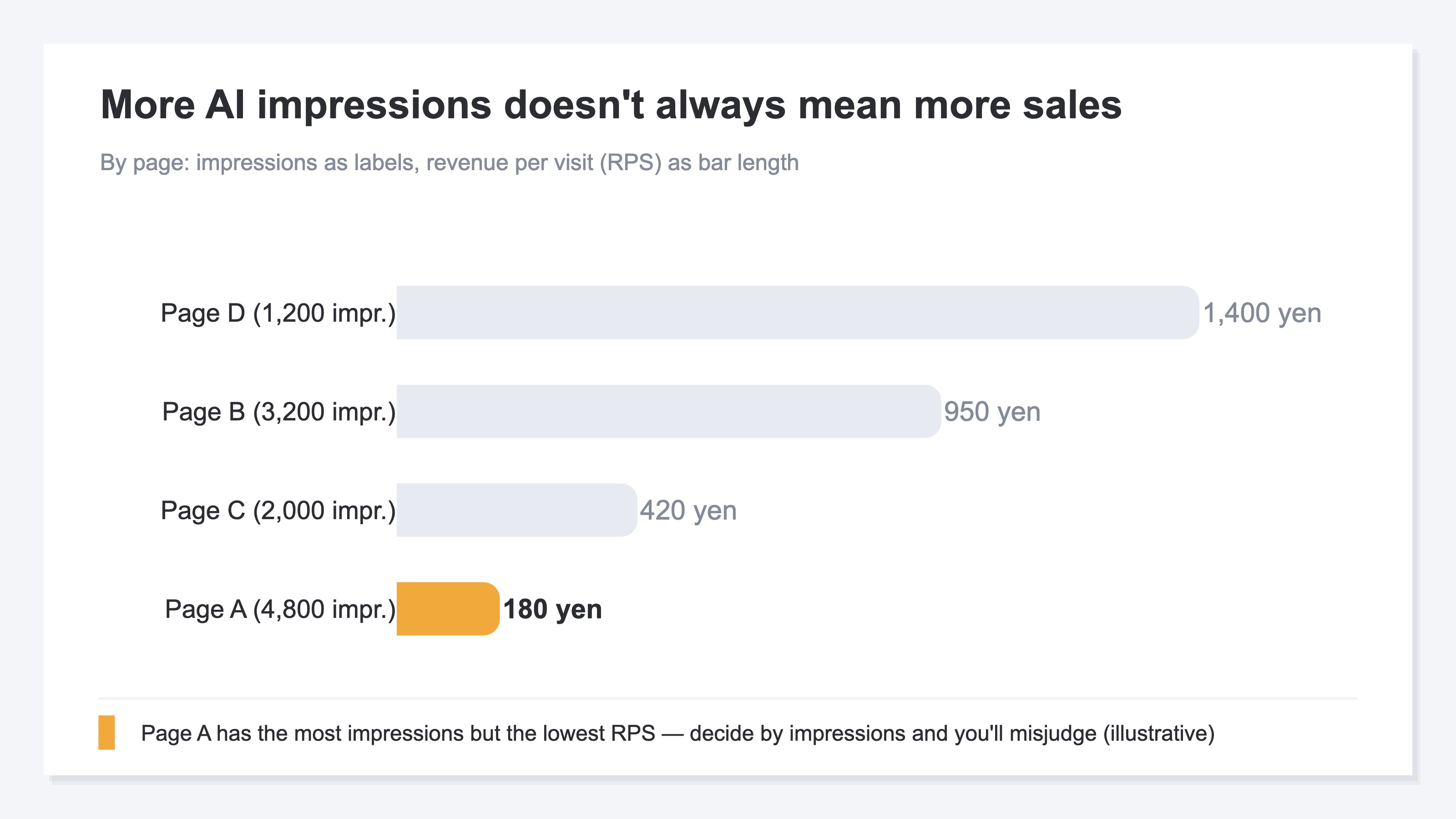
Impressions can double without telling you whether clicks, visits, and purchases followed. Watch impressions alone and you'll miss the case where it looks good but isn't selling. AI search results also wobble day to day — the same question can surface different stores. Lean on the rise and fall of impression counts and you'll misjudge.
The metric that helps here is RPS (Revenue Per Session — revenue per visit). It's a simple figure: "revenue ÷ visits," showing what one visit earned on average. For the basics, see "RPS (Revenue Per Session) complete guide." A page can have plenty of impressions or visits yet a low RPS — that is, weak revenue efficiency.
Conversely, a page with many impressions but almost no clicks or purchases can be a sign the search intent is off. Decide priority by sheer size and you'll pour effort into pages that won't grow. So look in order of "closest to revenue," not "most impressions."
There are free things you can do. Look at impressions in GSC, filter referrers by AI names in GA4 to confirm visits, and add a "how did you hear about us?" question at checkout. We've gathered the free way to confirm in "Check AI traffic for free." But these only collect "impressions," "visits," and "self-reports" separately — they never connect through to how much revenue a given AI's impressions produced. The method is simple, but cross-checking by hand every week, page by page, is heavy work. Impressions live in GSC, visits in GA4, revenue in your cart — the pieces sit in different places.
RevenueScope solution
Bottom line: where GSC and GA4 stop at "impressions / visits," RevenueScope connects the AI traffic that actually landed on your site through to "revenue and RPS," on one screen.
RevenueScope is a tool with exactly the aggregations an ecommerce revenue decision needs, prepared in advance. The key here is the difference in vantage point. What RS looks at is "the AI traffic that actually landed on your site." This is a different mechanism from GSC's AI search report (which is about appearing in search results): on the site side, RS identifies "which AI a visit came from" by its referrer and aggregates it. So traffic from outside AIs — ChatGPT, Claude, Gemini, Perplexity — is in scope too, in contrast to GSC's report covering only Google's own AI.
With automated access (bots) removed, RevenueScope shows human visits, revenue, and RPS per AI, already calculated. The numbers count only traffic with a solid referrer — a conservative floor you can act on with confidence. Where GSC stops at "impressions" and GA4 at "visits," RevenueScope lets you check "how much those visits earned."
In the actual RS screen, "visits, revenue, and RPS" are laid out together per AI on a single screen. You can also feed that data straight to an AI assistant (ChatGPT or Claude) and ask. Ask "which AI traffic has the best revenue efficiency?" and you get an answer like this (sample data).
| AI | Visits | Revenue | RPS (revenue per visit) |
|---|---|---|---|
| ChatGPT | 90 | ¥135,000 | ¥1,500 |
| Gemini | 48 | ¥38,400 | ¥800 |
| Perplexity | 70 | ¥14,000 | ¥200 |
Two points stand out. First, some traffic — like Perplexity — has a higher visit count but a low RPS. Spend budget or effort based on impression or visit count alone and you'll misjudge. Second, ChatGPT has the highest revenue per visit, so growing it (e.g., writing product descriptions that AI tends to cite) is the next move. Judging by the revenue of the people who arrived, not by impression count, is what makes these calls possible. There's also a view that estimates "how much revenue a search query is likely to drive" from Google search data (an estimate, so it's conservative and on the low side).
FAQ#
Q1. Do I need to set anything up to use this report?
No. If your site is registered in Google Search Console, you can open the generative AI performance report and view it [2]. But the scope is Google's own AI features (AI Overviews and AI Mode). Traffic from outside AIs like ChatGPT and Perplexity isn't included in this report.
Q2. Can I see clicks or revenue anywhere?
Not in this report. AI-search clicks are folded into your regular search performance report, and pulling out the AI-only portion is hard [2]. Revenue is out of scope for Google Search Console in the first place. To connect through to revenue, you need a separate way to view AI traffic by "revenue per visit (RPS)" on the site side.
Q3. My AI search impressions are still small — is there a point in looking now?
Yes. AI search impressions are growing steadily. Building the habit of "judging by revenue (RPS), not impression count" while volume is small means you'll judge correctly once it grows. The earlier you start, the easier it is to measure which efforts worked.
Summary#
- Google added a "generative AI performance report" to GSC (June 3, 2026); you can see impression counts in AI search by page, country, device, and date
- But it shows impressions only — no clicks, no position, no revenue — and it covers only Google's own AI features (ChatGPT and others aren't included)
- "Impressions are up" and "revenue is up" are different; connect through to "revenue per visit (RPS)," not impression count
- Judge the AI traffic that actually landed on your site by revenue and RPS per AI, and the next move (which AI to lean into) becomes clear
See which ads actually drive revenue, at a glance
Free up to 5,000 sessions/month, AI connection included. No credit card required. Up and running in 5 minutes.