
Your products appear in ChatGPT, Claude, and Perplexity, and people are coming from there. You have that hunch — yet open GA4 (Google Analytics) and "how many came from AI" never comes out clearly. This article lays out, without jargon, the free entry point for confirming whether AI-referred visits exist at all.
On top of that, it sketches a way of thinking that goes one step further: "look not just at the count, but at whether that visit moved revenue." Since this article narrows in on "confirming for free whether they're coming," the groundwork of making yourself easier to surface in AI belongs with How to appear in ChatGPT.
Table of contents
Key takeaways#
- Visits via ChatGPT and Claude really are arriving at many sites. Even with free GA4, filter referral sources by AI names and you can get a rough read on "whether they're coming"
- But AI traffic that carries no referrer slips into Direct and gets undercounted, and bots dirty the numbers. The figure you see is always a bit lower than reality
- Above all, what free manual checking reveals goes up to "how many came." "Whether that visit moved revenue" doesn't come out. What matters is comparing AI traffic by revenue per visit, not by count
1. Are AI-referred visitors really coming#
Bottom line: AI-referred visits really are arriving at many sites. It's just that, with free manual checking alone, you tend to undercount them.
Someone asks ChatGPT or Claude a question, then follows the store mentioned in the answer and visits — this flow is genuinely happening. The volume still isn't large; at many sites it's a few percent of all visits. But people who come via AI often arrive already knowing what you offer, and some reports say they buy at a higher rate. Small in number, this channel isn't one to brush aside.
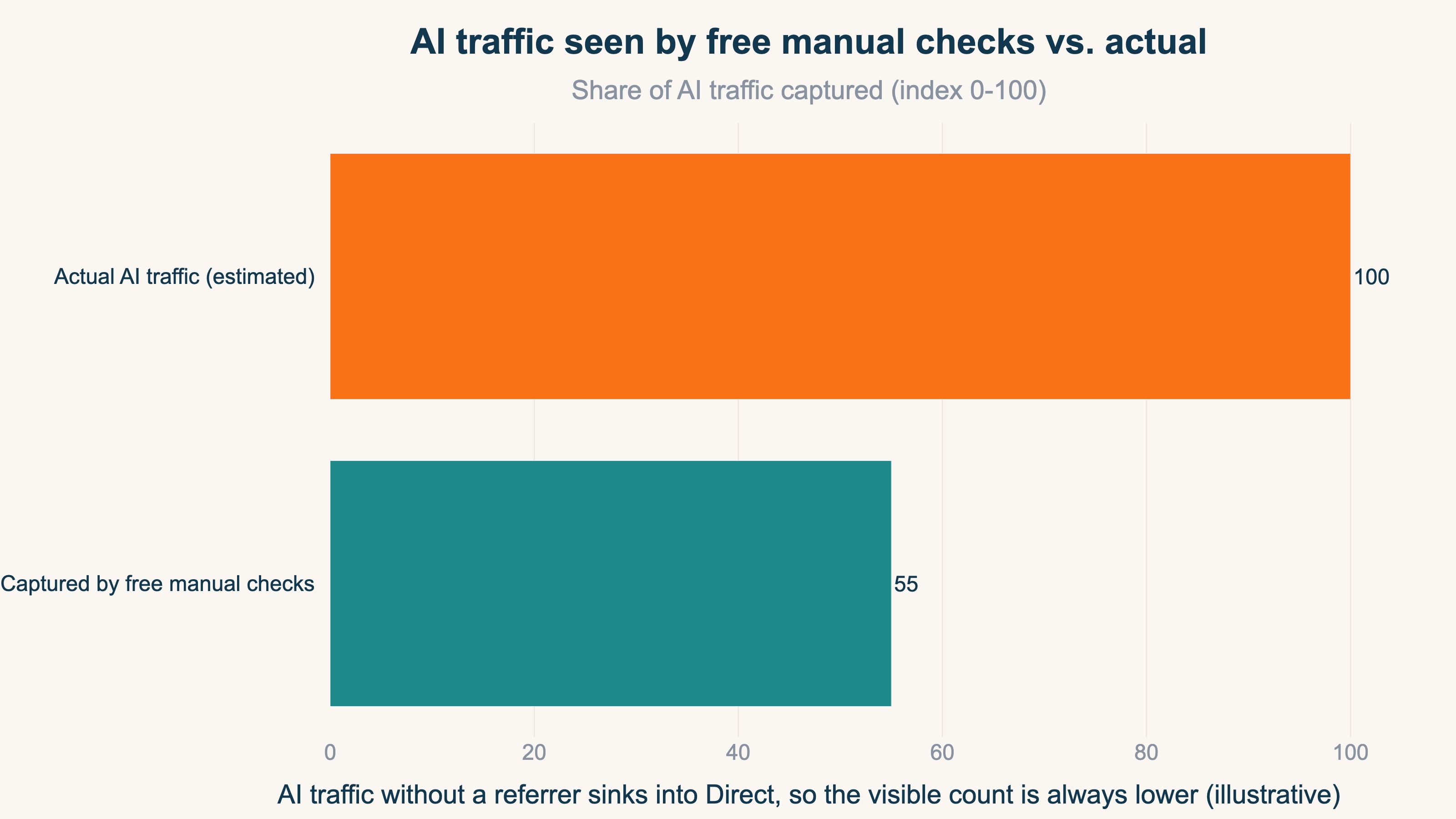
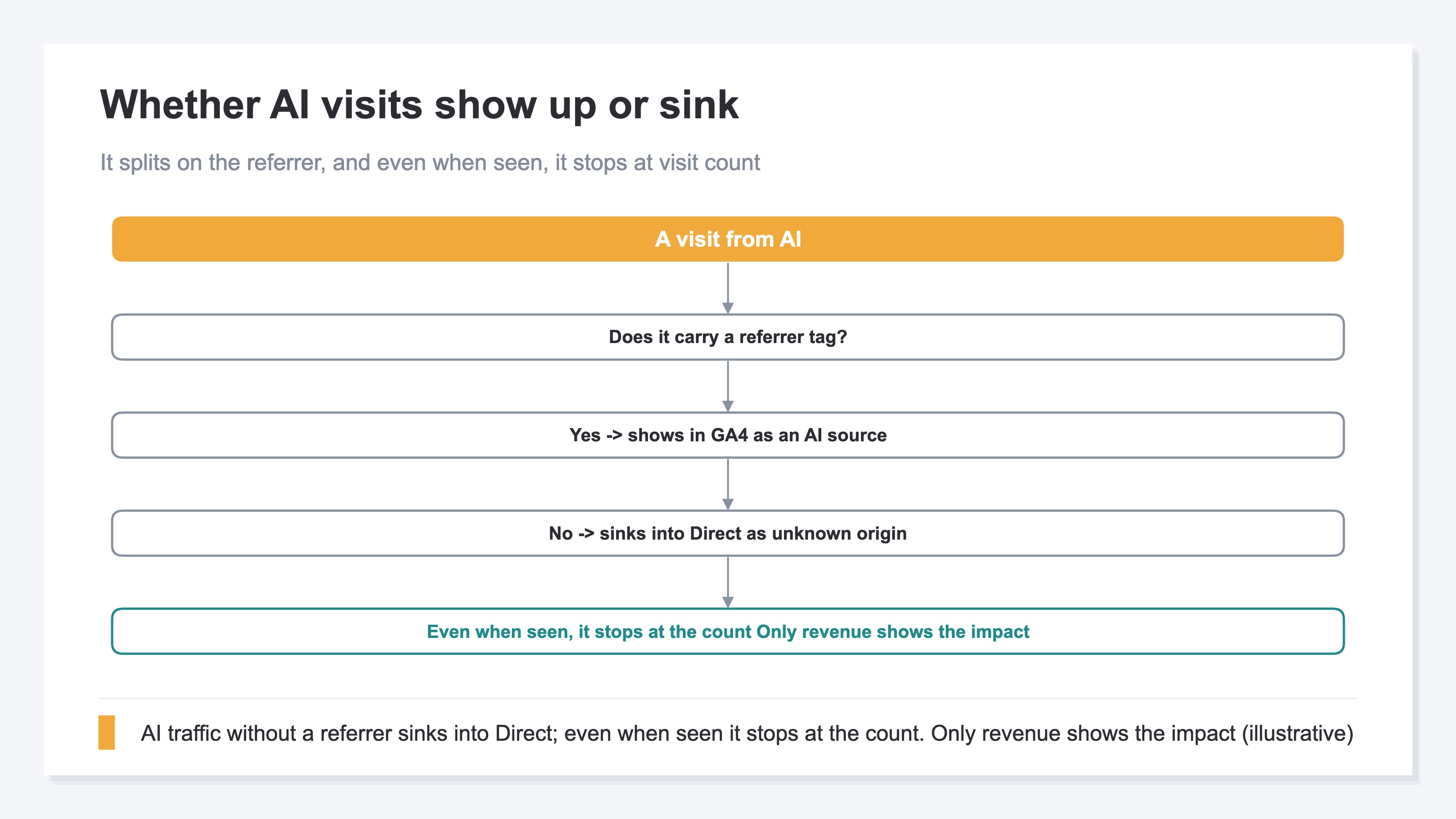
The problem is that it's hard to count correctly. Links from AI answers often carry no referrer (the information showing where they came from). With no referrer, GA4 drops that visit into "Direct" — the pile of unknown origin. The AI-referred number on screen looks smaller than reality.
The figure below lines up the AI traffic you can see through free manual checking against the AI traffic that's actually arriving (estimated). What's visible is only part of it, and "looking like zero" and "really not coming" are two different things.
If you want to measure how much you're surfacing in AI — the "volume of appearances" itself — How visible is your brand in AI search is a useful reference too.
2. The free way to check: GA4 referral sources and segments#
Bottom line: the free entry point is to look in GA4 at "where they came from," filtered by AI names. But what you learn here goes up to the direction of "they seem to be coming."
The idea behind the free way to check isn't that hard. GA4 has a screen that tallies where visits came from[1]. There, you look in the referral source (the site they came from) for AI service names like chatgpt or perplexity lined up. Then, using a "segment" — a filter that carves out just the range you want — you can pull out only the visits that look AI-referred, which makes counts and trends easier to follow.
From May 2026, GA4 also added a grouping called "AI Assistant"[2]. It automatically files visits from a defined set of AI services like ChatGPT and Gemini into this bucket. So some of it is easier to spot than before.
What to take to heart here isn't the fine operating steps. What matters is the sense of direction: "filter referral sources by AI names and you can get a rough read on whether they're coming." The exact setup steps we leave to GA4's official help. The point is that, even for free, you can stand at the entrance.
But this method has a wall that's hard to clear. AI traffic that arrived with no referrer still slips into Direct and doesn't show up on this screen. How to spot traffic that's sunk into unknown origin is taken one step further in When AI traffic hides in 'Direct'.
3. What free manual checking can and cannot tell you#
Bottom line: what free manual checking reveals goes up to "the number that seems to be coming." "The traffic missed because it carries no referrer" and "whether that visit moved revenue" remain in places manual work struggles to reach.
The free way to check has four clear limits.
The first is the missed traffic. AI doesn't always hand over where a visit came from. Visits with no referrer slip into Direct and stay uncounted. So the number you see by hand is always a bit lower than reality.
The second is dirty numbers. When automated programs (bots) step on a page, visits get padded. AI service crawlers can mix in too, making them hard to tell apart from human visits. Take the numbers at face value and you'll misjudge. This caveat is also laid out in Don't take GA4's new AI Assistant channel at face value.
The third is the rebuilding effort. Every time you want to line things up by engine or by period, you rebuild the referral source and the filter by hand. Keep it up monthly and this becomes fairly heavy work.
The fourth is the most important. What manual work reveals goes up to "how many came," and "how much that visit sold" doesn't come out. Even when the count is visible, whether it moved revenue is a separate matter.
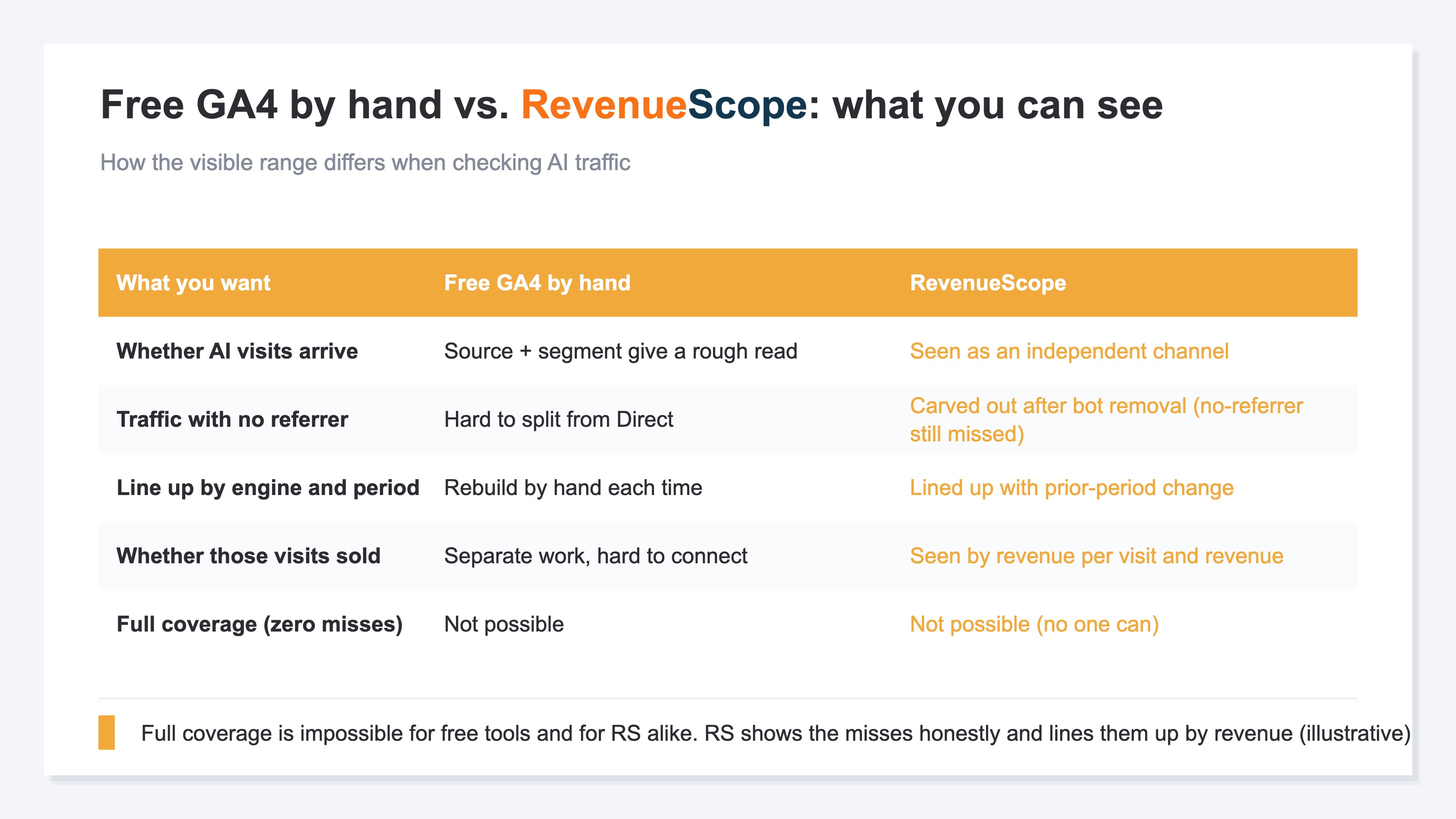
The table below lines up what you can see with free GA4 manual work versus RevenueScope. As the last row shows, complete coverage with zero missed traffic is impossible for anyone — free or with a dedicated tool.
RevenueScope solution
Chase AI traffic with free manual work and two walls remain. AI traffic with no referrer slips into Direct, so the visible number runs low; and even when the count is visible, whether that visit moved revenue doesn't come out.
RevenueScope carves this AI traffic out as an independent channel. With bots removed, it lets you line up AI-referred visit count, revenue per visit (RPS = how much, on average, one visit from that channel sold), and revenue on the same screen as your other channels (the display is demo data). It also surfaces pages that would be fair game for AI citation yet are missing the traffic.
| Source | Visits | Revenue per visit (RPS) | Revenue |
|---|---|---|---|
| AI referrals (ChatGPT/Claude, etc.) | 410 | ¥380 | ~¥160,000 |
| Search | 12,000 | ¥230 | ~¥2,760,000 |
| Social | 6,500 | ¥150 | ~¥980,000 |
| Unknown source (no referrer) | — | — | may be included here |
There are two things to read on this screen. One is that AI referrals are small in visit count, yet their revenue per visit is the highest. Rank by count alone and you overlook the efficient channel. The other is that it keeps the revenue that sank into unknown origin for lack of a referrer — shown, not erased. How to grow this into a screen that lines revenue up by channel is also touched on in How to design a dashboard where revenue is visible.
What RevenueScope owns is one thing: evaluating traffic by revenue. Gross margin and customer lifetime value (LTV) sit with the tools built for them; RevenueScope takes the data it receives via tools like GA4 and builds it into per-visit revenue (RPS) and revenue by channel, AI referrals included. That way you can read which channel is moving how much revenue — from your own numbers, not a hunch.
FAQ#
Q. Can I tell AI-referred visits from free GA4 alone?
You can get as far as a rough read of "they seem to be coming." Filter the referral source by AI names like chatgpt, use the "AI Assistant" bucket too, and part of the traffic becomes visible. But AI traffic with no referrer slips into Direct and doesn't show up. Assume the visible number is lower than reality and you won't misjudge.
Q. AI referrals are small in number — can I ignore them?
By count alone they look small. But people who come via AI often arrive already knowing what you offer, and revenue per visit can come out high. Look by revenue per visit rather than count and you'll see it's a channel you can't dismiss.
Q. In the end, where do I start?
Start with free GA4: filter the referral source by AI names and get a rough read on whether they're coming. Next, look at "whether that visit moved revenue," lined up by per-channel revenue per visit. Since manual work is heavy and missed traffic remains, when keeping it up gets hard, switching to a dedicated screen that shows AI traffic by revenue is the shortcut.
Summary#
Visits where people follow an AI answer and arrive really are happening at many sites. Start with free GA4, filter the referral source by AI names, and you can get a rough read on whether they're coming. It's an entrance you can stand at without spending money.
But what you learn goes up to "the number that seems to have come." AI traffic with no referrer slips into Direct and gets missed, bots dirty the numbers, and above all, even when the count is visible, whether that visit moved revenue doesn't come out. Chase the count alone and you'll overlook — for being small — the channel that may be selling most efficiently.
The real question is whether you can look at AI traffic by revenue rather than count. Line up revenue per visit without hiding the missed traffic, and you can decide whether to grow AI-referred traffic with your own numbers, not a hunch.
See which ads actually drive revenue, at a glance
Free up to 5,000 sessions/month, AI connection included. No credit card required. Up and running in 5 minutes.


![[Research] How Visible Is Your Brand in AI Search? You Can Measure It](/_next/image?url=%2Fimages%2Fnews%2Fai-search-brand-visibility.jpg&w=3840&q=75)