"If I cannot spend on ads, I cannot see anything." It is something you often hear from people who just opened a shop or launched a side project. But it is a misconception. You do not need to spend money to see where you stand right now.
It feels natural to think the numbers only move once you run ads. In reality, some businesses pay an agency every month and the report that comes back is a single line: "website traffic: 100 people." Yet where your visitors come from, whether AI is naming you, and how far people read your pages — all three are visible from free data, even with zero sales so far.
This article is for people with no budget and not much traffic yet. It lays out how to grasp "where I stand right now" from free data. The goal is not a flashy growth hack; it is to make your current position clear. Once you know where you stand, you can pour your limited time and effort into the places worth growing.
Table of Contents
TL;DR#
Here are the takeaways up front.
- "You can see nothing without ads" is a myth. Your sources, AI citations, and reach rate are all visible for free, before any sales
- Start with "where are they coming from." Free data in Google Search Console and GA4 shows you your entry points
- Whether AI cites you is a new source, yet a blind spot that free tools barely show. Start watching it early
- The "100 visitors" number hides bots and people who left without reading. See the read count (reach rate) to know where you really stand
- But every free tool is fragmentary. Connect sources, AI citations, and reach rate on one screen and the place to grow next becomes clear
1. You can see where you stand for free, before any sales#
Bottom line: even before any sales, free data shows you "where I stand right now."
When you cannot spend on ads, it is easy to feel that "looking at numbers is pointless." But knowing where you stand costs nothing. Just install Google Search Console (a free tool that shows how your site appears in Google search) and GA4 (Google's free web analytics), and you already have the first clues [1][3].
In fact, the harder the moment, the more people return to free data. One online store relied on a single search engine for most of its traffic, and one day that collapsed. The first thing the owner did was open Google Search Console to check where they stood — trying to read the "why" behind the drop from free data at hand.
There are three positions worth seeing. The first is "where are they coming from" (your sources). The second is "is AI citing you." The third is "are they actually reading" (reach rate). All three are visible for free, even with no sales.
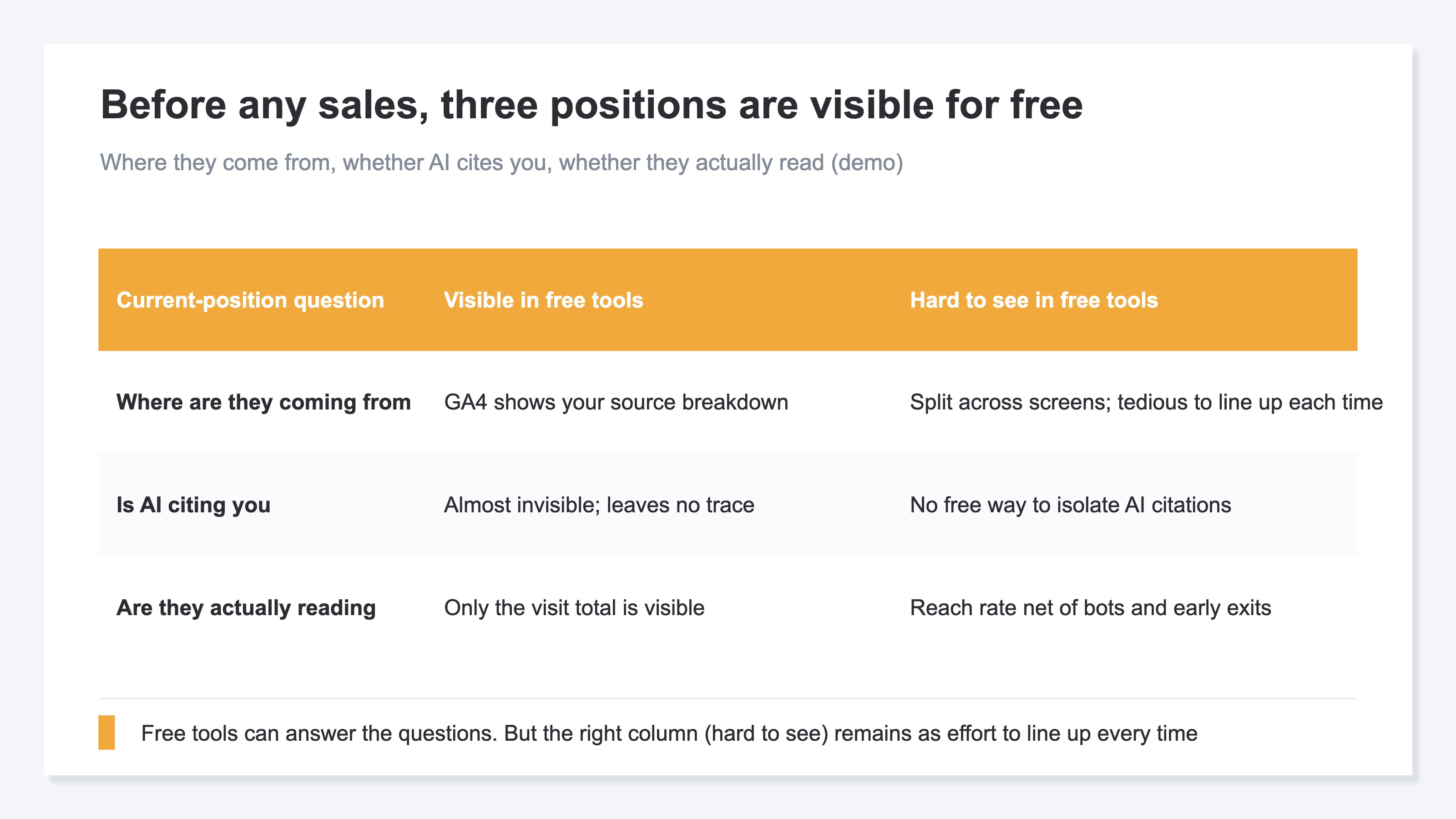
The catch is that each free tool is a separate window. GA4 shows "what happened after they arrived"; Google Search Console shows "only clicks from Google search." So pulling your position onto a single sheet takes a little work. Let us check how to read each one, step by step.
2. Where are they coming from (reading your sources)#
Bottom line: the first thing to check is "where are people coming from." Know your sources and you see where to grow.
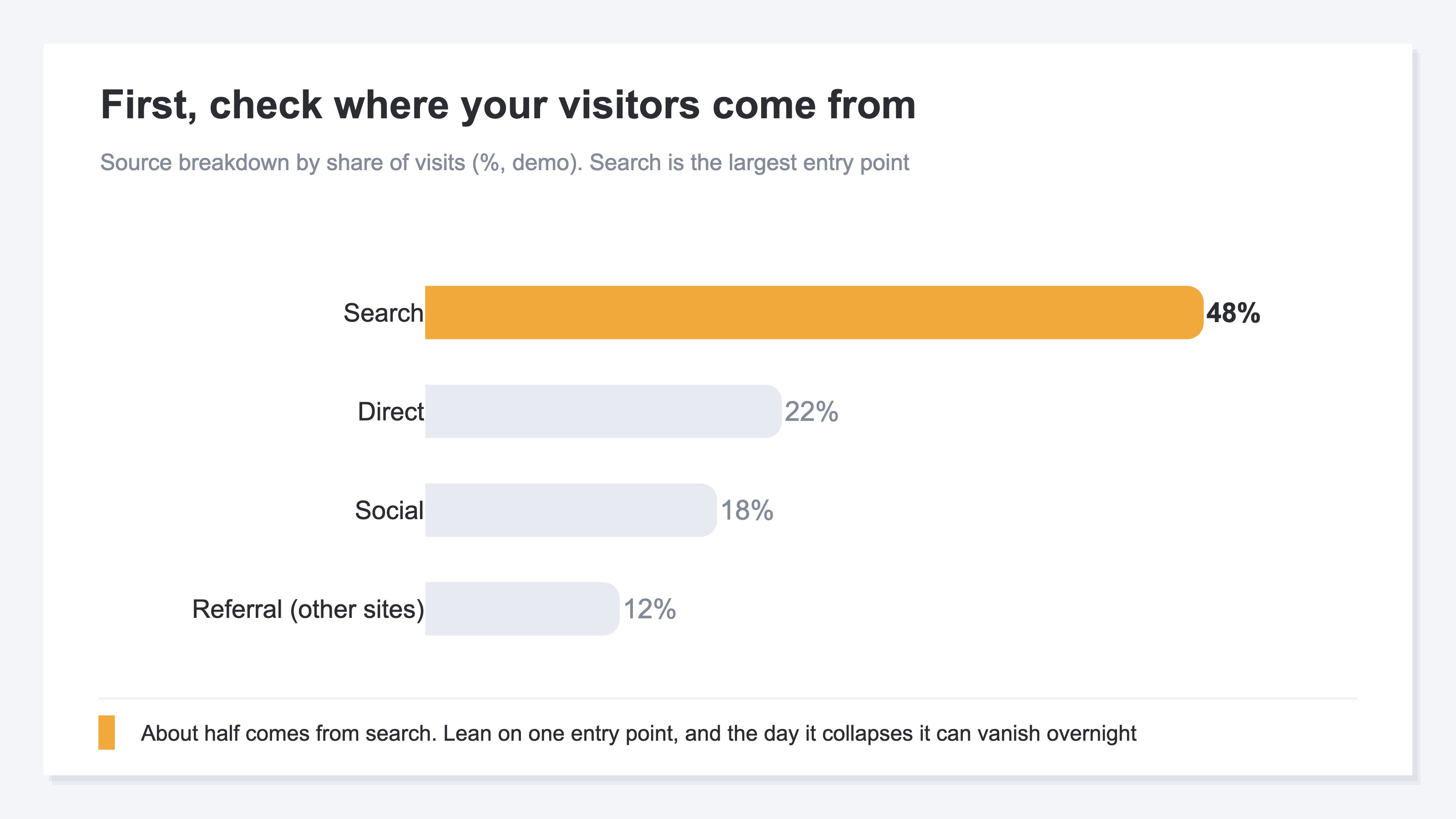
Your acquisition position starts at the entry points. A source is the path a visitor took to reach your site. Google search, social, referrals from other sites, direct access — you can see this breakdown for free in GA4's Traffic acquisition report [1][2].
This is where many people stumble. You run ads, and the report you get is a single line: "website traffic: 100 people." That tells you neither where those 100 came from nor whether they were ready to buy. The money goes out while the contents of the number stay hidden.
So start with the breakdown. How much comes from referrals is covered in Turning referral traffic into revenue, and how to build acquisition by source is laid out in Comparing 12 main EC acquisition channels. Once several sources come into view, check that you are not leaning too hard on one. When your traffic concentrates on a single entry point, the day that point collapses, it can vanish overnight.
That said, reading your sources has limits. You can read the breakdown of search and social for free, but each lives on a separate screen, and lining them up to compare every time is tedious.
3. Is AI citing you (a new, hard-to-see source)#
Bottom line: whether AI names you is a new source, yet a blind spot that free tools barely show.
Lately, more people ask ChatGPT and other AI tools to find a recommended service or shop. In other words, AI answers are becoming a new source too. And here lies the weak spot of free data: whether AI is citing you right now is very hard to see for free.
Here is a real case. One service had strong search numbers, yet when you asked ChatGPT, only competitors came up by name and the service itself appeared nowhere. Search rankings gave no hint of this "ignored by AI" state. AI is said to surface what is most often mentioned online, so it is somewhat tied to search. But there is still almost no free way to isolate and watch AI citations on their own.
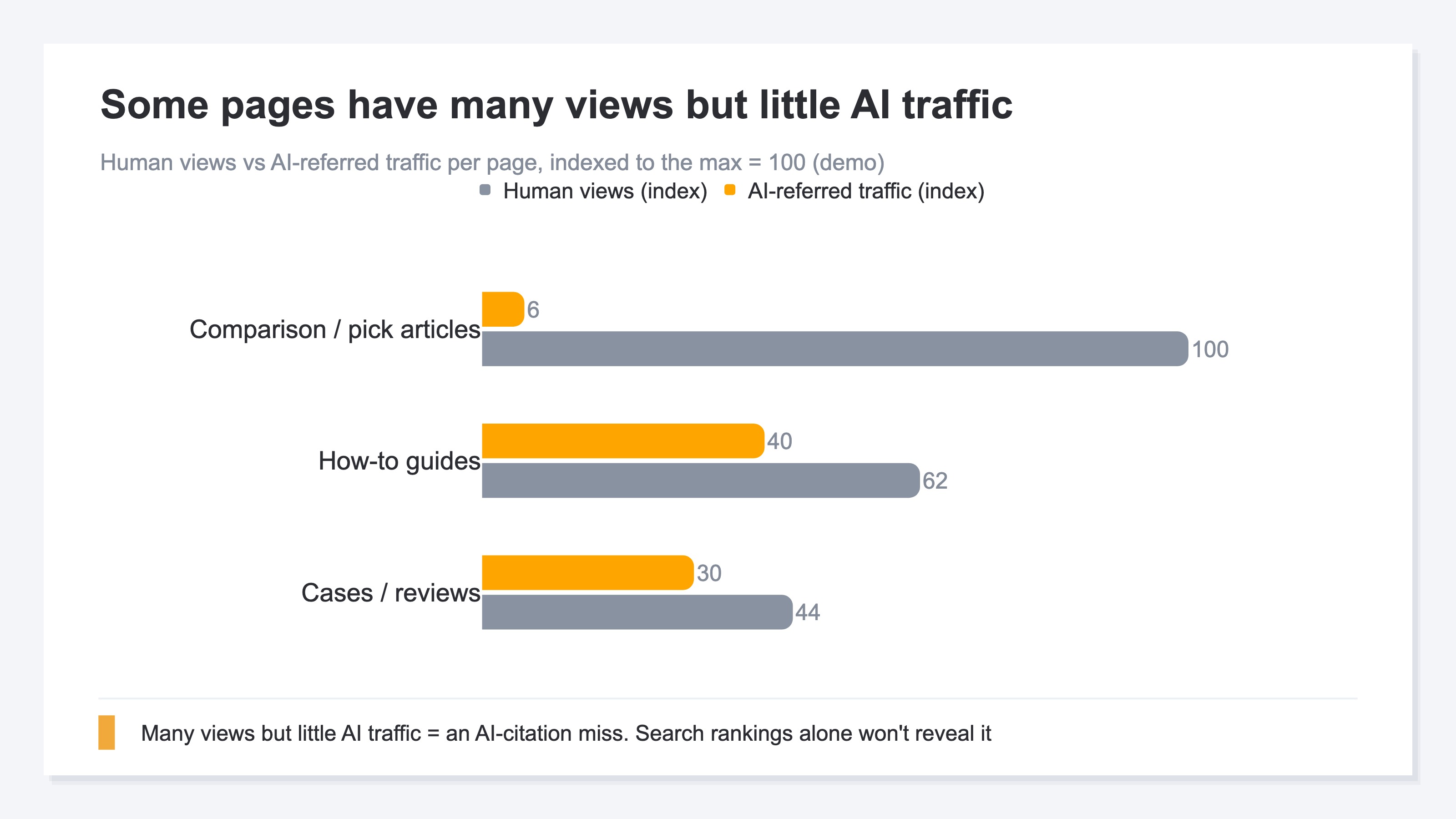
What you should know is that visibility into AI traffic has limits. Visits from AI answers do not always leave a trace (a referrer) [5]. So counting "how many came from AI" exactly is hard for anyone — undercounting and misses can happen. Even so, simply keeping an eye on "is AI citing me" lets you secure a new, growing entry point early. How to read AI-referred traffic is covered in detail in Turning AI-engine traffic into revenue.
4. Are they actually reading (the reach-rate trap)#
Bottom line: the "100 visitors" number hides bots and people who left without reading. See the read count, and your position comes clear.
Even when your sources come into view, there is one more trap. Looking only at the "count" of visits does not tell you your position accurately, because that count carries two contaminants.
The first is bots (automated, non-human access). When you examine the contents of "traffic" bought through ads, sometimes dwell time is near zero and it turns out to be bots. With bots mixed in, it can look like people are coming when in fact they are not. GA4 has a mechanism to exclude known bots, but misses still remain [4].
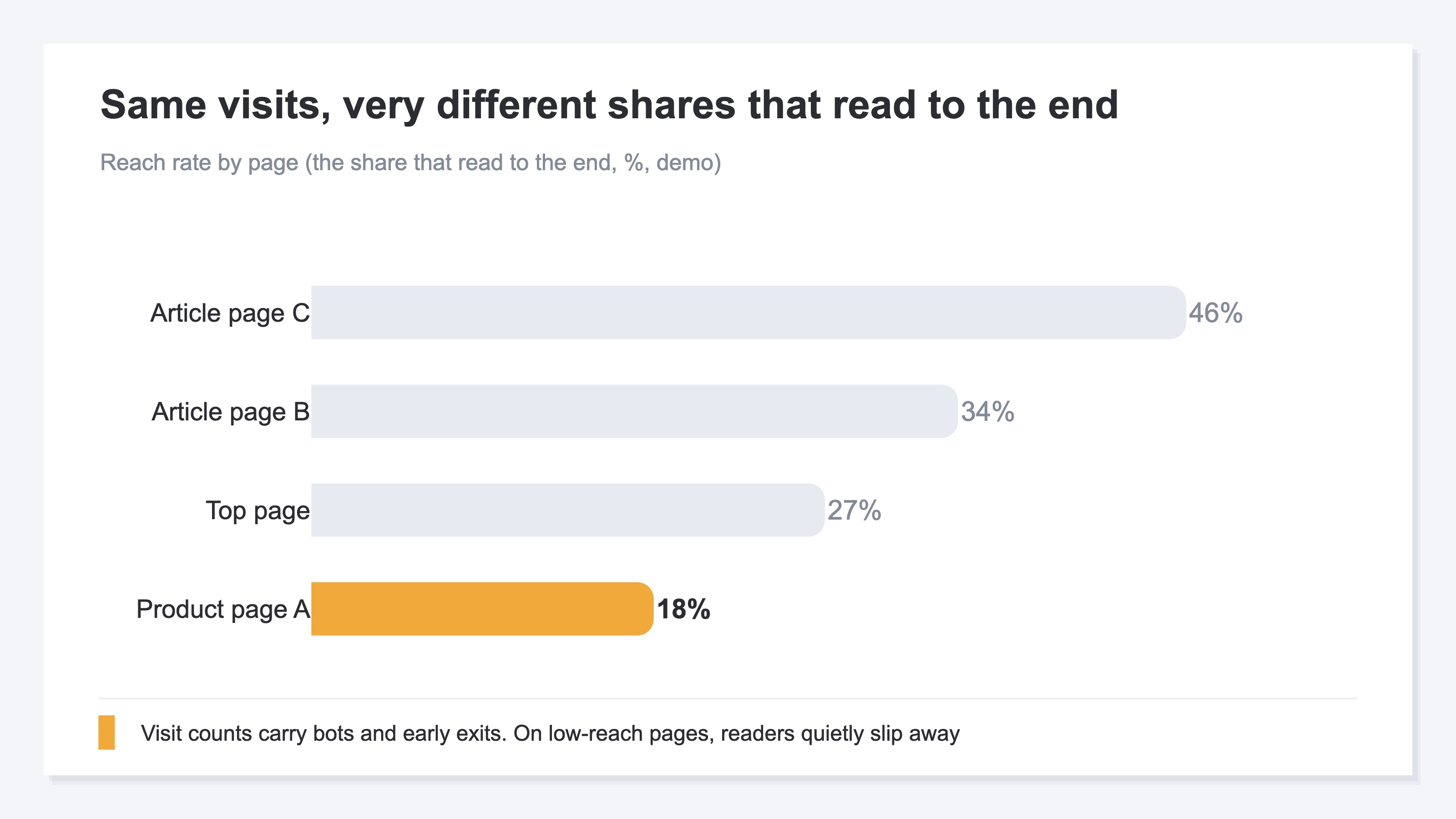
The second is people who left right after arriving. A visit where someone opened the page and left without reading still counts as a visit, but the content was not read. This is where reach rate matters. Reach rate looks at how far a page was read (for example, whether people reached the end). If, out of 100 visits, only 20 reached the end, your real position is on the side of that 20.
There is a healthy way to use free data. In Google Search Console, look for pages ranking around positions 8 to 20. These are "almost on page one" — close to breaking through. Touch them up and the ranking can jump. Even without spending, free data lets you read where the "almost there" lives [3]. The idea is simple. But pulling together sources, bot exclusion, and reach rate by hand every time is plain, heavy, repetitive work.
RevenueScope's solution
Bottom line: free tools are useful but fragmentary. RevenueScope connects your sources, AI citations, and reach rate on one screen, on bot-excluded numbers. And it is free to start.
What you have seen so far is that the material for your position — sources, AI citations, reach rate — is available for free. The problem is that each lives in a separate window. GA4 shows the result after arrival, Google Search Console shows only Google search clicks, and AI traffic is separate and heavy. You can see each one, but pulling all three together into a single sheet of "where I stand right now" takes effort every time.
RevenueScope is a lightweight dashboard you can use by adding a single tag to GA4. It puts your source breakdown, AI-referred traffic, and reach rate by page on the same screen, on bot-excluded clean numbers. With the three positions connected on one sheet, you can decide "which entry point to grow next" with numbers rather than guesswork.
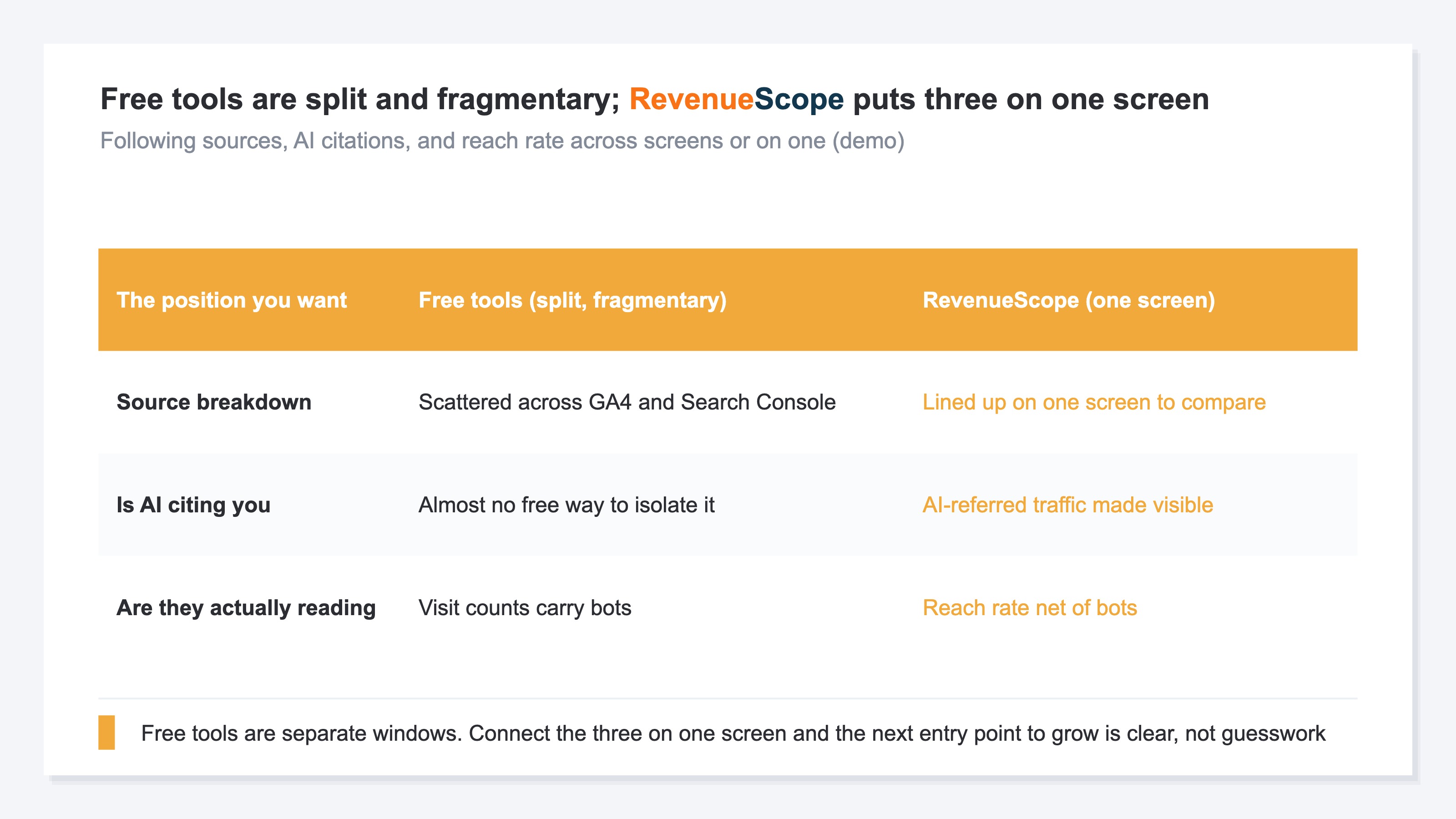
Unlike free tools split into separate windows, RevenueScope brings the three positions onto one screen (illustrative).
The key is that this is not a replacement for GA4 or Google Search Console. Detailed user behavior belongs in GA4, the deep details of Google search belong in Google Search Console, and connecting your position onto one sheet belongs to RevenueScope — they complement each other. And RevenueScope itself starts from a free sign-up. Rather than ending at "just ask AI and it is easy," you judge your position with real data — and you can hold that entry point without spending a yen.
This article is about the entry point "before any sales." The worry that comes after sales — traffic grew but revenue did not — is covered in Traffic is up but revenue is flat: the number to watch is RPS. And once sales appear, the next stage is revenue per session (RPS) and how you allocate ad budget. That thinking is explained in What is RPS? The metric, formula, and how to get it in GA4. Start by grasping your position for free, and add more numbers to watch as you grow.
FAQ#
Q. I have no ad budget at all. Are there still numbers worth watching?
Yes. Your sources (where people come from), whether AI cites you, and reach rate (the share that read) are all visible for free, even with no sales. Grasping your position with these three is the first move that costs nothing.
Q. GA4 or Google Search Console — which should I install first?
Both are free, so ideally both. Google Search Console shows how you appear in Google search; GA4 shows behavior after arrival. Their roles differ, so with only one you see just half of your position.
Q. Can I check whether AI is citing me myself?
To a degree, yes, but with limits. Visits from AI do not always leave a trace, and counting exactly how many arrived is hard. Even so, keeping an eye on "is AI citing me" lets you secure a new entry point early.
Summary#
"If I cannot spend on ads, I cannot see anything." That was a misconception. Where people come from, whether AI cites you, and whether they actually read — these three positions are visible from free data, even with zero sales.
But every free tool is its own window. GA4 shows the result after arrival, Google Search Console shows only Google search clicks, and AI traffic is separate and heavy. You can see each one, but pulling all three together into a single sheet of your position is a repetitive, effortful task each time.
So even when you finish this article, it does not end at "now I can see it for free." The work of connecting scattered free data into a single sheet of your own position still remains. Only once you do that can you pour your limited time and effort into the entry point worth growing. And when sales appear, you add a layer of numbers to watch. Start for free — start from where you stand.
See which ads actually drive revenue, at a glance
Free up to 5,000 sessions/month, AI connection included. No credit card required. Up and running in 5 minutes.
References#
- [1] Google Analytics Help "[GA4] Traffic acquisition report" (2026)
- [2] Google Analytics Help "[GA4] Source/medium" (2026)
- [3] Google Search Central "Use Google Search Console for SEO" (2026)
- [4] Google Analytics Help "[GA4] Bot traffic" (2026)
- [5] Google Search Central "Optimizing for AI features in Google Search" (2026)