
When an RPS number falls, compare it with your own prior period before looking for an industry average. Next, split the change by channel, then separate new from returning visitors only for the channel that drove it. That order keeps you from judging ads or SEO from the overall average alone. Revenue Per Session (RPS) is revenue divided by sessions. For the calculation itself, see What Is RPS? Formula and How to Calculate It in GA4.
Table of contents
This article in brief#
- Compare the RPS number with your own prior period using the same definition and date length
- Split the overall change into channel-mix changes and changes within each channel
- Check new versus returning visitor mix only after identifying the relevant channel
- Hold bot exclusion, dates, and attribution constant before comparing months
1. Compare the RPS number with your own prior period#
The first benchmark for an RPS number is your own prior period under the same conditions.
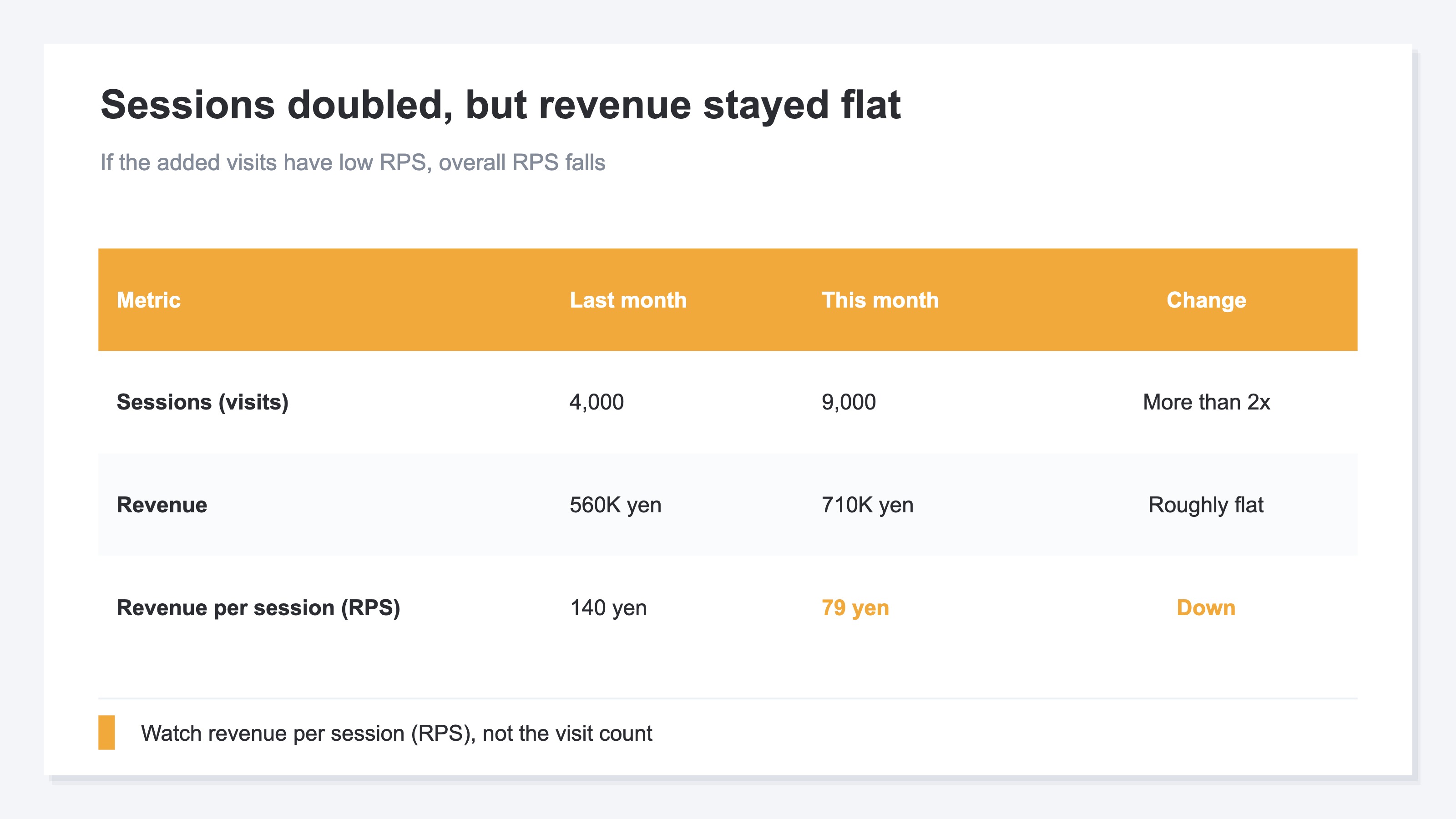
Revenue equals sessions × RPS. Suppose the prior period had 4,000 sessions and ¥560,000 in revenue, making RPS ¥140. This period adds 5,000 Instagram sessions and ¥150,000 in revenue. The total becomes 9,000 sessions and ¥710,000. Sessions more than double, but overall RPS falls to ¥79.
That tells you revenue grew slowly relative to the added sessions. The ¥79 figure alone does not say whether RPS is high or low. The level varies by industry, price range, and purchase frequency. First compare it with the prior ¥140 using the same date length and revenue definition. If you use an industry benchmark, use it as a secondary reference after the internal comparison. RPS Benchmarks by Industry explains those boundaries.
A lower RPS does not by itself tell you to stop an ad. The mix may have shifted after a new source added sessions. Alternatively, an established channel may have deteriorated. RPS by channel is the next number to inspect because it separates those paths.
2. Split the overall RPS change by channel#
Explain an overall RPS change by separating channel mix from changes within each channel.
Overall RPS mixes Email, Search, Instagram, and other entry points. Once you split it by channel, the average can fall through two different paths. One is that a channel with lower RPS takes a larger share of sessions. The other is that an existing channel's own RPS falls from its prior-period level.
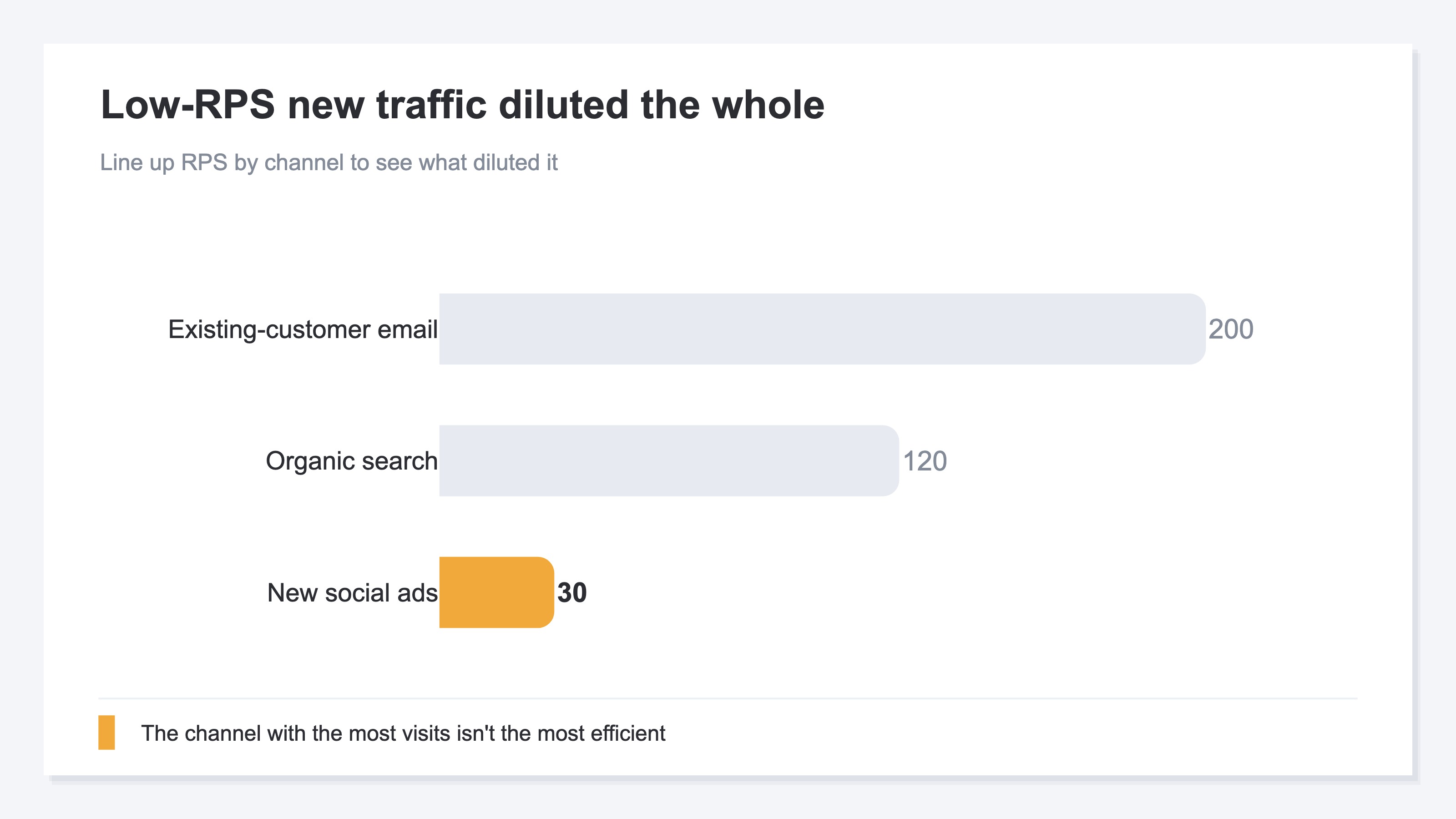
In the fictional chart example, Email is 200 yen, Search is 120 yen, and Instagram is 30 yen. Instagram added 5,000 sessions this period, changing the channel mix and pulling the overall average down to 79 yen. This only shows that Instagram drove the mix shift in this example. It does not establish that Instagram generally has low RPS or should be stopped.
To choose an action, treat the newly added Instagram channel separately from established channels. Instagram has no prior-period value, so start by treating its arrival as a channel-mix change. For established channels such as Search and Email, compare each current-period RPS with its own prior-period RPS. If those channels also fell, changes outside acquisition, such as checkout or product mix, become candidates.
3. Split the relevant channel into new and returning visitors#
After narrowing the cause by channel, check whether visitor mix explains the remaining difference.
Channel-level RPS does not show visitor mix within the channel. Even if the newly added Instagram traffic has an RPS of 30 yen, the next question is whether new sessions dominate the mix or whether RPS is low for both new and returning visitors. Those cases point to different follow-up checks. How to Split Revenue Between New and Returning Visitors covers the definitions and measurement cautions.
Do not assume new visitors have lower RPS or returning visitors have higher RPS. The relationship varies by product and campaign. Instead of splitting every channel, apply the visitor filter only to the channel identified through the prior-period and channel comparisons. That preserves the sequence from overall result to channel to audience.
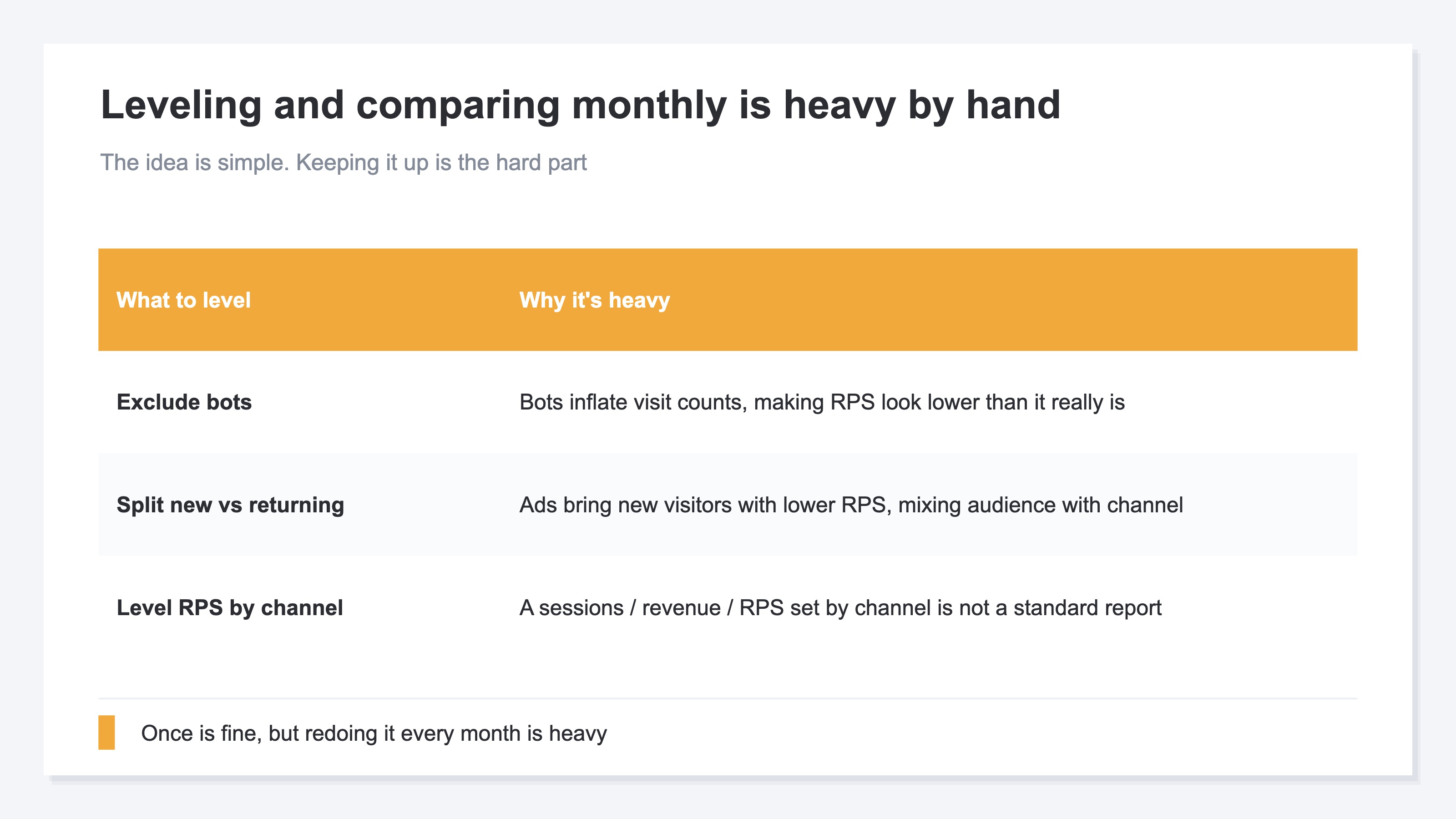
Keep the comparison conditions fixed as well. Automated traffic can inflate sessions and make RPS look lower. Changing the attribution model also moves revenue and RPS between channels. Date length, bot exclusion, attribution, and the new-versus-returning definition must remain consistent before a prior-period difference can guide an action.
The GA4 Traffic acquisition report provides session channel dimensions, Sessions, and Total revenue [1]. The Data API standard schema also lists sessions and totalRevenue, but it does not list RPS as a standard metric [2]. A one-time division is simple. Repeating the same comparison every month requires preserving the filters, definitions, and calculation steps.
RevenueScope — the solution
RevenueScope lets you inspect RPS in stages while keeping the date range and attribution model fixed. Start with sitewide RPS for the current period, prior period, and daily trend. Then compare sessions, revenue, and RPS by channel. Once a candidate channel appears, filter that channel to new or returning visitors and check RPS, orders, average order value, and conversion rate.
Channel figures exclude sessions classified as automated traffic from human metrics. Keep the date range and attribution model fixed during the comparison as well.
| Channel | Sessions | Revenue | CVR | RPS |
|---|---|---|---|---|
| 1,000 | ¥200,000 | 3.0% | ¥200 | |
| Search | 3,000 | ¥360,000 | 1.5% | ¥120 |
| 5,000 | ¥150,000 | 0.4% | ¥30 |
This is a fictional store example under the last_touch model, not actual customer data. Each channel is assumed to have at least 10 orders, so CVR is shown.
In this case, Instagram has the most sessions but an RPS of 30 yen. Treat that channel as the candidate behind the gap from the prior overall RPS of 140 yen. Split it into new and returning visitors to see whether audience mix changed or both groups' RPS is low. Then inspect the ad message or landing page.
Running the same aggregation each month reduces comparisons between mismatched methods. RevenueScope's role here is not to perform a difficult one-time division. It is to let you retrace the path from the overall result to the likely cause under consistent conditions.
FAQ#
Frequently asked questions#
Q. What RPS number counts as high?
A. Start by comparing with your own prior period under the same conditions. RPS levels vary by industry and price range, so there is no single pass mark for every store. Use an industry benchmark as a secondary reference after checking the internal change.
Q. Should I check RPS or conversion rate first?
A. Start with RPS when investigating a revenue change. RPS reflects both average order value and conversion rate. After finding the channel where RPS moved, split it into those two components. RPS vs CVR explains the relationship.
Q. Does excluding bots make RPS correct?
A. Bot exclusion reduces cases where sessions rise without revenue and make RPS look low. Detection is not perfect, however. Keep the date range, attribution model, and new-versus-returning definition consistent instead of treating bot exclusion alone as proof that the number is correct.
Summary#
Do not judge an RPS number from the overall average alone. Compare it with your own prior period under the same conditions, then split it by channel. That separates a change in traffic mix from a change within each channel.
After identifying the relevant channel, split it into new and returning visitors. Keep bot exclusion, dates, and attribution fixed. Repeating the same overall → channel → audience sequence turns the RPS change into a specific next check.
See which ads actually drive revenue, at a glance
Free up to 5,000 sessions/month, AI connection included. No credit card required. Up and running in 5 minutes.