
"I do check the data screen in BASE, but I still can't tell which channel's customers actually buy the most." For stores run on BASE, this comes up often.
The bottom line: BASE's default analytics rolls traffic sources into three buckets — "search / direct / SNS-other" — and, on top of that, shows traffic data and revenue data on separate screens [1]. So "which channel's visitors are buying" — channel-level revenue efficiency — is simply not visible from the default alone. To see it, you have to break traffic down with GA4 and UTM, and that is only the entrance.
Below we cover why BASE's default cannot show this per channel, how to break it out with GA4 and UTM (setup is the entrance), the "revenue per visit" you read beyond that, and why aligning it every month is heavy — from an online-store operator's view.
Note: this article is about BASE's default analytics being coarse. For choosing the ads themselves (free vs paid vs commission-based delivery), see The Complete BASE Advertising Guide; for the separate Shopify problem of referrers turning into "(none)," see Shopify Referrers Buried in "(none)". The Shopify referrer topic is a different article from BASE.
Table of contents
Key takeaways#
-
BASE's default rolls traffic into three buckets
Traffic sources are split only into "search / direct / SNS-other," and traffic data is shown separately from revenue, so you cannot link which channel's customers bought [1].
-
Breaking it out needs GA4 and UTM
Tag traffic with UTM and break it down by medium and campaign in GA4. But that setup is only the entrance — it is not the end.
-
The real work is revenue efficiency (RPS) by channel
Only when you read "revenue per visit" by channel beyond setup do you see the efficiency reversal that total revenue hides.
1. Why BASE's default can't show revenue by channel#
The bottom line: BASE's default analytics rolls traffic into three buckets and shows traffic and revenue separately, so channel-level revenue efficiency never appears.
The "Data" screen in BASE's admin shows the basics of a store's state — sales, order count, average order value, and pageviews (PV). For traffic sources, per the official help, it splits them into three — "search engines (Yahoo!/Google, etc.)," "direct (bookmarks or typed URLs)," and "SNS-other" — and shows each one's share [1].
Two problems follow. One is that this three-way split is coarse: Instagram and X both fall into "SNS-other," and paid and organic search are mixed together. The other is that the official help presents traffic data and revenue data as separate items [1], with no standard way shown to join them. So you cannot link "how much the customers who came from search actually bought" using the default data screen alone.
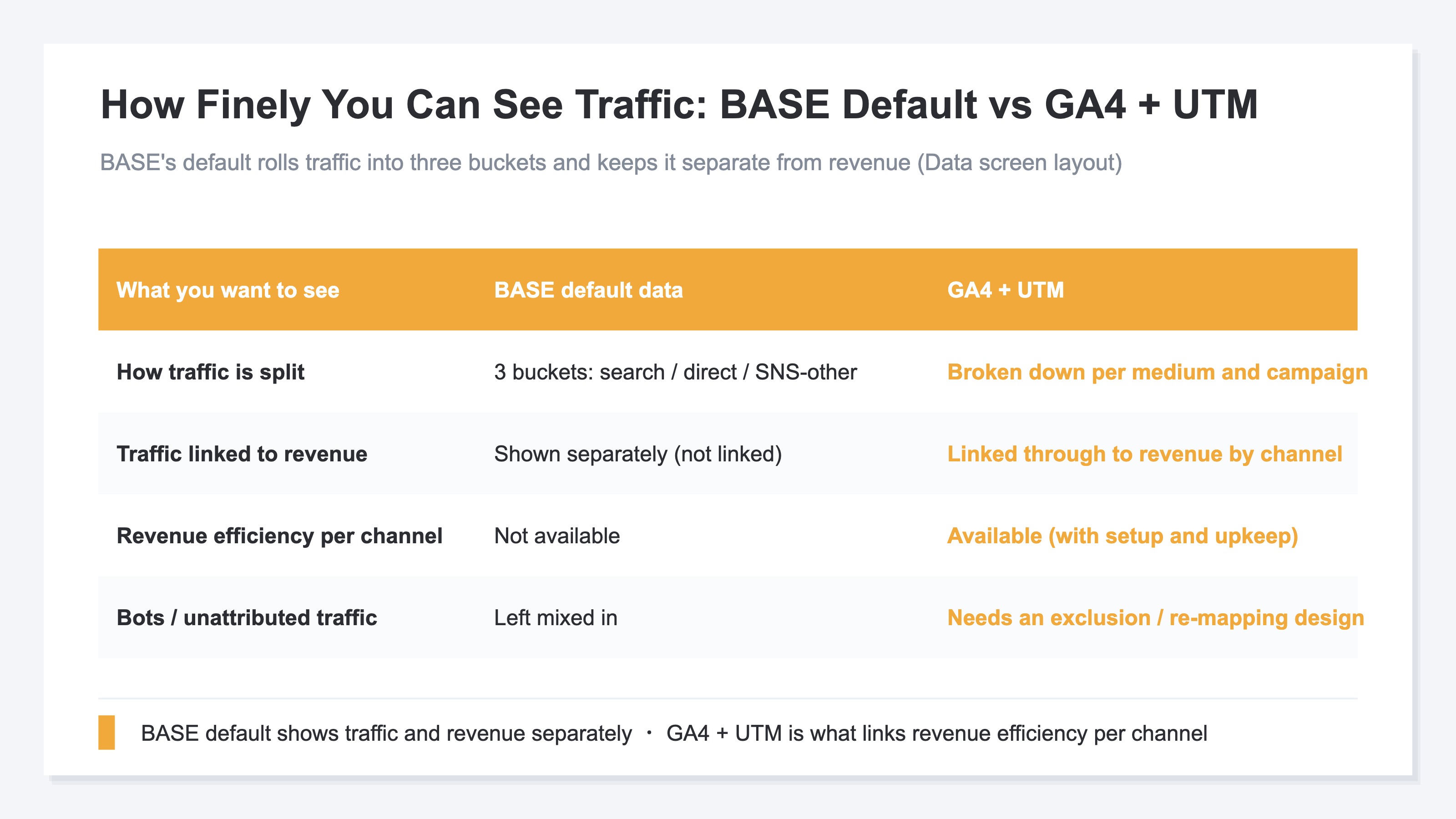
That means the default tells you "how much sold in total" and "the rough share of traffic sources" — and no further. Channel-level revenue efficiency — "how much each channel's visitors bought per visit" — is hard to see in the default. That is the starting point.
1.1 Judging by gut tends to miss#
When you can't see it by channel, it is tempting to judge by traffic volume alone — "lots of SNS traffic, so SNS is working." But the channel with the most traffic and the channel that sells best per visit do not line up. A channel that leads in traffic can trail in revenue efficiency, and steering budget by gut means betting on the less efficient side. For how to compare acquisition channels, see Comparing EC Acquisition Channels.
2. Break it out with GA4 and UTM (setup is the entrance)#
The bottom line: to see it by channel, tag traffic with UTM and break it down in GA4. But setup is only the entrance.
What BASE's default lacks can be supplemented by connecting Google Analytics (GA4). With GA4 you can break traffic down by medium and campaign, and follow page behavior and the path to purchase [2].
The marker that sharpens that breakdown is the UTM parameter — a tag added to the end of a link that indicates "which medium and campaign brought this visit." If you put distinct UTMs on your newsletter link and your Instagram post link, GA4 can count "from newsletter" and "from Instagram" as clearly separate. It is a step forward from BASE's single "SNS-other" bucket toward a per-medium breakdown.
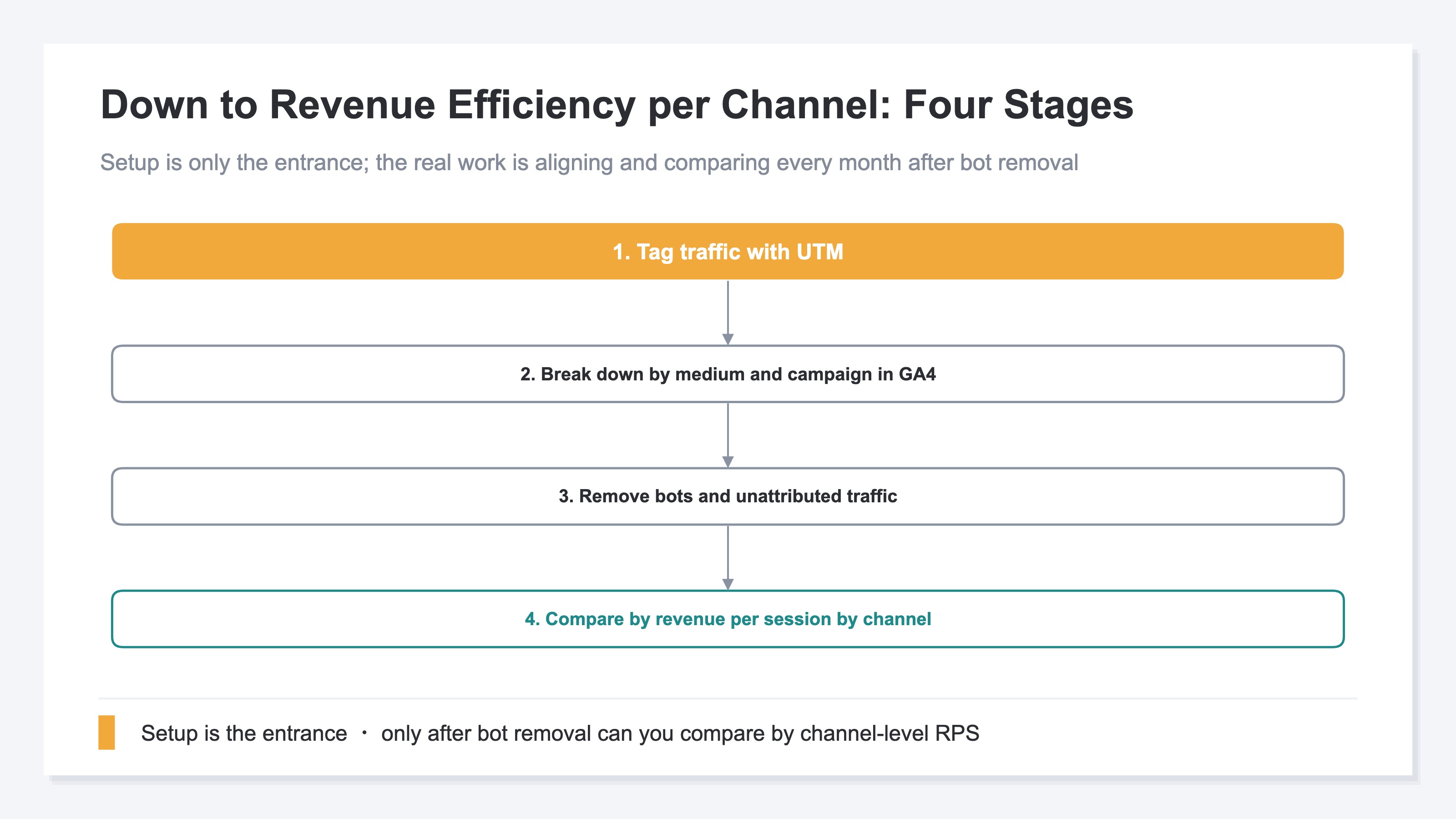
The key point is that setup is only the entrance. Connecting GA4 and adding UTM is just preparation for seeing things by channel. Stop there and you can see traffic counts by medium, but you fall short of the decision that matters — "which channel actually drives revenue." For how to set up UTM, see How to Use UTM Parameters Correctly (here we stay at the concept and direction).
3. The real work is beyond setup — channel-level RPS#
The bottom line: the real work beyond setup is comparing revenue efficiency by channel's "revenue per session (RPS)."
The idea itself is simple. For each channel, read "traffic → visit → purchase → revenue" as one connected flow, and compare by revenue per visit. RPS (revenue per session) is revenue divided by that channel's number of visits — a measure of traffic "quality," not "volume." Compared this way, you can tell apart a channel with lots of traffic but thin revenue from one with little traffic but rich revenue.
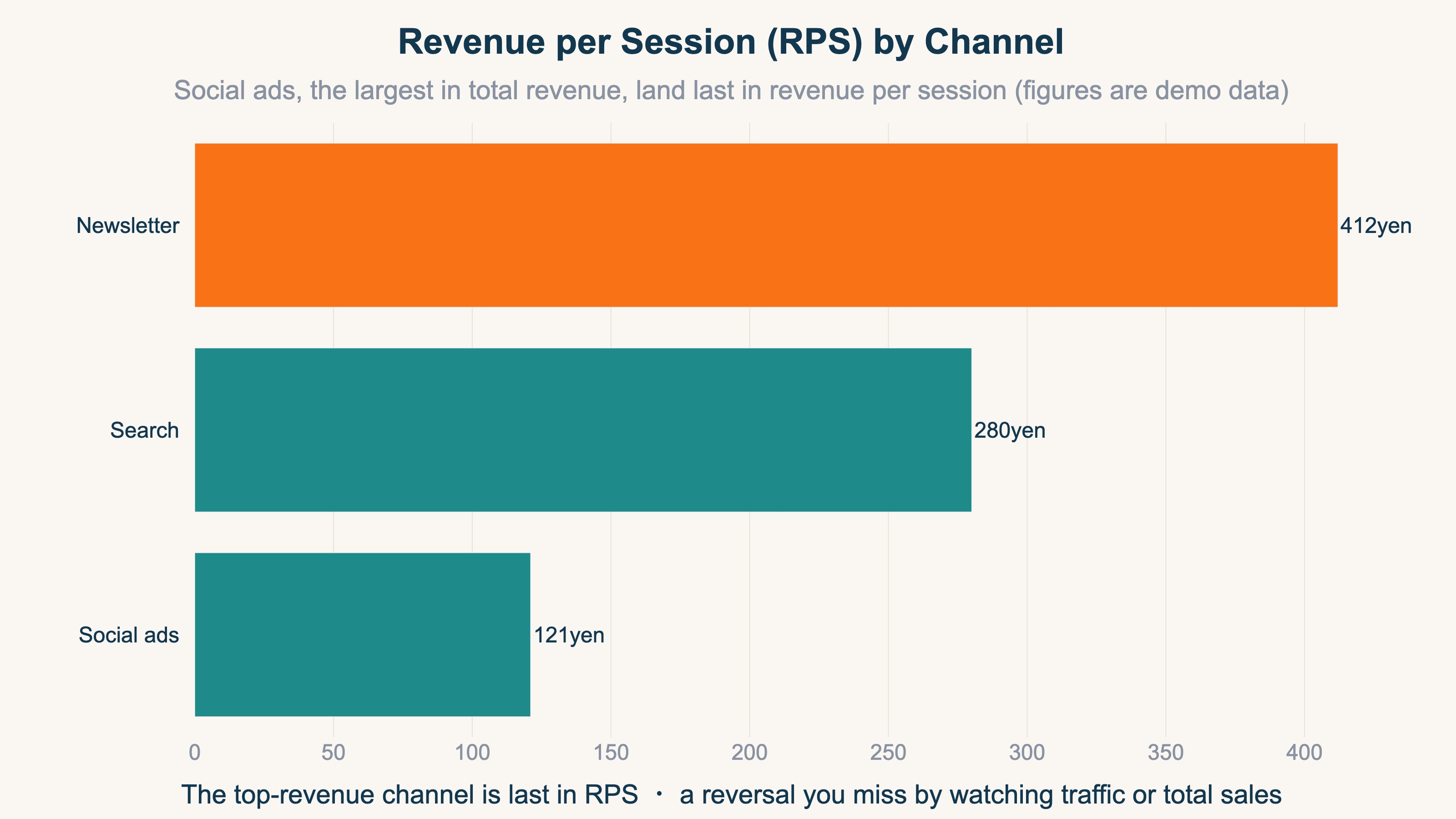
The chart above uses demo data, but social ads — the largest in total revenue — land last in revenue per session (RPS). Watching only traffic volume or total revenue, you cannot catch this reversal. The channel you thought was "selling" turns out thin per visit — that view only becomes possible beyond the breakdown. For the basics of RPS, see RPS Basics — Measuring Channel Quality by Revenue.
That said, the idea being simple is different from being able to keep it up every month. Aligning channel definitions, excluding bot visits, re-mapping unattributed (Direct-buried) traffic to its true channel, and stitching traffic through purchases and revenue — doing this prep by hand every month rarely lasts. GA4 and UTM setup is only the entrance; the heavy part is this repetition.
FAQ#
Q. Can you really not see channel-level revenue from BASE's default data alone?
The official help presents BASE's "Data" with traffic sources (search / direct / SNS-other) and revenue as separate items [1]; no standard feature to link the two appears there. There is a "Web / PAY ID app" revenue split, but that is different from revenue by traffic channel. To see channel-level revenue efficiency, connecting GA4 or an external tool is the premise.
Q. Does adding GA4 solve everything?
GA4 solves the part where you break traffic down by medium and campaign [2]. But adding GA4 alone leaves you at the "setup is the entrance" state — the repetitive work of excluding bots, re-mapping Direct-buried traffic, and aligning channel-level revenue efficiency (RPS) on the same basis remains. It is realistic to treat setup and operation as separate things.
Q. Should I add UTM to every link?
At minimum, add it to traffic you manage yourself — newsletters, social posts, and ads. You cannot add UTM to organic search or links from other sites yourself, but separating the traffic you can tag already raises the resolution of "which campaign's customers bought."
5. Channel-level RPS lives beyond setup#
The bottom line: channel-level revenue efficiency lives "beyond" GA4 and UTM setup. Setup shows you the traffic breakdown; revenue efficiency takes another move.
To recap: BASE's default rolls traffic into three buckets and can't link it to revenue; adding GA4 and UTM gets you as far as a per-medium breakdown. But that is the entrance. To compare channel-level revenue efficiency aligned every month, you have to repeat the prep of bot removal, Direct re-mapping, and stitching. The idea is simple, but keeping it up is heavy — that is the dividing line.
RevenueScope's solution
RevenueScope excludes bots with its own tracking, returns Direct-buried traffic to its true channel, and lets you compare each channel's visits, revenue, conversion rate, and revenue per session (RPS) on a single screen. It is the layer that takes on the heavy monthly alignment that lived beyond the "setup is the entrance" point of GA4 and UTM.
| Channel | Visits | Conversion rate | Revenue per session (RPS) |
|---|---|---|---|
| Newsletter | 1,200 | 4.8% | ¥412 |
| Search | 3,400 | 2.6% | ¥280 |
| Social ads | 9,800 | 0.9% | ¥121 |
RevenueScope's by-channel view (demo data). Social ads, with the most visits, land last in revenue per session — a reversal you cannot catch by watching traffic counts or total revenue alone.
With this view you can decide by revenue efficiency, not gut: "Newsletter is the richest at ¥412 per visit, so thicken what drives people there"; "Social ads bring lots of traffic but a thin ¥121 per visit, so lift the landing page's conversion rate before spending more."
Note that RevenueScope handles five metrics — revenue, average order value (AOV), revenue per session (RPS), conversion rate (CVR), and visits — and their breakdowns. LTV, gross margin, and inventory are out of scope and belong to other tools.
For reading revenue efficiency at the landing-page level, see Landing Page Revenue Efficiency; for how channel-analysis tools differ between EC and SaaS, see EC vs SaaS Channel Analytics Tools Compared.
Summary#
BASE's default analytics rolls traffic sources into three buckets — "search / direct / SNS-other" — and shows traffic and revenue on separate screens [1]. So channel-level revenue efficiency — which channel's customers bought — is not visible from the default alone. To see it by channel, you have to break traffic down with GA4 and UTM, but that is only the entrance.
The real work is reading "revenue per session (RPS) by channel" beyond the breakdown. Only there do you notice the reversal where the channel with the most total revenue lands last per visit. But excluding bots, re-mapping Direct-buried traffic, and aligning it every month is heavy to repeat by hand. Split traffic with setup, and only by reading channel-level revenue efficiency beyond it can you judge BASE revenue by channel.
See which ads actually drive revenue, at a glance
Free up to 5,000 sessions/month, AI connection included. No credit card required. Up and running in 5 minutes.