
Open GA4 for a Shopify store and the source of your traffic often shows up as "(none)" or Direct. You're sending people in from ads and social, yet split by channel, more than half reads as "source unknown." That makes it impossible to tell which channel is generating revenue. This has a Shopify-specific reason. When a visit moves to checkout or the thank-you page, it crosses to another domain, and the referrer (the information about where the visit came from) drops along the way. Once you know the cause, a referral exclusion list and cross-domain measurement can fix much of it.
But it would be a waste to stop there. Fixing the setup is the starting line; what really pays off is being able to compare revenue by channel afterward and decide where to put next month's budget. This article walks through why referrers turn into (none), what setup can fix, and how to use the fixed data afterward. (The separate issue of GA4 and Shopify revenue amounts not matching is covered in Why GA4 revenue doesn't match Shopify; this article focuses on the broken referrer — where the visit came from.)
Table of contents
TL;DR#
- Shopify referrers showing as "(none)" or Direct isn't a user problem; it's a measurement gap. The big driver is the move to checkout or the thank-you page on another domain, where the referrer drops.
- A referral exclusion list and cross-domain measurement can fix a good deal of it. The idea is simple: register the checkout domain so it isn't counted as a referrer, and stitch related domains into one visit. But this is only the starting line.
- Once fixed, revenue by channel comes into view — yet the real question is what comes next. How much extra to invest in each channel should be decided by revenue per session (RPS), not by visit count. Fixing the referrer isn't the goal; it's the starting point that prepares the material for the decision.
1. How referrers turn into "(none)"#
Bottom line: on Shopify, referrers turn into "(none)" or Direct because the information about where a visit came from drops when the visit moves to checkout or the thank-you page on another domain.
GA4 uses "(none)" and Direct as a holding place for visits whose origin couldn't be determined. A visit that really came from an outside site or social, but whose history (the referrer) can't be traced, lands here in a lump [1]. Several stages make this swell on Shopify stores.
One is when the inbound link carries no marker — a UTM, a tag added to ad links so you can later tell which ad a visit came from. Without it, even outside traffic can't be sorted into channels. We cover this in Why Direct/(none) grows in GA4.
But what really bites on Shopify is the move to checkout or the thank-you page. Going from cart to checkout can cross to a domain separate from the store. Without setup, that move to another domain is counted as a new visit, and the original outside referrer disappears. The chart below shows where the referrer is most likely to drop, from the inbound click to the completed purchase.
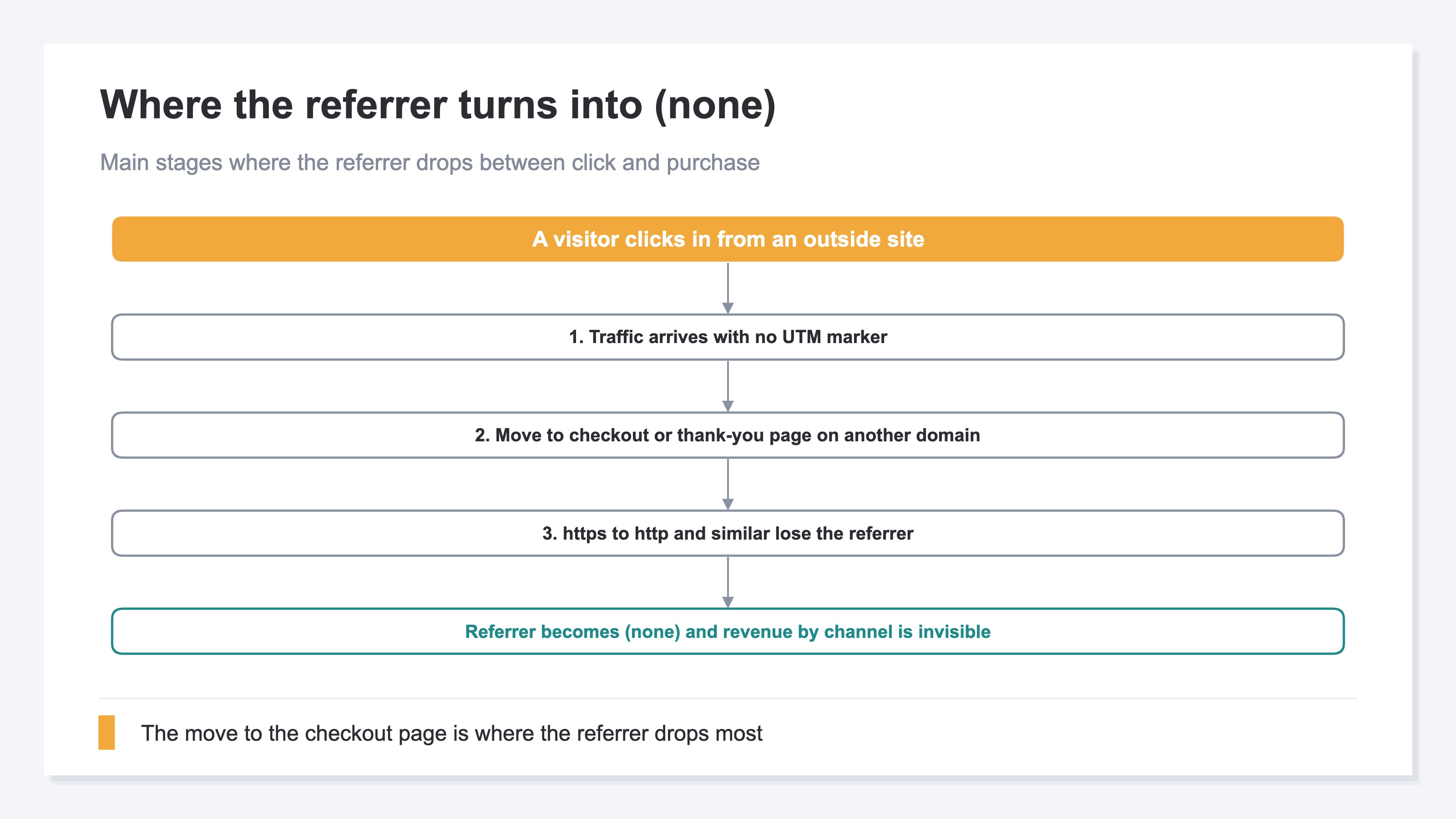
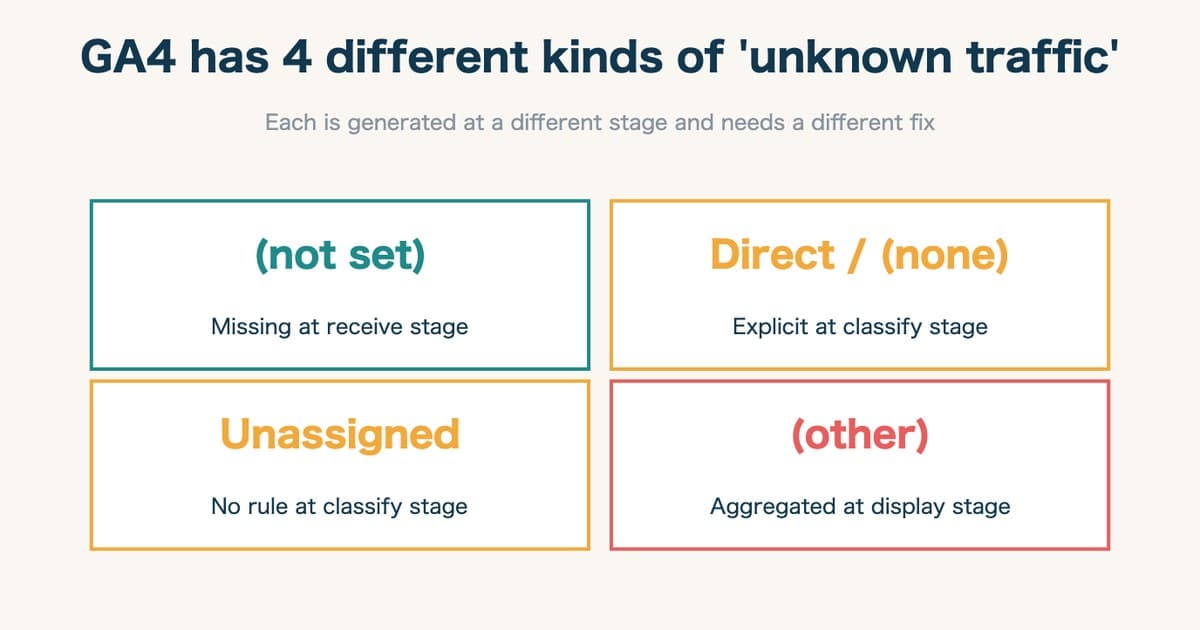
There's also the move from https (encrypted) to http (unencrypted), or browser settings, that can keep the history from carrying over. These happen across GA4 in general, but because Shopify crosses domains around checkout so readily, the impact shows up more. Aside from "(none)," you may also see "Unassigned" mixed in; the difference is sorted out in Not set vs Unassigned in GA4.
2. What setup can fix, and its limits#
Bottom line: the idea is simple and it's only the entrance. Register the checkout domain so it isn't counted as a referrer, and stitch related domains into one visit, and "(none)" shrinks a lot. But this is the starting line.
There are two pillars to the fix. One is the exclusion list: register the checkout and thank-you page domains on GA4 so they aren't treated as referrers. That way, a visit returning from the checkout domain isn't miscounted as a "referral from the checkout domain," and the original outside referrer is preserved [2]. The other is cross-domain measurement: a setup that stitches several related domains — your store and checkout, say — into "one continuous visit by the same person" [3].
Decide which domains to exclude and which to stitch, and register them. So this article won't hand over a click-by-click walkthrough. What matters is knowing this is the "entrance." Once setup is done, traffic that was buried in "(none)" comes into view as referral sites, social, search, and other channels.
Don't stop here. Setup shrinking "(none)" only means "the data now splits correctly." Facing correctly split data, the next question arises: "So which channel should get how much more budget?" An exclusion list alone can't answer that. This is where free setup hits its limit. What comes after the fix is the real work.
3. The fix is the starting line: compare revenue per visit by channel#
Bottom line: fixing the referrer makes traffic visible by channel, but to set a budget you need to compare by revenue per session (RPS), not by visit count.
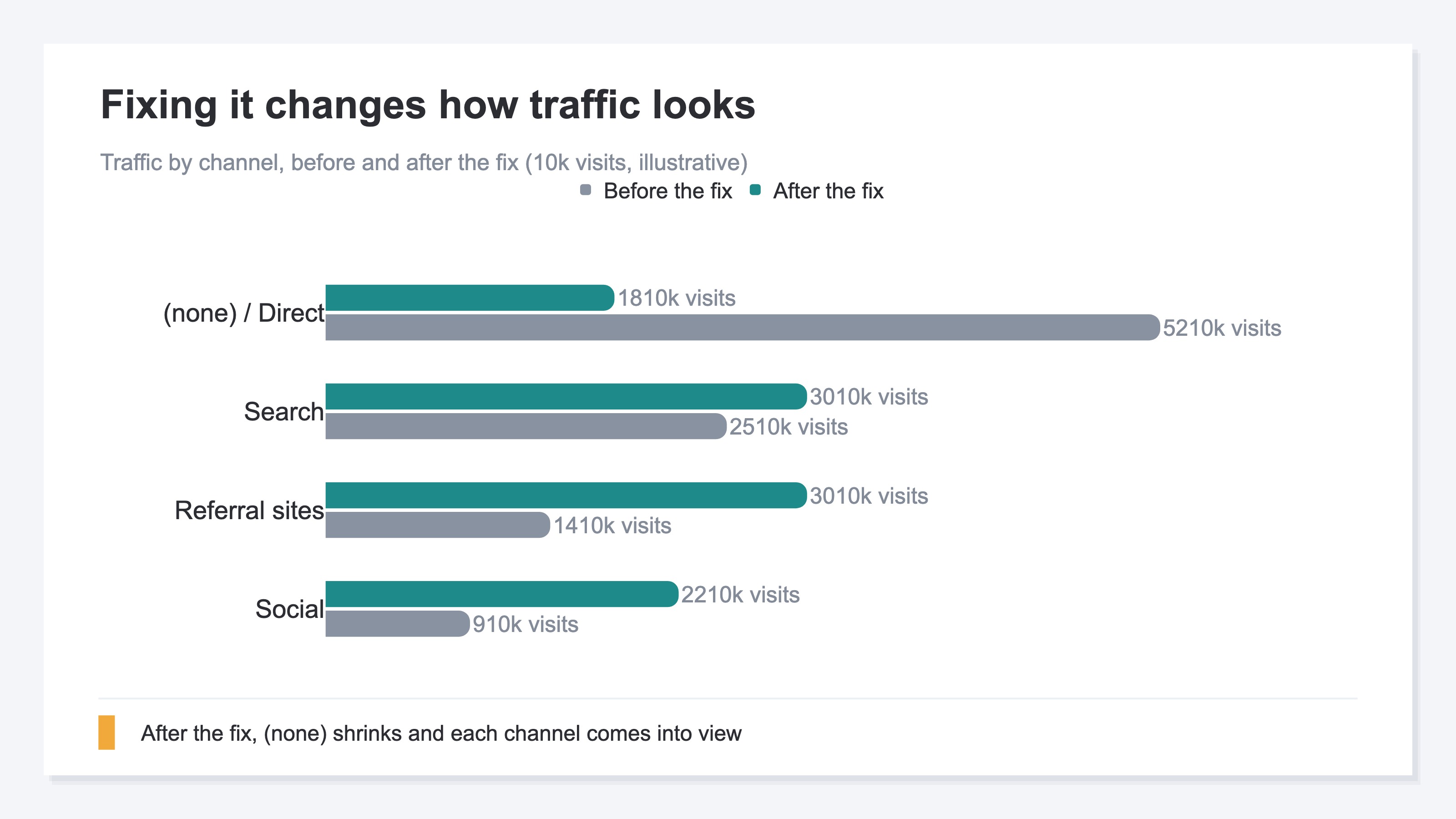
Fixing the referrer changes how the report reads, considerably. The chart below shows how traffic by channel looks before and after the fix. Before, the "(none) / Direct" pile is large and the real shape of each channel is buried. After the fix, "(none)" shrinks and traffic from referral sites and social comes clearly into view.
Even so, traffic being visible by channel doesn't let you set a budget yet. The channel with the most traffic isn't necessarily the one selling most efficiently. What to look at here is revenue per session (RPS — how much one visit from a channel sold on average). The chart below compares RPS by channel. A channel that doesn't stand out on visit count can turn out to be the most efficient seller per visit.
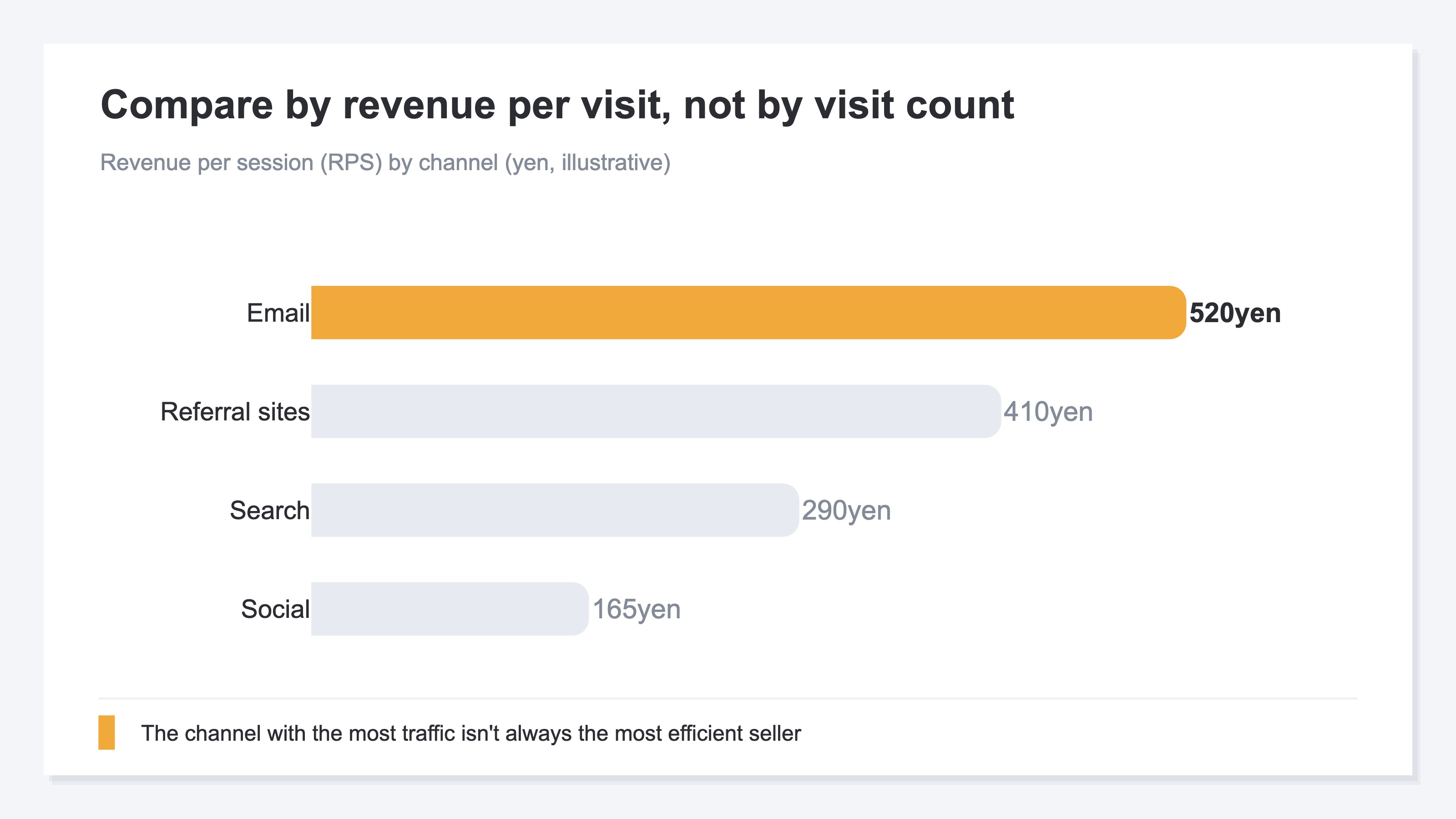
Compare by RPS across referrers and you find, for example, "a channel with little traffic but high revenue per visit." That may be exactly where room for extra investment sits. Conversely, a channel with lots of traffic but low RPS risks losing efficiency if you pour in more budget. The real meaning of fixing the referrer is being able to compare revenue efficiency by referrer like this and set the next budget by the numbers, not by gut. To go further into which landing pages convert well, look at revenue efficiency by page too.
Once you get here, the idea is simple. What's hard is doing the work — lining up traffic, revenue per visit, and revenue by referrer, with bots removed — every month, even as channels grow.
RevenueScope helps
Trying to turn a fixed referrer into a budget decision, you hit two walls. One: even after the exclusion list and cross-domain setup, that's just "the data split correctly" — it doesn't tell you how much to put on which channel. Two: lining up "traffic," "revenue per visit," and "revenue" by referrer, with bots removed, is heavy as a monthly chore by hand.
RevenueScope splits click traffic by referrer and channel, removes bots, and puts sessions side by side in one view. Channels buried in "(none)" become visible, giving you one consistent baseline for checking the referrer fix before and after.
Revenue per session, conversion rate, and revenue appear only when the purchase event flows into the dataLayer on the same page as the storefront measurement tag. Fixing the referrer does not guarantee that route on Shopify's purchase confirmation page. The table below is demo data for a fictional site that meets the condition.
| Channel | Traffic | Revenue per session (RPS) | Revenue |
|---|---|---|---|
| 8,000 | ¥520 | ¥4,160,000 | |
| Referral sites | 30,000 | ¥410 | ¥12,300,000 |
| Search | 30,000 | ¥290 | ¥8,700,000 |
| Social | 22,000 | ¥165 | ¥3,630,000 |
What stands out in this example is that the order of most traffic and the order of highest revenue per visit don't match. Referral sites has the most traffic and the largest total revenue, but per visit, email is more efficient. If you could add a few thousand more visits to email, you'd be reinforcing the channel that generates revenue most readily per visit. Lining up traffic and revenue efficiency by referrer in one view this way, you can decide "which channel to give the next budget" by revenue per visit, not by sheer visit count.
The baseline RevenueScope always provides is bot-excluded sessions by referrer. On sites that meet the purchase-event condition, RPS, CVR, and revenue join the same view so you can compare revenue efficiency by referrer.
FAQ#
Frequently asked questions#
Q. Will the exclusion list and cross-domain setup solve the referrer problem?
A. "(none)" and Direct shrink a lot, and referrers become visible by channel. But that's only "the data split correctly" — half of the problem. The other half is using the split data to decide where to put budget. Setup is the entrance to that, not the goal. Only after the fix, comparing revenue per visit, does it connect to a budget decision.
Q. Why does Shopify produce more "(none)" than other sites?
A. Because going to checkout or the thank-you page on Shopify can cross to a domain separate from the store. Without setup, that move to another domain is counted as a new visit, and the original outside referrer disappears [2][3]. This isn't user behavior; it's a measurement gap. The exclusion list and cross-domain setup reduce that gap.
Q. After fixing the referrer, which numbers do I look at to set a budget?
A. The key is not to decide by visit count alone. Even with lots of traffic, if revenue per session (RPS) is low, the efficiency of extra investment drops. Line up traffic, revenue per visit, and revenue by referrer, with bots removed, and look for the channels selling efficiently per visit. The idea is simple, but doing it by hand every month as channels grow is heavy work.
Conclusion#
Shopify referrers showing as "(none)" or Direct isn't a user problem; it's a measurement gap. The big driver is the move to checkout or the thank-you page on another domain, where the information about where a visit came from drops.
The exclusion list and cross-domain setup can reduce this gap considerably. The idea is simple: register the checkout domain so it isn't counted as a referrer, and stitch related domains into one visit. But this is only the starting line.
Once fixed, referrers come into view by channel — yet the real question is what comes next. How much extra to invest in each channel should be decided by revenue per session (RPS), not by visit count. Keep traffic and revenue efficiency by referrer lined up in one view, and you can set the next budget by your own revenue, not by gut.
See which ads actually drive revenue, at a glance
Free up to 5,000 sessions/month, AI connection included. No credit card required. Up and running in 5 minutes.



![[Research] More AI Traffic Isn't Proof It Worked: Tell the Real Gain by Revenue](/_next/image?url=%2Fimages%2Fnews%2Fai-referral-revenue-real.jpg&w=3840&q=75)