
Is ChatGPT or Perplexity citing you? Over the past year, far more people started to care. Some installed dedicated tools and watch a "mentions this week" count every Monday. But the articles you should fix next aren't found by counting how often you got cited.
What gets overlooked are the articles people do arrive at and read well, yet almost no one reaches via AI. Plenty of readers from search and social, decent time on page — but traffic that came from ChatGPT or Perplexity is near zero. These "articles with views but little AI traffic" are your missed-citation candidates. This article covers why we look from the AI-traffic angle instead of the citation count, how to find articles with views but little AI traffic, the limits of doing it by hand, and what to fix once you find them.
The same idea, but for product pages and bestsellers, is covered in AI-Missed Bestsellers: Finding the Flip Side of the Citations You Got. This piece is the content version of it — we look at article pages like glossary entries and comparison guides as the unit.
Table of contents
TL;DR#
- Instead of counting how often you were cited, find "articles AI won't cite" by looking at which ones get little AI-referred traffic.
- The candidates worth fixing are articles people do arrive at and read well, yet almost no one reaches via AI.
- But AI traffic only shows the click side. You aren't counting citations directly — you're surfacing articles with thin AI traffic as candidates to check.
- Once you know the candidates, fix them in order: lead with the point, tidy the structure, add first-party data. By hand, lining candidates up and sorting them is the heavy part, so it pays to keep this measurable.
1. What "an article AI won't cite" means#
Bottom line: here, "an article AI won't cite" doesn't mean directly counting whether your name appeared in an AI answer — it means an article that gets little AI-referred traffic.
A quick word on terms. When ChatGPT or Perplexity pulls a page into its answer, that's a "citation." Trying to count citations directly means typing your category's questions into each engine again and again and recording by hand whether a page showed up. That's hard to count, and unstable — the same question returns different pages on different days.
So this article changes the angle. We call the traffic that clicks through from an AI answer "AI-referred traffic," and we surface articles where it's thin as missed-citation candidates. Rather than the raw count of citations, we use the number of people actually arriving via AI as the cue. How to measure your overall exposure in AI search is covered in How Visible Is Your Brand in AI Search? You Can Measure It; this article narrows within that to missed citations at the article level. Measurement tools like GA4 now recognize when a referrer is an AI assistant and sort it into its own group [1]. Click-side traffic, at least, can be handled as a number this way.
One thing to make clear: AI-referred traffic only ever shows the arrival side. If your name appeared in an AI answer but no one clicked, that doesn't enter this number. And AI assistants don't always pass referrer information, so traffic that really did come from AI can get lost in other buckets and undercounted. So an article with little AI traffic isn't confirmed to have "zero citations" — it's a candidate, no more. Even so, using the number of people arriving is far more workable than hand-counting citations forever, and it leads more directly to a next move. Note, too, that "being cited" and "arriving via AI and buying" are different layers; that distinction is covered in The Revenue Contribution of AI Citations: "Cited" and "Sold" Are Different, so here we just look at the arrival side — the traffic — and move on.
2. Find articles with views but little AI traffic#
Bottom line: the trick isn't to scan every article with near-zero AI traffic, but to narrow to articles that have solid human readership yet thin AI traffic.
Articles with little AI-referred traffic are everywhere on a site. If nobody reads an article in the first place, it's no surprise AI sends no one either. What's worth fixing are articles with real readers from search and social, well read, yet with a gap where AI traffic should be. Real demand exists, but the AI answers aren't sending anyone. That's where the upside is.
The chart below compares, for a fictional site, human views (traffic from search, social, and so on) against AI-referred traffic, article by article.
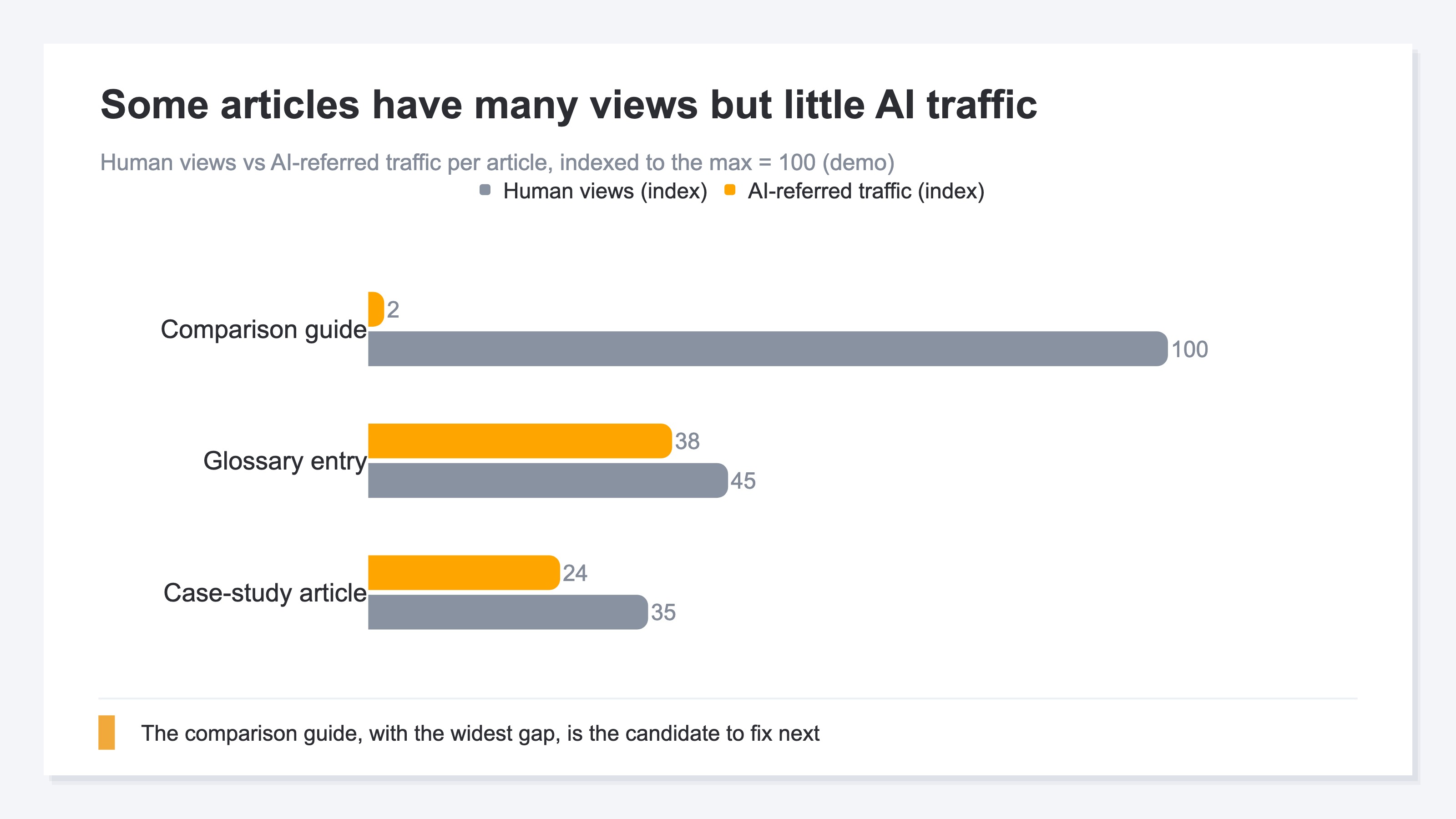
The biggest gap is the comparison guide. Lots of human views, but only a sliver of AI traffic — well read, yet not reached via AI: exactly a missed-citation candidate. The glossary and case-study articles, by contrast, get a fair amount of AI traffic, so their gap is small. They're already picked up by AI, so fixing them buys little upside. Working from the articles with the widest view-versus-AI gap points your limited effort where it counts.
This gap can't be captured as a binary (arrived / didn't), either. How many AI visits per how many views, and whether those visitors actually bought on the page — once you try to read the context, tracking article by article by eye quickly becomes unmanageable.
3. The limits of doing it by hand#
Bottom line: try to survey this "view-versus-AI gap" across the whole site by hand, and you hit two walls.
The first: AI-referred traffic is itself hard to see in your own data. Without setup, traffic from ChatGPT or Gemini can get lost in the "source unknown" bucket and never separated out as AI. And since AI assistants don't always pass a referrer, some real AI arrivals never enter the count. As Don't Take GA4's New AI Assistant Channel at Face Value notes, raw numbers warp with bots (machine traffic) and unknown referrers, so taking them at face value is risky.
The second: sorting across articles is heavy. With dozens of articles, you'd write out views and AI traffic for each, sort by the size of the gap, and repeat it every month. The table below compares doing this by hand against having the widest gaps lined up automatically.
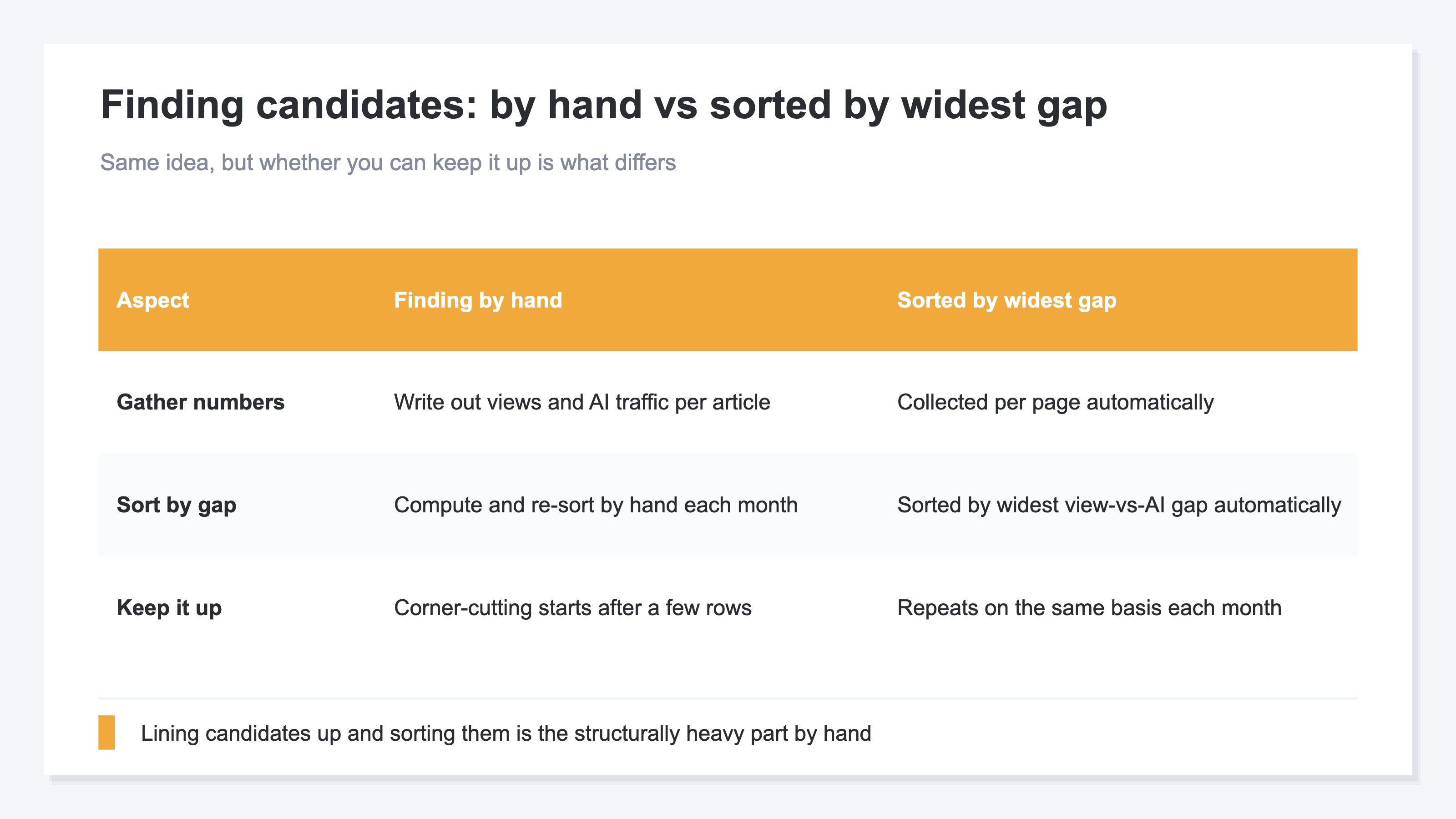
The idea itself isn't hard: look at the view-versus-AI gap, and fix the articles with the widest gaps first. But repeat it across every article, every month, and it's structurally laborious. You can confirm it once by hand, but tracking page by page, month by month, isn't work suited to manual effort.
4. Once you find them, what to fix#
Bottom line: once you have the candidates, fix them in order — lead with the point, tidy the structure, add first-party data.
When AI assembles an answer, it tends to cite pages whose point is clear and whose claims are backed. So that's where the fixes start. First, state the conclusion or the point up front at the top of the article. Next, tidy the structure with headings and bullets so it's easy to extract what's where — adding structured data [2] that tells search engines and AI what the page is about is part of this. Then add first-party data, like your own results and figures, so the page carries evidence others don't have. None of it is a trick; it's patient upkeep.
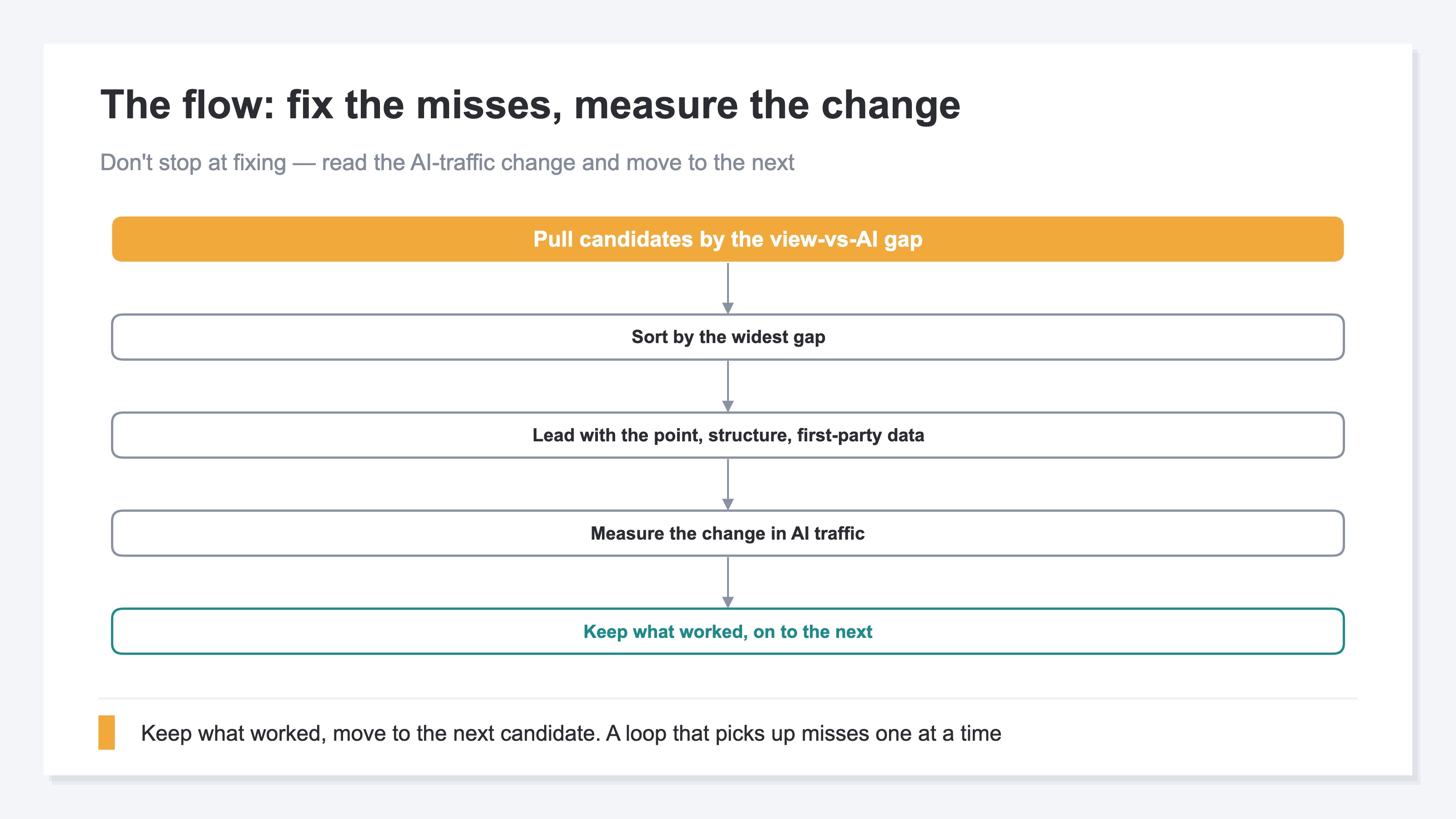
The key is not to stop at fixing. As the chart shows: pull candidates, sort by widest gap, fix the article, then measure how AI-referred traffic changed. Read the change, keep the moves that worked, move to the next candidate. Only by running this loop do you pick missed citations up one at a time. Fix and never measure, and you pile on work without knowing whether any of it landed.
One caution here: don't over-claim that "AI traffic rose this much because I fixed this article." Traffic moves with seasonality and other factors too, and AI-referred traffic is itself an approximate number that undercounts. So read the change as a slope — "did the fixed articles grow more than the unfixed ones?" — rather than treating it as confirmed cause and effect.
RevenueScope helps
By now the flow is clear: find candidates by the view-versus-AI gap, fix them, measure the change. But try it by hand and you hit the two walls from section 3. Separating AI traffic from the unknown bucket, and sorting articles by the widest gap — each is doable once by hand, but page by page, month by month, it's structurally heavy.
RevenueScope takes over that candidate-surfacing and continuous measurement. It separates click traffic from AI, with bots excluded, by page, compares it against human views (traffic from search, social, and so on), and lines up the missed-citation candidates — articles with views but thin AI traffic — sorted by the widest gap. It also connects through to whether arrivals bought on the page (revenue per session, RPS), so you can pick the next article to fix by closeness to revenue, not just view count (figures shown are demo data).
| Article (page) | Human views | AI-referred traffic | Revenue per session (RPS) |
|---|---|---|---|
| Comparison guide | 1,240 | 3 | ¥640 |
| Glossary entry | 560 | 88 | ¥210 |
| Case-study article | 430 | 41 | ¥480 |
The point of this table is the top row, the comparison guide. It has the most human views at 1,240 and a high revenue per session, yet only 3 AI-referred visits. Well read, close to revenue, but almost no one arriving from AI answers — so you can name it in numbers as the first article to fix. The glossary and case-study articles already get a fair amount of AI traffic, so the urgency to fix them is lower. Line up "views × AI traffic × revenue" in one view, and the order in which to fix articles is decided by numbers, not gut.
To be clear: RevenueScope counts only the click traffic that actually arrived from AI and its revenue. It does not count citations themselves where your name merely appeared (no click), or "how often you're cited in ChatGPT." Because AI assistants don't always pass a referrer, the AI-traffic count is not a complete tally but a conservative, approximate number. It also can't strictly attribute which answer produced a given visit. What RevenueScope takes over is splitting AI click traffic by page with bots excluded, and lining it up against human views and revenue to surface missed-citation candidates by the widest gap. Which article to fix, and how, is up to you.
How to view AI traffic not just as "how much" but as "which AI sent it and how much it sold" is covered further in AI Traffic and Revenue by Engine: Which AI's Visitors Buy.
FAQ#
Frequently asked questions#
Q. Can't I just ask ChatGPT directly "do you cite my articles?" and find the gaps?
A. It's useful for a rough read, but not enough on its own. The AI's answer changes each time you ask, so one miss doesn't mean "not cited." And with dozens of articles, checking and sorting each by hand isn't realistic. The approach here doesn't count citations directly — it surfaces articles with thin AI-referred traffic as candidates.
Q. If an article has zero AI traffic, can I conclude it isn't cited?
A. Better not to. AI assistants don't always pass a referrer, so traffic that really came from AI can fail to enter the count. So an article with thin AI traffic isn't confirmed to have "zero citations" — treat it as a candidate to check and fix next.
Q. How is this different from AI-missed bestsellers?
A. The unit. AI-Missed Bestsellers: Finding the Flip Side of the Citations You Got hunts missed citations at the level of product pages and bestsellers; this article uses articles (content) like glossary entries and comparison guides as the unit. The idea is the same — find what has real demand but isn't arriving via AI, from the click side of the traffic.
Conclusion#
To find "articles AI won't cite," hand-counting citations is unstable and unmanageable as article counts grow. Looking instead at which articles get little AI-referred traffic, and treating those as candidates, leads far more directly to a next move.
What's worth fixing isn't the article no one reads, but the one people do arrive at and read well, with only the AI traffic missing. Working from the articles with the widest view-versus-AI gap, you fix them in order: lead with the point, tidy the structure, add first-party data.
But AI-referred traffic shows only the arrival side and is an approximate number that includes undercounted referrers. So read the change as a slope, not as confirmed cause and effect. With that caveat, line up views, AI traffic, and revenue in one view and sort the missed-citation candidates by the widest gap, and you decide which article to fix next by numbers, not by gut.
See which ads actually drive revenue, at a glance
Free up to 5,000 sessions/month, AI connection included. No credit card required. Up and running in 5 minutes.


![[Research] How Visible Is Your Brand in AI Search? You Can Measure It](/_next/image?url=%2Fimages%2Fnews%2Fai-search-brand-visibility.jpg&w=3840&q=75)