Inside Google's search results, "AI Mode" — where an AI answers your question directly — has been spreading. Yet open GA4 (Google Analytics 4) and the growth in AI traffic is nowhere to be found. AI Mode is a feature inside Google Search, so a visit that comes from it is treated as having Google as its referrer, and it lands in Organic Search — or in Direct — rather than in an AI-specific channel. This article lays out where AI Mode traffic falls in GA4, and why reading "the AI-channel number equals all of AI" makes you undercount revenue, in plain terms.
Table of contents
This article in brief#
-
AI Mode is an AI feature inside Google Search, so its referrer is Google
A visit that arrives from an AI Mode answer is treated as having Google as its referrer, so in GA4 it lands in Organic Search
-
That's why it rarely surfaces in an AI-specific channel, and scatters across several buckets
When the referrer isn't carried over, it falls into Direct too. It doesn't necessarily gather into a channel you can identify as AI
-
Reading "the AI channel is small, so AI isn't working" makes you lose revenue
Judge only by the traffic you can identify as AI by referrer and the AI-Mode revenue hidden in Organic Search drops out entirely
-
The next move: read AI traffic by revenue per visit, not by visit count
Connect the AI traffic you can see through to revenue (RPS), and treat the part you can't isolate as "not yet visible"
What AI Mode is#
Search used to work like this: you type a keyword, a list of pages lines up, and you pick a link yourself. In AI Mode, the AI answers your question on Google's search screen, with reference links tucked into that answer. The visitor reads the AI's answer first and, if needed, visits a website through a link inside it. The entry point is still Google Search, but now there's a layer of AI answer in between.
This shift in how things look is tied to measurement too. On June 26, 2026, a report covering how generative AI surfaces your site became available in Google Search Console in Japan as well. But what you mainly learn there is impressions on the search screen — how many times the link was actually clicked, and how much revenue it produced, is not something that report alone can trace. The blind spot between impressions and revenue is covered in detail in Why the GSC generative-AI report doesn't show revenue.
"Fine, we know the impressions. So where do the people who clicked through show up in GA4?" That's the heart of this article. AI Mode visits don't come out in an AI-specific channel — they surface mixed into Organic Search and Direct.
Where AI Mode traffic shows up in GA4#
Because the referrer is Google, AI Mode visits land in Organic Search. The share whose referrer isn't carried over falls into Direct, and neither surfaces in a dedicated channel you can tell apart as AI.
First, the premise. Traffic like ChatGPT or Perplexity — where the referrer tells you it's an AI tool — can be grouped into an AI-related channel on the GA4 side. The caveats to that view are covered in Blind spots when reading GA4's AI Assistant traffic. What this article calls the "AI channel" for convenience is that bucket of traffic identifiable as AI by referrer — its formal channel name in GA4 is "AI Assistants."
Google's AI Mode is a different story. Because AI Mode is a feature inside the single service that is Google Search, a visit that comes through it arrives with google as the referrer. GA4 sorts traffic with a Google referrer into Organic Search, so AI-Mode visits land there too, indistinguishable at a glance from ordinary Google search. The official rules for how channels get sorted are laid out in Decoding GA4's channel classification from the official definitions.
This isn't guesswork. Google's help describes Organic Search as "including Google's AI Overviews and AI Mode," and says the AI channel "excludes Google's AI Overviews and AI Mode"[1]. Both halves of this article's claim are the official definitions themselves.
On top of that, when the referrer information isn't carried over cleanly, the destination shifts to Direct. The mechanism by which AI-related traffic slips into Direct is covered in detail in Why AI traffic hides in Direct. For AI Mode too, visits with a missing referrer fall into Direct, so the buckets end up split across two — Organic Search and Direct.
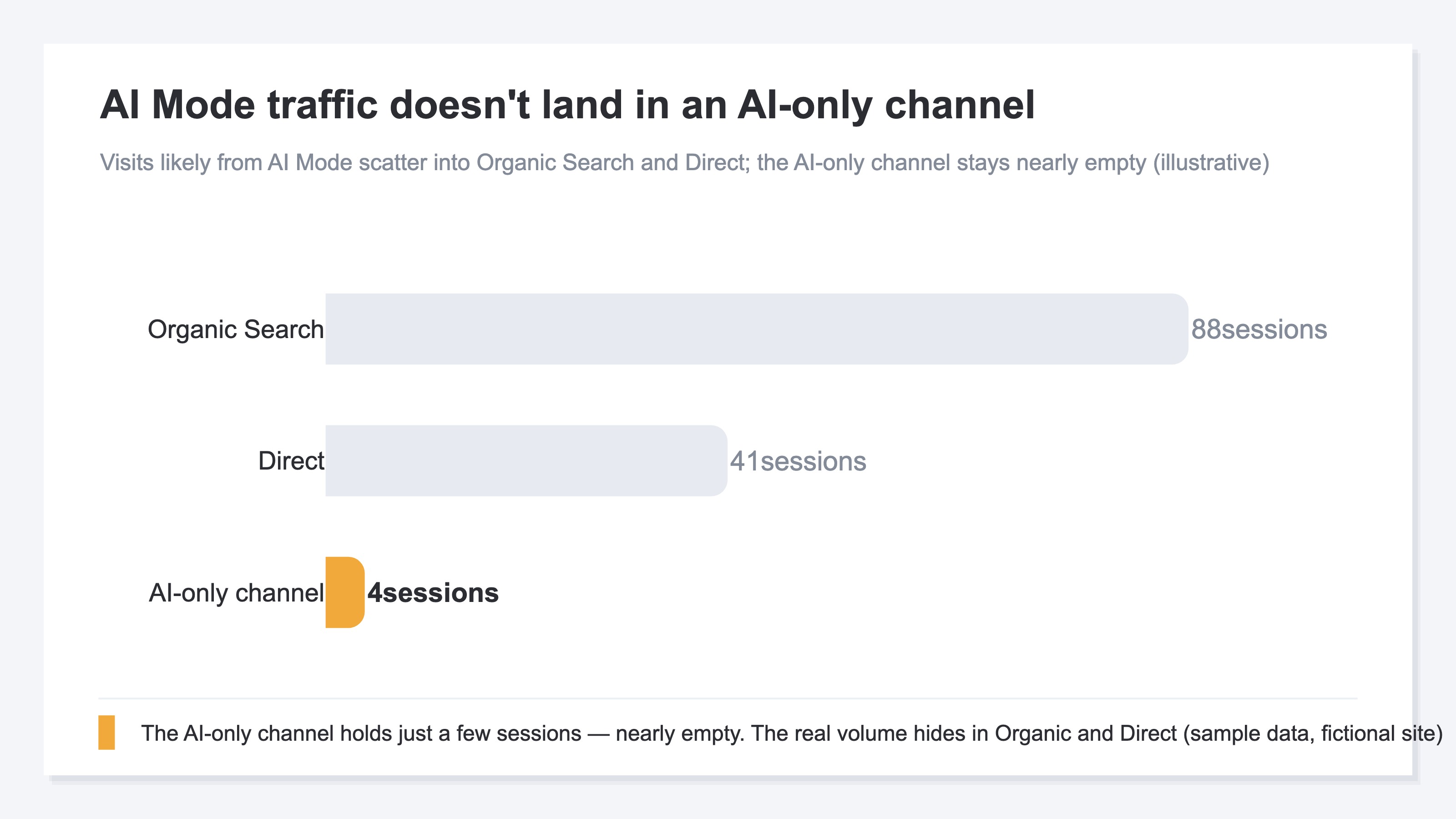
What you can't read is the split between Organic Search and Direct. How far the referrer is passed varies with your site's settings and the browser's behavior, and the official documentation says nothing about it. What share of AI-Mode visits ended up in Direct is not something GA4's traffic acquisition report will separate out for you[2].
The misread that the AI channel is small#
Say GA4 shows "120 visits last month" in the AI channel. Looking at that number alone, you're tempted to think "AI is still just a few percent of the total, so it can wait." But behind it, the people who came from Google's AI Mode are mixed into Organic Search, not the AI channel. In other words, outside those visible 120 visits, there may be a separate set of AI-Mode visits that aren't being counted.
What makes this leak nasty is that the revenue sold through AI Mode gets added to Organic Search revenue too, and never stands up as "AI-derived revenue." Mistake the AI-channel number for the whole picture, and you'll estimate AI's contribution as smaller than it really is and misjudge your investment. For an e-commerce operator, this is exactly where the blind spot sits.
And the AI-Mode share can't be isolated by referrer at all. However carefully you read GA4's AI Assistants row, AI-Mode revenue never appears in it.
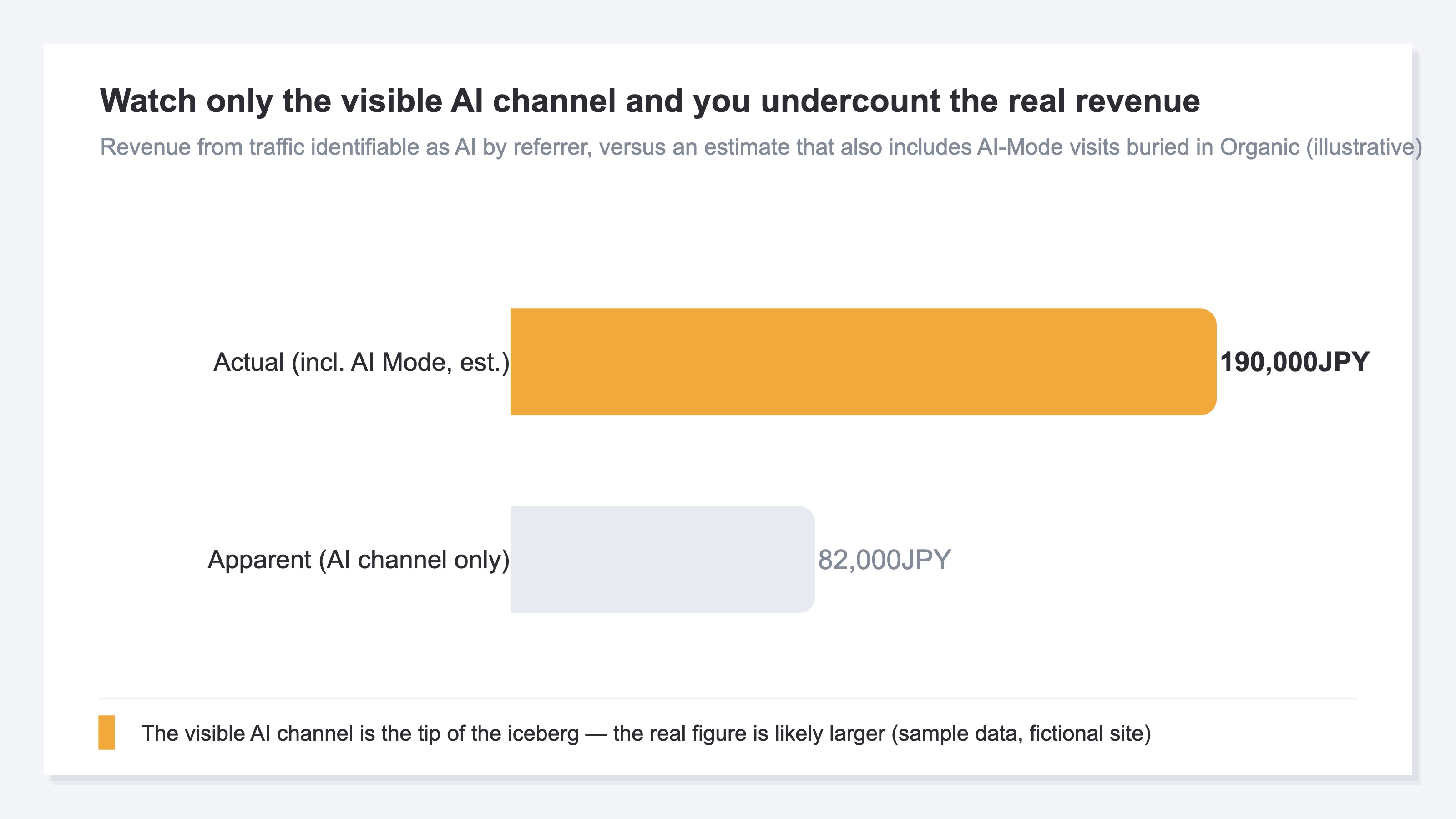
Put differently, judging AI's effect by "the size of a label called the AI channel" is shaky. How big that label gets is decided by the classification rules.
What changed in AI Mode in July 2026#
On July 16, 2026, Google announced connected apps for AI Mode, letting you link outside services and act on them right inside the answer[3]. Add ingredients to an Instacart cart, ask Canva for template options, save a playlist to YouTube Music — errands like these now finish without leaving the search screen. The rollout starts in the U.S., and the announcement says nothing about when it reaches Japan.
Five days later, on July 21, Google said Gemini 3.5 Flash-Lite is also rolling out in Google Search[4]. The faster and lighter answers get, the more routinely AI Mode gets used.
Where it's heading: from a place you look things up to a place your errand gets done. The clicks that do leave become a selected few, and the ones that leave still mix into Organic Search in GA4. The same shrinkage shows up on the impressions side, covered in Why AI Mode impressions come in lower than you expect.
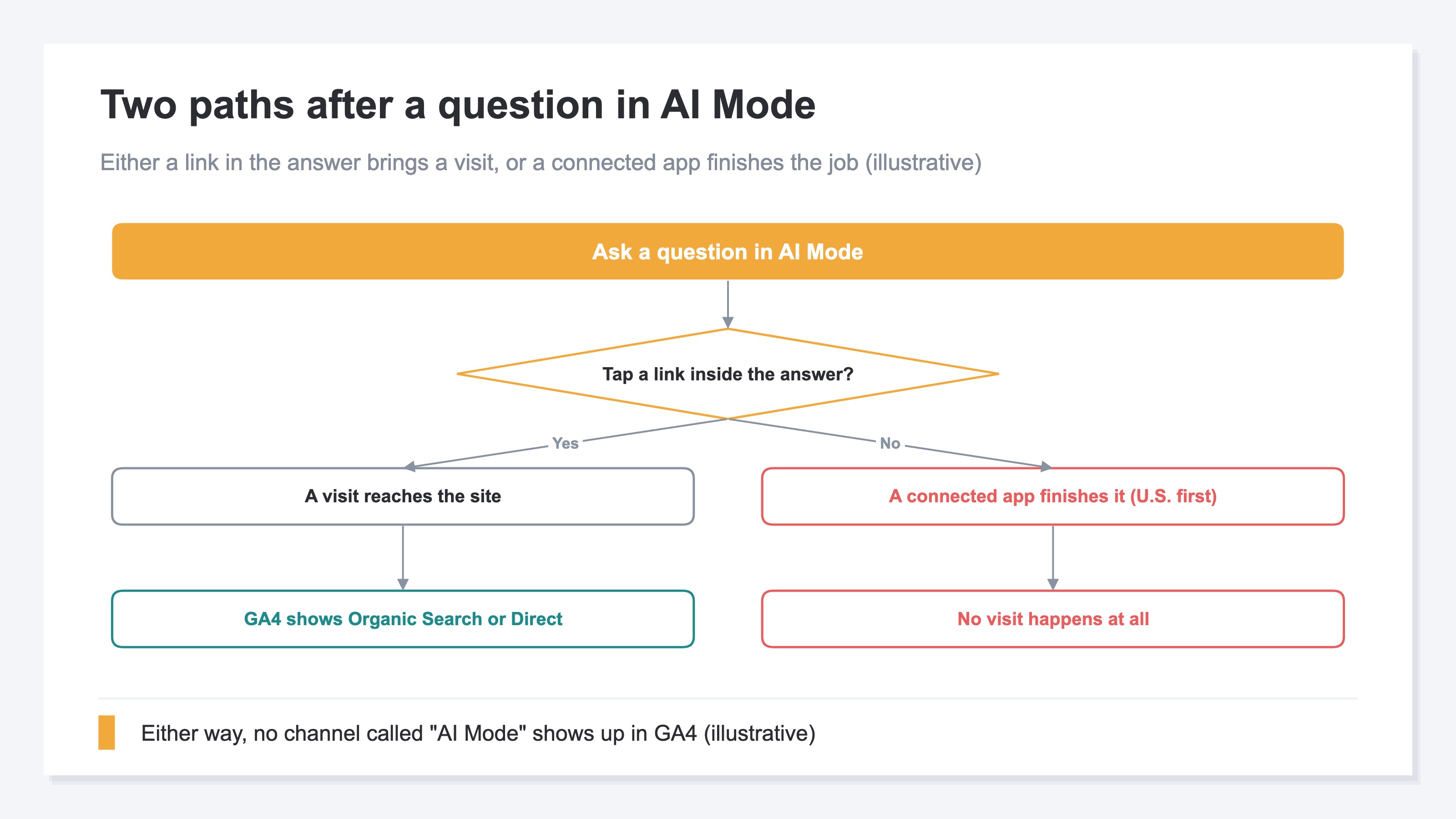
So judging AI's effect by the count of visits stops holding up. Before connected apps arrive in Japan, it's safer to shift to reading AI traffic by revenue per visit.
RevenueScope — how it helps
RevenueScope shows the AI traffic visible by referrer as its own row per engine, with revenue and RPS. Those figures read as a floor. Add the AI-Mode share that leaves no referrer and the real total is larger still.
RevenueScope doesn't bury AI traffic into one lump. It splits it by engine — ChatGPT, Claude, Perplexity, Gemini, Copilot — and computes each engine's visits, revenue, and RPS (revenue per visit). From the referrer and access characteristics, it tells human visits apart from bots (automated access) and displays clean numbers with bots removed. Why it's worth seeing revenue per AI engine is explored further in Seeing AI-engine traffic and revenue separately.
For example, traffic and revenue by AI engine are displayed like this (figures are one illustrative example).
| AI engine | Visits | Revenue | RPS |
|---|---|---|---|
| ChatGPT | 95 | ¥15,945 | ¥167 |
| Perplexity | 64 | ¥11,510 | ¥179 |
| Gemini | 33 | ¥33,188 | ¥1,005 |
| Claude | 10 | ¥12,088 | ¥1,208 |
| Copilot | 12 | ¥9,424 | ¥785 |
Even when the traffic looks small by visit count, RPS can reveal that engines like Gemini or Claude earn strikingly more per visit. Precisely because you're viewing by revenue efficiency rather than visit volume, you can notice differences like these.
What this table shows is the traffic you can identify as an AI tool by referrer. Because Google's AI Mode arrives with google as the referrer, it lands on the Organic Search side — just as it does in GA4 — and doesn't appear in these per-AI-engine rows. The AI-Mode share isn't in these numbers. Read them with that in mind and you won't undercount what AI contributes.
RevenueScope displays "AI-engine traffic × revenue" — structurally hard to surface in GA4's standard reports — on one screen with clean, bot-excluded figures. Add engines, change months, and it comes out in the same shape. It's the base for judging by revenue rather than by the size of a single label.
FAQ#
Q1. Which GA4 channel do people from AI Mode show up in?#
Because the referrer arrives as Google, they land in Organic Search — Google's own help folds AI Mode into the Organic Search definition. They don't surface in a dedicated channel you can tell apart as AI. The share whose referrer isn't carried over falls into Direct instead, and how large that share is varies with your site's settings and browser behavior.
Q2. Can RevenueScope fully isolate AI Mode traffic?#
Traffic identifiable as AI by referrer, like ChatGPT or Perplexity, is shown as its own row per engine with revenue and RPS. Google's AI Mode arrives with google as the referrer, so — just as in GA4 — it lands on the Organic Search side rather than the per-AI-engine rows. So RevenueScope fixes the referrer-visible AI figures as a floor. You connect what's visible through to revenue and treat the AI-Mode share as sitting outside it. That's how tracking AI traffic by revenue works in practice.
Q3. While the AI channel is still small, can I ignore it?#
Not recommended. Even if the AI channel visible by referrer is small, AI-Mode visits and revenue may be mixed into the Organic Search outside it. Rather than deciding "it isn't working" from the size of a single label, build the habit of connecting the AI traffic you can see through to revenue (RPS), and you won't misjudge when AI traffic grows.
Wrap-up#
AI Mode is an AI feature inside Google Search, so a visit coming from it carries Google as its referrer and lands in Organic Search in GA4. The share with a missing referrer goes to Direct. Neither surfaces in an AI-specific channel — and meanwhile AI Mode keeps moving toward being the place the errand gets done.
The next move is to swap the measure for AI traffic from the count of visits to revenue per visit (RPS). Connect the AI traffic you can see through to revenue, and treat the AI-Mode share as sitting outside it. Read it in that order and the size of the AI channel stops swinging your judgment.
See which ads actually drive revenue, at a glance
Free up to 5,000 sessions/month, AI connection included. No credit card required. Up and running in 5 minutes.