The numbers in Merchant Center and the numbers in Google Ads don't line up. Open the settings and the naming splits again — tags, tag IDs, destinations, event sources — and it stays unclear which screen covers what. This article shows that there are three screens in play rather than two, and that two of them are officially documented as different.
Contents
TL;DR#
- What you are comparing is not two screens but three: two inside Merchant Center and one in Google Ads
- Google states that the metrics shown on the [Campaign management] tab and on the [ANALYTICS] page can differ
- A "purchase" on the [ANALYTICS] page is a metric that starts from a link shown in Google organic search
- The Google Ads product report counts one ad impression once per featured product, so product impressions and clicks never add up to the campaign total
- Stop reconciling, and assign a screen to each decision: bid changes, product data fixes, and judging revenue
1. The Numbers That Don't Match Are Split Across Three Screens#
What you are comparing is not Google Ads against Merchant Center. There are three screens.
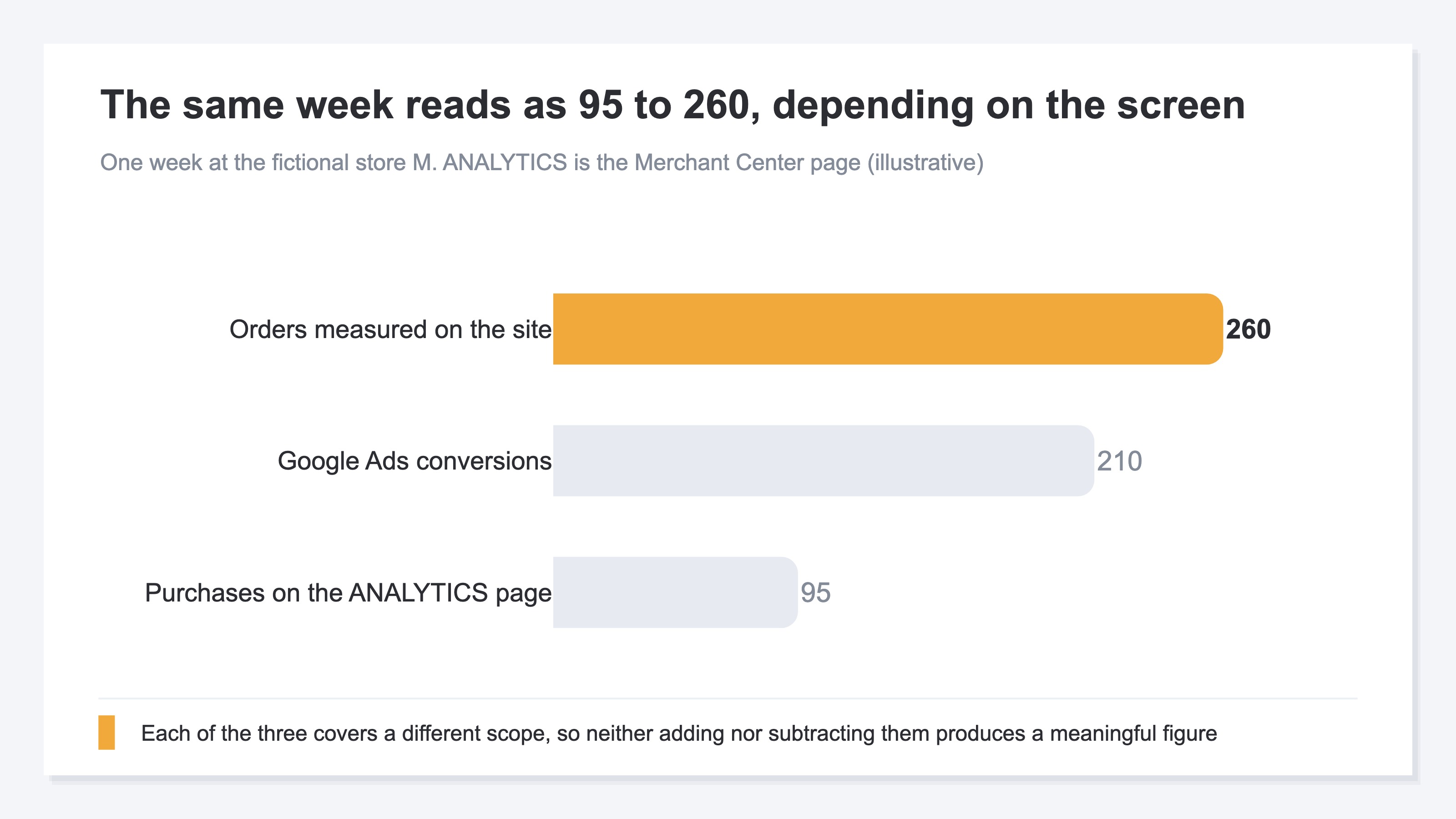
Behind the same complaint — the shopping figures don't line up — the screens split three ways. Only one thing needs settling first: which screen the number in front of you came from. Until that is fixed, chasing any gap leads nowhere.
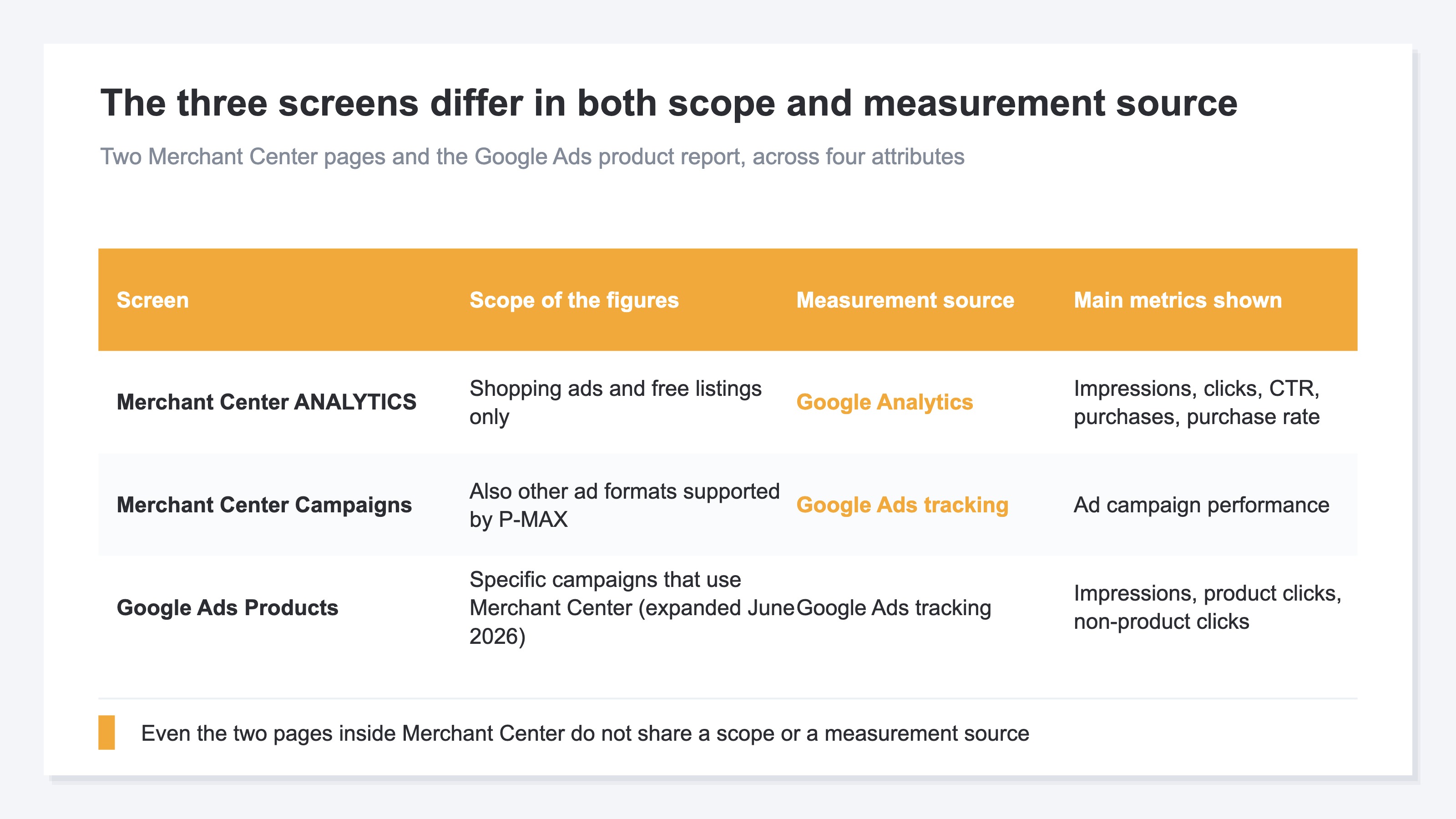
- The [ANALYTICS] page in Merchant Center — shows impressions, clicks, purchases and purchase rate at the product item level [2]
- The [Campaign management] tab in Merchant Center — where you review ad campaign performance from inside Merchant Center [1]
- The [Products] tab in Google Ads — the product report. Its scope was expanded in June 2026, so certain campaigns that use Merchant Center can now be read at the product level [4]
Before the screens, the product data itself may arrive by more than one route. A manual upload, an API connection to the cart platform, an automatic pull from a crawl of the site. With several routes enabled at once, the same product can end up registered more than once. Check how many sources the product data comes from before reading anything at the product level.
The same effect appears between the platform and GA4. The gap between clicks and sessions is covered in Google Ads clicks and GA4 sessions don't match. The core of this article is the two pages inside Merchant Center.
2. Two Pages Inside Merchant Center Measure Different Things#
That these two are different is documented by Google.
The help page carries it as an important note: the metrics shown on the [Campaign management] tab of [Ad campaigns] and on the [ANALYTICS] page can differ [1]. Google's documentation points to two reasons for the Merchant Center gap.
The first is scope. The [ANALYTICS] page shows only shopping ads and free listings, while the [Campaign management] tab also shows the other ad formats supported by P-MAX campaigns, such as ads served on YouTube [1]. The second is the measurement source. Metrics on the [Campaign management] tab are based on Google Ads tracking, while metrics on the [ANALYTICS] page are based on Google Analytics [1]. Different systems do the counting, so even matched scopes would not produce matched values.
And "purchase" on the [ANALYTICS] page carries a condition inside its own definition. It occurs when a user who clicked a link to your site shown in Google organic search completes checkout [2]. Set that beside an ad conversion count and argue about which is higher, and the two are already covering different routes.
Separately, the organic side of that same [ANALYTICS] page was itself rewritten back through past data by the change of August 24, 2026. That is a different matter — the same screen's history being replaced — covered in Google's free listings reporting change.
3. Product Impressions and Clicks Never Add Up to the Campaign Total#
The [Products] tab in Google Ads counts one ad impression once for every product featured in it.
The official example says so directly. If one ad features five different products, one impression is reported for each product item, and that single ad serving records five product impressions in total [4]. Impressions here track the visibility of individual product items rather than the ad as a whole [4].
Clicks work the same way. Non-product clicks count clicks on parts of the ad other than a specific product, such as the headline or the shop name, and every click on a general ad element is recorded against all of the products contained in that ad [4]. Those two rules give the conclusion: product-level impressions and clicks never add up to the campaign total. The work of closing that gap does not hold together in the first place.
Conversions are worded differently. Credit is assigned fairly across the inventory using specific logic — and that is as far as the documentation goes [4]. Since the allocation logic is not published, this screen cannot tell you how the sum of product-level conversions relates to the campaign figure.
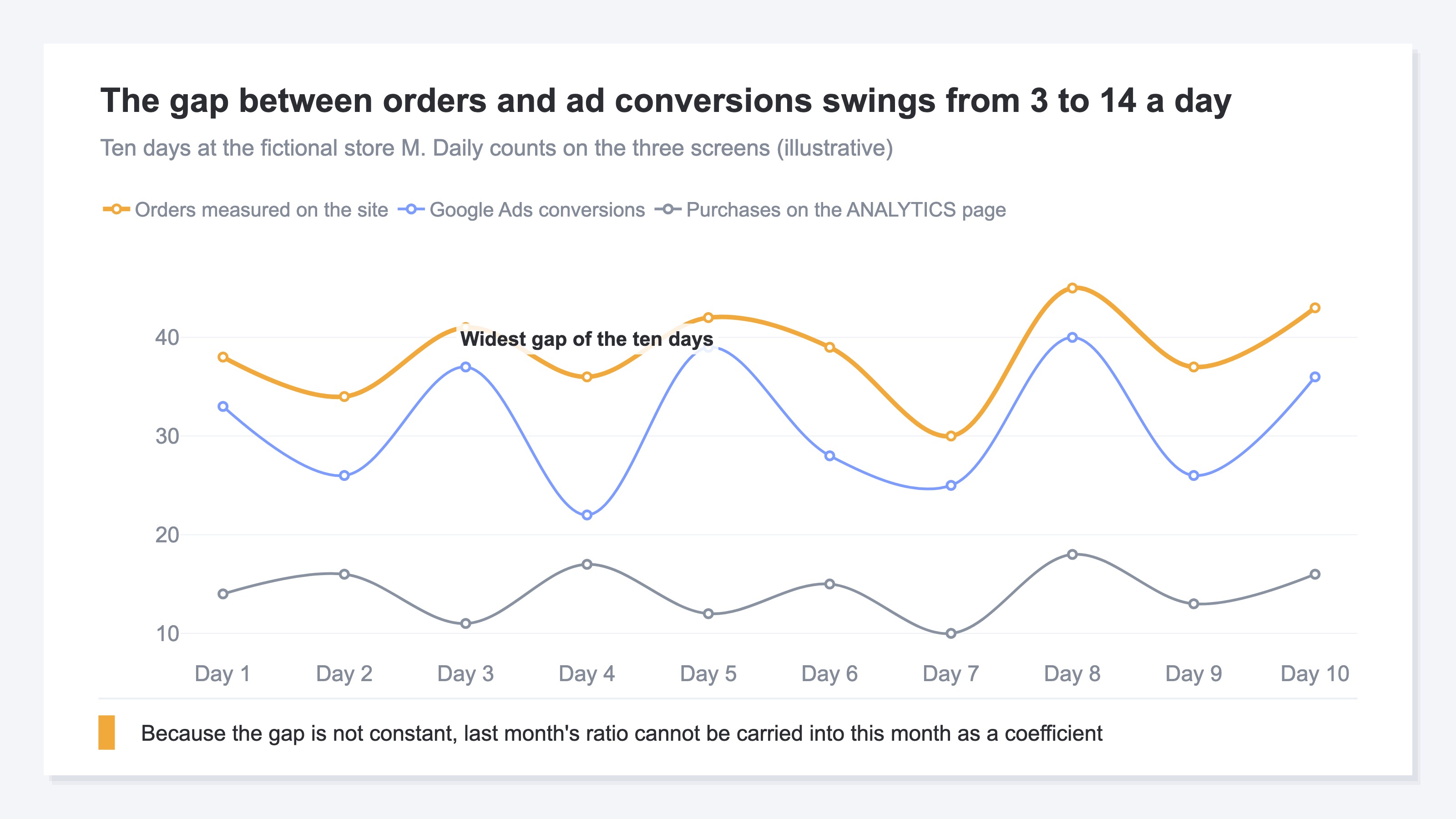
The size of the gap changing day to day blocks the reconciliation too. A fixed offset could be converted with a single coefficient, but a gap whose width varies by day has no such conversion.
4. Assign a Screen to Each Kind of Decision#
Stop reconciling, and assign a screen to each kind of decision.
- Changing bids or budgets inside Google Ads — Google Ads. Judge on the same figures automated bidding is actually working from
- Fixing product data or the feed — the [ANALYTICS] page in Merchant Center, or the [Products] tab in Google Ads. Compare before and after within one screen only
- Judging the store's revenue — neither of them. Hold revenue measured on your own site at the purchase level as a separate reference
Splitting paid from free has an officially recommended shape. Use a Google Ads tracking template with auto-tagging for paid clicks, and Merchant Center auto-tagging for free listings [3]. On the feed side the roles are split. Specify the landing page URL for Shopping ads in the ads redirect [ads_redirect] attribute, and the landing page URL for free traffic in the product link [link] or mobile link [mobile_link] attribute. On top of that, use separate tracking parameters for ads and for free [3]. Put a dedicated parameter on the free side only, and first-party measurement can treat free listing visits as their own segment. The documentation adds that parameters should not be hardcoded into a final URL or a Merchant Center URL, and that product click tracking belongs in a tracking template using ValueTrack or custom parameters [3]. What to verify against when the platform changes what it serves is covered in Verifying AI Max shopping delivery with UTM.
One week at fictional store M, top three products in the Google Ads [Products] tab (illustrative)
| Product | Impressions | Product clicks | Non-product clicks | Conversions |
|---|---|---|---|---|
| Toner A | 40,000 | 1,200 | 900 | 62 |
| Toner B | 38,000 | 1,180 | 900 | 61 |
| Cleansing oil | 25,000 | 640 | 900 | 28 |
Non-product clicks sit at 900 for all three because they were featured in the same ad, and clicks on the headline were recorded against every featured product [4].
The top two are one conversion apart, and 2% apart on clicks. Shifting budget to either one leaves next month's revenue where it was. The deciding figure is not on this screen at all: what each purchase was worth is where Toner A and Toner B separate.
How long can this checking go on? The meeting that sets next month's ad budget has a submission deadline, and working out which of the three screens is right will not be finished by that date. Working backwards from the deadline, what is needed is not agreement between screens but one calculation that settles the allocation on the day.
RevenueScope solution
What is missing is not a fourth screen but one calculation, free of re-allocation, sitting under the decision.
The channel breakdown shows sessions, revenue and RPS (revenue per session) for each channel. Open a channel and it goes down to revenue, RPS, AOV (average revenue per order) and CVR at the utm_campaign level. For any period where ad spend was entered by year, month and channel in the form, or imported by CSV, ROAS for that channel is shown as well. The numerator of that ROAS is fixed to revenue RevenueScope measured, so a platform's own reported figure never replaces it. Any purchase revenue that cannot be linked to one of these channels remains visible in a separate unattributed-revenue row.
To treat free listing visits as their own segment, put a dedicated tracking parameter on the product link [link] attribute in the feed. When that value is not in the default map, it separates out as an "unclassified (utm_medium=…)" row, and you read that row as the free side. RevenueScope is not a mechanism that pulls figures out of ad consoles to reconcile them. What it covers is putting purchases that occurred on your site into a single calculation.
Channel efficiency at fictional store M (illustrative)
| Channel | Sessions | Revenue | RPS |
|---|---|---|---|
| Shopping ads | 8,000 | 2,400,000 yen | 300 yen |
| Free listings | 3,000 | 1,200,000 yen | 400 yen |
| 1,000 | 300,000 yen | 300 yen |
This Merchant Center comparison is an illustrative calculation for reading the three channel rows. Because the CTA opens a sample store whose data is refreshed daily, its channel totals will differ from this example.
The three channels come out of the same calculation, so they compare directly. The material for deciding where to add budget is this, not conversion counts whose scope changes by screen. The next thing to check is the campaign-level breakdown: at the same 300 yen RPS, a campaign with low conversion rate and high order value and one with the reverse call for different changes.
FAQ#
Frequently Asked Questions#
Q. Which is correct, the Merchant Center purchase count or the Google Ads conversion count?
A. They are not a pair you judge for correctness. A "purchase" on the [ANALYTICS] page starts from Google organic search [2], while metrics on the [Campaign management] tab are based on Google Ads tracking and include the other formats P-MAX supports [1]. Each is correct within its own scope, and the scopes differ, so the values diverge.
Q. Summing product impressions gives more than the campaign total. Does that indicate a Merchant Center reporting fault?
A. That is the specification. If one ad features five products, that single serving records five product impressions [4]. Non-product clicks are likewise recorded against every product in the ad [4]. A total that does not match is the normal state.
Q. Are conversions double-counted the same way?
A. That is not documented. What the documentation says is that credit is assigned fairly across the inventory using specific logic [4], and no further. Don't extend the impressions and clicks story to conversions.
Q. If I settle on a correction factor for the gap, can I use it in monthly reporting?
A. No. The gap changes width by the day, so applying last month's ratio to this month removes the basis for the figure. Fix the reported figure to one system and compare month to month within it. Converting across systems mixes the effect of an allocation change with the effect of changing which source you read.
Summary#
When the figures don't line up, settle which screen your number came from before heading into the settings. The [Campaign management] tab and the [ANALYTICS] page in Merchant Center differ in both scope and measurement source, and Google documents this [1]. The [Products] tab in Google Ads counts one ad serving once per featured product, so impressions and clicks never add up to the campaign total [4].
With that settled, drop reconciliation as a goal. Bid changes go to Google Ads, product data fixes go to Merchant Center or the [Products] tab, and judging revenue goes to first-party measurement. Fix that assignment in advance and next month's allocation can be decided with the gap still standing. Splitting paid from free is the one piece to get in place early, following the recommended procedure [3].
See which ads actually drive revenue, at a glance
Free up to 2,000 sessions/month, AI connection included. No credit card required. Up and running in 5 minutes.