
Open GA4 and unfamiliar words line up: sessions, bounce rate, conversions, engagement. Many people feel they cannot read the numbers until they memorize every term, and they stall. But the real difficulty is not the volume of terms. Most of the time, it is simply that the definitions are not connected, in your head, to your own site's numbers.
You can open a glossary and read a definition, but it will not tell you whether your own number is high or low. A lot of people get stuck right here. Even as a beginner, you can get past this wall. The key is to let AI read your real numbers, and receive them together with the definition — before you memorize any jargon.
This article lays out, for beginners, the order for letting AI read your own numbers and reading GA4 terms through them. The goal is not perfect memorization. It is to get past the wall of terms and reach a state where you can move to your next step.
Contents
TL;DR#
Here are the takeaways up front.
- GA4 terms feel hard because the definitions are not connected to "your own numbers" — not because there are too many to memorize
- Instead of memorizing terms, translate them into your real numbers (sessions XX, bounce rate XX%) and they become yours at once
- The GA help and glossaries are correct, but returning to them and swapping in your own numbers every time is quietly heavy
- Connect your own numbers to AI in read-only mode, and it hands you the term's definition and your real figure together
- Reading the terms is not the goal itself; it is the entry point to the next move that grows traffic or revenue
1. Why GA4 Terms Feel Hard#
Bottom line: GA4 terms feel hard not because there are too many to memorize, but because the definitions are not connected to "your own site's numbers."
"What was a session again?" "How is bounce rate different from engagement?" Many people feel this and stall every time they open GA4. But the reason you stumble is not that you are "not smart enough" or "have not studied enough." It is that the definition of a term and your site's actual number sit apart, unconnected.
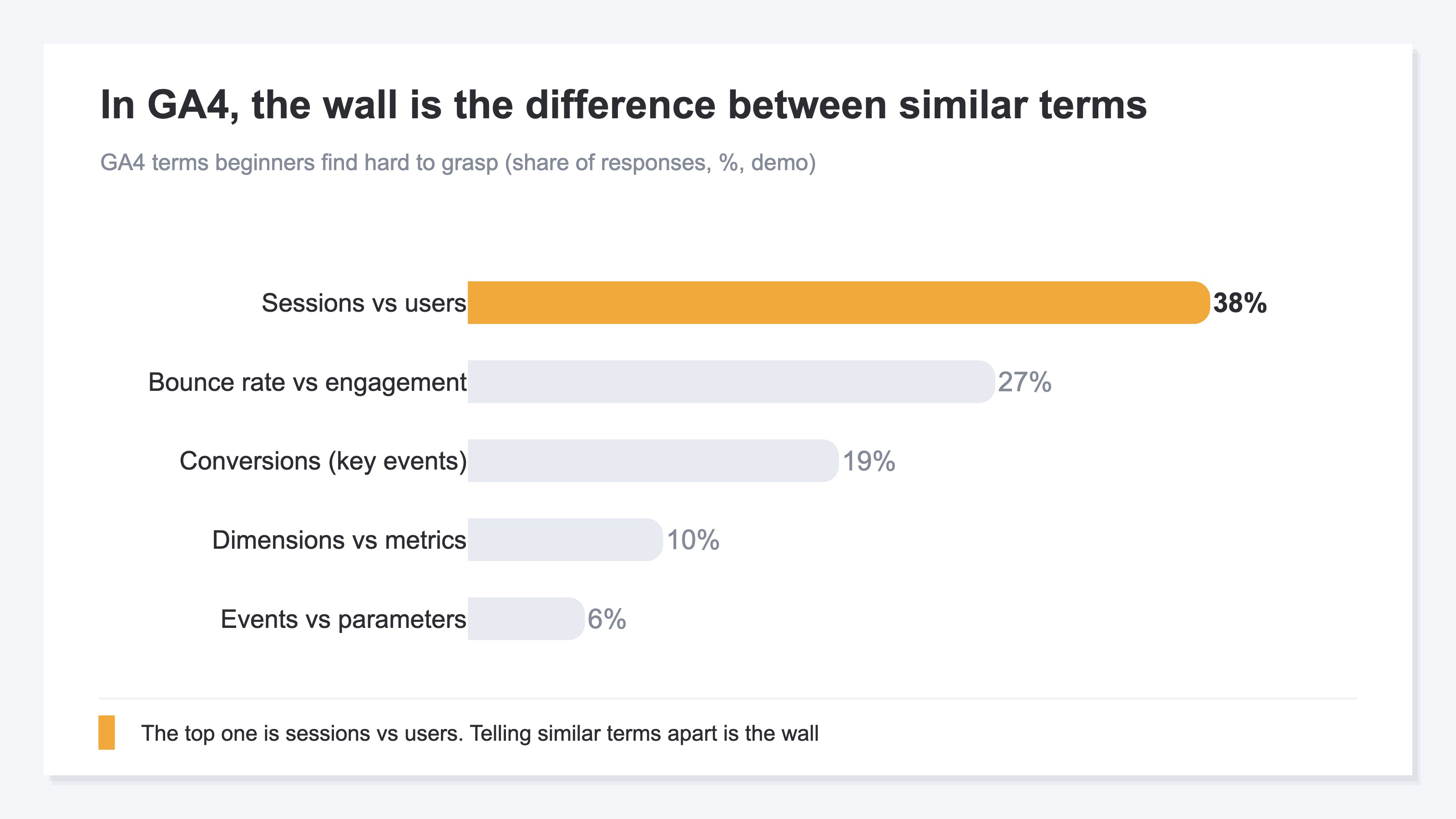
GA4 terms do come with definitions. But reading them will not tell you whether "your site's 1,375 sessions" is high or low. What makes the terms hard is that three steps are split apart: the definition (glossary), finding where the number lives (the GA4 screen), and interpreting what it means. This is the structural reason beginners stay stuck for so long.
Some of you will want to start by sorting out similar terms. The relationship between sessions and events is covered in GA4 events and sessions basics, and the easily-confused difference between bounce rate and exit rate in bounce rate vs exit rate. But even after learning definitions one by one, the next thing you need is a separate task: applying the word to your own numbers.
2. Read Terms With Your Own Numbers, Not by Rote#
Bottom line: rather than memorizing terms, translate them into your real numbers and they suddenly become clear.
The trick to making a term your own is to place "your site's number" right next to the definition. A session means "a group of visits (one arrival)," but that alone does not land. Put "mine is 1,375 over the last 30 days" beside it, and for the first time you can think about whether that is high or low. A term becomes readable only when it is paired with your own number.
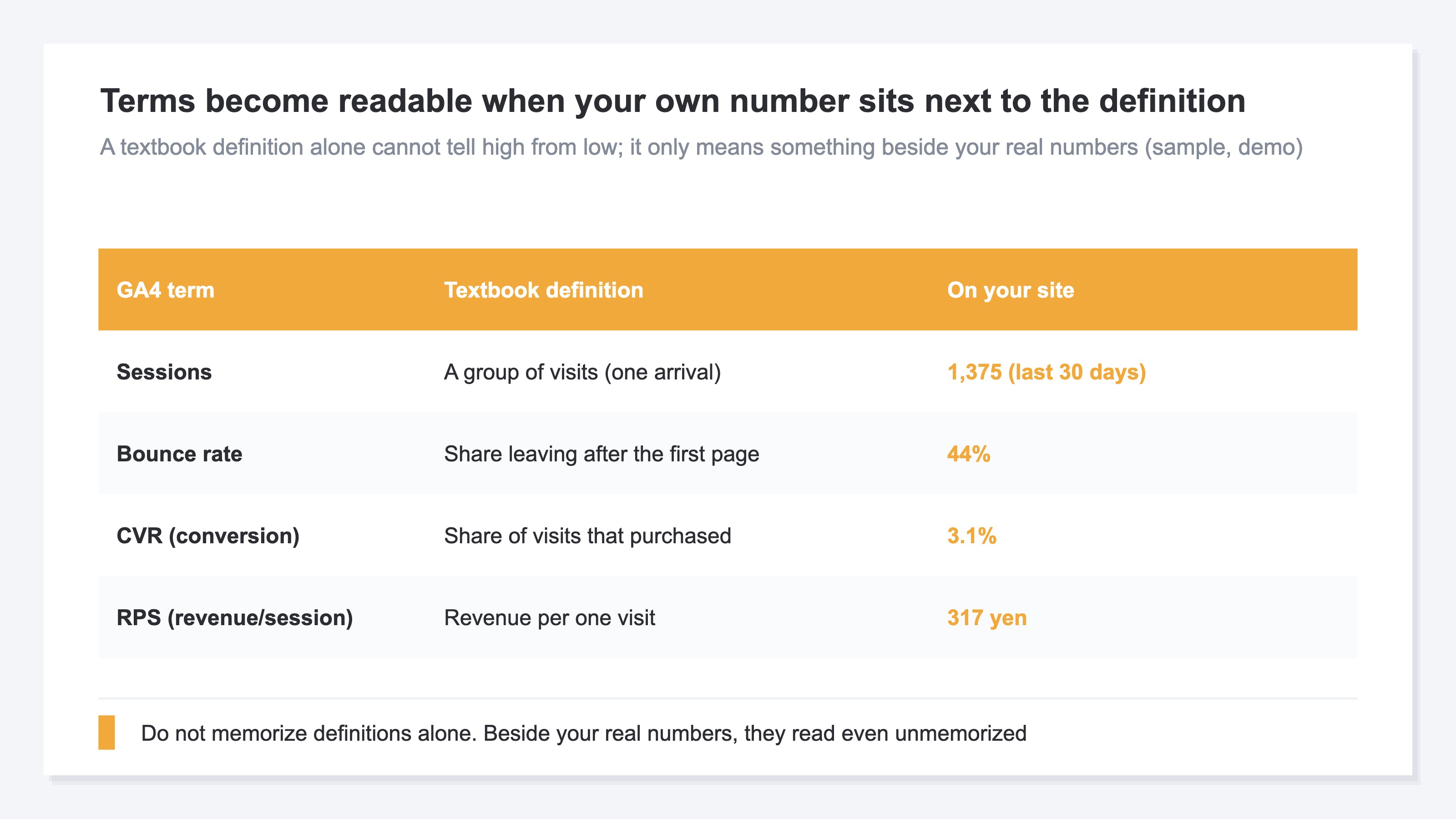
Likewise, bounce rate is "the share who left after only the first page," so if yours is 44%, you can read it as "just over four in ten visits leave on one page." CVR (the share that purchased) is 3.1%, and RPS (revenue per visit) is 317 yen — line up the definition and the real number like this, and the numbers mean something even without memorizing. If you are unsure which numbers to look at first, starting from the first three metrics to watch in EC analytics lets you sharply narrow the terms you need.
The GA help and glossaries themselves are correct and reliable partners. But their role ends at the "general definition." Returning to the help every time, hunting for your number on the screen, and swapping in "for my site, it means this" in your head — this round trip quietly remains as heavy work, every time.
3. Ask AI Your Own Numbers and the Terms Read Themselves#
Bottom line: connect your own numbers to AI in read-only mode, and it hands you the term's definition and your real figure together.
You can hand this "connecting the definition to your own numbers" round trip to AI. Recent AI (ChatGPT, Claude, and others) can read your own numbers directly and answer from them. No hard setup or SQL is needed. Because it connects in read-only mode, there is no risk of your data being rewritten. All you do is ask in plain words: "what are my sessions? my bounce rate?"
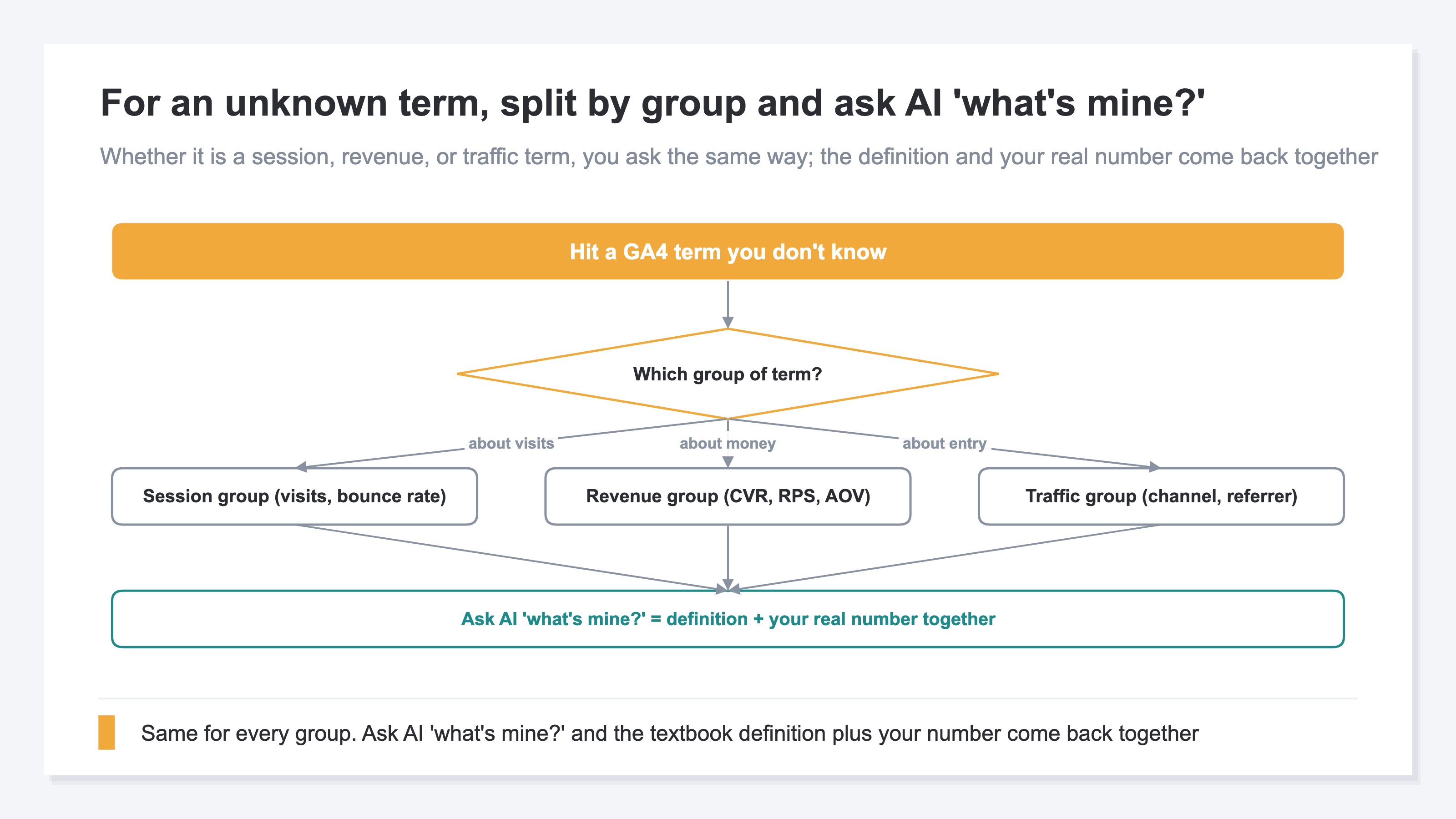
For example, ask "what is a session, and how many do I have?" and AI returns "a session is a group of visits, and your site has 1,375" — the definition and your number at once. Whether the term is in the session group (visits, bounce rate), the revenue group (CVR, RPS), or the traffic group (channels, referrers), you do the same thing. Just ask "what's mine?" and the textbook definition and your real figure come back together.
The important part is this: the terms do not become readable because AI is smart. They become readable because AI is reading "your real numbers." Where to look first in GA4's reports is laid out in the top 3 GA4 reports to watch in EC, but once you can read the terms, the next question is how to use them. The "first step to growing traffic" once you can read is connected in grow traffic with zero marketing know-how.
RevenueScope's solution
Bottom line: GA4 splits the translation from term to definition to your own number across three steps, and returning to it every time is heavy. RevenueScope lets AI answer with the definition and your real figure together. And it is free to start.
What you have seen so far is that the material for reading a term — the definition and your own real number — is already in hand. The problem is that connecting it by round-tripping between GA4's help and screen every time is heavy. The GA help shows the "general definition" of what happened, but it does not hand a beginner a one-line answer to "on your site, this term shows up like this."
RevenueScope is a lightweight dashboard you can use by adding a single tag to GA4, with a window (MCP) that lets AI read those numbers. Ask AI "what are my sessions? my bounce rate?" and it reads RevenueScope numbers in read-only mode and returns the term's definition and your real figure together. Sessions, bounce rate, CVR, RPS — even without memorizing the jargon, the meaning comes back with your numbers attached.
| Your question | What AI returns (example) |
|---|---|
| What's a session? Mine? | A group of visits (one arrival). Yours is 1,375 over the last 30 days, down 2.9% vs the prior period |
| Is my bounce rate high? | The share leaving after the first page. Yours is 44%, up 1.3 points from the prior period |
| CVR vs RPS? | CVR = share that purchased, 3.1%. RPS = revenue per visit, 317 yen. Both are your real numbers |
Ask RevenueScope's sample site, and it returns this (fictional site with sample data).
RevenueScope adds "what it means in your numbers" on top of GA4's figures and makes them easier to read. Without leaning on memorized jargon, you move straight from your own real numbers to thinking about "what to touch next." And RevenueScope starts from a free sign-up.
FAQ#
Q. I barely know any GA4 terms. Can I still use this?
Yes. In fact, making the terms readable even before you memorize them is exactly the point of this approach. Let AI read your own numbers and ask "what's mine?", and the definition and your figure come back together. You can pick up the jargon little by little, when you actually need it.
Q. If I ask AI, can I stop looking at GA4?
GA4 remains effective as a tool for seeing "what happened." RS adds "what it means in your words and figures" on top and makes those numbers easier to read. Use GA4 for the overall picture and RS to connect the terms to your own numbers — using both, each for its strength, is what we recommend.
Q. I have no sales yet. Is there still any point?
Yes. Sessions, bounce rate, and average time on page are visible before any sales. RPS and CVR start from zero, but it is best to begin by becoming able to read "the number of visits" and "how pages are read," with the terms attached.
Summary#
GA4 terms were not hard because you had not memorized enough. Most of the time, the cause is that "the definition of a term and your site's number are not connected." And that wall can be cleared before you memorize the jargon by rote. Translate terms into your real numbers, and sessions and bounce rate alike become yours at once.
The GA help and glossaries are correct and reliable, but the round trip of returning to them and swapping in your own numbers remains as a quietly heavy, repetitive task. Hand that to AI, and the term's definition and your real figure come back together.
So even when you finish this article, it does not end at "just ask AI." What remains is the work of using the numbers you can now read to make the next move that grows traffic or revenue. Start for free — start by letting AI read your numbers and reading one term through them.
See which ads actually drive revenue, at a glance
Free up to 5,000 sessions/month, AI connection included. No credit card required. Up and running in 5 minutes.