Next week's marketing meeting is coming, so you sit down to build the deck. You open GA4, pull the numbers for each channel, compare them with last month, and type them into a table. Do just that, and before you know it, it's night. By the time the numbers are finally lined up, you're out of energy—and there's no time left for the part that matters: "so, what do we do about it?" This isn't poor planning. The cause is the order of the workflow itself.
This article lays out a way to reverse that order. Decide what you want to say first, let AI gather only the numbers you need, and spend your own time on interpretation and next moves. Along the way, we touch on the pitfalls of pasting screenshots into a bare AI, keep the language plain, and shape it into something you can try today.
Contents
This article in brief#
- What eats your time in deck prep is "gathering the numbers." Opening GA4, pulling figures across channels, and transcribing them into a table takes up 80% of the work, and the valuable interpretation gets squeezed into 20%
- Reverse the order. Decide "what you want to say" first, let AI gather only the numbers you need, and keep people focused on interpretation and next moves. The thinking is simple; what's heavy is repeating the manual work every month, across channels
- Pasting screenshots into a bare AI is weak on three counts: misreads, staleness, and no link to revenue. Have AI read revenue-linked numbers directly, and the whole gathering step gets lighter
1. Where the hours really go in deck prep#
The short version: what eats the most time in deck prep isn't the thinking step—it's the "gather the numbers and line them up" step.
Think back. You open GA4, look at sessions by channel, check revenue, compare with last month, and type it all into a spreadsheet. Five channels means five round trips. Repeating this every month is the quiet weight of a monthly channel-efficiency review. On top of that, the referrer is buried in "Direct," or a metric is defined differently from screen to screen, so you add the extra chore of verifying whether the numbers you pulled are even right. You can even get stuck on which GA4 report to look at in the first place. By this point, most of the deck prep is done—and there's only a sliver of time left to write "what does this number mean" and "so what do we do next."
The chart below shows that time split. On the left is today's way; on the right, the picture after handing number-gathering to AI. Lighten the gathering, and that time flows back toward interpretation and action.
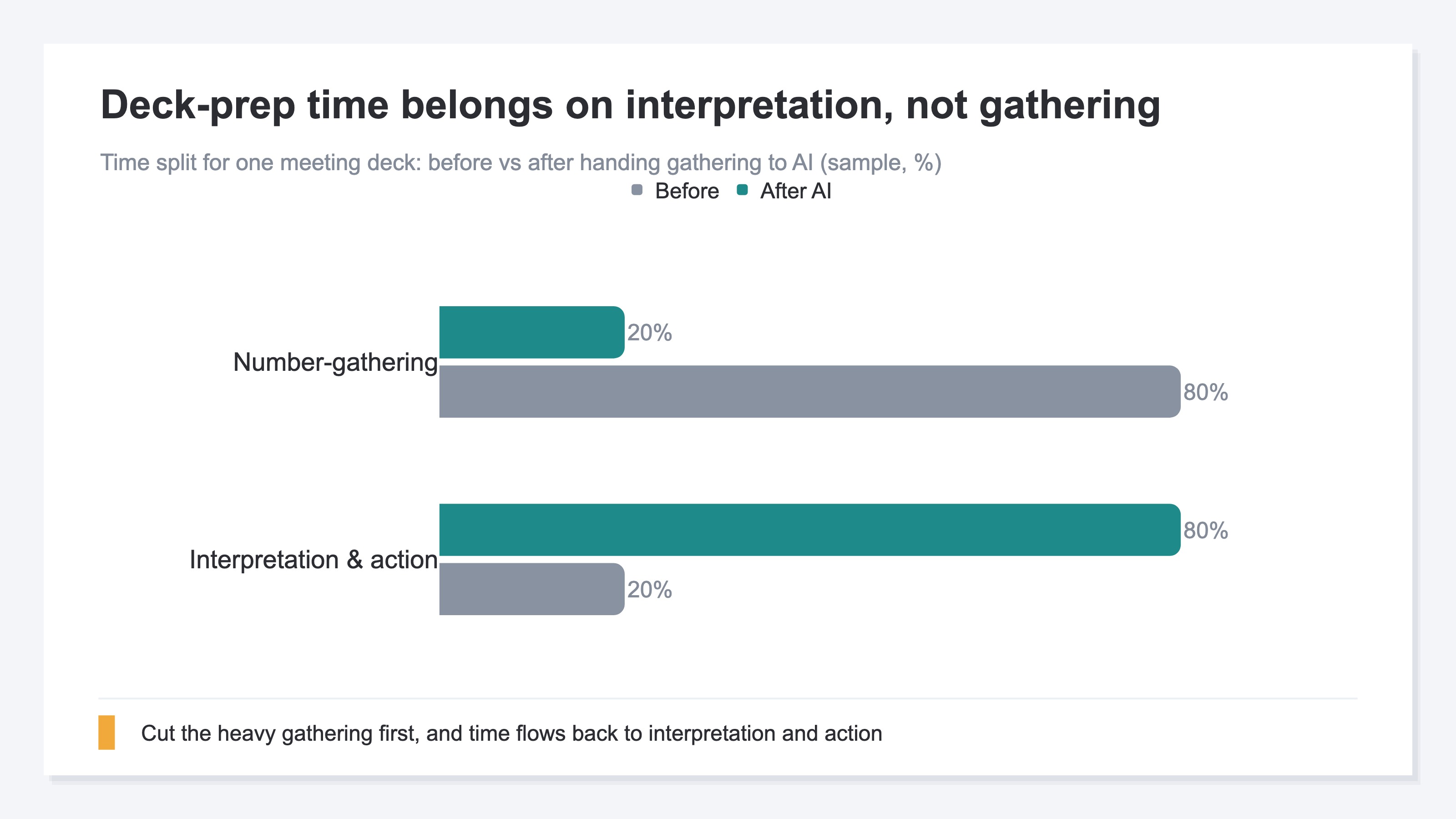
Why does it end up this way? The value of a meeting deck lies not in the numbers themselves but in "how you read them and what you propose." Yet in practice, the low-value gathering stands in the way first and drains your time and energy first. The order is backwards. Fix that, and deck prep gets surprisingly light.
2. Start from interpretation, not data#
The short version: instead of "gather the numbers, then think," prep the deck in the order "decide what you want to say first, then gather only the numbers you need."
The thinking is simple, in three stages. First, place your hypothesis for the conclusion up front. "Ad-driven revenue probably dropped last month." "Returning visitors probably have a higher order value than new ones." A hunch is fine. With a hypothesis, the numbers worth looking at naturally narrow down. Next, list only the numbers you need to test that hypothesis. You don't have to line up every metric—just the ones tied to the hypothesis. Finally, hand the gathering of those numbers to AI. What people face is reading the gathered numbers and writing takeaways and next moves—only that.
The chart below is the division of labor for this workflow. The heavy gathering goes to AI; people focus on interpretation. The line is drawn between gathering and reading.
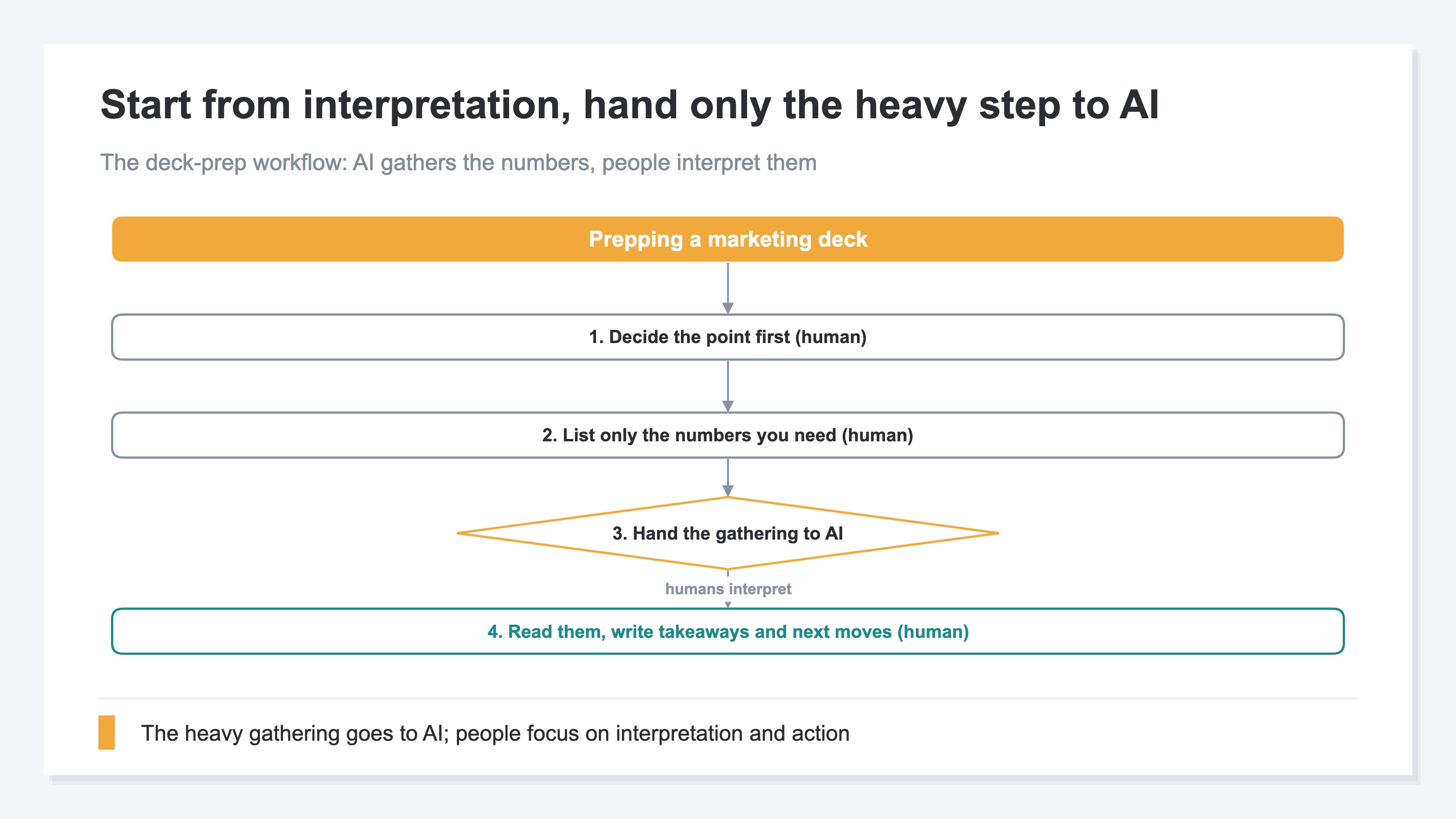
What matters is that this order cuts down on "gathered numbers going to waste." Because you placed the conclusion hypothesis first, the numbers you gather have a purpose from the start. Conversely, if you line up all the numbers first and only then start thinking, you gather a pile of numbers you'll never use—and you get lost in a sea of figures, asking "wait, what was I trying to say?" Starting from interpretation means drawing the map first, then walking only the roads you need. Try it once: on your next deck, start by writing a one-line conclusion hypothesis. The volume of numbers you gather should drop sharply.
3. The limits of handing gathering to a bare AI#
The short version: handing number-gathering to AI is effective, but pasting screenshots into a bare AI has clear limits.
The easiest move is to snap a photo of the GA4 screen and paste it into an AI with "read this." For a quick check, that's sometimes enough. But to use it as the foundation of a meeting deck, there are three weak points. First, misreads: an AI can mix up a small figure in a screenshot, or two similar metrics (sessions and impressions, say). Second, staleness: a screenshot is just one frozen frame from the moment you took it. The numbers keep moving every day and week, while the photo stays still. Third, no link to revenue: the GA4 screen shows you counts of access, but "how much revenue that channel returned" is often outside the frame.
Look at the chart below. Revenue moves like this, week to week. One week it climbs, the next it falls, then it recovers. A single screenshot can't follow this motion. Asked in the meeting "why did only week 3 dip," you can't answer from a frozen photo.
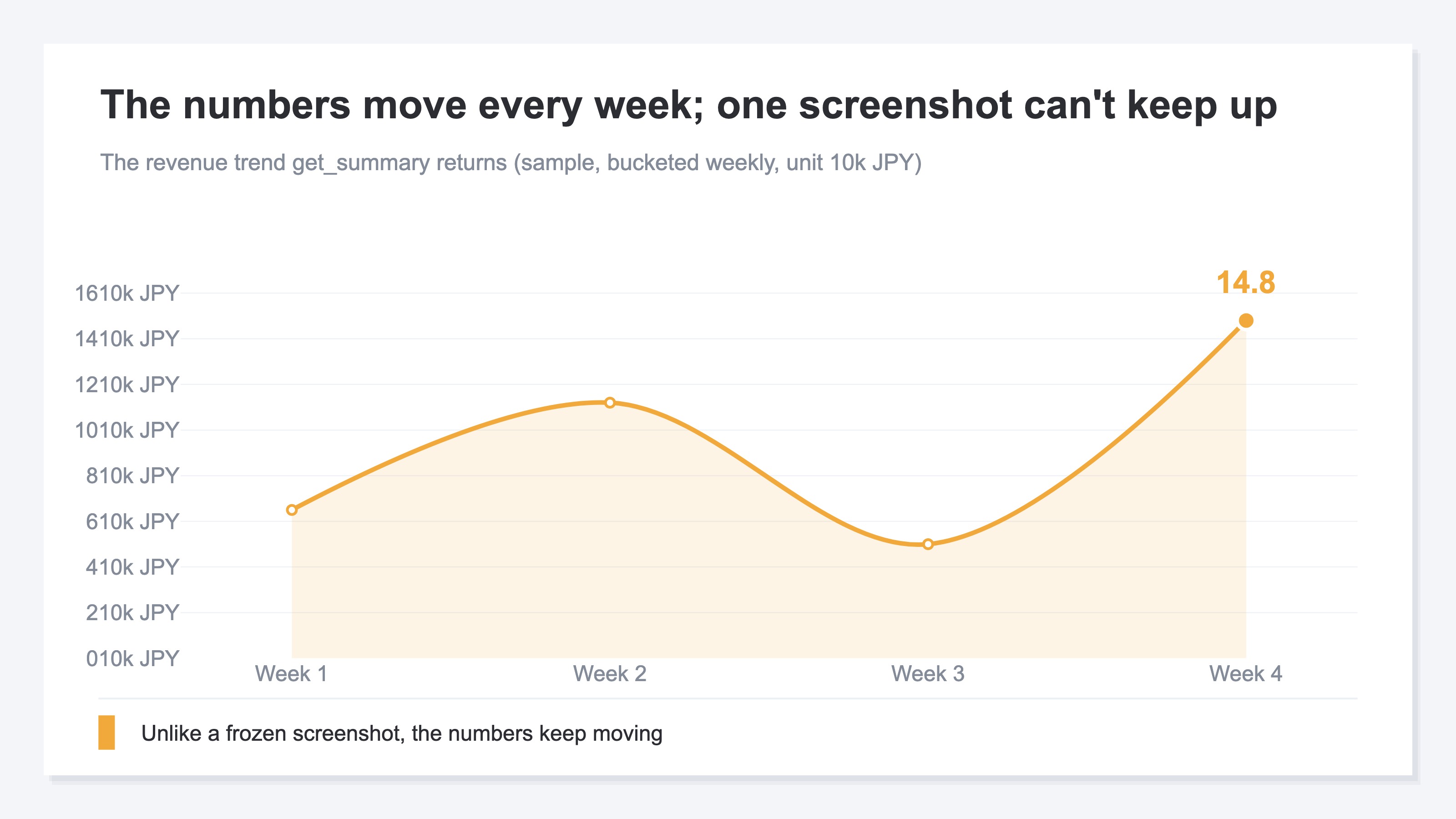
That doesn't mean GA4's manual gathering or a bare AI is useless. They work for the groundwork of grasping a direction. But repeating that every month, across channels (automating monthly reports with AI), and tying it to revenue in a table—that repetition is what's heavy. The thinking is simple; the hand-work is a lot. To lighten it, you need to have AI read the numbers themselves directly, rather than hand it a photo. The next section shows what that looks like.
RevenueScope solution
Even after you reverse the deck-prep workflow, there's a wall you always hit at the end. Even when you say "let AI gather only the numbers you need," if those numbers aren't in a revenue-linked form that AI can read at any time, you end up snapping a photo and pasting it again.
RevenueScope is the tool for getting over that wall. Connect RevenueScope to ChatGPT or Claude, and the AI reads your EC store's numbers directly and answers. No hard setup or SQL required—just ask the AI, "give me this month's summary, with month-over-month change." And those figures are after excluding automated-program (bot) access—revenue-linked values.
Ask RS, and this is what comes back (figures shown are demo data from a fictional sample site).
First, ask get_summary for "this month's summary," and the key figures you want to show in the meeting come back at once, with month-over-month change (it pairs well with the idea of a one-page revenue report).
| Metric | This month | MoM |
|---|---|---|
| Revenue | ¥435,699 | -10% |
| Sessions | 1,375 | -2.9% |
| RPS | ¥316.9 | -7.3% |
| AOV | ¥10,133 | +0.5% |
| CVR | 3.1% | -0.3pt |
| Avg. dwell | 69s | -4.9% |
| Bounce rate | 44% | +1.3pt |
RPS is "revenue per session"; AOV is "the average amount per order" (the five core KPIs to watch in EC). Even with revenue down month over month, AOV is flat—so at a glance you read that the price per order didn't fall; the number of visitors or the share who bought fell. Gathering these numbers takes no five-screen round trip through GA4.
Ask get_priority_insights, and it returns candidates for "what to do this week," ranked by revenue impact.
| Priority | What was found | Suggested move (draft) |
|---|---|---|
| 1 | AI-referred traffic rising (220 visits, +100% vs prior) | Identify the pages being cited and add related topics |
| 2 | "Direct" is high-efficiency (RPS ¥569, 1.8x the site average) but only 18% of traffic | Consider whether you can grow Direct |
Beyond lining up numbers, it offers a draft "next move," so the points worth debating in the back half of the meeting surface early.
What RevenueScope returns is judgment material you can take straight into the meeting. Both the key figures from get_summary and the draft "next moves" from get_priority_insights come ranked by revenue impact, giving you a starting point for discussion. Because the heavy gathering step gets lighter as a whole, you can put that time toward the most valuable part—interpretation and next moves. The last piece of reversing the deck-prep order is right here.
FAQ#
Frequently asked questions#
Q. Why isn't pasting GA4 screenshots into an AI enough?
A. It works for groundwork, but to use it as the foundation of a meeting deck there are three weak points. With a screenshot, an AI can misread similar metrics; a single frame goes stale because the numbers move; and "how much revenue that channel returned" isn't in the photo. Since the numbers move every week, one frozen frame can't answer the questions raised in the meeting. Have the AI read the revenue-linked numbers themselves, rather than a photo, and all three go away at once.
Q. When you say "start from interpretation," is it okay to place a hypothesis on a hunch?
A. Yes. A hypothesis doesn't need to be correct—it's the entry point for narrowing down "the numbers worth looking at." "Ad revenue probably dropped." "Returning visitors probably have a higher order value." A hunch is fine. With a hypothesis, the numbers you gather get a purpose, and wasted gathering shrinks. Even finding out the hypothesis was wrong becomes a discovery worth discussing in the meeting. It moves far faster than lining up every number first.
Q. Does using RevenueScope make deck prep fully automatic?
A. No. What RevenueScope lightens is the "gathering the numbers" step; writing the interpretation and next moves stays a human job. If anything, it's a tool for concentrating your time there. The "next move" from get_priority_insights is a draft for discussion, not a final decision. Hand the gathering to AI and let people make the calls—this division of labor is the shortcut to prepping decks faster while raising their quality.
Conclusion#
What eats your time in marketing deck prep turned out to be, not the thinking step, but the step of gathering and lining up numbers. Round-tripping through several GA4 screens, pulling figures across channels, transcribing them into a table. That manual work took up 80%, and the valuable interpretation got squeezed into 20%.
The fix is to reverse the order. Place a hypothesis for "what you want to say" first, let AI gather only the numbers you need, and keep people focused on interpretation and next moves. The thinking is simple; the heavy part is only the monthly, cross-channel repetition of manual work. Hand that to AI, and deck prep gets far lighter.
That's where having revenue-linked numbers in a form AI can read directly pays off. Instead of snapping a photo of the screen and pasting it, have the AI read the numbers themselves. The gathering step disappears, and your time returns to thinking about "so, what do we do." Start your next deck by writing a one-line conclusion hypothesis.
See which ads actually drive revenue, at a glance
Free up to 5,000 sessions/month, AI connection included. No credit card required. Up and running in 5 minutes.
References#
- [1] Google Analytics Help "[GA4] Traffic acquisition report" (2026)
- [2] Google Analytics Help "[GA4] About reports" (2026)
- [3] Model Context Protocol "Introduction" (2026)
- [4] Anthropic "Introducing the Model Context Protocol" (2026)