
"I ask ChatGPT about my store and all I get back is textbook, obvious advice." Sound familiar?
The reason is simple. It isn't that the AI is weak. It's that the AI hasn't seen a single one of your store's numbers. Without your data, it can only return the world's average answer — generic advice.
This guide covers why AI gives generic advice, how connecting your own numbers changes the answer, and a quick way to try it along with its limits — written so beginners can follow.
Table of Contents
TL;DR#
- AI gives generic advice not because it's weak, but because it hasn't seen any of your store's numbers. AI can only reason within the material it's given.
- The same AI changes its answer once you connect your own numbers — from "strengthen social media" to "email is most efficient, start with email." Textbook answers come from missing input, not missing ability.
- Paste your numbers in by hand and you can try it once. Doing it every month is heavy — gathering from several dashboards, stale numbers the moment you paste, and missed channels all follow you.
- The key to keeping it up is connecting your own data once, so the AI can always read your latest numbers and return "your tailored move for this week" instead of generic advice.
1. Why AI only gives generic advice#
The short answer: AI returns generic advice because it hasn't seen a single one of your store's numbers.
Ask ChatGPT "How do I grow my store's sales?" and any store gets the same kind of answer. "Strengthen social media." "Send newsletters." "Review your product pages." None of these are wrong, but none are aimed at your store. They're the average answer that fits e-commerce in general.
Why does that happen? Because AI reasons only within the material it's given[1]. If you haven't handed over your store's numbers, all it has is general knowledge of the world — so it returns the safest answer within that range, which is generic advice. It's a problem of what it can see, not of its ability.
The point to hold on to: "what you show the AI" decides the answer more than "which AI you use." Swap in the latest, smartest model and you'll still get generic advice if it can't see your store's numbers.
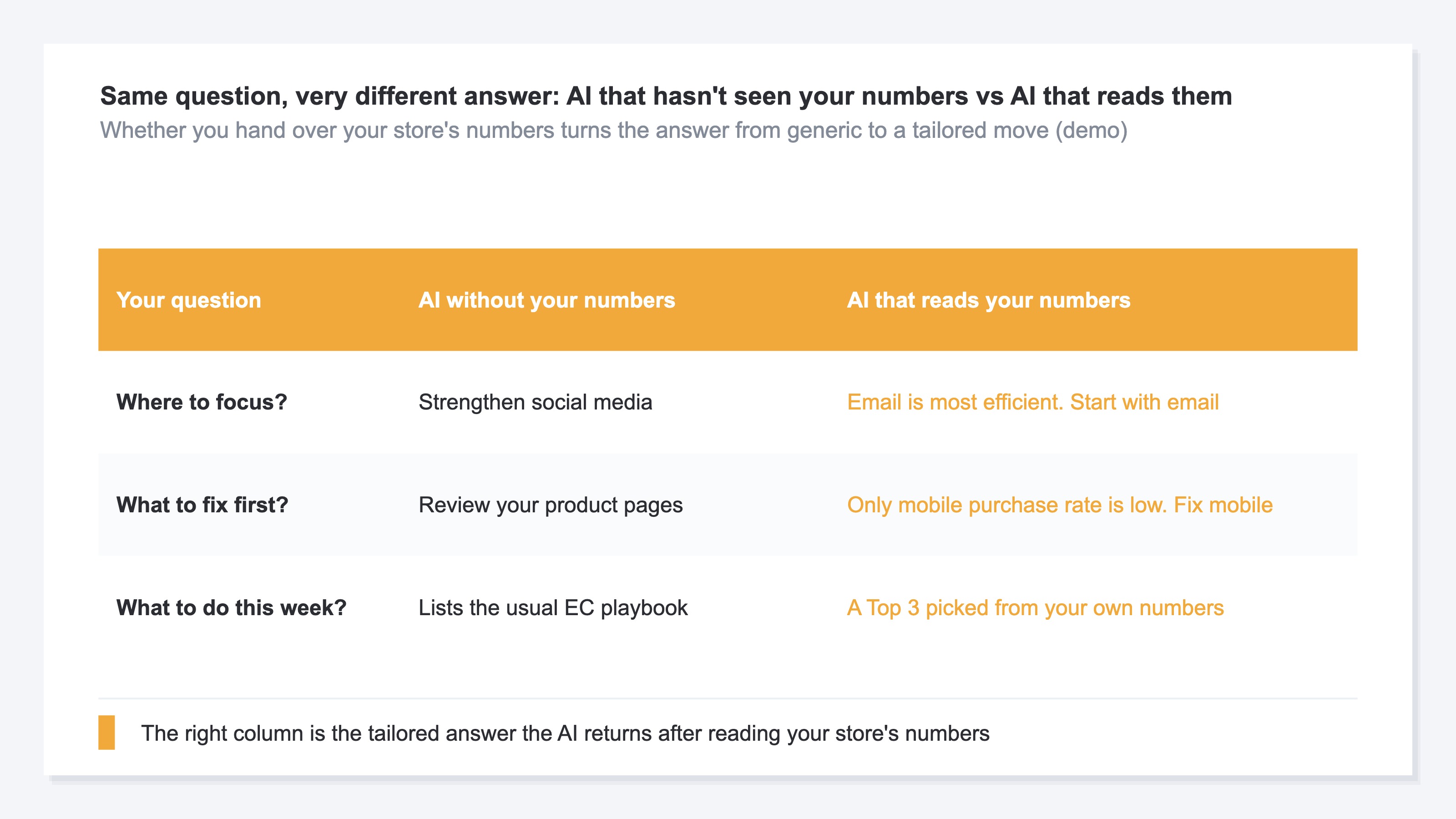
The table above lines up how the answer changes for the same question — AI that hasn't seen your numbers versus AI that reads them. The left is the same generic advice anyone gets; the right is a concrete move drawn from your own numbers. By "your store's numbers," we mean first the five numbers every EC store should track, like revenue and revenue per session.
2. Connect your numbers and the answer changes#
The short answer: with the same AI, connecting your own numbers turns the answer from generic advice into "your tailored next move."
Take the question "Where should I focus?" AI without your numbers says "Strengthen social media." But let the AI read your store's by-channel numbers and the answer changes: "Email sells most efficiently. Start your moves there."
What changed isn't how smart the AI is. Only the material it sees changed[2]. The textbook answer came not from a lack of ability, but from a lack of input — your store's own numbers.
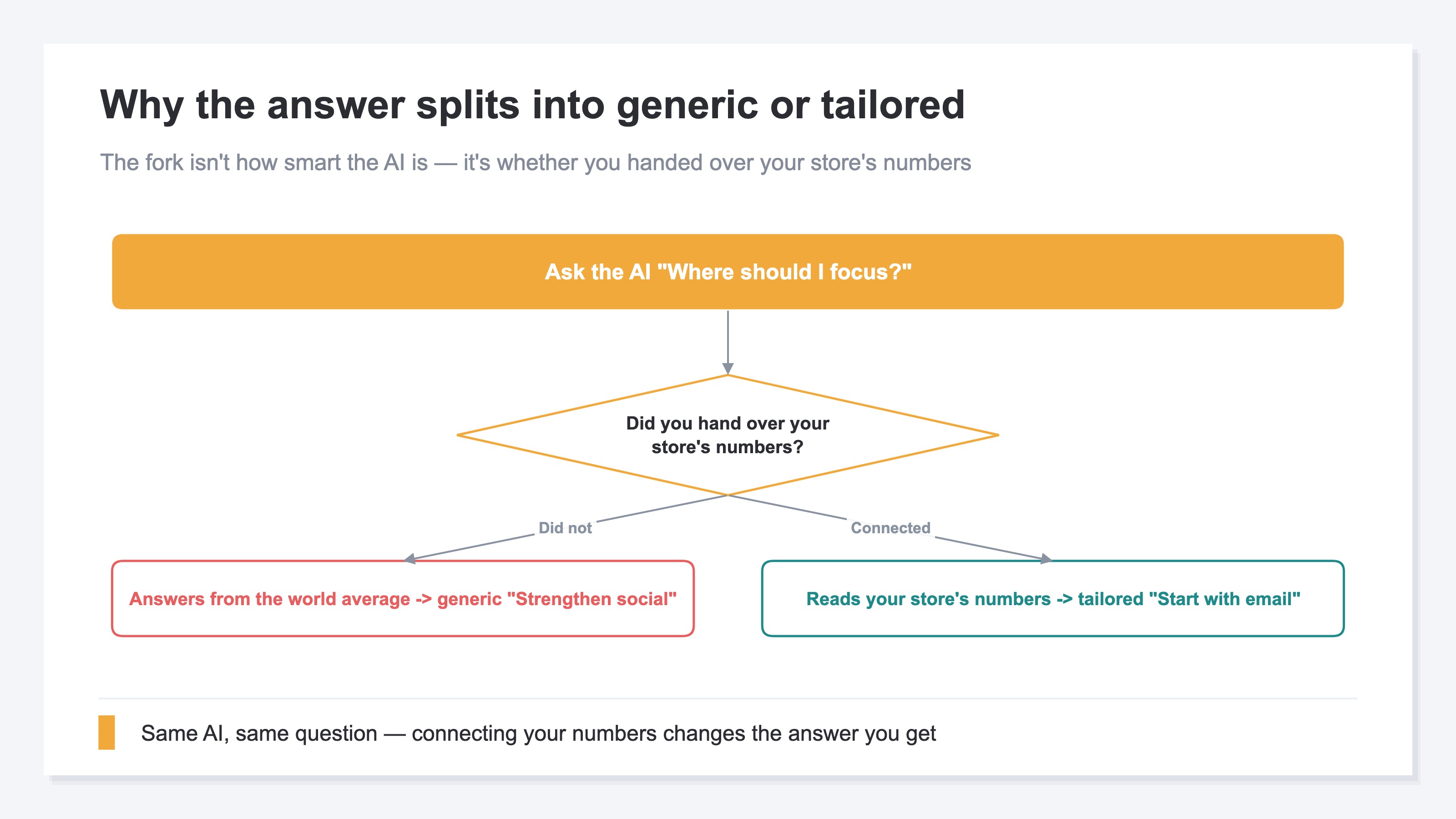
As the figure shows, the fork isn't how smart the AI is — it's whether you handed over your store's numbers. "Connecting" here isn't complicated. It means making your store's numbers readable to the AI directly. Connect once and the AI can always look up your latest numbers without you pasting them in each time. Keep it read-only and there's no worry the AI will rewrite your numbers.
3. You can try it by hand but it gets heavy#
The short answer: you can hand your numbers to the AI by pasting them in. For trying it once, that's plenty.
In practice, copy the numbers from your dashboards into ChatGPT and you can experience the "tailored answer." It's worth doing once. The catch shows up when you try to keep it up every month. Pasting by hand runs into trouble over time.
- The manual work is heavy every time. Ad dashboards, web analytics, the store admin — the numbers are scattered, and each time you collect and re-paste them.
- They go stale the moment you paste. Copied numbers are a snapshot, and by the next day they've changed. Ask with stale numbers and the answer drifts.
- You can't catch what's missing. Forget to paste one channel and the AI won't notice — it returns "here's your answer." Missing material still gets polished into something that looks right.
- Reshaping happens every time. Splitting the gathered numbers by channel and aligning them against last month doesn't finish with a paste. That's where the time goes.
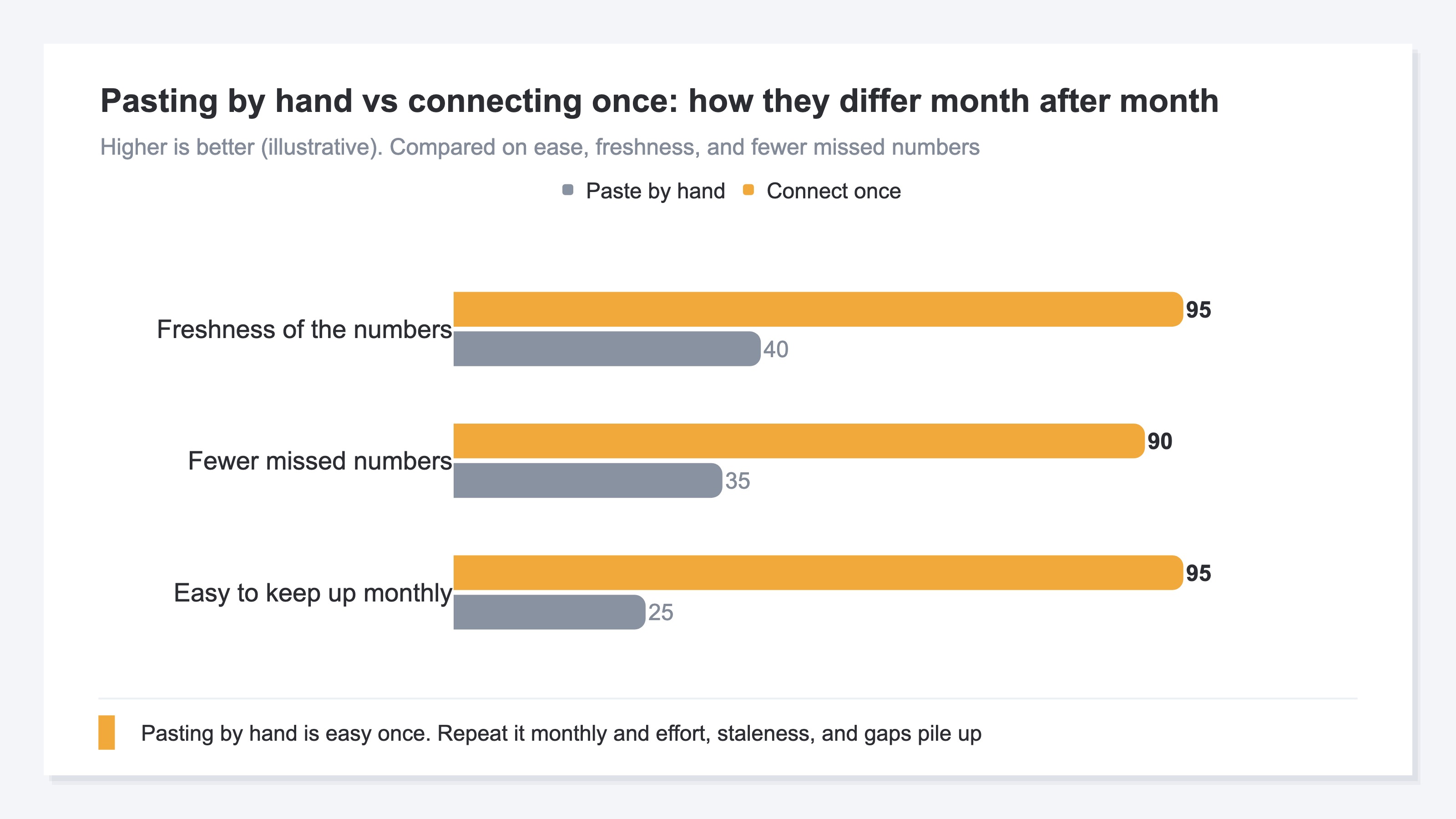
The figure above compares "paste by hand" and "connect once" on how easy it is to keep up monthly, the freshness of the numbers, and how few get missed. Pasting by hand is easy once, but repeat it monthly and effort, staleness, and gaps weigh on you.
So for a one-off, pasting by hand is enough. But to keep a monthly conversation from ending in generic advice, you need to connect your own data once. For the full workflow including building monthly reports, see our guide to automating monthly reports with AI.
RevenueScope solution
The generic advice and the heavy monthly pasting share one root cause: the "latest numbers for your store" handed to the AI can only be prepared by hand.
RevenueScope takes on that handing-over part. Connect it to ChatGPT or Claude and the AI reads your EC numbers directly to answer you. No complicated setup, no SQL — just ask the AI, "Which channel is driving my sales?" It's read-only, so there's no worry your data gets rewritten.
What the AI reads is five numbers — Revenue, AOV (average order value), RPS (revenue per session), CVR (purchase rate), and Sessions — plus their change versus the prior period, already shaped by channel and handed straight to the AI.
For example, an AI that has read your numbers answers like this (demo data):
| Your question | AI without your numbers | AI that reads your numbers |
|---|---|---|
| Where to focus? | Strengthen social media | Email is most efficient. Start with email |
| What's dropping? | Lists generic fixes | Only mobile purchase rate is falling |
| What to do this week? | Lists the usual EC playbook | A Top 3 picked from your own numbers |
Unlike the generic advice on the left, the right is drawn from your store's numbers. To get past "AI makes it easy" and reach decisions that move sales and traffic, you need to let the AI read your own real data like this. What RevenueScope does isn't make the AI smarter — it keeps handing over the "latest, shaped numbers for your store" the AI needs to give you a tailored answer.
FAQ#
Frequently asked questions#
Q. Without handing over my numbers, can good prompting alone make the answer specific?
A. Clever prompting and giving context up front[3] narrow it down somewhat, but there's a limit. The AI doesn't hold your store's real numbers, so however well you ask, it stays in the realm of guess-laden generic advice. Reaching a specific answer requires letting it read your actual numbers.
Q. If I hand my numbers to the AI, could it rewrite them?
A. Keep the connection read-only and the AI only reads — it won't rewrite your numbers. You decide which numbers to show and how far. Pasting by hand is the same: the AI won't change the numbers you paste.
Q. Where should I start?
A. Start by writing out which numbers you look at each month, and where they come from. Then paste them into the AI by hand once to experience the "tailored answer" — that's when the value of connecting it sinks in.
Conclusion#
AI gives generic advice not because of its performance, but because it can't see your store's numbers. With the same AI, let it read your own numbers and the answer shifts from "strengthen social media" to "email is most efficient, start with email" — a move tailored to you. The textbook answer is really a lack of input, not a lack of ability.
You can hand numbers over by pasting them in, and for a one-off that's the fastest path. But to keep a monthly conversation from ending in generic advice, connect your own data once so the AI can always read your latest numbers. The key to getting past "AI makes it easy" and reaching decisions that move sales and traffic is your own real data. Start by writing out the numbers you look at each month.
If you also want to track how much the people who came from AI actually spent, see reading AI-referred traffic by revenue.
See which ads actually drive revenue, at a glance
Free up to 5,000 sessions/month, AI connection included. No credit card required. Up and running in 5 minutes.