Generative AI impressions in Google Search Console (GSC), and sessions in GA4's AI Assistant channel. Anyone who opens both and lines them up is thrown first by how far apart the numbers sit. They can be orders of magnitude apart, or one of them can read as almost zero. This is not something you correct a setting to bring into agreement.
Contents
TL;DR#
- Google Search Console's generative AI performance report went live on June 3, 2026[1]. What it carries is impressions; clicks, average position and the list of search queries are not among its fields[2]
- Its scope is the generative AI features inside Google Search and in Discover[1]. AI from other companies, ChatGPT included, is out of scope
- GA4's AI Assistant channel was added on May 13, 2026[3]. It collects visits whose referral medium matches "ai-assistant", which is what ChatGPT, Gemini and the rest fall under[4]
- One counts how often a link appeared on a Google screen, the other counts visits that arrived from outside AI. The two don't overlap, so lining them up never produces a match
- Add the two together and you still can't say how much revenue the visits from any one AI produced
1. The Mismatch Isn't a Fault#
This gap is the first thing people run into when they set out to measure AI-driven traffic and open both screens. One lays out impressions in the thousands, the other displays a few dozen sessions. Both carry the word "AI", so it looks like one of them must be broken.
Both reports are behaving as documented. The two do not intersect on what they measure, so not matching is the specification working as written. The order of business is to pin down what each one counts, and only then decide which of them belongs to which decision.
Part of the confusion comes from how close together they appeared. The GA4 addition landed on May 13, 2026[3], the Google Search Console addition on June 3 of the same year[1]. Two reports with "AI" in the name arrived about three weeks apart, which set up conditions for reading them as two views of the same thing.
2. What GSC Counts Is Impressions on Google's Own Screens#
What was added to Google Search Console is a performance report for generative AI. The Google Search Central announcement describes its scope as the generative AI features inside Google Search and the generative AI features in Discover[1]. In other words, it splits out how many times your links appeared on the AI Overviews and AI Mode screens, separately from ordinary search results.
The point worth holding onto is which fields it carries. What the Help documentation lists is impressions, along with page, country, device and date[2]. The clicks, average position and search query list that the ordinary search performance report carries are not in that list of fields. You can see how many times you were shown, but you cannot follow how many clicks came out of it on the same screen.
How impressions are calculated has an assumption in it as well. If your content is used in an AI answer but no link appears on the screen, nothing is added to impressions. That is where the "lower than expected" reading comes from (why AI Mode impressions come in lower than you expect). Reading the report itself is covered separately (how to read GSC's AI search report).
One more thing: these impressions also remain rolled into the overall performance report as before[1]. Nothing new started being counted. What was already in the total was carved out so it could be viewed on its own.
3. What GA4 Counts Is Visits Arriving From Outside AI#
The AI Assistant channel added on the GA4 side comes from an entirely different place. This one classifies visits based on referral information. Under the default channel group definition, a visit whose medium matches "ai-assistant" exactly lands in this channel, and GA4 sets that value automatically when the visit comes from a recognized AI assistant[4]. The examples the Help documentation raises are ChatGPT, Gemini, Claude, Copilot and Grok[3][4].
What is being tallied is not impressions but visits that actually reached the site. Being cited in a ChatGPT answer produces nothing in GA4 on its own. One session is recorded only once a person presses that citation link.
And here is what matters: Google's own AI does not, as a rule, come through here. Visits from Google's AI Mode carry Google as the referral, so they blend into organic search and elsewhere. That mechanism is laid out separately (where AI Mode traffic shows up in GA4). What GSC counts is precisely those appearances on Google's AI screens, so impressions can climb on the GSC side while the AI Assistant channel in GA4 stays still.
This channel carries other cautions too — automated access can mix in and inflate the figure, and revenue is hard to see from it (the bot and revenue blind spots in GA4's AI assistant traffic).
4. Stop Reconciling Them and Read Them by Role#
Put together, the two reports differ both in where they look and in how they calculate.
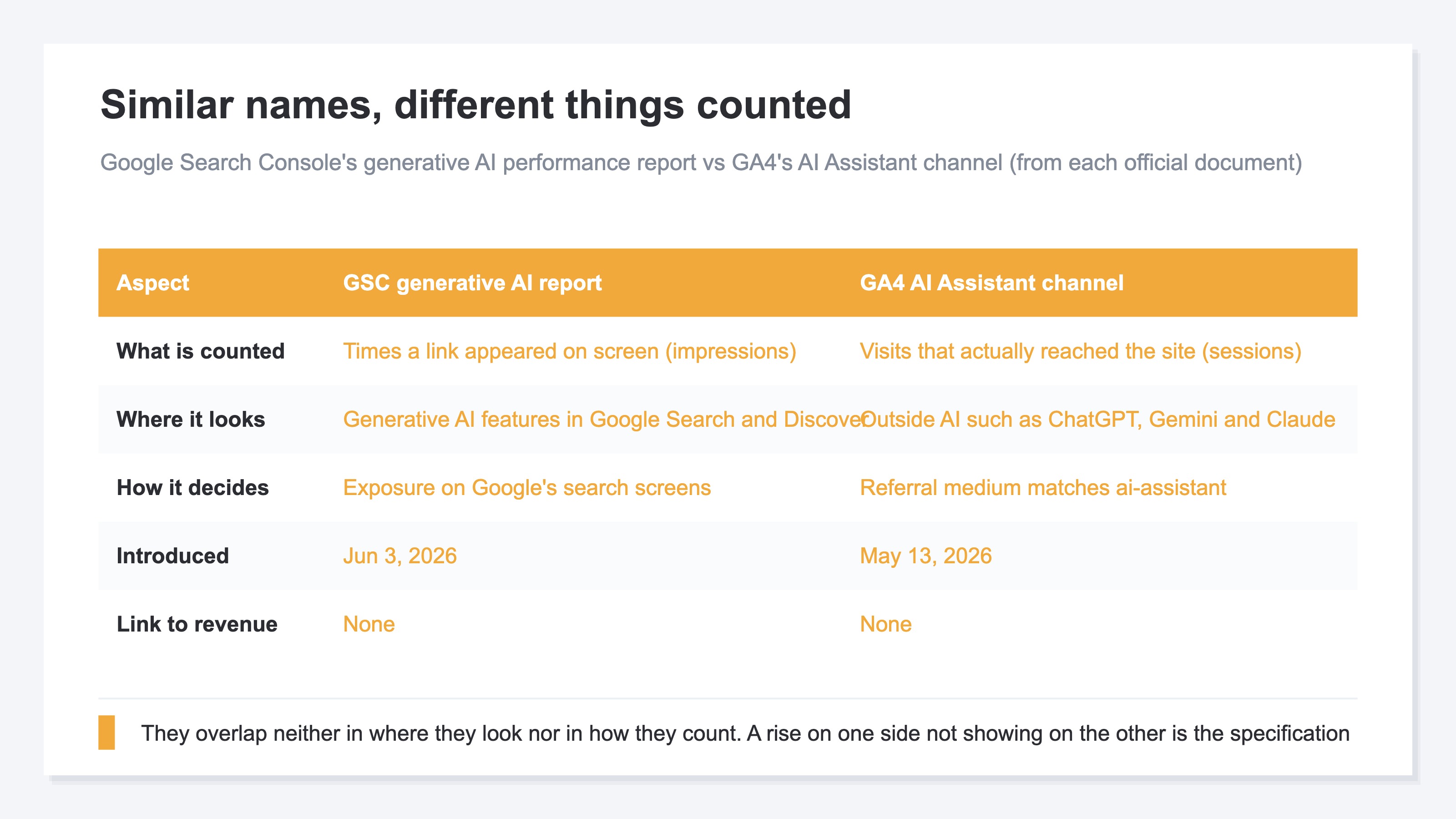
By place, GSC sits inside Google and GA4 sits outside it. By calculation, GSC counts times shown and GA4 counts visits that arrived. Neither of those two overlaps, so a rise or fall on one side not appearing on the other is exactly what you should expect. You also cannot add them and call the result "total AI traffic". That would be adding two things measured in different units.
Reading them by role comes out like this. If you want to know how much exposure your content is getting on Google's search screens, that is the GSC side. If you want to know whether people are actually arriving from outside AI like ChatGPT, that is the GA4 side. Separating out the symptom where average position hasn't moved but clicks alone have fallen is yet another way of looking (same rank, fewer clicks).
And what remains after opening both is a third layer. Impressions, GSC tells you. Visits, GA4 tells you. How much revenue the visits from any one AI produced is on neither screen. The GSC side stops at impressions by specification. The GA4 side does report revenue by channel, but not laid out alongside a breakdown by individual AI assistant. Exposure going up, and visits going up, are not on their own reasons to act.
RevenueScope solution
RevenueScope ties visits that arrived through an AI assistant to the page they landed on and to revenue. It identifies clicks from ChatGPT, Claude, Gemini, Perplexity and Copilot by their referral, and displays revenue for the sessions that entered through those pages. The channel listing carries revenue per visit (RPS) as well, so a source that brings small volume at high efficiency doesn't slip past unnoticed.
Visits from AI that pass no referral are outside this calculation, so the real figure for AI-driven traffic comes out on the low side in any tool. That doesn't blunt the judgment. If the low-side figure is rising, the real one is rising too, and as long as the periods you compare use the same calculation, the direction of change reads clearly.
Volume Order and Efficiency Order Don't Match#
Here is one month for Fictional Store B, written out by traffic source.
| Source | Sessions | Revenue | RPS |
|---|---|---|---|
| ChatGPT | 400 | ¥200,000 | ¥500 |
| Gemini | 150 | ¥50,000 | ¥330 |
| Perplexity | 80 | ¥60,000 | ¥750 |
| Ordinary search | 10,000 | ¥3,000,000 | ¥300 |
Note: this table is one example from Fictional Store B, built to explain the mechanism. The demo screen runs on the sample store's sample data, refreshed daily, so the figures the moment you open it will not be the ones here.
Going by sessions alone, AI-driven traffic is around 6% of ordinary search — a scale that gets waved through as noise in a monthly report. Read by RPS, though, Perplexity comes in at more than 2x ordinary search. Cut by volume and you cut away the efficient entrance. What to check next is which pages those sources are landing on.
FAQ#
Frequently asked questions#
Q. Is there a setting that brings the two reports closer together?
A. There isn't. What GSC counts is how often your links appeared on a Google screen; what GA4 counts is visits that actually arrived from outside AI. They don't overlap, so this is not the kind of difference a setting can reconcile.
Q. GSC impressions are climbing but GA4's AI Assistant channel hasn't moved. Is something wrong?
A. Nothing is wrong. What GSC counts is appearances on Google's AI screens, and visits from there blend into organic search and elsewhere in GA4. What lands in the AI Assistant channel is visits from outside AI like ChatGPT[4]. The two are separate paths, so one climbing leaves the other still.
Q. Can I get clicks out of GSC's generative AI report?
A. The fields the Help documentation lists are impressions, along with page, country, device and date[2]. Clicks are not in that list. The announcement does say more fields are under consideration[1], so the situation may change.
Q. Which number should I actually report AI-driven traffic with?
A. GSC impressions if you want to report exposure, GA4 sessions if you want to report traffic. But to make it something you decide investment on, you need to go as far as how much revenue those visits produced. Impressions and visits are both waypoint metrics.
Summary#
Google Search Console's generative AI performance report on June 3, 2026; GA4's AI Assistant channel on May 13 of the same year. The two that appeared about three weeks apart resemble each other only in name. The first counts how often your links appeared on Google's search screens and in Discover; the second counts visits that actually reached you from outside AI like ChatGPT. Neither where they look nor how they count intersects, so there is no point in the work of trying to reconcile them.
On top of that, a question stays open even with both screens in front of you: whether that exposure and that traffic turned into revenue. The GSC side stops at impressions by specification, and the GA4 side does not hold a per-AI breakdown and revenue on the same screen.
Exposure from GSC, traffic from GA4, and revenue tied together on your own side. Once those three roles are assigned, the numbers not matching stops costing you time.
See which ads actually drive revenue, at a glance
Free up to 5,000 sessions/month, AI connection included. No credit card required. Up and running in 5 minutes.