
From BASE or STORES to Shopify. The thing you most easily lose in a cart migration isn't product data, and it isn't the customer list. It's the baseline you compare against. A migration breaks measurement in three places: tracking tags, referrers, and search assets. And the past numbers themselves can't come along to the new cart. So what you carry over is how you measure, not the numbers. Set things up so the same definitions, the same naming, and the same baseline let you keep comparing before and after the move. Get that in place, and when the numbers shift after migration, you can isolate the cause and recover. This article lays out the measurement setup to line up before you migrate, and how to run the before-and-after comparison once you have.
Table of contents
Key takeaways#
- A cart migration breaks measurement in three places: tracking tags, referrers, and search assets. The past numbers themselves can't come along to the new cart.
- What you carry over is how you measure, not the numbers. Write down your baseline, keep your UTM naming unchanged, and miss no redirects — these three let you compare before and after on the same terms.
- Whether the migration succeeded can only be judged from the post-migration numbers. The real work is the monitoring: for 4–12 weeks after the move, comparing against your pre-migration baseline every week.
1. The three places measurement breaks in a cart migration#
A cart migration breaks measurement in three main places: tracking tags, referrers, and search assets.
First, tracking tags. The mechanism that sends purchase events differs from cart to cart, so the measurement setup on your old cart won't work as-is. It gets rebuilt on the new one. Which cart can measure what, and how far, is laid out in our comparison of measurement across major carts.
Referrers break too. When the migration changes your checkout page's domain, the page transition just before purchase can get counted as "traffic from another site" [1]. The real traffic source disappears, and vague buckets like Direct swell instead.
And then search assets. When a migration changes your URLs, the per-page series of search rankings and impressions gets cut off right there. Pages whose redirects were missed fade out of the search results, and search traffic drops off a cliff.
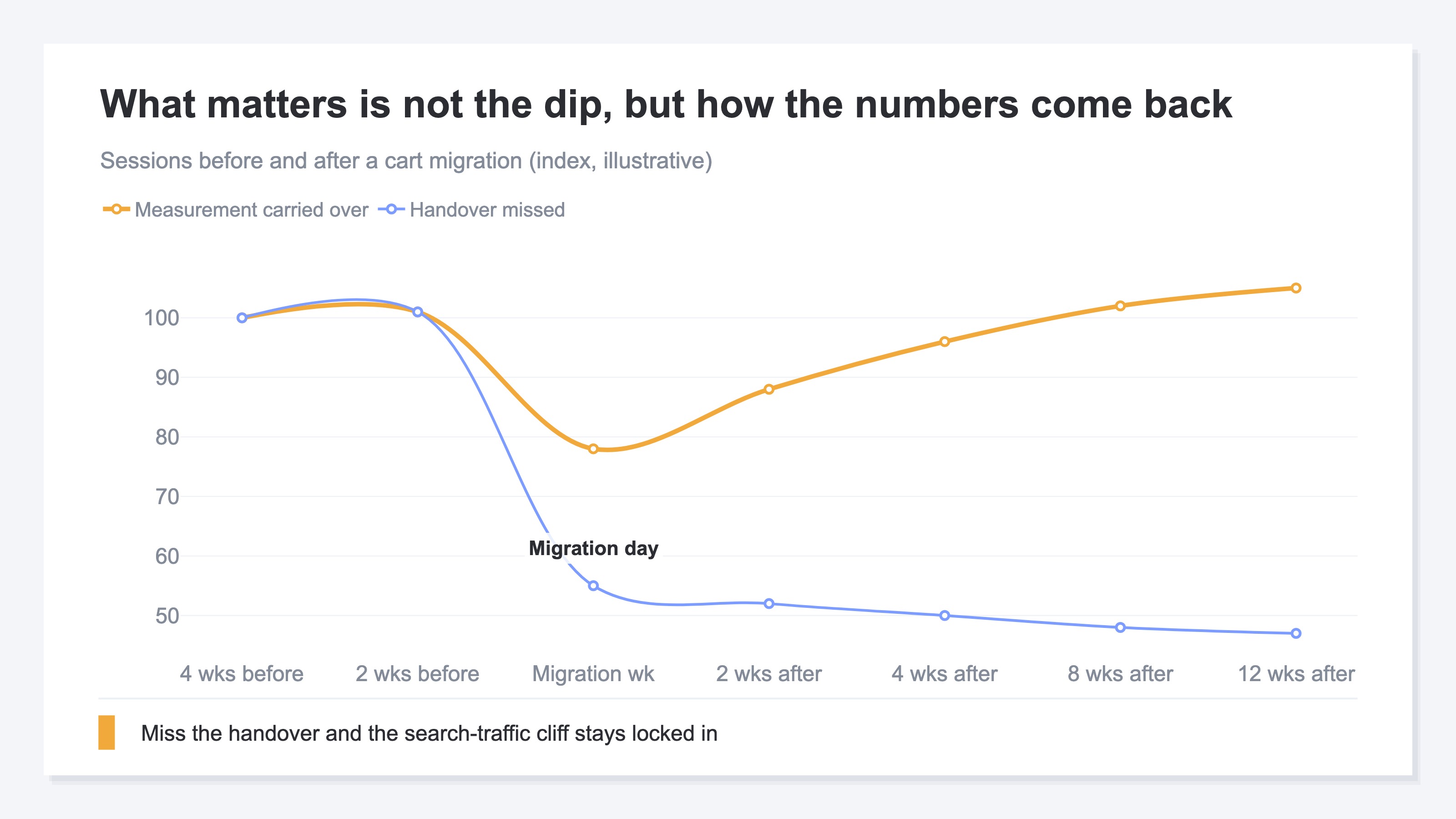
The chart above is an illustrative view of sessions around the migration date. Right after the move, even a well-run migration dips once. What separates the outcomes isn't the dip — it's the recovery. Carry over how you measure and the line climbs back within a few weeks. Miss the handover and the search cliff and the swollen Direct bucket stay fixed in place.
2. Carry over how you measure, not the numbers#
What you carry over in a migration is "how you measure," more than the past numbers themselves.
The reason is simple: the past numbers can't be carried. You can keep your GA4 property, but its numbers won't join into a single series with the new implementation on the new cart. And the analytics screen bundled with your cart becomes unreachable once you cancel.
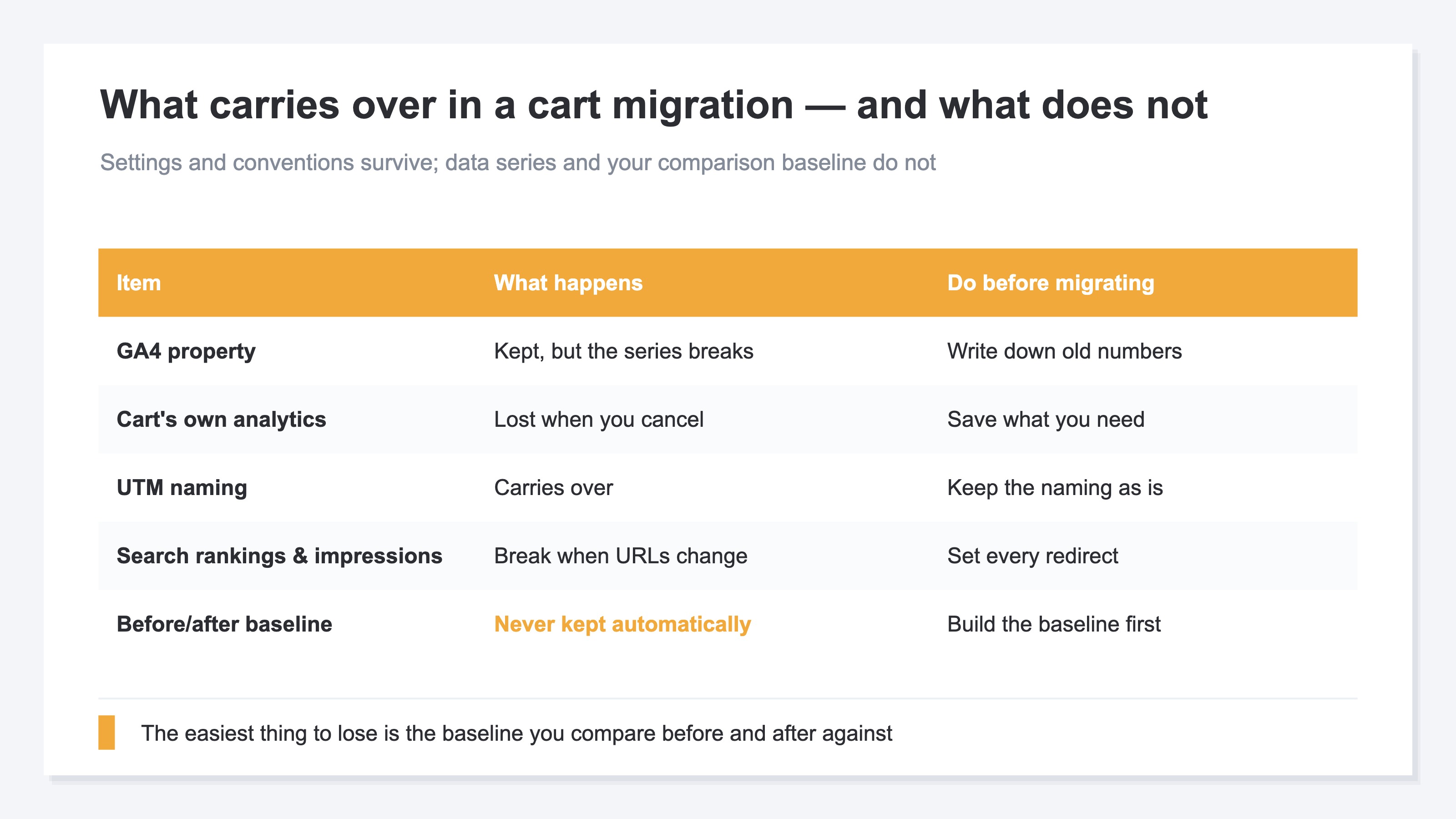
As the table shows, what survives is the "decisions" side: your UTM naming, your channel definitions, and the baseline you compare against. Keep those decisions consistent and the comparison continues even though the container for the numbers has changed. Change the decisions at migration time, and you end up measuring different things before and after the move. That's not a migration failure — it's a comparison failure. To judge the post-migration numbers at all, you first need a state where you can compare on the same way of measuring.
3. What to line up before you migrate#
There are only three things to do before you migrate, and the thinking behind each is simple.
- Write down your baseline: Record your numbers for the 4–8 weeks before the move. Sessions, revenue, and RPS (Revenue Per Session — the revenue a single visit brings in) by channel, plus search rankings and impressions for your main pages. This becomes what you compare against after the migration. One caveat: this record is a snapshot. It can't tell you whether the recovery after the move is on track — it doesn't show the trend.
- Don't change your UTM naming: Don't use the migration as an occasion to rename the UTMs on your ad and email links [2]. Change the naming and the same campaign gets counted as a different channel before and after the move. The thinking behind naming rules is covered in how to use UTM parameters correctly.
- Miss no redirects: Map old URLs to new URLs one to one. Any page that slips through loses its accumulated search assets, page by page.
This article deliberately stays out of the actual GA4 setup steps on the new cart. The walkthrough lives in our GA4 setup checklist for Shopify.
4. Why the real work starts after the migration#
Whether the migration succeeded can only be judged from the post-migration numbers. So the real work starts after the move.
Right after a migration, every site's numbers move. The problem is telling whether a drop is a temporary dip or a structural break. Decide the order in which you check, and you won't get lost.
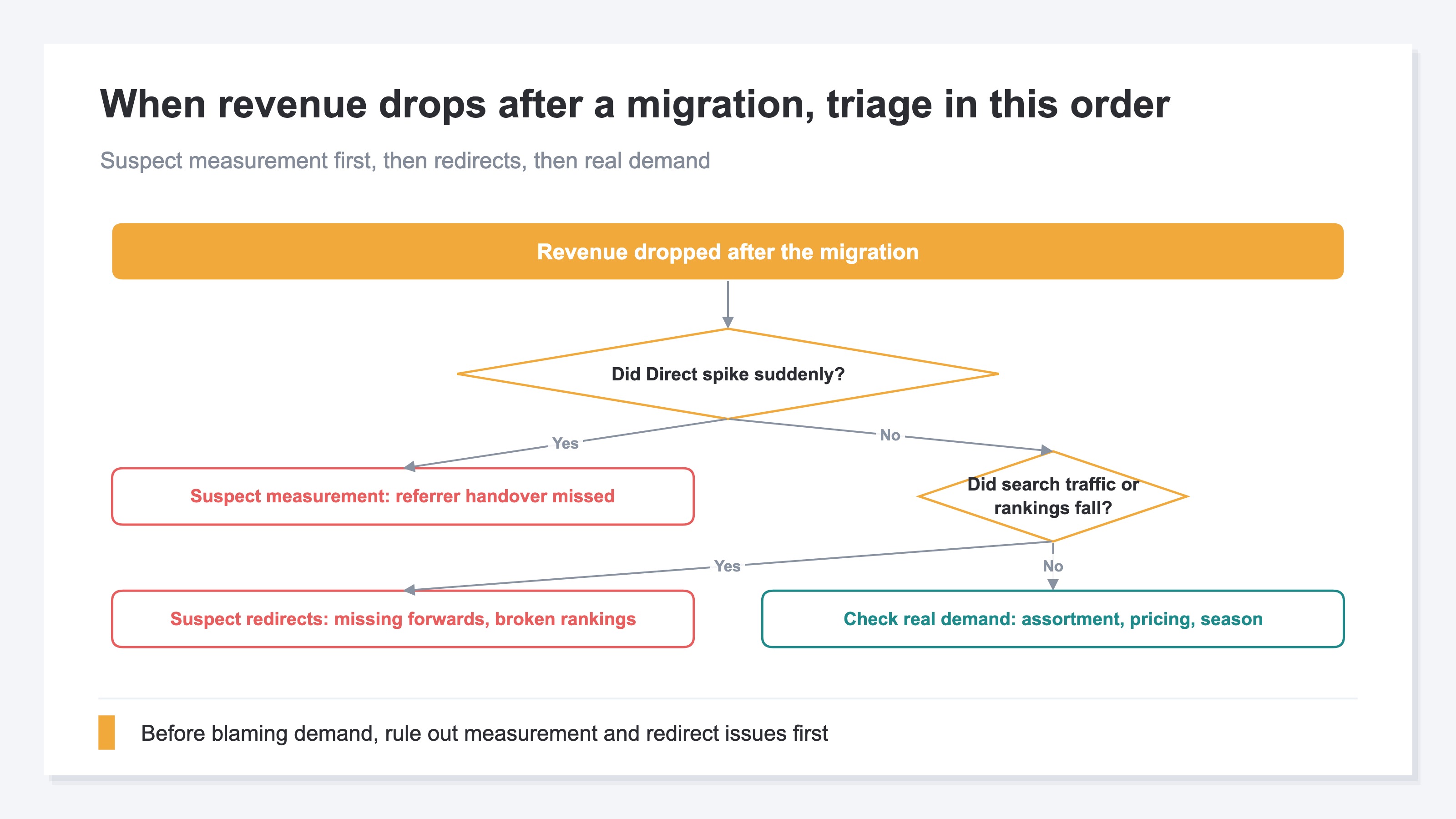
First: has Direct suddenly grown? If so, it's a measurement issue — a missed referrer handover [3]. The revenue didn't vanish; you've just lost sight of where it came from. The fix is covered in repairing referrers that turn into Direct. Next: have search traffic and rankings fallen? If so, it's a redirect issue. If neither, only then do you check real-sales factors — assortment, pricing, seasonality.
One more premise. Across a migration, GA4 and your cart's admin screen will disagree somewhat on revenue. Rather than chasing the gap to zero, the realistic approach is relative comparison within the same way of measuring. What's inside that gap is unpacked in why GA4 and Shopify revenue don't match.
And here's the heavy part. You keep running this diagnosis and before-and-after comparison every week, for 4–12 weeks after the move. You cycle between GA4, Google Search Console, and your cart's admin screen. You check channel-level and page-level numbers against your pre-migration baseline, one by one. Since the baseline record is a snapshot, you rebuild the comparison table every time. It's doable once — done weekly, it's heavy work.
RevenueScope's solution
The before-and-after comparison around a cart migration runs into two walls. In GA4, you have to rebuild the basis for comparing before and after by hand, every time. And Google Search Console's standard screens won't show one page's ranking trend in a revenue context in one click.
RevenueScope lightens the "after" side of this comparison. Site-wide sessions include the immediately preceding period under the same bot-excluded definition. Per-channel sessions cover the selected period, so compare them with the baseline recorded before migration. Page-level search rankings and impressions are also trackable for checking recovery after a redirect. Connect RevenueScope to an AI assistant, provide the recorded baseline, and ask which channels have not recovered; it lays current sessions by channel beside that baseline (display uses demo data).
Revenue and RPS appear only when the purchase event flows into the dataLayer on the same page as the storefront measurement tag. We cannot currently say that this arrangement holds on Shopify's purchase confirmation page after migration.
| Channel | Sessions (vs pre-migration) |
|---|---|
| Search engines | -18% |
| +2% | |
| Social | -6% |
| Direct | +45% |
Here is how to read it. Direct alone is up a large +45%, which signals a missed referrer handover. Search engines are down 18%, so redirects and search-traffic recovery deserve the next check.
Where RevenueScope helps is the continuous measurement going forward. If your environment allows a tag (on BASE via an extension [4], on STORES depending on your plan [5]), install it before the move and the before and after connect on the same way of measuring. Where that isn't possible, RevenueScope still keeps the post-migration recovery watch and the before-and-after comparison going on one screen.
FAQ#
Q1. Can I carry my pre-migration GA4 data over to the new cart?
The past numbers stay viewable if you keep the property. But they won't join into a single series with the new implementation on the new cart. The realistic approach is to write down your pre-migration baseline and use it as the "before" side of a before-and-after comparison.
Q2. How long should I keep monitoring after the migration?
Four to twelve weeks is the guide. Search engines take time to re-evaluate your redirects, so don't judge success or failure on the first week or two of numbers alone. Also keep in mind that Google Search Console data arrives with a 2–3 day lag.
Q3. Direct jumped right after we migrated. Does that mean the migration failed?
Suspect the measurement first. If the checkout domain change breaks the referrer handover, traffic around the purchase gets counted as Direct. The revenue didn't vanish — you've lost sight of where it came from. Fix the referrer settings and the numbers from that point on get counted under their real sources (past data can't be corrected retroactively).
Summary#
What a cart migration really puts at risk is your baseline for comparison. Measurement breaks in three places — tracking tags, referrers, and search assets — and the past numbers themselves can't come along. So what you carry over before the move is how you measure, not the numbers: write down your baseline, keep your UTM naming unchanged, and miss no redirects. That's all three.
And the real work starts after the migration. Success can only be judged from the post-migration numbers. Decide the order of suspicion — a swollen Direct means a measurement issue, a search cliff means a redirect issue — and keep comparing against your pre-migration baseline, on the same way of measuring, every week. Do that, and the migration stops being "it probably went fine" and becomes something you can verify with numbers.
See which ads actually drive revenue, at a glance
Free up to 5,000 sessions/month, AI connection included. No credit card required. Up and running in 5 minutes.
References#
- [1] Google Analytics Help "Set up cross-domain measurement" (2026)
- [2] Google Analytics Help "Collect campaign data with custom URLs" (2026)
- [3] Google Analytics Help "Identify unwanted referrals" (2026)
- [4] BASE Help "Access analytics and tracking tag setup" (2026)
- [5] STORES Help "What can I check in shop analytics?" (2026)