The ad platform reports clicks in the three digits, but open your own channel breakdown and sessions sit at almost zero. No revenue either. This article splits that zero into three kinds, then goes as far as how to decide whether to cut the channel or keep it.
Contents
TL;DR#
- "There are clicks but nothing is happening" holds several states inside it, and the move each one calls for is completely different
- Where they disappear splits three ways: dropped before landing / landed but not counted as human / landed but not classified into the ad channel
- The next move points the opposite way for each. Correct the settings, narrow the delivery, or fix the measurement
- The clue that tells them apart is the bot-exclusion count displayed on the same screen as sessions
- How much gets excluded differs widely by channel. On our own site over the past 30 days the spread was more than 20x
1. The Ad Platform Says 100 Clicks, Your Own Side Says 0 Sessions#
Behind the single appearance of "there are clicks but nothing is happening" sit states that call for completely different moves.
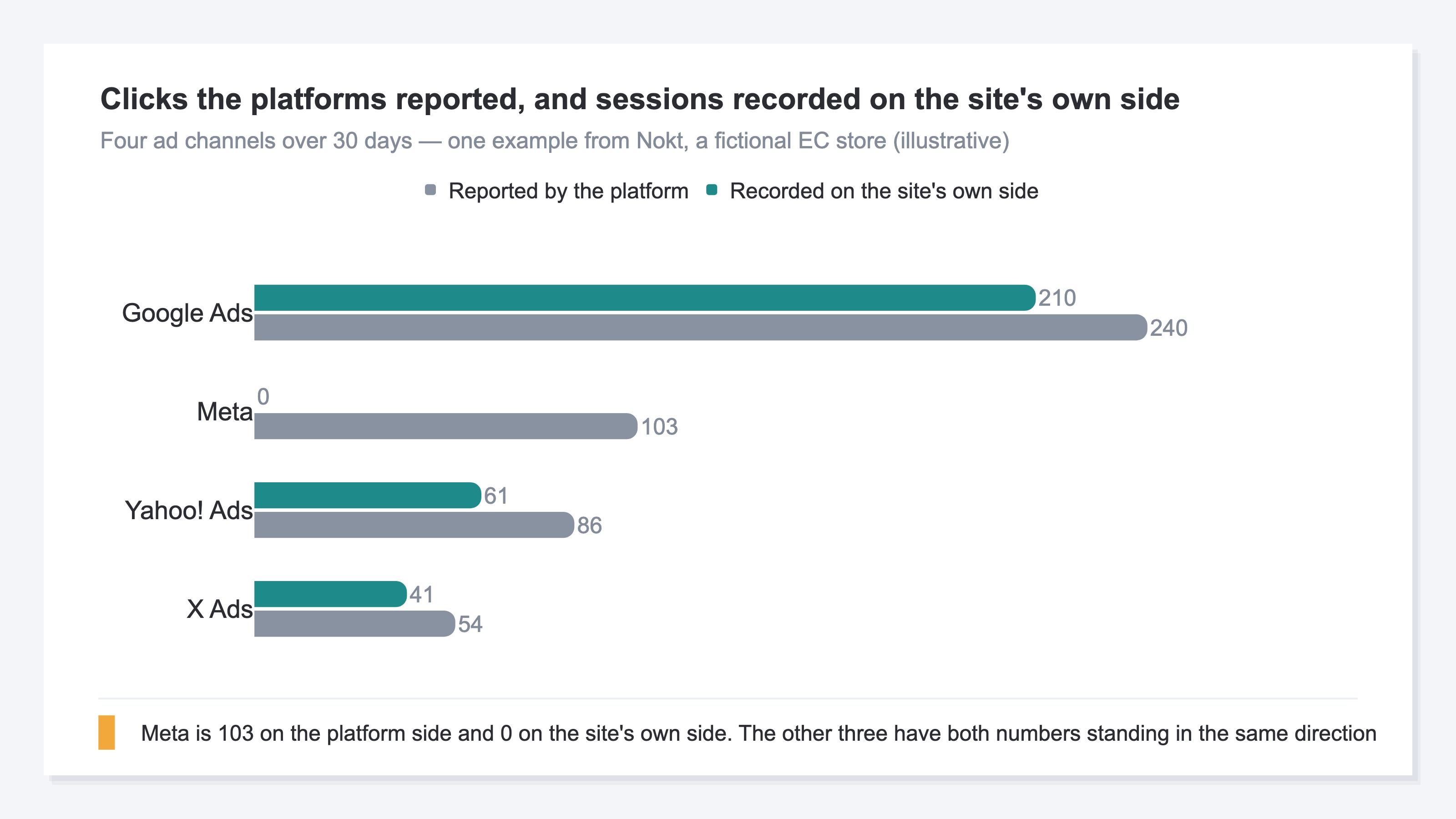
The common shape goes like this. A campaign you just launched has more than a hundred clicks in the platform's manager. Yet in your own channel breakdown, sessions from that platform stay at zero or in the single digits. Revenue is ¥0. Wait a few days and the numbers don't move.
What's easy to miss here is that what the platform counts is a "link click." Meta describes it as the number of clicks on links within an ad[1]. The number of times the page loaded is a separate metric called "landing page views." One of the reasons the two don't agree, it notes, is that the web page isn't fully loading after the link click[1].
Clicks and sessions drifting apart by a few percent to a few dozen percent happens all the time. The general mechanism behind that is laid out in Google Ads clicks and GA4 sessions don't agree. What this article covers is the extreme case where the drift has opened up to nearly all of it. A separate mechanism that makes platform-side results look larger is covered in Meta's Advantage+ and why results look larger.
In this state the hand reaches first for the pause button. But behind the same appearance live three causes, each of which has to be checked somewhere different. Some settle down once you narrow the delivery; for others the number doesn't move at all when you do. Deciding whether to stop comes after that.
2. Where It Disappears Splits Three Ways#
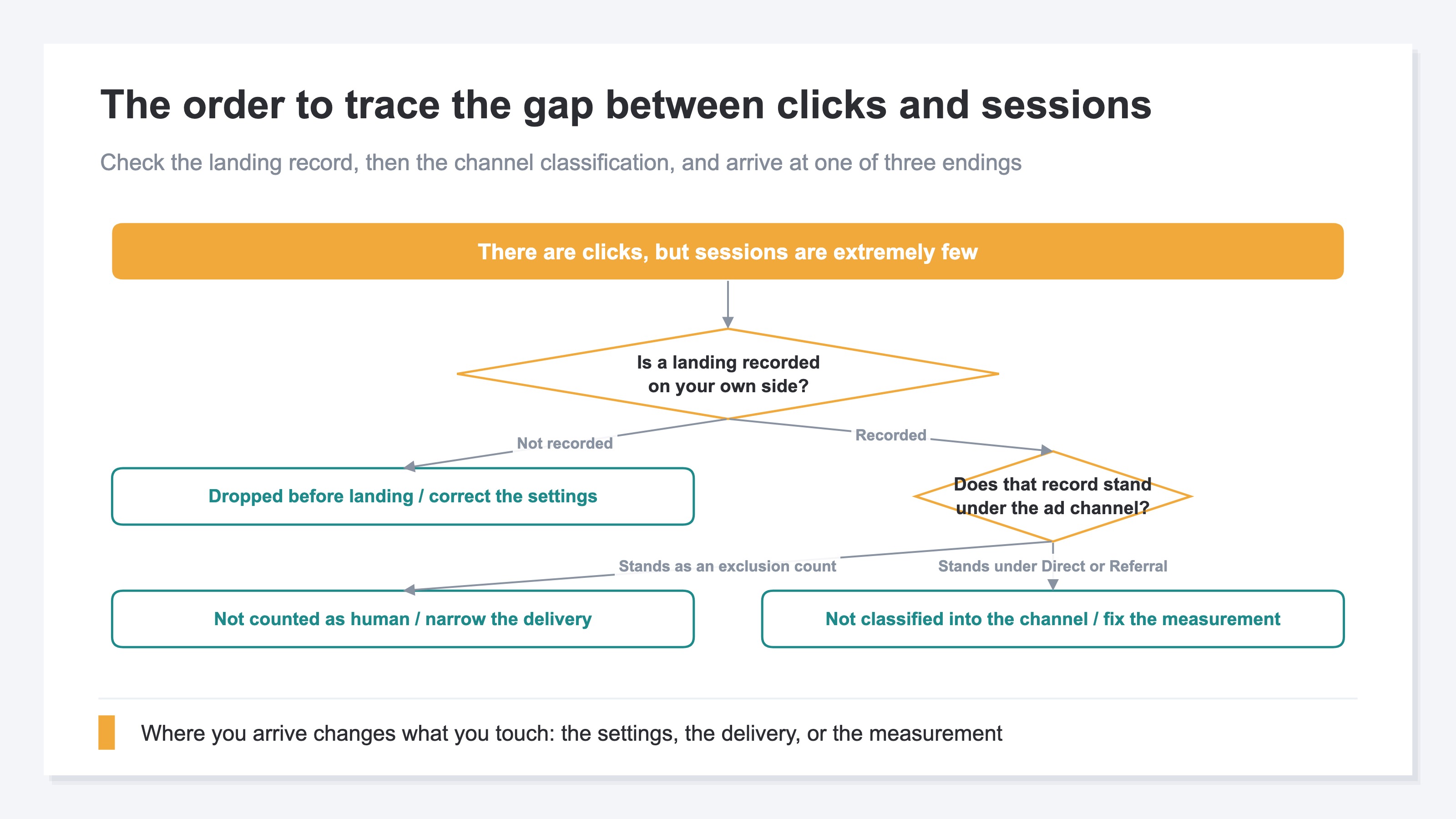
Start with the click-to-session path. What can happen between a click and a human session splits three ways, and each is checked somewhere different.
First, it dropped before landing. Leaving before the load finished, the measurement tag not firing, the link pointing at a URL other than the one intended — these all sit here. Meta's "the web page isn't fully loading" belongs to the same group[1]. In this group no visit is generated at all, so nothing is left on your own side, neither as a human nor as a bot.
Second, it landed but wasn't counted as human. When an automated crawling program opens an ad link, the landing does happen, but the behavior gets judged as a bot and drops out of the human metrics. Thales reports that bots have come to make up the majority of the world's web traffic[2]. GA4 also has a mechanism that automatically excludes known bots and spiders[3]. What a bot is, and how to tell one apart, is left to What is bot traffic?. Platforms do have their own mechanism for taking invalid clicks out of what you're charged for[4], but that exists to protect the bill, not to produce material for analysis. The line between the two is laid out in Invalid click filtering vs bot exclusion.
Third, it landed but wasn't classified into the ad channel. Channel classification looks only at the UTM parameters, click ID and referrer that the measurement side received. A click that passed along none of these three gets recorded not as the ad channel but as Direct or Referral. The traffic is reaching the site as a whole, yet it looks like it disappeared when seen from the ad channel alone.
3. Cut or Keep Depends on Which Kind of Zero It Is#
For a reported zero, identify which kind of zero you are looking at before acting. A zero is not one thing, and for each kind the next move points the opposite way.
If it's dropping before landing, what you touch is the link destination, the measurement tag and the parameter settings. You don't stop the delivery. Stop it and you lose, along with everything else, the traffic that would have come back once the settings were corrected.
If it isn't being counted as human, what you touch is the placements, the targeting and what you're bidding on. The landing itself is happening, so rebuilding the destination page doesn't move the number.
If it simply isn't being classified into the ad channel, what you fix is the measurement. Stop the channel here and you are cutting, by your own decision, traffic that is actually arriving. Of the three, this is the one where misreading costs the most.
If you want to check once, on the spot, there are two clues. On the platform side, put link clicks and landing page views side by side over the same period. If only the former is standing, the odds go up that it's dropping before landing[1]. Your cart platform's own reporting also has a traffic-source report. Narrow the period and you can confirm once whether visits from that platform are arriving.
That check, though, answers only for that platform and that one campaign. To keep making the same judgment across channels every month, the amount excluded has to be displayed on the screen you make the judgment on.
What comes after deciding to cut or keep — how to reallocate — continues in Cutting the ad budget: where to start.
4. How Much Gets Excluded Differs Widely by Channel#
The channel comparison changes the diagnosis again. Even inside the same site, the amount excluded per visit judged to be human differs widely by channel.
I calculated the channel breakdown for revenuescope.jp, the site I run, over the past 30 days (July 20 to August 19, 2026). The denominator is the human sessions left after bot exclusion. The numerator is the count excluded in the same channel. Switching the revenue attribution model changes neither the sessions nor the excluded counts.
For every visit judged to be human, the count excluded was 0.1 for Google search and 0.2 for Bing. Direct, on the other hand, was 2.4, a spread of more than 20x against Google search. Traffic that arrives with no referrer carries an order of magnitude more exclusions than traffic from search does. Higher ratios than this appear on other channels too, but those are channels with very few visits judged to be human, so they swing hard from month to month. When you line channels up by ratio, read from the channels with the most visits.
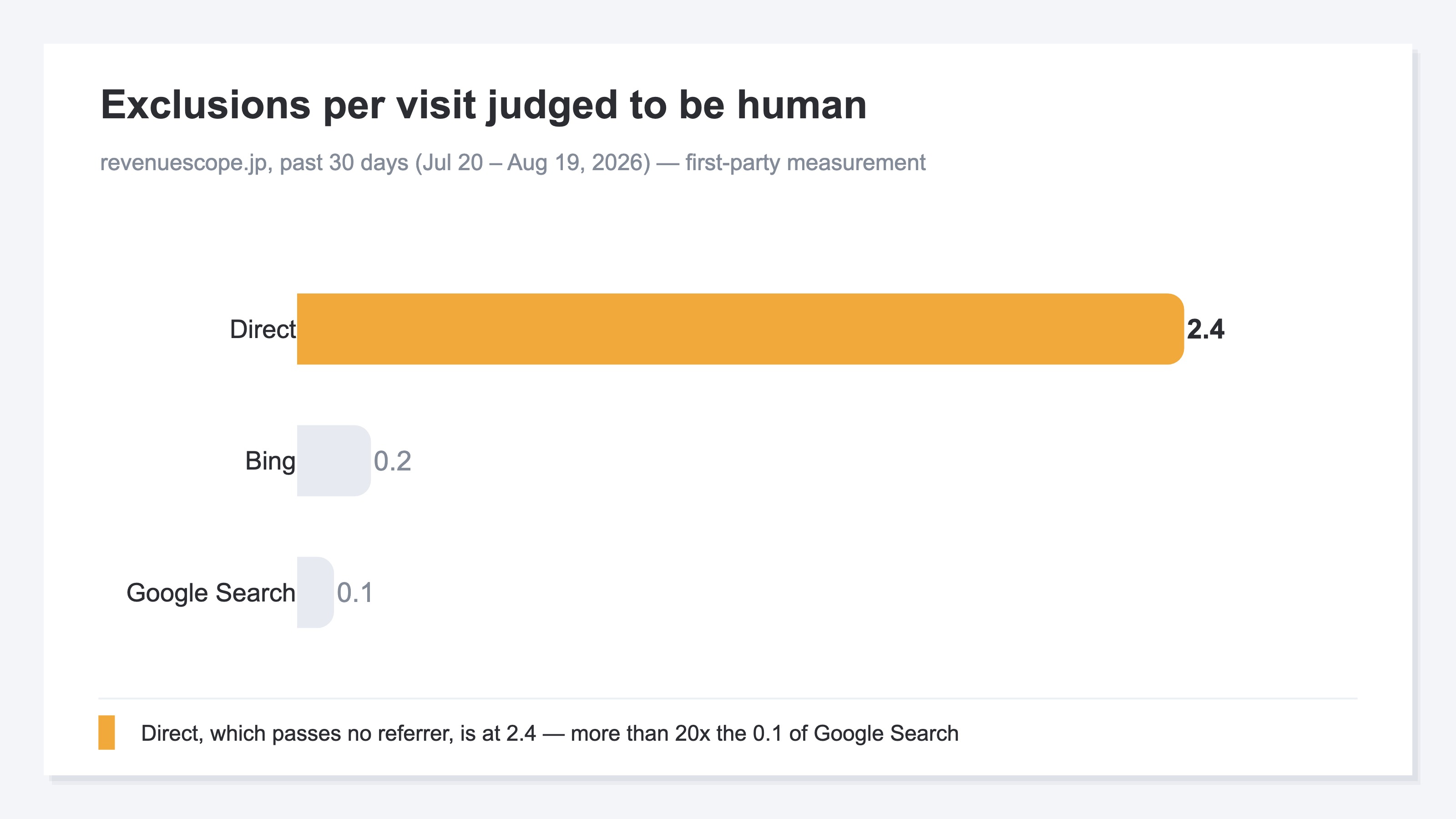
The excluded portion surfaces nowhere as a quantity. What the platform's manager shows reaches as far as the click; what your own aggregation shows is only the visits judged to be human. Neither screen holds "the amount that arrived but wasn't counted as human." So the one reading left is "nothing is coming from this channel." What changes the judgment is having that quantity displayed on the same screen.
RevenueScope solution
RevenueScope keeps the counts excluded by bot judgment instead of discarding them. For each channel it displays sessions, revenue and RPS (revenue per session) after exclusion, alongside the count that was excluded, on the same screen. Enter ad spend by year, month and channel in a form, or import it in bulk from CSV, and that channel's ad spend lines up next to the matching revenue.
Asking RevenueScope about the ads at Nokt, a fictional EC store (illustrative)
Reported by the ad platforms
| Ad platform | Impressions | Clicks | Ad spend |
|---|---|---|---|
| Meta | 24,000 | 103 | ¥80,000 |
| Google Ads | 31,000 | 240 | ¥120,000 |
Measured on the site's own side
| Channel | Sessions | Bot excluded | Revenue | RPS |
|---|---|---|---|---|
| Meta | 0 | 96 | — | — |
| Google Ads | 210 | 12 | ¥420,000 | ¥2,000 |
| Referral | 4 | 0 | ¥0 | ¥0 |
Note: the two tables above are one example built for explanation. The demo screen loads the sample store's sample data, refreshed daily, so both the counts and the amounts change from day to day.
Where the reading splits in this example is the two channels with no revenue. Meta has 0 sessions and 96 exclusions from bot judgment. The landing itself was happening; only the human visits were absent. Referral has 4 sessions and 0 exclusions. Visits are arriving, but there is no volume. Both say "no revenue," yet one is a conversation about narrowing who the delivery targets and the other is about raising the volume, and the next move points the opposite way.
Had these two been stopped together as one "no results" group, Meta would have lost its chance to revisit the delivery settings and Referral its chance to grow, at the same moment.
FAQ#
Frequently asked questions#
Q. If I subtract human sessions from clicks, do I get the number that was excluded?
A. You don't. The difference scatters across three paths. The portion that dropped before landing generates no visit at all, so it stays neither in the human record nor in the exclusion record. On top of that, a click is the platform's definition and a session is your own measurement side's definition, so the units differ to begin with.
Q. When the exclusion count is 0 and sessions are also extremely few, how should I read it?
A. That's a state with little trace of any landing, so start by checking the link destination, the measurement tag and the parameter settings. Touching the delivery settings comes after you know landings are happening.
Q. Where does traffic that wasn't classified into the ad channel get recorded?
A. As Direct or Referral. Classification looks only at the UTM parameters, click ID and referrer, so if none of them are passed along it doesn't enter the ad channel. It looks like it disappeared from the ad side, but it is reaching the site as a whole.
Summary#
100 clicks in the ad platform's manager, 0 sessions on your own side. This state is not one thing. Whether it dropped before landing, landed but wasn't counted as human, or landed but wasn't classified into the ad channel, what you touch is somewhere different in each case.
For the three, the next move points the opposite way. Stop the delivery when the settings were what needed correcting, and you lose traffic that would have come back. Stop the channel when the measurement was what needed fixing, and you cut traffic that is actually arriving. The clue that tells them apart is the exclusion count displayed on the same screen as sessions. Before you set this month's allocation, take one channel sitting at zero and check it all the way down to that count.
See which ads actually drive revenue, at a glance
Free up to 2,000 sessions/month, AI connection included. No credit card required. Up and running in 5 minutes.