
You have to rework your ad spend. The first place your hand reaches is the channel with the lowest ROAS in the dashboard. Cut there and it feels like you're trimming the most wasteful spend. But that order can be dangerous.
Here's the conclusion first. When you cut, going after "the channels with the lowest ROAS first" is a common default — and there's a trap in it. The ROAS a platform reports reads high because it leans on returning customers, whose conversions come cheap. So cutting by ROAS alone can mean the channel was only quietly efficient, while what you actually close is the entry point that brings in the new customers who become tomorrow's repeat buyers. To separate what to cut from what to protect, you look not at ROAS alone but at two axes: saturation (does spending more still grow revenue?) and whether the channel brings in new customers. This article walks through how to make that distinction, in order.
Table of contents
Key takeaways#
- When cutting ad spend, "cut the channels with the lowest ROAS (the multiple of revenue over ad spend) first" is the default call. But the ROAS a platform reports skews high toward cheap, easy conversions from returning customers, so cutting by ROAS alone can close, by your own hand, the entry point that brings in new customers.
- The axis for spotting what to cut is not average ROAS — it's saturation. A channel where spending more no longer grows revenue (its marginal ROAS has fallen) is the cut room, because adding to it does nothing. Even with a high headline ROAS, if a channel is saturated it becomes the first thing to cut.
- What to protect is the channel that brings in new customers, even at modest efficiency. Put your decision axis on "saturation × contribution to new-customer acquisition," not ROAS alone. Make the final cut only after ranking channels on these two axes.
1. Why "cut lowest ROAS first" is dangerous#
To put the conclusion first: cutting in order of lowest ROAS is dangerous because the ROAS a platform reports skews high toward cheap, returning customers.
ROAS is the number that shows how many times over your ad spend came back as revenue. A ROAS of 4.0 means the spend earned four times itself in sales. At a glance, the higher this number, the better the channel; the lower, the more wasteful. So when cutting, it seems safe to slice from the bottom up.
But a bias hides here. A platform's automated delivery favors whoever converts cheapest. Chief among them are returning customers coming back — people who already know the product and are ready to buy. Show them an ad again and the conversion comes at low cost. So ads aimed at existing customers, like retargeting, tend to post a high ROAS. Ads aimed at new customers who don't yet know the product, meanwhile, don't convert right away, so their ROAS looks modest.
In other words, a low-ROAS channel isn't necessarily wasteful spend. More often, it's the entry point that brings in new customers. Cut it on low ROAS alone and the numbers look clean in the moment — but new-customer inflow thins out. Then, next quarter, when branded and organic-search revenue slips, you finally realize you'd been cutting the seed. For why the higher-ROAS channels are exactly the ones to evaluate with care, see Are high-ROAS channels the risky ones? Evaluating channels by splitting new from returning.
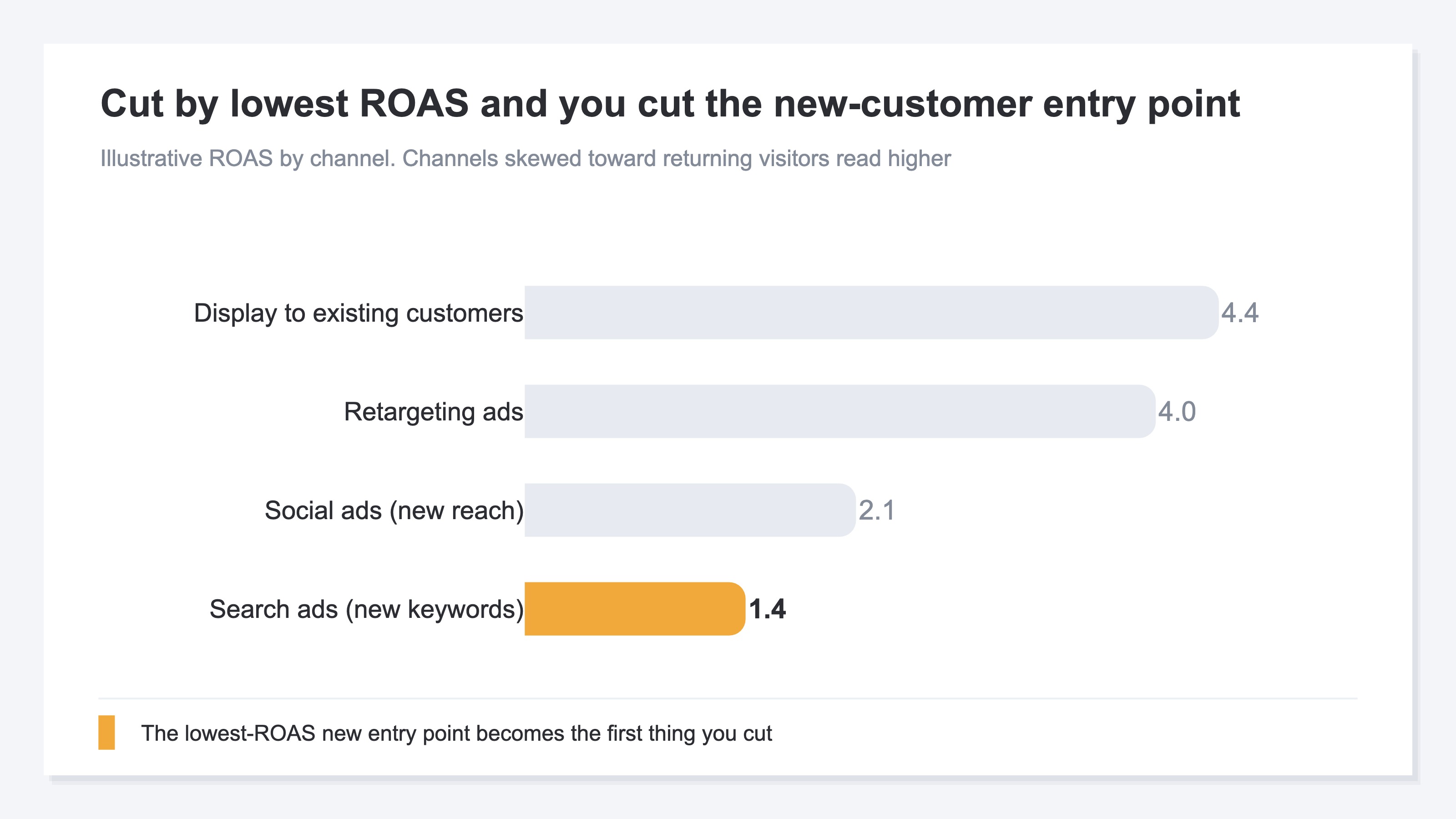
To begin with, average ROAS alone can't decide where to cut budget. Even at the same average, the contents differ entirely; that reasoning is laid out in Why average ROAS can't decide your ad budget. So separating what to cut from what to protect needs an axis other than ROAS. From the next section, we look at those two axes.
2. Spot what to cut: start with saturated spend#
The deciding factor for spotting what to cut is not average ROAS — it's saturation.
Saturation is the state where spending more no longer grows revenue. To see it, the notion of marginal ROAS helps. Marginal ROAS shows how many times over the next bit of budget, added to what you already spend, earns back. The more you spend, the thinner the audience you're still reaching, so marginal ROAS gradually declines. A channel where it has fallen far enough is saturated spend — spending more does nothing.
This is the crux of deciding cut order. The largest cut room lies in saturated channels. Since spending more doesn't grow revenue, spending less barely lowers it. Conversely, a channel that isn't saturated yet drops in revenue by the same amount you cut. So the sound order is not lowest average ROAS first, but most saturated first.
One thing to watch: even a channel with a high average ROAS can be saturated. Retargeting ads hit existing customers, so their average ROAS reads high. But the pool of existing customers you can reach is limited, so they saturate quickly. That is, high average ROAS, yet low marginal ROAS. This "looks excellent but no longer grows" spend is exactly the first to cut. For how to read that saturation — the fact that more ad spend doesn't always mean more profit — see More ad spend isn't always more profit: how to spot saturation in EC advertising.
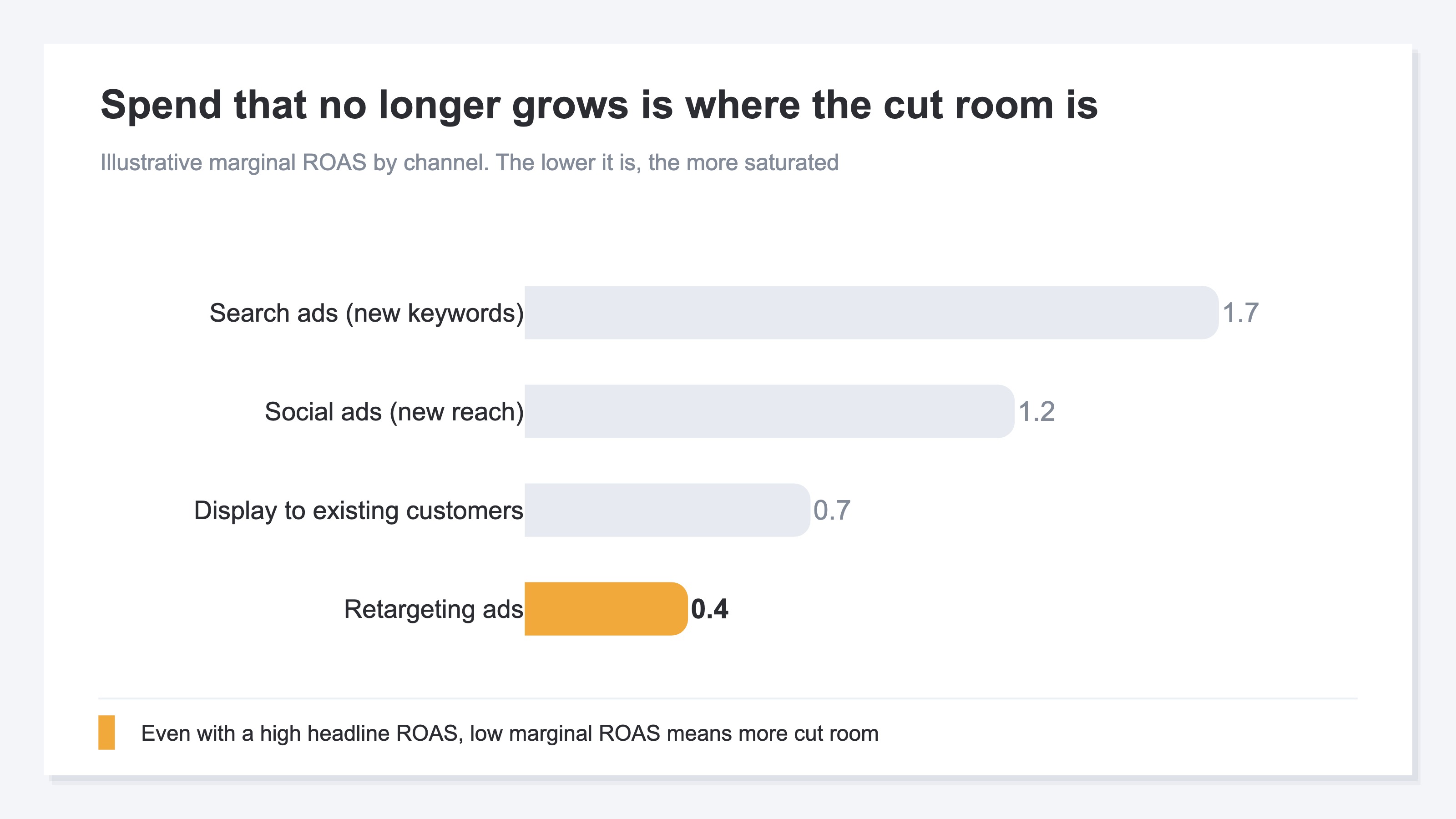
Don't be pulled by a high average ROAS; cut from the spend where marginal ROAS has fallen. That's how you spot what to cut. But looking at cut room alone gets you only halfway. The other half is what to protect.
3. Spot what to protect: channels that bring new customers#
What you protect is the channel that brings in new customers, even if its efficiency is modest.
Use two lenses here. One is per-channel efficiency. For a channel with ad spend connected, use ROAS; for a non-ad channel without spend attached, use revenue per session (RPS) — either way, to see which channels generate revenue efficiently. The idea of measuring non-ad channels by RPS rather than ROAS is the starting point in How to measure non-ad channel efficiency: by RPS, not ROAS.
The other lens is site-wide efficiency by new versus returning. New and returning customers differ sharply in both revenue per visit and the share who buy. At most stores, returning customers post higher efficiency. What matters here is that this high efficiency only exists because you've already gathered the new customers to begin with. Cut the new-customer entry point and the very pool of future repeat buyers shrinks. For how revenue splits between new and returning, Splitting revenue between new and returning customers: the measurement pitfalls is the entry point.
Hold these two as separate lenses and you can size up a channel. New-keyword search and new-reach social are entry points that bring in new customers. Retargeting and display to existing customers, on the other hand, are mostly just calling back customers you already have. The latter may look efficient, but they aren't growing your new-customer base. So you choose what to protect not by high efficiency but by "does it bring in new customers." What you protect is the channel that brings new customers even at modest efficiency. The cut candidates are the existing-customer reactivation that brings in no new customers — the saturated ones especially.
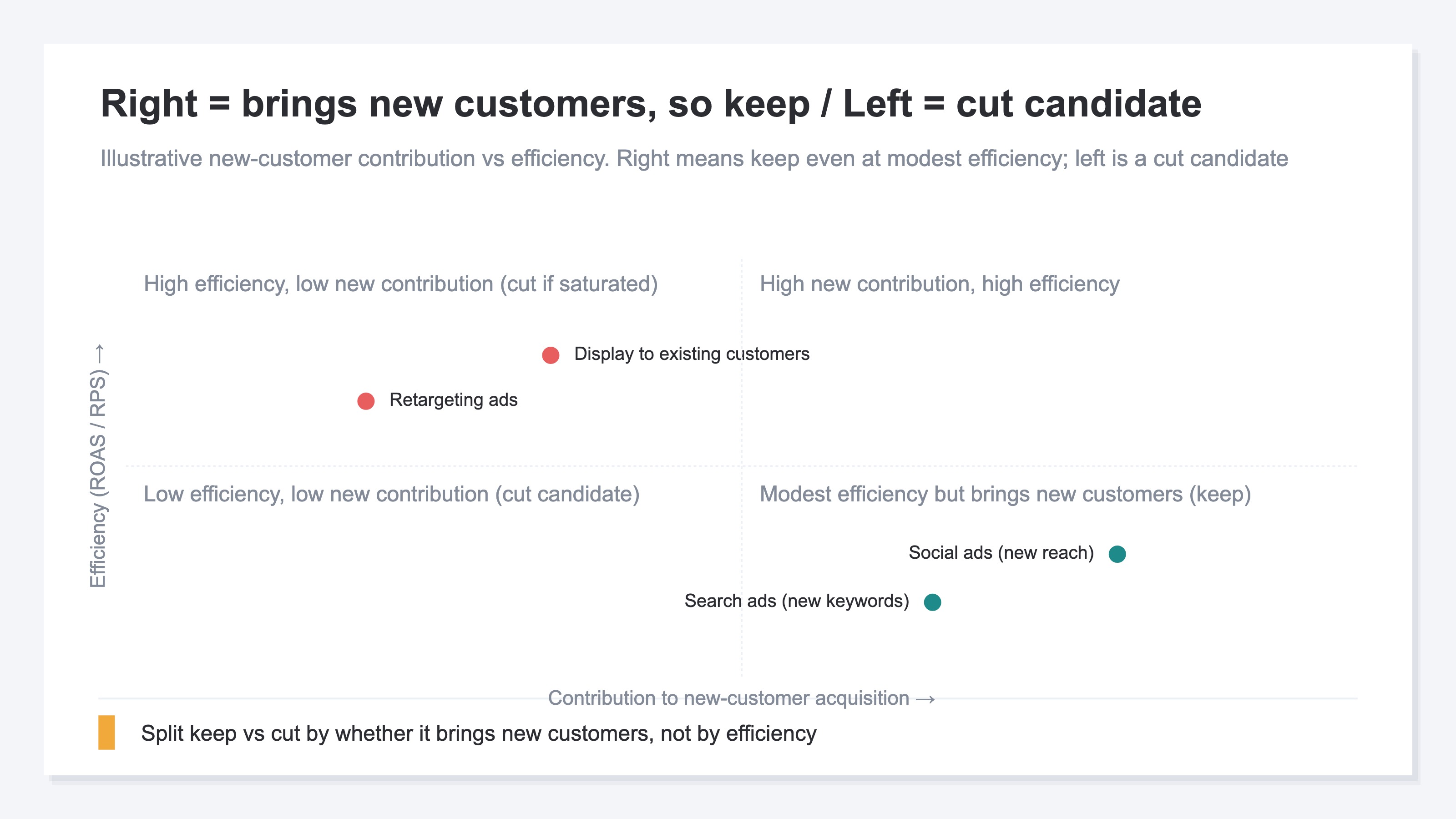
To sum this up on two axes: what you cut is "saturated spend whose marginal ROAS has fallen," and what you protect is "the channel that brings new customers even at modest efficiency." Put your decision axis on "saturation × contribution to new-customer acquisition" rather than ROAS alone, and you cut from the most wasteful spend first while keeping the seed of future revenue.
The idea itself isn't hard. What's hard is keeping it up every time. There are three walls. First, the ROAS each platform reports runs on different standards per platform, with duplication still baked in — so you can't compare what to cut and what to protect on one common yardstick. Second, aligning new- and returning-customer efficiency to a single starting point means flipping the axis by hand and redoing the tally each time. Third, the work of computing saturation (the fall in marginal ROAS) and removing bots and duplicates is manual by default, and usually doesn't finish in time for the budget meeting.
RevenueScope's solution
When you try to justify what to cut and what to protect, you hit the same wall in the end. You understand the idea, yet the manual work is heavy. Aligning each platform's differently-based ROAS to one common standard, computing saturation, and re-tallying new- versus returning-customer efficiency — none of it finishes before the meeting. In GA4 and the various ad dashboards, this is where you get structurally stuck.
RevenueScope produces this split with two lenses, from a single starting point. The first is per-channel efficiency and saturation. It aligns every channel on last-touch, and on the figures left after removing bots and duplicates, outputs ROAS (for channels with ad spend connected) and marginal ROAS — that is, saturation (display uses demo data). Ask it, and it comes back like this.
| Channel | ROAS (illustrative) | Marginal ROAS (saturation) | Cut / protect read |
|---|---|---|---|
| Search ads (new keywords) | 1.4 | 1.7 | Protect (new entry point, room to grow) |
| Social ads (new reach) | 2.1 | 1.2 | Protect (leans new) |
| Display to existing customers | 4.4 | 0.7 | Cut room (reactivation, near saturation) |
| Retargeting ads | 4.0 | 0.4 | First to cut (saturated) |
What this table tells you is that headline ROAS and cut room run in opposite directions. Retargeting ads post a high ROAS of 4.0, yet marginal ROAS has fallen to 0.4. They're already saturated — spending more won't grow them, so the cut room is large. Search ads on new keywords, conversely, post a modest ROAS of 1.4, but marginal ROAS is 1.7, with room still to grow. They aren't something to cut on low ROAS alone.
The second lens is site-wide efficiency by new versus returning.
| Visitor | RPS (illustrative) | CVR (illustrative) |
|---|---|---|
| New | 100 | 1.1% |
| Returning | 240 | 3.4% |
Returning customers look more than twice as efficient as new ones. But that high efficiency exists only because of the new customers you gathered in the past. Cut the new-customer entry point and the pool feeding into this thins out. So the order comes into view: what you protect is the channel that brings new customers even at modest efficiency in the first lens (new-keyword search and the like). What you cut is, among the existing-customer reactivation the second lens makes look efficient, the saturated ones (retargeting ads) — starting there.
What RevenueScope outputs is revenue, AOV, RPS, CVR, and session count. You can view these by channel and, site-wide, split by new versus returning. With ad spend connected, it also outputs measured ROAS, saturation, and a budget-allocation suggestion. RevenueScope specializes in these revenue-based metrics — rather than cost-based profit or lifetime value (LTV) — and lines up channel efficiency and site-wide new-vs-returning efficiency as two separate lenses read from one starting point. It assembles the material for cut order and protect targets on that common footing.
FAQ#
Frequently asked questions#
Q. Does this mean I should never cut a high-ROAS channel?
A. Not necessarily. What you look at is not average ROAS but saturation (marginal ROAS). Even with a high average ROAS, if marginal ROAS has fallen, it's saturated spend that no longer grows when you add to it. The cut room there is large. A channel like retargeting — high average, but quick to saturate — is, if anything, the first to cut.
Q. If a channel brings new customers, should I protect all of them even at low ROAS?
A. If it isn't saturated (marginal ROAS still has room) and it serves as a new-customer entry point, lean toward protecting it. That said, if ROAS is extremely low with no prospect of improvement at all, the spend itself needs a rethink. Decide protect versus cut on the two axes of "saturation × contribution to new-customer acquisition," not ROAS alone.
Q. In the end, how do I decide the cut order?
A. Not by lowest average ROAS, but by cutting from the saturated spend (where marginal ROAS has fallen) first. What you protect is the channel that brings new customers even at modest efficiency. Rank on these two axes before deciding where and how much to cut, and you cut from the most wasteful spend first while keeping the seed of future revenue.
Summary#
When cutting ad spend, "cut the channels with the lowest ROAS first" is the default — and there's a trap in it. The ROAS a platform reports skews high toward cheap, easy conversions from returning customers. So cutting by ROAS alone means the channel was only quietly efficient, while you close, by your own hand, the entry point that brings in new customers. The numbers look clean in the moment, but next quarter, when search and branded revenue slip, you finally notice.
The axis that separates what to cut from what to protect isn't ROAS alone. What you cut is "saturated spend whose marginal ROAS has fallen"; what you protect is "the channel that brings new customers even at modest efficiency." Start by rereading the channels in front of you not by average ROAS but on the two axes of saturation and contribution to new customers. Cut order and protect targets then get decided by evidence, not by gut.
See which ads actually drive revenue, at a glance
Free up to 5,000 sessions/month, AI connection included. No credit card required. Up and running in 5 minutes.
References#
- [1] Ministry of Economy, Trade and Industry "Survey on Electronic Commerce" (2024)
- [2] Google Ads Help "About return on ad spend (ROAS)" (URL unconfirmed)
- [3] Google Analytics Help "About channels" (URL unconfirmed)
- [4] Baymard Institute (2024)