"We're running ads, but sales aren't growing the way I'd expect. And yet the click counts in the dashboard are right there." Have you ever felt that disconnect?
Bottom line: those clicks may be hit by bots (automated, non-human visits), not people. And the real loss is not that bots arrive — it is that you read a bot-inflated channel as a "high-click winner," keep shifting ad budget toward it, and the money leaks into a place that produces no sales.
Bots now account for 53% of all internet traffic, surpassing humans (47%) [1]. Looking only at click counts, you can't see this leaking ad spend. This guide shows how to judge channels by revenue per session (RPS) instead of raw traffic, so you can spot the channels where ad spend is leaking — from an EC operator's practical perspective.
Table of contents
- Why ad spend leaks — traffic comes in but no sales follow
- Clicks don't reveal waste — look at revenue quality (RPS)
- The steps to spot channels that don't sell
- Signs of bot contamination — zero dwell, full bounce, zero purchases
- After you spot it — stop the waste, shift budget to channels that sell
- How RevenueScope helps
- FAQ
Key takeaways#
-
Ad spend leaks into channels with lots of clicks but no sales
A bot-inflated path lights up on clicks and traffic alone. Read it as an "effective channel" and shift budget there, and you keep paying for a place with no people and no sales.
-
The metric that reveals waste is RPS (revenue per session), not click count
Even with many clicks, if revenue per session (RPS) is near zero, the channel isn't producing sales. The point is to judge by the revenue behind the clicks, not the number of clicks.
-
Triangulate with traffic volume × RPS, then confirm on bot-excluded numbers
Suspect channels with high traffic but low RPS, and confirm on the human-only numbers after bots are removed. Doing this across every channel, every time, is the part that's heavy by hand.
1. Why ad spend leaks — traffic comes in but no sales follow#
Bottom line: ad spend "leaks" because you keep paying a channel that gathers clicks but produces no sales.
Each ad platform's dashboard shows you impressions, clicks, and cost per click — and stops there. What follows, "how much revenue that click produced," lives outside the dashboard. So people read many clicks = it's working.
This is where bots blend in. Many bots are recorded as referral traffic, so even without a single human visit, "traffic from a particular channel" lights up as a number. Clicks and traffic rise, but revenue doesn't follow. That is the entry point where ad spend quietly leaks away.
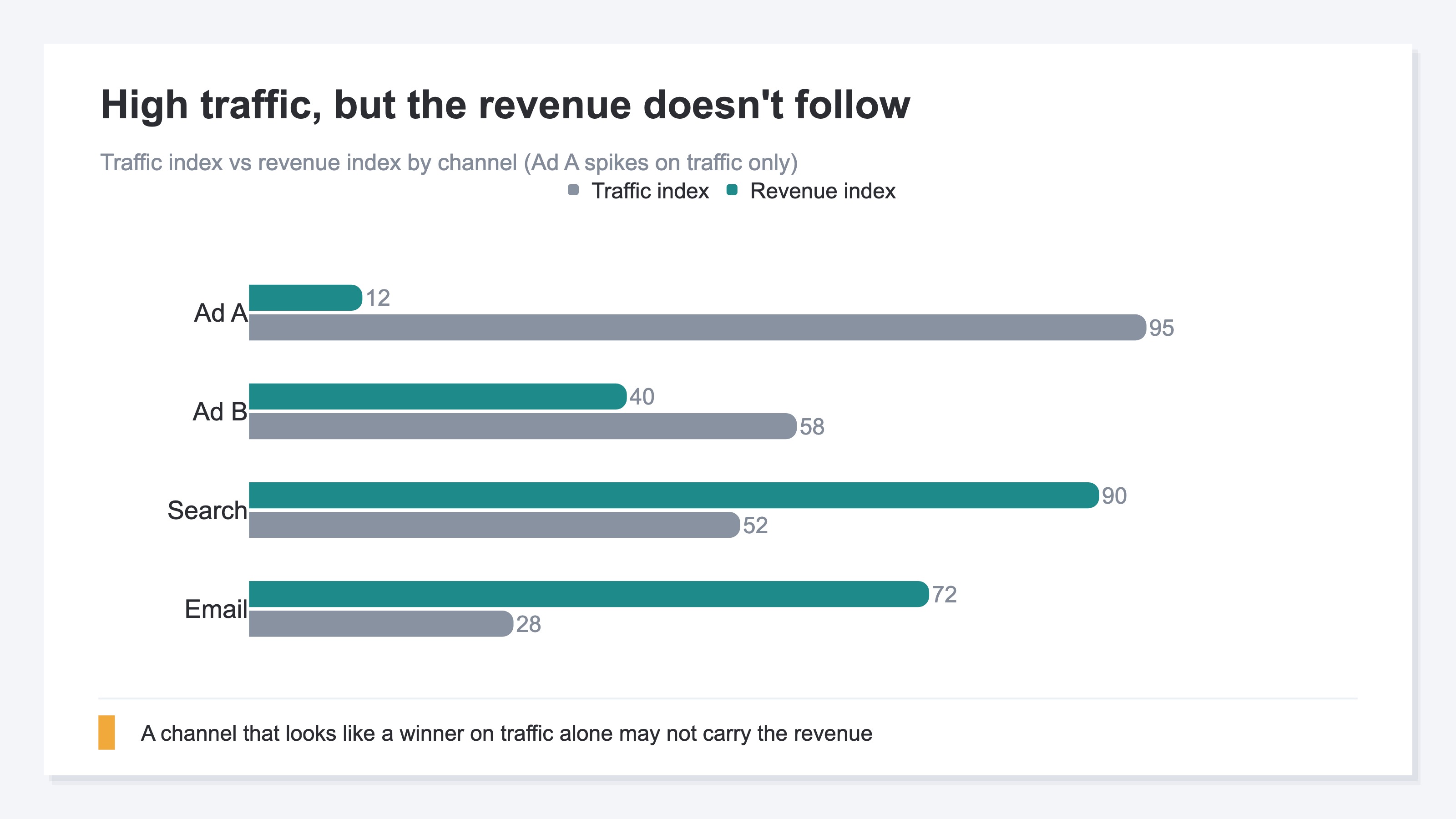
As the chart shows, a channel that looks like it's "growing" on the traffic index alone may not carry the revenue index. The moment you trust the traffic number at face value, your budget decision starts to drift.
2. Clicks don't reveal waste — look at revenue quality (RPS)#
Bottom line: the key to spotting a wasteful channel isn't the number of clicks, it's revenue per session (RPS).
RPS (Revenue Per Session) is a channel's revenue divided by its sessions. It tells you "how much revenue one visit produced, on average." Even with many clicks, if RPS is near zero, the channel is busy only on paper and isn't producing sales.
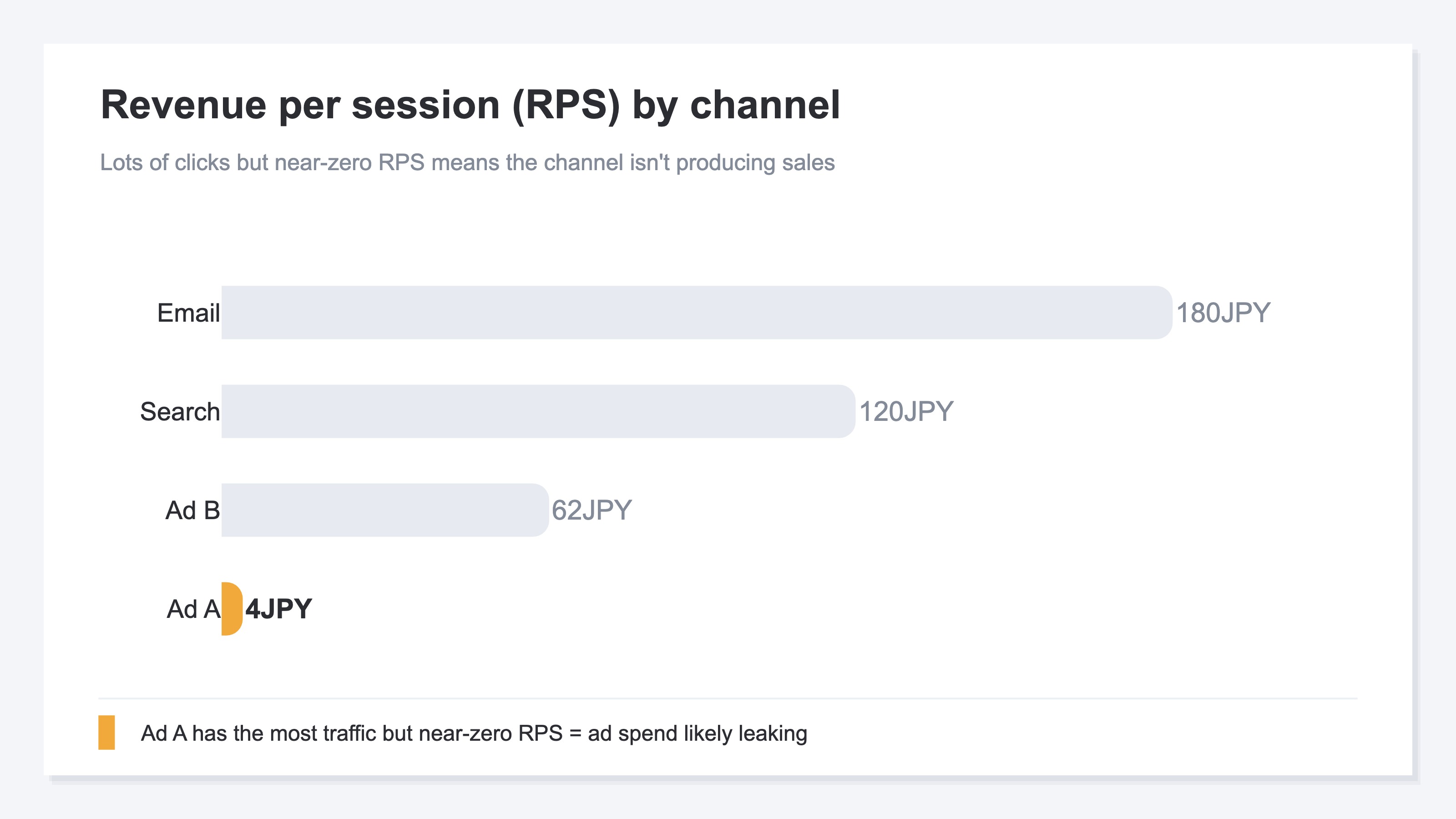
A channel with a cheaper cost per click looks like a "bargain," but if RPS is low even at a cheap click, the more you buy the closer you get to a loss. We cover that trap in The Cheap Click Trap: judge by revenue per click, not CPC. Judge by the revenue behind the click, not the cheapness or volume of clicks. That is the shift in view that lets you notice leaking ad spend.
3. The steps to spot channels that don't sell#
Bottom line: find channels that don't sell by triangulating "traffic volume × RPS," then confirm on the numbers after bots are removed.
The steps themselves aren't hard. Narrow it down in three:
- Find channels with high traffic but low RPS — a path where traffic is up but revenue doesn't follow is the first suspect for leaking ad spend
- Look at that channel's numbers with bots removed — check whether human visits remain after bots are taken out, or whether the number deflates
- Drill down to the campaign level — pinpoint which campaign is leaking by going down to per-campaign revenue and conversion rate
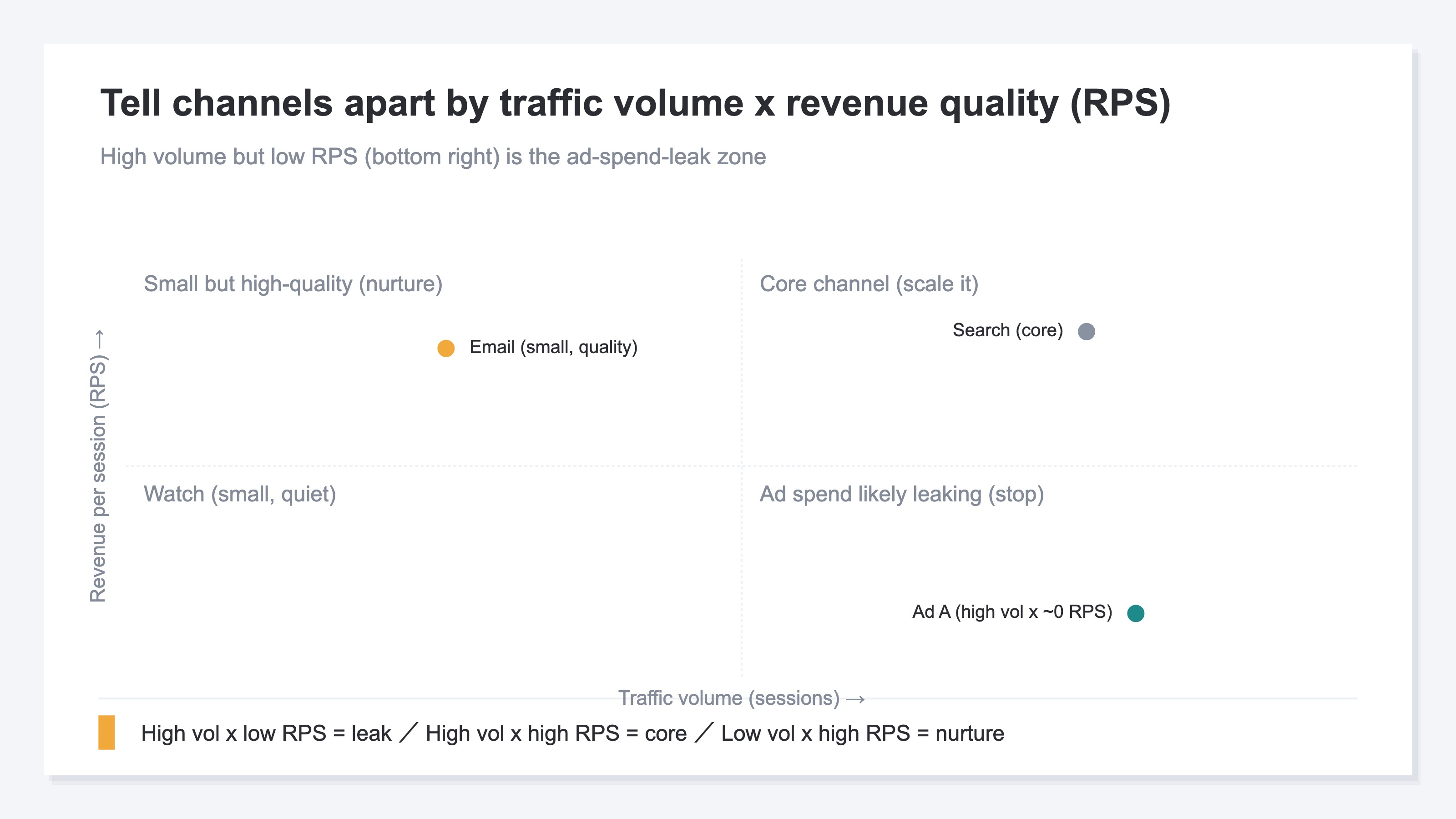
In the quadrant view, the personalities split clearly: high traffic with high RPS is a true core channel; high traffic with low RPS is a suspect leak. The thinking is simple, but lining this up across every channel — and on the numbers after bots are excluded — gets heavy by hand when you do it every time.
4. Signs of bot contamination — zero dwell, full bounce, zero purchases#
Bottom line: if traffic is high but dwell time is near zero, bounce is near 100%, and purchases are zero, suspect bot contamination.
Once you find a low-RPS channel, confirm whether bots are the cause by looking at behavior. Humans stay at least a few seconds when they open a page, and may view other pages. Many bots open one page and leave at zero seconds. High traffic but near-zero average dwell, near-100% bounce, and no purchases at all — that kind of path is the top candidate for bot contamination.
Still, this visual check alone isn't enough for peace of mind. Bots that disguise themselves as humans can't be caught by dwell time alone, and in most cases you can't even see how many were auto-excluded. We cover how bots skew channel evaluation in What Is Bot Traffic? Causes that skew channel and ad evaluation, and how to exclude it, and how protecting ad billing differs from excluding bots in analytics in Invalid Click Protection vs Bot Exclusion: billing and analytics are different.
5. After you spot it — stop the waste, shift budget to channels that sell#
Bottom line: once you've found the leaking channel, stop spending on it and shift budget to the channels with high RPS.
Finding the waste isn't the goal. The next move is clear: pause ads to channels with near-zero RPS, and shift the next budget to channels with high RPS. That alone changes the revenue you get from the same ad spend.
Here, look not just at ad channels but at non-ad channels like search and email too, lined up by RPS, and the decision gets more accurate. We cover how to compare channels in Which EC acquisition channel is most efficient, compared by RPS, and the efficiency of channels beyond ads in How to read the cost-effectiveness of non-ad channels. Shift budget by click volume and it flows to the leaking channel; compare by RPS and the place to put your money can flip.
RevenueScope solution
Bottom line: comparing channel RPS and bot-exclusion counts on the human-only numbers, in one view — that's not in standard GA4 reports; it's RevenueScope's domain.
As long as you evaluate channels by click volume, budget keeps getting drained by bot-inflated paths. RevenueScope judges bots by behavior, removes them from the totals, and shows channel-level real revenue and RPS on human visits only. It also shows how many were excluded as bots in each channel (bot-exclusion count) on the same screen, so a channel that "had lots of traffic but almost no humans" is obvious at a glance.
For example, here's what "asking RevenueScope" looks like (demo data):
| Channel | Recorded sessions (incl. bots) | Of which bots | RPS (JPY) |
|---|---|---|---|
| Ad A (suspect) | 1,200 | 980 | 4 |
| Search | 640 | 30 | 120 |
| 210 | 8 | 180 |
Ad A has the most sessions, but most of them are bots; with humans only, RPS is near zero. What looked like the "biggest winner" by click count turns out, on bot-excluded revenue, to be the path where ad spend is leaking. Connect your ad spend (Path B) and you can go further into channel-level ROAS, saturation, and a suggested budget allocation. Judge on the human RPS after bots are removed. That is the foundation for keeping inflated numbers from draining your budget.
FAQ#
Q. Should I care even if I only run a small amount of ads?
Yes. Bot contamination skews the judgment of which channels are good or bad, regardless of budget size. In fact, the earlier the stage with little traffic, the more a few bots can move the numbers and push you to shift budget to the wrong path.
Q. Isn't a channel with lots of clicks still a good channel?
Click count isn't "how many people came," only "how many visits were recorded." If bots are mixed into those visits, many clicks won't bring sales. Judge quality by revenue per session (RPS), not the number of clicks.
Q. Is low RPS always caused by bots?
No. Low RPS can also come from a poor product-channel fit or from reaching an audience with little intent to buy. That's exactly why you should look at dwell time, bounce rate, and whether humans remain after bot exclusion, to separate the causes.
Summary#
When ad clicks are coming in but sales aren't growing, those clicks may be mixed with bots. Bots now make up 53% of all internet traffic, surpassing humans. The real loss is not that bots arrive, but that you read a bot-inflated channel as a "high-click winner" and keep shifting ad budget into a place that produces no sales. Judge channels by revenue per session (RPS) instead of raw traffic, triangulate with traffic volume × RPS, and confirm on the numbers after bots are removed. Stop spending on the leaking channel and shift budget to high-RPS channels, and the revenue from the same ad spend changes.
See which ads actually drive revenue, at a glance
Free up to 5,000 sessions/month, AI connection included. No credit card required. Up and running in 5 minutes.