Google Ads has an official system that automatically detects "invalid clicks" and removes them from your bill [1]. So can you leave bot protection to the platforms? Not quite. What the platform protects is your invoice — not the judgment material (your measurement data) you look at every day. This article sorts out the difference between the two systems and how they divide the work.
Table of contents
TL;DR#
-
Platform invalid-click filtering protects your billing. Analytics-side bot exclusion protects your judgment. Different jobs
-
Google itself states that conversions from invalid clicks are "not necessarily removed"
Gone from your bill — possibly still in your data
-
Bots that never click ads (search crawlers, scrapers, AI crawlers) are outside platform filtering entirely
-
You need both. Platform filtering already runs automatically. The analytics side is yours to verify
1. Two systems that only look alike#
Bottom line: the two things people call "bot protection" differ in what they protect, where they act, and what they cover.
Ecommerce operators encounter two separate systems under the label "bot (automated, programmatic access) protection." One is platform-side invalid-click filtering — Google Ads or Meta making sure you're not billed for fraudulent clicks. The other is analytics-side bot exclusion — removing machine traffic from your measurement so it doesn't mislead your decisions.
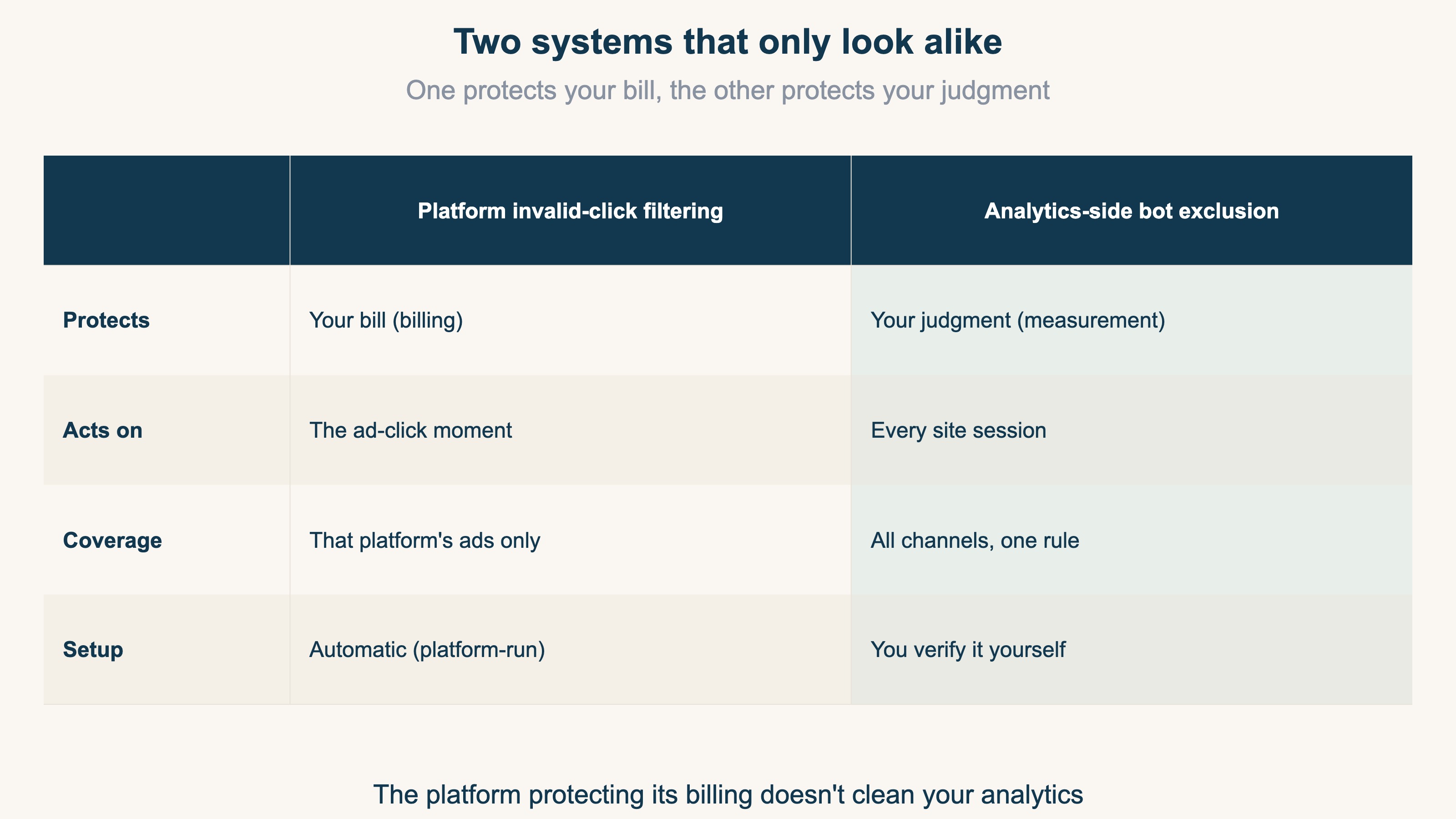
In one sentence: platform filtering protects your bill; analytics-side exclusion protects your judgment. Without this distinction, it's easy to assume "the platform handles bots, so my numbers must be clean." That assumption is the trap.
2. Platform invalid-click filtering: protecting your bill#
Bottom line: as billing protection it's excellent — but Google itself says it doesn't guarantee your conversion data gets cleaned.
According to Google Ads' official help, "invalid clicks" are clicks not born of genuine user interest: manual repeat-clicking meant to inflate costs, clicks by automated tools or robots, the second click of an accidental double-click. Google detects these automatically and excludes them from billing [1] — no advertiser setup required, with invalid-click activity viewable in your account. As invoice protection, it's a well-built system.
The same official page carries one crucial sentence: a conversion that came from a click later deemed invalid "may not necessarily be removed" [1]. In other words —
- It disappears from your billing data (your money is protected)
- It can remain in your measurement data (your CVR — conversion rate — and channel comparisons stay distorted)
"Billing exclusion" and "measurement exclusion" are separate processes. The platform tidying your invoice doesn't mean the judgment material you see in GA4 or your dashboards got tidied too.
3. Three reasons your analytics still gets distorted#
Bottom line: three structural gaps slip past platform filtering and bend your judgment material.
Gap 1: billing exclusion ≠ measurement exclusion. As chapter 2 showed, Google acknowledges that the footprints of invalid clicks can persist on the measurement side [1].
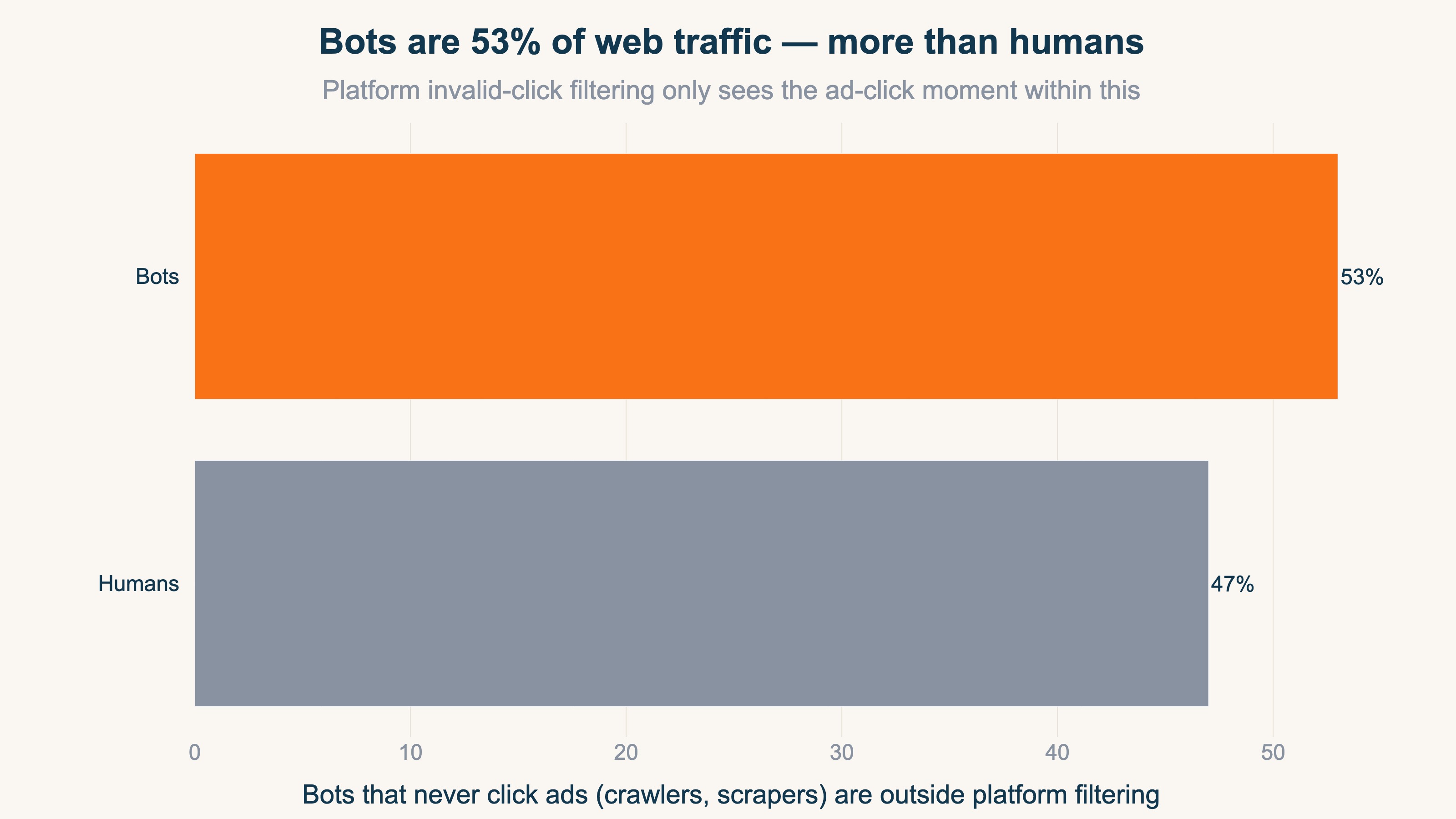
Gap 2: bots that never click ads are out of scope entirely. Platform filtering watches one thing: the moment its own ad gets clicked. But most bots visiting your site never click an ad — search engine crawlers, price scrapers, AI crawlers, social link-preview fetchers. One study found 53% of global web traffic is bots, outnumbering humans at 47% [2]. All of it mixes into your session counts, bounce rates, and channel numbers without ever touching platform filtering.
Gap 3: every platform draws its own line. Google, Meta, and Yahoo! each judge invalidity by their own standards. Click-fraud rates vary wildly by network — and when exclusion strictness differs across the numbers you line up, the laxest platform looks the most efficient. So channel comparison needs to line up every channel on real revenue after a single, uniform bot exclusion. Aligning the exclusion standard isn't enough — only when you see RPS and purchase rate too, on the same screen, do you learn "which channel is actually efficient."
4. Analytics-side bot exclusion: protecting your judgment#
Bottom line: exclude on the session side, across all channels, with the excluded counts disclosed.
Analytics-side bot exclusion looks at the sessions arriving at your site — so crawlers and scrapers get caught regardless of whether ads were involved, and one standard applies to every channel, eliminating gap 3.
How to identify bots (user agents, datacenter-origin traffic, behavior) and how unfiltered bots distort ad and SEO decisions are covered in the companion piece, What Is Bot Traffic?. GA4 also auto-excludes known bots — but it never shows how many it removed, and more importantly, it never produces a table that ties post-exclusion traffic to per-channel real revenue and purchase rate. Bot exclusion and EC revenue live on separate layers, so seeing "after bots are removed, which channel actually sold" on one screen takes a separate aggregation.
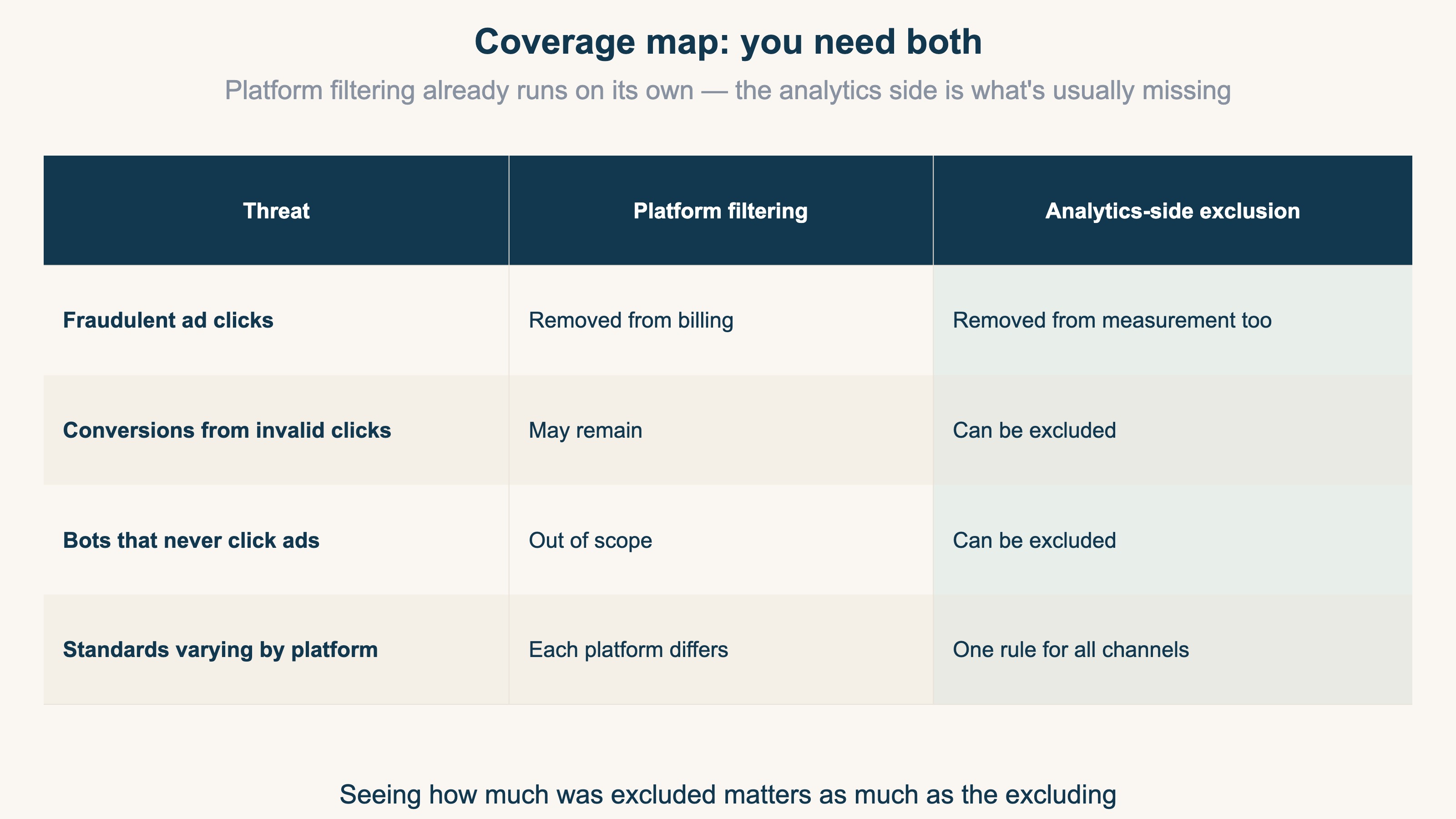
The conclusion is simple: you need both. Platform filtering is already running on its own. What's usually missing is the analytics side — the protection of your judgment. And bot exclusion is preprocessing, not the goal. What you really want to know is which channel actually generates revenue after the bots are removed. Only by lining up post-exclusion real revenue, RPS, and purchase rate per channel can you decide where next month's budget should go.
RevenueScope solution
Bottom line: Comparing per-channel real revenue, RPS, AOV, and purchase rate on one screen after excluding bots — that's a view GA4's standard reports don't produce. Bot exclusion is the preprocessing that makes the comparison valid; the real subject is the revenue comparison that follows.
RevenueScope performs session-side bot exclusion uniformly across every channel, then — on the post-exclusion traffic only — lines up per-channel real revenue, RPS (revenue per session), AOV, and purchase rate. You can also see the excluded counts (how many sessions were removed as bots), but the lead is "with bots stripped out, which channel is actually selling." In real-world measurement, we've seen cases where over 30% of pre-exclusion traffic was bots — a volume that, left in, turns RPS and purchase rate into fiction.
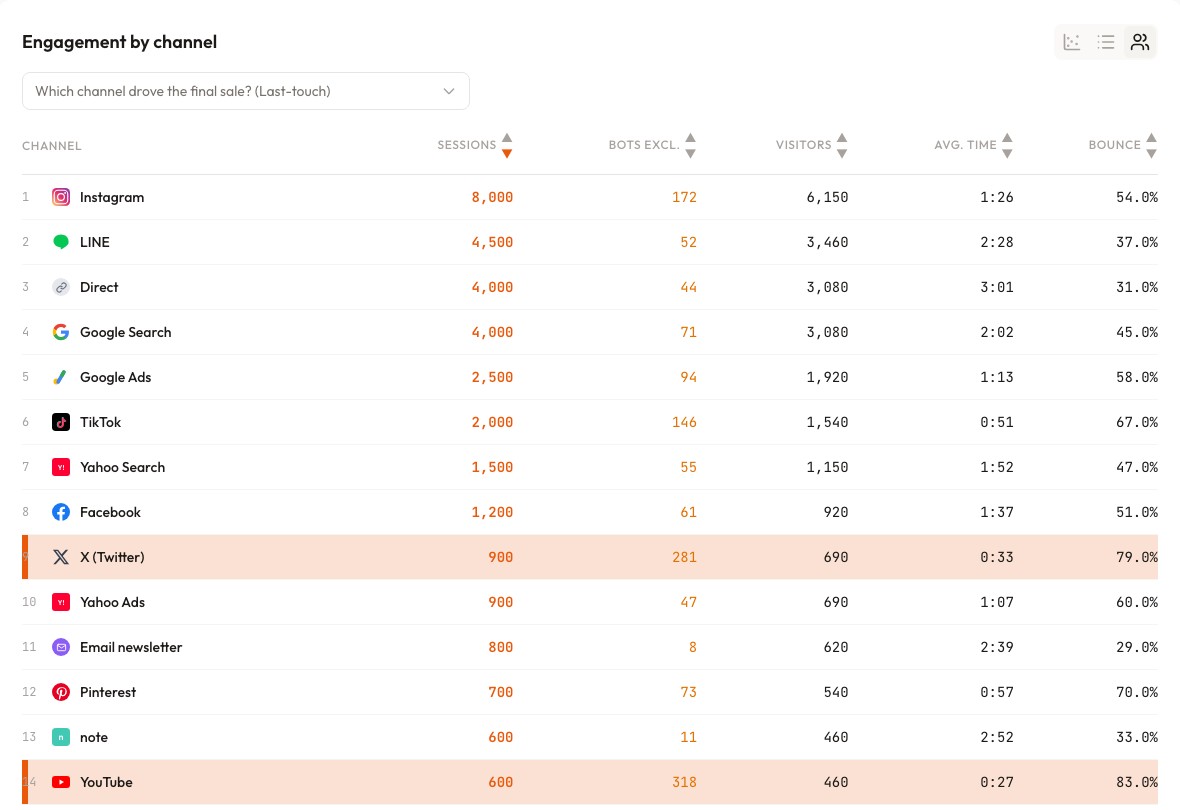
In the screen above (demo data), each channel's bot-excluded count sits in its own column. YouTube (318) and X (281) — where link-preview fetchers and crawlers run thickest — show the largest exclusions, telling you how dirty each channel was. But the point is what comes next: comparing per-channel real revenue, RPS, and purchase rate on these post-exclusion clean numbers is what keeps budget from being siphoned into a bot-inflated "apparent winner." The platform guards the invoice; the foundation for budget decisions gets guarded here.
FAQ#
Q1. Can I check whether I'm being billed for invalid clicks?
Yes. Google Ads lets you monitor invalid-click activity in your account [1]. Exclusion from billing is automatic, so no advertiser action is normally needed.
Q2. If I use GA4, is bot exclusion already handled?
GA4 does auto-exclude known bot traffic. But it doesn't display how much it removed, and the scope of datacenter or behavioral detection isn't published. Use it knowing that "what was removed" stays invisible. See What Is Bot Traffic? for details.
Q3. What should I do about a platform that seems click-fraud-heavy?
First check the billing reality in that platform's invalid-click monitoring, and request an investigation if needed. In parallel, base your budget decisions on per-channel real revenue, RPS, and purchase rate after bot exclusion. Producing that "post-exclusion revenue comparison" on one screen is what RevenueScope does. Treating "a billing problem" and "a judgment problem" separately is this article's whole point.
Summary#
- Platform invalid-click filtering protects the invoice; analytics-side bot exclusion protects the judgment. Different systems — you need both
- Google itself notes conversions from invalid clicks are "not necessarily removed" — billing exclusion ≠ measurement exclusion
- Bots that never click ads (crawlers, scrapers) are outside platform filtering; bots are 53% of web traffic
- Platforms each draw their own line, so channel comparison needs one uniform bot exclusion. And exclusion is preprocessing — the real subject is lining up post-exclusion real revenue, RPS, and purchase rate per channel to decide where the next budget goes
See which ads actually drive revenue, at a glance
Free up to 5,000 sessions/month, AI connection included. No credit card required. Up and running in 5 minutes.