Traffic fell visibly the day after the bot protection went in. The cause is already known — it is the setting you put in yourself. What you decide here is not whether to roll it back. There is one place to check first.
Contents
TL;DR#
- The first thing to open is daily revenue over the same period the sessions fell
- If the revenue line runs flat, what disappeared was visits that never bought
- Having the total session count open in front of you gives you no way down to the one channel that fell
- Catch verified crawlers in the block and what takes the hit is crawling, weeks later
- Blocked traffic ends before the measurement tag, so you infer what it was from the side that got through
1. Did Revenue Change? The One Place to Look First#
What you open right after putting bot protection in is daily revenue over the same period.
Lay daily revenue over the session line. Split at the day the setting went in and show both sides at the same scale. The only thing to look at is whether a step has appeared in the revenue line.
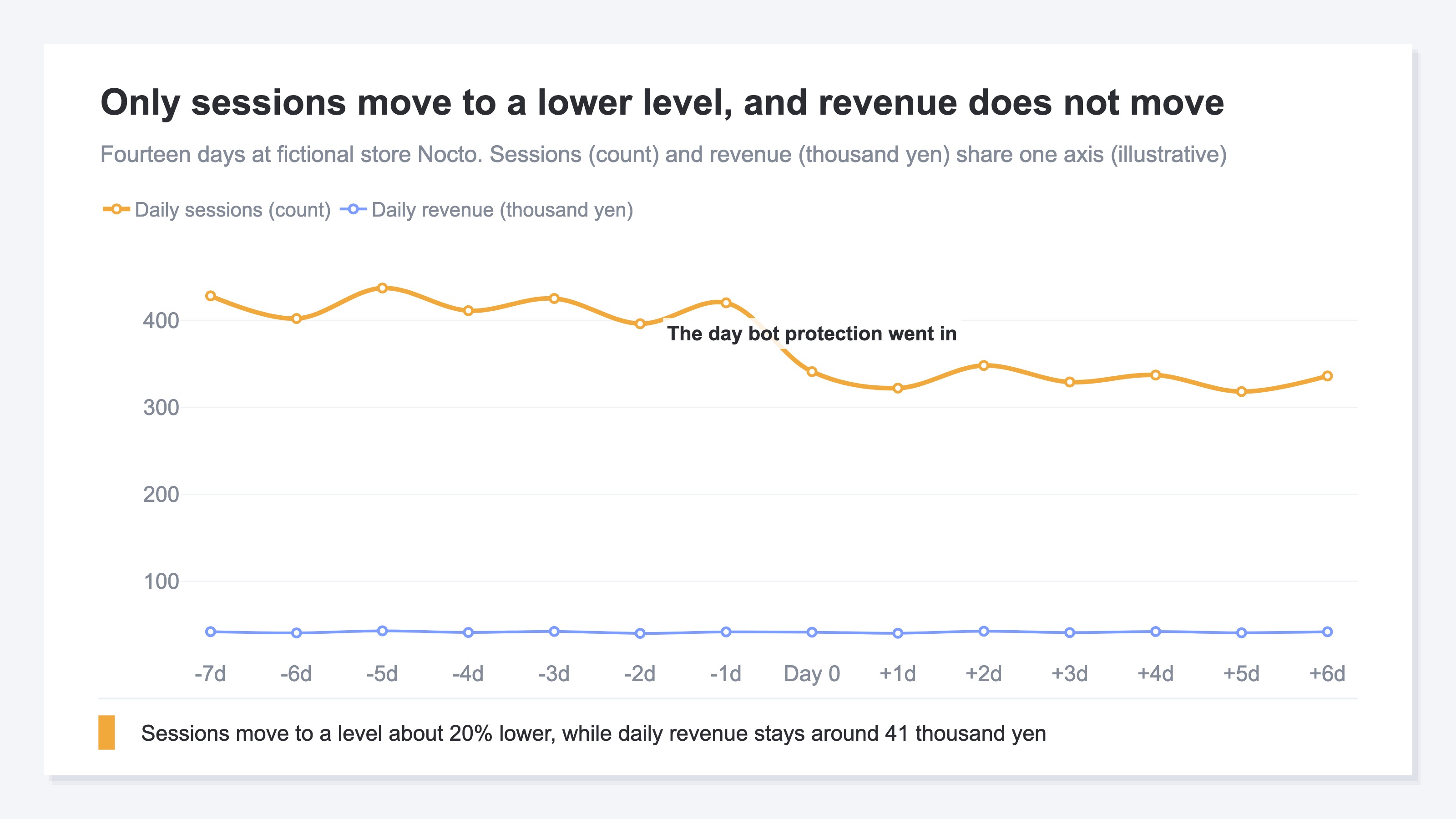
If the revenue line runs flat, the traffic that disappeared was the side that never carried a single yen of revenue. Visits that do not buy have gone, and nothing was lost. If the revenue line falls from the same day too, there were buyers inside the traffic that disappeared.
While you are here, note RPS (revenue per session) as well. It is revenue divided by sessions. If only sessions fall and revenue holds, RPS goes up. That rise is not a fault — it is what is left once the non-buying visits have gone.
This one place is the whole check. And which way the line went changes which section you read next. If revenue was flat, go on to the next section. If revenue fell too, skip section 2 and start at section 3. Identifying what you blocked is covered there.
Note that GA4 also has a mechanism for excluding known bots, on by default[1]. It can overlap with what the CDN stopped, so do not read the two declines as additive.
The symptom also comes the other way around. What to suspect when traffic suddenly rises is covered in Traffic suddenly spiked? Suspect bots before you celebrate. What a bot even refers to is laid out in What is bot traffic?.
2. Did Everything Fall, or Just One Channel?#
A decline has a shape. One that spreads thinly across everything, and one that leans on a single channel.
Split sessions by channel and join two points — before the setting went in and after — with a line. Two values are all the figure needs.
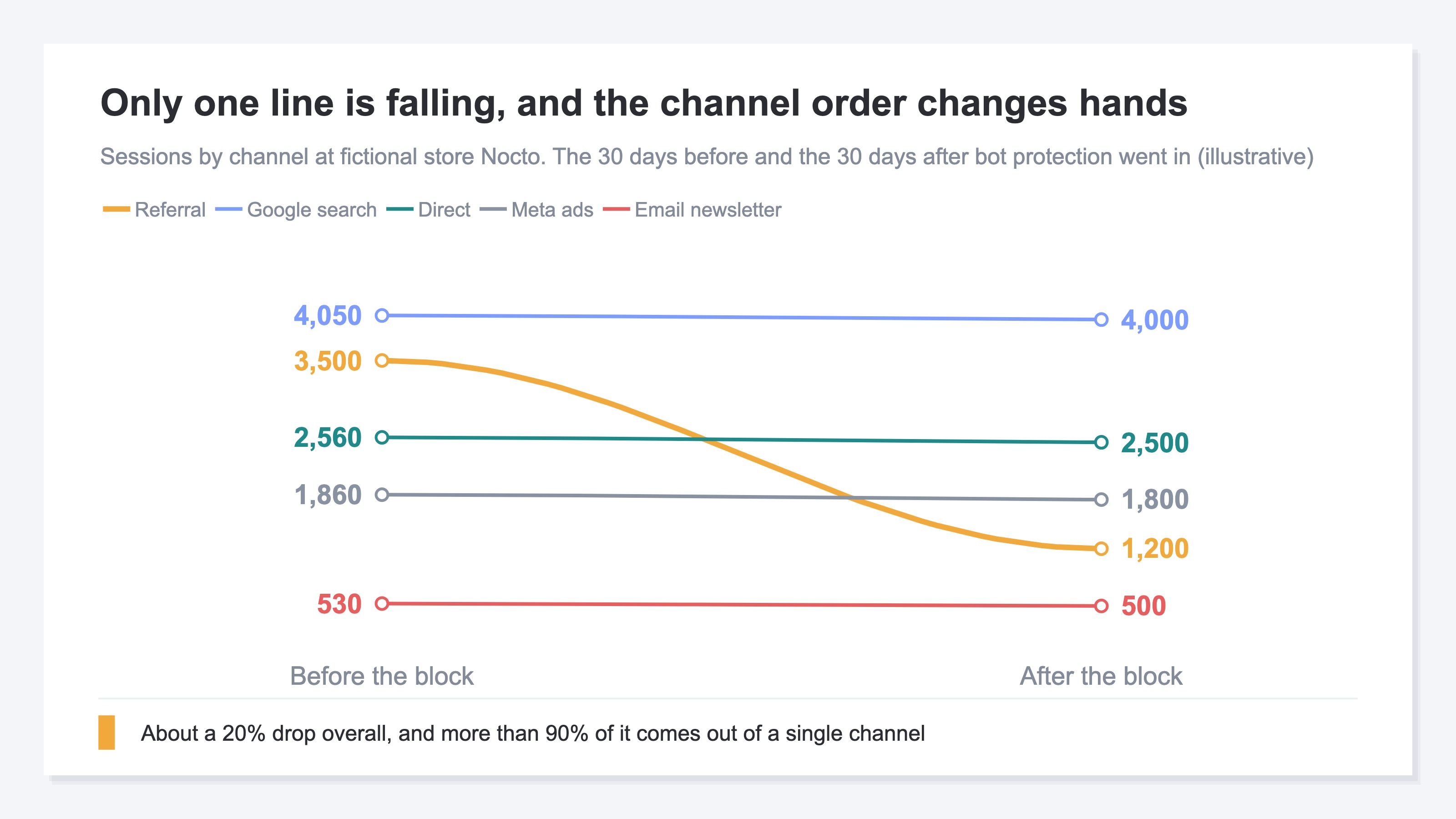
Four lines run almost flat and one drops sharply. The decline is about 20% overall, but almost all of that 20% comes out of this one line. The rest of the channels are barely different from before the setting went in.
If the line that fell is traffic arriving from other sites, that is a route automated access travels in the first place. If the search or the ads row is the one that fell, the story changes. Those are paths people were arriving on, so the odds go up that you stopped real visitors.
Traffic falling while revenue holds happens on its own, with no bot protection involved. How to read that is covered in Search traffic down, revenue flat: you lost the visits that never bought.
3. Check What You Blocked: Verified Crawlers and Access From Inside the Company#
What stopped is not necessarily only bots. What you check is verified crawlers, and access from inside your own company.
Bot protection is not a setting that stops every bot. Cloudflare has a category called verified bots, and crawlers whose origin can be confirmed — search engine crawls, for instance — belong to it[2]. Configure the block to drop that category and search engine crawling stops with it.
What falls then is not sessions. It is crawling and indexing. Rankings and impressions take time to move, so no amount of staring at the analytics screen will show it. Where you check is the crawl stats report in Google Search Console.
The other one is access from inside the company. On Cloudflare, the bot verdict is expressed not as a binary but as a score[3]. The tighter the threshold, the more human visits get caught in it. A shared office line, a VPN, traffic routed through the cloud — many users leave through a single exit, which is the shape most likely to be judged machine access.
I have had it happen myself: after tightening the threshold, users were still getting through while only our own verification traffic tripped the verdict, and what changed was how things looked.
Impersonation is still left too. Access that claims to be Googlebot can be told apart from the real thing by a reverse DNS lookup[4]. Configure it to pass on the claim alone and you can end up stopping the real one while letting the fake through. On the CDN side, how AI crawlers are handled is being reconsidered as well[5]. Which AI is a welcome visitor for your own site is laid out in Cloudflare launched an 'AI toll': should your site welcome AI or charge it?.
Everything checked so far lands on two axes. Whether revenue fell, and whether the bot-exclusion count fell.
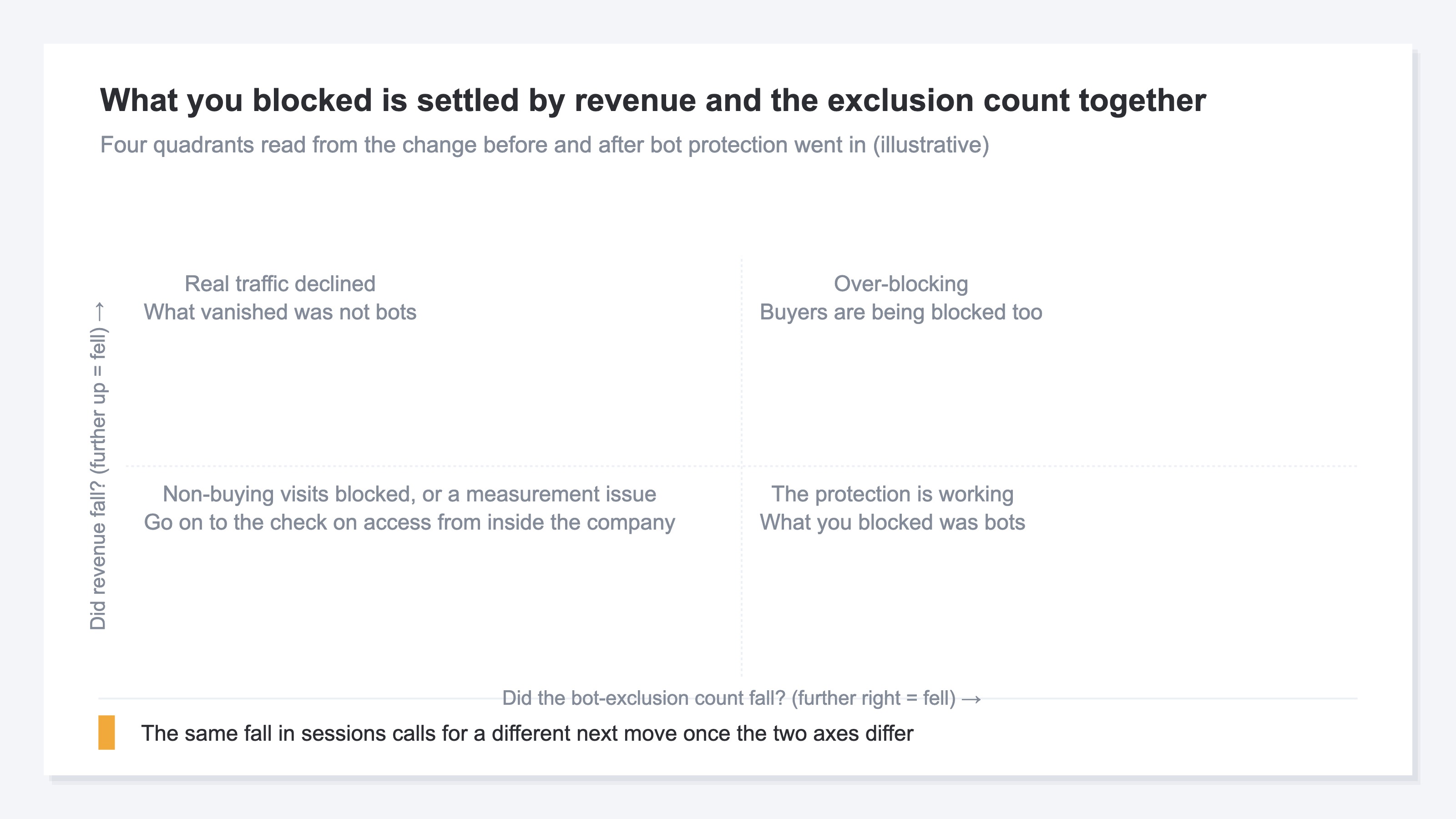
Bot protection is not the only reason sessions fall. How the numbers drop when a consent banner goes in is covered in Consent banners cut GA4 numbers: a measurement problem or a revenue problem. Once causes overlap, which portion to subtract stops being decidable.
With that, look at the figure in section 2 once more. Only one line had fallen. And yet what sits on the screen the person wavering over rolling the setting back opens first is a single number: total sessions. You can descend to the channel breakdown, but on the row you land on, revenue and RPS and the bot-exclusion count are not lined up beside it. "The whole thing fell about 20%" and "there is one row that does not need rolling back" are two facts that never appear on the same screen.
RevenueScope solution
RevenueScope displays sessions, revenue, RPS and the bot-exclusion count by channel in a single table. Sessions and revenue are the figures after bots have been excluded on a behavioral basis, and the number excluded sits on the same row.
What is displayed is the traffic that got through. Traffic stopped at the CDN ends before the measurement tag, so what it was gets inferred from these four numbers. A row where revenue and RPS are unchanged and only the bot-exclusion count has fallen — that is the row where what vanished upstream was bots.
Ask an AI assistant such as ChatGPT over MCP, "Over the last 30 days, what are sessions, revenue, RPS and the bot-exclusion count by channel?", and the answer comes back in the form below. For illustration, it is written out for fictional store Nocto.
Fictional Store Nocto's channel breakdown (illustrative)
| Channel | Sessions | Revenue | RPS | Bots excluded |
|---|---|---|---|---|
| Google search | 4,000 | ¥600,000 | ¥150 | 260 |
| Direct | 2,500 | ¥300,000 | ¥120 | 80 |
| Meta ads | 1,800 | ¥180,000 | ¥100 | 210 |
| Referral | 1,200 | ¥90,000 | ¥75 | 20 |
| Email newsletter | 500 | ¥80,000 | ¥160 | 5 |
Note: the table above is a fictional store placed here for illustration, with the figures rounded. The demo screen reads the sample data of the sample store (refreshed daily), so neither the cast of channels nor the amounts will match the table above.
Read it in two parts: how far sessions fell, and whether RPS held. Put the period before the setting went in into the same shape and set them side by side, and the change on each row becomes visible.
Referral is the row that dropped sharply in the section 2 figure. But the sessions in this table are the count after bots have been excluded. Most of what looked like a sharp fall in that figure was bots RevenueScope had been excluding all along. Sessions after exclusion have barely fallen, so revenue of ¥90,000 and RPS of ¥75 are unchanged from before the setting went in. The bot-exclusion count, meanwhile, is down to 20. What RevenueScope had been excluding vanished upstream. There is nothing on this row for you to touch.
That leaves Meta ads. Sessions fell far less than Referral's did, yet RPS is down. The bot-exclusion count is still 210, unchanged. What vanished was something other than bots. The candidate for reviewing the setting comes down to this one row.
FAQ#
Frequently asked questions#
Q. If traffic falls right after bot protection goes in, should the setting be rolled back straight away?
A. Check daily revenue over the same period first. If the revenue line runs flat, what disappeared was visits that do not buy. There is no reason to roll it back. If there is a row where revenue fell too, review that row and only that row.
Q. I hear GA4 also has a mechanism for excluding known bots. Does that make CDN-side protection unnecessary?
A. GA4's exclusion is processing applied before the numbers reach a report, and the traffic itself still arrives at the server[1]. The CDN side stops it before it arrives. The roles are separate, so read the numbers on the assumption that both are working.
Q. Where do I look for the effect on search rankings?
A. The crawl stats report in Google Search Console. If the setting drops verified crawlers[2], the crawling itself declines. What shows up on the analytics screen only appears after rankings have already moved, so this is where you find out first.
Q. How do I confirm whether access from inside the company is being blocked?
A. Open your own site from an internal line and watch whether that visit gets recorded as a session. On shared lines and VPNs many users leave through a single exit, so the traffic is sometimes judged to be machine access[3].
Summary#
When traffic falls after bot protection goes in, what you open is daily revenue over the same period. If the revenue line runs flat, what disappeared was traffic that carried no revenue, and there is no reason to roll the setting back.
The total session count alone, however, never reaches which row fell. Join before and after for each channel and the shape appears: only one line is heading down. If you had verified crawlers dropped, what takes the hit is crawling, so look at the crawl stats report in Google Search Console separately[2].
Blocked traffic itself ends before the measurement tag. That is why what it was gets inferred from the side that got through. A row where revenue and RPS held while only the exclusion count fell can be set aside as a row you do not need to touch. Spend the time reviewing settings on the rows that are left.
See which ads actually drive revenue, at a glance
Free up to 2,000 sessions/month, AI connection included. No credit card required. Up and running in 5 minutes.
References#
- [1] Google Analytics Help "Known bot-traffic exclusion" (2026)
- [2] Cloudflare Docs "Verified bots" (2026)
- [3] Cloudflare Docs "Bot scores" (2026)
- [4] Google Search Central "Verify requests from Google crawlers and fetchers" (2026)
- [5] Cloudflare Blog "Content Independence Day: no AI crawl without compensation!" (2025)