
A sudden increase in traffic does not necessarily mean demand has grown. Check five signs together: concentration in one channel, repeated visits from the same country on the same day, one or fewer page views, visits lasting two seconds or less, and no growth in purchases or revenue. The presence or absence of dwell data alone is not enough.
Table of contents
Key takeaways#
-
Assess a traffic spike by combining five signs
Check the channel, date and country, page views, dwell time, purchases, and revenue
-
Dwell data is not proof that a visitor is human
In August 2026, 61 of 66 crawler sessions sent dwell data
-
GA4 automatically excludes known bots and spiders
It does not show how many sessions were excluded, and unknown bots may remain
-
Look for same-day concentration, not one short visit
A single visit can be hard to distinguish from a normal exit, so assess overlapping conditions
1. Before celebrating a traffic spike, separate real visitors from bots#
Before treating a traffic spike as the result of a campaign, check five signs.
Mistaking a spike for real demand can change your acquisition decisions. You might add ad spend to the channel where sessions increased and blame a lower purchase rate on the product page. But if bots caused the increase, more budget will not bring more buyers. Including bots in the denominator also lowers the apparent purchase rate and RPS, making a productive channel look weaker than it is. Here, RPS means revenue divided by the number of sessions after bot exclusion.
A bot is an automated visit that is not controlled by a person. Some bots, such as search engine crawlers, serve a useful purpose. Others are used for abuse or data collection. According to Thales's 2026 Bad Bot Report, bots accounted for 53% of web traffic in 2025: 40% malicious bots and 13% good bots [1]. This is a study of web traffic overall, not the bot share of any individual ecommerce site.
Start by combining these five signs:
- Only one channel has spiked
- Short visits are concentrated in the same country on the same day
- Page views skew toward one or fewer per session
- Many visits last two seconds or less, although dwell data alone must not decide the result
- Sessions increased while purchases and revenue did not
No single sign proves a visit is a bot. Visits from email or an app can be attributed to Direct. A person may open one product page and leave before buying. Look for several signs overlapping in the same channel, date and country. For more detail on how bots alter the channel mix, see Why bot traffic distorts channel analysis.
2. Bots can have dwell time: what changed in August 2026#
You cannot conclude that a session was human simply because it sent dwell data.
On August 30, 2026, RevenueScope measured 84 sessions on its own site. Of those, 66 were crawlers routed through access sources that looked like household internet connections, known as residential proxies. They used the same user-agent strings as ordinary browsers, while their IP addresses were distributed across multiple cities. A user-agent string, or UA, identifies the type of browser or other client. Browser and access-source information alone could not identify them.
In fact, 62 of the 66 crawler sessions passed the browser and access-source check. Of the 71 sessions shown on the dashboard, the investigation confirmed only 9 as visits by people. Sessions rose sharply, but actual visitors did not.
Moreover, 61 of the 66 crawlers recorded dwell time. In this measurement, the data only indicated a stay of at least 100 milliseconds. A bot operating a headless browser can also produce it. The earlier check based on missing dwell time could not capture these 61 sessions.
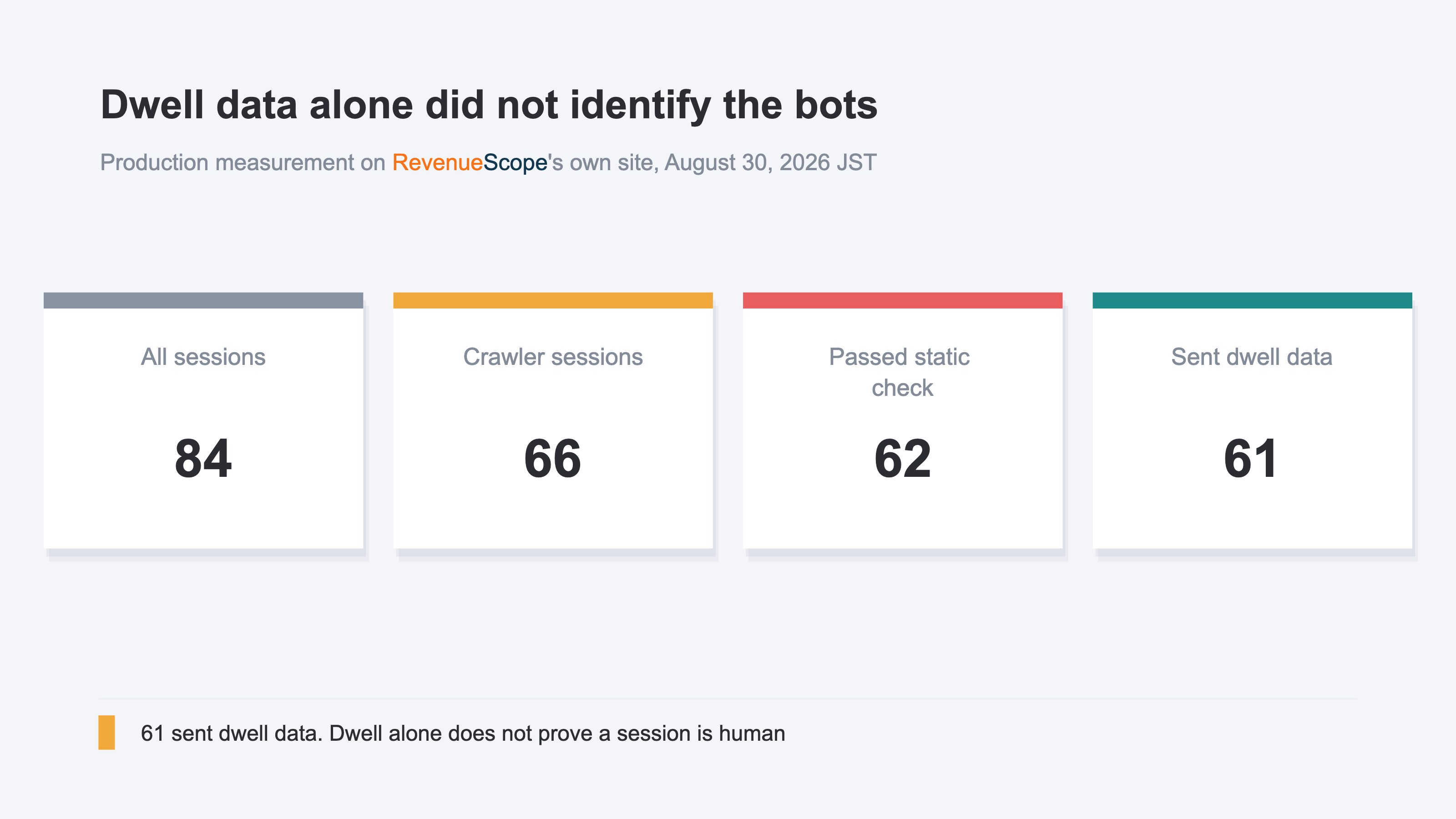
This measurement shows that checking dwell time does not finish the diagnosis. A spike with an average dwell time near zero deserves scrutiny. But a recorded stay of one or two seconds does not prove a session was human. Combine dwell time, page views, new-versus-returning status, country, and date. How to assess traffic quality in three layers also explains why one metric should not decide visit quality.
3. How much does GA4's known-bot exclusion prevent?#
GA4 automatically excludes known bots and spiders, but it does not exclude every bot.
According to the official Google Analytics Help page, GA4 automatically excludes known bots and spiders. It uses the IAB International Spiders and Bots List for identification. Unlike Universal Analytics, GA4 does not require users to turn this setting on [2].
Two aspects of the automatic exclusion cannot be inspected. Users cannot turn it off, and they cannot see how much bot traffic was excluded [2]. As a result, a GA4 report cannot tell you how many known bots were removed during a spike on a given day. It also does not show how many unknown bots remain after the exclusion.
When GA4 sessions increase, it is also wrong to conclude immediately that the known-bot exclusion has failed. Bots outside the automatic exclusion may be present, or human visits may have increased. See The difference between invalid clicks and bot exclusion for how this differs from the invalid clicks handled by advertising platforms.
To investigate in GA4, first split the Traffic acquisition report by day, channel, and country. Then compare the increase in sessions with changes in purchases and revenue over the same period. GA4 still does not display a breakdown of excluded bots. The report will not add a field showing how many bots were present in the channel that spiked.
4. Identify a spike by same-day concentration, not one visit#
Do not classify each short visit as a bot. Look for a concentration of visits with the same characteristics.
Human visits can also have one or fewer page views, last two seconds or less, and come from a new visitor. Classifying someone who opens a product page and leaves immediately as a bot based on that one visit would increase false positives. In the August 2026 case, we did not rely on a single visit. We checked whether at least five visits with the same characteristics occurred on the same site, on the same calendar day in JST, and in the same country. JST is Japan Standard Time.
RevenueScope checks same-day concentrations with these five conditions. Country groups similar visits; it does not remove every visit from a particular country.
- The same site, the same calendar day in JST, and the same country
- One or fewer page views
- Dwell time of two seconds or less
- A new visitor
- A concentration of at least five visits
In the August 30, 2026 measurement, multiple checks that included these five conditions classified 61 sessions as bots. The five conditions alone did not detect all 61.
Visits with the same pattern that appear four or fewer times in one day are outside this check. It also excludes sessions with dwell time of three seconds or more from its scope and does not apply to data from before August 29, 2026 at 00:00 JST. Real visitors using a VPN or proxy could be misclassified, so it does not identify every bot.
Check the channel that spiked first, then purchases and revenue, followed by same-day, same-country concentration. Only after that should you inspect page views and dwell time. This order avoids the premature conclusion that a visit was human because its dwell time was not zero. To examine the effect on ad spend, see How bot traffic wastes ad spend.
RevenueScope's solution
RevenueScope checks browser and access-source information, one-page visits, recorded dwell time and same-day concentration. After excluding sessions classified as bots, it shows sessions, revenue, RPS, and bot exclusions by channel.
GA4 does not show how many known bots were excluded from its reports, and its tables do not reveal the unknown bots that remain. RevenueScope keeps a channel visible even when every visit was a bot. It shows zero sessions alongside a bot-exclusion count, making it possible to distinguish no traffic from traffic that became zero after bot exclusion.
The following is sample data for a fictional ecommerce store. It does not represent the results of a real business.
| Channel | Sessions | Bots excluded | Revenue | RPS |
|---|---|---|---|---|
| Google Search | 245 | 15 | 612,500 JPY | 2,500 JPY |
| Direct | 170 | 310 | 306,000 JPY | 1,800 JPY |
| Referral | 0 | 190 | 0 JPY | — |
These three rows are fixed fictional examples. Because the sample store changes each day, its current figures will not match them.
After 190 visits were excluded from Referral, it had zero sessions and zero revenue. Its traffic volume would have looked large before exclusion, but it would not justify adding ad spend. Direct still has 170 sessions and revenue after bot exclusion. RevenueScope puts sessions and revenue efficiency by channel on the same screen after bots are removed.
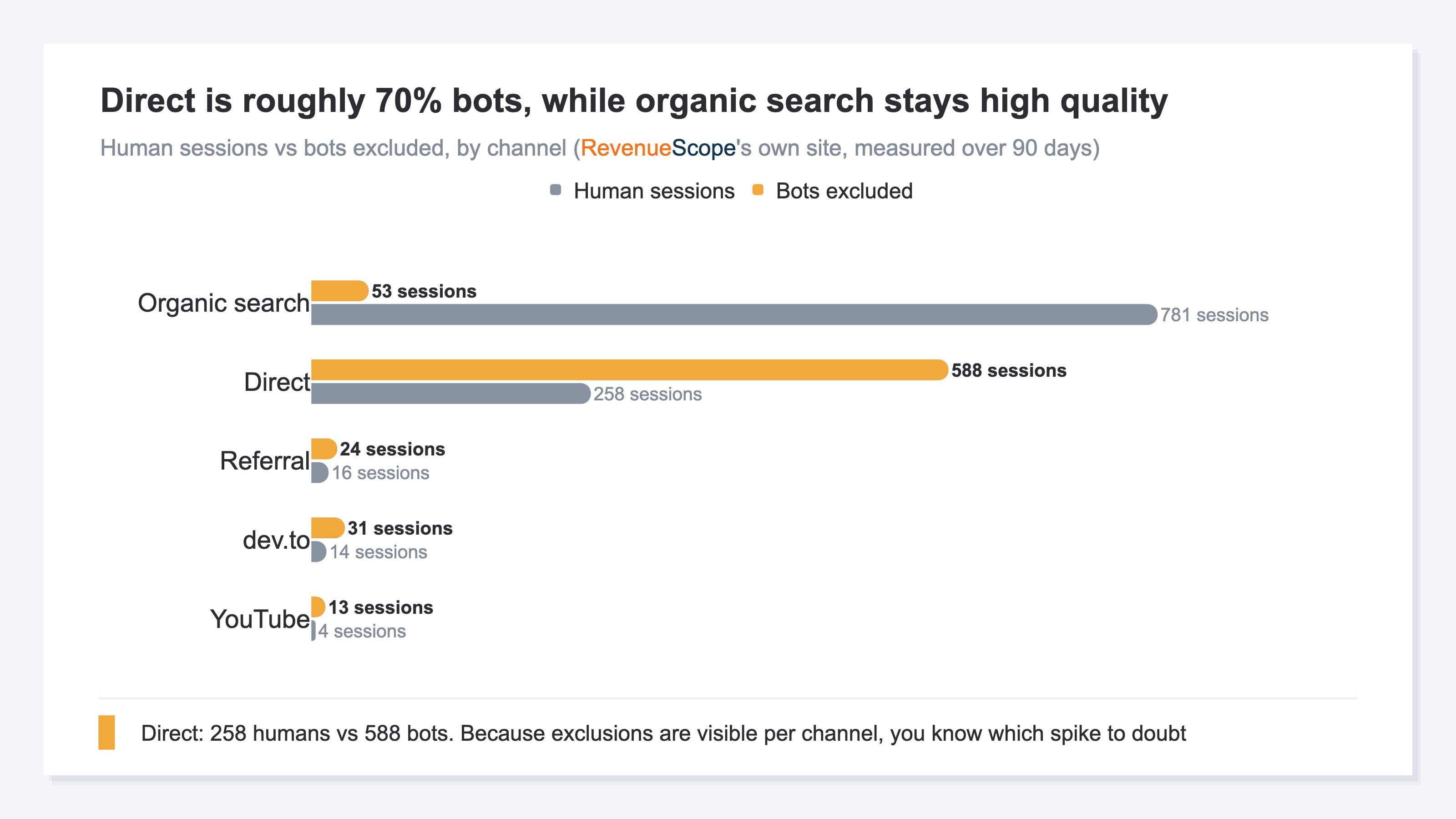
After excluding concentrations that strongly suggest bot activity, check sessions, revenue, and RPS for each channel. With the denominator used for purchase and revenue decisions corrected, you can assess acquisition and ad-budget allocation.
FAQ#
Q. Do I need to turn on bot exclusion in GA4?
A. No. GA4 automatically excludes known bots and spiders; there is no setting for users to turn on. However, GA4 does not show how many sessions were excluded, and unknown bots may remain. When traffic spikes, check visit concentration and revenue as well.
Q. Does a dwell time of zero mean a session is a bot?
A. No. A real visitor who leaves quickly may also record zero dwell time. Conversely, a bot using a headless browser can send dwell data. Check whether new visitors with one or fewer page views and dwell time of two seconds or less are concentrated in the same country on the same day.
Q. Should I exclude all overseas traffic?
A. No. Doing so could remove overseas customers or people traveling abroad. Use country to group visits with the same characteristics, not to label an entire country as bots. Combine sessions, page views, dwell time, purchases, and revenue.
Q. What should I check after bot exclusion?
A. Check sessions, revenue, and RPS by channel. A channel consisting only of bots remains visible with zero sessions and an exclusion count, so you can distinguish it from a channel that received no traffic. Use the channels that retain human revenue as evidence for acquisition and ad-spend decisions.
Summary#
On August 30, 2026, 61 of 66 crawler sessions recorded dwell time. Assess a traffic spike by combining dwell time with visit concentration and revenue.
GA4 automatically excludes known bots and spiders, but it does not show the excluded count, and unknown bots may remain. Look for same-day concentration instead of judging one short visit. Sessions, revenue, and RPS after bot exclusion provide a sounder basis for acquisition and ad-budget allocation.
See which ads actually drive revenue, at a glance
Free up to 5,000 sessions/month, AI connection included. No credit card required. Up and running in 5 minutes.